2009 JAGUAR XF rfa
[x] Cancel search: rfaPage 170 of 391
Driving dynamics
170
DYNAMIC MODE
(V8 petrol and diesel vehicles only)
Press to operate. Dynamic mode
co-ordinates the vehicle's control
systems to deliver a high
performance driving experience. This setting
enhances key vehicle systems so that the
vehicle's full potential can be exploited. The
vehicle's responses are aimed at involving the
driver more in focused and purposeful driving,
helping swift progress.
Note: When the transmission is set to
permanent manual mode (i.e. using the
paddles to change gear while in Sport mode)
and Dynamic mode is selected, transmission
upshifts are fully controlled by the driver. This
means that the transmissi on will not change up
a gear automatically, even when the vehicle's
rev limit is reached. When the rev limit is
reached, the gear position indicator in the
message centre will glow amber, to indicate
that the next gear should be selected.
Note: Dynamic mode cannot be active at the
same time as Winter m ode. Dynamic mode will
remain selected for approximately six hours
after the ignition is swit ched off, after which
point it will need to be reselected if required.
STABILITY CONTROL
Dynamic Stability Control (DSC)
Dynamic Stability Contro l (DSC) is operational
whenever the engine is running, unless it has
been manually switched off. When the system
is operating, the warn ing indicator in the
instrument panel will flash.
The DSC system controls the Anti-lock Braking
System (ABS), traction control and yaw control
of the vehicle.
The DSC system assists the driver in retaining
directional control of th e vehicle in situations
where the vehicle is sliding (understeer or
oversteer). It must not encourage the driver to
drive beyond the limit of adhesion or at speeds
higher than those suitable for the prevailing
road and traffic conditions.
DSC applies braking pres sure to individual
wheels if excessive variation is detected. This
ensures that the vehicle follows the driver’s
intended direction of travel as closely as
possible.
Traction control will intervene to control wheel
spin by automatically reducing the power
output from the engine and applying braking to
individual wheels. This improves acceleration,
particularly on surfaces with uneven friction
(e.g. one wheel on ice with another on tarmac).
Note: For recommended DSC mode selection,
refer to the JaguarDri ve Control scenarios
section in this handbook.
WARNING
The fact that the vehicle is fitted with
DSC, must never allow the driver to
be tempted into taking risks which
could affect his or her sa fety or that of other
road users. In all cases, it remains the driver’s
responsibility to drive sa fely according to the
prevailing conditions.
Page 171 of 391
171
Driving dynamics
TracDSC
TracDSC is an alternative setting of DSC with
reduced system interventions. With TracDSC
engaged, traction may be somewhat increased,
although stability may be reduced compared to
normal DSC. TracDSC is intended for use only
on dry tarmac, by suitably experienced drivers
and should not be select ed for other surfaces
or by drivers with insufficient skill and training
to operate the vehicle safely with the TracDSC
function engaged.
The less restrictive TracDSC setting may be
preferred, for example, by expert drivers
engaged in high performance driving on dry
Tarmac surfaces such as tracks and circuits.
Switching between DSC and Trac DSC
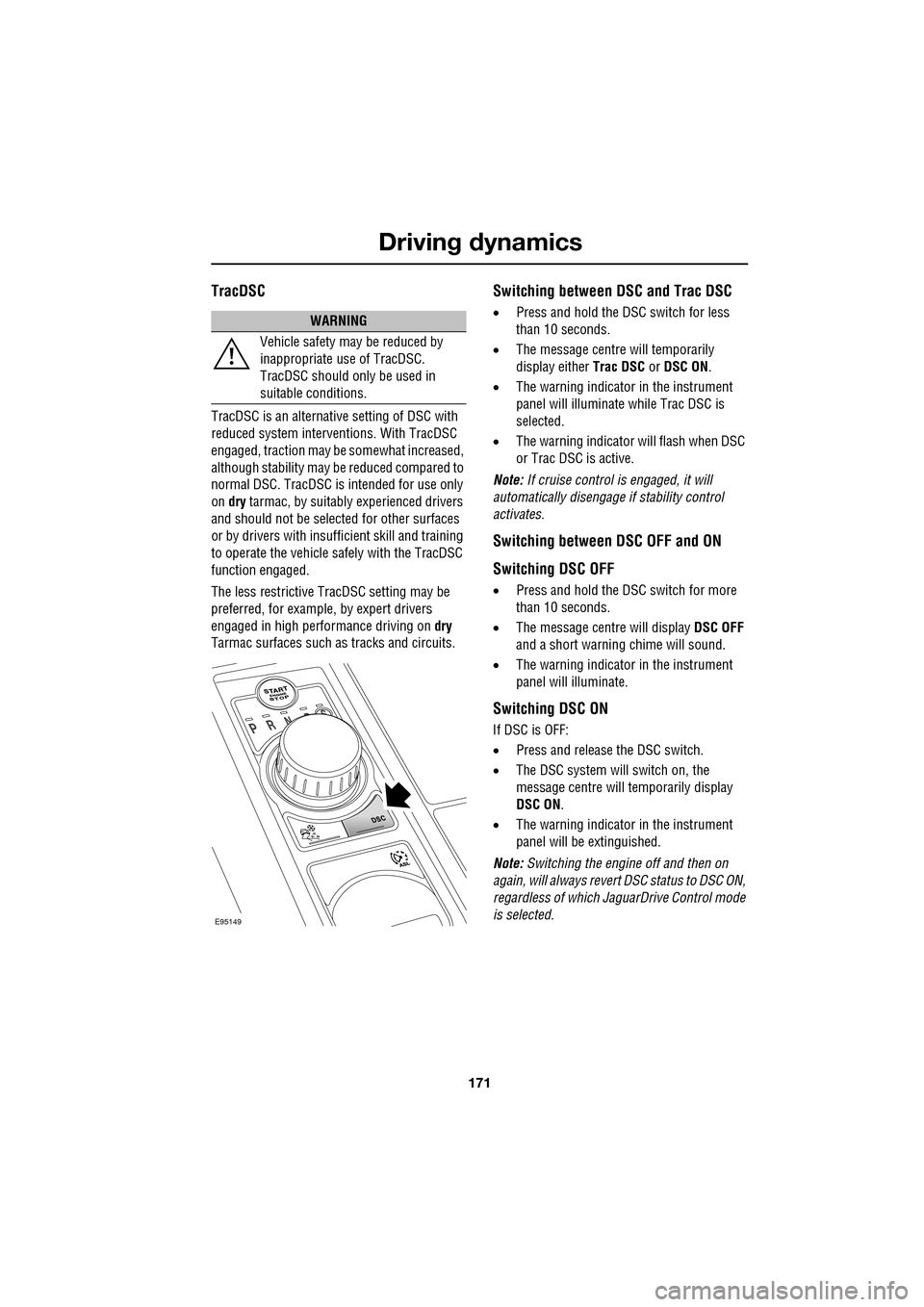
• Press and hold the DSC switch for less
than 10 seconds.
• The message centre will temporarily
display either Trac DSC or DSC ON.
• The warning indicator in the instrument
panel will illuminate while Trac DSC is
selected.
• The warning indicator will flash when DSC
or Trac DSC is active.
Note: If cruise control is engaged, it will
automatically disengage if stability control
activates.
Switching between DSC OFF and ON
Switching DSC OFF
• Press and hold the DSC switch for more
than 10 seconds.
• The message centre will display DSC OFF
and a short warning chime will sound.
• The warning indicator in the instrument
panel will illuminate.
Switching DSC ON
If DSC is OFF:
• Press and release the DSC switch.
• The DSC system will switch on, the
message centre will temporarily display
DSC ON .
• The warning indicator in the instrument
panel will be extinguished.
Note: Switching the engine off and then on
again, will always revert DSC status to DSC ON,
regardless of which Ja guarDrive Control mode
is selected.
WARNING
Vehicle safety may be reduced by
inappropriate use of TracDSC.
TracDSC should only be used in
suitable conditions.
E95149
Page 172 of 391
Driving dynamics
172
Note: In rare circumstances, when TracDSC is
selected or DSC is o ff, high acceleration on
rough roads may cause DSC to switch back on.
This prevents high loads on the vehicle
driveline. DSC will su bsequently remain on,
unless TracDSC is selected or DSC is switched
off manually.
Stability control indicator
If there is a fault, the warning
indicator will ill uminate in the
instrument panel and the message
centre will display DSC NOT AVAILABLE with
an amber backlight.
It is safe to drive the vehicle, but the DSC
system will not activa te under wheel spin or
slide conditions. You should seek qualified
assistance as soon as possible.
Adaptive dynamics
(Supercharged vehicles only)
Jaguar Adaptive dy namics continuously
monitors the road a nd driver inputs and
optimises the vehicle suspension settings for
ride comfort and control.
The adaptive dynamics system is linked to
Dynamic mode, modifying the suspension
settings for a more sporting character.
If the message centre displays the message
ADAPTIVE DYNAMICS FAULT , a fault has been
detected in the adaptive dynamics system.
Seek qualified assistan ce as soon as possible.
Active Differential Control (E-diff)
(Supercharged vehicles only)
The E-diff improves trac tion when one driven
wheel has more grip than the other. This
improves progress out of corners and on
patchy or uneven surfaces. The E-diff can also
increase stability in oversteer situations,
depending on road c onditions and driver
inputs. Settings for the E-diff are made automatically,
without the need for driver selection.
If there is a fault with the E-diff system, the
message centre will display
EDIFF SYSTEM
FAULT . If DSC is off, then TracDSC will be
selected automatically. The driver can still
switch between DSC mode s, as normal and the
vehicle is safe to dr ive, but seek qualified
assistance as soon as possible.
Note: If the E-diff is active continuously for an
extended period (e.g. on a patchy surface with
DSC off) then the E-diff may be temporarily
deactivated to prevent ov erheating. If DSC is
off, then TracDSC will be selected
automatically. The mess age centre will display
EDIFF NOT AVAILABLE . The driver can still
switch between DSC modes as normal and the
E-diff will become availa ble again automatically
when it has cool ed sufficiently.
Page 173 of 391
173
Driving dynamics
JaguarDrive Control scenarios
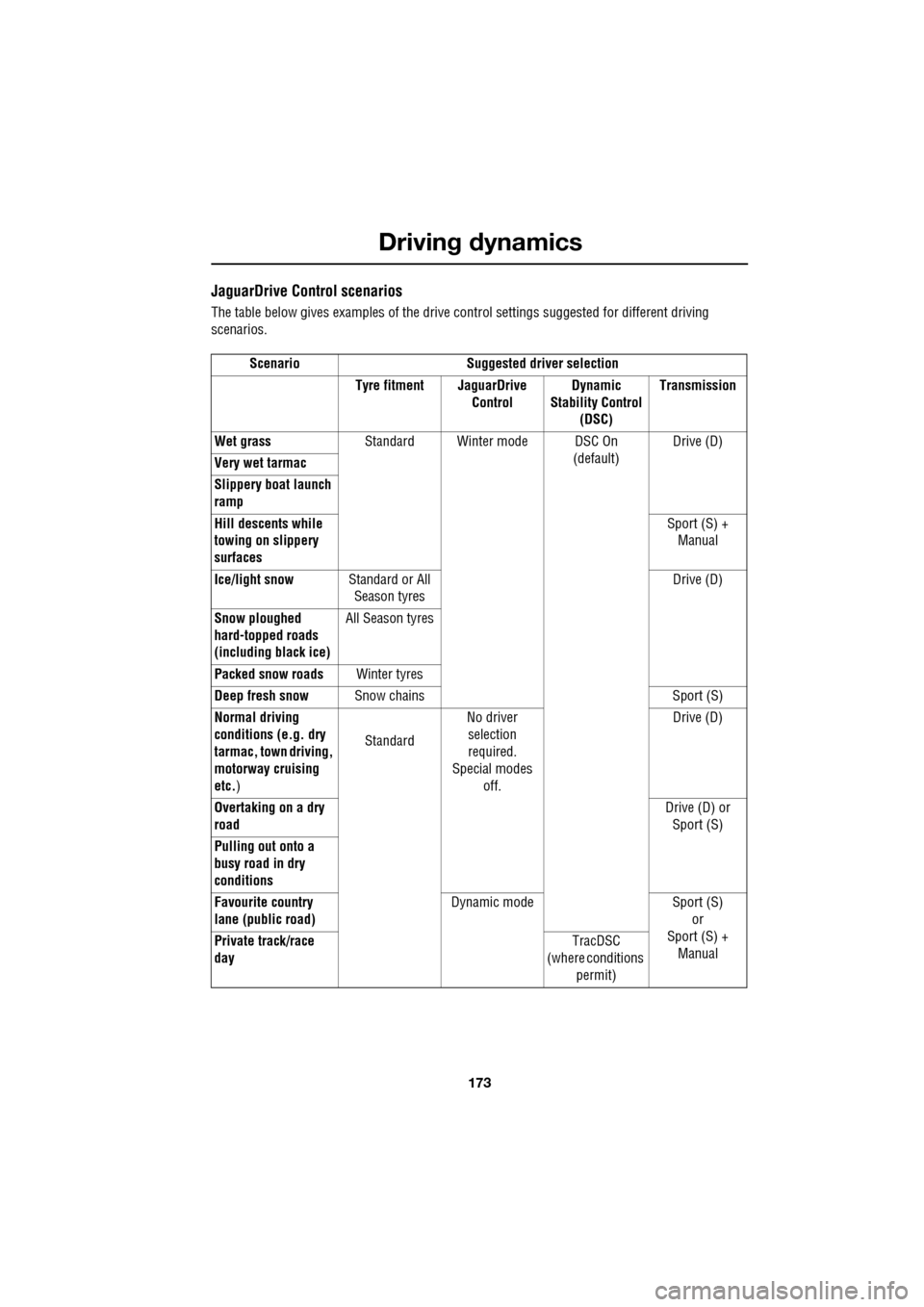
The table below gives examples of the drive control settings suggested for different driving
scenarios.
Scenario Suggested driver selection Tyre fitment JaguarDrive ControlDynamic
Stability Control (DSC) Transmission
Wet grass Standard Winter mode DSC On
(default)Drive (D)
Very wet tarmac
Slippery boat launch
ramp
Hill descents while
towing on slippery
surfaces Sport (S) +
Manual
Ice/light snow Standard or All
Season tyres Drive (D)
Snow ploughed
hard-topped roads
(including black ice) All Season tyres
Packed snow roads Winter tyres
Deep fresh snow Snow chains Sport (S)
Normal driving
conditions (e.g. dry
tarmac, town driving,
motorway cruising
etc. ) Standard
No driver
selection
required.
Special modes off. Drive (D)
Overtaking on a dry
road Drive (D) or
Sport (S)
Pulling out onto a
busy road in dry
conditions
Favourite country
lane (public road) Dynamic mode Sport (S)
or
Sport (S) + Manual
Private track/race
day TracDSC
(where conditions
permit)
Page 188 of 391

Vehicle care
188
Do not use household soaps or detergents. The
use of Jaguar Vehicle Shampoo is
recommended.
Note: The vehicle's brightwork should be
cleaned using a sponge and generous
quantities of cold or lukewarm water only.
Rinse thoroughly and dry with a chamois
leather or synthetic substitute.
Using an automatic wash
Note: Regular use of automatic car washes
tends to dull the lustre of the paintwork.
1. Drive up to the entry of the car wash and
onto the conveyor.
2. Select N (Neutral) using the JaguarDrive
selector.
3. Press and release the engine START/STOP
button to stop the engine. The JaguarDrive
selector should remain raised and the
selector and message centre should
indicate that N is selected. 4.
The vehicle should rema in in this condition
while it is conveyed through the car wash.
5. At the end of the wash cycle, when directed
to start the engine by the car wash
instructions, press the brake pedal and
press and release the engine START/STOP
button to start the engine.
6. Select D (Drive) using the JaguarDrive
selector and drive away.
Do not start the engine or change the
JaguarDrive selector position during the car
wash.
After leaving the car wash, switch on the
windscreen wiper immediately to remove water
and prevent a build up of wax.
Underbonnet cleaning
CAUTIONS
Commercially operated automatic car
washes, jet washes and power-operated
mops, are not recommen ded. The detergents
used can contain certain chemicals which
may, over time, be detrimental to some
exterior parts of the vehicle. Prolonged usage
of automatic car wash es and power-operated
mops will also cause fine scratches in the paint
surface.
Ensure that Auto wipe is not selected
when entering a car wash, or damage to
the wiper blades and arms can occur if they
operate during the wash cycle.
Ensure that when using an automatic
drive through car wash, N (Neutral) is
selected and that the ignition is left in
convenience mode for the duration of the
wash.
CAUTIONS
Do not use a high pr essure washer or
steam cleaner in the engine
compartment. Damage to components could
occur.
Ensure that the brake fluid reservoir is
kept dry at all times. Only use a clean,
dry cloth to clean the brake fluid cap and
reservoir.
Page 189 of 391
189
Vehicle care
Glass surfaces
Clean the rear window with a soft cloth to avoid
damaging the heating element. Do not scrape
the glass or use any abrasive cleaning fluid.
Mirror glass is particularly susceptible to
damage. Wash with soapy water. Do not use
abrasive cleaning compounds or metal
scrapers to remove ice.
The following products will ensure glass
surfaces and windscreen wipers are kept in
good condition:
• Jaguar Screen Clean Paste - Apply only to
the windscreen exterior to ensure effective
operation of the windscreen wiper.
• Jaguar Glass Cleaner - Interior and exterior
of all other glass surfaces.
• Jaguar Screen Wash - Washer reservoir
additive.
• Jaguar Winter Care Kit comprising de-icer,
ice scraper, anti-mist wipe cloth and aerial
cleaner - for use in adverse weather
conditions.
Cleaning the rear screen
To avoid damaging the heating elements when
cleaning the inside of th e rear screen, use only
a soft damp cloth/chamois leather. Do not use
solvents or sharp objects to clean the glass.
Removing grease and tar
Remove grease or tar with Jaguar Tar Remover
or methylated spirit (a lcohol). White spirit is
also effective, but mu st not be applied to
rubber, particularly the windscreen wiper
blades.
Bird droppings
Do not allow bird droppings or tree sap to
harden. Remove from paintwork immediately
with a lukewarm soap and water solution.
Polishing
For maximum protection against road dust,
salts, industrial fall-out etc., it is recommended
that the vehicle is polished regularly using
Jaguar polish and a polishing cloth.
CLEANING THE INTERIOR
CAUTION
Ensure that after using methylated or
white spirit, the area is washed
immediately with soapy water, to remove all
traces of spirit.
CAUTION
Chrome polish, or other abrasive
cleaners, must not be used on the
vehicle's brightwork. The vehicle's brightwork
should be cleaned using a sponge and
generous quantities of cold or lukewarm water
only. Rinse thoroughly a nd dry with a chamois
leather or synthetic substitute.
WARNING
Ensure that you read all of the
information and instructions for use
provided with cleaning products.
Some products contain substances that are
harmful and can cause he alth problems if used
incorrectly.
CAUTIONS
Some products, if used incorrectly can
cause damage to the in terior surfaces of
the vehicle.
To prevent airbag damage, the steering
wheel centre pad and other areas
containing airbags s hould only be cleaned
sparingly with a damp cl oth, warm water and a
non-detergent soap. Do not allow these areas
to be flooded with chemical solvents, liquids,
furniture cream or polishes.
Page 190 of 391
Vehicle care
190
Leather
Leather is an easy to maintain natural product.
However, dust and subs tances can penetrate
the pores and crease the leather, causing
surface wear and brittleness.
To prevent ingrained dirt and staining, inspect
the seat upholstery regularly and clean every
one to two months, as follows:
• Wipe off fine dust from the seat surfaces
using a clean, damp, non-coloured cloth.
Change frequently to a clean area of cloth,
to avoid abrasive action on the leather
surface. Avoid over-wetting.
• If this is not suffic ient, use a cloth which
has been dampened with warm soapy
water and then wrung out. Use only mild
non-caustic soap.
• Use Jaguar Leather Cleaner for heavily
soiled areas. Dry off and rub with a clean
soft cloth, changing surfaces regularly.
When staining (e.g. from clothing) or spillage
occurs, clean the affected area immediately as
described above.
Use Jaguar Leather Cleaner several times a
year to maintain its appearance and
suppleness. The clea ner will nourish and
moisturise and help to improve the surface
protective film agains t dust and substances.
• Do not use solvents. Do not use
detergents, furniture polish or household
cleaners. While these products may
initially give impressi ve results, their use
will lead to rapid deterioration of the
leather and will inva lidate the warranty.
Jaguar recommend a basic set of products
that have been specially selected for the
type of leather in your vehicle.
• Dark clothing may stain leather seats just
like other upholstery products. •
Sharp objects such as belts, zip fasteners,
rivets, etc., can leave permanent scratches
and scratch marks on the leather surface.
• Unless spillages such as tea, coffee or ink
are washed away immediately, permanent
staining may have to be accepted.
If a valet service is used, ensure that the
specialist concerned is aware of, and follows,
these instructions precisely.
Cloth and fabric
Use Jaguar Upholstery Cleaner, following the
instructions. Avoid over-wetting.
Removing stains
Most stains on woollen fabric can be removed
if treatment is carried out immediately, before
the stain has a chance to dry-in.
Most stains can be treated with one of three
cleaning fluids: Jaguar U pholstery Cleaner, dry
cleaning fluid or clean water. Follow the
instructions on the package.
Instrument pack, clock, and audio
equipment
Only use a soft dry cloth to clean the
instrument pack, clock and audio equipment.
Do not use cleaning fluids or sprays.
CAUTIONS
Never use soap, ammonia, bleach or
other cleaners intended for use on hard
surfaces.
Do not use upholst ery cleaner on
electrical equipment such as fascia
switches.
When cleaning around electrical
equipment such as switches, ensure
that fluids do not leak into any gaps around the
components or between panels or trim.
Page 196 of 391
Maintenance
196
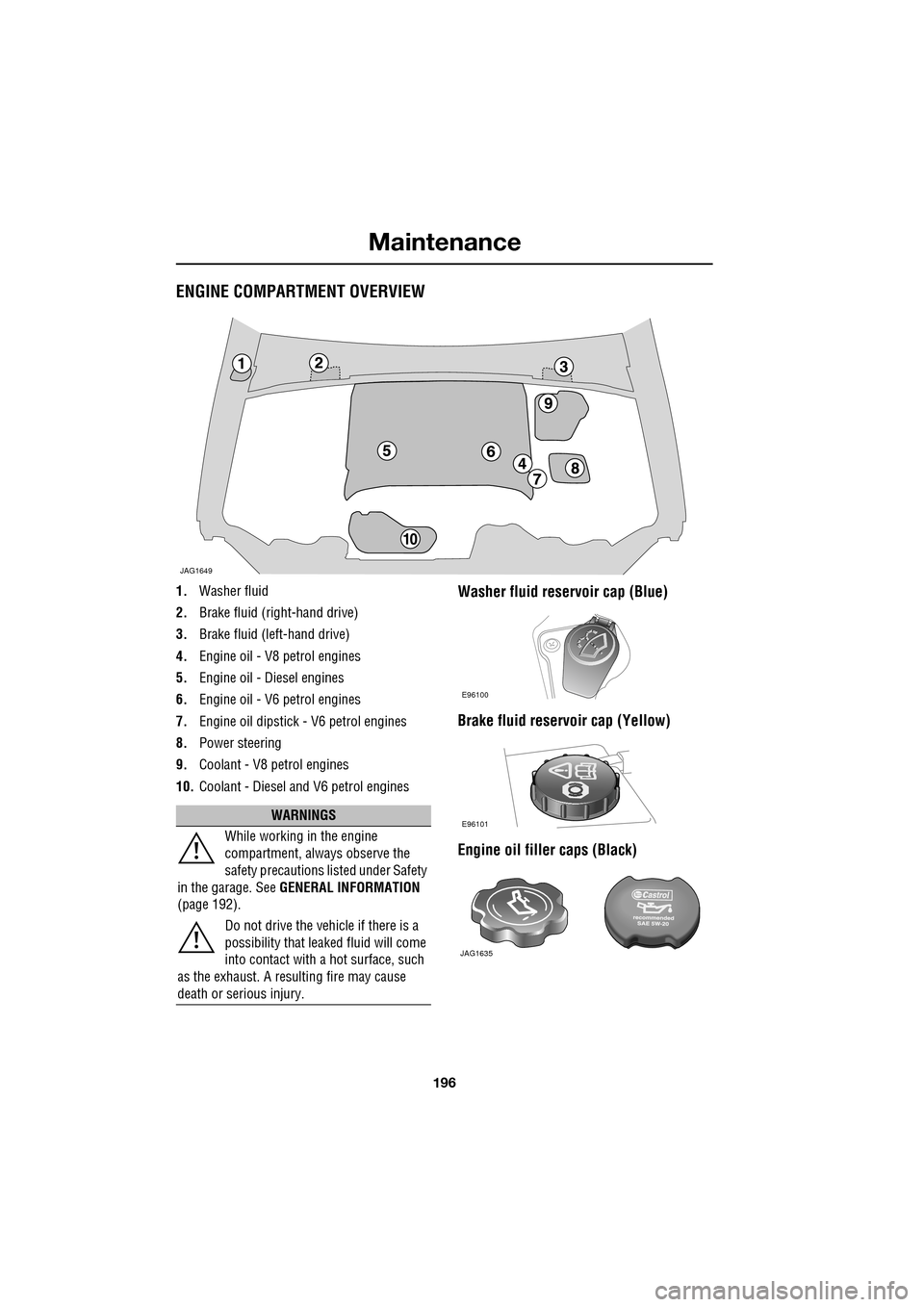
ENGINE COMPARTMENT OVERVIEW
1.Washer fluid
2. Brake fluid (right-hand drive)
3. Brake fluid (left-hand drive)
4. Engine oil - V8 petrol engines
5. Engine oil - Diesel engines
6. Engine oil - V6 petrol engines
7. Engine oil dipstick - V6 petrol engines
8. Power steering
9. Coolant - V8 petrol engines
10. Coolant - Diesel and V6 petrol enginesWasher fluid reservoir cap (Blue)
Brake fluid reservoir cap (Yellow)
Engine oil filler caps (Black)
JAG1649
WARNINGS
While working in the engine
compartment, always observe the
safety precautions listed under Safety
in the garage. See GENERAL INFORMATION
(page 192).
Do not drive the vehicle if there is a
possibility that leaked fluid will come
into contact with a hot surface, such
as the exhaust. A resulting fire may cause
death or serious injury.
E96100
E96101
JAG1635