2009 JAGUAR XF Park brake
[x] Cancel search: Park brakePage 104 of 391

Instruments
104
AUDIBLE WARNINGS AND INDICATORS
Various sounds are produced for warning and notification purposes as follows:Hazard or Condition Chime or tone/remedy
External lamps remain on when
the driver’s door is opened. A chime will sound until the lamps are switched off or driver’s
door is closed (unless the lighting control is in
AUTO position).
Hazard warning indicators on. A ti cking will sound until the hazard indicators are switched off.
Direction indicators on. A tick ing will sound until the indicators are switched off.
Memory 1 (or 2) settings saved. A short tone as the memory selection is saved.
Airbag system failure. A tone sequence is repeated five times. Seek qualified assistance as soon as possible.
Seat belt reminder. A chime will sound until an unfastened se at belt is fastened. The
warning will cease if occupied fr ont seat belts are buckled, the
ignition is turned off or more than approximately three minutes
has elapsed since the start of the chime.
Electric parking brake (EPB). If the EPB is a pplied while the vehicle is moving a continuous
chime will sound; release the EPB. If there is a fault with the
system which would prevent the a pplication of the EPB, a brief
sequence of chimes is initiated.
Adaptive Cruise Control (ACC)
driver intervene. Multiple chime. Apply the brakes.
ACC low speed automatic
switch off. A chime will sound to indicate that the ACC system is no longer
operating.
Forward Alert Multiple chime. Apply the brakes.
Speed is over 15 km/h (9 mph)
above the set limit speed. A short warning chime. Reduce speed.
Gear selector is not in Park with
ignition off. A chime will sound.
Select Park.
Entry delay warning (European
markets only). Intermittent slow, low pitc
hed chime. Disarm vehicle.
The Jaguar Smart Key cannot be
detected. A chime will sound. The remote ha
ndset should be inserted into
the starter control unit.
The Jaguar Smart Key is to be
removed from the starter
control unit. A chime will sound for 60 seconds if
the Jaguar Smart Key is in
the starter control unit and the driver’s door is opened. The
remote handset should be remove d from the starter control unit.
DSC OFF A chime will sound.
Page 109 of 391
109
Information displays
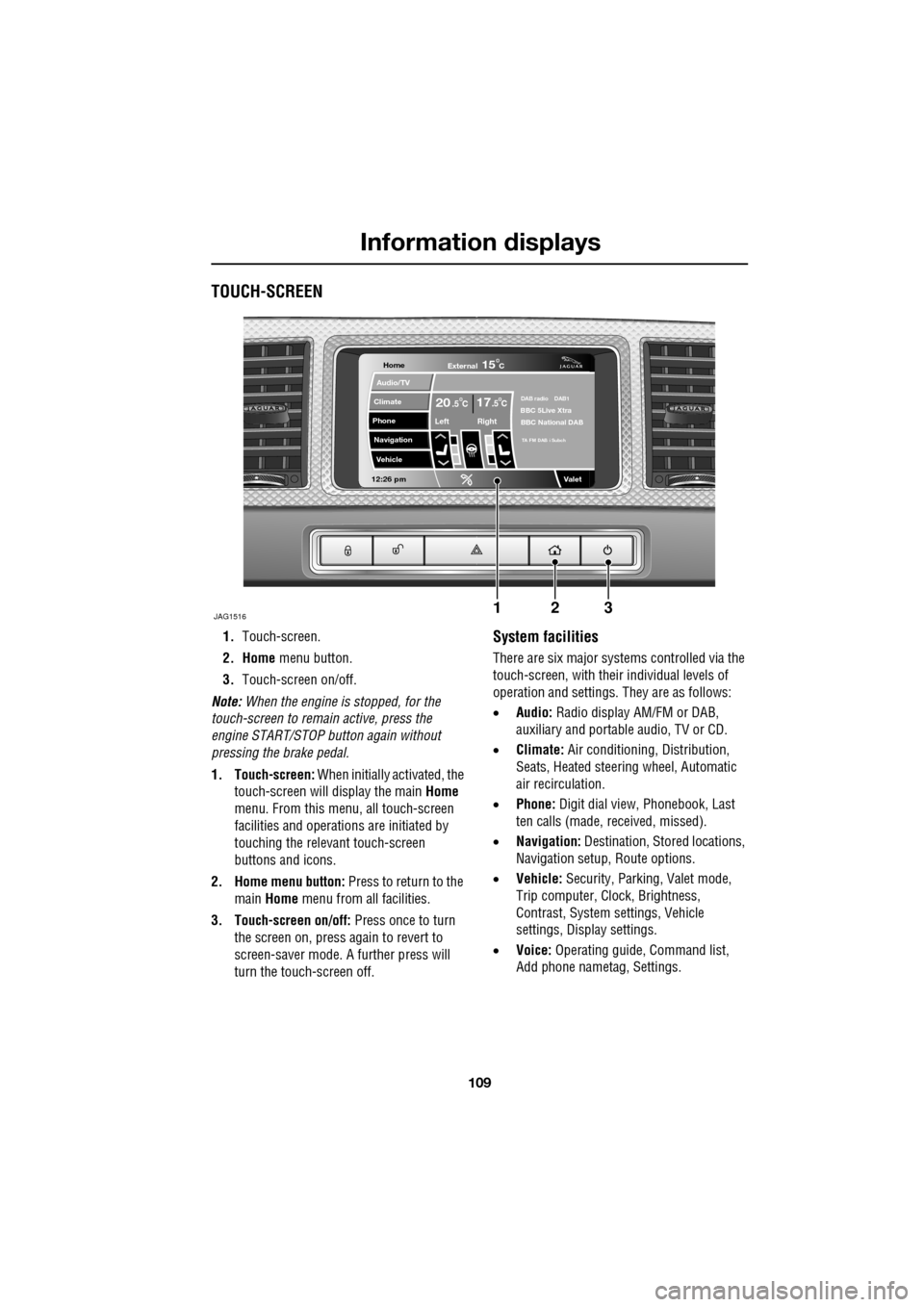
TOUCH-SCREEN
1.Touch-screen.
2. Home menu button.
3. Touch-screen on/off.
Note: When the engine is stopped, for the
touch-screen to remain active, press the
engine START/STOP button again without
pressing the brake pedal.
1. Touch-screen: When initially activated, the
touch-screen will display the main Home
menu. From this menu, all touch-screen
facilities and operati ons are initiated by
touching the relevant touch-screen
buttons and icons.
2. Home menu button: Press to return to the main Home menu from all facilities.
3. Touch-screen on/off: Press once to turn
the screen on, press again to revert to
screen-saver mode. A further press will
turn the touch-screen off.System facilities
There are six major systems controlled via the
touch-screen, with their individual levels of
operation and settings. They are as follows:
• Audio: Radio display AM/FM or DAB,
auxiliary and portable audio, TV or CD.
• Climate: Air conditioning, Distribution,
Seats, Heated steering wheel, Automatic
air recirculation.
• Phone: Digit dial view, Phonebook, Last
ten calls (made, received, missed).
• Navigation: Destination, St ored locations,
Navigation setup, Route options.
• Vehicle: Security, Parking, Valet mode,
Trip computer, Clock, Brightness,
Contrast, System settings, Vehicle
settings, Displa y settings.
• Voice: Operating guide, Command list,
Add phone nametag, Settings.
Home
Audio/TV
Climate
Phone
Navigation
Vehicle
Valet12:26 pm
JAG1516
External15C
Left Right
20 17CC.5 .5DAB radio DAB1BBC 5Live Xtra
BBC National DAB
TA FM DAB i Subch
123
Page 137 of 391

137
Transmission
AUTOMATIC TRANSMISSION
The transmission system is designed to
operate in two distinct modes, conventional
automatic and Jaguar Sequential Shift.
The automatic modes are accessed by the gear
selector:
•D - Drive - automatic shifting.
• S - Sport - sport automatic shifting.
The Jaguar Sequential Shift mode enables
sequential manual gear selection in D
(temporary) and S (permanent) modes, via the
steering wheel m ounted paddles.
Note: In addition to the st andard shift patterns
available in D and S, the transmission will
adapt to differing conditions by modifying shift
points, based upon vehicl e sensor information
for road gradient, cornering, braking pressure
and driving style.
JaguarDrive selector
The JaguarDrive selector elevates out of the
centre console when the engine is started, in
readiness for gear selection. Press the brake
pedal, then rotate the control to select the
chosen gear ( P, R , N or D) or, from D, press
down on the control and rotate to select S
(Sport).
CAUTIONS
Never select the Park ( P) position whilst
the vehicle is in motion. Doing so may
cause serious damage to the transmission.
Never select the Reverse ( R) position
whilst the vehicle is in forward motion.
Doing so may cause serious damage to the
transmission.
Never select a forward gear whilst the
vehicle is in rearward motion. Doing so
may cause serious damage to the
transmission.
Do not rev the engine or allow it to run
above normal idle speed while selecting
D or R, or while the vehicle is stationary with
any gear selected.
Do not allow the vehicle to remain
stationary for any length of time, with a
gear selected and the engine running. Always
select P or N if the engine is to idle for a
prolonged period.
E94119
Page 138 of 391

Transmission
138
P should be selected before switching off the
engine. However, it is possible to switch the
engine off with R, D or S selected - the selector
will automatica lly select P, while retracting into
the centre console.
Note: If the engine is switched off with N
selected, the system will wait for 10 minutes
before selecting P. This procedure is to allow
the vehicle to be conveyed through a car wash
only and should not be used for vehicle
recovery purposes.
To prevent the transmission from
automatically selecting P (e.g. for vehicle
recovery purposes), it is necessary to activate
the Emergency Park Release.
See TRANSPORTING THE VEHICLE
(page 254).
Selector positions
P - Park: Use when parked. In this position the
transmission is locked, do not attempt to select
P if the vehicle is moving.
Note: P will be selected automatically when the
engine is switched off.
R - Reverse: Do not select if the vehicle is
moving forward.
N - Neutral: Disconnects drive to the wheels.
Use the parking brake when stopping
temporarily with N selected.
D - Drive: Gear changing is automatic for all six
forward gears. The shift points are determined
by accelerator pedal pos ition and road speed,
to provide the best ba lance of performance,
refinement and fuel economy, for the large
majority of driving conditions.
S - Sport: Gear changing is automatic for all six
forward gears, with modified gear shift points
to maximise the ve hicle response in
demanding driving condi tions. This mode is
not suitable for town or highway cruising. Note:
Both D and S positions also offer
additional features, wh ich are listed under
Automatic mode and Sport mode , later in this
section.
Stationary vehicle
When the vehicle is stationary, the selector
may be left in D or S, unless the vehicle is to be
parked. When stopping fo r extended periods,
either select P or apply the parking brake and
select N.
Selector interlock
The transmission is equippe d with an interlock,
to prevent inadvertent selection of a drive gear
(D , S or R) from the P or N positions. To
release the interlock to select a drive gear,
press the brake pedal while making the
selection.
Ensure the required driv ing range has selected
prior to releasing the brake pedal. The range
indicator ( R, D or S) on the selector and
message centre disp lays, will illuminate
continuously to confirm selection.
Note: If the brake pedal is released too early
during selector rotation from P or N to a driving
range ( R, D or S), then the selected range will
not be engaged. The selected range will flash
on the selector and message centre displays.
To obtain the selected range, press the brake
pedal, select P or N and reselect the required
range, ensuring the brake pedal is depressed.
If N is selected for less than 2 seconds (e.g.
when moving the selector between R and D),
the interlock will not ac tivate and the brake
pedal will not need to be pressed.
Note: The interlock is deactivated when the
vehicle is travelling at more than 5 km/h
(3 mph).
Page 146 of 391

Brakes
146
Emergency Brake Assist (EBA)
The EBA system measures the rate at which the
brake pressure increases. If the system detects
an emergency braking situation, EBA
automatically init iates full braking effect. This
can reduce stopping dist ances in critical
situations.
EBA stops operating as soon as the brake pedal
is released.
EBA is part of the Dynamic Stability
Control (DSC) system and a fault
with the EBA system is indicated by
the amber DSC warning indicator illuminating
and DSC NOT AVAILABLE (with amber
backlight) displaying in the message centre.
Seek qualified assistan ce as soon as possible.
Brake vacuum assist
(V6 petrol models only)
When the engine is cold and/or engine vacuum
is low, Brake vacuum assist provides additional
brake pedal assistance. When the function is
operating, a pulsation ma y be felt through the
brake pedal - this is not a cause for concern.
A fault is indicate d by the message BRAKE
ASSIST FAULT (with amber backlight)
appearing in the message centre. Increased
brake pedal effort may be required to slow the
vehicle when the engine is cold and/or engine
vacuum is low. Seek qualified assistance.
ELECTRIC PARKING BRAKE (EPB)
The switch which operate s the parking brake is
mounted on the centre c onsole to the rear of
the gear selector.
To engage the parking brake (1): Pull the
parking brake switch up wards and release. The
switch will return to the neutral position. The
Parking brake warning and Brake fluid low
warning indicator on the instrument panel will
illuminate.
The Drive Away Release feature allows the
parking brake to release automatically as the
vehicle is driven away.
To disengage the parking brake (2): With the
ignition system on or with the engine running,
apply the foot brake and press the parking
brake switch down.
If the parking brake is a pplied while the vehicle
is stationary and D or R is selected, applying
the throttle will auto matically release the
parking brake.
The parking brake is also automatically
released when the gear selector is moved from
the P position.
WARNING
The EBA system is an additional
safety system; it is not intended to
relieve the driver of his or her
responsibility for exercising due care and
attention when driving.12
E95148
Page 147 of 391
147
Brakes
If the parking brake is inadvertently applied
when the vehicle is moving at above 3 km/h
(1.8 mph), PARK BRAKE APPLIED is displayed
in the message centre, the warning indicator in
the instrument panel will illuminate and a
warning chime will sound.
If the parking brake is a pplied whilst the vehicle
is moving, releasing the switch will disengage
the parking brake. The parking brake cannot be
applied when the vehicle is moving, if the
accelerator pedal is pressed.
Note: If the vehicle is in motion, the parking
brake should only be used as an emergency
brake.
The warning indicator in the instrument panel
will remain on for a short time, if the parking
brake is applied when the ignition system is
reverted to the convenience mode.
If a fault in the system is detected,
the amber brake warning indicator
will illuminate and PARK BRAKE
FAULT or CANNOT APPLY PARK BRAKE will
be displayed in the message centre. Seek
qualified assistance as soon as possible.
If the battery has been discharged or
disconnected, APPLY FOOT AND PARK BRAKE
will be displayed in the message centre when
the ignition is next switched on. Depress the
foot brake and pull the parking brake switch up
to apply the parking brake. This is required to
reset the parking brake system. The parking
brake will now function correctly.
CAUTION
Always apply the parking brake when
the vehicle is parked.
Page 151 of 391
151
Parking aid
The front or rear warning tone will become
continuous when the obstacle is detected at or
within 300 mm (12 inches) from the vehicle.
Note: The outer front and rear sensors will
switch off if the distance to an object increases
or remains constant for 3 seconds. The
sensors will reactivate automatically if a new
object is detected with in the operating range,
or if the distance to the original object reduces.
Rear fitted accessories
Particular care must be taken when reversing
with rear fitted accessories e.g. bicycle carrier,
as the rear park assist will only indicate the
distance from the bumper to the obstacle.
Cleaning the sensors
Do not clean the sensors with abrasive or sharp
objects or materials.
For reliable operation, th e sensors in the front
and rear bumpers should be kept free from ice,
frost and grime.
When using a high pressure spray the sensors
should only be sprayed br iefly and not from a
distance of less than 200 mm (8 inches).
System fault
If the system has a fault when engaging reverse
gear or turning on the ignition, then a single,
three second tone will be heard (only once per
ignition cycle) and a pop-up warning will
appear on the touch-scre en. If both front and
rear parking aids are fitted, the warning
indicator in the parking aid switch will flash for
three seconds and then switch off, if a fault is
detected.
If a fault is detected, the system is
automatically disabled.
The parking aid may sound spurious tones if it
detects a frequency tone using the same band
as the sensors (e.g. air brakes).
Page 155 of 391

155
Driving hints
ECONOMICAL DRIVING
There are two main factors which influence fuel
economy, the way the vehicle is driven and
maintenance.
Driving tips for economy
•Avoid unnecessary jour neys, especially
short stop-start trips.
• Accelerate smoothly and gently from a
stand still.
• Allow time to brake gently and smoothly.
• Be aware of traffic and road conditions
ahead, and take action in time to avoid
hard braking or acceleration.
• When stationary apply the park brake, and
select neutral.
• Turn off the air conditioning when not
needed.
Maintenance and fuel economy
Regular servicing by a Dealer/Authorised
Repairer, along with regular checks by the
driver are essential fo r vehicle longevity and
fuel economy.
The condition of the engine (oils, filters, spark
plugs, settings etc.) tyre pressures, and wheel
alignment, will all have a bearing on fuel
economy. For this reason it is essential that the
vehicle is checked regularly by the driver and
serviced by an approved Dealer/Authorised
Repairer at the correct intervals.
Note: If you are in any doubt about the
maintenance requirement s, intervals, or
checks required, contact your Dealer/
Authorised Repairer for advice.