2009 Hyundai Sonata display
[x] Cancel search: displayPage 107 of 286
1FEATURES OF YOUR HYUNDAI94
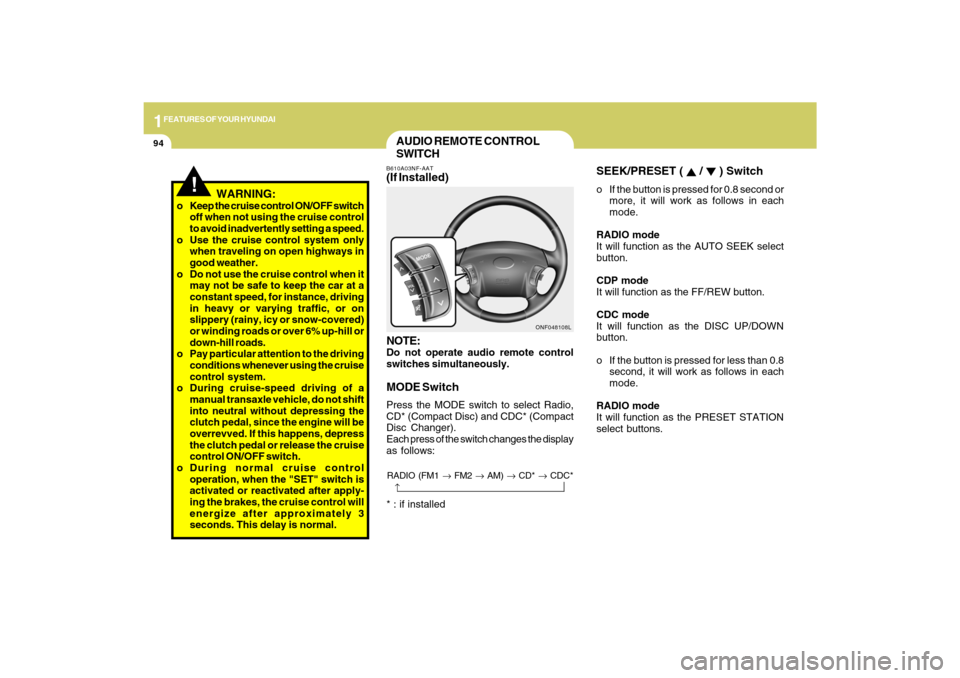
SEEK/PRESET (
/
) Switch
o If the button is pressed for 0.8 second or
more, it will work as follows in each
mode.
RADIO mode
It will function as the AUTO SEEK select
button.
CDP mode
It will function as the FF/REW button.
CDC mode
It will function as the DISC UP/DOWN
button.
o If the button is pressed for less than 0.8
second, it will work as follows in each
mode.
RADIO mode
It will function as the PRESET STATION
select buttons.
AUDIO REMOTE CONTROL
SWITCHB610A03NF-AAT(If Installed)
NOTE:Do not operate audio remote control
switches simultaneously.MODE SwitchPress the MODE switch to select Radio,
CD* (Compact Disc) and CDC* (Compact
Disc Changer).
Each press of the switch changes the display
as follows:
ONF048108L
!
WARNING:
o Keep the cruise control ON/OFF switch
off when not using the cruise control
to avoid inadvertently setting a speed.
o Use the cruise control system only
when traveling on open highways in
good weather.
o Do not use the cruise control when it
may not be safe to keep the car at a
constant speed, for instance, driving
in heavy or varying traffic, or on
slippery (rainy, icy or snow-covered)
or winding roads or over 6% up-hill or
down-hill roads.
o Pay particular attention to the driving
conditions whenever using the cruise
control system.
o During cruise-speed driving of a
manual transaxle vehicle, do not shift
into neutral without depressing the
clutch pedal, since the engine will be
overrevved. If this happens, depress
the clutch pedal or release the cruise
control ON/OFF switch.
o During normal cruise control
operation, when the "SET" switch is
activated or reactivated after apply-
ing the brakes, the cruise control will
energize after approximately 3
seconds. This delay is normal.* : if installed
RADIO (FM1 → FM2 → AM) → CD* → CDC*
→
Page 117 of 286
1FEATURES OF YOUR HYUNDAI
104
AUTOMATIC HEATING AND COOLING CONTROL SYSTEMB970A01Y-AAT(If lnstalled)Your Hyundai is equipped with an auto-
matic heating and cooling control system
controlled by simply setting the desired
temperature.
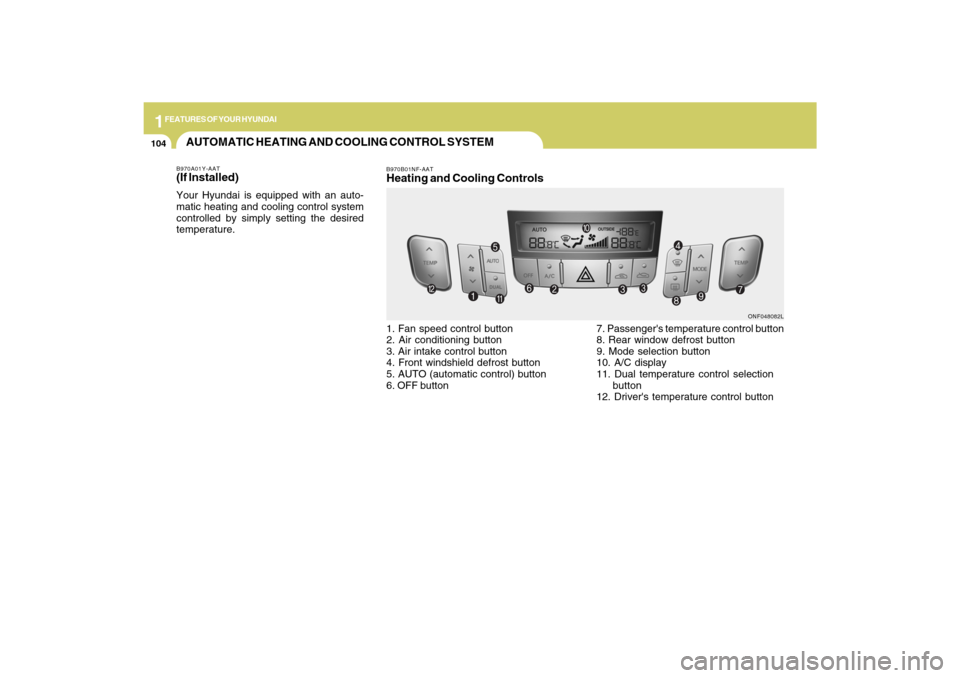
B970B01NF-AATHeating and Cooling Controls1. Fan speed control button
2. Air conditioning button
3. Air intake control button
4. Front windshield defrost button
5. AUTO (automatic control) button
6. OFF button7. Passenger's temperature control button
8. Rear window defrost button
9. Mode selection button
10. A/C display
11. Dual temperature control selection
button
12. Driver's temperature control button
ONF048082L
Page 118 of 286
1
FEATURES OF YOUR HYUNDAI
105105
B970C01NF-AATAutomatic OperationThe FATC (Full Automatic Temperature
Control) system automatically controls
heating and cooling as follows:
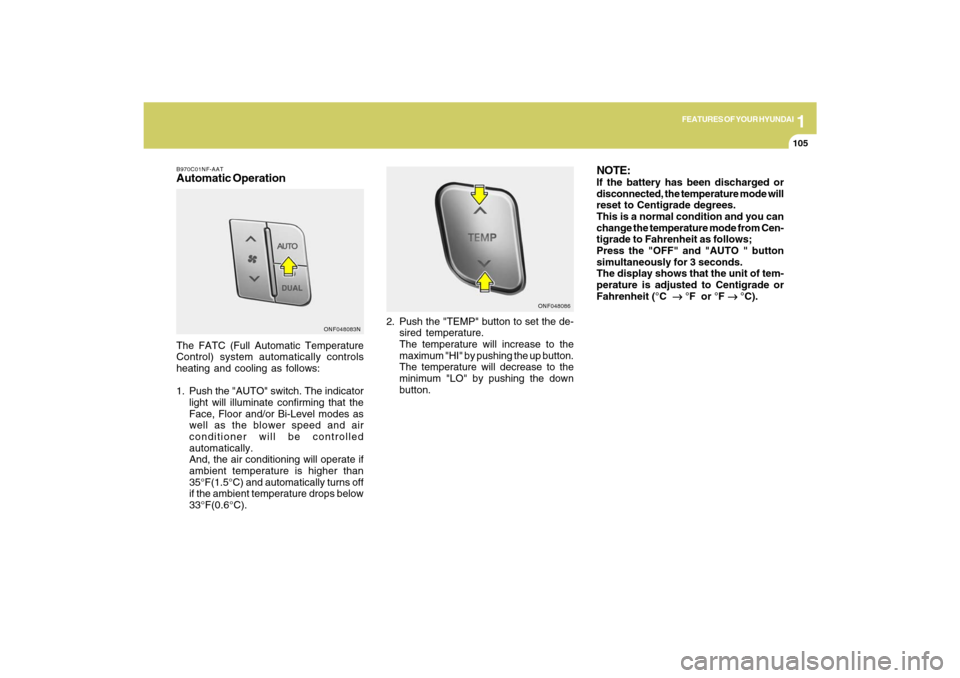
1. Push the "AUTO" switch. The indicator
light will illuminate confirming that the
Face, Floor and/or Bi-Level modes as
well as the blower speed and air
conditioner will be controlled
automatically.
And, the air conditioning will operate if
ambient temperature is higher than
35°F(1.5°C) and automatically turns off
if the ambient temperature drops below
33°F(0.6°C).2. Push the "TEMP" button to set the de-
sired temperature.
The temperature will increase to the
maximum "HI" by pushing the up button.
The temperature will decrease to the
minimum "LO" by pushing the down
button.
NOTE:If the battery has been discharged or
disconnected, the temperature mode will
reset to Centigrade degrees.
This is a normal condition and you can
change the temperature mode from Cen-
tigrade to Fahrenheit as follows;
Press the "OFF" and "AUTO " button
simultaneously for 3 seconds.
The display shows that the unit of tem-
perature is adjusted to Centigrade or
Fahrenheit (°C
→ →→ →
→ °F or °F
→ →→ →
→ °C).
ONF048083NONF048086
Page 119 of 286

1FEATURES OF YOUR HYUNDAI
106
B980A01Y-AATMANUAL OPERATIONThe heating and cooling system can be
controlled manually as well by pushing
buttons other than the "AUTO" button. In
this state, the system sequentially works
according to the order of buttons selected.
The function of the buttons which are not
selected will be controlled automatically.
Press the "AUTO" button in order to convert
to automatic control of the system.
ONF048115
NOTE:Never place anything over the sensor
which is located on the instrument panel
to ensure better control of the heating
and cooling system.
ONF048087
Adjusting the driver and passenger
side temperature individually1. Press the DUAL button to operate the
driver and passenger side temperature
individually. Pressing the right
temperature control button will
automatically switch to the DUAL mode
as well.
2. Press the left temperature control to
adjust the driver side temperature. Press
the right temperature control to adjust
the passenger side temperature.
When the driver side temperature is set to
the highest (HI) or lowest (LO) temperature
setting, the DUAL mode is deactivated for
maximum heating or cooling.
Adjusting the driver and passenger
side temperature equally1. Press the DUAL button again to
deactivate DUAL mode. The passenger
side temperature will be set to the same
as the driver side temperature.
2. Press the left temperature control button.
The driver and passenger side
temperature will be adjusted equally.Temperature conversionIf the battery has been discharged or dis-
connected, the temperature mode display
will reset to Fahrenheit.
This is normal condition. You can switch
the temperature mode between Fahrenheit
to Centigrade as follows;
While depressing the AUTO button,
depress the OFF button for 3 seconds or
more. The display will change from
Fahrenheit to Centigrade, or from
Centigrade to Fahrenheit.
Page 124 of 286
1
FEATURES OF YOUR HYUNDAI
111111
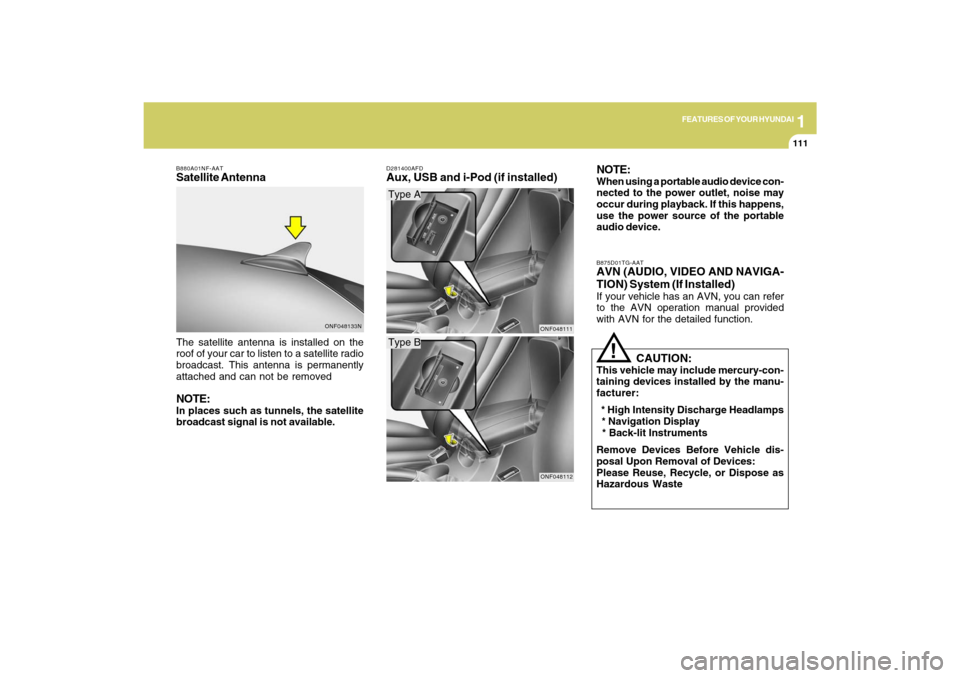
The satellite antenna is installed on the
roof of your car to listen to a satellite radio
broadcast. This antenna is permanently
attached and can not be removedNOTE:In places such as tunnels, the satellite
broadcast signal is not available.
D281400AFDAux, USB and i-Pod (if installed)NOTE:
When using a portable audio device con-
nected to the power outlet, noise may
occur during playback. If this happens,
use the power source of the portable
audio device.
Type AType B
ONF048111ONF048112B875D01TG-AAT
AVN (AUDIO, VIDEO AND NAVIGA-
TION) System (If Installed)If your vehicle has an AVN, you can refer
to the AVN operation manual provided
with AVN for the detailed function.
!
CAUTION:
This vehicle may include mercury-con-
taining devices installed by the manu-
facturer:
* High Intensity Discharge Headlamps
* Navigation Display
* Back-lit Instruments
Remove Devices Before Vehicle dis-
posal Upon Removal of Devices:
Please Reuse, Recycle, or Dispose as
Hazardous Waste
ONF048133N B880A01NF-AAT
Satellite Antenna
Page 128 of 286
1
FEATURES OF YOUR HYUNDAI
115
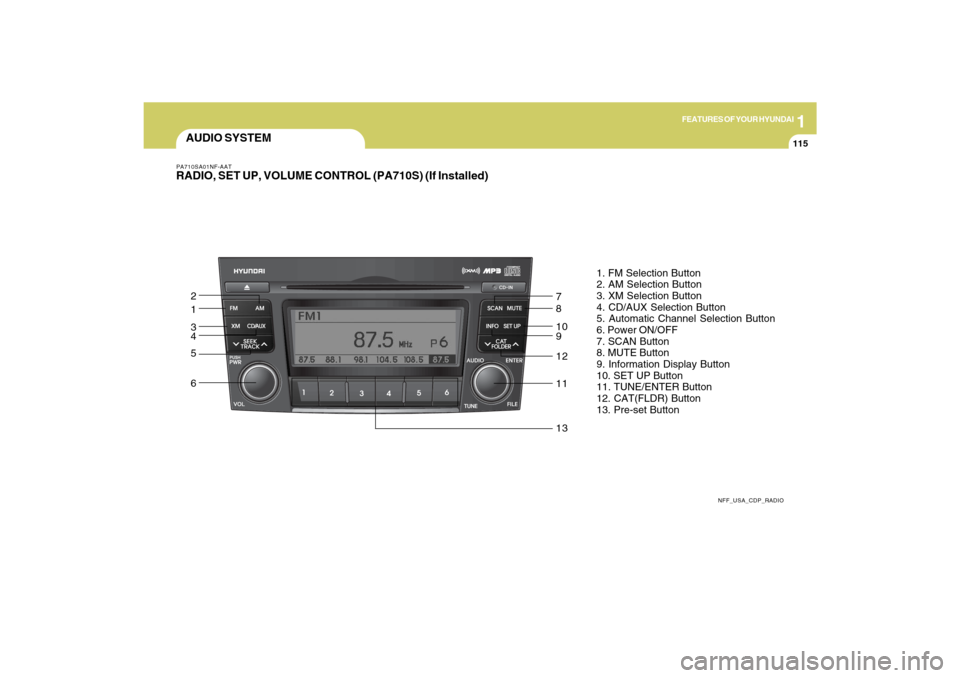
AUDIO SYSTEMPA710SA01NF-AATRADIO, SET UP, VOLUME CONTROL (PA710S) (If Installed)
NFF_USA_CDP_RADIO
1. FM Selection Button
2. AM Selection Button
3. XM Selection Button
4. CD/AUX Selection Button
5. Automatic Channel Selection Button
6. Power ON/OFF
7. SCAN Button
8. MUTE Button
9. Information Display Button
10. SET UP Button
11. TUNE/ENTER Button
12. CAT(FLDR) Button
13. Pre-set Button
1 2
3
4
5
67
8
10
9
12
11
13
Page 129 of 286
1FEATURES OF YOUR HYUNDAI
116
PA710SB01NF-AAT1. FM Selection ButtonTurns to FM mode and toggles FM1 and
FM2 when the button is pressed each time.2. AM Selection ButtonTurns to AM mode, selects the AM.3. XM Selection ButtonTurns to XM mode, and toggles in the order
of XM1➟XM2➟XM3➟···➟XM1··· when the
button is pressed each time.4. CD/AUX Selection ButtonIf there is a CD in the CDP DECK it turns to
CD mode, and if a device is connected to
AUX then it toggles.
CD➟AUX➟CD··· when the button is
pressed each time.(It will not turn to AUX if
the auxiliary device is not connected)
5. Automatic Channel Selection
Buttono When the [SEEK
]button is pressed,
it reduces the band frequency by 200khz
to automatically select channel. Stops
at the previous frequency if no channel
is found.
o When the [SEEK ]button is pressed,
it increases the band frequency by
200khz to automatically select chan-
nel. Stops at the previous frequency if
no channel is found.
6. Power ON/OFF & Volume Control
ButtonTurns the set on/off when the IGNITION
SWITCH is on ACC or ON. If the button is
turned to the right, it increases the volume
and left, decreases the volume.7. SCAN ButtonIf this button is pressed, the frequencies
will increase and receive the correspond-
ing broadcasts.
This function will play the frequencies for
5 seconds (XM mode : 10 seconds) each
and find other broadcasts as the frequency
increases.
Press the button again when desiring to
continue listening to the currently playing
broadcast.
8. MUTE ButtonPress to temporarily cut off the Sound.9. Information Display ButtonInformation Display function operation (In-
formation is displayed each time (the) Key
is pressed) : Pressing the Category/
Channel➟ Artist Name/Song
Title➟Category/Channel... for 3 seconds
will display the corresponding text then
become restored.
Text Scroll operation
After pressing (the) Key, if the text to be
displayed is longer than the LCD text line,
then rotating the Tune Knob will operate
the Page up function displaying 16(Max.
characters) characters for 3 seconds each
dispalys.10. SET UP ButtonPress this button to turn to the XM option,
TEXT SCROLL, AVC and adjustment
mode.
If no action is taken for 5 seconds after
pressing the button, it will return to the play
mode.(After entering SET UP mode, move
between items using the left, right and
PUSH functions of the TUNE button.)
The set up item changes from TEXT
SCROLL ➟AVC➟XM...
Page 130 of 286
1
FEATURES OF YOUR HYUNDAI
117
11. TUNE/ENTER ButtonTurn this button clockwise by one notch to
increase frequency by 200Khz from cur-
rent frequency.
Turn this button counterclockwise by one
notch to decrease frequency by 200Khz
from current frequency.
Press this button while holding SET UP
button to activate / inactivate the item.
Select SET UP item using left and right
function of the Tune button.
Pressing the button changes the BASS,
MIDDLE, TREBLE, FADER and BALANCE
TUNE mode.
The mode selected is shown on the dis-
play.
After selecting each mode, rotate the Au-
dio control knob clockwise or counter-
clockwise.
o BASS Control
To increase the BASS, rotate the knob
clockwise, while to decrease the BASS,
rotate the knob counterclockwise.
o MIDDLE Control
To increase the MIDDLE, rotate the knob
clockwise, while to decrease the MIDDLE,
rotate the knob counterclockwise.o TREBLE Control
To increase the TREBLE, rotate the knob
clockwise, while to decrease the TREBLE,
rotate the knob counterclockwise.
o FADER Control
Turn the control knob clockwise to empha-
size rear speaker sound (front speaker
sound will be attenuated). When the con-
trol knob is turned counterclockwise, front
speaker sound will be emphasized (rear
speaker sound will be attenuated).
o BALANCE Control
Rotate the knob clockwise to emphasize
right speaker sound (left speaker sound
will be attenuated). When the control knob
is turned counter clockwise, left speaker
sound will be emphasized (right speaker
sound will be attenuated).
12. CAT(FLDR) ButtonMoves [CAT
] button when Category Up
search operation.
o Category is moved Up from the cat-
egory currently being received and
Category Name becomes displayed.
o If the Enter Key is not pressed within 5
seconds, then the previous mode will
be restored.o If the Key is pressed while in the last
Category, then the first category will
become displayed and operation will
be repeated.
o Corresponding category can be se-
lected by pressing ENTER.
Moves [CAT
] button when Category
Down search operation.
o Category is moved Down from the cat-
egory currently being received and
Category Name becomes displayed.
o If the Enter Key is not pressed within 5
seconds, then the previous mode will
be restored.
o If the [CAT ] Key is pressed while in
the first Category, then the last category
will become displayed and operation
will be repeated.
o Corresponding category can be se-
lected by pressing ENTER.
13. Pre-set ButtonPush [1]~[6] buttons less than 0.8 seconds
to play the channel saved in each button.
Push pre-set button for 0.8 seconds or
longer to save current channel to the re-
spective button with a beep.