2009 Hyundai Accent radio
[x] Cancel search: radioPage 2 of 266
F2
A080A01S-AAT
TWO-WAY RADIO OR CELLULAR TELEPHONE INSTALLATION
Your vehicle is equipped with electronic fuel injection and other electronic components. It is possible
for an improperly installed/adjusted two-way radio or cellular telephone to adversely affect electronic
systems. For this reason, we recommend that you carefully follow the radio manufacturer's instruc-
tions or consult your Hyundai dealer for precautionary measures or special instructions if you choose
to install one of these devices.
!
A070A01A-AAT
CAUTION: MODIFICATIONS TO YOUR HYUNDAI
Your Hyundai should not be modified in any way. Such modifications may adversely affect the
performance, safety or durability of your Hyundai and may, in addition, violate conditions of the limited
warranties covering the vehicle. Certain modifications may also be in violation of regulations
established by the U.S. Department of Transportation and other federal or state agencies.
Page 18 of 266

1FEATURES OF YOUR HYUNDAI8
THEFT-ALARM SYSTEMB070A01A-AAT(If Installed)This system is designed to provide pro-
tection from unauthorized entry into the
car. This system is operated in three
stages: the first is the "Armed" stage, the
second is the "Alarm" stage, and the third
is the "Disarmed" stage. If triggered, the
system provides an audible alarm with
blinking of the turn signal lights.
Locking doors1. Close all doors.
2. Push the "LOCK" button on the trans-
mitter.
3. At the same time all doors lock, the turn
signal light will blink once to indicate
that the system is armed.Unlocking doors1. Push the "UNLOCK" button on the
transmitter.
2. At the same time the driver's door
unlocks, the turn signal light will blink
twice to indicate that the system is
disarmed.NOTE:If you wish to unlock all the doors, press
the "UNLOCK" button on the transmitter
again within 4 seconds.
NOTE:The transmitter will not work if any of
following occur:
- The ignition key is in ignition switch.
- You exceed the operating distance
limit (10 m).
- The battery in the transmitter is weak.
- Other vehicles or objects may be
blocking the signal.
- The weather is extremely cold.
- The transmitter is close to a radio
transmitter such as a radio station
or an airport which can interfere with
normal operation of the transmitter.
When the transmitter does not work
correctly, open and close the door with
the ignition key. If you have a problem
with the transmitter, contact an autho-
rized Hyundai Dealer.NOTE:Keep the transmitter away from water or
any liquid. If the keyless entry system is
inoperative due to exposure to water or
liquids, it will not be covered by your
manufacturer vehicle warranty.
Page 127 of 266
1
FEATURES OF YOUR HYUNDAI
1171
FEATURES OF YOUR HYUNDAI
117
STEREO SOUND SYSTEM
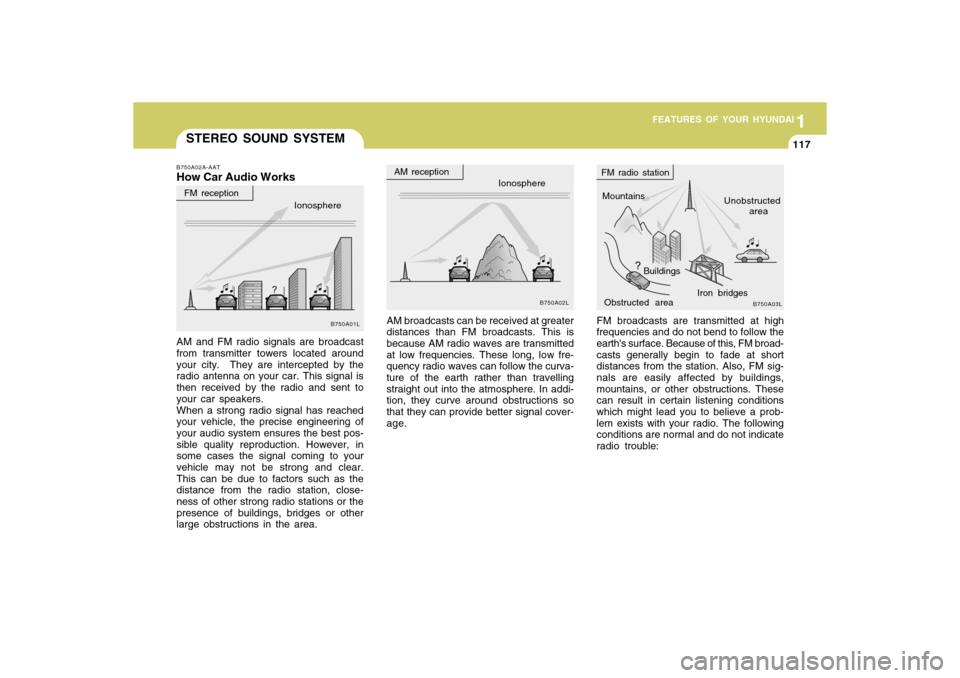
FM broadcasts are transmitted at high
frequencies and do not bend to follow the
earth's surface. Because of this, FM broad-
casts generally begin to fade at short
distances from the station. Also, FM sig-
nals are easily affected by buildings,
mountains, or other obstructions. These
can result in certain listening conditions
which might lead you to believe a prob-
lem exists with your radio. The following
conditions are normal and do not indicate
radio trouble: AM broadcasts can be received at greater
distances than FM broadcasts. This is
because AM radio waves are transmitted
at low frequencies. These long, low fre-
quency radio waves can follow the curva-
ture of the earth rather than travelling
straight out into the atmosphere. In addi-
tion, they curve around obstructions so
that they can provide better signal cover-
age.
B750A02A-AATHow Car Audio WorksAM and FM radio signals are broadcast
from transmitter towers located around
your city. They are intercepted by the
radio antenna on your car. This signal is
then received by the radio and sent to
your car speakers.
When a strong radio signal has reached
your vehicle, the precise engineering of
your audio system ensures the best pos-
sible quality reproduction. However, in
some cases the signal coming to your
vehicle may not be strong and clear.
This can be due to factors such as the
distance from the radio station, close-
ness of other strong radio stations or the
presence of buildings, bridges or other
large obstructions in the area.
Ionosphere
B750A02L
Mountains
Buildings
Obstructed areaUnobstructed
area FM radio station
B750A03L
Ionosphere FM reception
B750A01L
Iron bridges
AM reception
Page 128 of 266
1FEATURES OF YOUR HYUNDAI
118
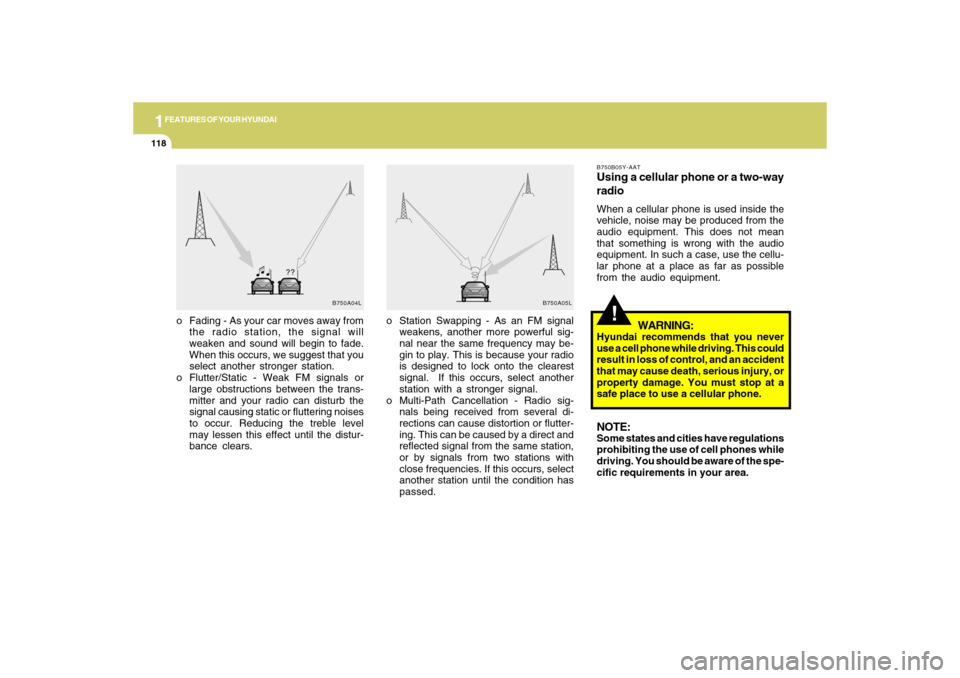
o Station Swapping - As an FM signal
weakens, another more powerful sig-
nal near the same frequency may be-
gin to play. This is because your radio
is designed to lock onto the clearest
signal. If this occurs, select another
station with a stronger signal.
o Multi-Path Cancellation - Radio sig-
nals being received from several di-
rections can cause distortion or flutter-
ing. This can be caused by a direct and
reflected signal from the same station,
or by signals from two stations with
close frequencies. If this occurs, select
another station until the condition has
passed. o Fading - As your car moves away from
the radio station, the signal will
weaken and sound will begin to fade.
When this occurs, we suggest that you
select another stronger station.
o Flutter/Static - Weak FM signals or
large obstructions between the trans-
mitter and your radio can disturb the
signal causing static or fluttering noises
to occur. Reducing the treble level
may lessen this effect until the distur-
bance clears.
B750A04L B750A05L
!
B750B05Y-AATUsing a cellular phone or a two-way
radioWhen a cellular phone is used inside the
vehicle, noise may be produced from the
audio equipment. This does not mean
that something is wrong with the audio
equipment. In such a case, use the cellu-
lar phone at a place as far as possible
from the audio equipment.
WARNING:
Hyundai recommends that you never
use a cell phone while driving. This could
result in loss of control, and an accident
that may cause death, serious injury, or
property damage. You must stop at a
safe place to use a cellular phone.NOTE:Some states and cities have regulations
prohibiting the use of cell phones while
driving. You should be aware of the spe-
cific requirements in your area.
Page 129 of 266
1
FEATURES OF YOUR HYUNDAI
1191
FEATURES OF YOUR HYUNDAI
119
CARE OF DISCS
StorageWhen not in use, place your discs in their
individual cases and store them in a cool
place away from the sun, heat, and dust.
Do not grip or pull out the disc with your
hand while the disc is being pulled into
the unit by the self loading mechanism.Keep Your Discs Clean
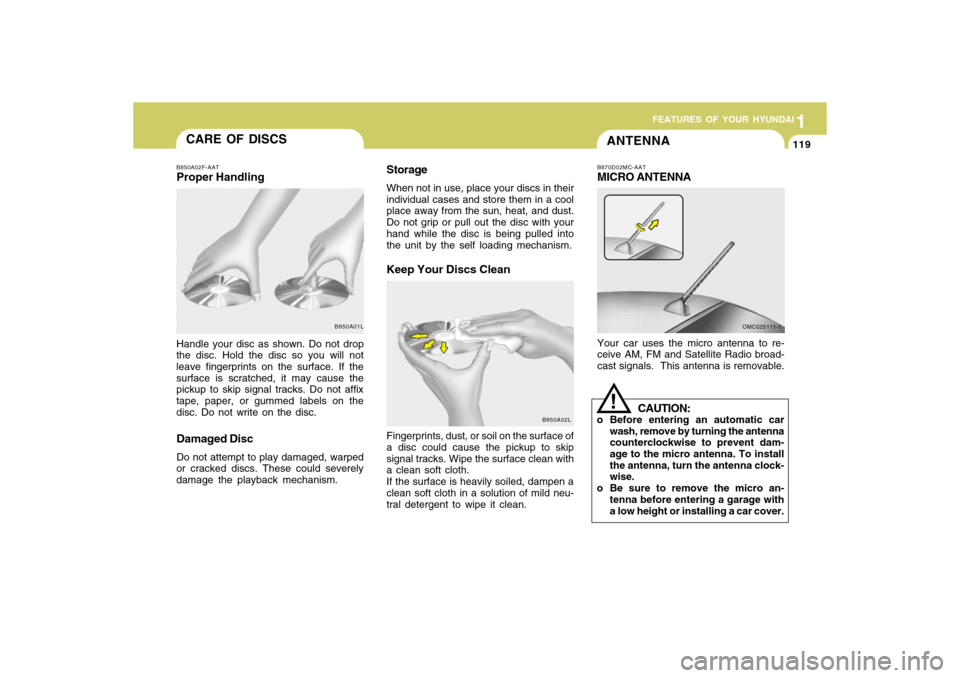
B850A02F-AATProper HandlingHandle your disc as shown. Do not drop
the disc. Hold the disc so you will not
leave fingerprints on the surface. If the
surface is scratched, it may cause the
pickup to skip signal tracks. Do not affix
tape, paper, or gummed labels on the
disc. Do not write on the disc.Damaged DiscDo not attempt to play damaged, warped
or cracked discs. These could severely
damage the playback mechanism.Fingerprints, dust, or soil on the surface of
a disc could cause the pickup to skip
signal tracks. Wipe the surface clean with
a clean soft cloth.
If the surface is heavily soiled, dampen a
clean soft cloth in a solution of mild neu-
tral detergent to wipe it clean.
B850A01L
B850A02L
ANTENNAB870D02MC-AATMICRO ANTENNAYour car uses the micro antenna to re-
ceive AM, FM and Satellite Radio broad-
cast signals. This antenna is removable.
OMC025111-1
CAUTION:
o Before entering an automatic car
wash, remove by turning the antenna
counterclockwise to prevent dam-
age to the micro antenna. To install
the antenna, turn the antenna clock-
wise.
o Be sure to remove the micro an-
tenna before entering a garage with
a low height or installing a car cover.
!
Page 130 of 266

1FEATURES OF YOUR HYUNDAI
120
AUDIO SYSTEM
1. AM Selection Button
2. FM Selection Button
3. Automatic Channel Selection Button
4. Power ON/OFF & Volume Control
Button
5. SCAN Button
6. MUTE Button
7. SETUP Button
8. TUNE/ENTER Button
9. PRESET Button
OMCAU01-A
PA710A01MC-AATRADIO, SETUP, VOLUME CONTROL (PA710) (If Installed)
Page 134 of 266

1FEATURES OF YOUR HYUNDAI
124
PA710D01MC-AAT1. CD Loading SlotPlease face printed side upward and
gently push in. When the ignition switch
is on ACC or ON and power is off, power
is automatically turned on if the CD is
loaded. This CDP supports only 12 cm
CD. If VCD or Data CD is loaded, "Er-6"
message will appear and CD will be
ejected.2. CD IndicatorWhen ignition switch is ACC or ON and if
the CD is loaded, this indicator is lighted.
If the CD is ejected the light is turned off.3. CD Eject ButtonPush
button to eject the CD. This
button is enabled when ignition switch is
off.
4. CD Selection ButtonIf there is a CD in the CDP DECK it plays
the CD.
Press CD button to automatically insert
CD when the disc is ejected from the deck
by pressing CD EJECT.
NOTE:o Do not stick paper or tape etc., on
the label side or the recording side
of any discs, as it may cause a
malfunction.
o Depending on the recording status,
some CD-Rs/CD-RWs may not be
played on this unit.
o Playback of MP3 and WMA file for-
mats are supported. Load to play
time for these formats may be longer
due to the compressed nature of
these discs.5. AUX Selection ButtonIf the auxiliary device is connected, it
turns to AUX MODE to play the sound
from the auxiliary player.o When the AUX device is discon-
nected while in AUX-IN mode, the
unit automatically switches its mode
to last selected mode (CD mode or
RADIO mode).
o The quality of sound may be de-
fected or distorted when the unit's
EQ control and AUX device's EQ
control are both enabled (not flat).
When you want to use the unit's EQ
control feature, disable the AUX
device's EQ control feature, and vice
versa.
o To prevent noise, the AUX devices
with adjustable volume levels must
have the volume adjusted high.
o If an external power connector is
connected to the vehicle, noise may
be introduced to the sound. If noise is
heard, verify the AUX device volume
is turned up, then test the sound with
the power cable disconnected. If
necessary, use the AUX device pow-
ered from its internal battery, or pur-
chase a ground loop isolator to con-
nect the AUX device to the vehicle.AUX 3.5mm STEREO MINI PLUGNOTE :o If the AUX device is not connected,
you cannot switch to AUX-IN mode.
Page 137 of 266

1
FEATURES OF YOUR HYUNDAI
127127
PA710SA01MC-AATRADIO, SETUP, VOLUME CONTROL (PA710S) (If Installed)
1. AM Selection Button
2. FM Selection Button
3. XM Selection Button
4. Automatic Channel Selection Button
5. Power ON/OFF & Volume Control
Button
6. SCAN Button
7. MUTE Button
8. SETUP Button
9. Information Display Button
10. CAT(FOLDER) Button
11. TUNE/ENTER Button
12. PRESET Button
OMCAU02-A