Page 236 of 532
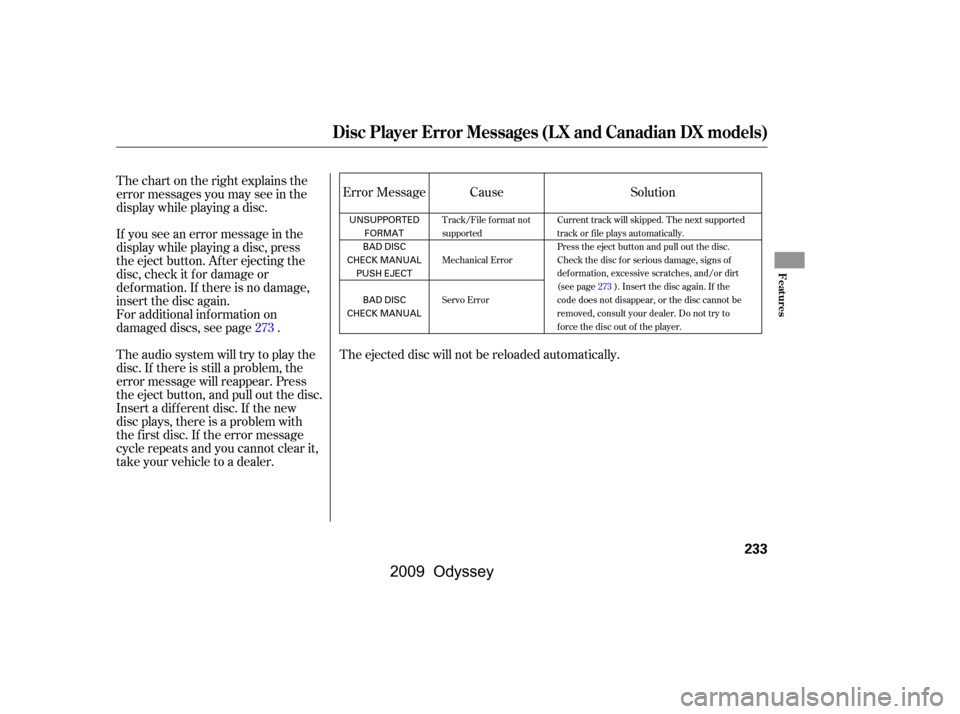
The ejected disc will not be reloaded automatically.
If you see an error message in the
display while playing a disc, press
the eject button. After ejecting the
disc, check it for damage or
deformation. If there is no damage,
insert the disc again.
For additional information on
damaged discs, see page .
Theaudiosystemwilltrytoplaythe
disc. If there is still a problem, the
error message will reappear. Press
the eject button, and pull out the disc.
Insert a dif f erent disc. If the new
disc plays, there is a problem with
the f irst disc. If the error message
cycle repeats and you cannot clear it,
take your vehicle to a dealer. Cause
Error Message
Thechartontherightexplainsthe
error messages you may see in the
display while playing a disc. Solution
273
Track/File format not
supported
Mechanical Error
Servo Error Current track will skipped. The next supported
track or file plays automatically.
Press the eject button and pull out the disc.
Check the disc for serious damage, signs of
deformation, excessive scratches, and/or dirt
(see page273). Insert the disc again. If the
code does not disappear, or the disc cannot be
removed, consult your dealer. Do not try to
force the disc out of the player.
Disc Player Error Messages (LX and Canadian DX models)
Features
233
UNSUPPORTED
FORMAT
BAD DISC
CHECK MANUAL PUSH EJECT
BAD DISC
CHECK MANUAL
�\f���—�\f���—���
�y�
�
���������\f�y���
�(���������\f�y�\f�������y
2009 Odyssey
Page 244 of 532

�µ
�µ �µ �µ
�µ
�µ
�µ
Repeat steps 2 and 3 to store the
f irst six channels.
Press the XM button again. The
other XM band will show. Store
the next six channels using steps 2
and 3.
Once a channel is stored, simply
press and release the proper preset
button to tune to it. The signal is
currently too weak. Move the vehicle
to an area away from tall buildings,
and with an unobstructed view of the
southern horizon.
The selected channel
number does not exist or is not part
of your subscription.
The selected
channel has no artist or title
inf ormation at this time.
There is
a problem with the XM antenna.
Please consult your dealer.
XM is loading the
audio or program inf ormation.
The channel
currently selected is no longer
broadcasting.
The encryption
code is being updated. Wait until the
encryption code is f ully updated.
Channels 0 and 1 should still work
normally.
4.
5.
CONT INUED
Playing the XMRadio (U.S. EX and all EX-L models without navigation system)
XM Radio Display Messages ‘‘NO SIGNA L ’’
‘‘----’’
‘‘NO INFO’’
‘‘CHECK A NT ENNA ’’
‘‘L OA DING’’
‘‘OFF A IR’’
‘‘UPDA T ING’’
Features
241
�\f���—�\f���—���
�y�
�
�����������y���
�(���������\f�y�\f�������y
2009 Odyssey
Page 254 of 532

If you see an error message in the
display while playing a disc, press
the eject button. After ejecting the
disc, check it for damage or
deformation. If there is no damage,
insert the disc again.
For additional information on
damaged discs, see page .
Theaudiosystemwilltrytoplaythe
disc. If there is still a problem, the
error message will reappear. Press
the eject button, and pull out the disc.
Insert a dif f erent disc. If the new
disc plays, there is a problem with
the f irst disc. If the error message
cycle repeats and you cannot clear it,
take your vehicle to a dealer.Cause
Solution
Error Message
Thechartontherightexplainsthe
error messages you may see in the
display while playing a disc.
273
High temperature
Track/File format not
supported
Mechanical Error
Servo Error Will disappear when the temperature returns to
normal.
Current track will be skipped. The next
supported track or file plays automatically.
Press the EJECT button and pull out the disc(s).
Check the disc for serious damage, signs of
deformation, excessive scratches, and/or dirt
(see page273). Insert the disc again. If the
code does not disappear, or the disc(s) cannot
be removed, consult your dealer. Do not try to
force the disc out of the player.
Disc Changer Error Messages (EX and EX-L models without navigation system)
Features
251
HEAT ERROR
UNSUPPORTED FORMAT
BAD DISC
PLEASE CHECK OWNER’S
MANUAL PUSH EJECT
BAD DISC
PLEASE CHECK OWNER’SMANUAL
�\f���—�\f���—���
�y�
�
�������\f�
�y���
�(���������\f�y�\f�������y
2009 Odyssey
Page 263 of 532
�µ
�µ �µ
�µ
�µ
�µ �µ
The signal is
currently too
weak. Move the
vehicle to an area
away from tall
buildings, and
with an
unobstructed view
of the southern
horizon.
The selected channel
number does not exist, or
isnotpartofyour
subscription, or this
channel has no artist or
title information at this
time.
This channel has no
artist or title
inf ormation at this
time.
XM is loading the
audio or program
inf ormation.
The channelcurrently selected is
no longer
broadcasting.
The encryption
code is being
updated. Wait
until the
encryption code is
f ully updated.
Channels 0 and 1
should still work
normally. There is
a problem with the XM antenna.
Please consult your dealer.
XM Radio Display Messages ‘‘NO SIGNA L ’’
‘‘----’’
‘‘NO INFO’’
‘‘L OA DING’’
‘‘OFF A IR’’
‘‘UPDA T ING’’
‘‘CHECK A NT ENNA ’’
Playing the XMRadio (Models with navigation system)
260
�\f���—�\f���—���
�y�
����
����\f���y���
�(���������\f�y�\f�������y
2009 Odyssey
Page 274 of 532

If you see an error message in the
display while playing a disc, press
the eject button. After ejecting the
disc, check it for damage or
deformation. If there is no damage,
insert the disc again.
For additional information on
damaged discs, see page .
Theaudiosystemwilltrytoplaythe
disc. If there is still a problem, the
error message will reappear. Press
the eject button, and pull out the disc.
Insert a dif f erent disc. If the new
disc plays, there is a problem with
the f irst disc. If the error message
cycle repeats and you cannot clear it,
take your vehicle to a dealer.
Thechartontherightexplainsthe
error messages you may see in the
display while playing a disc.Solution
Error Message Cause
273
Will disappear when the temperature returns to
normal.
Current track will be skipped. The next
supported track or file plays automatically.
Press the EJECT button and pull out the disc(s).
Check the disc for serious damage, signs of
deformation, excessive scratches, and/or dirt
(see page273). Insert the disc again. If the
code does not disappear, or the disc(s) cannot
be removed, consult your dealer. Do not try to
force the disc out of the player.
High temperature
Track/File format not
supported
Mechanical Error
Servo Error
Disc Changer Error Messages (Models with navigation system)
Features
271
HEAT ERROR
UNSUPPORTED FORMAT
BAD DISC
PLEASE CHECK OWNER’S
MANUAL PUSH EJECT
BAD DISC
PLEASE CHECK OWNER’SMANUAL
�\f���—�\f���—���
�y�
�
����\f������y���
�(���������\f�y�\f�������y
2009 Odyssey
Page 317 of 532

Message
Thechartontherightexplainsthe
error messages you may see in the
display while playing a disc.
If you see an error message in the
display while playing a disc, press
the eject button. After ejecting the
disc, check it for damage or
deformation. If there is no damage,
insert the disc again.
For additional information on
damaged discs, see page .
Theaudiosystemwilltrytoplaythe
disc. If there is still a problem, the
error message will reappear. Press
the eject button, and pull out the disc.
Insert a dif f erent disc. If the new
disc plays, there is a problem with
the f irst disc. If the error message
cycle repeats and you cannot clear it,
take your vehicle to a dealer. Solution
273
ERROR F0
ERROR F2
Invalid region code
Invalid disc
Parental control active.
Change level to view. Eject the disc and reinsert it.
Use a disc with the regional designation of ‘‘1’’ or ‘‘All’’.
The disc is not playable in this unit. Eject the disc, and insert a disc
compatible with this system.
Reinsert the disc, and increase the parental control level (see
pages308and309).
DVD Player Error Messages
Rear Entertainment System
314
�\f���—�\f���—���
�y�
�
�������
�\f�y���
�(���������\f�y�\f���
���y
2009 Odyssey
Page 366 of 532
If the system develops a problem,
you will see a ‘‘CHECK PARKING
SENSOR SYSTEM’’ message on the
multi-inf ormation display, and a
beeper sounds continuously. Very
of ten, a sensor covered with mud, ice,
snow,etc.isthecauseof this
message. Check the sensors f irst. If
the message stays on or the beeper
does not stop, have the system
checked by your dealer.
Distance
Beeper Short beeps
Continuous
beeps
Very short beeps
Bottom
indicator stays on
About 40-70 in
(1-1.8 m)
About 24-40 in
(0.6-1 m)
About 24 in
(0.6 m) or less
Bottom
indicator stays on Bottom
indicator stays on
Indicator
CONT INUED
Rear Cent er Sensor Operat ion
Parking Sensor System
Features
363
�\f���—�\f���—���
�y�
����\f������
�y���
�(���������\f�y�\f�������y
2009 Odyssey
Page 370 of 532
Bef ore you begin driving your
vehicle, you should know what
gasoline to use and how to check the
levels of important f luids. You also
need to know how to properly store
luggage or packages. The
inf ormation in this section will help
you. If you plan to add any
accessories to your vehicle, please
read the information in this section
first...............................
Break-in period .368
.................
Fuel Recommendation .368
.........
Service Station Procedures .369
....................................
Ref ueling .369
Opening and Closing the .......................................
Hood .370
...................................
Oil Check .371
.............
Engine Coolant Check .372
...............................
Fuel Economy .373
...
Accessories and Modif ications .376
.............................
Carrying Cargo .378
Bef ore Driving
Bef ore Driving
367
�\f���—�\f���—���
�y�
����\f����\f���y���
�(���������\f�y�\f�������y
2009 Odyssey