Page 73 of 373

The odometer shows the total
distance your vehicle has been
driven. It measures miles in U.S.
models and kilometers in Canadian
models. It is illegal under U.S.
federal law and Canadian provincial
regulations to disconnect, reset, or
alter the odometer with the intent to
change the number of miles or
kilometers indicated.This indicator displays the outside
temperature in Fahrenheit (U.S.
models) or Celsius (Canadian
models).
This shows how much f uel you have.
It may show slightly more or less
than the actual amount. This shows the temperature of the
engine’s coolant. During normal
operation, the reading should be in
the middle of the gauge. In severe
driving conditions, such as very hot
weather or a long period of uphill
driving, the reading may reach near
the red mark. If it reaches the red
(Hot) mark, pull saf ely to the side of
the road. See page f or
instructions and precautions on
checking the engine’s cooling
system.
322
If equipped
CONT INUED
Outside Temperature Indicator
Temperature Gauge
Odometer
Fuel Gauge
Gauges
Inst rument s and Cont rols
69
OUTSIDE TEMPERATURE INDICATOR
Avoid driving with an extremely low
f uel level. Running out of f uel could
cause the engine to misf ire, damaging
the catalytic converter.
�\f���—�\f���—�����y�
�����������\f�y���
�(�,�������\f�y�\f�\f�����y
2009 CR- V
Page 74 of 373

�¶�¶�µ�µ�µ�µ�µ�µ�µ�µ
The temperature sensor is in the
f ront bumper. Theref ore, the
temperature reading can be af f ected
by heat ref lection f rom the road
surf ace, engine heat, and the
exhaust f rom surrounding traf f ic.
This can cause an incorrect
temperature reading when your
speed is under 19 mph (30 km/h).
If the outside temperature is
incorrectly displayed, you can adjust
it up to 5°F in U.S. models ( 3°C
in Canadian models) warmer or
cooler.
The sensor delays the display update
until it reaches the correct outside
temperature. This may take several
minutes.
In certain weather conditions,
temperature readings near f reezing
(32°F, 0°C) could mean that ice is
f orming on the road surf ace.
To adjust the outside temperature
display, press and hold the select/
reset knob f or 10 seconds. The
display changes as shown above.
Select the outside temperature
indicator by turning the select/reset
knob. The display begins to blink.
Pushthesameknobtoenterthis
setting, then turn it to adjust the
temperature. The f ollowing
sequence will appear f or each: 0, 1, 2,
3, 4, 5, 5, 4, 3, 2, 1, 0 (U.S.)
or 0, 1, 2, 3, 3, 2, 1, 0 (Canada). When it reaches the desired value,
push the select/reset knob to enter
the setting. You should see the new
outside temperature displayed.
The temperature must be
stabilized bef ore doing this
procedure.
Gauges
70
NOTE:
�\f���—�\f���—�����y�
�������������y���
�(�,�������\f�y�\f�\f�����y
2009 CR- V
Page 82 of 373

Push the lever under the steering
column all the way down.
Make any steering wheel adjustment
bef ore you start driving.
To apply the parking brake, push the
pedal down with your f oot. To
release it, push on the pedal again.
The parking brake indicator on the
instrument panel should go out when
the parking brake is fully released
(see page ). Move the steering wheel up or
down, and in or out, so it points
toward your chest, not toward
your f ace. Make sure you can see
the instrument panel gauges and
indicators.
1.
2.
60
Parking Brake
Steering Wheel A djustment
Parking Brake, Steering Wheel A djustment
78
PARKING BRAKE PEDAL
Adjusting the steering wheel
position while driving may
cause you to lose control of the
vehicle and be seriously injured
inacrash.
Adjust the steering wheel only
when the vehicle is stopped.
Driving the vehicle with the parking
brake applied can damage the rear
brakes and hubs. A beeper will sound if
the vehicle is driven with the parking
brake on.
�\f���—�\f���—�����y�
�������������y���
�(�,�������\f�y�\f�\f�����y
2009 CR- V
Page 83 of 373

Youshouldhavereceivedakey
number tag with your keys. You will
need this key number if you ever
have to get a lost key replaced. Use
only Honda-approved key blanks.
These keys contain electronic
circuits that are activated by the
immobilizer system. They will not
work to start the engine if the
circuits are damaged.Protect the keys f rom direct
sunlight, high temperature, and
high humidity.
Donotdropthekeysorsetheavy
objects on them.
Keep the keys away f rom liquids.
If they get wet, dry them
immediately with a sof t cloth.
Push the lever up to lock the
steering wheel in position.
Make sure you have securely
locked the steering wheel in place
by trying to move it up, down, in,
and out.
The master key fits all the locks on
your vehicle. The valet key works
only in the ignition and the driver’s
door lock. You can keep the glove
boxlockedwhenyouleaveyour
vehicle and the valet key at a parking
f acility.
The valet key does not contain a
battery. Do not try to take it apart.
3.
4. Keys and Locks
Steering Wheel A djustment, K eys and L ocks
Inst rument s and Cont rols
79
LEVER
KEY
NUMBER
TAG
MASTER KEY
WITH REMOTE
TRANSMITTER VALET
KEY
(Gray)
�\f���—�\f���—�����y�
�������������y���
�(�,�������\f�y�\f�\f�����y
2009 CR- V
Page 84 of 373

If the system repeatedly does not
recognize the coding of your key,
contact your dealer.
Do not attempt to alter this system
or add other devices to it. Electrical
problems could result that may make
your vehicle inoperable.
If you have lost your key and cannot
start your engine, contact your
dealer.
When you turn the ignition switch to
the ON (II) position, the immobilizer
system indicator should come on
brief ly, then go of f . If the indicator
starts to blink, it means the system
does not recognize the coding of the
key. Turn the ignition switch to the
LOCK (0) position, remove the key,
reinsert it, and turn the ignition
switch to the ON (II) position again.
The system may not recognize your
key’s coding if another immobilizer
key or other metal object (i.e. key
f ob) is near the ignition switch when
you insert the key.
The immobilizer system protects
your vehicle f rom thef t. If an
improperly coded key (or other
device) is used, the engine’s f uel
system is disabled.As required by the FCC:
This device complies with Part 15 of theFCC rules. Operation is subject to thef ollowing two conditions: (1) This devicemay not cause harmf ul interf erence, and(2) this device must accept anyinterf erence received, includinginterf erence that may cause undesiredoperation.
Changes or modif ications not expresslyapproved by the party responsible f orcompliance could void the user’sauthority to operate the equipment.
This device complies with IndustryCanada Standard RSS-210.Operation is subject to the f ollowing twoconditions: (1) this device may not causeinterf erence, and (2) this device mustaccept any interf erence that may causeundesired operation of the device.
Immobilizer System
80
Always take the ignition key with you
whenever you leave the vehicle alone.
�\f���—�\f���—�����y�
���������\f�\f�y���
�(�,�������\f�y�\f�\f�����y
2009 CR- V
Page 95 of 373
�´
As required by the FCC:This device complies with Part 15 of theFCC rules. Operation is subject to thef ollowing two conditions: (1) This devicemay not cause harmf ul interf erence, and(2) this device must accept anyinterf erence received, includinginterf erence that may cause undesiredoperation.
Changes or modif ications not expresslyapproved by the party responsible f orcompliance could void the user’sauthority to operate the equipment.
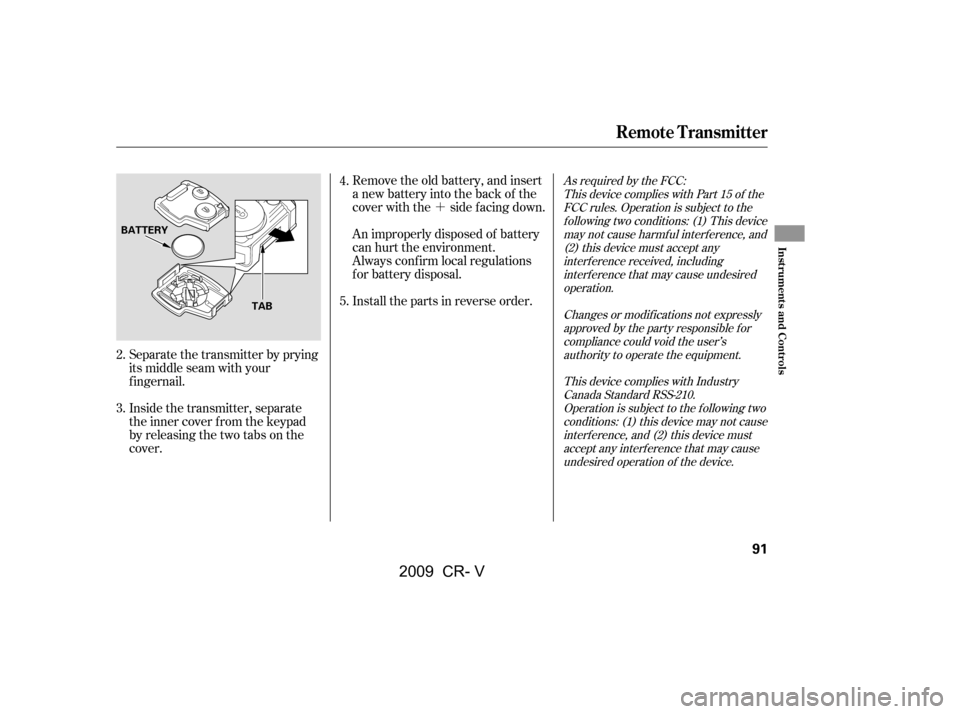
This device complies with IndustryCanada Standard RSS-210.Operation is subject to the f ollowing twoconditions: (1) this device may not causeinterf erence, and (2) this device mustaccept any interf erence that may causeundesired operation of the device.Remove the old battery, and insert
a new battery into the back of the
cover with the side f acing down.
Install the parts in reverse order.
An improperly disposed of battery
can hurt the environment.
Always conf irm local regulations
for battery disposal.
Inside the transmitter, separate
the inner cover f rom the keypad
by releasing the two tabs on the
cover.
Separate the transmitter by prying
its middle seam with your
f ingernail. 5.
2.
3. 4.
Remote Transmitter
Inst rument s and Cont rols
91
BATTERY
TAB
�\f���—�\f���—�����y�
�������������y���
�(�,�������\f�y�\f�\f�����y
2009 CR- V
Page 100 of 373
Each front seat has an armrest on
thesideof theseat-back.Touseit,
pivotitdown.
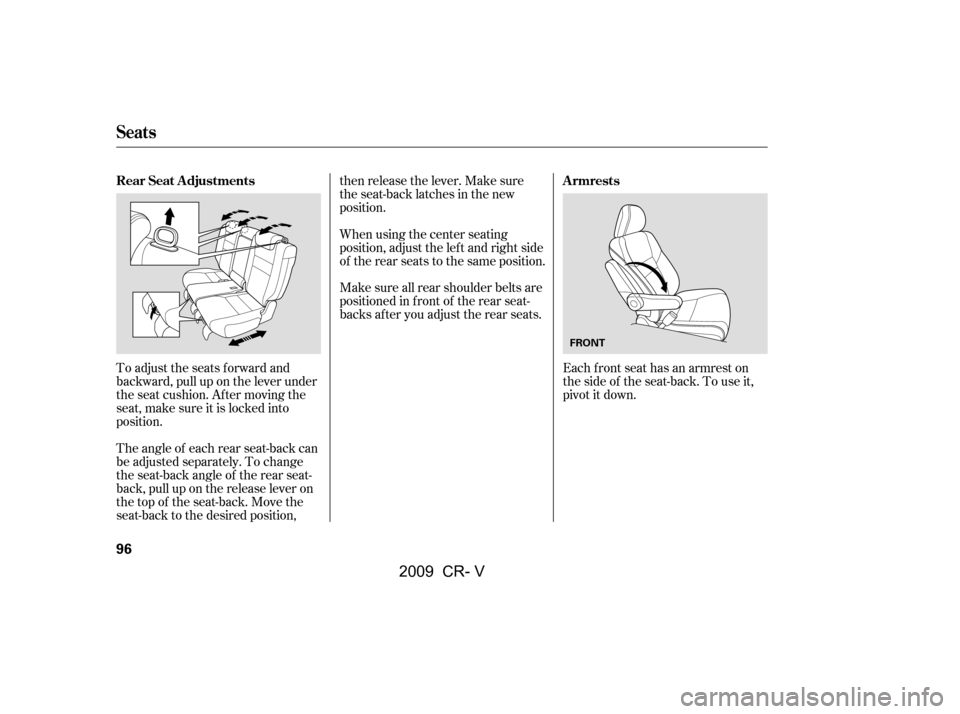
To adjust the seats forward and
backward, pull up on the lever under
the seat cushion. Af ter moving the
seat, make sure it is locked into
position.
The angle of each rear seat-back can
be adjusted separately. To change
the seat-back angle of the rear seat-
back, pull up on the release lever on
the top of the seat-back. Move the
seat-back to the desired position, then release the lever. Make sure
the seat-back latches in the new
position.
Make sure all rear shoulder belts are
positioned in f ront of the rear seat-
backs af ter you adjust the rear seats.
When using the center seating
position, adjust the lef t and right side
of the rear seats to the same position.
Armrests
Rear Seat Adjustments
Seats
96
FRONT
�\f���—�\f���—�����y�
���������
���y���
�(�,�������\f�y�\f�
�\f�
�y
2009 CR- V
Page 104 of 373
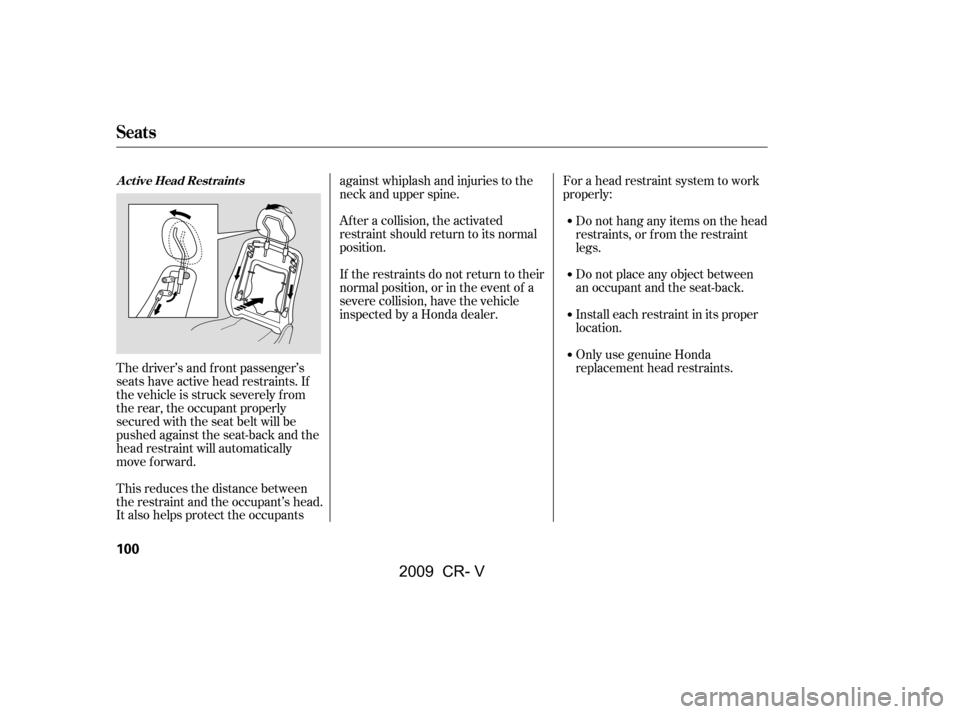
The driver’s and f ront passenger’s
seats have active head restraints. If
the vehicle is struck severely f rom
the rear, the occupant properly
secured with the seat belt will be
pushed against the seat-back and the
head restraint will automatically
move forward.
This reduces the distance between
the restraint and the occupant’s head.
It also helps protect the occupantsagainst whiplash and injuries to the
neck and upper spine.
Af ter a collision, the activated
restraint should return to its normal
position.
If the restraints do not return to their
normal position, or in the event of a
severe collision, have the vehicle
inspected by a Honda dealer.
For a head restraint system to work
properly:
Do not hang any items on the head
restraints, or f rom the restraint
legs.
Do not place any object between
an occupant and the seat-back.
Install each restraint in its proper
location.
Only use genuine Honda
replacement head restraints.
Seats
A ct ive Head Rest raint s
100
�\f���—�\f���—�����y�
�������������y���
�(�,�������\f�y�\f�
�\f���y
2009 CR- V