2009 GMC SIERRA change time
[x] Cancel search: change timePage 315 of 596

Push the power button to turn on the headphones.
An indicator light located on the headphones comes on.
If the light comes on but, there is intermittent sound
and/or static on the headphones, or if the indicator light
does not come on, the batteries might need to be
replaced. See “Battery Replacement” later in this section
for more information. Switch the headphones to Off
when not in use.
Infrared transmitters are located at the rear of the
overhead console. The headphones shut off
automatically to save the battery power if the RSE
system and RSA are shut off or if the headphones
are out of range of the transmitters for more than
three minutes. If you move too far forward or step out of
the vehicle, the headphones lose the audio signal.
The headphones automatically turns off after four hours
of continuous use.
To adjust the volume on the headphones, use the
volume control located on the right side.
For optimal audio performance, the headphones must
be worn correctly. The symbol L (Left) appears on
the upper left side, above the ear pad and should be
positioned on the left ear. The symbol R (Right) appears
on the upper right side, above the ear pad and should
be positioned on the right ear.Notice:Do not store the headphones in heat or
direct sunlight. This could damage the headphones
and repairs will not be covered by the warranty.
Storage in extreme cold can weaken the batteries.
Keep the headphones stored in a cool, dry place.
If the foam ear pads attached to the headphones
become worn or damaged, the pads can be replaced
separately from the headphone set. Refer to your
dealer/retailer for more information.
Battery Replacement
To change the batteries on the headphones, do the
following:
1. Turn the screw to loosen the battery door located
on the left side of the headphones. Slide the
battery door open.
2. Replace the two batteries in the compartment.
Make sure that they are installed correctly, using
the diagram on the inside of the battery
compartment.
3. Replace the battery door and tighten the door
screw.
If the headphones are to be stored for a long period of
time, remove the batteries and keep them in a cool,
dry place.
3-131
Page 320 of 596

e(Audio):Press this button to change audio tracks on
DVDs that have this feature when the DVD is playing.
The format and content of this function vary for each disc.
{(Subtitles):Press this button to turn ON/OFF
subtitles and to move through subtitle options when a
DVD is playing. The format and content of this function
vary for each disc.
AUX (Auxiliary):Press this button to switch the system
between the DVD player and an auxiliary source.
d(Camera):Press this button to change camera
angles on DVDs that have this feature while a DVD is
playing. The format and content of this function vary for
each disc.
1 through 0 (Numeric Keypad):The numeric keypad
provides the capability of direct chapter or track
number selection.
\(Clear):Press this button within three seconds after
entering a numeric selection, to clear all numerical inputs.
}10 (Double Digit Entries):Press this button to
select chapter or track numbers greater than nine.
Press this button before entering the number.
Battery Replacement
To change the remote control batteries, do the following:
1. Slide the rear cover back on the remote control.
2. Replace the two batteries in the compartment.
Make sure they are installed correctly using the
diagram on the inside of the remote control.
3. Replace the battery cover.
If the remote control is to be stored for a long period of
time, remove the batteries and keep them in a cool,
dry place.
Problem Recommended Action
No power. The ignition might not be
turned ON/RUN or in
ACC/ACCESSORY.
The picture does not ll
the screen. There are
black borders on the
top and bottom or on
both sides or it looks
stretched out.Check the display mode
settings in the setup menu
by pressing the display
menu button on the
remote control.
In auxiliary mode, the
picture moves or scrolls.Check the auxiliary input
connections at both
devices.
3-136
Page 331 of 596

Antilock Brake System (ABS)
This vehicle has the Antilock Brake System (ABS),
an advanced electronic braking system that will
help prevent a braking skid.
When the engine is started and the vehicle begins to
drive away, ABS checks itself. A momentary motor or
clicking noise might be heard while this test is going on.
This is normal.
If there is a problem with
ABS, this warning light
stays on. SeeAntilock
Brake System (ABS)
Warning Light on
page 3-43.
Along with ABS, the vehicle has a Dynamic Rear
Proportioning (DRP) system. If there is a DRP problem,
both the brake and ABS warning lights come on
accompanied by a 10-second chime. The lights and
chime will come on each time the ignition is turned on
until the problem is repaired. See your dealer/retailer
for service.Let us say the road is wet and you are driving safely.
Suddenly, an animal jumps out in front of you. You slam
on the brakes and continue braking. Here is what
happens with ABS:
A computer senses that the wheels are slowing down.
If one of the wheels is about to stop rolling, the computer
will separately work the brakes at each front wheel
and at both rear wheels.
ABS can change the brake pressure to each wheel,
as required, faster than any driver could. This can help
the driver steer around the obstacle while braking hard.
As the brakes are applied, the computer keeps receiving
updates on wheel speed and controls braking pressure
accordingly.
Remember: ABS does not change the time needed
to get a foot up to the brake pedal or always decrease
stopping distance. If you get too close to the vehicle in
front of you, there will not be enough time to apply the
brakes if that vehicle suddenly slows or stops. Always
leave enough room up ahead to stop, even with ABS.
Using ABS
Do not pump the brakes. Just hold the brake pedal
down rmly and let antilock work. The brakes might
vibrate or some noise might be heard, but this is normal.
4-5
Page 338 of 596
Of course, traction is reduced when water, snow, ice,
gravel, or other material is on the road. For safety, slow
down and adjust your driving to these conditions. It is
important to slow down on slippery surfaces because
stopping distance will be longer and vehicle control
more limited.
While driving on a surface with reduced traction, try your
best to avoid sudden steering, acceleration, or braking,
including reducing vehicle speed by shifting to a lower
gear. Any sudden changes could cause the tires to
slide. You may not realize the surface is slippery until
the vehicle is skidding. Learn to recognize warning
clues — such as enough water, ice, or packed snow
on the road to make a mirrored surface — and slow
down when you have any doubt.
Remember: Any Antilock Brake System (ABS) helps
avoid only the braking skid.
Off-Road Driving
Vehicles with four-wheel drive can be used for off-road
driving. Vehicles without four-wheel drive and vehicles
with 20-inch tire/wheel assemblies should not be driven
off-road except on a level, solid surface.The airbag system is designed to work properly under
a wide range of conditions, including off-road usage.
Always wear your safety belt and observe safe driving
speeds, especially on rough terrain.
Drinking and driving can be very dangerous on any road
and this is certainly true for off-road driving. At the very
time you need special alertness and driving skills, your
reexes, perceptions, and judgment can be affected
by even a small amount of alcohol. You could have a
serious — or even fatal — accident if you drink and
drive or ride with a driver who has been drinking.
Off-roading can be great fun but has some denite
hazards. The greatest of these is the terrain itself. When
off-road driving, traffic lanes are not marked, curves are
not banked, and there are no road signs. Surfaces can
be slippery, rough, uphill, or downhill.
Avoid sharp turns and abrupt maneuvers. Failure to
operate the vehicle correctly off-road could result in
loss of vehicle control or vehicle rollover.
Off-roading involves some new skills. That is why it is
very important that you read these driving tips and
suggestions to help make off-road driving safer
and more enjoyable.
4-12
Page 342 of 596
Getting Familiar with Off-Road Driving
It is a good idea to practice in an area that is safe
and close to home before you go into the wilderness.
Off-roading requires some new and different skills.
Tune your senses to different kinds of signals. Your
eyes need to constantly sweep the terrain for unexpected
obstacles. Your ears need to listen for unusual tire or
engine sounds. Use your arms, hands, feet, and body
to respond to vibrations and vehicle bounce.
Controlling the vehicle is the key to successful off-road
driving. One of the best ways to control the vehicle
is to control the speed. At higher speeds:
You approach things faster and have less time
to react.
There is less time to scan the terrain for obstacles.
The vehicle has more bounce when driving over
obstacles.
More braking distance is needed, especially on an
unpaved surface.
{CAUTION:
When you are driving off-road, bouncing and quick
changes in direction can easily throw you out of
position. This could cause you to lose control and
crash. So, whether you are driving on or off the
road, you and your passengers should wear
safety belts.
Scanning the Terrain
Off-road driving can take you over many different kinds
of terrain. Be familiar with the terrain and its many
different features.
Surface Conditions:Off-roading surfaces can be
hard-packed dirt, gravel, rocks, grass, sand, mud, snow,
or ice. Each of these surfaces affects the vehicle’s
steering, acceleration, and braking in different ways.
Depending on the surface, slipping, sliding, wheel
spinning, delayed acceleration, poor traction, and
longer braking distances can occur.
Surface Obstacles:Unseen or hidden obstacles
can be hazardous. A rock, log, hole, rut, or bump can
startle you if you are not prepared for them. Often these
obstacles are hidden by grass, bushes, snow, or even
the rise and fall of the terrain itself.
4-16
Page 377 of 596

Towing a Trailer
If the vehicle has a diesel engine, see the DURAMAX®
Diesel manual for more information.
Do not tow a trailer during break-in. SeeNew Vehicle
Break-In on page 2-22for more information.
{CAUTION:
The driver can lose control when pulling a trailer if
the correct equipment is not used or the vehicle is
not driven properly. For example, if the trailer is too
heavy, the brakes may not work well or even at all.
The driver and passengers could be seriously
injured. The vehicle may also be damaged; the
resulting repairs would not be covered by the
vehicle warranty. Pull a trailer only if all the steps in
this section have been followed. Ask your dealer/
retailer for advice and information about towing a
trailer with the vehicle.Notice:Pulling a trailer improperly can damage
the vehicle and result in costly repairs not covered
by the vehicle warranty. To pull a trailer correctly,
follow the advice in this section and see your
dealer/retailer for important information about
towing a trailer with the vehicle.
To identify the trailering capacity of the vehicle, read
the information in “Weight of the Trailer” that appears
later in this section.
Trailering is different than just driving the vehicle by
itself. Trailering means changes in handling, acceleration,
braking, durability and fuel economy. Successful, safe
trailering takes correct equipment, and it has to be used
properly.
The following information has many time-tested,
important trailering tips and safety rules. Many of
these are important for your safety and that of your
passengers. So please read this section carefully
before pulling a trailer.
4-51
Page 399 of 596
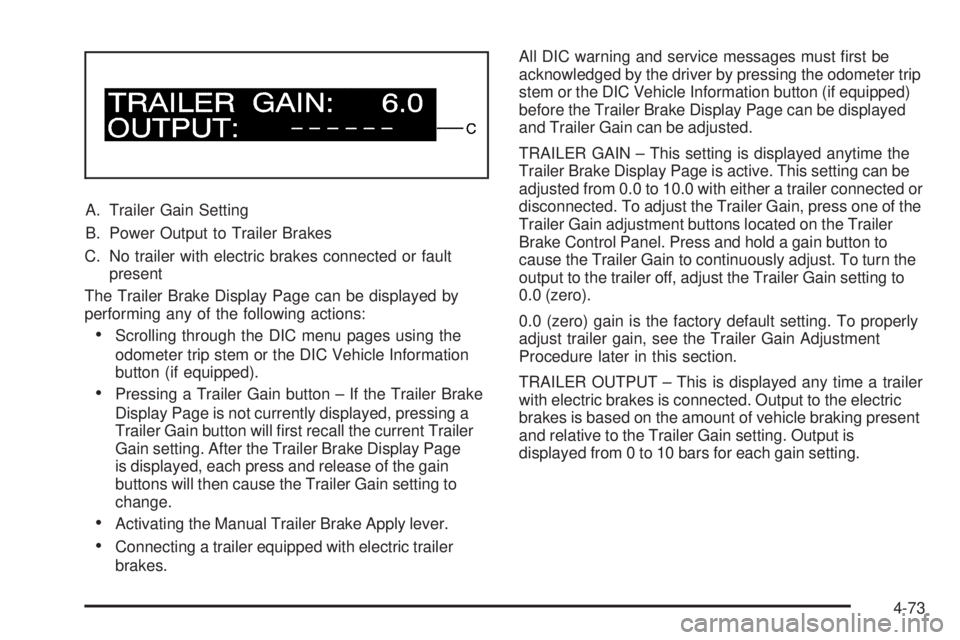
A. Trailer Gain Setting
B. Power Output to Trailer Brakes
C. No trailer with electric brakes connected or fault
present
The Trailer Brake Display Page can be displayed by
performing any of the following actions:
Scrolling through the DIC menu pages using the
odometer trip stem or the DIC Vehicle Information
button (if equipped).
Pressing a Trailer Gain button – If the Trailer Brake
Display Page is not currently displayed, pressing a
Trailer Gain button will rst recall the current Trailer
Gain setting. After the Trailer Brake Display Page
is displayed, each press and release of the gain
buttons will then cause the Trailer Gain setting to
change.
Activating the Manual Trailer Brake Apply lever.
Connecting a trailer equipped with electric trailer
brakes.All DIC warning and service messages must rst be
acknowledged by the driver by pressing the odometer trip
stem or the DIC Vehicle Information button (if equipped)
before the Trailer Brake Display Page can be displayed
and Trailer Gain can be adjusted.
TRAILER GAIN – This setting is displayed anytime the
Trailer Brake Display Page is active. This setting can be
adjusted from 0.0 to 10.0 with either a trailer connected or
disconnected. To adjust the Trailer Gain, press one of the
Trailer Gain adjustment buttons located on the Trailer
Brake Control Panel. Press and hold a gain button to
cause the Trailer Gain to continuously adjust. To turn the
output to the trailer off, adjust the Trailer Gain setting to
0.0 (zero).
0.0 (zero) gain is the factory default setting. To properly
adjust trailer gain, see the Trailer Gain Adjustment
Procedure later in this section.
TRAILER OUTPUT – This is displayed any time a trailer
with electric brakes is connected. Output to the electric
brakes is based on the amount of vehicle braking present
and relative to the Trailer Gain setting. Output is
displayed from 0 to 10 bars for each gain setting.
4-73
Page 400 of 596
The Trailer Output will indicate “------“ontheTrailer
Brake Display Page whenever the following occur:
No trailer is connected.
A trailer without electric brakes is connected
(no DIC message is displayed).
A trailer with electric brakes has become
disconnected (a CHECK TRAILER WIRING
message will also be displayed on the DIC).
There is a fault present in the wiring to the electric
trailer brakes (a CHECK TRAILER WIRING
message will also be displayed on the DIC).
There is a fault in the ITBC system (a SERVICE
TRAILER BRAKE SYSTEM message will also
be displayed in the DIC).
Manual Trailer Brake Apply
The Manual Trailer Brake Apply Lever is located on
the Trailer Brake Control Panel and is used to apply the
trailer’s electric brakes independent of the vehicle’s
brakes. This lever is used in the Trailer Gain Adjustment
Procedure to properly adjust the power output to the
trailer brakes. Sliding the lever to the left will apply only
the trailer brakes. The power output to the trailer is
indicated in the Trailer Brake Display Page in the DIC.If the vehicle’s service brakes are applied while using
the Manual Trailer Brake Apply Lever, the trailer output
power will be the greater of the two.
The trailer and the vehicle’s brake lamps will come on
when either vehicle braking or manual trailer brakes are
applied.
Trailer Gain Adjustment Procedure
Trailer Gain should be set for a specic trailering
condition and must be adjusted any time vehicle loading,
trailer loading or road surface conditions change.
Setting the Trailer Gain properly is needed for the best
trailer stopping performance. A trailer that is over-gained
may result in locked trailer brakes. A trailer that is
under-gained may result in not enough trailer braking.
Both of these conditions may result in poorer stopping
and stability of the vehicle and trailer.
Use the following procedure to correctly adjust Trailer
Gain for each towing condition:
1. Make sure the trailer brakes are in proper working
condition.
2. Connect a properly loaded trailer to the vehicle
and make all necessary mechanical and electrical
connections. SeeLoading the Vehicle on page 4-32
for more information.
4-74