2009 GMC SIERRA door lock
[x] Cancel search: door lockPage 6 of 24

Getting to Know Your Sierra6
(Customization):Press this button
to scroll through the following custom-
ization features:
• Display Language
• Auto Door Lock
• Auto Door Unlock
• Remote Door Lock
• Remote Door Unlock
• Delay Door Lock
• Exit Lighting
• Approach Lighting
• Chime Volume
• Park Tilt Mirrors (if equipped)
• Easy Exit Seat Recall (if equipped)
• Easy Exit Seat Setup (if equipped)
• Memory Seat Recall (if equipped)
• Remote Start (if equipped)
• Factory Settings
• Exit Feature Settings
(Set/Reset):Press this button to set
or reset DIC information while it is dis-
played or to acknowledge a warning
message.
Customization Settings
To customize features:
1. With the vehicle in Park, turn on the
ignition.
2. Press the (Customization) button
to display available customization
features.
3. With the desired customization
feature displayed, press the
(Set/Reset) button to access the
feature settings.
4. Press the button to scroll through
the available settings.5. With the desired setting displayed,
press the button to select it.
6. Press the button to scroll to the
next feature.
7. To exit the Feature Settings menu,
press the button until EXIT
FEATURE SETTINGS is displayed
and then press the button; or
press the button or the
button.
Compass Operation
To adjust for compass variance when
traveling on a long-distance trip or to
calibrate the compass, refer to your
Owner Manual.
Warnings and Messages
The DIC provides a variety of vehicle
warning messages (depending on
optional equipment) if a problem is
sensed in a vehicle system. To acknowl-
edge a message and clear it from the
display, press the (Set/Reset) button.
Some urgent messages cannot be
cleared from the DIC display.
If you have a current OnStar subscrip-
tion, and a warning message appears,
you can press the OnStar button and
speak to an OnStar Advisor. In many
vehicles, OnStar Advisors can access
certain diagnostic information and can
tell you how serious the problem is and
what you should do about it.
See Section 3 of your Owner Manual.
Note: Your vehicle’s warnings and mes-
sages provide critical information that
can prevent damage to your vehicle.
Review your Owner Manual to become
familiar with the information displayed
and the action required.
Page 7 of 24

7
Remote Keyless Entry
(if equipped)
SAFETY & SECURITY
The Remote
Keyless Entry (RKE)
transmitter includes
the following
functions:
(Remote
Vehicle Start)
(if equipped): This
feature can be used to start the engine
from outside the vehicle. (See Remote
Vehicle Start.)
(Lock):Press this button to lock all
the doors. RKE feedback (light flash
and/or horn chirp) can be programmed
using the DIC.
(Unlock):Press this button to unlock
the driver’s door. Press it again within
five seconds to unlock all remaining
doors. RKE feedback (light flash) can
be programmed using the DIC.
(Vehicle Locator/Panic Alarm):
Press this button to locate your vehicle.
The turn signal lamps will flash and the
horn will sound three times.
Press and hold the button to activate the
panic alarm. The turn signal lamps will
flash and the horn will sound for 30 sec-
onds. Press the button again or turn the
ignition to Run to cancel the alarm.
See Section 2 of your Owner Manual.
Content Theft-Deterrent System
(if equipped with RKE)
To arm the content theft-deterrent
alarm system, lock the doors using the
Remote Keyless Entry (RKE) transmit-
ter. The security light on the instrument
panel cluster will flash for approximately
30 seconds to indicate the alarm is acti-
vated. To disarm the system, unlock the
doors using the RKE transmitter.
The alarm system will not be armed or
disarmed if the doors are locked or
unlocked with a key or the manual
door lock.
See Section 2 of your Owner Manual.
Your vehicle may feature the OnStar
Safe & Sound Plan or the uplevel
OnStar Directions & Connections Plan,
with one year of OnStar service from the
date you purchased your new vehicle.
OnStar offers a variety of capabilities,
such as Remote Door Unlock, Automatic
Notification of Airbag Deployment, and
Hands-Free Calling. In addition, most
vehicles can get driving directions using
Turn-by-Turn Navigation or Destination
Download. OnStar Advisors can send a
planned route to your vehicle and, as
you approach a turn, instructions play
over your vehicle speakers or are
displayed on the navigation screen
(if equipped). Press the OnStar button to
ask an OnStar Advisor about the service
plan you have or to upgrade your plan.
For more information, refer to your
OnStar Owner’s Guide, call
1-888-4-ONSTAR (1-888-466-7827),
or visit onstar.com.
See Section 2 of your Owner Manual.
OnStar®(if equipped)
Page 17 of 24

operation, avoid placing any objects on
or near the sensor.
The exterior and interior lamp controls
are located on the instrument panel to
the left of the steering wheel.
Exterior Lamp Controls
(Off/On): Turn the knob to this posi-
tion to turn off the Automatic Headlamp
System and DRLs. Turn the knob to this
position again to turn them on.
AUTO (Automatic):This position turns
on the Automatic Headlamp System
and DRLs.
(Parking Lamps):This position
turns on the parking lamps and
taillamps.
(Headlamps):This position turns
on the headlamps and other exterior
lamps.
(Fog Lamps)(if equipped): Press
this button to turn the fog lamps on
or off.
Interior Lamp Controls
(Instrument Panel Brightness):
Turn this pop-out knob to adjust the
brightness of the instrument panel lights.
Turn the knob fully clockwise to turn on
the dome lamps and cargo lamps.
(Dome Off):Press in this button to
turn the dome lamps off when a
door is open. Press the button again
to have the dome lamps turn on auto-
matically when a door is open.
See Section 3 of your Owner Manual.
17
Heated Windshield Washer
Fluid (if equipped)
Press the (Heated Washer Fluid)
button, located below the climate con-
trols on the instrument panel, to spray
heated washer fluid on the windshield.
This will help clear ice, tree sap or bugs
from the windshield. It may take up to
40 seconds to heat the washer fluid. A
message will be displayed on the Driver
Information Center when the system is
on. The wipers will automatically turn on
for four heated wash cycles or until the
button is pressed again.
See Section 3 of your Owner Manual.
Your vehicle is equipped with an
Automatic Headlamp System, which
turns on the Daytime Running Lamps
(DRLs) during the day and the head-
lamps and other exterior lamps at night
or when necessary.
The system uses a light sensor, located
on top of the instrument panel, to deter-
mine light conditions. For proper system
Automatic Headlamp System
and Interior Lamps
Rainsense function (if equipped) and
adjust the sensitivity levels. The wipers
activate more often as the band is rotat-
ed upward.
(Low):Rotate the band up to this
position for steady, low-speed wipes.
(High):Rotate the band up to
this position for high-speed wipes.
(Washer):Push the paddle on top
of the multifunction lever to spray wash-
er fluid on the windshield.
See Section 3 of your Owner Manual.
Page 19 of 24
19
Universal Home Remote
(if equipped)
Automatic Dimming
The automatic dimming feature is turned
on each time the vehicle is started. To
Automatic Dimming Rearview
Mirror (if equipped)
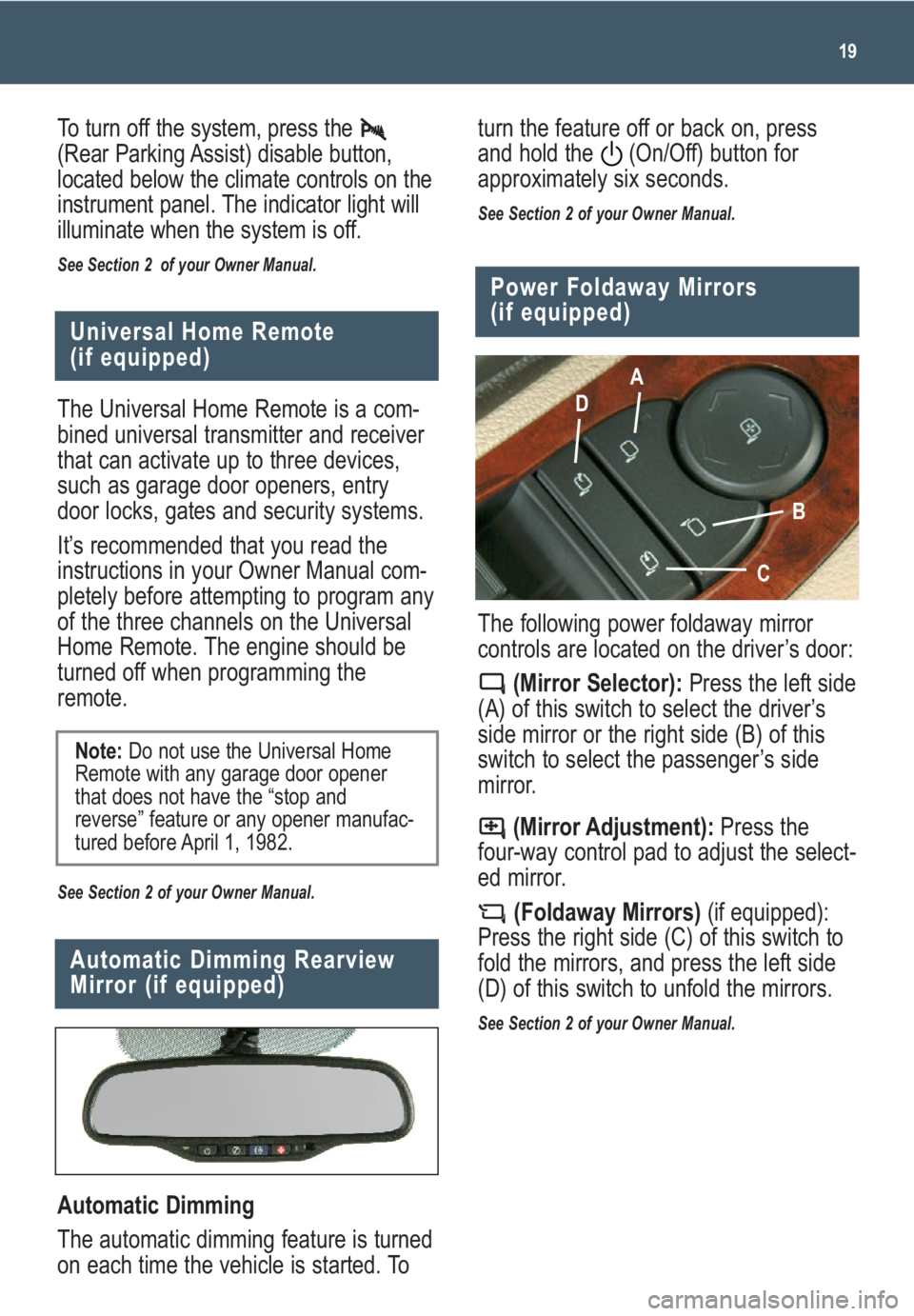
The following power foldaway mirror
controls are located on the driver’s door:
(Mirror Selector):Press the left side
(A) of this switch to select the driver’s
side mirror or the right side (B) of this
switch to select the passenger’s side
mirror.
(Mirror Adjustment):Press the
four-way control pad to adjust the select-
ed mirror.
(Foldaway Mirrors)(if equipped):
Press the right side (C) of this switch to
fold the mirrors, and press the left side
(D) of this switch to unfold the mirrors.
See Section 2 of your Owner Manual.
Power Foldaway Mirrors
(if equipped)
A
D
B
C
The Universal Home Remote is a com-
bined universal transmitter and receiver
that can activate up to three devices,
such as garage door openers, entry
door locks, gates and security systems.
It’s recommended that you read the
instructions in your Owner Manual com-
pletely before attempting to program any
of the three channels on the Universal
Home Remote. The engine should be
turned off when programming the
remote.
See Section 2 of your Owner Manual.
Note:Do not use the Universal Home
Remote with any garage door opener
that does not have the “stop and
reverse” feature or any opener manufac-
tured before April 1, 1982.
To turn off the system, press the
(Rear Parking Assist) disable button,
located below the climate controls on the
instrument panel. The indicator light will
illuminate when the system is off.
See Section 2 of your Owner Manual.
turn the feature off or back on, press
and hold the (On/Off) button for
approximately six seconds.
See Section 2 of your Owner Manual.