2009 FORD SUPER DUTY brake
[x] Cancel search: brakePage 249 of 418

and remain on for approximately five (5) seconds. If the light does not
illuminate, the tool needs to be replaced.
TPMS reset tips:
•To reduce the chances of interference from another vehicle, TPMS
reset should be performed at least three feet (one meter) away from
another Ford Motor Company vehicle undergoing the TPMS reset
procedure at the same time.
•Do not wait more than two (2) minutes between resetting each tire
sensor or the system will timeout and the entire procedure will have
to be repeated on all four wheels.
•A double horn chirp indicates the need to repeat the procedure.
TPMS reset procedure
It is recommended that you read the entire procedure before attempting.
Note:To enter the reset mode, Steps 1–6 MUST be completed within
60 seconds.
1. Place the ignition in the off position and keep the key in the ignition.
2. Press and release the brake
pedal.
3. Cycle the ignition from off to on
three (3) times ending in the on
position—DO NOTstart the engine.
2009 F-250/350/450/550(f23)
Owners Guide, 1st Printing
USA(fus)
Tires, Wheels and Loading
249
Page 250 of 418
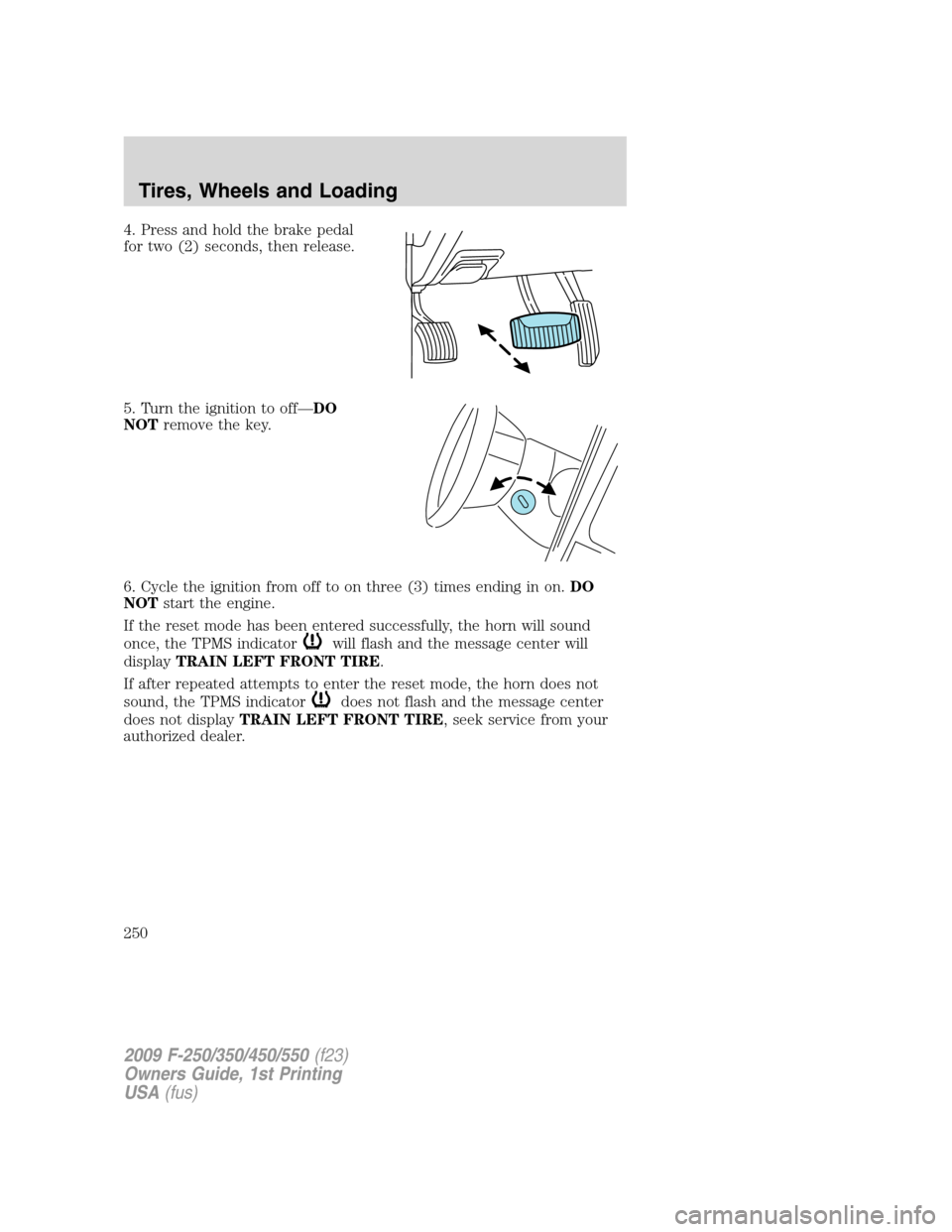
4. Press and hold the brake pedal
for two (2) seconds, then release.
5. Turn the ignition to off—DO
NOTremove the key.
6. Cycle the ignition from off to on three (3) times ending in on.DO
NOTstart the engine.
If the reset mode has been entered successfully, the horn will sound
once, the TPMS indicator
will flash and the message center will
displayTRAIN LEFT FRONT TIRE.
If after repeated attempts to enter the reset mode, the horn does not
sound, the TPMS indicator
does not flash and the message center
does not displayTRAIN LEFT FRONT TIRE, seek service from your
authorized dealer.
2009 F-250/350/450/550(f23)
Owners Guide, 1st Printing
USA(fus)
Tires, Wheels and Loading
250
Page 252 of 418
10. Perform Steps 8 and 9 on the right front tire, right rear tire and
finally the left rear tire. Training is complete after the horn sounds for
the last tire trained (left rear tire) and the message center displays:
TRAINING COMPLETE.
Turn the ignition to off. If two short horn beeps are heard, the reset
procedure was unsuccessful and must be repeated.
If after repeating the procedure and two short beeps are heard when the
ignition is turned to off, seek assistance from your authorized dealer.
SNOW TIRES AND CHAINS
WARNING:Snow tires must be the same size, load index, speed
rating as those originally provided by Ford. Use of any tire or
wheel not recommended by Ford can affect the safety and
performance of your vehicle, which could result in an increased risk of
loss of vehicle control, vehicle rollover, personal injury and death.
Additionally, the use of non-recommended tires and wheels could
cause steering, suspension, axle or transfer case/power transfer unit
failure.
Note:Do not use snow chains on front tires of vehicles with 20” wheels
and tires.
The tires on your vehicle have all weather treads to provide traction in
rain and snow. However, in some climates, you may need to use snow
tires and chains. If you need to use chains, it is recommended that steel
wheels (of the same size and specifications) be used, as chains may chip
aluminum wheels.
Follow these guidelines when using snow tires and chains:
•Use only SAE Class S chains.
•Install chains securely, verifying that the chains do not touch any
wiring, brake lines or fuel lines.
•Drive cautiously. If you hear the chains rub or bang against your
vehicle, stop and re-tighten the chains. If this does not work, remove
the chains to prevent damage to your vehicle.
•If possible, avoid fully loading your vehicle.
•Remove the tire chains when they are no longer needed. Do not use
tire chains on dry roads.
•The suspension insulation and bumpers will help prevent vehicle
damage. Do not remove these components from your vehicle when
using snow tires and chains.
2009 F-250/350/450/550(f23)
Owners Guide, 1st Printing
USA(fus)
Tires, Wheels and Loading
252
Page 257 of 418
WARNING:Exceeding the Safety Compliance Certification Label
vehicle weight rating limits could result in substandard vehicle
handling or performance, engine, transmission and/or structural
damage, serious damage to the vehicle, loss of control and personal
injury.
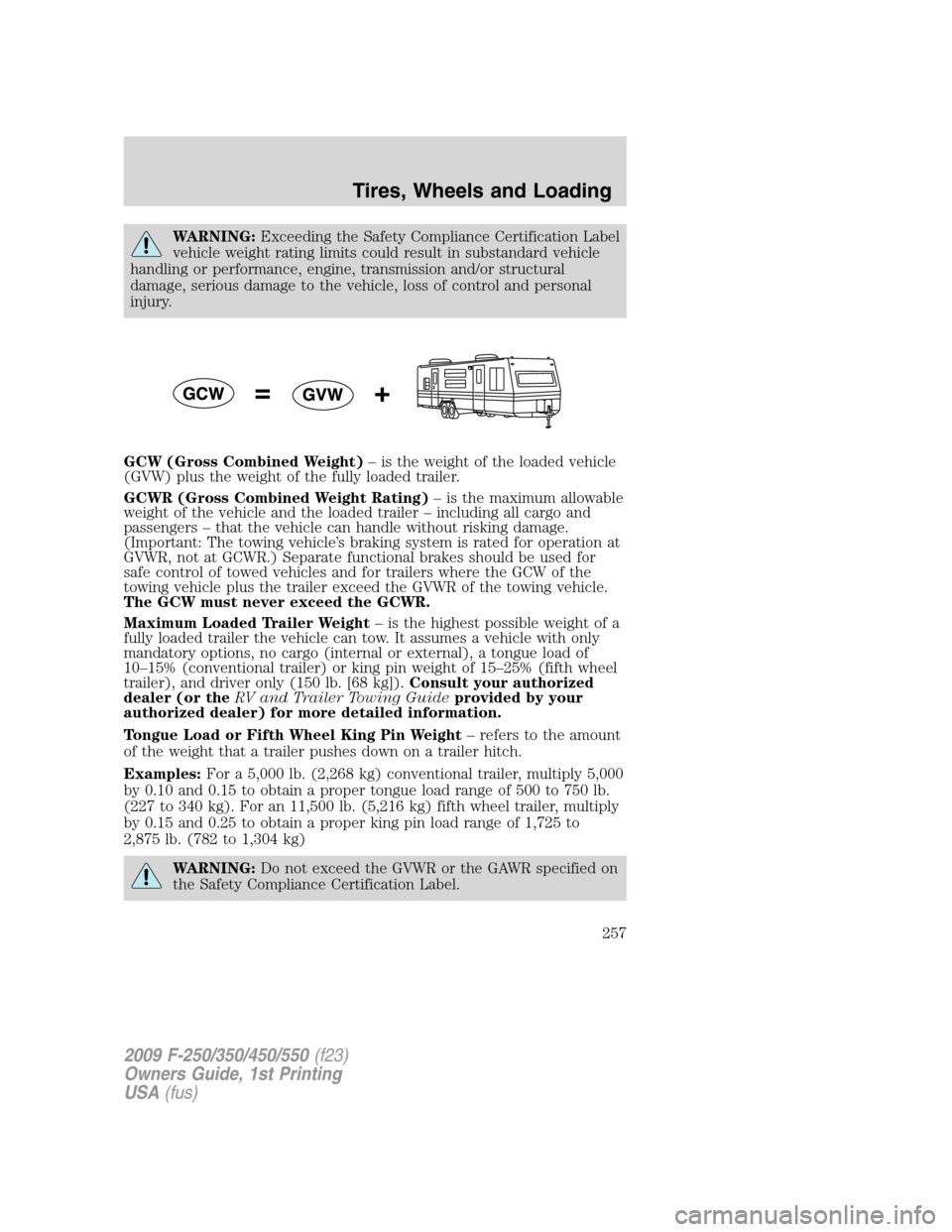
GCW (Gross Combined Weight)– is the weight of the loaded vehicle
(GVW) plus the weight of the fully loaded trailer.
GCWR (Gross Combined Weight Rating)– is the maximum allowable
weight of the vehicle and the loaded trailer – including all cargo and
passengers – that the vehicle can handle without risking damage.
(Important: The towing vehicle’s braking system is rated for operation at
GVWR, not at GCWR.) Separate functional brakes should be used for
safe control of towed vehicles and for trailers where the GCW of the
towing vehicle plus the trailer exceed the GVWR of the towing vehicle.
The GCW must never exceed the GCWR.
Maximum Loaded Trailer Weight– is the highest possible weight of a
fully loaded trailer the vehicle can tow. It assumes a vehicle with only
mandatory options, no cargo (internal or external), a tongue load of
10–15% (conventional trailer) or king pin weight of 15–25% (fifth wheel
trailer), and driver only (150 lb. [68 kg]).Consult your authorized
dealer (or theRV and Trailer Towing Guideprovided by your
authorized dealer) for more detailed information.
Tongue Load or Fifth Wheel King Pin Weight– refers to the amount
of the weight that a trailer pushes down on a trailer hitch.
Examples:For a 5,000 lb. (2,268 kg) conventional trailer, multiply 5,000
by 0.10 and 0.15 to obtain a proper tongue load range of 500 to 750 lb.
(227 to 340 kg). For an 11,500 lb. (5,216 kg) fifth wheel trailer, multiply
by 0.15 and 0.25 to obtain a proper king pin load range of 1,725 to
2,875 lb. (782 to 1,304 kg)
WARNING:Do not exceed the GVWR or the GAWR specified on
the Safety Compliance Certification Label.
2009 F-250/350/450/550(f23)
Owners Guide, 1st Printing
USA(fus)
Tires, Wheels and Loading
257
Page 260 of 418
Your vehicle may tow a Conventional/Class IV trailer or fifth wheel trailer
provided the maximum trailer weight is less than or equal to the
maximum trailer weight listed for your engine and rear axle ratio on the
following charts.
To calculate your maximum trailer weight:
For pickup trucks:Take curb weight, hitch hardware and the driver’s
weight, then subtract them from the GCWR listed for your vehicle series,
engine, transmission and drive axle ratio(refer to the chart/table in the
following text). This calculation will give you the maximum trailer
weight possible for your vehicle.
For chassis cabs and pickup trucks with aftermarket equipment:
Weigh your vehicle at a certified scale and subtract this actual curb
weight, hitch hardware, and the driver’s weight from the GCWR listed for
your vehicle series, engine, transmission and drive axle ratio(refer to
the chart/table in the following text). This calculation will give you the
maximum trailer weight possible for your vehicle.
The weight of all additional cargo and passengers must be subtracted
from the maximum trailer weight calculated above.
Further trailer/hitch restrictions and limitations exist depending on the
type of trailer and hitch used. These additional maximum trailer weight
and tongue load limitations are listed in the chart/table that follows the
listing of GCWRs.
Towing a trailer places an additional load on your vehicle’s engine,
transmission, axle, brakes, tires and suspension. Inspect these
components carefully prior to and after any towing operation. Refer to
Transmission fluid temperature gaugein theInstrument Cluster
chapter for the transmission fluid temperature information.
Note:Do not exceed the GCWR listed for your vehicle on the following
chart/table, or the GVWR, GAWR or tire ratings specified on the Tire
Label or Safety Compliance Certification Label.
WARNING:Towing trailers beyond the maximum recommended
trailer weight which exceeds the limit of the vehicle’s GCWR,
GVWR, GAWR or tire ratings could result in engine damage,
transmission damage, structural damage, loss of vehicle control, vehicle
rollover and personal injury.
2009 F-250/350/450/550(f23)
Owners Guide, 1st Printing
USA(fus)
Tires, Wheels and Loading
260
Page 264 of 418
WARNING:Do not adjust a weight distributing hitch to any
position where the rear bumper of the vehicle is higher than it
was before attaching the trailer. Doing so will defeat the function of
the weight distributing hitch, which may cause unpredictable handling,
and could result in serious personal injury.
Safety chains
Always connect the trailer’s safety chains to the frame or hook retainers
of the vehicle hitch. To connect the trailer’s safety chains, cross the
chains under the trailer tongue and allow slack for turning corners.
If you use a rental trailer, follow the instructions that the rental agency
gives to you.
Do not attach safety chains to the bumper.
Trailer brakes
Electric brakes and manual, automatic or surge-type trailer brakes are
safe if installed properly and adjusted to the manufacturer’s
specifications. The trailer brakes must meet local and Federal
regulations.
WARNING:If you own a trailer with a hydraulic brake system,
do not connect the trailer’s hydraulic brake system directly to
your vehicle’s brake system. The vehicle’s brake system is only
designed to carry the appropriate amount of brake fluid for the vehicle
alone. Connecting a hydraulic trailer braking system could adversely
affect your vehicle’s braking performance.
The braking system of the tow vehicle is rated for operation at the
GVWR not GCWR.
Integrated trailer brake controller (if equipped)
Your vehicle may be equipped with a fully integrated electronic Trailer
Brake Controller (TBC). When used properly, the TBC helps ensure
smooth and effective trailer braking by powering the trailer’s electric
brakes with a proportional output based on the towing vehicle’s brake
pressure.
WARNING:The Ford TBC has only been verified to be
compatible with trailers having electric-actuated drum brakes
(one to four axles) and not hydraulic surge or electric-over-hydraulic
types. It is the responsibility of the customer to ensure that the trailer
brakes are adjusted appropriately, functioning normally and all electric
connections are properly made.
2009 F-250/350/450/550(f23)
Owners Guide, 1st Printing
USA(fus)
Tires, Wheels and Loading
264
Page 265 of 418
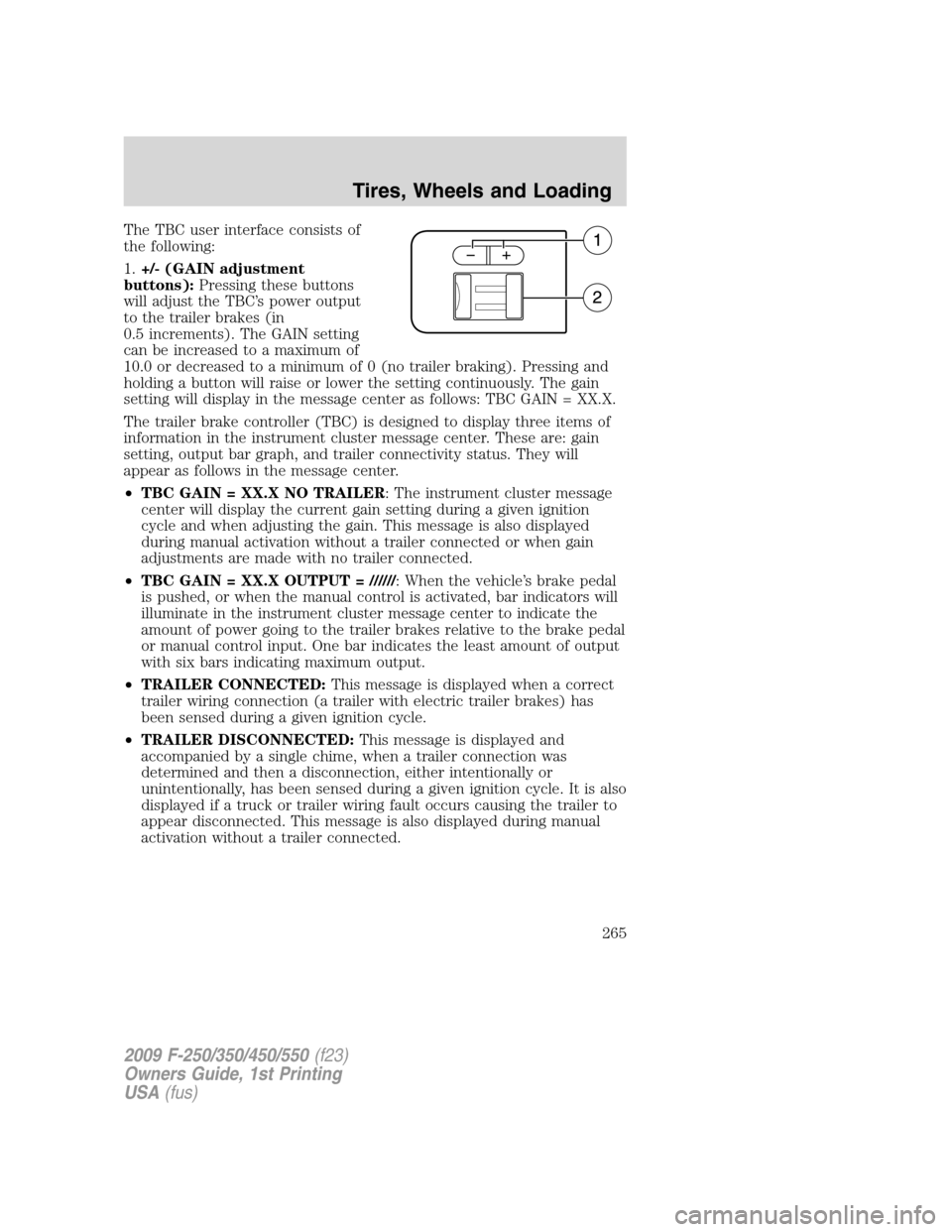
The TBC user interface consists of
the following:
1.+/- (GAIN adjustment
buttons):Pressing these buttons
will adjust the TBC’s power output
to the trailer brakes (in
0.5 increments). The GAIN setting
can be increased to a maximum of
10.0 or decreased to a minimum of 0 (no trailer braking). Pressing and
holding a button will raise or lower the setting continuously. The gain
setting will display in the message center as follows: TBC GAIN = XX.X.
The trailer brake controller (TBC) is designed to display three items of
information in the instrument cluster message center. These are: gain
setting, output bar graph, and trailer connectivity status. They will
appear as follows in the message center.
•TBC GAIN = XX.X NO TRAILER: The instrument cluster message
center will display the current gain setting during a given ignition
cycle and when adjusting the gain. This message is also displayed
during manual activation without a trailer connected or when gain
adjustments are made with no trailer connected.
•TBC GAIN = XX.X OUTPUT = //////: When the vehicle’s brake pedal
is pushed, or when the manual control is activated, bar indicators will
illuminate in the instrument cluster message center to indicate the
amount of power going to the trailer brakes relative to the brake pedal
or manual control input. One bar indicates the least amount of output
with six bars indicating maximum output.
•TRAILER CONNECTED:This message is displayed when a correct
trailer wiring connection (a trailer with electric trailer brakes) has
been sensed during a given ignition cycle.
•TRAILER DISCONNECTED:This message is displayed and
accompanied by a single chime, when a trailer connection was
determined and then a disconnection, either intentionally or
unintentionally, has been sensed during a given ignition cycle. It is also
displayed if a truck or trailer wiring fault occurs causing the trailer to
appear disconnected. This message is also displayed during manual
activation without a trailer connected.
2009 F-250/350/450/550(f23)
Owners Guide, 1st Printing
USA(fus)
Tires, Wheels and Loading
265
Page 266 of 418
2.Manual control lever:Slide the control lever to the left to activate
power to the trailer’s electric brakes independent of the tow vehicle’s
brakes (see the followingProcedure for adjusting GAINsection for
instructions on proper use of this feature). If the manual control is
activated while the brake is also applied, the greater of the two inputs
determines the power sent to the trailer brakes.
•Stop Lamps:Activating the TBC manual control lever will illuminate
both the trailer brake lamps and the tow vehicle brake lamps except
the Center High-Mount Stop Lamp (presuming proper trailer electrical
connection). Pressing the vehicle brake pedal will also illuminate both
trailer and vehicle brake lamps.
Procedure for adjusting GAIN:
The GAIN setting is used to set the TBC for the specific towing
condition and should be changed as towing conditions change. Changes
to towing conditions include trailer load, vehicle load, road conditions
and weather.
The GAIN should be set to provide the maximum trailer braking
assistance while ensuring the trailer wheels do not lock when braking.
Locked trailer wheels may lead to trailer instability.
Note:This should only be performed in a traffic free environment at
speeds of approximately 20–25 mph (30–40 km/h).
1. Make sure the trailer brakes are in good working condition,
functioning normally, and properly adjusted. See your trailer dealer if
necessary.
2. Hook up the trailer and make the electrical connections according to
the trailer manufacturer’s instructions.
3. When a trailer with electric brakes is plugged in, theTRAILER
CONNECTEDmessage will display in the instrument cluster message
center.
4. Use the GAIN adjustment (+/-) buttons to increase or decrease the
GAIN setting to the desired starting point. A GAIN setting of 6.0 is a
good starting point for heavier loads.
5. In a traffic-free environment, tow the trailer on a dry, level surface at
a speed of 20–25 mph (30–40 km/h) and squeeze the manual control
lever completely.
2009 F-250/350/450/550(f23)
Owners Guide, 1st Printing
USA(fus)
Tires, Wheels and Loading
266