2009 FORD EXPEDITION oil
[x] Cancel search: oilPage 139 of 416

•They reappear if the condition clears then reoccurs within the same
ignition on-off cycle.
This acts as a reminder that these warning conditions still exist within
the vehicle.
Warning display Status
Door ajar Warning can be reset. Will return if
reset and warning is cleared and
set again within the same ignition
cycle. Will return on ignition cycle. Liftgate/glass ajar
Check charging system
Check fuel fill inlet
Tire pressure sensor fault
Low tire pressure
Tire pressure monitor fault
4x4 shift in progress (if equipped)
Brake fluid level low Warning can be reset. Will NOT
return if reset and warning is
cleared and set again within the
same ignition cycle. Will return on
ignition cycle. Check park brake
Washer fluid level low
Oil life change soon
Oil change required
Check brake system Warning can be reset. Will return
after 10 minutes. If within the
10 minutes, the condition is
cleared and set again, it will not
return until the initial 10 minutes
is up. Will return on ignition cycle. XXX miles to E fuel level low
Park brake engaged Warning can be reset. Will return
after 10 minutes. If within the
10 minutes, the condition is
cleared and set again, it will return
immediately. Will return on ignition
cycle.
DOOR AJAR— Displayed when a door is not completely closed.
LIFTGATE / GLASS AJAR— Displayed when the liftgate or the
liftgate glass is not completely closed.
CHECK CHARGING SYSTEM— Displayed when the electrical system
is not maintaining proper voltage when the engine is running. If you are
2009 Expedition(exd)
Owners Guide, 1st Printing
USA(fus)
Driver Controls
139
Page 141 of 416

XXX MILES TO E FUEL LEVEL LOW— Displayed as an early
reminder of a low fuel condition.
WASHER FLUID LEVEL LOW— Indicates the washer fluid reservoir
is less than one quarter full. Check the washer fluid level. Refer to
Windshield washer fluidin theMaintenance and Specifications
chapter.
OIL LIFE CHANGE SOON— Displayed when the engine oil life
remaining is 10% or less. When oil life left is between 10% and 0%, the
XX% OIL LIFE CHANGE SOON message will be displayed.
OIL CHANGE REQUIRED— Displayed when the oil life left reaches
0%, the OIL CHANGE REQUIRED message will be displayed.
OPTIONAL MESSAGE CENTER (IF EQUIPPED)
With the ignition in the on position,
the message center, located on your
instrument cluster, displays
important vehicle information
through a constant monitor of
vehicle systems.You may select
display features on the message center for a display of status preceded
by a brief indicator chime. The system will also notify you of potential
vehicle problems with a display of system warnings followed by a long
indicator chime.
Selectable features
Reset
Press this control to select and reset
functions shown in the INFO menu
and SETUP menu.
Info menu
This control displays the following
control displays:
•Odometer/Trip odometer
•Outside air temperature (if
equipped)
•Distance to Empty (DTE)
2009 Expedition(exd)
Owners Guide, 1st Printing
USA(fus)
Driver Controls
141
Page 144 of 416
2. Press and release RESET to pause the timer.
3. Press and hold RESET for two seconds in order to reset the timer.
Blank screen
Press the RESET once to turn the message center display off.
Setup menu
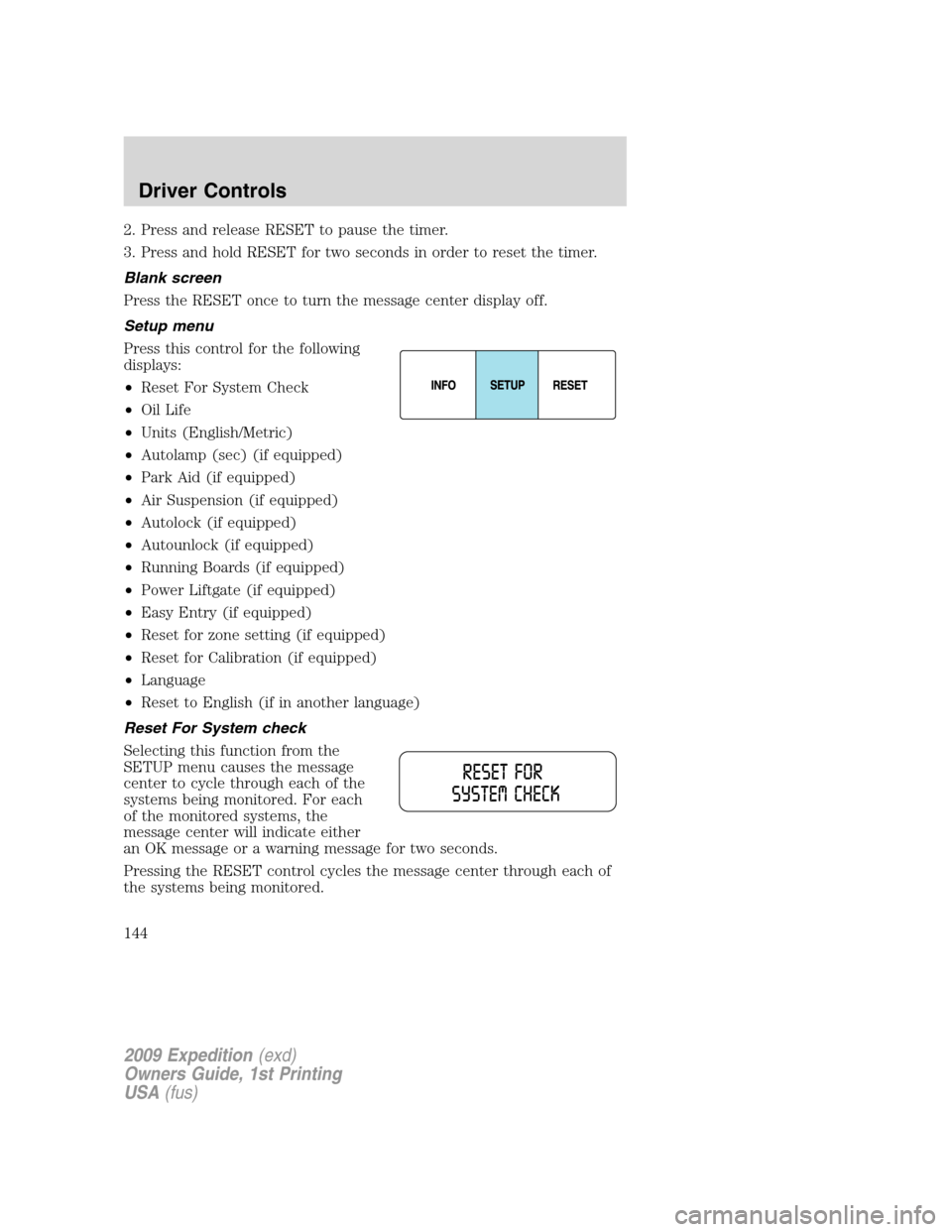
Press this control for the following
displays:
•Reset For System Check
•Oil Life
•Units (English/Metric)
•Autolamp (sec) (if equipped)
•Park Aid (if equipped)
•Air Suspension (if equipped)
•Autolock (if equipped)
•Autounlock (if equipped)
•Running Boards (if equipped)
•Power Liftgate (if equipped)
•Easy Entry (if equipped)
•Reset for zone setting (if equipped)
•Reset for Calibration (if equipped)
•Language
•Reset to English (if in another language)
Reset For System check
Selecting this function from the
SETUP menu causes the message
center to cycle through each of the
systems being monitored. For each
of the monitored systems, the
message center will indicate either
an OK message or a warning message for two seconds.
Pressing the RESET control cycles the message center through each of
the systems being monitored.
2009 Expedition(exd)
Owners Guide, 1st Printing
USA(fus)
Driver Controls
144
Page 145 of 416

The sequence of the system check report and how it appears in the
message center is as follows:
1. OIL LIFE
2. CHARGING SYSTEM
3. WASHER FLUID LEVEL
4. DOOR STATUS
5. LIFTGATE/GLASS
6. BRAKE FLUID LEVEL
7. AIR SUSPENSION SYSTEM (if equipped)
8. FUEL LEVEL
Oil life
An oil change is required whenever indicated by the message center and
according to the recommended maintenance schedule. USE ONLY
RECOMMENDED ENGINE OILS.
To reset the oil monitoring system to 100% after each oil change
(approximately 7,500 miles [12,000 km] or six months) perform the
following:
1. Press and release the SETUP
control to display “OIL LIFE XXX%
HOLD RESET = NEW”.
2. Press and hold the RESET
control for two seconds and release.
Oil life is set to 100% and “OIL LIFE
SET TO 100%” is displayed.
Note:To change oil life 100% miles value from 7,500 miles (12,000 km)
or six months to another value, proceed to Step 3.
3. Once “OIL LIFE SET TO XXX%” is displayed, release and press the
RESET control switch to change the Oil Life Start Value. Each release
and press will reduce the value by 10%.
2009 Expedition(exd)
Owners Guide, 1st Printing
USA(fus)
Driver Controls
145
Page 152 of 416
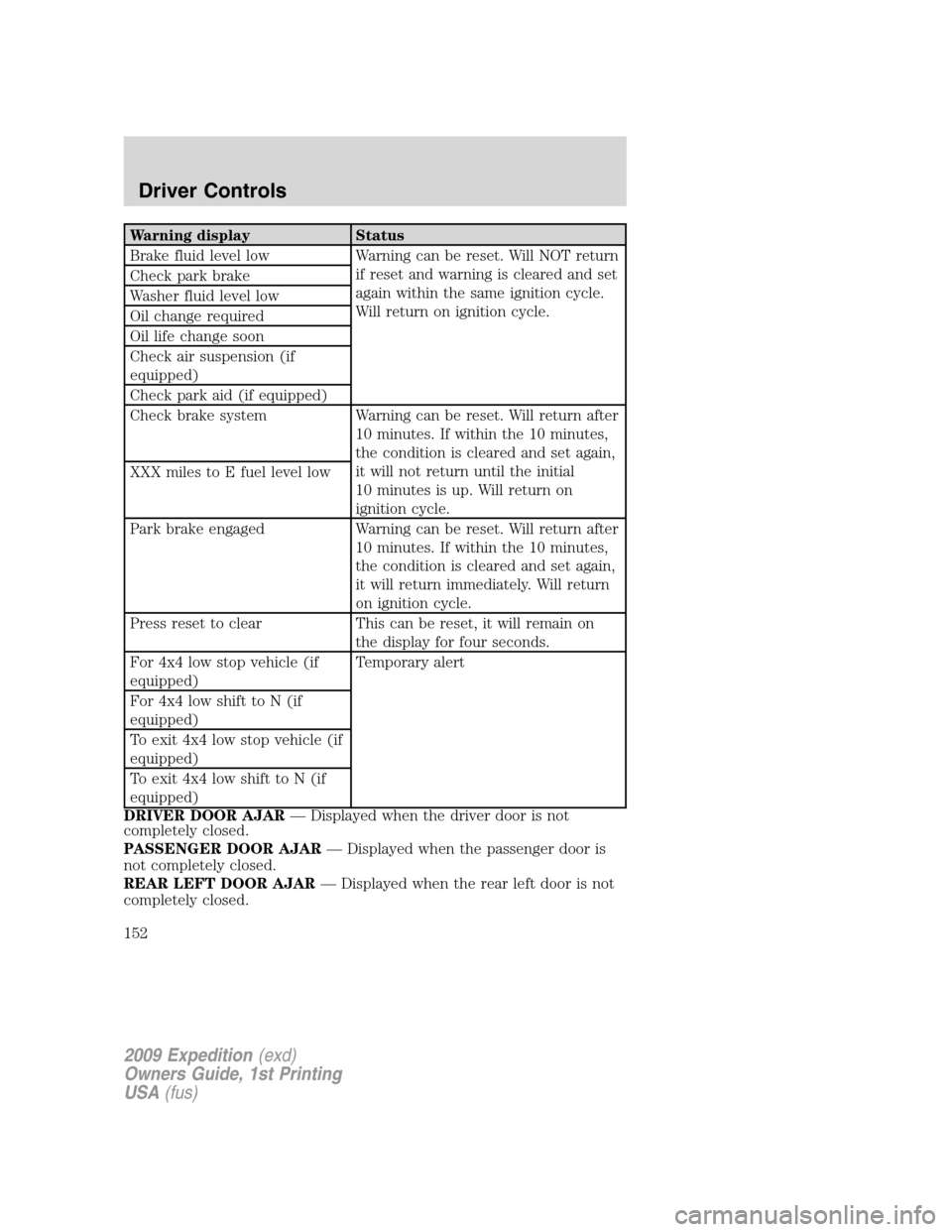
Warning display Status
Brake fluid level low Warning can be reset. Will NOT return
if reset and warning is cleared and set
again within the same ignition cycle.
Will return on ignition cycle. Check park brake
Washer fluid level low
Oil change required
Oil life change soon
Check air suspension (if
equipped)
Check park aid (if equipped)
Check brake system Warning can be reset. Will return after
10 minutes. If within the 10 minutes,
the condition is cleared and set again,
it will not return until the initial
10 minutes is up. Will return on
ignition cycle. XXX miles to E fuel level low
Park brake engaged Warning can be reset. Will return after
10 minutes. If within the 10 minutes,
the condition is cleared and set again,
it will return immediately. Will return
on ignition cycle.
Press reset to clear This can be reset, it will remain on
the display for four seconds.
For 4x4 low stop vehicle (if
equipped)Temporary alert
For 4x4 low shift to N (if
equipped)
To exit 4x4 low stop vehicle (if
equipped)
To exit 4x4 low shift to N (if
equipped)
DRIVER DOOR AJAR— Displayed when the driver door is not
completely closed.
PASSENGER DOOR AJAR— Displayed when the passenger door is
not completely closed.
REAR LEFT DOOR AJAR— Displayed when the rear left door is not
completely closed.
2009 Expedition(exd)
Owners Guide, 1st Printing
USA(fus)
Driver Controls
152
Page 154 of 416
WASHER FLUID LEVEL LOW— Indicates the washer fluid reservoir
is less than one quarter full. Check the washer fluid level. Refer to
Windshield washer fluidin theMaintenance and Specifications
chapter.
AIR SUSPENSION OFF (if equipped)— Displayed when the air
suspension is off. For more information, refer toAir suspension system
in theDrivingchapter.
CHECK AIR SUSPENSION (if equipped)— Displayed when the air
suspension system is not operating properly. If this message is displayed
while driving, pull off the road as soon as safely possible. For more
information, refer toAir suspension systemin theDrivingchapter.
CHECK BRAKE SYSTEM— Displayed when the braking system is not
operating properly. If the warning stays on or continues to come on,
contact your authorized dealer as soon as possible.
PARK BRAKE ENGAGED— Displayed when the manual park brake is
set, the engine is running and the vehicle is driven more than 3 mph
(5 km/h). If the warning stays on after the park brake is released,
contact your authorized dealer as soon as possible.
CHECK PARK AID(if equipped)—
Displayed when the transmission is
in R (Reverse). Refer toReverse sensing systemin theDrivingchapter.
OIL LIFE CHANGE SOON— Displayed when the engine oil life
remaining is 10% or less. When oil life left is between 10% and 0%, the
XX% OIL LIFE CHANGE SOON message will be displayed.
OIL CHANGE REQUIRED— Displayed when the oil life left reaches
0%, the OIL CHANGE REQUIRED message will be displayed.
FOR 4X4 LOW STOP VEHICLE(if equipped)—
Displayed when 4X4
LOW is selected while the vehicle is moving. For more information, refer to
Control Trac four-wheel drive (4x4) operationin theDrivingchapter.
FOR 4X4 LOW SHIFT TO N(if equipped)—Displayed when 4X4
LOW is selected and the vehicle is stopped. For more information, refer to
Control Trac four-wheel drive (4x4) operationin theDrivingchapter.
TO EXIT 4X4 LOW STOP VEHICLE(if equipped)— Displayed when
2WD is selected while the vehicle is operating in 4X4 LOW. For more
information, refer toControl Trac four-wheel drive (4x4) operationin
theDrivingchapter.
TO EXIT 4X4 LOW SHIFT TO N(if equipped)— Displayed when
2WD is selected while the vehicle has been stopped in 4X4 LOW. For
more information, refer toControl Trac four-wheel drive (4x4)
operationin theDrivingchapter.
2009 Expedition(exd)
Owners Guide, 1st Printing
USA(fus)
Driver Controls
154
Page 245 of 416
Move a child to a different seating location if the shoulder belt does not
stay positioned on the shoulder during use.
Follow all instructions provided by the manufacturer of the booster seat.
WARNING:Never place, or allow a child to place, the shoulder
belt under a child’s arm or behind the back because it reduces
the protection for the upper part of the body and may increase the risk
of injury or death in a collision.
Child restraint and safety belt maintenance
Inspect the vehicle safety belts and child safety seat systems periodically
to make sure they work properly and are not damaged. Inspect the
vehicle and child seat safety belts to make sure there are no nicks, tears
or cuts. Replace if necessary. All vehicle safety belt assemblies, including
retractors, buckles, front safety belt buckle assemblies, buckle support
assemblies (slide bar-if equipped), shoulder belt height adjusters (if
equipped), shoulder belt guide on seatback (if equipped), child safety
seat LATCH and tether anchors, and attaching hardware, should be
inspected after a collision. Refer to the child restraint manufacturer’s
instructions for additional inspection and maintenance information
specific to the child restraint. Ford Motor Company recommends that all
safety belt assemblies in use in vehicles involved in a collision be
replaced. However, if the collision was minor and an authorized dealer
finds that the belts do not show damage and continue to operate
properly, they do not need to be replaced. Safety belt assemblies not in
use during a collision should also be inspected and replaced if either
damage or improper operation is noted.
For proper care of soiled safety belts, refer toInteriorin theCleaning
chapter.
WARNING:Failure to inspect and if necessary replace the
safety belt assembly or child restraint system under the above
conditions could result in severe personal injuries in the event of a
collision.
2009 Expedition(exd)
Owners Guide, 1st Printing
USA(fus)
Seating and Safety Restraints
245
Page 327 of 416

Fuse/Relay
LocationFuse Amp
RatingProtected Circuits
25 10A Demand lamps, Glovebox, Visor
26 10A Instrument panel cluster
27 20A Ignition switch
28 5A Radio
29 5A Instrument panel cluster
30 5A Not used (Spare)
31 10A Not used (Spare)
32 10A Restraints control module
33 10A Not used (Spare)
34 5A Not used (Spare)
35 10A Rear park assist, 4x4, rear video
camera
36 5A PATS transceiver
37 10A Climate control
38 20A Subwoofer/Amp (Audiophile
radio)
39 20A Radio
40 20A Navigation system amplifier
41 15A Power windows, Power vents,
Power moon roof, Auto dimming
rear view mirror
42 10A Not used (Spare)
43 10A Rear wiper logic, Rain sensor
44 10A Trailer tow battery charge relay
coil
45 5A Front wiper logic
46 7.5A Climate control, Auxiliary relay
control
47 30A Circuit
BreakerPower windows, Moon roof
48 — Delayed accessory relay
2009 Expedition(exd)
Owners Guide, 1st Printing
USA(fus)
Roadside Emergencies
327