Page 116 of 299

Tone Control
The Bass and/or Treble controls sound for the desired
tone. Press the AUDIO button, select Bass or TREBLE,
then press SEEK + or SEEK�to increase or decrease
amplification of the band.
To Set the Radio Pushbutton Memory
When you are receiving a station that you wish to
commit to pushbutton memory, press the SET button.
SET 1 will show in the display window. Select the
pushbutton you wish to lock onto this station and press
and release that button. If a station is not selected within
five seconds after pressing the SET button, the station
will continue to play but will not be locked into push-
button memory.
You may add a second station to each pushbutton by
repeating the above procedure with this exception: Press
the SET button twice and SET 2 will show in the display
window. Each button can be set for SET 1 and SET 2 inboth AM and FM. This allows a total of 10 AM and 10 FM
stations to be locked into memory. You can recall the
stations stored in SET 2 memory by pressing the push-
button twice.
To Change from Clock to Radio Mode
Press the TIME button to change the display between
radio frequency and time.
General Information
This radio complies with Part 15 of FCC rules and with
RSS-210 of Industry Canada. Operation is subject to the
following conditions:
1. This device may not cause harmful interference.
2. This device must accept any interference received,
including interference that may cause undesired
operation.
114 UNDERSTANDING YOUR INSTRUMENT PANEL
Page 125 of 299
and the bottom of the button to search down. Holding the
TUNE button causes the radio to bypass channels until
the button is released.
Press and release the SCAN button (if equipped) to
automatically change channels every seven seconds. The
radio will pause on each channel for seven seconds
before moving on to the next channel. The word�SCAN�
will appear in the display between each channel change.
Press the SCAN button a second time to stop the search.
NOTE:Channels that may contain objectionable content
can be blocked. Contact Sirius Customer Care at 888-539-
7474 to discuss options for channel blocking or unblock-
ing. Please have your ESN/SID information available.
Storing and Selecting Pre-Set Channels
In addition to the 10 AM and 10 FM pre-set stations, you
may also commit 10 satellite stations to pushbutton
memory. These satellite channel pre-set stations will noterase any AM or FM pre-set memory stations. Follow the
memory pre-set procedures that apply to your radio.
Using the PTY (Program Type) Button (If
Equipped)
Follow the PTY button instructions that apply to your
radio.
PTY (SCAN) Button
When the desired program type is obtained, press the
SCAN button within five seconds. The radio will play
seven seconds of the selected channel before moving to
the next channel of the selected program type. Press the
SCAN button a second time to stop the search.
NOTE:Pressing the SEEK or SCAN button while per-
forming a music type scan will change the channel by one
and stop the search. Pressing a pre-set MEMORY button
during a music type scan, will call up the memory
channel and stop the search.
UNDERSTANDING YOUR INSTRUMENT PANEL 123
4
Page 126 of 299
PTY (SEEK) Button
When the desired program is obtained, press the SEEK
button within five seconds. The channel will change to
the next channel that matches the program type selected.
Satellite Antenna
To ensure optimum reception, do not place items on the
roof around the rooftop antenna location or strap items to
the trunk lid around the trunk lid antenna (if equipped).
Metal objects placed within the line of sight of the
antenna will cause decreased performance. Larger lug-
gage items such as bikes should be placed as far rearward
as possible, within the loading design of the rack. Do not
place items directly on or above the antenna.
Reception Quality
Satellite reception may be interrupted due to one of the
following reasons.
•The vehicle is parked in an underground parking
structure or under a physical obstacle.
•Dense tree coverage may interrupt reception in the
form of short audio mutes.
•Driving under wide bridges or along tall buildings can
cause intermittent reception.
•Placing objects over or too close to the antenna can
cause signal blockage.
RADIO ANTENNA
The radio antenna is located in the windshield.
CD/DVD MAINTENANCE
To keep a CD/DVD in good condition, take the following
precautions:
1. Handle the disc by its edge; avoid touching the
surface.
2. If the disc is stained, clean the surface with a soft cloth,
wiping from center to edge.
124 UNDERSTANDING YOUR INSTRUMENT PANEL
Page 128 of 299
Air Conditioning and Heating SystemBlower Control
Use this control to regulate the
amount of air forced through the sys-
tem in any mode you select. Turn the
control clockwise to increase fan
speed. Turn the control to the O (Off)
position to shut off the fan and to
prevent any outside air from entering
the vehicle. This also turns off the A/C compressor.
NOTE:For vehicles equipped with Remote Start, the
climate controls will not function during Remote Start
operation if the blower control is left in the “O” (Off)
position.
Air Conditioning And Heater Controls
126 UNDERSTANDING YOUR INSTRUMENT PANEL
Page 129 of 299
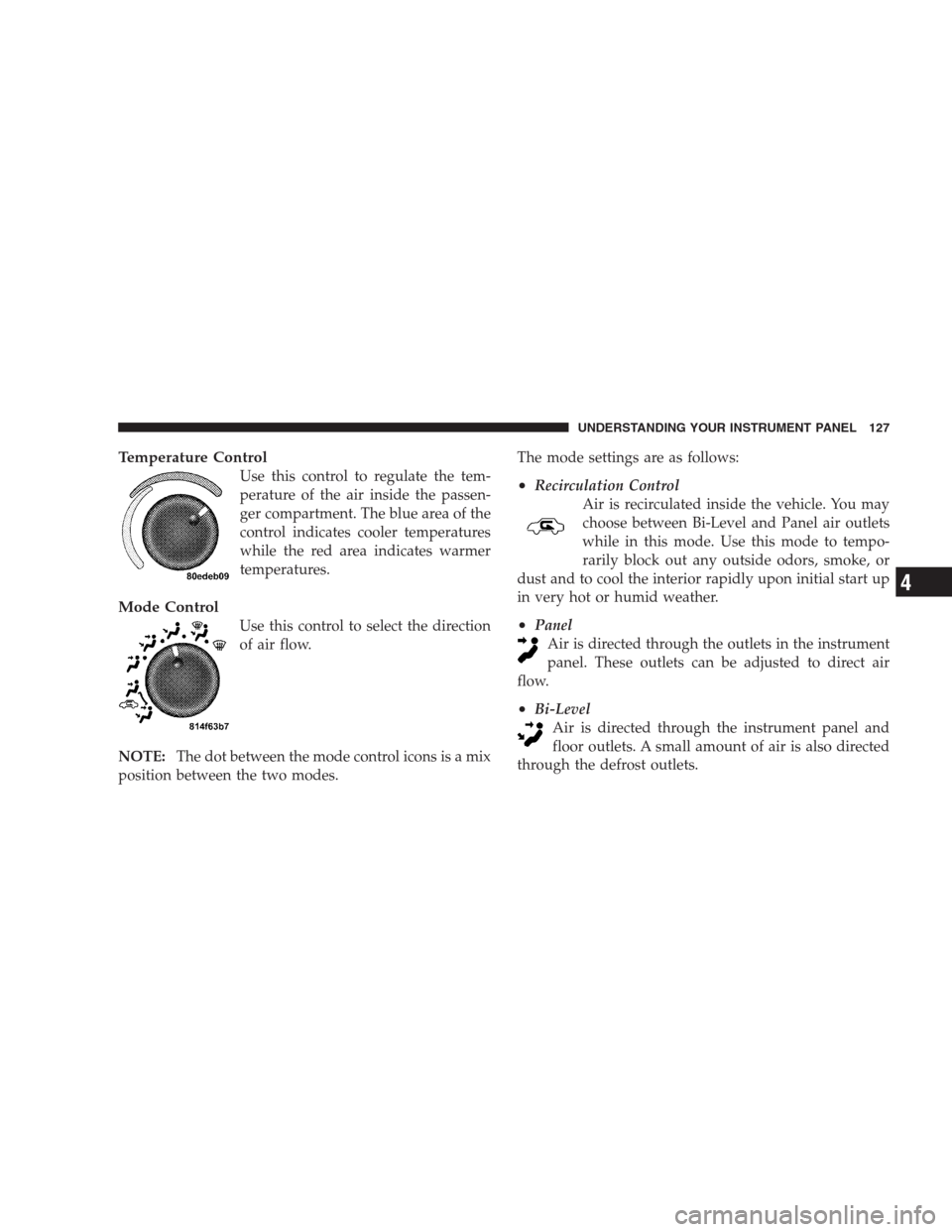
Temperature Control
Use this control to regulate the tem-
perature of the air inside the passen-
ger compartment. The blue area of the
control indicates cooler temperatures
while the red area indicates warmer
temperatures.
Mode Control
Use this control to select the direction
of air flow.
NOTE:The dot between the mode control icons is a mix
position between the two modes.The mode settings are as follows:
•Recirculation Control
Air is recirculated inside the vehicle. You may
choose between Bi-Level and Panel air outlets
while in this mode. Use this mode to tempo-
rarily block out any outside odors, smoke, or
dust and to cool the interior rapidly upon initial start up
in very hot or humid weather.
•Panel
Air is directed through the outlets in the instrument
panel. These outlets can be adjusted to direct air
flow.
•Bi-Level
Air is directed through the instrument panel and
floor outlets. A small amount of air is also directed
through the defrost outlets.
UNDERSTANDING YOUR INSTRUMENT PANEL 127
4
Page 134 of 299

▫Anti-Lock Brake System................ 148
�Tire Safety Information.................. 151
▫Tire Markings....................... 151
▫Tire Identification Number (TIN).......... 155
▫Tire Loading And Tire Pressure........... 156
�Tires — General Information.............. 160
▫Tire Pressure........................ 160
▫Tire Inflation Pressures................. 161
▫Tire Pressures For High Speed Operation.... 162
▫Radial Ply Tires...................... 163
▫Tire Spinning....................... 164
▫Tread Wear Indicators................. 164
▫Life Of Tire......................... 165▫Replacement Tires.................... 166
▫Tire Storage......................... 167
�Tire Chains.......................... 167
�Snow Tires.......................... 167
�Tire Rotation Recommendations............ 167
�Tire Pressure Monitor System (TPMS)....... 169
▫Low Tire Indicator.................... 169
�Fuel Requirements..................... 170
▫8.4L Engine......................... 170
▫Reformulated Gasoline................. 171
▫Gasoline/Oxygenate Blends............. 171
▫E-85 Usage In Non-Flex Fuel Vehicles...... 172
▫MMT In Gasoline.................... 172
132 STARTING AND OPERATING
Page 137 of 299

Normal Starting
CAUTION!
The engine in your vehicle is designed for operation
down to 0°F (-18°C). Starting the engine below 0°F
(-18°C) creates a potential for scuffing or seizing of
internal components in this very high performance
engine. To prevent engine damage, do not start the
engine at temperatures below 0°F (-18°C).
NOTE:
•You must disarm the security system in order to start
the engine. For details, refer to “Security Alarm Sys-
tem” in Section 2 of this manual
•Normal Starting of either a cold or a warm engine does
not require pumping or depressing the accelerator
pedal. However, if the engine has not started within
three seconds, slightly depress the accelerator pedalwhile continuing to crank. If the engine fails to start
within 15 seconds, turn the key to the OFF/LOCK
position, wait five seconds, then repeat the normal
starting procedure.
To start the engine:
1. Fully apply the parking brake.
2. Press the clutch pedal to the floor.
NOTE:The engine will not start unless the clutch pedal
is pressed to the floor.
3. Place the gear selector in NEUTRAL
4. Insert the ignition key fully into the ignition switch
5. Turn the key to the ON/RUN position.
STARTING AND OPERATING 135
5
Page 145 of 299

CAUTION! (Continued)
•Driving through standing water may cause dam-
age to your vehicle’s drivetrain components. Al-
ways inspect your vehicle’s fluids (i.e., engine oil,
transmission/transaxle, axle, etc.) for signs of con-
tamination (i.e., fluid that is milky or foamy in
appearance) after driving through standing water.
Do not continue to operate the vehicle if any fluid
appears contaminated, as this may result in further
damage. Such damage is not covered by the New
Vehicle Limited Warranty.
•Getting water inside your vehicle’s engine can
cause it to lock up and stall out, and cause serious
internal damage to the engine. Such damage is not
covered by the New Vehicle Limited Warranty.
WARNING!
•Driving through standing water limits your vehi-
cle’s traction capabilities. Do not exceed 5 mph
(8 km/h) when driving through standing water.
•Driving through standing water limits your vehi-
cle’s braking capabilities, which increases stop-
ping distances. Therefore, after driving through
standing water, drive slowly and lightly press on
the brake pedal several times to dry the brakes.
•Getting water inside your vehicle’s engine can
cause it to lock up and stall out, and leave you
stranded.
•Failure to follow these warnings may result in
injuries that are serious or fatal to you, your
passengers, and others around you.
STARTING AND OPERATING 143
5
