Page 135 of 429
ELECTRONIC SPEED CONTROL — IF EQUIPPED
When engaged, Electronic Speed Control takes over
accelerator operation at speeds greater than 25 mph
(40 km/h). The controls are mounted on the steering
wheel.
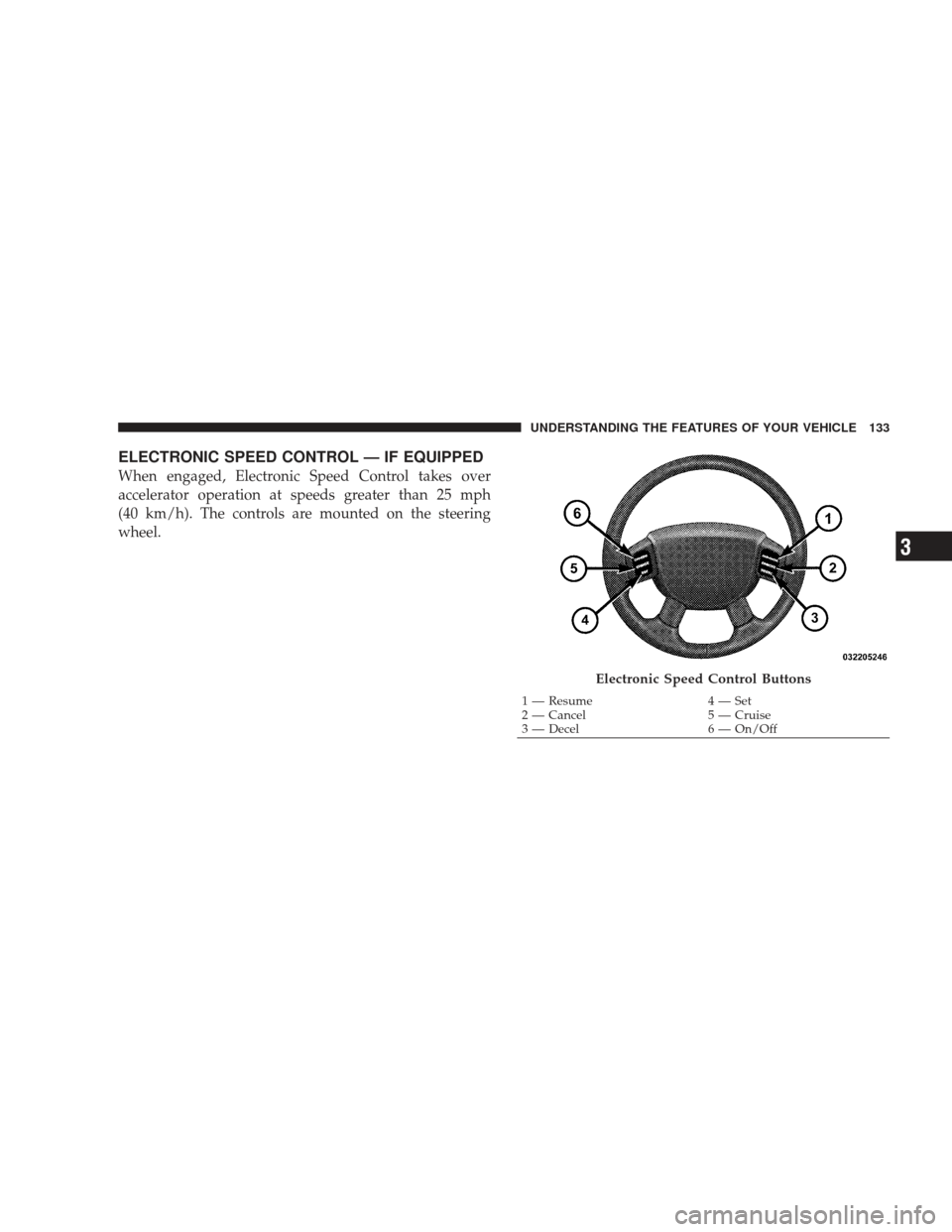
Electronic Speed Control Buttons
1 — Resume4 — Set
2 — Cancel 5 — Cruise
3 — Decel 6 — On/Off
UNDERSTANDING THE FEATURES OF YOUR VEHICLE 133
3
Page 136 of 429
NOTE:The Electronic Speed Control system has been
designed to shut down if multiple speed control switch
buttons (i.e., SET and CANCEL) are operated simulta-
neously, in order to ensure proper operation. The system
can be reactivated by pushing the Electronic Speed
Control switch ON/OFF button and reestablishing the
desired vehicle SET speed.
To Activate
Push the ON/OFF button to the ON position. An indi-
cator light in the instrument cluster illuminates when the
system is on.
To Set At A Desired Speed
When the vehicle has reached the desired speed, press
and release the SET button. Release the accelerator and
the vehicle will operate at the selected speed.
To Deactivate
A soft tap on the brake pedal, normal braking, clutch
pressure while slowing the vehicle, or pressing the CAN-
CEL button will deactivate the Electronic Speed Control
without erasing the memory. Pushing the ON/OFF but-
ton to the OFF position or turning off the ignition erases
the memory.
WARNING!
Leaving the Electronic Speed Control on when not in
use is dangerous. You could accidentally set the
system to cause it to go faster than you want. You
could lose control and have an accident. Always
leave the system off when you are not using it.
134 UNDERSTANDING THE FEATURES OF YOUR VEHICLE
Page 137 of 429
To Resume Speed
To resume a previously set speed, push and release the
RESUME button. Resume can be used at any speed above
30 mph (50 km/h).
To Vary The Speed Setting
When the Electronic Speed Control is on, speed can be
increased by pressing and holding the RESUME/ACCEL
button. When the button is released, a new set speed will
be established.
Tapping the ACCEL button once will result in a speed
increase of 1 mph (2 km/h). Each time the button is
tapped, speed increases so that tapping the button three
times will increase speed by 3 mph (4.8 km/h).
Tapping the DECEL button once will result in a speed
decrease of 1 mph (2 km/h). Each time the button is
tapped, speed will decrease. For example, tapping the
button three times will decrease the speed by 3 mph
(4.8 km/h)To decrease speed while the speed control is on, press
and hold the DECEL button. Release the button when the
desired speed is reached, and the new speed will be set.
To Accelerate For Passing
Depress the accelerator as you would normally. When the
pedal is released, the vehicle will return to the set speed.
NOTE:
When driving uphill, at elevations above 2,000 ft
(610 m), or when the vehicle is heavily loaded (especially
when towing) the vehicle may slow below the SET speed.
If the vehicle speed drops below 25 mph (40 km/h), the
speed control will automatically disengage. If this hap-
pens, you can push down on the accelerator pedal to
maintain the desired speed.
Vehicles equipped with a 6–speed manual transmission
should be operated in 4th or 5th gear under the above
conditions.
UNDERSTANDING THE FEATURES OF YOUR VEHICLE 135
3
Page 139 of 429
US/M Button
Use this button to change the display from U.S. to metric
measurement units.
Reset Button
Use this button to reset the following displays:
Average Fuel Economy (AVG ECO)
Trip Odometer (ODO)
Elapsed Time (ET)
US/M Button
Reset Button
UNDERSTANDING THE FEATURES OF YOUR VEHICLE 137
3
Page 140 of 429
Step Button
Use this button to choose or cycle through the four trip
conditions.
Average Fuel Economy (AVG ECO)
Shows the average fuel economy since the last reset.
Average fuel economy is a running average of the
amount of fuel used and the distance the vehicle has
traveled.
When the fuel economy is reset, the display will momen-
tarily blank. Then the history will be erased and the
AVERAGING WILL CONTINUE FROM WHERE IT
WAS BEFORE THE RESET. The reset value is based on a
minimal amount of fuel used and the distance traveled
from the previous drive cycle. The displaymay take
several miles/kilometers for this value to change, depen-
dent upon driving habits.
Step Button
138 UNDERSTANDING THE FEATURES OF YOUR VEHICLE
Page 141 of 429

Distance To Empty (DTE)
Shows the estimated distance that can be traveled with
the fuel remaining in the tank. This estimated distance is
determined by weighted average of the instantaneous
and average fuel economy, according to the current fuel
tank level. This is not resettable.
NOTE:Significant changes in driving style or vehicle
loading will greatly affect the actual drivable distance of
the vehicle, regardless of the DTE displayed value.
When the DTE value is less than 30 miles (48 km)
estimated driving distance, the DTE display will change
to an alternating text display of “LO” and “FUEL.” This
display will continue until the vehicle runs out of fuel.
Adding a significant amount of fuel to the vehicle will
turn off the “LO FUEL” text and a new DTE value will be
displayed, based on the current values in the DTE
calculation and the current fuel tank level. NOTE:
It is possible for DTE to display “LO FUEL”
before the low fuel warning light turns on in the instru-
ment cluster. This could occur because low fuel warning
is set to a specified fuel tank volume and DTE is an
estimated distance calculation based on fuel economy
and remaining fuel tank volume.
Ram fuel tank volumes are as follows:
•52 gal (196 L) - Standard rear tank
•22 gal (83 L) - Optional midship tank
Trip Odometer (ODO)
NOTE: The maximum value is approximately
6,000 miles (9,657 km). Then the trip odometer must be
reset in order to update the trip odometer miles/
kilometers.
UNDERSTANDING THE FEATURES OF YOUR VEHICLE 139
3
Page 142 of 429
This display shows the distance traveled since the last
reset. Resetting of this screen will cause the trip odometer
to change to zero.
Elapsed Time (ET)
This display shows the accumulated ignition ON time
since the last reset. Resetting the elapsed time will cause
the display to change to zero.
C/T Button
Use this button to select a readout of the outside tem-
perature and one of eight compass headings that indicate
the direction in which the vehicle is facing.
C/T Button
140 UNDERSTANDING THE FEATURES OF YOUR VEHICLE
Page 143 of 429
WARNING!
Even if the display still reads a few degrees above
32°F (0°C), the road surface may be icy, particularly in
woods or on bridges. Drive carefully under such
conditions to prevent an accident and possible per-
sonal injury or property damage.
Global Reset
If the RESET button is pressed twice within two seconds
while in any of the three resettable displays (AVG, ECO,
ODO, ET), the Global Reset will reset all three displays.
Automatic Compass Calibration
This compass is self-calibrating, which eliminates the
need to manually set the compass. When the vehicle is
new the compass may appear erratic and the CAL
symbol will be displayed.
Reset Button
UNDERSTANDING THE FEATURES OF YOUR VEHICLE 141
3