Page 172 of 532
WARNING!
•
This armrest is not a seat. Anyone seated on the
armrest could be seriously injured during vehicle
operation, or an accident. Only use the center
seating position when the armrest is fully upright.
•
In an accident, the latch may open if the total
weight of the items stored exceeds about 10 lbs
(4.5 kg). These items could be thrown about en-
dangering occupants of the vehicle. Items stored
should not exceed a total of 10 lbs (4.5 kg).
CAUTION!
•
Many accessories that can be plugged in draw
power from the vehicle’s battery, even when not in
use (i.e., cellular phones, etc.). Eventually, if
plugged in long enough, the vehicle’s battery will
discharge sufficiently to degrade battery life
and/or prevent engine starting.
•
Accessories that draw higher power (i.e., coolers,
vacuum cleaners, lights, etc.), will degrade the
battery even more quickly. Only use these inter-
mittently and with greater caution.
•
After the use of high power draw accessories, or
long periods of the vehicle not being started (with
accessories still plugged in), the vehicle must be
driven a sufficient length of time to allow the
generator to recharge the vehicle’s battery.
170 UNDERSTANDING THE FEATURES OF YOUR VEHICLE
Page 183 of 532
UNDERSTANDING YOUR INSTRUMENT PANEL
CONTENTS�Instrument Panel Features .............. 184
▫ RamTruck ........................ 184
▫ Power Wagon ..................... 185
� Instrument Cluster – Base .............. 186
� Instrument Cluster – Premium ........... 187
� Instrument Cluster Description ........... 188
� Electronic Digital Clock ................ 201
▫ Clock Setting Procedure .............. 202 �
Sales Code RAQ – AM/FM/CD (6-Disc) Radio
With Optional uconnect� studios (Satellite
Radio), uconnect� phone, And Video
Entertainment Systems (VES)™ Capabilities . . . 202
▫ Operating Instructions - Radio Mode ..... 203
▫ Operation Instructions - (CD Mode For CD
Audio Play) ........................ 208
▫ Load/Eject Button (CD Mode For CD Audio
Play) ............................. 209
▫ Notes On Playing MP3 Files ........... 211
4
Page 184 of 532

▫Operation Instructions - (CD Mode For MP3
Audio Play) ........................ 214
▫ Load/Eject Button
(CD Mode For MP3 Play) .............. 214
� Sales Code REF — AM/FM/CD (Single-Disc)
Radio With Optional uconnect� studios
(Satellite Radio) And uconnect� phone
Capability ........................... 216
▫ Operating Instructions - Radio Mode ...... 216
▫ Operating Instructions - CD Mode ........ 220
▫ Operating Instructions - Auxiliary Mode .... 222
▫ Operating Instructions - uconnect� phone —
If Equipped ........................ 223
▫ Operating Instructions - uconnect� studios
(Satellite Radio) — If Equipped .......... 223�
Sales Code REC — AM/FM/CD (6–Disc)
Radio With uconnect� gps (Navigation)...... 224
▫ Operating Instructions — uconnect� studios
(Satellite Radio) — If Equipped .......... 224
▫ REC Setting The Clock ................ 224
� uconnect� studios (Satellite Radio) —
If Equipped .......................... 227
▫ System Activation .................... 227
▫ Electronic Serial Number/Sirius
Identification Number (ESN/SID) ......... 227
▫ Selecting uconnect� studios (Satellite) Mode
In REF, RAQ, And RAK Radios .......... 228
▫ Selecting A Channel .................. 229
▫ Storing And Selecting Preset Channels ..... 229
182 UNDERSTANDING YOUR INSTRUMENT PANEL
Page 185 of 532
▫Using The PTY (Program Type) Button —
If Equipped ........................ 229
▫ PTY Button Scan ................... 230
▫ PTY Button Seek ................... 230
▫ Satellite Antenna ................... 230
▫ Reception Quality ................... 230
� Video Entertainment System (VES)™ —
If Equipped .......................... 231
� Remote Sound System Controls —
If Equipped .......................... 231
▫ Radio Operation .................... 232
▫ CD Player ........................ 232 �
CD/DVD Maintenance ................ 232
� Radio Operation And Cellular Phones ...... 233
� Climate Controls ..................... 234
▫ Heater Only — If Equipped ............ 234
▫ Air Conditioning And Heating —
If Equipped ........................ 237
▫ Air Conditioning With Dual Zone
Temperature Control — If Equipped ....... 240
▫ Operating Tips ..................... 244
▫ Operating Tips Chart ................ 246
UNDERSTANDING YOUR INSTRUMENT PANEL 183
4
Page 204 of 532
Clock Setting Procedure1. Press and hold the time button until the hours blink.
2. Adjust the hours by turning the right side Tune/
Audio control.
3. After the hours are adjusted, press the right side
Tune/Audio control to set the minutes.
4. Adjust the minutes using the right side Tune/Audio
control.
5. To exit, press any button/knob or wait approximately
five seconds.
SALES CODE RAQ – AM/FM/CD (6-DISC) RADIO
WITH OPTIONAL uconnect�studios (SATELLITE
RADIO), uconnect� phone, AND VIDEO
ENTERTAINMENT SYSTEMS (VES)™
CAPABILITIESNOTE: The radio sales code is located on the lower right
side of your radio faceplate.
RAQ Radio
202 UNDERSTANDING YOUR INSTRUMENT PANEL
Page 206 of 532

will return. Rotating the volume control, turning the
radio ON/OFF, or turning OFF the ignition will also
return the sound from the speakers
NOTE:In Hands Free Phone (if equipped) mode, the
MUTE button mutes the microphone.SCAN Button (Radio Mode)Pressing the SCAN button causes the tuner to search for
the next listenable station, in either AM, FM or Satellite (if
equipped) frequencies, pausing for 5 seconds at each
listenable station before continuing to the next. To stop
the search, press SCAN a second time.MSG or INFO Button (Radio Mode)Press the MSG or INFO button for an RBDS station (one
with call letters displayed). The radio will return a radio
text message broadcast from an FM station (FM mode
only).
TIME ButtonPress the TIME button and the time of day will be
displayed for 5 seconds.Clock Setting Procedure1. Press and hold the TIME button until the hours blink.
2. Adjust the hours by turning the right side Tune /
Audio control.
3. After the hours are adjusted, press the right side Tune
/ Audio control to set the minutes. The minutes will
begin to blink.
4. Adjust the minutes using the right side Tune / Audio
control.
5. To exit, press any button/knob or wait 5 seconds.
204 UNDERSTANDING YOUR INSTRUMENT PANEL
Page 217 of 532
MSG or INFO Button (CD Mode for MP3 Play)Press and MSG or INFO button while playing MP3 disc.
The radio scrolls through the following TAG information:
Song Title, Artist, File Name, and Folder Name (if avail-
able).
Press the MSG or INFO button once more to return to
�elapsed time�priority mode.
Press and hold the MSG or INFO button while in the
message display priority mode or elapsed time display
priority mode will display the song title for each file.RW/FF (CD Mode for MP3 Play)Press the FF side of the button to move forward through
the MP3 selection.TUNE Control (CD Mode for MP3 Play)Pressing the TUNE Control allows the adjustment of
Tone, Balance, and Fade.
AM/FM Button (CD Mode for MP3 Play)Switches back to radio mode.RND/ PTY Button (CD Mode for MP3 Play)Pressing this button plays files randomly.SET/DIR Button (CD Mode for MP3 Play)Press the SET/DIR button to display folders, when
playing an MP3 discs that have a file/folder structure.
Turn the TUNE control to display available folders or
move through available folders. Press the TUNE control
to select a folder.Buttons1-6(CDModeforMP3Play)Selects disc positions 1 - 6 for Play/Load/Eject.Operating Instructions - uconnect �phone (If
Equipped)Refer to uconnect� phone in Section 3 of the Owner’s
Manual.
UNDERSTANDING YOUR INSTRUMENT PANEL 215
4
Page 218 of 532
Operating Instructions - uconnect�studios
(Satellite Radio) (If Equipped)Refer to the uconnect� studios (Satellite Radio) section of
the Owner’s Manual.Operating Instructions - Video Entertainment
System (VES)™ (If Equipped)Refer to separate Video Entertainment System (VES)™
Guide.SALES CODE REF — AM/FM/CD (SINGLE-DISC)
RADIO WITH OPTIONAL uconnect �studios
(SATELLITE RADIO) AND uconnect �phone
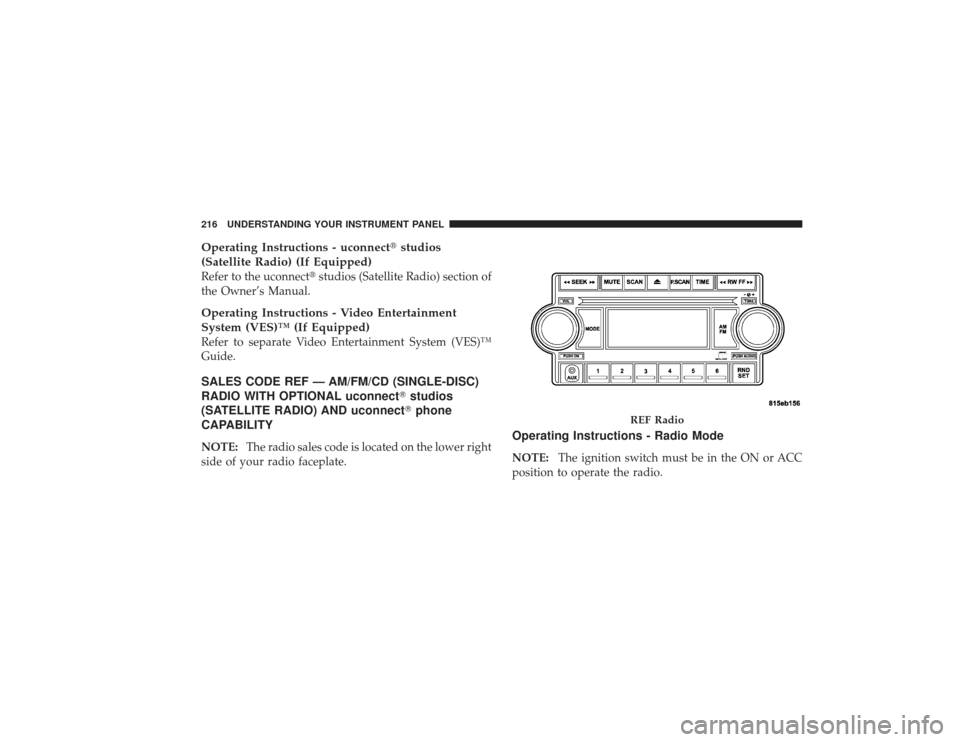
CAPABILITYNOTE: The radio sales code is located on the lower right
side of your radio faceplate.
Operating Instructions - Radio ModeNOTE: The ignition switch must be in the ON or ACC
position to operate the radio.
REF Radio
216 UNDERSTANDING YOUR INSTRUMENT PANEL