Page 149 of 449
transmission ± which may not be long enough for
HomeLinktto pick up the signal during programming.
Similar to this Canadian law, some U.S. gate operators are
designed to ªtime-outº in the same manner.
It may be helpful to unplug the device during the cycling
process, to prevent possible overheating of the garage
door or gate motor.
If you are having difficulties programming a garage door
opener or a gate operator, replace ªProgramming
HomeLink,º Step 3, with the following:
3. Continue to press and hold the HomeLinktbutton,
while you press and release - every two seconds
(ªcycleº), your hand-held transmitter until HomeLinkt
has successfully accepted the frequency signal. The
indicator(s) will change from a slow flash, to a rapid
flash when trained.If you unplugged the device for training, plug it back in
at this time.
Then proceed with Step 4 under, ªProgramming
HomeLinkt,º earlier in this section.
Using HomeLinkT
To operate, simply press and release the programmed
HomeLinktbutton. Activation will now occur for the
trained device (i.e., garage door opener, gate operator,
security system, entry door lock, home/office lighting,
etc.) The hand-held transmitter of the device may also be
used at any time.
Reprogramming A Single HomeLinkTButton
To reprogram a channel that has been previously trained,
follow these steps:
UNDERSTANDING THE FEATURES OF YOUR VEHICLE 147
3
Page 150 of 449
1. Turn the ignition switch to the ON/RUN position.
2. Press and hold the desired HomeLinktbutton, for
20 seconds, until the indicator(s) starts to flash.Do not
release the button.
3.Without releasing the button,proceed with PRO-
GRAMMING HOMELINKt, Step #2, and follow all
remaining steps.
Security
It is advised to erase all channels before you sell or turn
in your vehicle.
To do this, press and hold the two outside buttons, for
20 seconds, until the indicators begin to flash. Note that
all channels will be erased. Individual channels cannot be
erased.
The HomeLinktUniversal Transceiver is disabled when
the Vehicle Theft Alarm is active.
Troubleshooting Tips
If you are having trouble programming HomeLinkt, here
are some of the most common solutions:
²Replace the battery in the original transmitter.
²Press the ªLearnº button on the Garage Door Opener
to complete the training for Rolling Code.
²Did you unplug the device for training, and remember
to plug it back in?
If you have any problems, or require assistance, please
call toll-free 1±800±355±3515 or, on the Internet at
www.HomeLink.com, for information or assistance.
General Information
This device complies with FCC rules part 15 and Industry
Canada RSS-210. Operation is subject to the following
two conditions:
1. This device may not cause harmful interference
148 UNDERSTANDING THE FEATURES OF YOUR VEHICLE
Page 157 of 449
inside of the armrest lid. A tissue holder is also provided
on the inside of the armrest lid, which holds a pocket-size
soft pack of tissue.
REAR CARGO AREA UTILITY RAILS
CAUTION!
The maximum load per cleat should not exceed
320 lbs (145 kg) and the angle of the load on each
cleat should not exceed 60 degrees above horizontal,
or damage to the cleat or cleat rail may occur.
There are four adjustable cleats that can be used to assist
in securing cargo. Each cleat must be located and tight-
ened down in one of the detentes, along either rail, in
order to keep cargo properly secure.
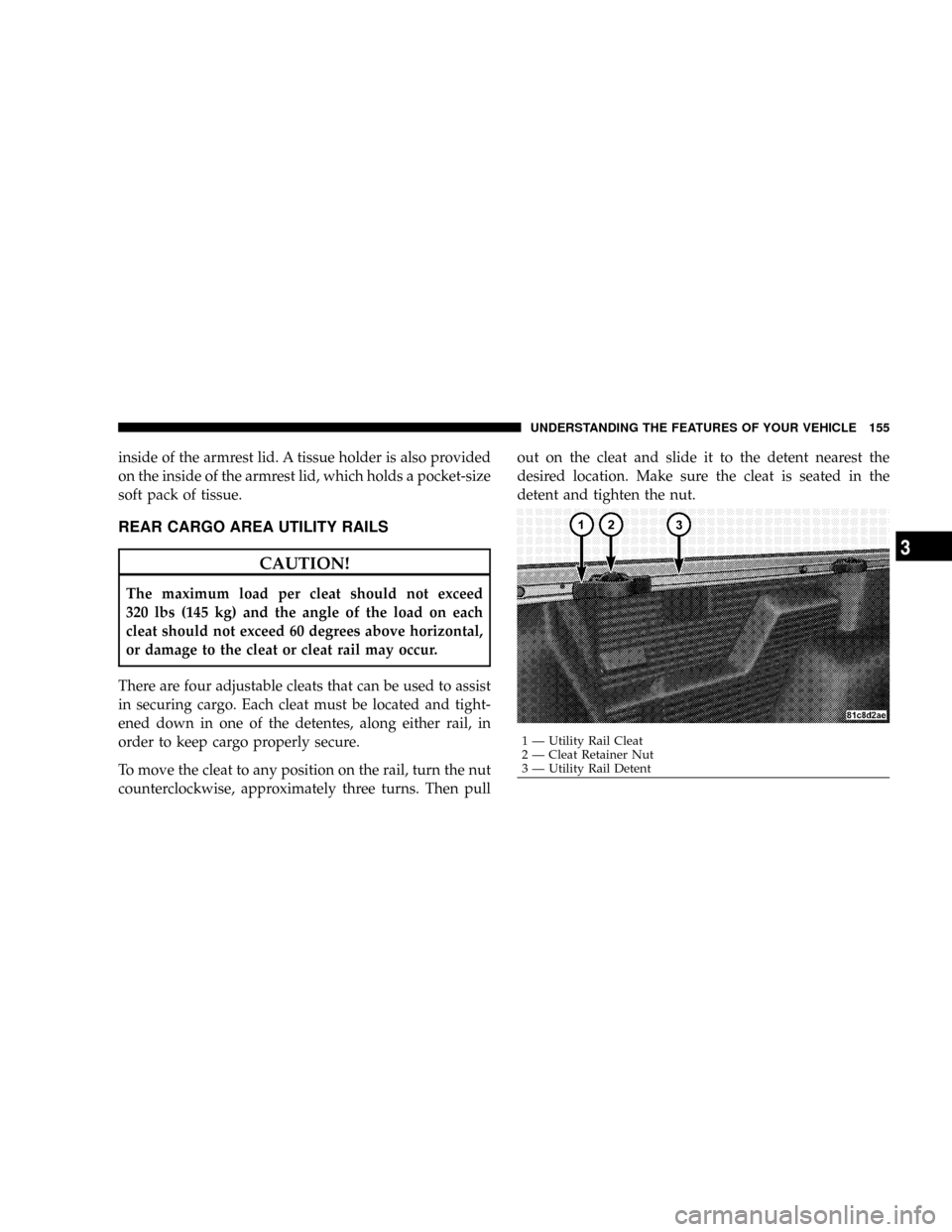
To move the cleat to any position on the rail, turn the nut
counterclockwise, approximately three turns. Then pullout on the cleat and slide it to the detent nearest the
desired location. Make sure the cleat is seated in the
detent and tighten the nut.
1 Ð Utility Rail Cleat
2 Ð Cleat Retainer Nut
3 Ð Utility Rail DetentUNDERSTANDING THE FEATURES OF YOUR VEHICLE 155
3
Page 162 of 449
2. Secure the tailgate in the partially-open position:
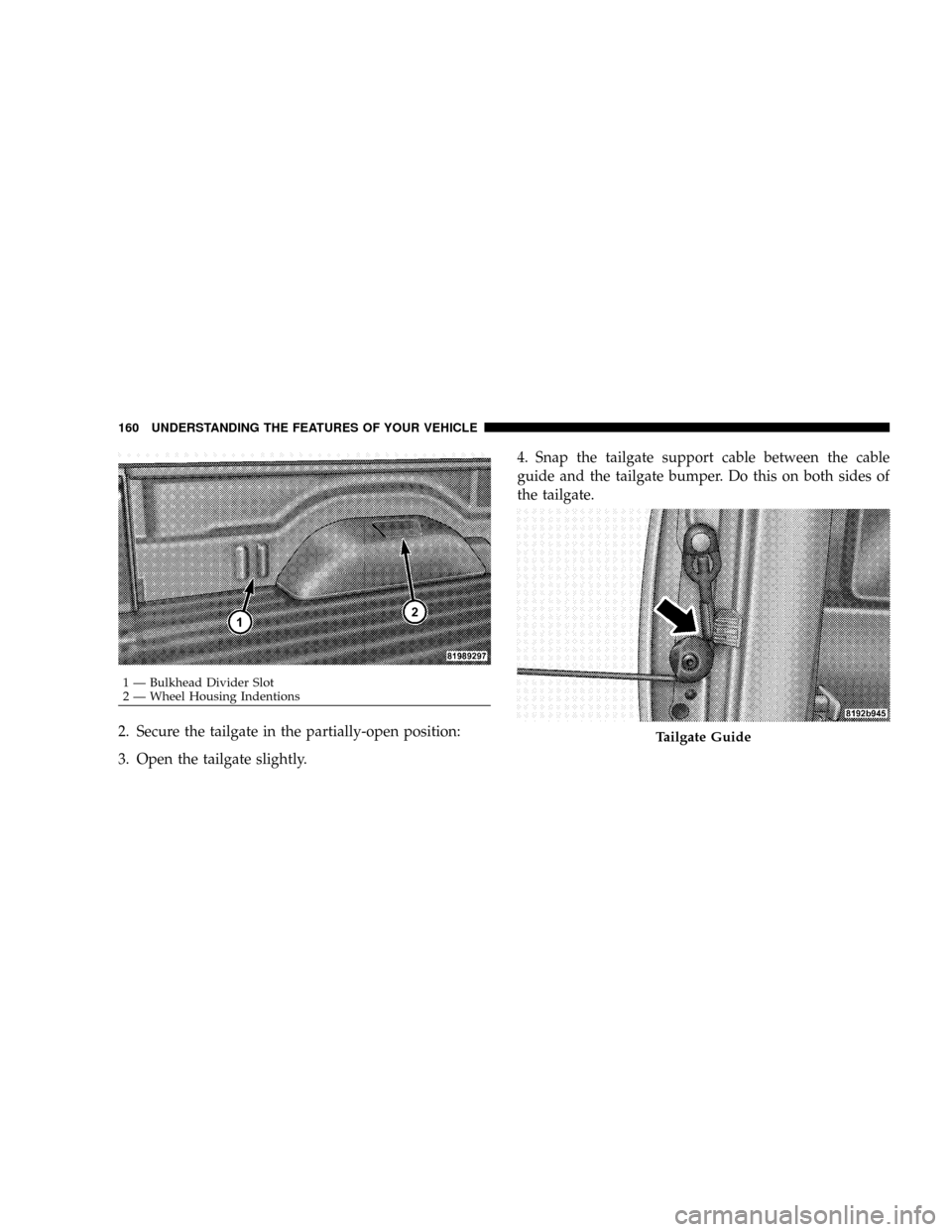
3. Open the tailgate slightly.4. Snap the tailgate support cable between the cable
guide and the tailgate bumper. Do this on both sides of
the tailgate.
1 Ð Bulkhead Divider Slot
2 Ð Wheel Housing Indentions
Tailgate Guide
160 UNDERSTANDING THE FEATURES OF YOUR VEHICLE
Page 163 of 449
To return the tailgate to the full-open position:
1. Lift up on the tailgate.
2. Remove both cables from between the cable guides
and the tailgate bumpers, and lower the tailgate.
CAUTION!
²Care should always be exercised when operating a
vehicle with cargo. Vehicle speeds may need to be
reduced. Severe turns or rough roads may cause
shifting or bouncing of the cargo that may result in
vehicle damage.
²Ensure the load is securely tied down and is
properly identified according to local laws if it
extends beyond the tail lights.
(Continued)
CAUTION! (Continued)
²Loading should not exceed 400 lbs (181 kg) of
material suspended above the wheelhouse and
partially open tailgate or vehicle damage may
result.
UNDERSTANDING THE FEATURES OF YOUR VEHICLE 161
3
Page 172 of 449
WARNING!
A hot engine cooling system is dangerous. You or
others could be badly burned by steam or boiling
coolant. You may want to call a service center if your
vehicle overheats. If you decide to look under the
hood yourself, see Section 7 of this manual. Follow
the warnings under the Cooling System Pressure Cap
paragraph.
8. Speedometer
The speedometer shows the vehicle's speed.
9. Charging System Light
This light shows the status of the electrical charg-
ing system. The light should come on when the
ignition switch is first turned ON and remain on briefly
as a bulb check. If the light stays on or comes on while
driving, turn off some of the vehicle's non-essential
electrical devices or increase engine speed (if at idle). Ifthe charging system light remains on, it means that the
vehicle is experiencing a problem with the charging
system. Obtain SERVICE IMMEDIATELY. See an autho-
rized dealer.
10. Vehicle Security Light
The vehicle security light will flash rapidly for approxi-
mately 15 seconds when the vehicle security alarm is
arming. The light will flash at a slower speed continu-
ously after the alarm is set. The security light will also
come on for about three seconds when the ignition is first
turned ON.
11. Anti-Lock Brake System (ABS)
This light monitors the Anti-Lock Brake System
(ABS). The light will illuminate when the igni-
tion switch is turned to the ON position and
may stay on for as long as four seconds.
If the ABS light remains on or turns on while driving, it
indicates that the Anti-Lock portion of the brake system
170 UNDERSTANDING YOUR INSTRUMENT PANEL
Page 260 of 449
roads. This feature provides the safety, security, and
convenience of operating in all-wheel drive at all times
regardless of road conditions.
When additional traction is required, the 4WD LOCK
and 4WD LOW positions can be used to lock the front
and rear driveshafts together, through the transfer case
inter-axle differential, and force the front and rear wheels
to rotate at the same speed. This is accomplished by
rotating the 4WD Control Switch to these positions. The
4WD LOCK and 4WD LOW positions are intended for
loose, slippery road surfaces only. Driving in the 4WD
LOCK and 4WD LOW positions on dry, hard-surfaced
roads may cause increased tire wear and damage to the
driveline components.
The transfer case NEUTRAL position is selected by
depressing the recessed button located on the lower left
hand corner of the 4WD Control Switch.NOTE:The transfer case NEUTRAL position is to be
used for recreational towing only. Refer to ªRecreational
Towingº in Section 5 for specific procedures on shifting
into and out of NEUTRAL.
Transfer Case Position Indicator Lights
Transfer case position indicator lights are located on the
instrument cluster. If there are no indicator lights on or
flashing, the transfer case position is 4-wheel drive
(4WD) and indicates the current and desired transfer case
selection (4WD,4WD LOCK).
The ªSVC 4WDº warning light monitors the electric shift
4WD system. If this light remains on after engine start up
or illuminates during driving, it means that the 4WD
system is not functioning properly and that service is
required. See your authorized dealer for service.
258 STARTING AND OPERATING
Page 312 of 449
should then be determined separately to be sure that the
load is properly distributed over front and rear axle.
Weighing the vehicle may show that the GAWR of either
the front or rear axles has been exceeded but the total
load is within the specified GVWR. If so, weight must be
shifted from front to rear or rear to front as appropriate
until the specified weight limitations are met.
Store heavier items down low and be sure that the weight
is distributed equally. Stow all loose items securely before
driving.
Improper weight distribution can have an adverse effect
on the way your vehicle steers and handles and the way
the brakes operate.WARNING!
Do not load your vehicle any heavier than the GVWR
or the maximum front and rear GAWR. If you do,
parts on your vehicle can break, or it can change the
way your vehicle handles. This could cause you to
lose control. Also, overloading can shorten the life of
your vehicle.
TRAILER TOWING
In this section you will find safety tips and information
on limits to the type of towing you can reasonably do
with your vehicle. Before towing a trailer carefully re-
view this information to tow your load as efficiently and
safely as possible.
To maintain warranty coverage, follow the requirements
and recommendations in this manual concerning ve-
hicles used for trailer towing.
310 STARTING AND OPERATING