Page 104 of 449
system Voice Training feature may be used. To enter this
training mode, follow one of the two following proce-
dures:
From outside the UConnecttmode (e.g., from radio
mode):
²Press and hold the ªVoice Recognitionº button for five
seconds until the session begins, or,
²Press the ªVoice Recognitionº button and say the
9Setup, Voice Training9command.
Repeat the words and phrases when prompted by the
UConnecttsystem. For best results, the Voice Training
session should be completed when the vehicle is parked
with the engine running, all windows closed, and the
blower fan switched OFF.
This procedure may be repeated with a new user. The
system will adapt to the last trained voice only.To restore the Voice Recognition system to factory default
settings, enter the Voice Training session via the above
procedure and follow the prompts.
Voice Recognition (VR)
²
For best performance, adjust the rearview mirror to
provide at least1¤2in (1 cm) gap between the overhead
console (if equipped) and the mirror.
²Always wait for the beep before speaking.
²Speak normally, without pausing, just as you would
speak to a person sitting a few feet/meters away from
you.
²Make sure that no one other than you is speaking
during a voice recognition period.
²Performance is maximized under:
²low-to-medium blower setting,
102 UNDERSTANDING THE FEATURES OF YOUR VEHICLE
Page 112 of 449
General Information
This device complies with Part 15 of the FCC rules and
RSS 210 of Industry Canada. Operation is subject to the
following conditions:
²Changes or modifications not expressly approved by
the party responsible for compliance could void the
user's authority to operate the equipment.
²This device may not cause harmful interference.
²This device must accept any interference received,
including interference that may cause undesired
operation.
VOICE RECOGNITION SYSTEM (VR) Ð IF
EQUIPPED
Voice Recognition System (VR) Operation
This Voice Recognition System allows you to
control your AM, FM radio, satellite radio, disc
player, and a memo recorder.
NOTE:Take care to speak into the Voice Interface
System as calmly and normally as possible. The ability of
the Voice Interface System to recognize user voice com-
mands may be negatively affected by rapid speaking or a
raised voice level.
WARNING!
Any voice commanded system should be used only
in safe driving conditions and all attention should be
kept on the roadway ahead. Failure to do so may
result in an accident causing serious injury or death.
110 UNDERSTANDING THE FEATURES OF YOUR VEHICLE
Page 113 of 449
When you press the VR hard-key, you will hear a beep.
The beep is your signal to give a command.
NOTE:If you do not say a command within a few
seconds, the system will present you with a list of
options.
If you ever wish to interrupt the system while it lists
options, press the VR hard-key, listen for the beep, and
say your command.
Pressing the VR hard-key while the system is speaking is
known as ªbarging in.º The system will be interrupted
and after the beep you can add or change commands.
This will become helpful once you start to learn the
options.
NOTE:At any time, you can say the words CANCEL,
HELP, or MAIN MENU.These commands are universal and can be used from any
menu. All other commands can be used depending upon
the active application.
For example, if you are in the disc menu and you are
listening to FM radio, you can speak commands from the
disc menu or from the FM radio menu.
When using this system, you should speak clearly and at
a normal speaking volume.
The system will best recognize your speech if the win-
dows are closed, and the heater/air-conditioning fan is
set to low.
At any point, if the system does not recognize one of your
commands, you will be prompted to repeat it.
To hear the first available Menu, press the VR hard-key
and say HELP or MAIN MENU.
UNDERSTANDING THE FEATURES OF YOUR VEHICLE 111
3
Page 114 of 449
Commands
The Voice Recognition System understands two types of
commands. Universal commands are available at all
times. Local commands are available if the supported
radio mode is active.
Changing the Volume
1. Start a dialogue by pressing the VR hard-key.
2. Say a command (e.g., HELP).
3. Use the ON/OFF VOLUME rotary knob to adjust the
volume to a comfortable level while the voice recognition
system is speaking. Please note the volume setting for VR
is different then the audio system.
Main Menu
Start a dialogue by pressing the VR hard-key. You may
say MAIN MENU to switch to the main menu.
In this mode, you can say the following commands:
²RADIO (to switch to the radio mode)
²DISC (to switch to the disc mode)
²MEMO (to switch to the memo recorder)
²SYSTEM SETUP (to switch to system setup)
Radio AM (or Radio Long Wave or Radio Medium
Wave - if equipped)
To switch to the AM band say AM or RADIO AM. In this
mode, you may say the following commands:
²FREQUENCY (to change the frequency)
²NEXT STATION (to select the next station)
²PREVIOUS STATION (to select the previous station)
²RADIO MENU (to switch to the radio menu)
²MAIN MENU (to switch to the main menu)
112 UNDERSTANDING THE FEATURES OF YOUR VEHICLE
Page 115 of 449
Radio FM
To switch to the FM band say FM or RADIO FM. In this
mode, you may say the following commands:
²FREQUENCY (to change the frequency)
²NEXT STATION (to select the next station)
²PREVIOUS STATION (to select the previous station)
²RADIO MENU (to switch to the radio menu)
²MAIN MENU (to switch to the main menu)
Satellite Radio
To switch to satellite radio mode say SAT or SATELLITE
RADIO. In this mode, you may say the following com-
mands:
²CHANNEL NUMBER (to change the channel by its
spoken number)
²NEXT CHANNEL (to select the next channel)
²PREVIOUS CHANNEL (to select the previous chan-
nel)
²LIST CHANNEL (to hear a list of available channels)
²SELECT NAME (to say the name of a channel)
²RADIO MENU (to switch to the radio menu)
²MAIN MENU (to switch to the main menu)
Disc
To switch to the disc mode say DISC. In this mode, you
may say the following commands:
²TRACK (#) (to change the track)
²NEXT TRACK (to play the next track)
²PREVIOUS TRACK (to play the previous track)
²MAIN MENU (to switch to the main menu)
UNDERSTANDING THE FEATURES OF YOUR VEHICLE 113
3
Page 125 of 449
LIGHTS
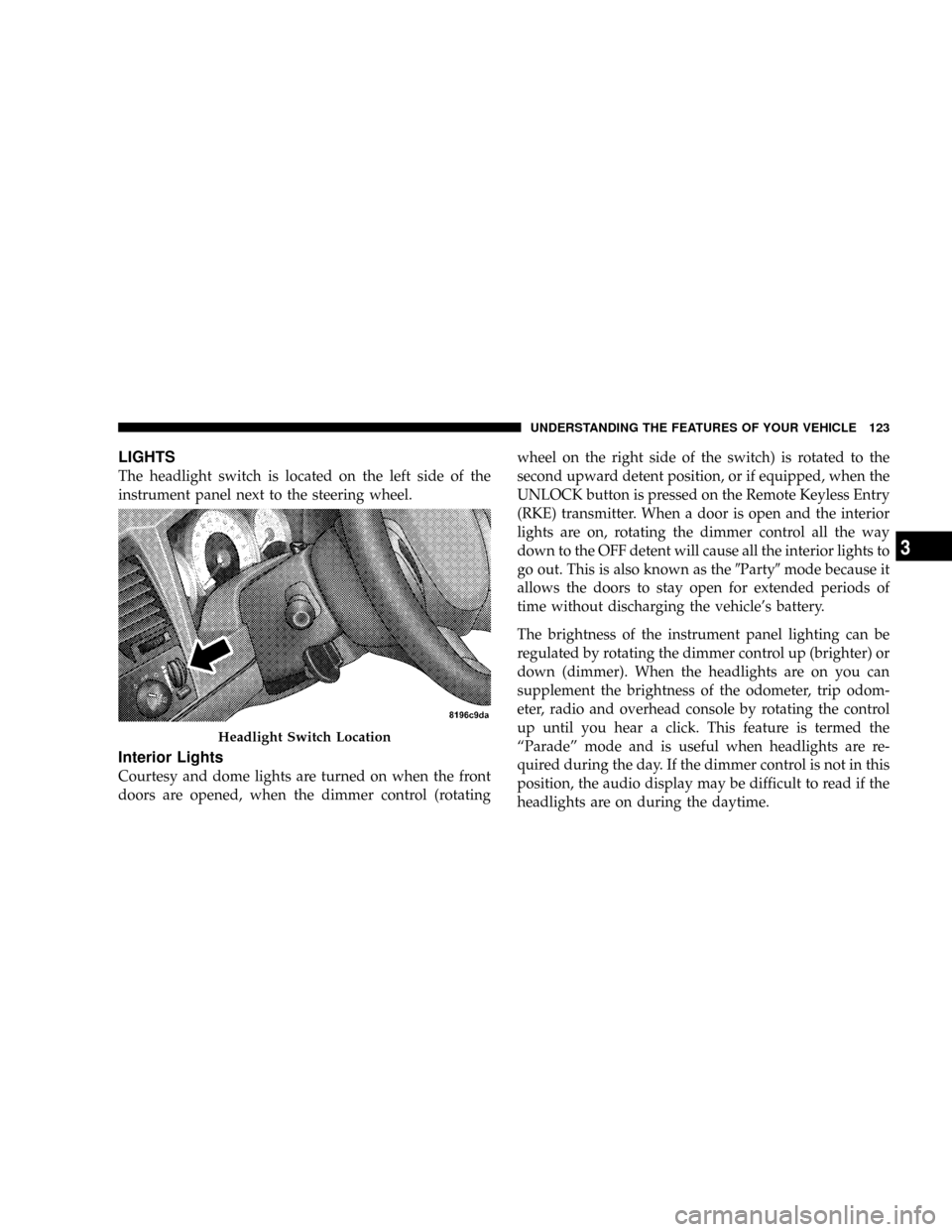
The headlight switch is located on the left side of the
instrument panel next to the steering wheel.
Interior Lights
Courtesy and dome lights are turned on when the front
doors are opened, when the dimmer control (rotatingwheel on the right side of the switch) is rotated to the
second upward detent position, or if equipped, when the
UNLOCK button is pressed on the Remote Keyless Entry
(RKE) transmitter. When a door is open and the interior
lights are on, rotating the dimmer control all the way
down to the OFF detent will cause all the interior lights to
go out. This is also known as the9Party9mode because it
allows the doors to stay open for extended periods of
time without discharging the vehicle's battery.
The brightness of the instrument panel lighting can be
regulated by rotating the dimmer control up (brighter) or
down (dimmer). When the headlights are on you can
supplement the brightness of the odometer, trip odom-
eter, radio and overhead console by rotating the control
up until you hear a click. This feature is termed the
ªParadeº mode and is useful when headlights are re-
quired during the day. If the dimmer control is not in this
position, the audio display may be difficult to read if the
headlights are on during the daytime.
Headlight Switch Location
UNDERSTANDING THE FEATURES OF YOUR VEHICLE 123
3
Page 146 of 449
WARNING!
Vehicle exhaust contains carbon monoxide, a danger-
ous gas. Do not run your vehicle in the garage while
training the transceiver. Exhaust gas can cause seri-
ous injury or death.
Programming HomeLinkT
Before You Begin
The Compass Mini-Trip Computer (CMTC) illuminates
the HomeLinktsymbol (a house with an arrow inside it)
along with 1, 2 or 3 indicators under it, when a
HomeLinktbutton is pressed.
Pay attention to the indicator(s), as they will flash at
different rates, or remain solid during training.
If you have not trained any of the HomeLinktbuttons,
erase all channels before you begin training.To do this, press and hold the two outside buttons for
20 seconds. Release the buttons when the indicators start
to flash.
It is recommended that anew batterybe placed in the
hand-held transmitter of the device being programmed
to HomeLinkt, for more efficient training and accurate
transmission of the radio-frequency signal.
Your vehicle should be parked outside of the garage
while training.
1. Turn the ignition switch to the ON/RUN position.
2. Place the hand-held transmitter 1 to 3 inches (3 to
8 cm) from the HomeLinktbuttons, while keeping the
HomeLinktdisplay in view.
For optimal training, point the battery end of the hand-
held transmitter away from the HomeLinkt.
144 UNDERSTANDING THE FEATURES OF YOUR VEHICLE
Page 148 of 449
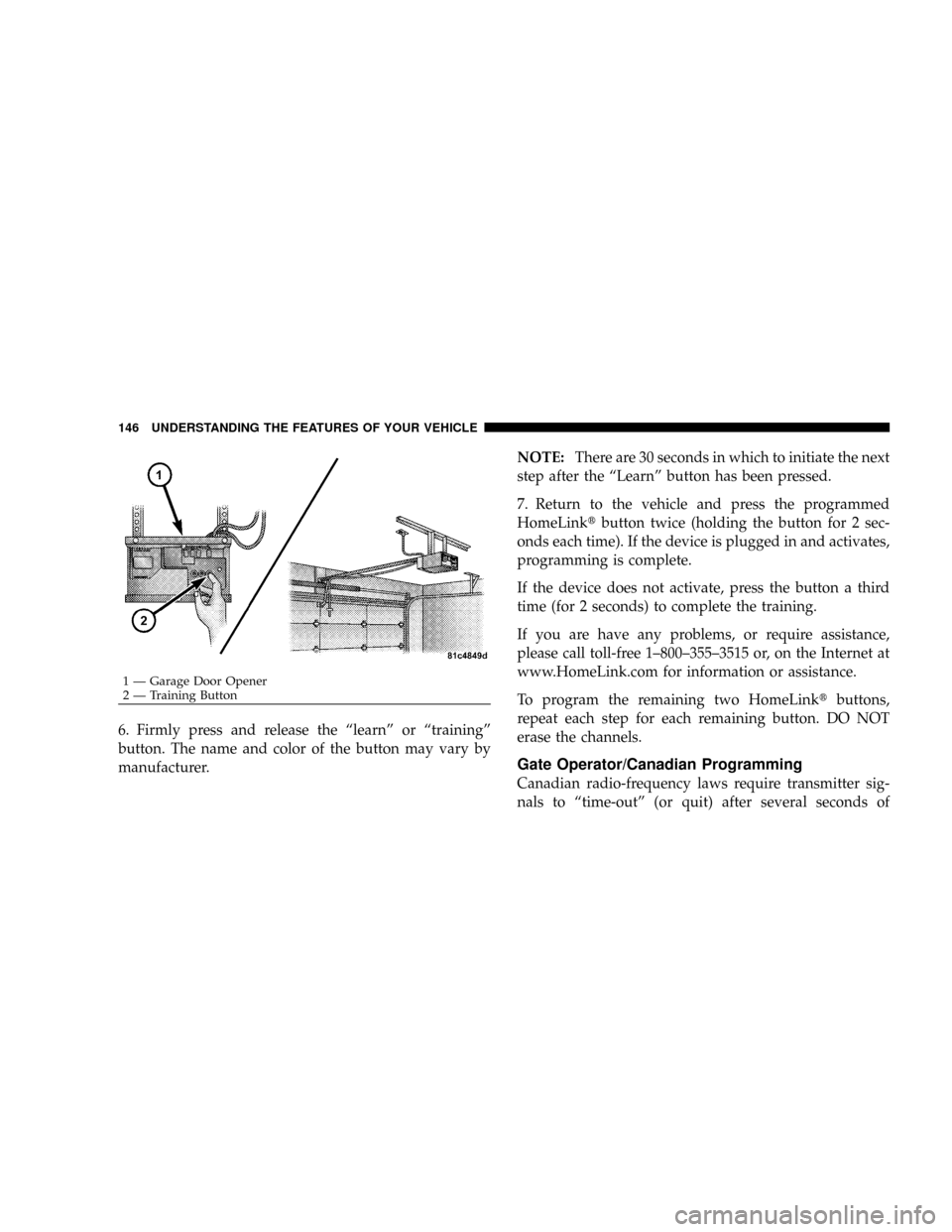
6. Firmly press and release the ªlearnº or ªtrainingº
button. The name and color of the button may vary by
manufacturer.NOTE:There are 30 seconds in which to initiate the next
step after the ªLearnº button has been pressed.
7. Return to the vehicle and press the programmed
HomeLinktbutton twice (holding the button for 2 sec-
onds each time). If the device is plugged in and activates,
programming is complete.
If the device does not activate, press the button a third
time (for 2 seconds) to complete the training.
If you are have any problems, or require assistance,
please call toll-free 1±800±355±3515 or, on the Internet at
www.HomeLink.com for information or assistance.
To program the remaining two HomeLinktbuttons,
repeat each step for each remaining button. DO NOT
erase the channels.
Gate Operator/Canadian Programming
Canadian radio-frequency laws require transmitter sig-
nals to ªtime-outº (or quit) after several seconds of
1 Ð Garage Door Opener
2 Ð Training Button 146 UNDERSTANDING THE FEATURES OF YOUR VEHICLE