Page 93 of 469
•After the ignition key is switched to OFF, a call can
continue on the uconnect�phone for a certain dura-
tion, after which the call is automatically transferred
from the uconnect�phone to the cellular phone.
•An active call is automatically transferred to the
cellular phone after the ignition key is switched to
OFF.
uconnect�phone Features
Language Selection
To change the language that the uconnect�phone is
using:
•Press the PHONE button to begin.
•After the�Ready�prompt and the following beep, say
the name of the language you wish to switch to
English, Espanol, or Francais.
•Continue to follow the system prompts to complete
the language selection.
After selecting one of the languages, all prompts and
voice commands will be in that language.
NOTE:After every uconnect�phone language change
operation, only the language-specific 32-name phone-
book is usable. The paired phone name is not language-
specific and usable across all languages.
Emergency Assistance
If you are in an emergency and the cellular phone is
reachable:
•Pick up the phone and manually dial the emergency
number for your area.
3
UNDERSTANDING THE FEATURES OF YOUR VEHICLE 91
Page 95 of 469
Towing Assistance
If you need towing assistance:
•Press the PHONE button to begin.
•After the�Ready�prompt and the following beep, say
�Towing Assistance.�
NOTE:
•The towing assistance number dialed is based on the
country where the vehicle is purchased (1-800-528-
2069 for the U.S., 1-877-213-4525 for Canada, 55-14-
3454 for Mexico City and 1-800-712-3040 for outside
Mexico City in Mexico).
•If supported, this number may be programmable on
some systems. To do this, press the PHONE button
and say “Setup”, followed by “Towing Assistance”.
Paging
To learn how to page, refer to�Working with Automated
Systems.�Paging works properly except for pagers of
certain companies, which time out a little too soon to
work properly with the uconnect�phone.
Voice Mail Calling
To learn how to access your voice mail, refer to�Working
with Automated Systems.�
Working with Automated Systems
This method is used in instances where one generally has
to press numbers on the cellular phone keypad while
navigating through an automated telephone system.
You can use your uconnect�phone to access a voice mail
system or an automated service, such as a paging service
or automated customer service line. Some services re-
quire immediate response selection. In some instances,
that may be too quick for use of the uconnect�phone.
3
UNDERSTANDING THE FEATURES OF YOUR VEHICLE 93
Page 96 of 469
When calling a number with your uconnect�phone that
normally requires you to enter in a touch-tone sequence
on your cellular phone keypad, you can press the VOICE
RECOGNITION button and say the sequence you wish
to enter, followed by the word�Send.�For example, if
required to enter your PIN followed with a pound, (3 7 4
6 #), you can press the VOICE RECOGNITION button
and say,�3746#Send.�Saying a number, or sequence of
numbers, followed by�Send,�is also to be used for
navigating through an automated customer service cen-
ter menu structure, and to leave a number on a pager.
You can also send stored uconnect�phonebook entries as
tones for fast and easy access to voice mail and pager
entries. To use this feature, dial the number you wish to
call and then press the VOICE RECOGNITION button
and say, “Send.” The system will prompt you to enter the
name or number and say the name of the phonebook
entry you wish to send. The uconnect�phone will thensend the corresponding phone number associated with
the phonebook entry, as tones over the phone.
NOTE:
•You may not hear all of the tones due to cellular phone
network configurations. This is normal.
•Some paging and voice mail systems have system time
out settings that are too short and may not allow the
use of this feature.
Barge In - Overriding Prompts
The “Voice Recognition” button can be used when you
wish to skip part of a prompt and issue your voice
recognition command immediately. For example, if a
prompt is asking�Would you like to pair a phone, clear
a...,�you could press the VOICE RECOGNITION button
and say,�Pair a Phone�to select that option without
having to listen to the rest of the voice prompt.
94 UNDERSTANDING THE FEATURES OF YOUR VEHICLE
Page 97 of 469
Turning Confirmation Prompts ON/OFF
Turning confirmation prompts off will stop the system
from confirming your choices (e.g., the uconnect�phone
will not repeat a phone number before you dial it).
•Press the PHONE button to begin.
•After the�Ready�prompt and the following beep, say
�Setup Confirmations.�The uconnect�phone will play
the current confirmation prompt status and you will
be given the choice to change it.
Phone and Network Status Indicators
If available on the radio and/or on a premium display
such as the instrument panel cluster, and supported by
your cellular phone, the uconnect�phone will provide
notification to inform you of your phone and network
status when you are attempting to make a phone call
using uconnect�phone. The status is given for roaming,
network signal strength, phone battery strength, etc.
Dialing Using the Cellular Phone Keypad
You can dial a phone number with your cellular phone
keypad and still use the uconnect�phone (while dialing
via the cellular phone keypad, the user must exercise
caution and take precautionary safety measures). By
dialing a number with your paired Bluetooth�cellular
phone, the audio will be played through your vehicle’s
audio system. The uconnect�phone will work the same
as if you dial the number using voice recognition.
NOTE:Certain brands of cellular phones do not send
the dial ring to the uconnect�phone to play it on the
vehicle audio system, so you will not hear it. Under this
situation, after successfully dialing a number the user
may feel that the call did not go through even though the
call is in progress. Once your call is answered, you will
hear the audio.
3
UNDERSTANDING THE FEATURES OF YOUR VEHICLE 95
Page 102 of 469
•In a convertible vehicle, system performance may be
compromised with the convertible top down.
Far End Audio Performance
•
Audio quality is maximized under:
•low-to-medium blower setting,
•low-to-medium vehicle speed,
•low road noise,
•smooth road surface,
•fully closed windows,
•dry weather conditions, and
•operation from the driver’s seat.
•Performance, such as audio clarity, echo, and loudness
to a large degree rely on the phone and network, and
not the uconnect�phone.
•Echo at the far end can sometimes be reduced by
lowering the in-vehicle audio volume.
•In a convertible vehicle, system performance may be
compromised with the convertible top down.
Bluetooth�Communication Link
Cellular phones have been found to lose connection to
the uconnect�phone. When this happens, the connection
can generally be reestablished by switching the phone
off/on. Your cellular phone is recommended to remain in
Bluetooth�ON mode.
Power-Up
After switching the ignition key from OFF to either the
ON or ACC position, or after a language change, you
must wait at least five seconds prior to using the system.
100 UNDERSTANDING THE FEATURES OF YOUR VEHICLE
Page 125 of 469
High Beam/Low Beam Select Switch
Push the multifunction lever away from you to switch
the headlights to high beam. Pull the multifunction lever
toward you to switch the headlights back to low beam.
Flash-to-Pass
You can signal another vehicle with your headlights by
lightly pulling the multifunction lever toward you. This
will turn on the high beam headlights until the lever is
released.
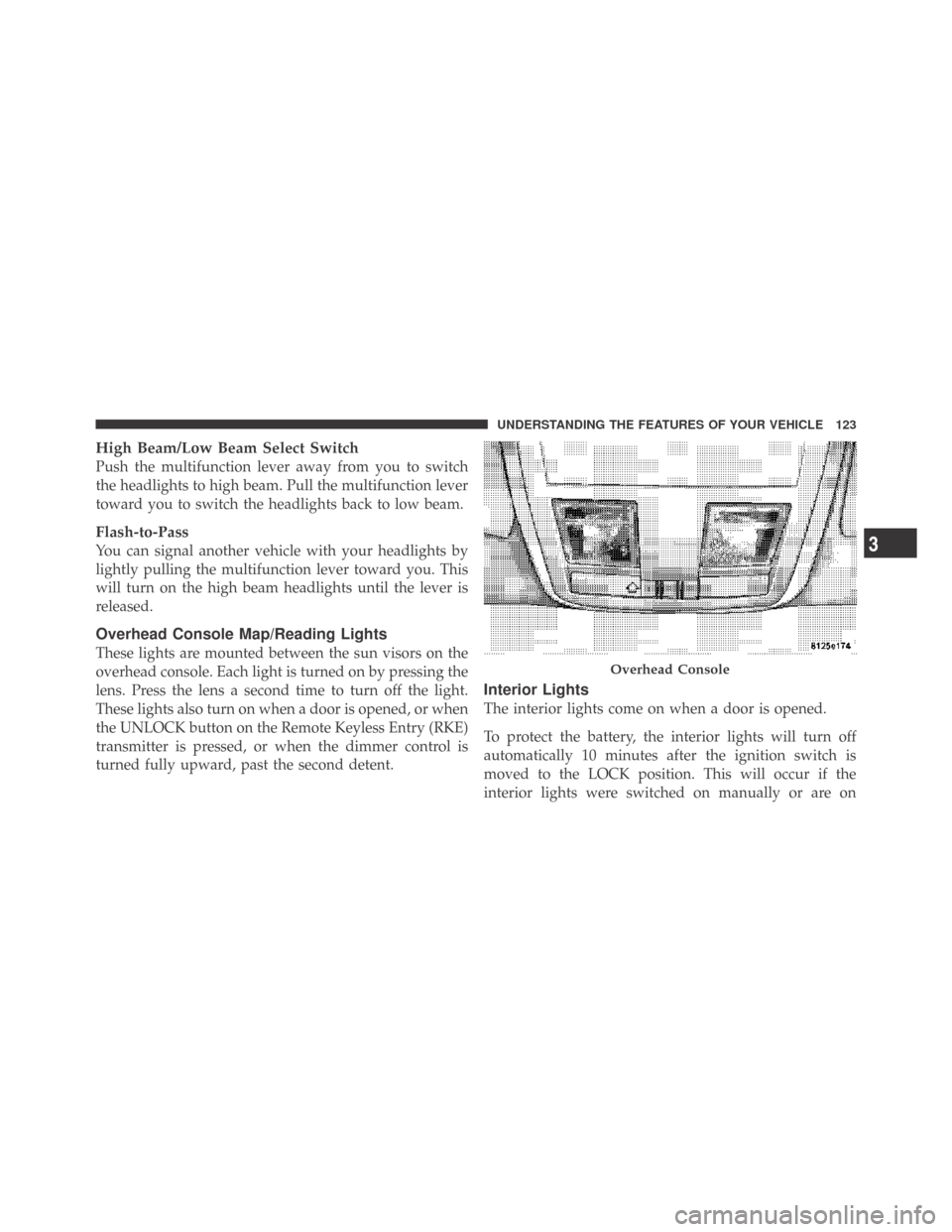
Overhead Console Map/Reading Lights
These lights are mounted between the sun visors on the
overhead console. Each light is turned on by pressing the
lens. Press the lens a second time to turn off the light.
These lights also turn on when a door is opened, or when
the UNLOCK button on the Remote Keyless Entry (RKE)
transmitter is pressed, or when the dimmer control is
turned fully upward, past the second detent.
Interior Lights
The interior lights come on when a door is opened.
To protect the battery, the interior lights will turn off
automatically 10 minutes after the ignition switch is
moved to the LOCK position. This will occur if the
interior lights were switched on manually or are on
Overhead Console
3
UNDERSTANDING THE FEATURES OF YOUR VEHICLE 123
Page 134 of 469
OVERHEAD CONSOLE
The overhead console contains courtesy/reading lights
and sunglass storage. Universal Garage Door Opener
(HomeLink�) button and a power sunroof switch may
also be included, if equipped.
Courtesy/Reading Lights
At the forward end of the console are two courtesy/
reading lights.
Press the lens to turn on the light. Press it a second time
to turn off the light.
These lights also turn on when a door is opened, when
the UNLOCK button on the Remote Keyless Entry (RKE)
transmitter is pressed, or when the dimmer control is
turned fully upward, past the second detent.
Sunglasses Storage
At the rear of the console, a compartment is provided for
the storage of a pair of sunglasses.
The storage compartment access is a�push/push�design.
Push on the raised bar on the compartment door to open.
Push on the raised bar to close.
Overhead Console
132 UNDERSTANDING THE FEATURES OF YOUR VEHICLE
Page 142 of 469
WARNING!
•Never leave children in a vehicle with the key in
the ignition switch. Occupants, particularly unat-
tended children, can become entrapped by the
power sunroof while operating the power sunroof
switch. Such entrapment may result in serious
injury or death.
•In an accident, there is a greater risk of being
thrown from a vehicle with an open sunroof. You
could also be seriously injured or killed. Always
fasten your seat belt properly and make sure all
passengers are also properly secured.
•Do not allow small children to operate the sun-
roof. Never allow your fingers, other body parts, or
any object, to project through the sunroof opening.
Injury may result.
Opening Sunroof — Partially
Press and hold the switch in the rearward position.
Release the switch when the sunroof is in the position
desired and it will stop moving. If you continue to hold
the switch in the rearward position, the sunroof will open
fully and then stop automatically. Release the switch once
the sunroof stops moving.
Opening Sunroof — Express
Press the switch rearward and release, and the sunroof
will open automatically from any position. The sunroof
will open fully and then stop automatically. This is called
Express Open. During Express Open operation, any
movement of the sunroof switch will stop the sunroof.
Closing Sunroof — Partially
Press and hold the switch in the forward position.
Release the switch when the sunroof is in the position
desired and it will stop moving. If you continue to hold
140 UNDERSTANDING THE FEATURES OF YOUR VEHICLE