Page 230 of 469
When in “Audio Surround” mode, balance is set auto-
matically. Fader control is available to add more sur-
round audio if desired.
REMOTE SOUND SYSTEM CONTROLS — IF
EQUIPPED
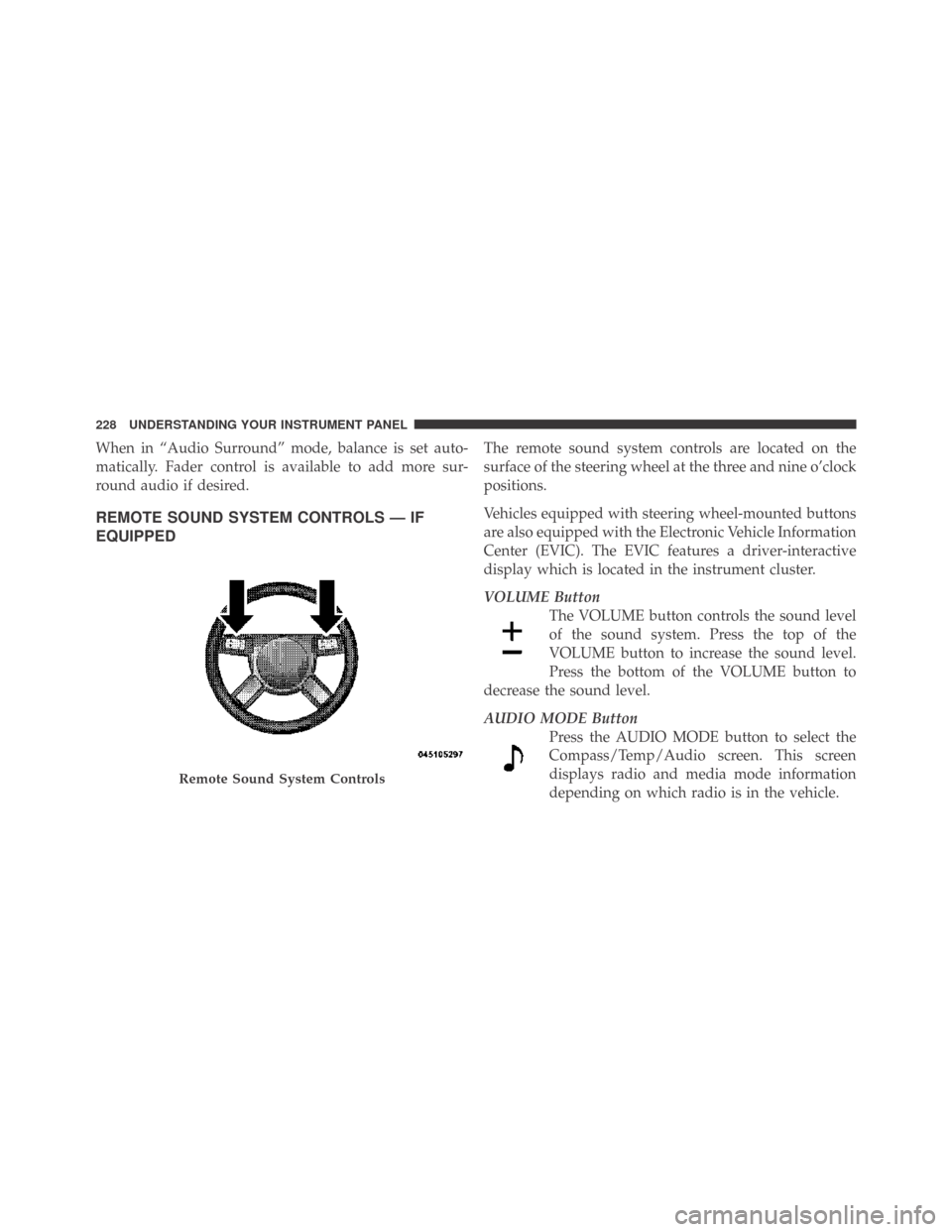
The remote sound system controls are located on the
surface of the steering wheel at the three and nine o’clock
positions.
Vehicles equipped with steering wheel-mounted buttons
are also equipped with the Electronic Vehicle Information
Center (EVIC). The EVIC features a driver-interactive
display which is located in the instrument cluster.
VOLUME Button
The VOLUME button controls the sound level
of the sound system. Press the top of the
VOLUME button to increase the sound level.
Press the bottom of the VOLUME button to
decrease the sound level.
AUDIO MODE Button
Press the AUDIO MODE button to select the
Compass/Temp/Audio screen. This screen
displays radio and media mode information
depending on which radio is in the vehicle.
Remote Sound System Controls
228 UNDERSTANDING YOUR INSTRUMENT PANEL
Page 236 of 469
NOTE:The air conditioning compressor will not engage
until the engine has been running for a few seconds.
•MAX A/C
For maximum cooling use the A/C and recirculation
buttons at the same time and set the temperature control
to full cool by rotating the temperature control knob full
counterclockwise.
•Economy Mode
If economy mode is desired, press the A/C button to turn
off the indicator light and the A/C compressor. Then,
move the temperature control to the desired temperature.
Remote Start – If Equipped
During remote start operation, the climate control soft-
ware may override the climate control settings depend-
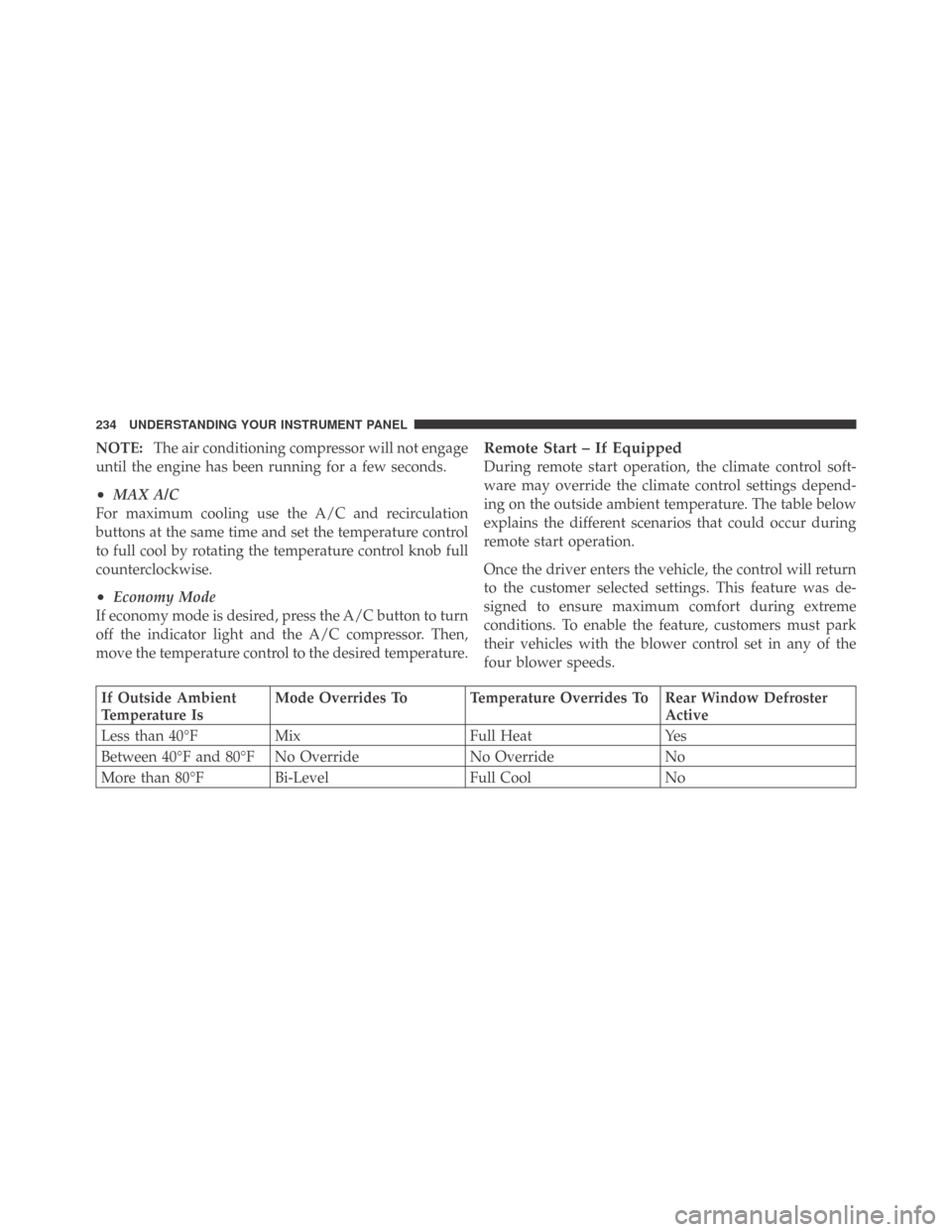
ing on the outside ambient temperature. The table below
explains the different scenarios that could occur during
remote start operation.
Once the driver enters the vehicle, the control will return
to the customer selected settings. This feature was de-
signed to ensure maximum comfort during extreme
conditions. To enable the feature, customers must park
their vehicles with the blower control set in any of the
four blower speeds.
If Outside Ambient
Temperature IsMode Overrides To Temperature Overrides To Rear Window Defroster
Active
Less than 40°F Mix Full Heat Yes
Between 40°F and 80°F No Override No Override No
More than 80°F Bi-Level Full Cool No
234 UNDERSTANDING YOUR INSTRUMENT PANEL
Page 237 of 469
NOTE:
•The feature can be disable by parking the vehicle with
the blower control set to the “O” (or OFF) position.
•For maximum performance, it is recommended that
the vehicle is parked with the blower control set to the
“High” (full clockwise) position.
Operating Tips
NOTE:Refer to the chart at the end of this section for
suggested control settings for various weather condi-
tions.
Summer Operation
The engine cooling system in air-conditioned vehicles
must be protected with a high-quality antifreeze coolant
to provide proper corrosion protection and to protect
against engine overheating. A solution of 50% ethylene
glycol antifreeze coolant and 50% water is recommended.
Refer to “Maintenance Procedures” in Section 7 of this
manual for proper coolant selection.
Winter Operation
Use of the air Recirculation mode during winter months
is not recommended because it may cause window
fogging.
Vacation Storage
Anytime you store your vehicle, or keep it out of service
(i.e., vacation) for two weeks or more, run the air
conditioning system at idle for about five minutes in the
fresh air and high blower settings. This will ensure
adequate system lubrication to minimize the possibility
of compressor damage when the system is started again.
Window Fogging
Interior fogging on the windshield can be quickly re-
moved by turning the mode selector to Defrost. The
Defrost/Floor mode can be used to maintain a clear
windshield and provide sufficient heating. If side win-
dow fogging becomes a problem, increase blower speed.
Vehicle windows tend to fog on the inside in mild but
rainy or humid weather.
4
UNDERSTANDING YOUR INSTRUMENT PANEL 235
Page 247 of 469

Do notpress the accelerator. Use the Fob with Integrated
Key to briefly turn the ignition switch to the START
position and release it as soon as the starter engages. The
starter motor will continue to run, and it will disengage
automatically when the engine is running. If the engine
fails to start, the starter will disengage automatically in
10 seconds. If this occurs, turn the ignition switch to the
LOCK position, wait 10 to 15 seconds, then repeat the
“Normal Starting” procedure.
Keyless Go — If Equipped
This feature allows the driver to oper-
ate the ignition switch with the push
of a button, as long as the ENGINE
START/STOP button is installed and
the Remote Keyless Entry transmitter
is in the passenger compartment.
Installing and Removing the ENGINE
START/STOP Button
Installing the Button
1. Remove the ignition key.
2. Insert the ENGINE START/STOP button into the
ignition switch with the lettering facing up and readable.
3. Press firmly on the center of the button to secure it into
position.
Removing the Button
1. The ENGINE START/STOP button can be removed
from the ignition switch for regular ignition key use.
2. Insert the metal part of the valet key under the chrome
bezel at the 6 o’clock position and gently pry the button
loose.
5
STARTING AND OPERATING 245
Page 352 of 469
WARNING!
To avoid possible personal injury, handle the wheel
covers with care to avoid contact with the metal edges
and retention teeth.
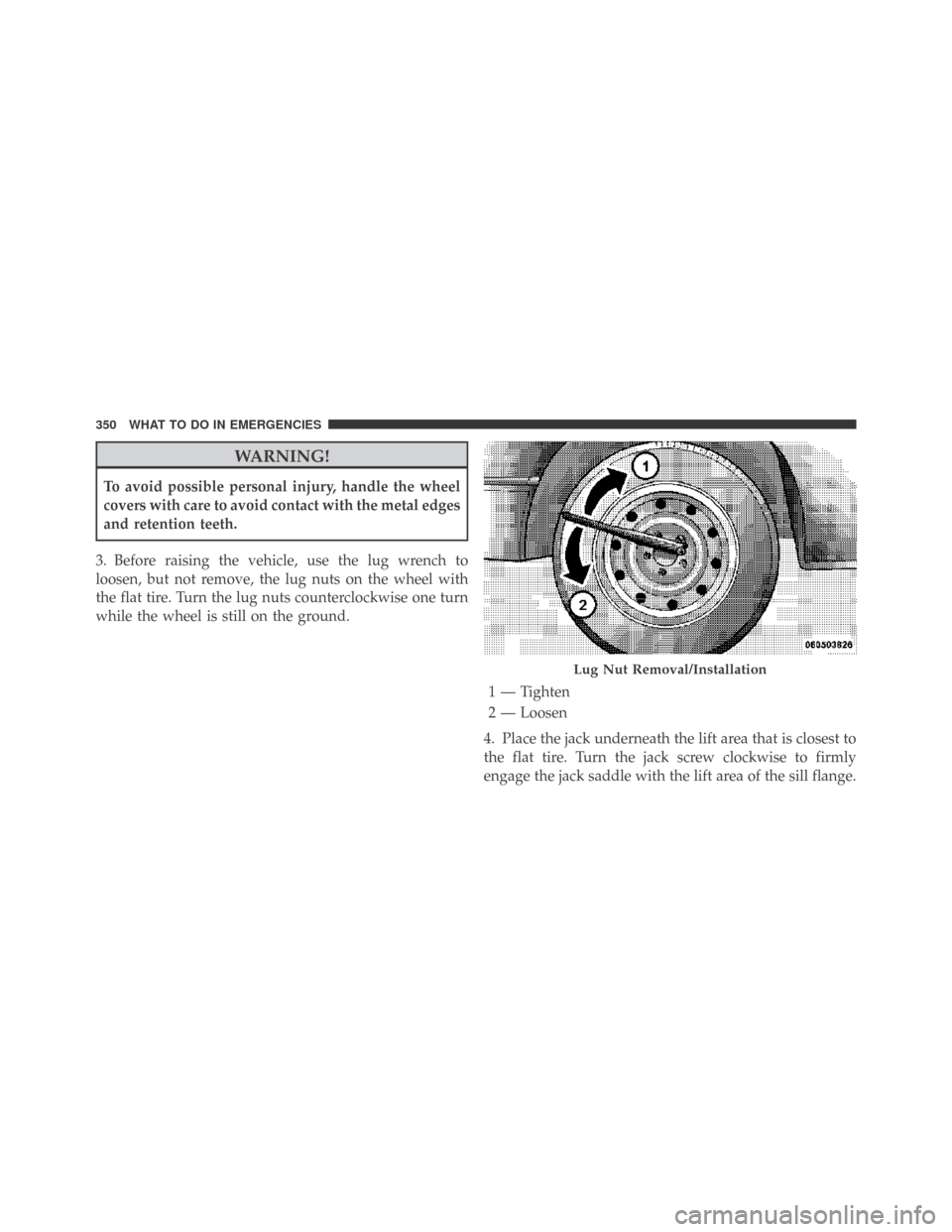
3. Before raising the vehicle, use the lug wrench to
loosen, but not remove, the lug nuts on the wheel with
the flat tire. Turn the lug nuts counterclockwise one turn
while the wheel is still on the ground.
4. Place the jack underneath the lift area that is closest to
the flat tire. Turn the jack screw clockwise to firmly
engage the jack saddle with the lift area of the sill flange.
Lug Nut Removal/Installation
1 — Tighten
2 — Loosen
350 WHAT TO DO IN EMERGENCIES
Page 354 of 469

8. Install the lug nuts with the cone shaped end of the
nut toward the wheel. Lightly tighten the lug nuts. To
avoid the risk of forcing the vehicle off the jack, do not
tighten the lug nuts fully until the vehicle is lowered to
the ground.
9. Lower the vehicle to the ground by turning the jack
handle counterclockwise.
10. Finish tightening the lug nuts. Push down on the
wrench while tightening for increased leverage. Alternate
lug nuts until each nut has been tightened twice. The
correct tightness of each lug nut is 100 ft/lb. (135 N·m). If
in doubt about the correct tightness, have them checked
with a torque wrench by your authorized dealer or at a
service station.11. Stow the jack, tools and flat tire. Make sure the base
of the jack faces the rear of the vehicle before tightening
down the fastener.
WARNING!
A loose tire or jack thrown forward in a collision or
hard stop could endanger the occupants of the ve-
hicle. Always stow the jack parts and the spare tire in
the places provided.
Compact Spare Tire
The compact spare tire is for temporary emergency use
with radial tires. It is engineered to be used on your style
vehicle only. Since this tire has limited tread life, the
original tire should be repaired (or replaced) and rein-
stalled at the first opportunity.
352 WHAT TO DO IN EMERGENCIES
Page 357 of 469
3. Align the valve notch in the wheel cover with the
valve stem on the wheel. Install the cover by hand,
snapping the cover over the two lug nuts. Do not use a
hammer or excessive force to install the cover.
4. Install the remaining lug nuts with the cone shaped
end of the nut toward the wheel. Lightly tighten the lug
nuts. To avoid the risk of forcing the vehicle off the jack,
do not tighten the lug nuts fully until the vehicle is
lowered to the ground.
5. Lower the vehicle to the ground by turning the jack
handle counterclockwise.
6. Finish tightening the lug nuts. Push down on the
wrench while tightening for increased leverage. Alternate
lug nuts until each nut has been tightened twice. The
correct tightness of each lug nut is 100 ft/lb. (135 N·m). If
in doubt about the correct tightness, have them checked
with a torque wrench by your authorized dealer or at a
service station.7. For vehicles equipped with center caps, install the
center cap by hand. Do not use a hammer or excessive
force to install the center cap.
8. Stow the jack, tools, and spare tire. Make sure the base
of the jack faces the rear of the vehicle before tightening
down the fastener.
WARNING!
A loose tire or jack thrown forward in a collision or
hard stop could endanger the occupants of the ve-
hicle. Always stow the jack parts and the spare tire in
the places provided.
6
WHAT TO DO IN EMERGENCIES 355
Page 412 of 469
NOTE:
•If a screwdriver is used, make sure a soft material is
placed between the vehicle body and tool so not to
scratch the paint.
2. Rotate the bulb’s socket counterclockwise, and remove
the bulb and socket assembly from the housing.
3. Pull the bulb out of the socket and insert the replace-
ment bulb.
4. Install the bulb and socket assembly into the housing,
and rotate the socket clockwise to lock it in place.
5. Reinstall the front/rear side marker.
Tail/Turn and Stop Lamp
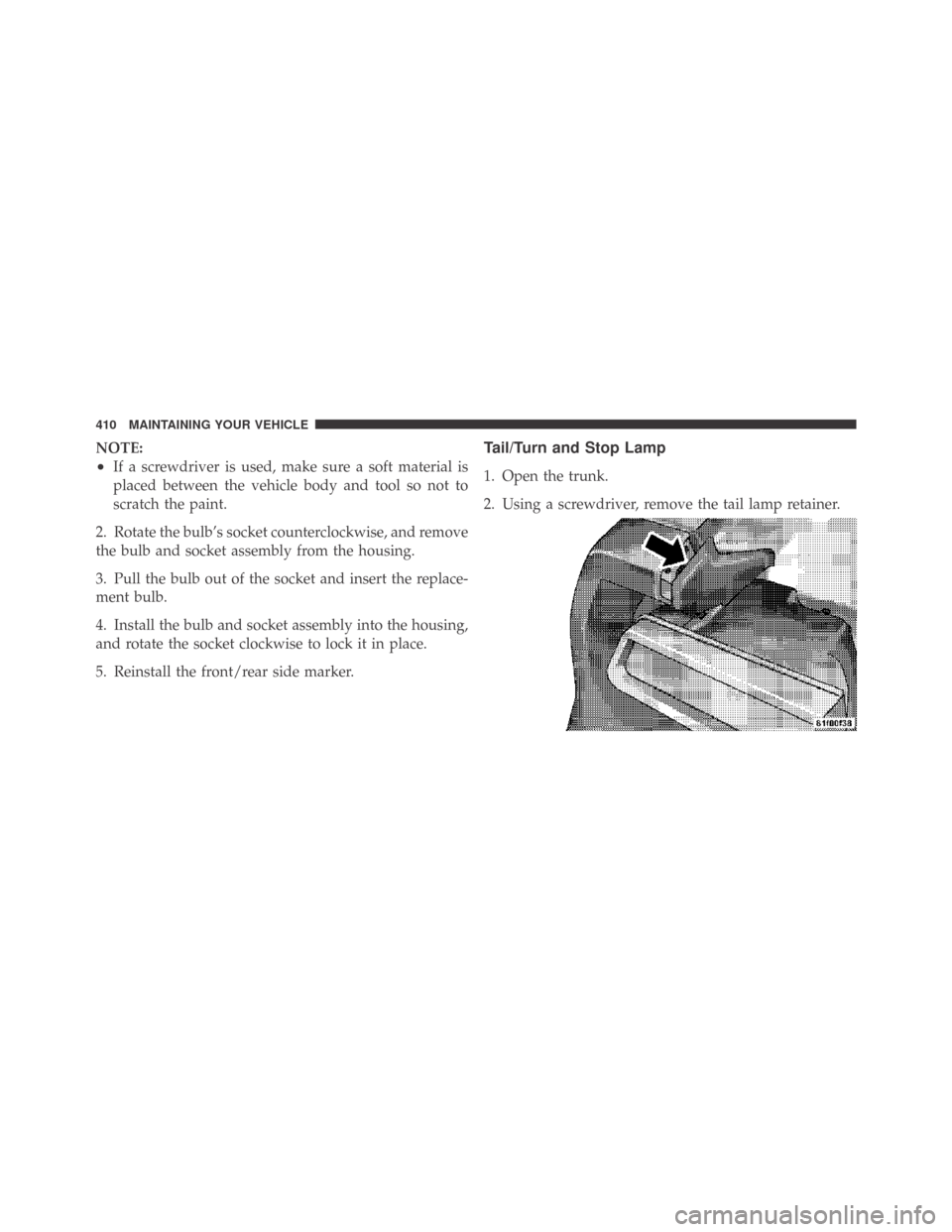
1. Open the trunk.
2. Using a screwdriver, remove the tail lamp retainer.
410 MAINTAINING YOUR VEHICLE