Page 297 of 534
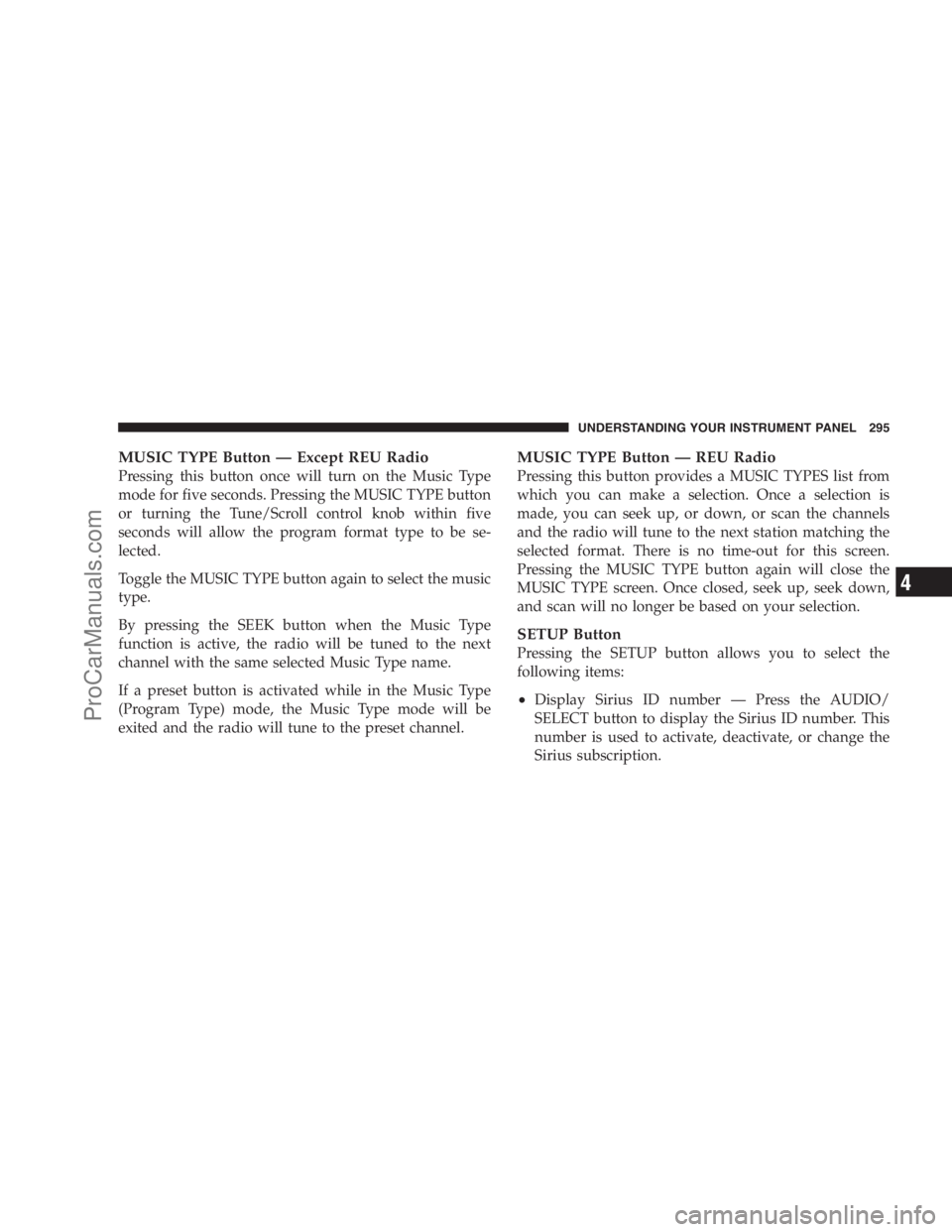
MUSIC TYPE Button — Except REU Radio
Pressing this button once will turn on the Music Type
mode for five seconds. Pressing the MUSIC TYPE button
or turning the Tune/Scroll control knob within five
seconds will allow the program format type to be se-
lected.
Toggle the MUSIC TYPE button again to select the music
type.
By pressing the SEEK button when the Music Type
function is active, the radio will be tuned to the next
channel with the same selected Music Type name.
If a preset button is activated while in the Music Type
(Program Type) mode, the Music Type mode will be
exited and the radio will tune to the preset channel.
MUSIC TYPE Button — REU Radio
Pressing this button provides a MUSIC TYPES list from
which you can make a selection. Once a selection is
made, you can seek up, or down, or scan the channels
and the radio will tune to the next station matching the
selected format. There is no time-out for this screen.
Pressing the MUSIC TYPE button again will close the
MUSIC TYPE screen. Once closed, seek up, seek down,
and scan will no longer be based on your selection.
SETUP Button
Pressing the SETUP button allows you to select the
following items:
•Display Sirius ID number — Press the AUDIO/
SELECT button to display the Sirius ID number. This
number is used to activate, deactivate, or change the
Sirius subscription.
UNDERSTANDING YOUR INSTRUMENT PANEL 295
4
ProCarManuals.com
Page 299 of 534

SIRIUS BACKSEAT TV™ — IF EQUIPPED
Satellite video uses direct satellite receiver broadcasting
technology to provide streaming video. The subscription
service provider is SIRIUS Satellite Radio. SIRIUS Back-
seat TV™ offers three video channels for family enter-
tainment, directly from its satellites and broadcasting
studios.
NOTE:SIRIUS service is not available in Hawaii and
has limited coverage in Alaska.
Refer to your Video Entertainment System (VES)™, RER
Navigation or REN Multimedia User Manuals for de-
tailed operating instructions.
VIDEO ENTERTAINMENT SYSTEM (VES)™ — IF
EQUIPPED
The optional Video Entertainment System (VES)™ is
available with:
•One or two video screens
•Additional single-disc DVD player with two-screen
system
•Battery-powered two-channel remote control
•Two remote headphones
•Integrated remote storage in either screen location
•Three different medias can be played simultaneously
(Cabin speakers and Headphone Channels 1 and 2)
•Easy menu-driven functions on touch-screen radios
•Video and audio input jacks available in rear seating
area
UNDERSTANDING YOUR INSTRUMENT PANEL 297
4
ProCarManuals.com
Page 472 of 534
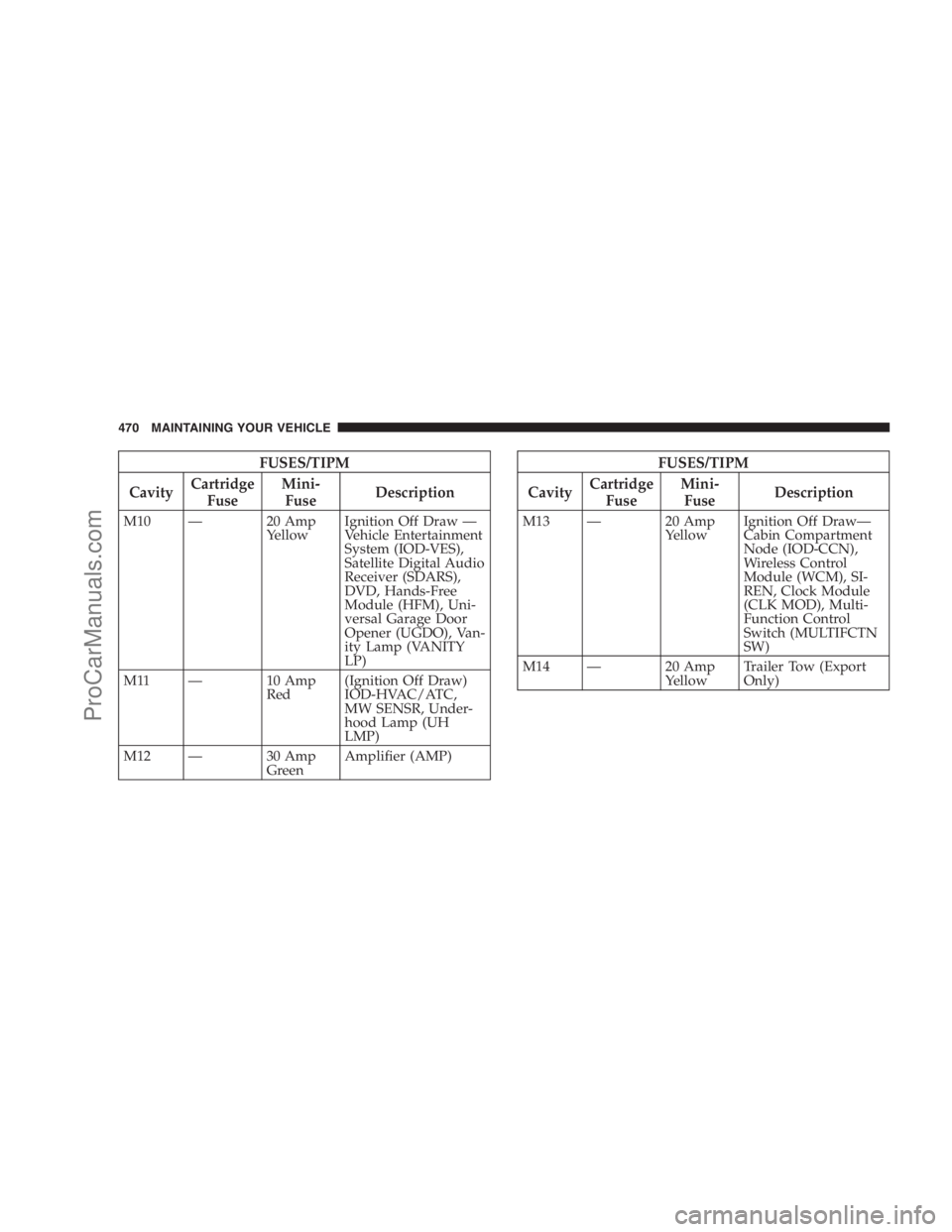
FUSES/TIPM
CavityCartridge
FuseMini-
FuseDescription
M10 — 20 Amp
YellowIgnition Off Draw —
Vehicle Entertainment
System (IOD-VES),
Satellite Digital Audio
Receiver (SDARS),
DVD, Hands-Free
Module (HFM), Uni-
versal Garage Door
Opener (UGDO), Van-
ity Lamp (VANITY
LP)
M11 — 10 Amp
Red(Ignition Off Draw)
IOD-HVAC/ATC,
MW SENSR, Under-
hood Lamp (UH
LMP)
M12 — 30 Amp
GreenAmplifier (AMP)
FUSES/TIPM
CavityCartridge
FuseMini-
FuseDescription
M13 — 20 Amp
YellowIgnition Off Draw—
Cabin Compartment
Node (IOD-CCN),
Wireless Control
Module (WCM), SI-
REN, Clock Module
(CLK MOD), Multi-
Function Control
Switch (MULTIFCTN
SW)
M14 — 20 Amp
YellowTrailer Tow (Export
Only)
470 MAINTAINING YOUR VEHICLE
ProCarManuals.com