Page 292 of 534

•Turning it clockwise (forward) and counterclock-
wise (backward) scrolls through the lists, displaying
the track detail on the radio display. Once you have
the track to be played highlighted on the radio
display, press theTUNEcontrol knob to select and
start playing the track. Turning theTUNEcontrol
knob fast will scroll through the list faster. During
fast scroll, you may notice a slight delay in updating
the information on the radio display.
•During all List modes, the iPod�displays all lists in
“wrap-around” mode. So if the track is at the
bottom of the list just turn the wheel backwards
(counter-clockwise) to get to the track faster.
•In List mode, the radioPRESETButtons are used as
shortcuts to the following lists on the iPod�.
•Preset 1 – Playlists
•Preset 2 – Artists
•Preset 3 – Albums
•Preset 4 – Genres
•Preset 5 - Audiobooks
•Preset 6 – Podcasts
•Pressing a PRESET button, will display the current
list on the top line and the first item in that list on
the second line.
•To Exit List mode without selecting a track, press the
samePRESETbutton again to go back toPlay
mode.
•LISTbutton: TheLISTbutton will display the top
level menu of the iPod�. Turn theTUNEcontrol knob
to list the top-menu item you wish to select and press
theTUNEcontrol knob. This will display the next
sub-menu list item on the iPod�then you can follow
290 UNDERSTANDING YOUR INSTRUMENT PANEL
ProCarManuals.com
Page 301 of 534

REMOTE SOUND SYSTEM CONTROLS — IF
EQUIPPED
The remote sound system controls are located on the rear
surface of the steering wheel, at the three and nine
o’clock positions.
The right-hand rocker switch has a pushbutton in the
center, and controls the volume and mode of the soundsystem. Pressing the top of the rocker switch will increase
the volume. Pressing the bottom of the rocker switch will
decrease the volume. Pressing the center button changes
the operation of the radio from AM to FM, or Tape to CD
mode, depending on which radio is in the vehicle.
The left-hand rocker switch has a pushbutton in the
center. The function of the left-hand switch is different,
depending on which mode you are in.
The following describes the left-hand rocker switch op-
eration in each mode.
Radio Operation
Pressing the top of the switch will SEEK up for the next
listenable station, and pressing the bottom of the switch
will SEEK down for the next listenable station.
The button located in the center of the left-hand switch
will tune to the next preset station that you have pro-
grammed in the radio preset pushbutton.
UNDERSTANDING YOUR INSTRUMENT PANEL 299
4
ProCarManuals.com
Page 332 of 534

When parking on a flat surface, place the shift lever in the
PARK position first, and then apply the parking brake.
When parking on a hill, it is important to set the parking
brake before placing the shift lever in PARK, otherwise
the load on the transaxle locking mechanism may make it
difficult to move the shift lever out of PARK. As an added
precaution, turn the front wheels toward the curb on a
downhill grade, and away from the curb on an uphill
grade.
WARNING!
•Never use the PARK position on an automatic
transaxle as a substitute for the parking brake.
Always apply the parking brake fully when
parked to guard against vehicle movement and
possible injury or damage.
(Continued)
WARNING! (Continued)
•Unintended movement of a vehicle could injure
those in and near the vehicle. As with all vehicles,
you should never exit a vehicle while the engine is
running. Before exiting a vehicle, you should
always move the shift lever into PARK, remove the
key from the ignition, and apply the parking
brake. Once the key is removed from the ignition,
the shift lever is locked in the PARK position,
securing the vehicle against unwanted movement.
Furthermore, you should never leave unattended
children or pets inside a vehicle.
The following indicators should be used to ensure that
you have placed the shift lever into the PARK position:
•When moving the shift lever into PARK, depress the
button on the shift lever and firmly move the lever all
the way forward until it stops.
330 STARTING AND OPERATING
ProCarManuals.com
Page 333 of 534

•Look at the shift indicator window on the console to
ensure the shift lever is in the PARK position.
•When engaged in PARK, you will not be able to move
the shift lever rearward without depressing the shift
lever button.
CAUTION!
Before moving the shift lever out of PARK, you must
turn the ignition from LOCK/OFF to ON so the
steering wheel and shift lever are released. Other-
wise, damage to the steering column or shift lever
could result.
REVERSE
Use REVERSE for moving the vehicle rearward. Shift into
REVERSE only after the vehicle has come to a complete
stop.
NEUTRAL
Place the shift lever into this gear only after the vehicle
has come to a complete stop. The engine may be started
in this range.
WARNING!
Do not coast in NEUTRAL and never turn off the
ignition to coast down a hill. These are unsafe
practices that limit your response to changing traffic
or road conditions. You might lose control of the
vehicle and have an accident.
DRIVE — Six-Speed Transaxle
This range should be used for most city and highway
driving. It provides the smoothest upshifts, downshifts,
and best fuel economy. However, use the Electronic
Range Select (ERS) mode by moving the lever—/+and
select the “5” range when frequent transaxle shifting
occurs while using the DRIVE range, such as when
STARTING AND OPERATING 331
5
ProCarManuals.com
Page 335 of 534
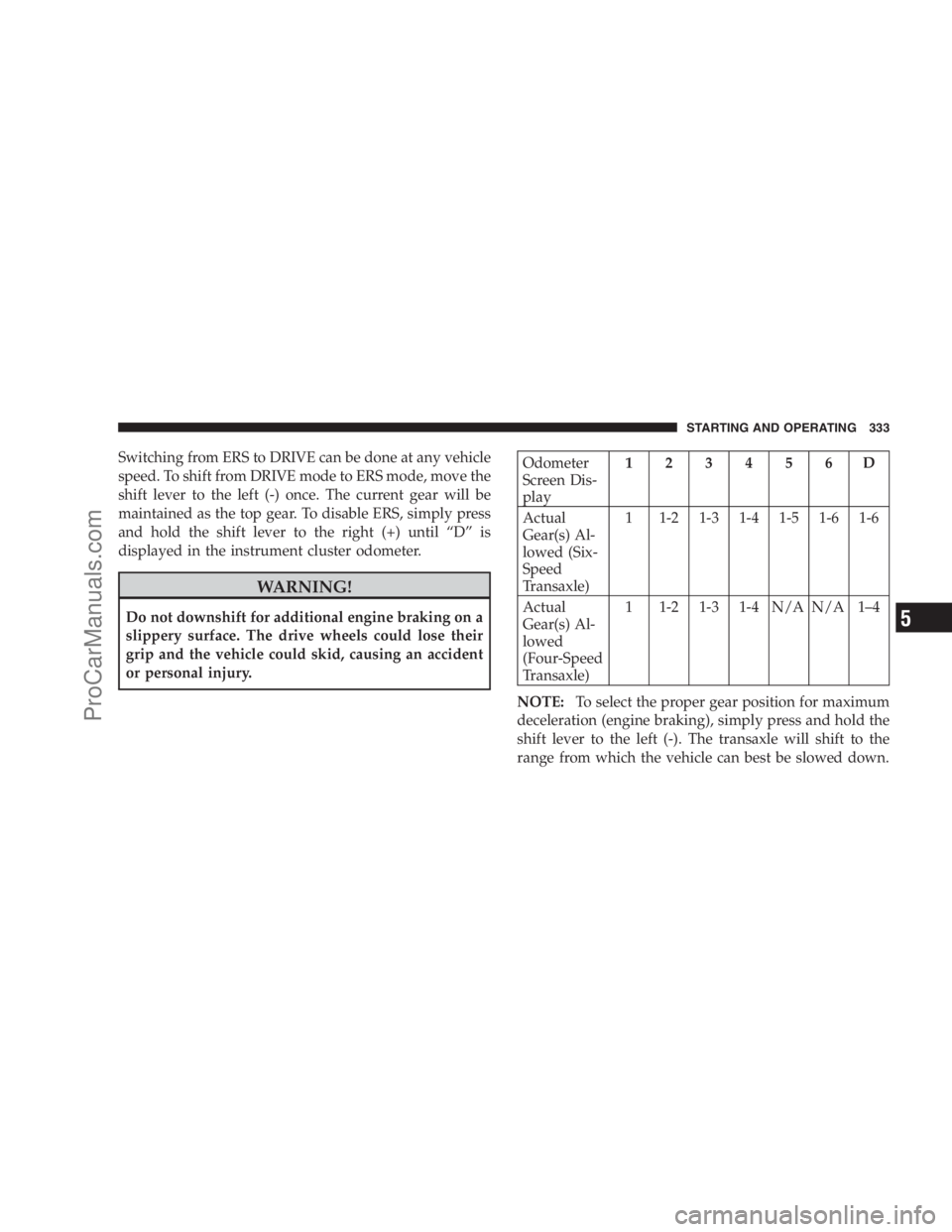
Switching from ERS to DRIVE can be done at any vehicle
speed. To shift from DRIVE mode to ERS mode, move the
shift lever to the left (-) once. The current gear will be
maintained as the top gear. To disable ERS, simply press
and hold the shift lever to the right (+) until “D” is
displayed in the instrument cluster odometer.
WARNING!
Do not downshift for additional engine braking on a
slippery surface. The drive wheels could lose their
grip and the vehicle could skid, causing an accident
or personal injury.
Odometer
Screen Dis-
play123456D
Actual
Gear(s) Al-
lowed (Six-
Speed
Transaxle)1 1-2 1-3 1-4 1-5 1-6 1-6
Actual
Gear(s) Al-
lowed
(Four-Speed
Transaxle)1 1-2 1-3 1-4 N/A N/A 1–4
NOTE:To select the proper gear position for maximum
deceleration (engine braking), simply press and hold the
shift lever to the left (-). The transaxle will shift to the
range from which the vehicle can best be slowed down.
STARTING AND OPERATING 333
5
ProCarManuals.com
Page 336 of 534

Reset Mode - Electronic Transaxle
The transaxle is monitored electronically for abnormal
conditions. If a condition is detected that could cause
damage, the transaxle automatically shifts into 2nd gear
(3rd gear for six-speed). The transaxle remains in 2nd
gear (3rd gear for six-speed) despite the forward gear
selected. PARK, REVERSE, and NEUTRAL will continue
to operate. This Reset feature allows the vehicle to be
driven to an authorized dealer for service without dam-
aging the transaxle.
In the event of a momentary problem, the transaxle can
be reset to regain all forward gears by performing the
following steps:
1. Stop the vehicle.
2. Shift into PARK.
3. Turn the ignition switch to the LOCK position.
4. Restart the engine.5. Shift into the desired gear range and resume driving.
NOTE:Even if the transaxle can be reset, it is recom-
mended that you visit an authorized dealer at your
earliest possible convenience. Your authorized dealer has
diagnostic equipment to determine if the problem could
recur.
If the transaxle cannot be reset, authorized dealer service
is required.
DRIVING ON SLIPPERY SURFACES
Acceleration
Rapid acceleration on snow covered, wet, or other slip-
pery surfaces may cause the front wheels to pull errati-
cally to the right or left. This phenomenon occurs when
there is a difference in the surface traction under the front
(driving) wheels.
334 STARTING AND OPERATING
ProCarManuals.com
Page 337 of 534

WARNING!
Rapid acceleration on slippery surfaces is dangerous.
Unequal traction can cause sudden pulling of the
front wheels. You could lose control of the vehicle
and possibly have an accident. Accelerate slowly and
carefully whenever there is likely to be poor traction
(ice, snow, wet mud, loose sand, etc.).
Traction
When driving on wet or slushy roads, it is possible for a
wedge of water to build up between the tire and road
surface. This is known as hydroplaning and may cause
partial or complete loss of vehicle control and stopping
ability. To reduce this possibility, the following precau-
tions should be observed:
1. Slow down during rainstorms or when roads are
slushy.2. Slow down if the road has standing water or puddles.
3. Replace the tires when tread wear indicators first
become visible.
4. Keep the tires properly inflated.
5. Maintain sufficient distance between your vehicle and
the vehicle in front of you to avoid a collision in a sudden
stop.DRIVING THROUGH WATER
Driving through water more than a few inches/
centimeters deep will require extra caution to ensure
safety and prevent damage to your vehicle.
STARTING AND OPERATING 335
5
ProCarManuals.com
Page 340 of 534
POWER STEERING
The standard power steering system will give you good
vehicle response and increased ease of maneuverability
in tight spaces. The system will provide mechanical
steering capability if power assist is lost.
If for some reason the power assist is interrupted, it will
still be possible to steer your vehicle. Under these condi-
tions, you will observe a substantial increase in steering
effort, especially at very low vehicle speeds and during
parking maneuvers.
NOTE:Increased noise levels at the end of the steering
wheel travel are considered normal and do not indicate
that there is a problem with the power steering system.
Upon initial start-up in cold weather, the power steering
pump may make noise for a short amount of time. This is
due to the cold, thick fluid in the steering system. This
noise should be considered normal, and it does not in any
way damage the steering system.WARNING!
Continued operation with reduced power steering
assist could pose a safety risk to yourself and others.
Service should be obtained as soon as possible.
CAUTION!
Prolonged operation of the steering system at the end
of the steering wheel travel will increase the steering
fluid temperature and it should be avoided when
possible. Damage to the power steering pump may
occur.
Power Steering Fluid Check
Checking the power steering fluid level at a defined
service interval is not required. The fluid should only be
checked if a leak is suspected, abnormal noises are
338 STARTING AND OPERATING
ProCarManuals.com