Page 173 of 411

If the vehicle electronics sense that the vehicle has
traveled about one mile with the turn signals on, a
continuous chime will sound to alert you to turn the
signals off. If either indicator flashes at a rapid rate, check
for a defective outside light bulb.
20. Front Fog Light Indicator — If Equipped
This light shows when the front fog lights are ON.
21. Electronic Stability Program (ESP) Indicator Light
The malfunction lamp for the Electronic Stabil-
ity Program (ESP) is combined with Brake
Assist System (BAS). The yellow “ESP/BAS
Warning Lamp” comes on when the ignition
switch is turned to the “ON” position. They should go
out with the engine running. If the “ESP/BAS Warning
Lamp” comes on continuously with the engine running,a malfunction has been detected in either the ESP or the
BAS system. If this light remains on after several ignition
cycles, and the vehicle has been driven several miles at
speeds greater than 30 mph (48 km/h), see an authorized
dealer as soon as possible.
22. Tire Pressure Monitoring Telltale Light
Each tire, including the spare (if provided),
should be checked monthly, when cold and
inflated to the inflation pressure recommended
by the vehicle manufacturer on the vehicle
placard or tire inflation pressure label. (If your vehicle
has tires of a different size than the size indicated on the
vehicle placard or tire inflation pressure label, you should
determine the proper tire inflation pressure for those
tires.)
UNDERSTANDING YOUR INSTRUMENT PANEL 171
4
Page 176 of 411
If the ABS light remains on or turns on while driving, it
indicates that the Anti-Lock portion of the brake system
is not functioning and that service is required. However,
the conventional brake system will continue to operate
normally if the BRAKE warning light is not on.
If the ABS light is on, the brake system should be serviced
as soon as possible to restore the benefits of Anti-Lock
brakes. If the ABS light does not turn on when the
Ignition switch is turned to the ON position, have the
light inspected by an authorized dealer.
25. High Beam Indicator
This light shows that the headlights are on high
beam. Push the turn signal lever away from the
steering wheel to switch the headlights from high or low
beam.26. Electronic Vehicle Information Center (EVIC)
Button — If Equipped
Pushing this button will switch between the different
EVIC functions.
27. Electronic Vehicle Information Center (EVIC)
Display — If Equipped
Refer to Electronic vehicle Information Center (EVIC) in
this section for more information.
ELECTRONIC VEHICLE INFORMATION CENTER
(EVIC)
The Electronic Vehicle Information Center (EVIC) fea-
tures a driver-interactive display that is located in the
instrument cluster.
174 UNDERSTANDING YOUR INSTRUMENT PANEL
Page 184 of 411

Lock Doors Automatically at 15 mph (24 km/h)
When ON is selected, all doors lock automatically when
the speed of the vehicle reaches 15 mph (24 km/h). Press
and hold the EVIC button when in this display until
“ON” or “OFF” appears to make your selection.
Auto Unlock On Exit
When ON is selected, all the doors will unlock when the
driver’s door is opened if the vehicle is stopped. Press
and hold the EVIC button when in this display until
“ON” or “OFF” appears to make your selection.
Remote Unlock Driver’s Door 1st
WhenDRIVER’S DOOR 1STis selected, only the driv-
er’s door will unlock on the first press of the Remote
Keyless Entry (RKE) transmitter UNLOCK button. A
second press will unlock the remaining locked doors.
WhenREMOTE UNLOCK ALL DOORSis selected, all
of the doors will unlock at the first press of the RKE
transmitter UNLOCK button. Press and hold the EVICbutton when in this display until “DRIVER’S DOOR 1ST”
or “ALL DOORS” appears to make your selection.
Sound Horn With Remote Key Lock
When ON is selected a short horn sound will occur when
the RKE transmitter LOCK button is pressed. This feature
may be selected with or without the flash lights on
lock/unlock feature. Press and hold the EVIC button
when in this display until “ON” or “OFF” appears to
make your selection.
Flash Lights With Remote Key Lock
When ON is selected, the front and rear turn signals will
flash when the doors are locked or unlocked using the
RKE transmitter. This feature may be selected with or
without the Sound Horn On Lock feature selected. Press
and hold the EVIC button when in this display until
“ON” or “OFF” appears to make your selection.
182 UNDERSTANDING YOUR INSTRUMENT PANEL
Page 185 of 411

Delay Turning Headlights Off
When this feature is selected you can choose to have the
headlights remain on for 0, 30, 60, or 90 seconds when
exiting the vehicle. Press and hold the EVIC button when
in this display until 0, 30, 60, or 90 appears to make your
selection.
Headlights On With Wipers (Available With Auto
Headlights Only)
When ON is selected and the headlight switch is in the
AUTO position, the headlights will turn on approxi-
mately 10 seconds after the wipers are turned on. The
headlights will also turn off when the wipers are turned
off if they were turned on by this feature. Press and hold
the EVIC button when in this display until “ON” or
“OFF” appears to make your selection.
NOTE:Turning the headlights on during the daytime
causes the instrument panel lights to dim. To increase the
brightness, refer to “Lights” in this section.
Delay Power Off to Accessories Until Exit
When this feature is selected, the power window
switches, radio, hands–free system, power sunroof, and
power outlets will remain active for up to 60 minutes
after the ignition switch has been turned OFF. Opening a
vehicle door will cancel this feature. Press and hold the
EVIC button when in this display until “Off”, “45 sec.”,
“5 min.”, or “10 min.” appears to make your selection.
Turn Headlights on with Remote Key Unlock
When this feature is selected the headlights will activate
and remain on for up to 90 seconds when the doors are
unlocked using the RKE transmitter. Press and hold the
EVIC button when in this display until “OFF”, “30 sec.”,
“60 sec.”, or “90 sec.” appears to make your selection.
UNDERSTANDING YOUR INSTRUMENT PANEL 183
4
Page 326 of 411
▫Manual Transaxle.................... 346
▫Appearance Care And Protection From
Corrosion.......................... 347
�Fuses.............................. 352
▫Integrated Power Module............... 352
�Vehicle Storage....................... 355
�Replacement Bulbs..................... 355
�Bulb Replacement..................... 356
▫Headlights/Front Parking/Front
Turn Signal......................... 356▫Fog Lights......................... 356
▫Tail Lights, Rear Turn Signals And Backup
Lights............................. 357
▫License Lights....................... 357
▫Center High-Mounted Stoplight.......... 358
�Fluids And Capacities................... 359
�Fluids, Lubricants, And Genuine Parts....... 360
▫Engine............................ 360
▫Chassis............................ 361
324 MAINTAINING YOUR VEHICLE
Page 352 of 411
Stubborn soils can be removed easily with a soft cloth
and MOPAR�Total Clean. Care should be taken to avoid
soaking your leather upholstery with any liquid. Please
do not use polishes, oils, cleaning fluids, solvents, deter-
gents, or ammonia-based cleaners to clean your leather
upholstery. Application of a leather conditioner is not
required to maintain the original condition.
WARNING!
Do not use volatile solvents for cleaning purposes.
Many are potentially flammable, and if used in
closed areas they may cause respiratory harm.
Cleaning Headlights
Your vehicle has plastic headlights that are lighter and
less susceptible to stone breakage than glass headlights.
Plastic is not as scratch resistant as glass and therefore
different lens cleaning procedures must be followed.To minimize the possibility of scratching the lenses and
reducing light output, avoid wiping with a dry cloth. To
remove road dirt, wash with a mild soap solution fol-
lowed by rinsing.
Do not use abrasive cleaning components, solvents, steel
wool or other aggressive material to clean the lenses.
Glass Surfaces
All glass surfaces should be cleaned on a regular basis
with MOPAR�Glass Cleaner or any commercial
household-type glass cleaner. Never use an abrasive type
cleaner. Use caution when cleaning the inside rear win-
dow equipped with electric defrosters or the right rear
quarter window equipped with the radio antenna. Do
not use scrapers or other sharp instruments which may
scratch the elements. When cleaning the rear view mirror,
spray cleaner on the towel or rag that you are using. Do
not spray cleaner directly on the mirror.
350 MAINTAINING YOUR VEHICLE
Page 358 of 411
LIGHT BULBS — Interior Bulb Number
Front Header Light......................T578
Center Dome Light......................T578
Rear Cargo/Flashlight.................8–A35LF
LIGHTS BULBS — Exterior Bulb Number
Low Beam/High Beam Headlight............ H13
Front Park/Turn Signal/Side Marker
Light.......................3157AK or 3157A
Front Fog Light.........................9145
Center High-Mounted Stop Light
(CHMSL)...................... LEDAssembly
Rear Turn/Tail/Stop.....................3157
Backup Light.....................W16W (921)
License Light.......................... W5WBULB REPLACEMENT
Headlights/Front Parking/Front Turn Signal
See your authorized dealer for replacement.
Fog Lights
1. Access light through the lower fascia cutout.
2. Rotate bulb and connector 1/4 turn counterclockwise.
356 MAINTAINING YOUR VEHICLE
Page 359 of 411
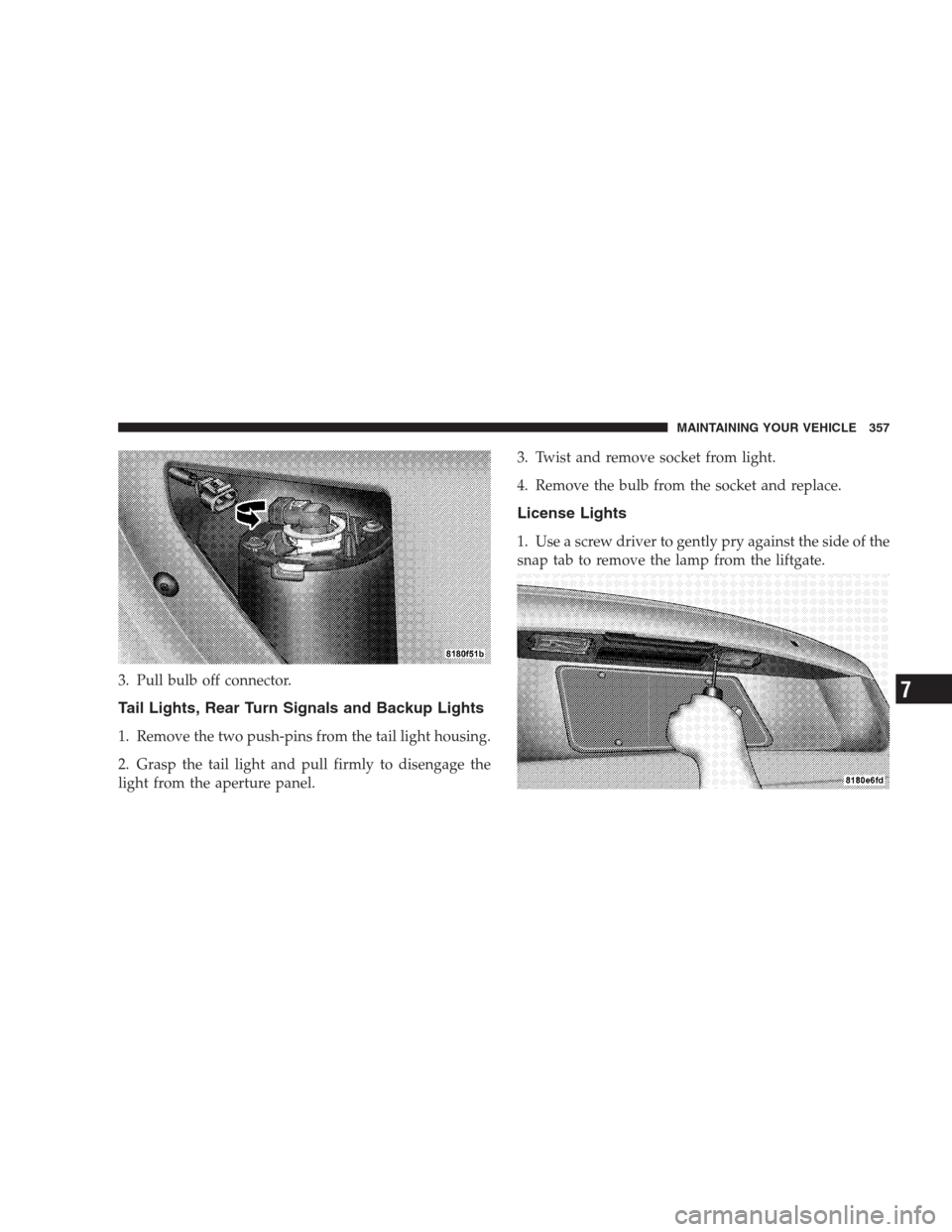
3. Pull bulb off connector.
Tail Lights, Rear Turn Signals and Backup Lights
1. Remove the two push-pins from the tail light housing.
2. Grasp the tail light and pull firmly to disengage the
light from the aperture panel.3. Twist and remove socket from light.
4. Remove the bulb from the socket and replace.
License Lights
1. Use a screw driver to gently pry against the side of the
snap tab to remove the lamp from the liftgate.
MAINTAINING YOUR VEHICLE 357
7