Page 230 of 473

Clock Setting Procedure
1. Press and hold the TIME button until the hours blink.
2. Adjust the hours by turning the right side TUNE/
SCROLL control knob.
3. After adjusting the hours, press the right side TUNE/
SCROLL control knob to set the minutes. The minutes
will begin to blink.
4. Adjust the minutes using the right side TUNE/
SCROLL control knob. Press the TUNE/SCROLL control
knob to save time change.
5. To exit, press any button/knob or wait five seconds.
The clock can also be set by pressing the SETUP button.
For vehicles equipped with satellite radio, press the
SETUP button, use the TUNE/SCROLL control to select
SET CLOCK, and then follow the above procedure,starting at Step 2. For vehicles not equipped with satellite
radio, press the SETUP button and then follow the above
procedure, starting at Step 2.
INFO Button
Press the INFO button for an RDS station (one with call
letters displayed). The radio will return a Radio Text
message broadcast from an FM station (FM mode only).
RW/FF
Pressing the RW (Rewind) or FF (Fast Forward) buttons
causes the tuner to search for the next frequency in the
direction of the arrows. This feature operates in either
AM or FM frequencies.
TUNE Control
Turn the rotary TUNE/SCROLL control knob clockwise
to increase or counterclockwise to decrease the frequency.
228 UNDERSTANDING YOUR INSTRUMENT PANEL
Page 233 of 473
By pressing the SEEK button when the Music Type icon
is displayed, the radio will be tuned to the next frequency
station with the same selected Music Type name. The
Music Type function only operates when in the FM
mode.
If a preset button is activated while in the Music Type
(Program Type) mode, the Music Type mode will be
exited and the radio will tune to the preset station.
SETUP Button
Pressing the SETUP button allows you to select between
the following items:
•Set Clock— Pressing the SELECT button will allow
you to set the clock. Turn the TUNE/SCROLL control
knob to adjust the hours and then press and turn the
TUNE/SCROLL control knob to adjust the minutes.
Press the TUNE/SCROLL control knob again to save
changes.
AM/FM Button
Press the button to select either AM or FM mode.
SET/RND Button — To Set the Pushbutton
Memory
When you are receiving a station that you wish to
commit to pushbutton memory, press the SET/RND
button. The symbol SET 1 will now show in the display
window. Select the button (1 to 6) you wish to lock onto
this station and press and release that button. If a button
is not selected within five seconds after pressing the
SET/RND button, the station will continue to play but
will not be stored into pushbutton memory.
You may add a second station to each pushbutton by
repeating the above procedure with this exception: Press
the SET/RND button twice and SET 2 will show in the
display window. Each button can be set for SET 1 and
SET 2 in both AM and FM. This allows a total of 12 AM
UNDERSTANDING YOUR INSTRUMENT PANEL 231
4
Page 244 of 473

TUNE Control (Rotary)
Turn the rotary TUNE/SCROLL control knob clockwise
to increase or counterclockwise to decrease the channel.
MUSIC TYPE Button — Except REU Radio
Pressing this button once will turn on the Music Type
mode for five seconds. Pressing the MUSIC TYPE button
or turning the TUNE/SCROLL control knob within five
seconds will allow the program format type to be se-
lected.
Toggle the MUSIC TYPE button again to select the music
type.
By pressing the SEEK button when the Music Type
function is active, the radio will be tuned to the next
channel with the same selected Music Type name.
If a preset button is activated while in the Music Type
(Program Type) mode, the Music Type mode will be
exited and the radio will tune to the preset channel.
MUSIC TYPE Button — REU Radio
Pressing this button provides a Music Type list from
which you can make a selection. Once a selection is
made, you can seek up or down or scan the channels and
the radio will tune to the next station matching the
selected format. There is no time-out for this screen.
Pressing the MUSIC TYPE button again will close the
Music Type screen. Once closed, seek up, seek down, and
scan will no longer be based on your selection.
SETUP Button
Pressing the SETUP button allows you to select the
following items:
•Display Sirius ID number — Press the AUDIO/
SELECT button to display the Sirius ID number. This
number is used to activate, deactivate, or change the
Sirius subscription.
242 UNDERSTANDING YOUR INSTRUMENT PANEL
Page 405 of 473
CavityCartridge
FuseMini Fuse Description
13 —20 Amp Yel-
low—
14 — 10 Amp RedIgnition Off
Draw (IOD)
— Cabin
Compart-
ment Node
(CCN)/ In-
terior Light-
ing
1540 Amp
Green—Battery Feed
— Radiator
Fan RelayCavityCartridge
FuseMini Fuse Description
16 —15 Amp Lt.
BlueIGN Run/
ACC — Ci-
gar Lighter/
PWR
Sunroof
Mod
17 — 10 Amp RedIgnition Off
Draw (IOD)
— Wireless
Control
Module
(WCM)/
Clock/
Steering
Control
Module
(SCM)
MAINTAINING YOUR VEHICLE 403
7
Page 413 of 473
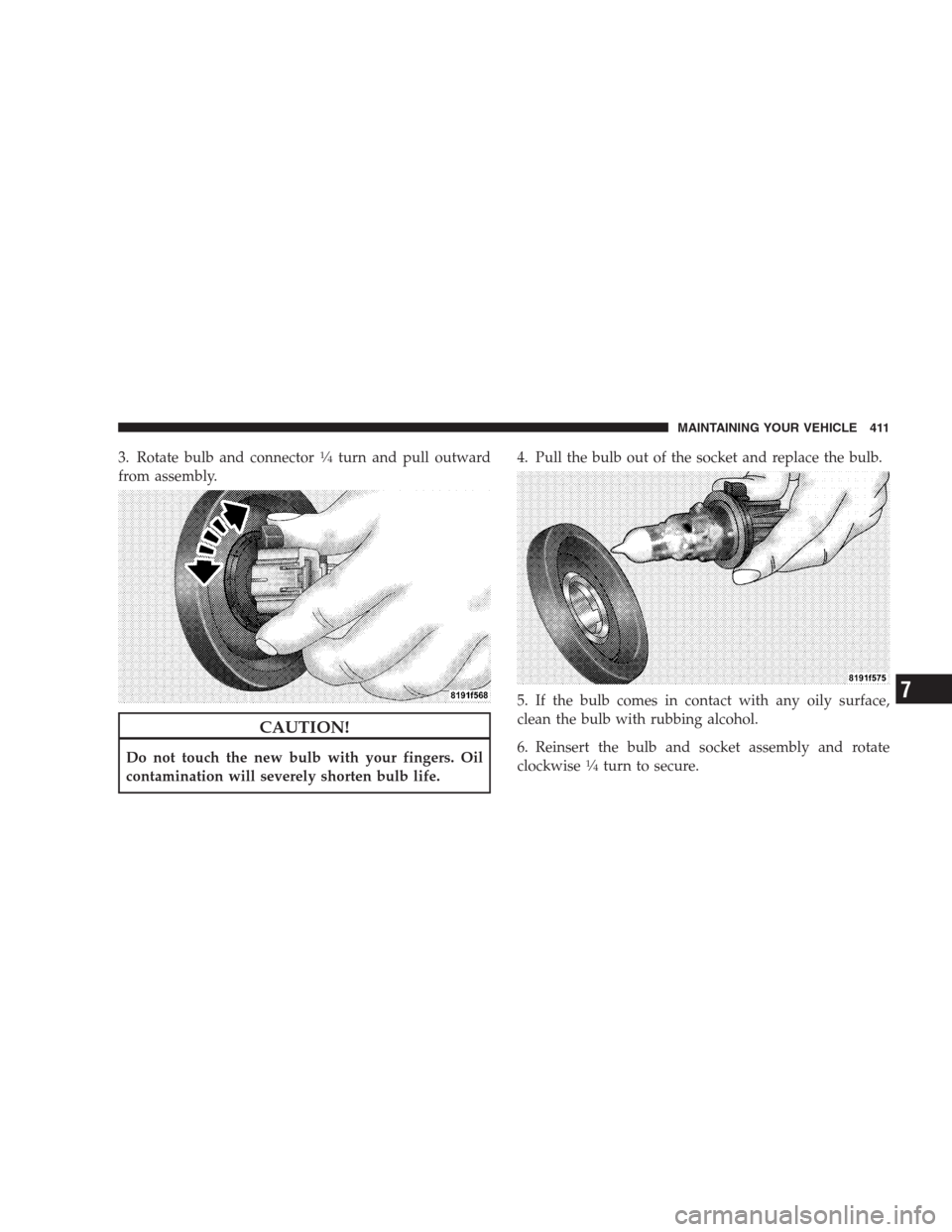
3. Rotate bulb and connector14turn and pull outward
from assembly.
CAUTION!
Do not touch the new bulb with your fingers. Oil
contamination will severely shorten bulb life.4. Pull the bulb out of the socket and replace the bulb.
5. If the bulb comes in contact with any oily surface,
clean the bulb with rubbing alcohol.
6. Reinsert the bulb and socket assembly and rotate
clockwise14turn to secure.
MAINTAINING YOUR VEHICLE 411
7
Page 414 of 473
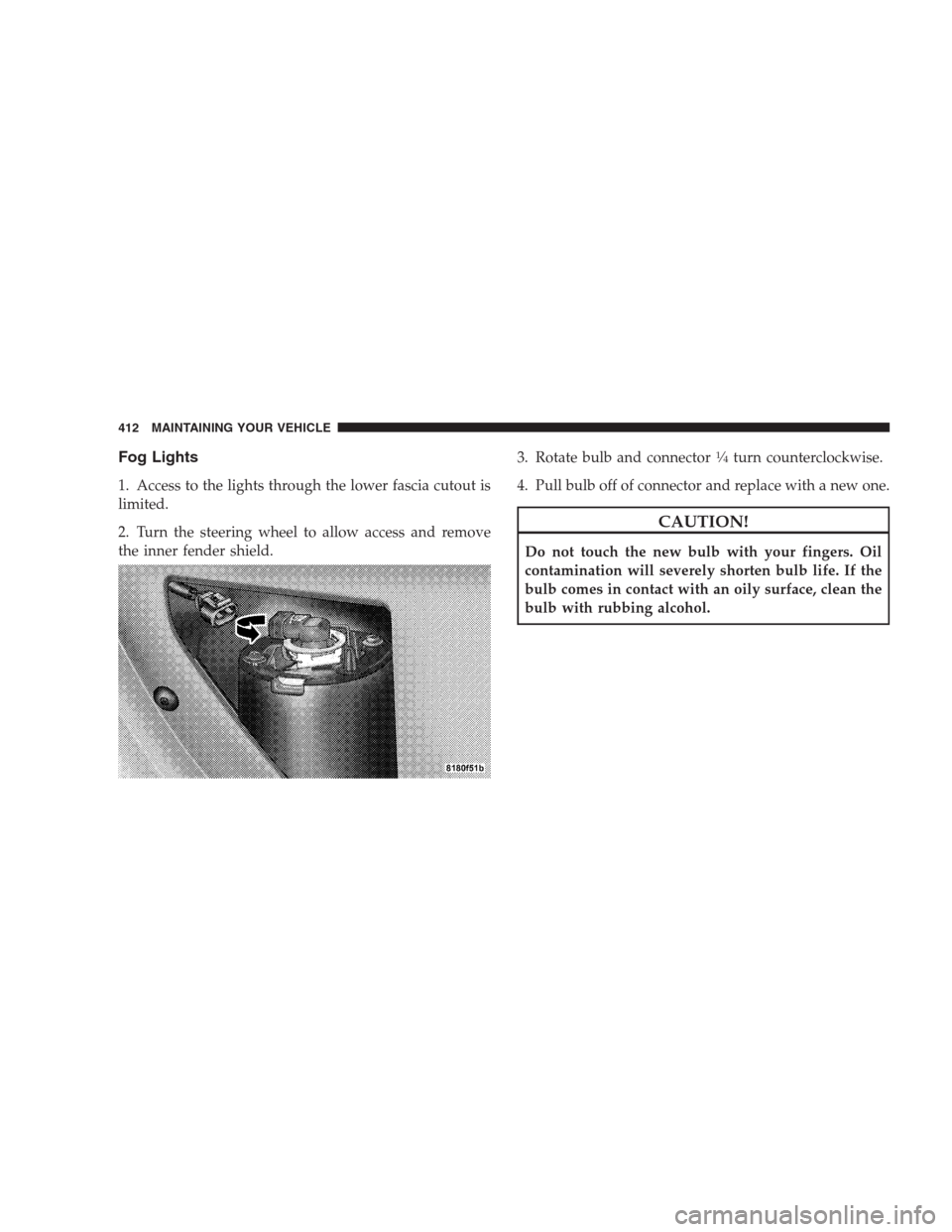
Fog Lights
1. Access to the lights through the lower fascia cutout is
limited.
2. Turn the steering wheel to allow access and remove
the inner fender shield.3. Rotate bulb and connector
14turn counterclockwise.
4. Pull bulb off of connector and replace with a new one.
CAUTION!
Do not touch the new bulb with your fingers. Oil
contamination will severely shorten bulb life. If the
bulb comes in contact with an oily surface, clean the
bulb with rubbing alcohol.
412 MAINTAINING YOUR VEHICLE
Page 454 of 473

Caps, Filler
Fuel................................ 331
Oil (Engine)..................367,368,369,375
Power Steering........................ 282
Radiator (Coolant Pressure)............... 388
Car Washes............................ 395
Carbon Monoxide Warning................. 327
Cargo Area Features...................... 162
Cargo Compartment...................... 162
Cargo Load Floor........................ 162
Cargo (Vehicle Loading)................... 162
Caution, Exhaust Gas...................... 80
Cellular Phone........................91,249
Center High Mounted Stop Light............ 415
Chains, Tire............................ 312
Changing A Flat Tire..................... 350
Chart, Tire Sizing........................ 296
Check Engine Light (Malfunction Indicator
Light)................................ 371Child Restraint....................68,70,74,77
Child Restraint Tether Anchors.............72,74
Child Safety Locks........................ 34
Cigar Lighter........................... 159
Clean Air Gasoline....................... 324
Cleaning
Wheels............................. 397
Windshield Wiper Blades................. 382
Climate Control......................... 250
Clock........................200,214,218,228
Coin Holder........................... 164
Compact Disc (CD) Maintenance............. 249
Compact Spare Tire...................... 306
Compass.............................. 193
Compass Calibration..................... 194
Compass Variance....................... 194
Computer, Trip/Travel..................21,192
Console............................132,164
Console, Floor.......................132,164
452 INDEX
Page 466 of 473

Selection of Oil......................... 375
Sentry Key (Immobilizer)................... 15
Sentry Key Programming................... 17
Service Assistance....................... 441
Service Contract......................... 443
Service Manuals........................ 445
Setting the Clock................200,214,218,228
Settings, Personal........................ 196
Shoulder Belts........................... 43
Side Window Demisters (Defrosters).......... 261
Signals, Turn........................... 413
Slippery Surfaces, Driving On............... 278
Snow Chains (Tire Chains)................. 312
Snow Tires............................ 312
Spare Tire.......................306,308,351
Specifications
Oil ................................ 375
Speed Control (Cruise Control)...........144,182
Speedometer........................... 177Speedometer and Odometer................ 175
Starting............................... 267
Engine Fails to Start.................... 268
Starting Procedures...................... 267
Steering
Power...........................281,282
Tilt Column.......................... 143
Wheel, Tilt........................... 143
Steering Wheel Mounted Sound
System Controls......................... 246
Storage............................162,409
Storage, Vehicle......................... 260
Stuck, Freeing.......................... 361
Sun Roof.............................. 153
Supplemental Restraint System - Airbag........ 52
Synthetic Engine Oil...................... 376
Tachometer............................ 179
Taillights.............................. 413
464 INDEX