Page 126 of 475
•low-to-medium vehicle speed,
•low road noise,
•smooth road surface,
•fully closed windows,
•dry weather conditions, and
•operation from the driver’s seat.
•Performance, such as audio clarity, echo, and loudness
to a large degree rely on the phone and network, and
not the UConnect�system.
•Echo at the far end can sometimes be reduced by
lowering the in-vehicle audio volume.
•In a convertible vehicle, system performance may be
compromised with the convertible top down.
Bluetooth�Communication Link
Cellular phones have been found to lose connection to
the UConnect�system. When this happens, the connec-
tion can generally be re-established by switching the
phone off/on. Your cellular phone is recommended to
remain in Bluetooth�ON mode.
Power-Up
After switching the ignition key from OFF to either the
ON or ACC position, or after a language change, you
must wait at least five seconds prior to using the system.
124 UNDERSTANDING THE FEATURES OF YOUR VEHICLE
Page 131 of 475
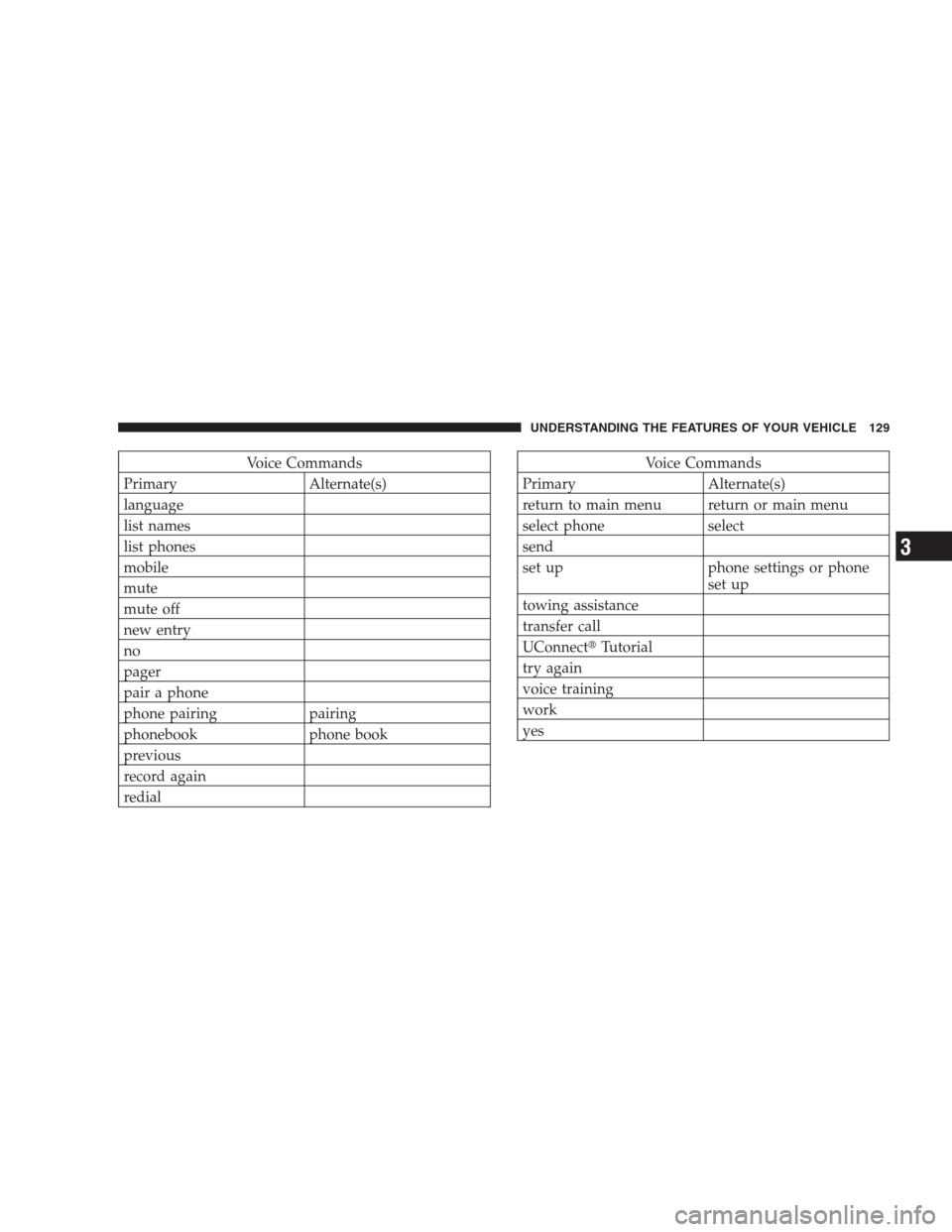
Voice Commands
Primary Alternate(s)
language
list names
list phones
mobile
mute
mute off
new entry
no
pager
pair a phone
phone pairing pairing
phonebook phone book
previous
record again
redialVoice Commands
Primary Alternate(s)
return to main menu return or main menu
select phone select
send
set up phone settings or phone
set up
towing assistance
transfer call
UConnect�Tutorial
try again
voice training
work
yes
UNDERSTANDING THE FEATURES OF YOUR VEHICLE 129
3
Page 168 of 475
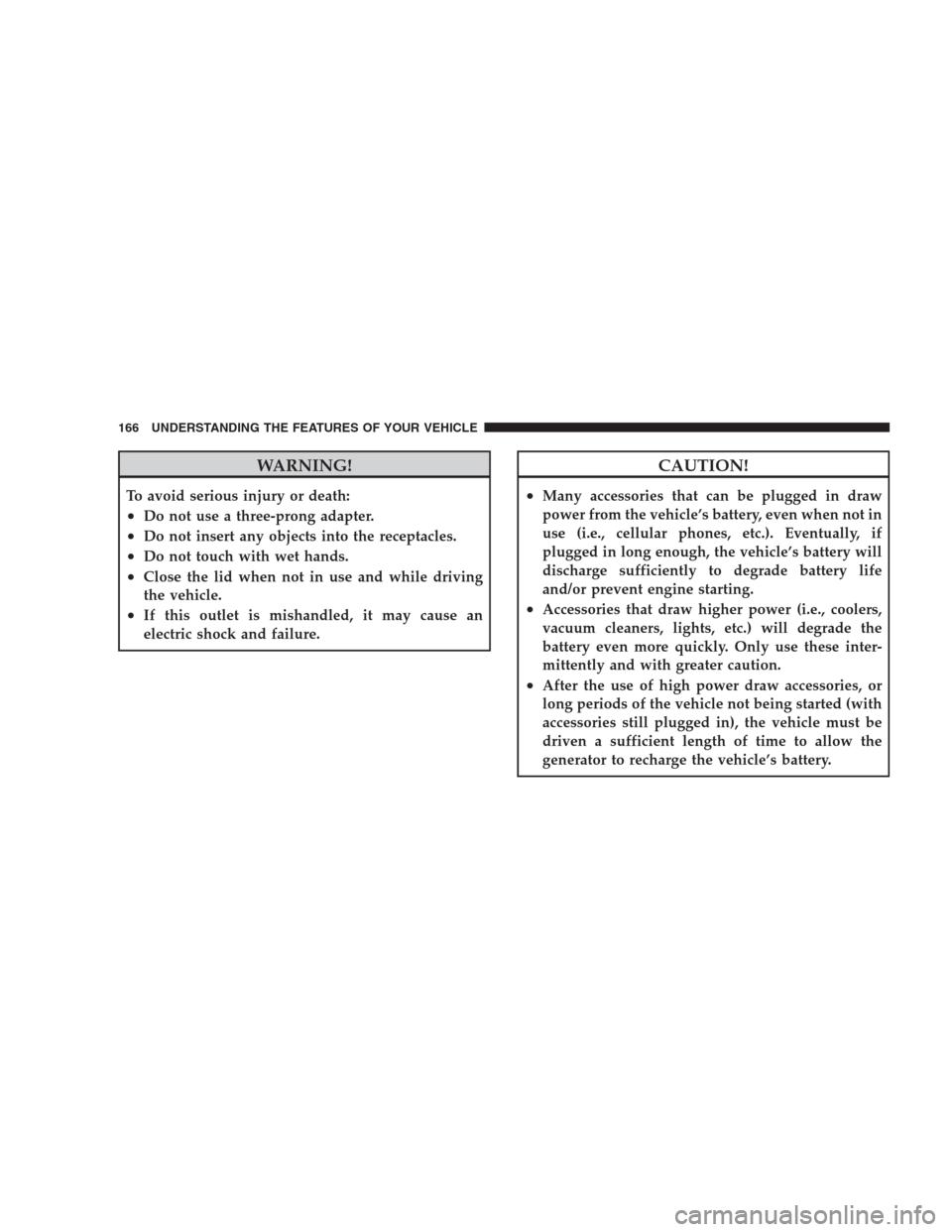
WARNING!
To avoid serious injury or death:
•Do not use a three-prong adapter.
•Do not insert any objects into the receptacles.
•Do not touch with wet hands.
•Close the lid when not in use and while driving
the vehicle.
•If this outlet is mishandled, it may cause an
electric shock and failure.
CAUTION!
•Many accessories that can be plugged in draw
power from the vehicle’s battery, even when not in
use (i.e., cellular phones, etc.). Eventually, if
plugged in long enough, the vehicle’s battery will
discharge sufficiently to degrade battery life
and/or prevent engine starting.
•Accessories that draw higher power (i.e., coolers,
vacuum cleaners, lights, etc.) will degrade the
battery even more quickly. Only use these inter-
mittently and with greater caution.
•After the use of high power draw accessories, or
long periods of the vehicle not being started (with
accessories still plugged in), the vehicle must be
driven a sufficient length of time to allow the
generator to recharge the vehicle’s battery.
166 UNDERSTANDING THE FEATURES OF YOUR VEHICLE
Page 174 of 475
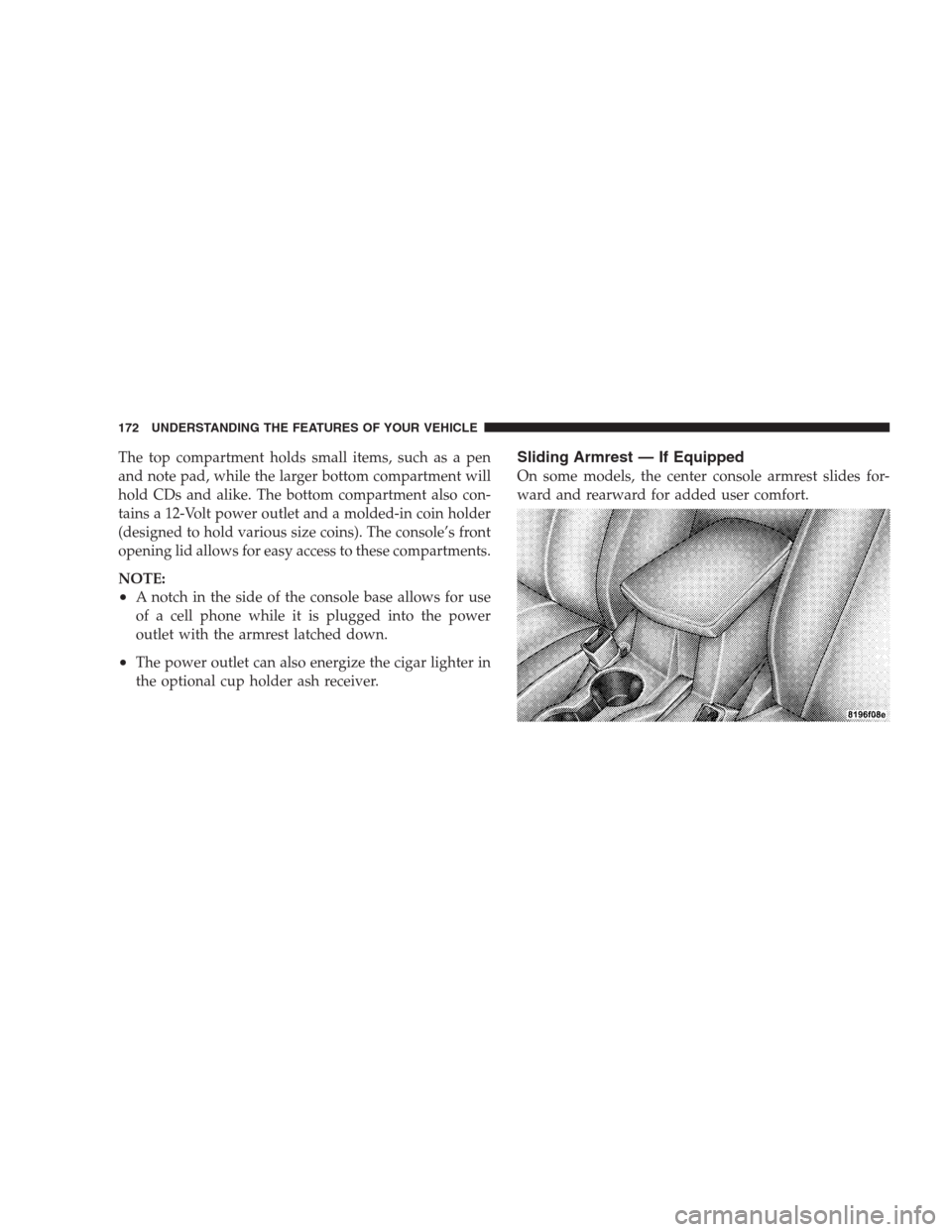
The top compartment holds small items, such as a pen
and note pad, while the larger bottom compartment will
hold CDs and alike. The bottom compartment also con-
tains a 12-Volt power outlet and a molded-in coin holder
(designed to hold various size coins). The console’s front
opening lid allows for easy access to these compartments.
NOTE:
•A notch in the side of the console base allows for use
of a cell phone while it is plugged into the power
outlet with the armrest latched down.
•The power outlet can also energize the cigar lighter in
the optional cup holder ash receiver.
Sliding Armrest — If Equipped
On some models, the center console armrest slides for-
ward and rearward for added user comfort.
172 UNDERSTANDING THE FEATURES OF YOUR VEHICLE
Page 179 of 475
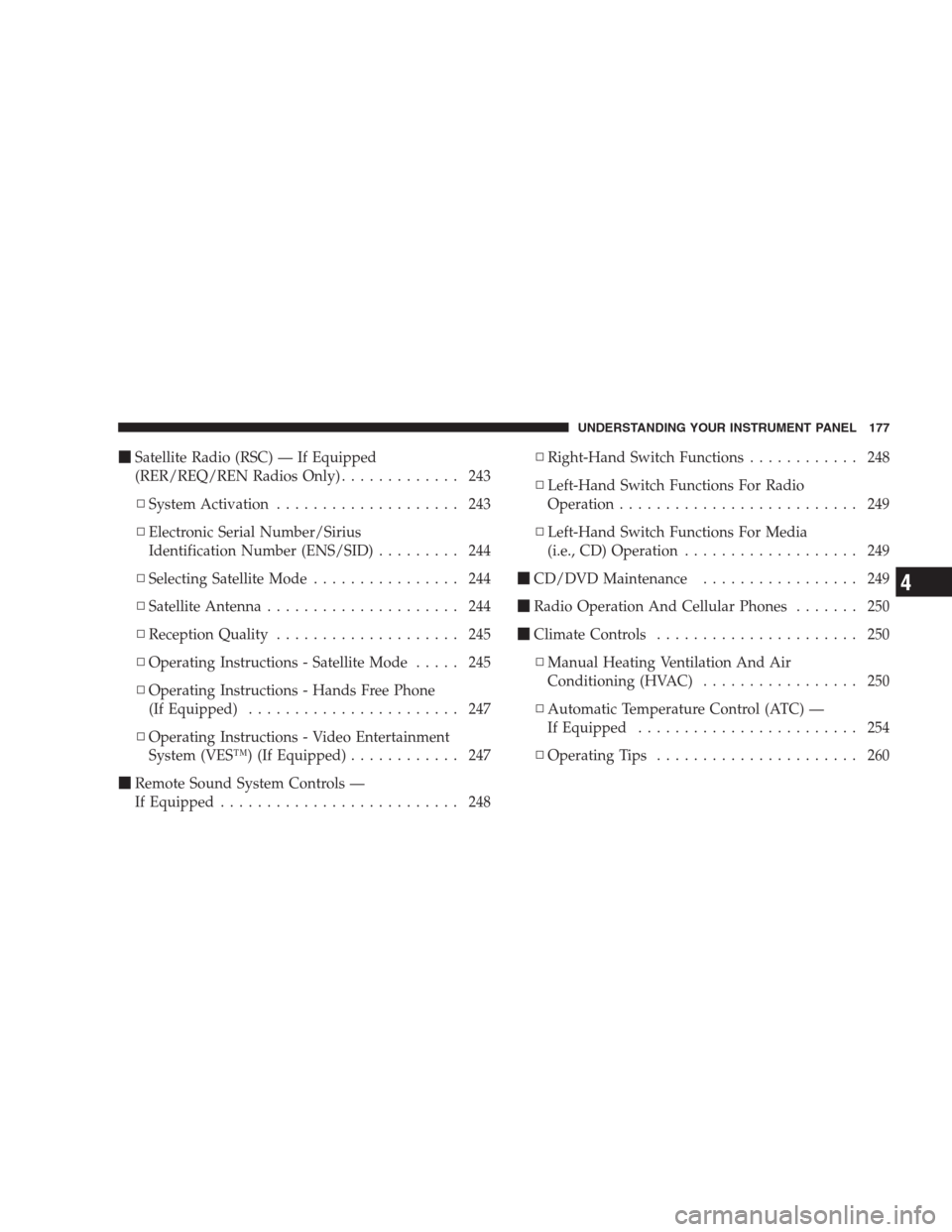
�Satellite Radio (RSC) — If Equipped
(RER/REQ/REN Radios Only)............. 243
▫System Activation.................... 243
▫Electronic Serial Number/Sirius
Identification Number (ENS/SID)......... 244
▫Selecting Satellite Mode................ 244
▫Satellite Antenna..................... 244
▫Reception Quality.................... 245
▫Operating Instructions - Satellite Mode..... 245
▫Operating Instructions - Hands Free Phone
(If Equipped)....................... 247
▫Operating Instructions - Video Entertainment
System (VES™) (If Equipped)............ 247
�Remote Sound System Controls —
If Equipped.......................... 248▫Right-Hand Switch Functions............ 248
▫Left-Hand Switch Functions For Radio
Operation.......................... 249
▫Left-Hand Switch Functions For Media
(i.e., CD) Operation................... 249
�CD/DVD Maintenance................. 249
�Radio Operation And Cellular Phones....... 250
�Climate Controls...................... 250
▫Manual Heating Ventilation And Air
Conditioning (HVAC)................. 250
▫Automatic Temperature Control (ATC) —
If Equipped........................ 254
▫Operating Tips...................... 260
UNDERSTANDING YOUR INSTRUMENT PANEL 177
4
Page 201 of 475
5. Drive the vehicle slowly, completing one or more
circles (in an area free from large metal or metallic
objects) until the CAL indicator turns off. The compass
will now function normally.
Compass Variance
Compass Variance is the difference between magnetic
North and Geographic North. In some areas of the
country, the difference between magnetic and geographic
North is great enough to cause the compass to give false
readings. If this occurs, the compass variance must be set
using the following procedure:
NOTE:Keep magnetic materials away from the top of
the instrument panel, such as iPod’s, Cell Phones, Lap-
tops and Radar Detectors. This is where the compass
module is located, and it can cause interference with the
compass sensor, and it may give false readings.1. Turn the ignition switch to the ON position. Leave the
shift lever in PARK.
2. Press and release the MENU button until “Personal
Settings” displays in the EVIC.
UNDERSTANDING YOUR INSTRUMENT PANEL 199
4
Page 206 of 475
SEEK Buttons
Press and release the SEEK buttons to search for the next
listenable station in AM/FM mode. Press the right switch
to seek up and the left switch to seek down. The radio
will remain tuned to the new station until you make
another selection. Holding either button will bypass
stations without stopping until you release it.
SCAN Button
Pressing the SCAN button causes the tuner to search for
the next listenable station, in AM, FM or Satellite (if
equipped) frequencies, pausing for five seconds at each
listenable station before continuing to the next. To stop
the search, press the SCAN button a second time.
Voice Recognition Button (UConnect�Hands-Free
Phone) — If Equipped
Press this button to operate the Hands-Free Phone
(UConnect�) feature (if equipped). Refer to “Hands-Free
Communication (UConnect�)” in Section 3.If your vehicle is not equipped with or this feature is not
available on your vehicle, a “Not Equipped With
UConnect” message will display on the radio screen.
Phone Button (UConnect�Hands-Free Phone) — If
Equipped
Press this button to operate the Hands-Free Phone
(UConnect�) feature (if equipped). Refer to “Hands-Free
Communication (UConnect�)” in Section 3.
If your vehicle is not equipped with or this feature is not
available on your vehicle, a “Not Equipped With
UConnect” message will display on the radio screen.
TIME Button
Press the TIME button and the time of day will display. In
AM or FM mode, pressing the TIME button will switch
between the time and frequency displays.
204 UNDERSTANDING YOUR INSTRUMENT PANEL
Page 211 of 475
•Angle – Repeatedly pressing SELECT will change
the viewing angle if supported by the DVD disc (if
equipped).
NOTE:
•The available selections for each of the above entries
varies depending upon the disc.
•These selections can only be made while playing a
DVD.
•VES™ Power -Allows you to turn VES™ ON and
OFF (if equipped).
•VES™ Lock -Locks out rear VES™ remote controls (if
equipped).
•VES™ CH1/CH2 -Allows the user to change the
mode of either the IR1 or IR2, wireless headphones by
pressing the AUDIO/SELECT button (if equipped).
•Set Home Clock -Pressing the SELECT button allows
you to set the clock. Turn the TUNE/SCROLL control
knob to adjust the hours and then press and turn the
TUNE/SCROLL control knob to adjust the minutes.
Press the TUNE/SCROLL control knob again to save
changes.
•Player Defaults -Selecting this item will allow the
user to scroll through the following items, and set
defaults according to customer preference.
Menu Language — If Equipped
Selecting this item will allow the user to choose the
default startup DVD menu language (effective only if
language supported by disc). If you want to select a
language not listed, then scroll down and select�other.�
Enter the four-digit country code using the TUNE/
SCROLL control knob to scroll up and down to select the
number and then push to select.
UNDERSTANDING YOUR INSTRUMENT PANEL 209
4