Page 148 of 481

NOTE:While the engine is running, the system will
deactivate the fog lights and heated seats if a low battery
system voltage is detected.
Illuminated Entry
The headlights turn will turn on for 90 seconds when the
RKE transmitter UNLOCK button is pressed.
The illuminated entry time is programmable on vehicles
equipped with the Electronic Vehicle Information Center
(EVIC). For details, refer to ªPersonal Settings (Customer
Programmable Features)º under ªOverhead Console
with Electronic Vehicle Information Center (EVIC) ± If
Equippedº in Section 3.
Daytime Running Lights (Canada Only)
The headlights on your vehicle will illuminate when the
engine is started and the transmission is not in PARK.
This provides a constant ªLights ONº condition until the
ignition is turned OFF or the transmission returned to
PARK. The lights illuminate at reduced intensity. If the
parking brake is applied the Daytime Running Lights
(DRLs) will turn off. If the headlights are activated, the
DRL feature will transition to the normal headlight
operating mode.
Lights-On Reminder
If the headlights, parking lights or courtesy lights are left
on after the ignition is turned OFF, a continuous fast
chime will sound when the driver's door is opened.
146 UNDERSTANDING THE FEATURES OF YOUR VEHICLE
Page 149 of 481
Fog Lights Ð If Equipped
The fog lights are turned on by placing the headlight
rotary control in the parking light, headlight or Auto
position and pressing the fog light button.The fog lights will operate only when the parking lights
are on or when the vehicle headlights are on low beam.
An indicator light located in the instrument cluster will
illuminate when the fog lights are on. The fog lights will
turn off when the switch is pressed in, when the head-
light switch is rotated to the OFF position or the high
beam is selected.
Fog Light Switch
UNDERSTANDING THE FEATURES OF YOUR VEHICLE 147
3
Page 150 of 481

Multifunction Lever
The multifunction lever is located on the left side of the
steering column.
Turn Signals
Move the multifunction lever upward to signal a right
turn or down to signal a left turn.The turn signal indicator located in the instrument cluster
will flash indicating the direction of the turn, and proper
operation of the front and rear turn signal lights. If an
indicator fails to light when the lever is moved, it would
suggest that the switch or indicator lamp is defective.
If a defective bulb or wiring circuit is detected for the
turn signal system, the arrow indicators will flash at a
faster rate.
You can signal a lane change by moving the multifunc-
tion lever partially up or down.
NOTE:If a turn signal has been left on for at least 1mile
(1 km), a continuous chime will sound.
Turn Signal Auto-Mode
Tap the multifunction lever once and the turn signal (left
or right) will flash three times, and automatically turn off.
Signaling Turns
148 UNDERSTANDING THE FEATURES OF YOUR VEHICLE
Page 151 of 481
Flash-To-Pass
You can signal another vehicle with your headlights by
partially pulling the multifunction lever toward the steer-
ing wheel. This will momentarily turn on the high beams
until the multifunction lever is released.
High Beam/Low Beam Select Switch
Pull the multifunction lever fully toward the steering
wheel to switch the headlights from high or low beam.
High Beam/Low Beam
UNDERSTANDING THE FEATURES OF YOUR VEHICLE 149
3
Page 167 of 481
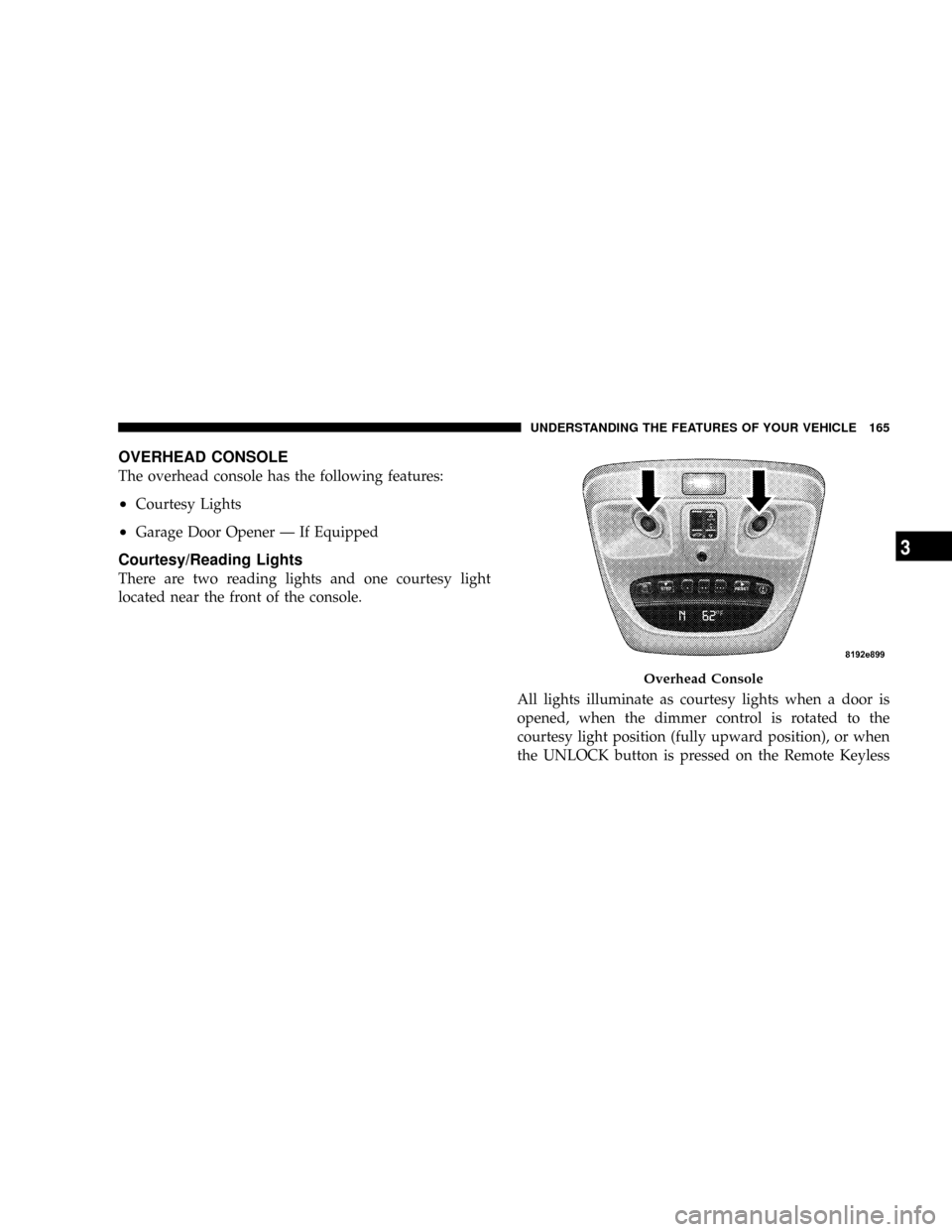
OVERHEAD CONSOLE
The overhead console has the following features:
²Courtesy Lights
²Garage Door Opener Ð If Equipped
Courtesy/Reading Lights
There are two reading lights and one courtesy light
located near the front of the console.
All lights illuminate as courtesy lights when a door is
opened, when the dimmer control is rotated to the
courtesy light position (fully upward position), or when
the UNLOCK button is pressed on the Remote Keyless
Overhead Console
UNDERSTANDING THE FEATURES OF YOUR VEHICLE 165
3
Page 168 of 481
Entry (RKE) transmitter, if equipped. The two round
lamps are also operated individually as reading lights by
pressing the center of each lens.
NOTE:The courtesy/reading lights will remain on until
the switch is pressed a second time, so be sure they have
been turned off before leaving the vehicle. If the interior
lights are left on after the vehicle is turned OFF, they will
turn off after 15 minutes.
OVERHEAD CONSOLE WITH ELECTRONIC
VEHICLE INFORMATION CENTER (EVIC) Ð IF
EQUIPPED
The overhead console contains dome/reading lights, and
an Electronic Vehicle Information Center (EVIC).
Dome/Reading Lights
Located in the overhead console are two dome/reading
lights.The dome/reading lights illuminate when a door is
opened or when the interior lights are turned on by
rotating the dimmer control located on the headlight
switch.
The reading lights are activated by pressing the center of
each lens.
NOTE:The dome/reading lights will remain on until
the switch is pressed a second time, so be sure they have
been turned off before leaving the vehicle.
166 UNDERSTANDING THE FEATURES OF YOUR VEHICLE
Page 173 of 481

²ªAUTO DOOR LOCK > ONº ± When ON is selected,
all doors will lock automatically when the vehicle
reaches a speed of 15 mph (24 km/h). To make your
selection, press and release the RESET button until
ªONº or ªOFFº appears.
²ªAUTO UNLOCK ON EXIT > ONº ± When ON is
selected, all doors will unlock when the vehicle is
stopped and the transmission is in the PARK or
NEUTRAL position and the driver's door is opened.
To make your selection, press and release the RESET
button until ªONº or ªOFFº appears.
²ªRKE UNLOCK DRV DR 1stº ± WhenDRV DR 1stis
selected, only the driver's door will unlock on the first
press of the RKE UNLOCK button. When Driver Door
1st Press is selected, you must press the Remote
Keyless Entry UNLOCK button twice to unlock the
passenger's doors. To make your selection, press and
release the RESET button until ªDRV DR 1st º appears.
²ªRKE UNLOCK ALL DR 1STº ± When AllALL DR
1STis selected, all of the doors will unlock on the first
press of the RKE UNLOCK button. To make your
selection, press and release the RESET button until
ªAll DR 1stº appears.
²MEM. RECALL WITH RKE > ON ± When ON is
selected, pressing the UNLOCK button on the RKE
will recall the memory settings for the seat, mirror and
radio. To make your selection, press and release the
RESET button until ªON9or ªOFFº appears.
²ªSOUND HORN W/LOCK > ONº ± When ON is
selected, a short horn sound will occur when the
Remote Keyless Entry LOCK button is pressed. This
feature may be selected with or without the flash lights
on lock/unlock feature. To make your selection, press
and release the RESET button until ªONº or ªOFFº
appears.
UNDERSTANDING THE FEATURES OF YOUR VEHICLE 171
3
Page 174 of 481

²ªFLASH LAMPS W/LOCK >ONº ± When ON is
selected, the front and rear turn signals will flash when
the doors are locked or unlocked with the RKE Trans-
mitter. This feature may be selected with or without
the sound horn on lock feature selected. To make your
selection, press and release the RESET button until
ªONº or ªOFFº appears.
²ªHEADLAMP OFF DELAY > 0 SECº ± When this
feature is selected, the driver can choose to have the
headlamps remain on for 0, 30, 60, or 90 seconds when
exiting the vehicle. To make your selection, press and
release the RESET button until ª0,º ª30,º ª60,º or ª90º
appears.
NOTE:The headlamp switch must be in the ªAº auto
mode before this feature will work.
²HEADLAMPS W/WIPERS > ON ± When ON is
selected, the headlamps will automatically turn on
when the wiper switch is activated.
²EASY EXIT SEAT > ON ± When ON is selected, and
the key is removed from the ignition, the driver's seat
will automatically move rearward to allow easy exit.
²TILT MIRRORS IN ªRº > ON ± When ON is selected,
and the transmission is put in REVERSE, the outside
mirrors will tilt downward.
²ªKEY OFF POWER DELAY> OFFº ± When this feature
is selected, the power window switches, radio, hands±
free system (if equipped), and power outlets will
remain active for up to 10 minutes after the ignition
switch is turned off. Opening a vehicle door will
cancel this feature. To make your selection, press and
release the RESET button until ªOff,º ª45 sec.,º ª5
min.,º ª10 min.º appears.
²ªILLUMINATED APRCH > OFFº ± When this feature
is selected, the headlights will activate and remain on
for up to 90 seconds when the doors are unlocked with
172 UNDERSTANDING THE FEATURES OF YOUR VEHICLE