Page 79 of 481
Safety Checks You Should Make Outside The
Vehicle
Tires
Examine tires for tread wear or uneven wear patterns.
Check for stones, nails, glass or other objects lodged in
the tread.
Inspect for tread cuts or sidewall cracks. Check wheel
nuts for tightness and tires for proper pressure.
Lights
Check the operation of all exterior lights. Check turn
signal and high beam indicator lights on the instrument
panel.
Door Latches
Check for positive closing, latching and locking.
Fluid Leaks
Check area under vehicle after overnight parking for fuel,
water, oil, or other fluid leaks. Also, if fuel fumes are
detected, the cause should be located and corrected.
THINGS TO KNOW BEFORE STARTING YOUR VEHICLE 77
2
Page 83 of 481

NSelf-Limiting Control.................. 139
NDriver Easy Exit And Easy Entry Control.... 139
mTo Open And Close The Hood............. 140
mLights.............................. 142
NHeadlight Switch..................... 142
NInterior Lights....................... 144
NBattery Saver........................ 145
NIlluminated Entry.................... 146
NDaytime Running Lights (Canada Only).... 146
NLights-On Reminder.................. 146
NFog Lights Ð If Equipped.............. 147
NMultifunction Lever................... 148
mWindshield Wipers And Washers........... 150NWindshield Wipers................... 150
NWindshield Washers................... 151
mTilt Steering Column................... 152
mDriver Adjustable Pedals Ð If Equipped..... 153
NAdjustment......................... 154
mElectronic Speed Control Ð If Equipped...... 155
NTo Activate......................... 156
NTo Set At A Desired Speed.............. 156
NTo Deactivate....................... 156
NTo Resume Speed.................... 156
NTo Vary The Speed Setting.............. 157
NTo Accelerate For Passing............... 157
UNDERSTANDING THE FEATURES OF YOUR VEHICLE 81
3
Page 84 of 481
mRear Park Assist System Ð If Equipped...... 158
NRear Park Assist Sensors............... 158
NRear Park Assist Warning Display......... 159
N
Enable/Disable The Rear Park Assist System. . 162
NService The Rear Park Assist System....... 162
NCleaning The Rear Park Assist System...... 163
mRear Backup Camera Ð If Equipped........ 163
mOverhead Console..................... 165
NCourtesy/Reading Lights............... 165
mOverhead Console With Electronic Vehicle
Information Center (EVIC) Ð If Equipped..... 166
NDome/Reading Lights................. 166
NElectronic Vehicle Information Center (EVIC)
Ð If Equipped....................... 167NCompass/Temperature Button........... 173
mGarage Door Opener Ð If Equipped........ 176
NProgramming HomeLinkt.............. 177
NGate Operator/Canadian Programming..... 180
NUsing HomeLinkt.................... 181
NReprogramming A Single HomeLinkt
Button............................ 181
NSecurity........................... 181
NTroubleshooting Tips.................. 182
NGeneral Information................... 182
mPower Sunroof Ð If Equipped............. 183
NExpress Open Feature................. 183
NWind Buffeting...................... 184
82 UNDERSTANDING THE FEATURES OF YOUR VEHICLE
Page 90 of 481
Illuminated Vanity Mirrors Ð If Equipped
An illuminated vanity mirror is on each sun visor. To use
the mirror, rotate the sun visor down and rotate the
mirror cover upward. The lights will turn on and off
automatically.
HANDS-FREE COMMUNICATION (UConnectT)Ð
IF EQUIPPED
NOTE: The sales code RER, REN and REU radios
contain an integrated Hands-Free Communication
(UConnectt) system. Refer to your ªNavigation User's
Manualº for UConnecttsystem operating instructions
for these radios.
UConnecttis a voice-activated, hands-free, in-vehicle
communications system. UConnecttallows you to dial a
phone number with your cellular phone using simple
voice commands (e.g.,9Callº{ªMikeº{ºWork9or9Dialº
{ª248-555-12129). Your cellular phone's audio is trans-
mitted through your vehicle's audio system; the system
will automatically mute your radio when using the
UConnecttsystem.
Illuminated Vanity Mirror
88 UNDERSTANDING THE FEATURES OF YOUR VEHICLE
Page 144 of 481
LIGHTS
Headlight Switch
Headlights, Parking Lights and Instrument Panel
Lights
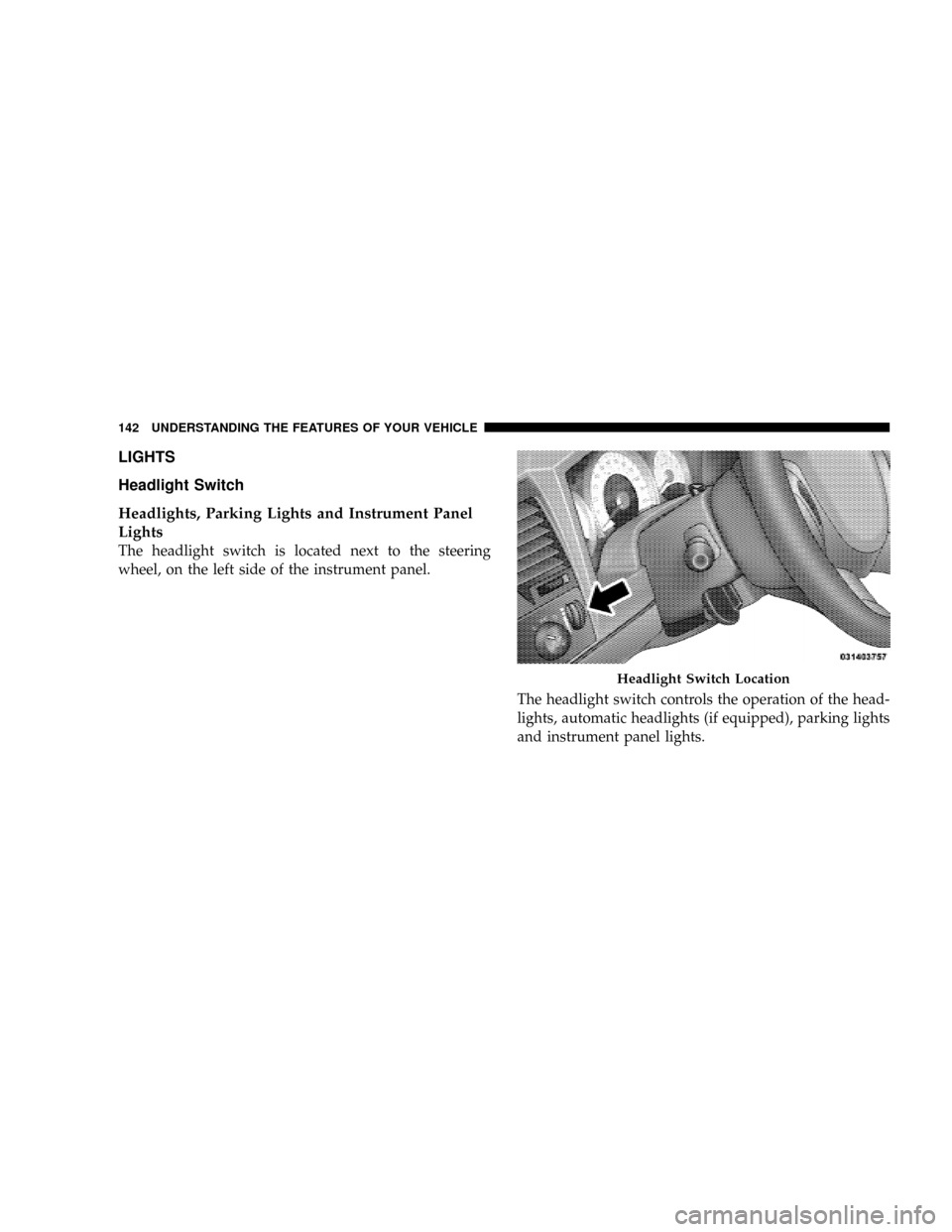
The headlight switch is located next to the steering
wheel, on the left side of the instrument panel.
The headlight switch controls the operation of the head-
lights, automatic headlights (if equipped), parking lights
and instrument panel lights.
Headlight Switch Location
142 UNDERSTANDING THE FEATURES OF YOUR VEHICLE
Page 145 of 481
Rotating the headlight switch clockwise to the first
position will turn on the parking lights, taillights, side
marker lights, license plate light and instrument panel
lights. To turn on the headlights, rotate the switch clock-
wise into the second position.NOTE:
²Your vehicle is equipped with plastic headlight lenses
that are lighter and less susceptible to stone breakage
than glass headlights.
²Plastic is not as scratch resistant as glass and therefore
different lens cleaning procedures must be followed.
²To minimize the possibility of scratching the lenses
and reducing light output, avoid wiping with a dry
cloth. To remove road dirt, wash with a mild soap
solution followed by rinsing.
²Do not use abrasive cleaning components, solvents,
steel wool or other abrasive materials to clean the
lenses.Headlight Switch
UNDERSTANDING THE FEATURES OF YOUR VEHICLE 143
3
Page 146 of 481

Automatic Headlights Ð If Equipped
Automatic headlights can be activated by rotating the
rotary headlight switch to the symbol ªA.º The head-
lights will turn on when the engine is running and the
ambient light sensor indicates that the headlights should
be activated. The headlights will turn off if the headlight
switch is rotated to the OFF position or 90 seconds after
the ignition is turned to OFF.
Headlight Delay
To aid in your exit, your vehicle is equipped with a
headlight delay that will leave the headlights on for 90
seconds. This delay is initiated when the ignition is
cycled off while the headlight switch is on, and then the
headlight switch is cycled off. The headlights will remain
on for 90 seconds. Headlight delay can be canceled by
either turning the headlight switch ON then OFF or by
turning the ignition ON.The headlight delay time is programmable on vehicles
equipped with the Electronic Vehicle Information Center
(EVIC). For details, refer to ªPersonal Settings (Customer
Programmable Features)º under ªOverhead Console
with Electronic Vehicle Information Center (EVIC) ± If
Equippedº in Section 3.
Interior Lights
The brightness of the instrument panel lighting can be
regulated by rotating the dimmer control up (brighter) or
down (dimmer). When the headlights are ON you can
supplement the brightness of the odometer, trip odom-
eter, radio and overhead console by rotating the control
up until you hear a click. This feature is termed the
9Parade9mode and is useful when headlights are re-
quired during the day.
144 UNDERSTANDING THE FEATURES OF YOUR VEHICLE
Page 147 of 481

Courtesy and dome lights are turned on when the front
doors are opened, when the dimmer control is rotated to
the second upward detent position or when the UN-
LOCK button is pressed on the Remote Keyless Entry
(RKE) transmitter. When a door is open and the interior
lights are on, rotating the dimmer control all of the waydown to the OFF detent will cause all the interior lights to
go out. This allows the doors to stay open for extended
periods of time without discharging the vehicle's battery.
Battery Saver
To protect the life of your vehicle's battery, load shedding
is provided for both the interior and exterior lights.
If the ignition is off and any door is left ajar for eight
minutes or the dimmer control is rotated upwards for 15
minutes, the interior lights will automatically turn off.
If the headlights remain on while the ignition is cycled
off, the exterior lights will automatically turn off after
eight minutes. If the headlights are turned on and left on
for eight minutes while the ignition is off, the exterior
lights will automatically turn off.
NOTE:Battery Saver mode is cancelled if the ignition is
ON.
Dimmer Control
UNDERSTANDING THE FEATURES OF YOUR VEHICLE 145
3