Page 193 of 526
Sunroof Fully Closed
Press the switch forward and release to ensure that the
sunroof is fully closed.
ELECTRICAL POWER OUTLETS
There are two 12-Volt electrical outlets on this vehicle.
Both of the outlets are protected by a fuse.
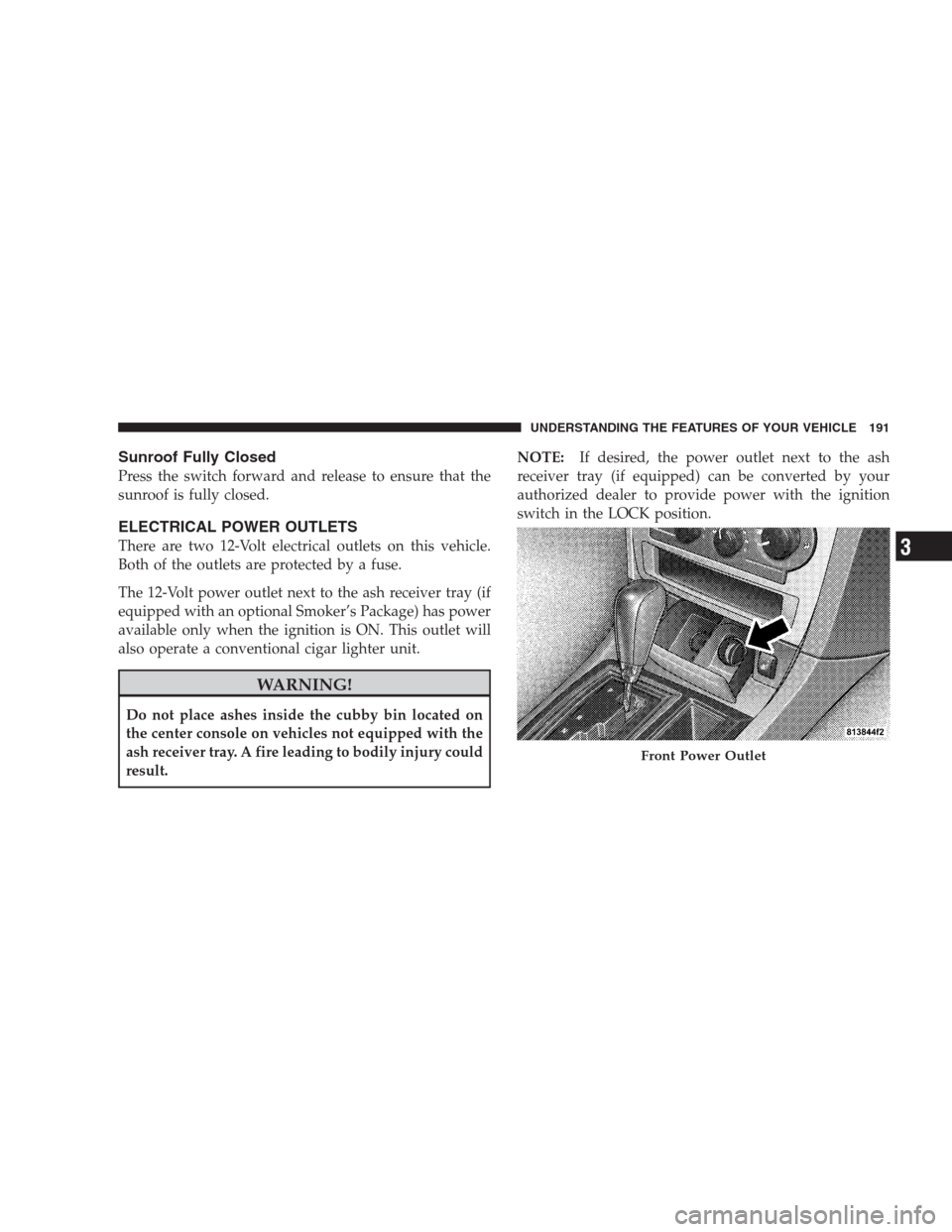
The 12-Volt power outlet next to the ash receiver tray (if
equipped with an optional Smoker’s Package) has power
available only when the ignition is ON. This outlet will
also operate a conventional cigar lighter unit.
WARNING!
Do not place ashes inside the cubby bin located on
the center console on vehicles not equipped with the
ash receiver tray. A fire leading to bodily injury could
result.NOTE:If desired, the power outlet next to the ash
receiver tray (if equipped) can be converted by your
authorized dealer to provide power with the ignition
switch in the LOCK position.
Front Power Outlet
UNDERSTANDING THE FEATURES OF YOUR VEHICLE 191
3
Page 199 of 526
WARNING! (Continued)
•Always place cargo evenly on the cargo floor. Put
heavier objects as low and as far forward as
possible.
•Place as much cargo as possible in front of the rear
axle. Too much weight or improperly placed
weight over or behind the rear axle can cause the
rear of the vehicle to sway.
•Do not pile luggage or cargo higher than the top of
the seatback. This could impair visibility or be-
come a dangerous projectile in a sudden stop or
collision.
When the seatback is folded to the upright position, make
sure it is latched by strongly pulling on the top of the
seatback above the seat strap.
WARNING!
•Be certain that the seatback is securely locked into
position. If the seatback in not securely locked
into position, the seat will not provide the proper
stability for child seats and/or passengers. An
improperly latched seat could cause serious injury.
•The cargo area in the rear of the vehicle (with the
rear seatbacks in the locked-up or folded down
position) should not be used as a play area by
children when the vehicle is in motion. They could
be seriously injured in an accident. Children
should be seated and using the proper restraint
system.
(Continued)
UNDERSTANDING THE FEATURES OF YOUR VEHICLE 197
3
Page 203 of 526
UNDERSTANDING YOUR INSTRUMENT PANEL
CONTENTS
�Instrument Panel Features............... 205
�Instrument Cluster — Base............... 206
�Instrument Cluster — Premium........... 207
�Instrument Cluster Descriptions........... 208
�Electronic Vehicle Information Center (EVIC)
— If Equipped........................ 220
▫Electronic Vehicle Information Center (EVIC)
Displays........................... 222
▫Oil Change Required.................. 225
▫Trip Functions...................... 226▫Automatic All Wheel Drive (AWD) Displays
— If Equipped...................... 228
▫Compass Display.................... 229
▫Driver-Selectable Surround Sound (DSS)
– If Equipped....................... 231
▫uconnect�gps (Navigation) — If Equipped . . 232
▫Personal Settings (Customer-Programmable
Features).......................... 232
�Setting The Analog Clock................ 2374
Page 204 of 526
�Sales Code REQ — AM/FM Stereo Radio And
6–Disc CD/DVD Changer (MP3/WMA AUX
Jack)............................... 238
▫Operating Instructions - Radio Mode...... 238
▫Operation Instructions - (Disc Mode For CD
And MP3/WMA Audio Play, DVD-Video) . . . 246
▫Notes On Playing MP3/WMA Files....... 248
▫List Button (Disc Mode For MP3/WMA
Play)............................. 250
▫Info Button (Disc Mode For MP3/WMA
Play)............................. 251
�AM/FM/CD/DVD Radio (RER/REN)
– If Equipped......................... 253
▫Operating Instructions — Voice Recognition
System (VR) — If Equipped............. 253▫Operating Instructions — uconnect�phone
— If Equipped...................... 253
▫Clock Setting Procedure............... 253
�Sales Code RES — AM/FM Stereo Radio With
CD Player (MP3 AUX Jack)............... 256
▫Operating Instructions — Radio Mode..... 256
▫Operation Instructions — CD Mode For CD
And MP3 Audio Play................. 259
▫Notes On Playing MP3 Files............ 261
▫Operation Instructions - Auxiliary Mode.... 264
�Sales Code RES/RSC — AM/FM Stereo Radio
With CD Player (MP3 AUX Jack) And Sirius
Radio............................... 265
▫Operating Instructions — Radio Mode..... 265
202 UNDERSTANDING YOUR INSTRUMENT PANEL
Page 207 of 526
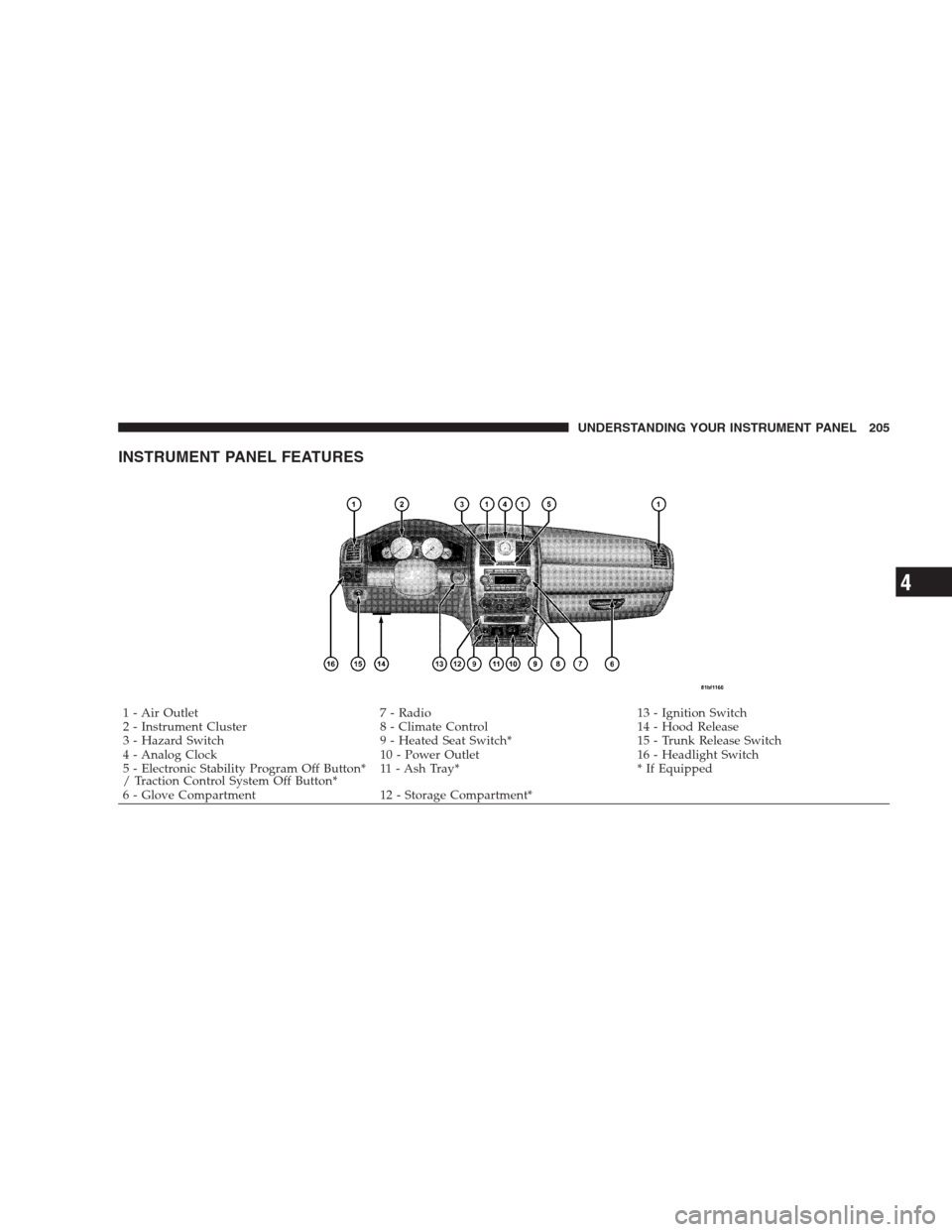
INSTRUMENT PANEL FEATURES
1 - Air Outlet 7 - Radio 13 - Ignition Switch
2 - Instrument Cluster 8 - Climate Control 14 - Hood Release
3 - Hazard Switch 9 - Heated Seat Switch* 15 - Trunk Release Switch
4 - Analog Clock 10 - Power Outlet 16 - Headlight Switch
5 - Electronic Stability Program Off Button*
/ Traction Control System Off Button*11 - Ash Tray* * If Equipped
6 - Glove Compartment 12 - Storage Compartment*UNDERSTANDING YOUR INSTRUMENT PANEL 205
4
Page 212 of 526

reset the oil change indicator system (after performing
the scheduled maintenance) perform the following pro-
cedure:
1. Turn the ignition switch to the ON position. (Do not
start the engine).
2. Fully depress the accelerator pedal slowly three
times within 10 seconds.
3. Turn the ignition switch to the LOCK position.
NOTE:If the indicator message illuminates when you
start the vehicle, the oil change indicator system did not
reset. If necessary, repeat this procedure.
On vehicles equipped with a Premium Instrument Clus-
ter, this display shows the Electronic Vehicle Information
Center (EVIC) messages when the appropriate conditions
exist.Lo tirE
When the appropriate condition exists the odometer
display will toggle between Lo and tirE for three cycles.
Loose Fuel Filler Cap Message
If the vehicle diagnostic system determines that the fuel
filler cap is loose, improperly installed, or damaged, a
“Check Gascap” message will display in the EVIC.
Tighten the fuel filler cap properly and press the TRIP
ODOMETER button to turn off the message. If the
problem continues, the message will appear the next time
the vehicle is started.
A loose, improperly installed, or damaged fuel filler cap
may also turn on the Malfunction Indicator Light (MIL).
Refer to “Electronic Vehicle Information Center (EVIC)”
in this section for more information.
210 UNDERSTANDING YOUR INSTRUMENT PANEL
Page 213 of 526
7. Tachometer
The red segments indicate the maximum permissible
engine revolutions per minute (RPM x 1000) for each gear
range. Ease up on the accelerator before reaching the red
area.
8. Engine Temperature Warning Light
This light will turn on and a single chime will
sound to warn of an overheated engine condition.
When this light turns on, the engine temperature
is critically hot. If the light turns on while driving, safely
pull over and stop the vehicle. The vehicle should be
turned OFF immediately and serviced as soon as pos-
sible. (Refer to “If Your Engine Overheats” in Section 6
for more information).9. Anti-Lock Brake (ABS) Light — If Equipped
This light monitors the Anti-Lock Brake System
(ABS). The light will turn on when the ignition
switch is turned to the ON position and may stay on for
as long as four seconds.
If the ABS Light remains on or turns on while driving,
then the Anti-Lock portion of the brake system is not
functioning and service is required. However, the con-
ventional brake system will continue to operate normally
if the Brake Warning Light is not on.
If the ABS Light is on, the brake system should be
serviced as soon as possible to restore the benefits of
Anti-Lock brakes. If the ABS Light does not turn on when
the ignition switch is turned to the ON position, have the
light inspected by an authorized dealer.
UNDERSTANDING YOUR INSTRUMENT PANEL 211
4
Page 214 of 526

10. Electronic Stability Program (ESP) / Brake Assist
System (BAS) Malfunction Indicator Light
The yellow Electronic Stability Program (ESP)
/ Brake Assist System (BAS) Malfunction Indi-
cator Light will turn on when the key in the
ignition switch is turned to the ON position.
The light should go out with the engine running. The
system will turn this light on continuously while the
engine is running if it detects a malfunction in either the
ESP, the BAS or both.
11. Airbag Warning Light
This light will turn on for six to eight seconds
as a bulb check when the ignition switch is first
turned ON. If the light is either not on during
starting, or stays on, or turns on while driving,
then have the system inspected at an authorized dealer as
soon as possible.12. Brake Warning Light
This light monitors various brake functions,
including brake fluid level and parking brake
application. If the brake light turns on, it may
indicate that the parking brake is applied, that
the brake fluid level is low, or that there is a problem with
the anti-lock brake system reservoir.
If the light remains on when the parking brake has been
disengaged, and the fluid level is at the full mark on the
master cylinder reservoir, it indicates a possible brake
hydraulic system malfunction or a problem with the
Brake Booster has been detected by the Anti-Lock Brake
System (ABS) / Electronic Stability Program (ESP) sys-
tem. In this case, the light will remain on until the
condition has been corrected. If the problem is related to
the brake booster, the ABS pump will run when applying
the brake and a brake pedal pulsation may be felt during
each stop.
212 UNDERSTANDING YOUR INSTRUMENT PANEL