Page 219 of 526
Also, have the system checked by an authorized dealer if
the light does not come on during starting.
22. Tire Pressure Monitoring Telltale Light
Each tire, including the spare (if provided),
should be checked monthly when cold and
inflated to the inflation pressure recommended
by the vehicle manufacturer on the vehicle
placard or tire inflation pressure label. (If your vehicle
has tires of a different size than the size indicated on the
vehicle placard or tire inflation pressure label, you should
determine the proper tire inflation pressure for those
tires.)
As an added safety feature, your vehicle has been
equipped with a Tire Pressure Monitoring System
(TPMS) that illuminates a low tire pressure telltale when
one or more of your tires is significantly under-inflated.
Accordingly, when the low tire pressure telltale illumi-
nates, you should stop and check your tires as soon aspossible, and inflate them to the proper pressure. Driving
on a significantly under-inflated tire causes the tire to
overheat and can lead to tire failure. Under-inflation also
reduces fuel efficiency and tire tread life, and may affect
the vehicle’s handling and stopping ability.
Please note that the TPMS is not a substitute for proper
tire maintenance, and it is the driver ’s responsibility to
maintain correct tire pressure, even if under-inflation has
not reached the level to trigger illumination of the TPMS
low tire pressure telltale.
Your vehicle has also been equipped with a TPMS
malfunction indicator to indicate when the system is not
operating properly. The TPMS malfunction indicator is
combined with the low tire pressure telltale. When the
system detects a malfunction, the telltale will flash for
approximately one minute and then remain continuously
illuminated. This sequence will continue upon subse-
quent vehicle start-ups as long as the malfunction exists.
UNDERSTANDING YOUR INSTRUMENT PANEL 217
4
Page 220 of 526
When the malfunction indicator is illuminated, the sys-
tem may not be able to detect or signal low tire pressure
as intended. TPMS malfunctions may occur for a variety
of reasons, including the installation of replacement or
alternate tires or wheels on the vehicle that prevent the
TPMS from functioning properly. Always check the
TPMS malfunction telltale after replacing one or more
tires or wheels on your vehicle to ensure that the replace-
ment or alternate tires and wheels allow the TPMS to
continue to function properly.CAUTION!
The TPMS has been optimized for the original
equipment tires and wheels. TPMS pressures and
warning have been established for the tire size
equipped on your vehicle. Undesirable system opera-
tion or sensor damage may result when using re-
placement equipment that is not of the same size,
type, and/or style. Aftermarket wheels can cause
sensor damage. Do not use aftermarket tire sealants
or balance beads if your vehicle is equipped with a
TPMS, as damage to the sensors may result.
23. Charging System Light
This light shows the status of the electrical charg-
ing system. The light should come on when the
ignition switch is first turned ON and remain on briefly
as a bulb check. If the light stays on or comes on while
driving, turn off some of the vehicle’s non-essential
218 UNDERSTANDING YOUR INSTRUMENT PANEL
Page 221 of 526
electrical devices or increase engine speed (if at idle). If
the charging system light remains on, it means that the
vehicle is experiencing a problem with the charging
system. Obtain SERVICE IMMEDIATELY. See an autho-
rized dealer.
24. Malfunction Indicator Light (MIL)
The Malfunction Indicator Light (MIL) is part of
an onboard diagnostic system called OBD. The
OBD system monitors engine and automatic
transmission control systems. The MIL will turn on when
the key is in the ON position before engine start. If the
MIL does not come on when turning the key from LOCK
to ON, have the condition checked promptly.
Certain conditions such as a loose or missing gas cap,
poor fuel quality, etc., may illuminate the MIL after
engine start. The vehicle should be serviced if the MILstays on through several of your typical driving cycles. In
most situations, the vehicle will drive normally and will
not require towing.
The MIL flashes to alert you to serious conditions that
could lead to immediate loss of power or severe catalytic
converter damage. The vehicle should be serviced as
soon as possible if this occurs.
25. Oil Pressure Warning Light
This light indicates low engine oil pressure. The
light should turn on momentarily when the engine
is started. If the light turns on while driving, stop the
vehicle, and shut OFF the engine as soon as possible. A
single chime will sound when this light turns on.
Do not operate the vehicle until the cause is corrected.
This light does not show how much oil is in the engine.
The engine oil level must be checked using the procedure
shown in Section 7.
UNDERSTANDING YOUR INSTRUMENT PANEL 219
4
Page 222 of 526
ELECTRONIC VEHICLE INFORMATION CENTER
(EVIC) — IF EQUIPPED
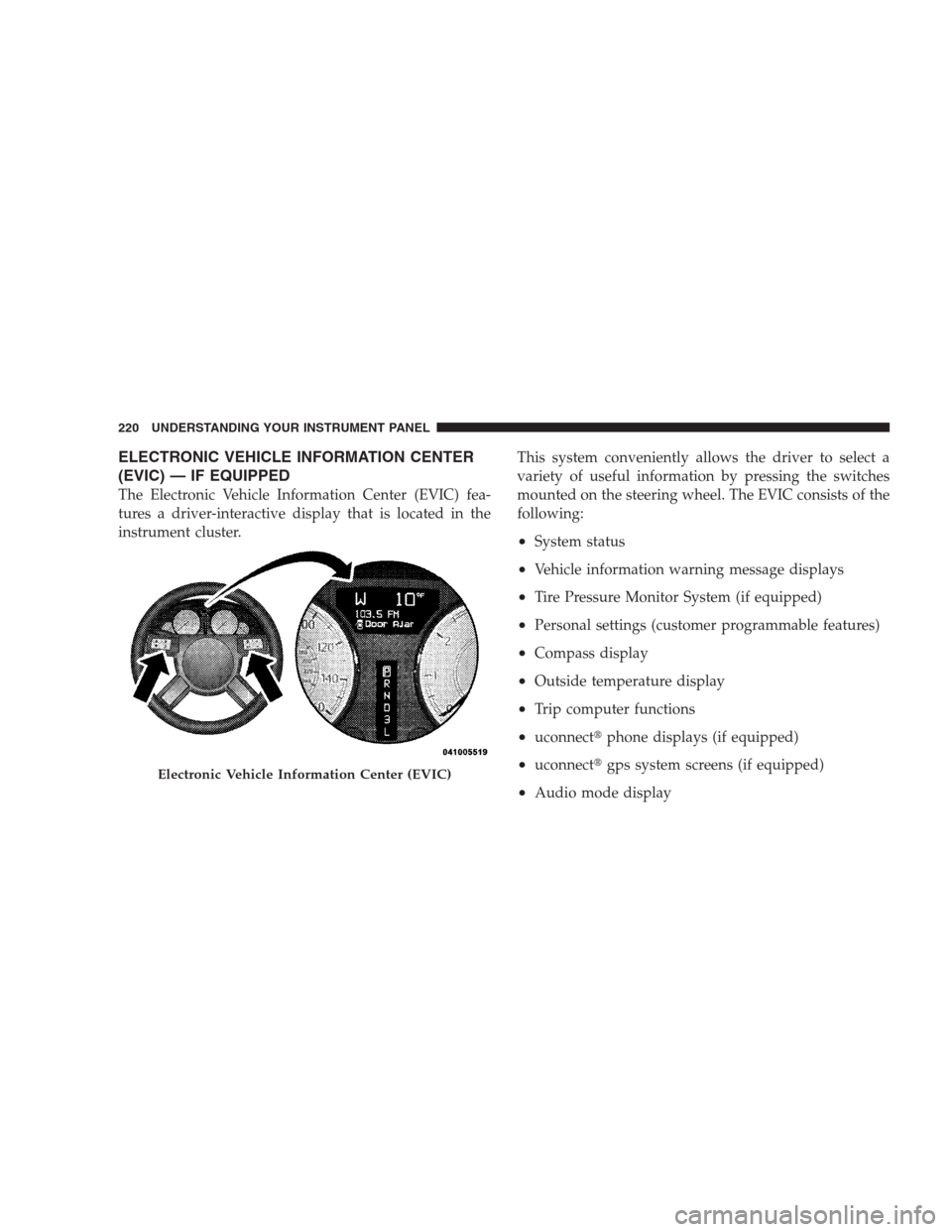
The Electronic Vehicle Information Center (EVIC) fea-
tures a driver-interactive display that is located in the
instrument cluster.This system conveniently allows the driver to select a
variety of useful information by pressing the switches
mounted on the steering wheel. The EVIC consists of the
following:
•System status
•Vehicle information warning message displays
•Tire Pressure Monitor System (if equipped)
•Personal settings (customer programmable features)
•Compass display
•Outside temperature display
•Trip computer functions
•uconnect�phone displays (if equipped)
•uconnect�gps system screens (if equipped)
•Audio mode display
Electronic Vehicle Information Center (EVIC)
220 UNDERSTANDING YOUR INSTRUMENT PANEL
Page 223 of 526
![CHRYSLER 300 2009 1.G Owners Manual •Surround Sound Modes (If Equipped with Driver-
Selectable Surround [DSS])
The system allows the driver to select information by
pressing the following buttons mounted on the steering
wheel.
Press a](/manual-img/25/8416/w960_8416-222.png "CHRYSLER 300 2009 1.G Owners Manual •Surround Sound Modes (If Equipped with Driver-
Selectable Surround [DSS])
The system allows the driver to select information by
pressing the following buttons mounted on the steering
wheel.
Press a")
•Surround Sound Modes (If Equipped with Driver-
Selectable Surround [DSS])
The system allows the driver to select information by
pressing the following buttons mounted on the steering
wheel.
Press and release the MENU button and the
mode displayed will change between Trip
Functions, uconnect�gps (if equipped), System
Status, and Personal Settings.
Press the FUNCTION SELECT button to accept
a selection. The FUNCTION SELECT button
also functions as a remote sound system con-
trol. Refer to “Remote Sound System Controls”
in this section.Press the SCROLL button to scroll through Trip
Functions, uconnect�gps (if equipped), System
Status Messages, and Personal Settings
(Customer-Programmable Features). The
SCROLL button also functions as a remote
sound system control. Refer to “Remote Sound
System Controls” in this section.
Press the AUDIO MODE button to select the
Compass/Temp/Audio screen. Along with
compass reading and outside temperature, this
screen will display radio and media mode
information depending on which radio is in the
vehicle. Refer to “Remote Sound System Con-
trols” in this section.
MENU
Button
FUNC-
TION
SELECT
Button
SCROLL
Button
AUDIO
MODE
Button
UNDERSTANDING YOUR INSTRUMENT PANEL 221
4
Page 224 of 526
Electronic Vehicle Information Center (EVIC)
Displays
When the appropriate conditions exist, the EVIC displays
the following messages:
•Turn Signal On (with a continuous warning chime if
the vehicle is driven more than 1 mile [1.6 km] with
either turn signal on)
•Left Front Turn Signal Light Out (with a single chime)
•Left Rear Turn Signal Light Out (with a single chime)
•Right Front Turn Signal Light Out (with a single
chime)
•Right Rear Turn Signal Light Out (with a single chime)
•RKE Battery Low (with a single chime)
•Memory #1/#2 Profile Set
•Memory #1/#2 Profile Recall
•Memory System Disabled – Vehicle Not In PARK (with
a single chime)
•Memory System Disabled – Seat Belt Buckled (with a
single chime)
•Personal Settings Not Available – Vehicle Not in PARK
•Left/Right Front Door Ajar (one or more, with a single
chime if speed is above 1 mph [1.6 km/h])
•Left/Right Rear Door Ajar (one or more, with a single
chime if speed is above 1 mph [1.6 km/h])
•Door(s) Ajar (with a single chime if vehicle is in
motion)
•Trunk Ajar (with a single chime)
•Low Washer Fluid (with a single chime)
222 UNDERSTANDING YOUR INSTRUMENT PANEL
Page 225 of 526
•SERVICE AWD SYSTEM — All Wheel Drive (AWD)
system is not functioning properly and service is
required.
•Normal Cruise Ready — When Adaptive Cruise Con-
trol (ACC) system is turned off and Normal (Fixed
Speed) Cruise Control mode is available. Refer to
“Adaptive Cruise Control (ACC)” in Section 3 (if
equipped).
•Cruise Off — When the Adaptive Cruise Control
(ACC) system is turned off. Refer to “Adaptive Cruise
Control (ACC)” in Section 3 (if equipped).
•ACC Ready — When the ACC system is activated.
Refer to “Adaptive Cruise Control (ACC)” in Section 3
(if equipped).
•ACC Set — After setting the desired speed in the ACC
system. Refer to “Adaptive Cruise Control (ACC)” in
Section 3 (if equipped).
•ACC Cancelled — To disable the ACC system. Refer to
“Adaptive Cruise Control (ACC)” in Section 3 (if
equipped).
•Sensed Vehicle Indicator — The system detects a
slower moving vehicle in the same lane. Refer to
“Adaptive Cruise Control (ACC)” in Section 3 (if
equipped).
•Driver Override — If you apply the accelerator after
setting the desired speed in the ACC system. Refer to
“Adaptive Cruise Control (ACC)” in Section 3 (if
equipped).
•Distance Set — After changing the desired following
distance in the ACC system, this message will display
momentarily. Refer to “Adaptive Cruise Control
(ACC)” in Section 3 (if equipped).
UNDERSTANDING YOUR INSTRUMENT PANEL 223
4
Page 226 of 526
•Attention — If the ACC system predicts that its
maximum braking level is not sufficient to maintain
the set distance, this message will flash and a chime
will sound while ACC continues to apply its maxi-
mum braking capacity. When this occurs, you should
immediately apply the brakes as needed to maintain a
safe distance from the vehicle ahead. Refer to “Adap-
tive Cruise Control (ACC)” in Section 3 (if equipped).
•ACC Blinded — If the ACC system deactivates due to
performance limiting conditions. Refer to “Adaptive
Cruise Control (ACC)” in Section 3 (if equipped).
•ACC Unavailable — If the ACC system turns off due
to a temporary malfunction that limits functionality.
Refer to “Adaptive Cruise Control (ACC)” in Section 3
(if equipped).
•Service ACC — If the ACC system turns off due to an
internal system fault that requires service from an
authorized dealer. Refer to “Adaptive Cruise Control
(ACC)” in Section 3 (if equipped).
•Adjustable Pedals Disabled – Cruise Engaged (with a
single chime) — only available on vehicles equipped
with memory seats.
•Adjustable Pedals Disabled – Vehicle In REVERSE
(with a single chime) — only available on vehicles
equipped with memory seats.
•Channel # Transmit
•Channel # Training
•Channel # Trained
•Clearing Channels
•Channels Cleared
224 UNDERSTANDING YOUR INSTRUMENT PANEL