Page 196 of 526
CUPHOLDERS
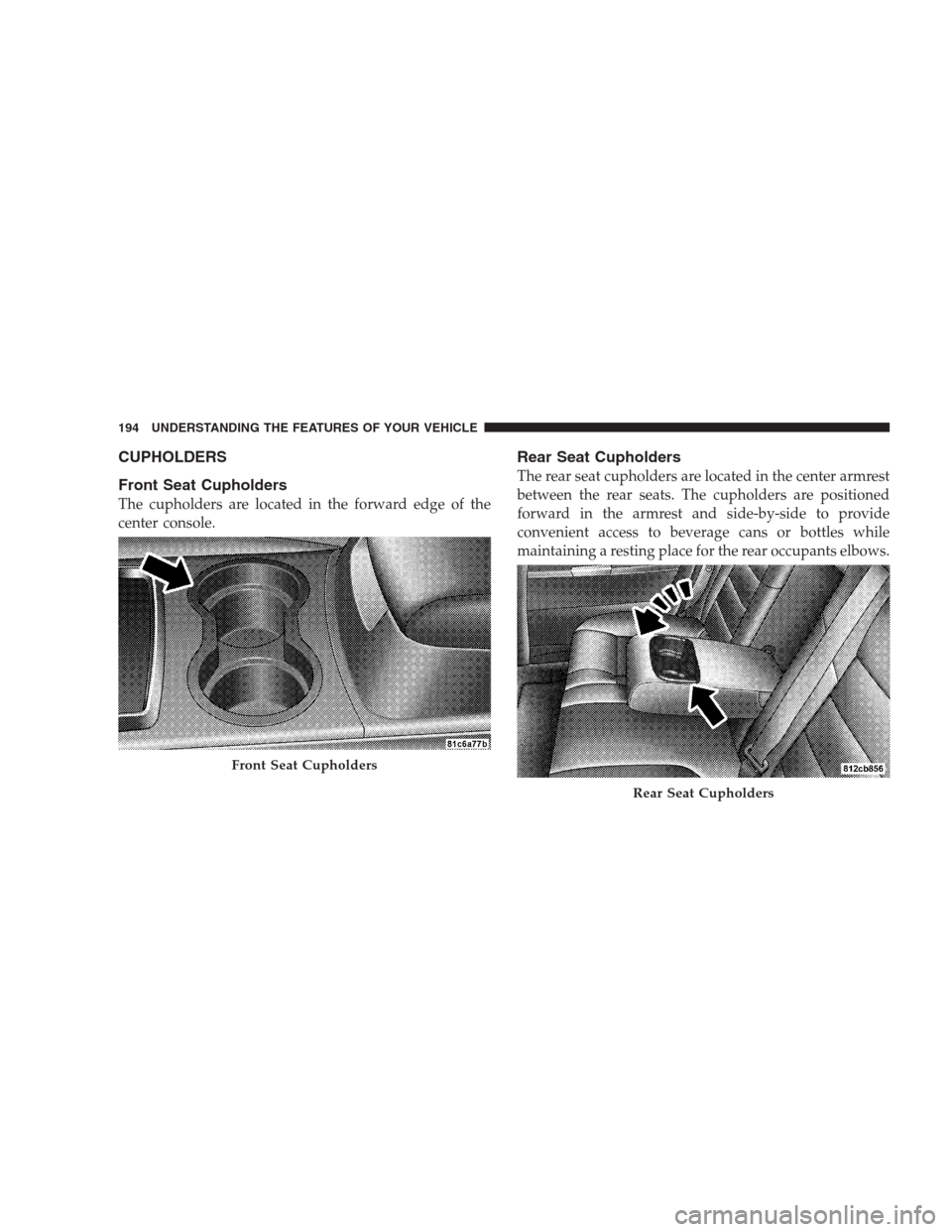
Front Seat Cupholders
The cupholders are located in the forward edge of the
center console.
Rear Seat Cupholders
The rear seat cupholders are located in the center armrest
between the rear seats. The cupholders are positioned
forward in the armrest and side-by-side to provide
convenient access to beverage cans or bottles while
maintaining a resting place for the rear occupants elbows.
Front Seat Cupholders
Rear Seat Cupholders
194 UNDERSTANDING THE FEATURES OF YOUR VEHICLE
Page 198 of 526
The top compartment holds small items, such as a pen
and note pad, while the larger bottom compartment will
hold CDs and alike. The bottom compartment also con-
tains a 12-Volt power outlet and a molded-in coin holder
(designed to hold various size coins). A slot in the left and
right side of the top compartment provides clearance for
power cords to pass conveniently out of the bin with the
lid closed. This feature is ideal for games, laptop’s,
cellular phones or other electrical equipment. The con-
sole’s front opening lid allows for easy access to these
compartments.
With Vehicle Entertainment System (VES�)
The center console contains a large storage compartment.
The storage compartment contains a 12-Volt power outlet
and a molded-in coin holder (designed to hold various
size coins). A slot in the top left and right side of the
storage compartment provides clearance for power cords
to pass conveniently out of the compartment with the lid
closed. This feature is ideal for games, laptop’s, cellularphones, or other electrical equipment. The console’s
front-opening lid allows for easy access to the storage
compartment for both the driver and the front passenger.
Cargo Area
The 60/40 split-folding rear seat provides cargo-carrying
versatility. The seatbacks fold down easily by pulling
nylon tabs between the seatbacks and the bolsters. When
the seats are folded down, they provide a continuous,
nearly-flat extension of the load floor.
WARNING!
The weight and position of cargo and passengers can
change the vehicle center of gravity and vehicle
handling. To avoid loss of control resulting in per-
sonal injury, follow these guidelines for loading your
vehicle:
(Continued)
196 UNDERSTANDING THE FEATURES OF YOUR VEHICLE
Page 199 of 526
WARNING! (Continued)
•Always place cargo evenly on the cargo floor. Put
heavier objects as low and as far forward as
possible.
•Place as much cargo as possible in front of the rear
axle. Too much weight or improperly placed
weight over or behind the rear axle can cause the
rear of the vehicle to sway.
•Do not pile luggage or cargo higher than the top of
the seatback. This could impair visibility or be-
come a dangerous projectile in a sudden stop or
collision.
When the seatback is folded to the upright position, make
sure it is latched by strongly pulling on the top of the
seatback above the seat strap.
WARNING!
•Be certain that the seatback is securely locked into
position. If the seatback in not securely locked
into position, the seat will not provide the proper
stability for child seats and/or passengers. An
improperly latched seat could cause serious injury.
•The cargo area in the rear of the vehicle (with the
rear seatbacks in the locked-up or folded down
position) should not be used as a play area by
children when the vehicle is in motion. They could
be seriously injured in an accident. Children
should be seated and using the proper restraint
system.
(Continued)
UNDERSTANDING THE FEATURES OF YOUR VEHICLE 197
3
Page 200 of 526
WARNING! (Continued)
•To help protect against personal injury, passengers
should not be seated in the rear cargo area. The
rear cargo space is intended for load carrying
purposes only, not for passengers, who should sit
in seats and use seat belts.
CARGO AREA FEATURES
Trunk Mat — If Equipped
A reversible trunk mat covers the bottom of the cargo
area. The rubber side of the mat is used to protect the
interior of the trunk from mud, snow, and debris. It
provides a nonskid surface to keep cargo from sliding.
REAR WINDOW FEATURES
Rear Window Defroster
The electric rear window defroster button is lo-
cated on the climate control. Press this button toturn on the rear window defroster and the heated outside
rearview mirrors (if equipped). An indicator in the button
will illuminate when the rear window defroster is on. The
rear window defroster automatically turns off after ap-
proximately 10 minutes. For an additional five minutes of
operation, press the button a second time.
CAUTION!
•To avoid damaging the electrical conductors of the
rear window defroster, do not use scrapers, sharp
instruments, or abrasive window cleaners on the
interior surface of the window.
•Labels can be peeled off after soaking with warm
water.
198 UNDERSTANDING THE FEATURES OF YOUR VEHICLE
Page 226 of 526
•Attention — If the ACC system predicts that its
maximum braking level is not sufficient to maintain
the set distance, this message will flash and a chime
will sound while ACC continues to apply its maxi-
mum braking capacity. When this occurs, you should
immediately apply the brakes as needed to maintain a
safe distance from the vehicle ahead. Refer to “Adap-
tive Cruise Control (ACC)” in Section 3 (if equipped).
•ACC Blinded — If the ACC system deactivates due to
performance limiting conditions. Refer to “Adaptive
Cruise Control (ACC)” in Section 3 (if equipped).
•ACC Unavailable — If the ACC system turns off due
to a temporary malfunction that limits functionality.
Refer to “Adaptive Cruise Control (ACC)” in Section 3
(if equipped).
•Service ACC — If the ACC system turns off due to an
internal system fault that requires service from an
authorized dealer. Refer to “Adaptive Cruise Control
(ACC)” in Section 3 (if equipped).
•Adjustable Pedals Disabled – Cruise Engaged (with a
single chime) — only available on vehicles equipped
with memory seats.
•Adjustable Pedals Disabled – Vehicle In REVERSE
(with a single chime) — only available on vehicles
equipped with memory seats.
•Channel # Transmit
•Channel # Training
•Channel # Trained
•Clearing Channels
•Channels Cleared
224 UNDERSTANDING YOUR INSTRUMENT PANEL
Page 297 of 526
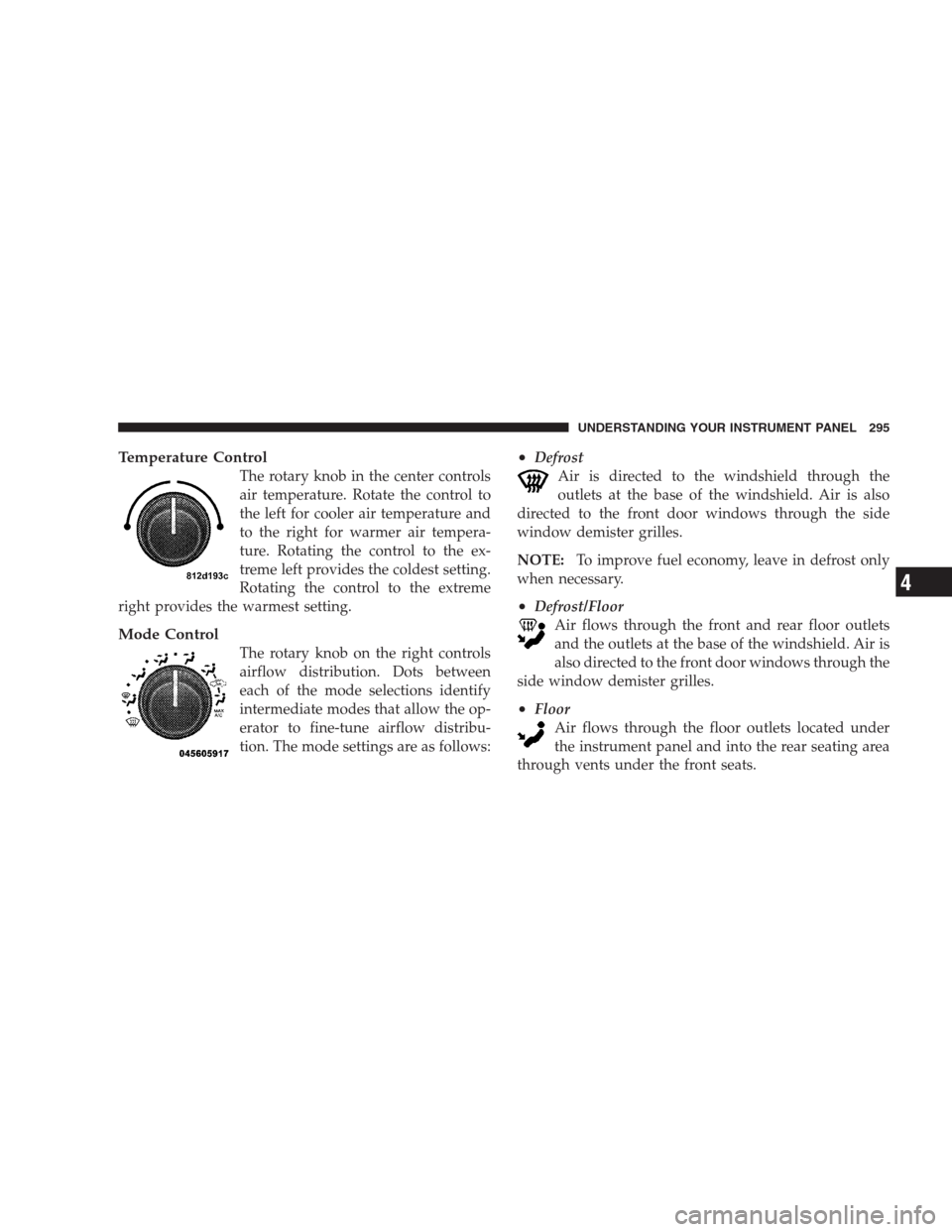
Temperature Control
The rotary knob in the center controls
air temperature. Rotate the control to
the left for cooler air temperature and
to the right for warmer air tempera-
ture. Rotating the control to the ex-
treme left provides the coldest setting.
Rotating the control to the extreme
right provides the warmest setting.
Mode Control
The rotary knob on the right controls
airflow distribution. Dots between
each of the mode selections identify
intermediate modes that allow the op-
erator to fine-tune airflow distribu-
tion. The mode settings are as follows:
•Defrost
Air is directed to the windshield through the
outlets at the base of the windshield. Air is also
directed to the front door windows through the side
window demister grilles.
NOTE:To improve fuel economy, leave in defrost only
when necessary.
•Defrost/Floor
Air flows through the front and rear floor outlets
and the outlets at the base of the windshield. Air is
also directed to the front door windows through the
side window demister grilles.
•Floor
Air flows through the floor outlets located under
the instrument panel and into the rear seating area
through vents under the front seats.
UNDERSTANDING YOUR INSTRUMENT PANEL 295
4
Page 303 of 526
The operator can override the AUTO mode setting to
change airflow distribution by rotating the mode control
knob (on the right) to one of the following positions.
•Defrost
Air is directed to the windshield through the
outlets at the base of the windshield. Air is also
directed to the front door windows through the side
window demister grilles.
•Defrost/Floor
Air flows through the front and rear floor outlets
and the outlets at the base of the windshield. Air is
also directed to the front door windows through the
side window demister grilles.
•Floor
Air flows through the floor outlets located under
the instrument panel and into the rear seating area
through vents under the front seats.
•Bi-Level
Air flows through the outlets located in the instru-
ment panel and through the outlets located on the
floor. Air flows through the registers in the back of the
center console to the rear seat passengers. These registers
can be closed to block airflow.
•Panel
Air flows through the outlets located in the instru-
ment panel. Air flows through the registers in the
back of the center console to the rear seat passengers.
These registers can be closed to block airflow.
•Air Conditioning Control
Press this button to turn on the air conditioning
during manual operation only. When the air con-
ditioning is turned on, cool dehumidified air will
flow through the outlets selected with the mode control
dial. Press this button a second time to turn off the air
conditioning. An indicator in the button illuminates
when manual compressor operation is selected.
UNDERSTANDING YOUR INSTRUMENT PANEL 301
4
Page 455 of 526
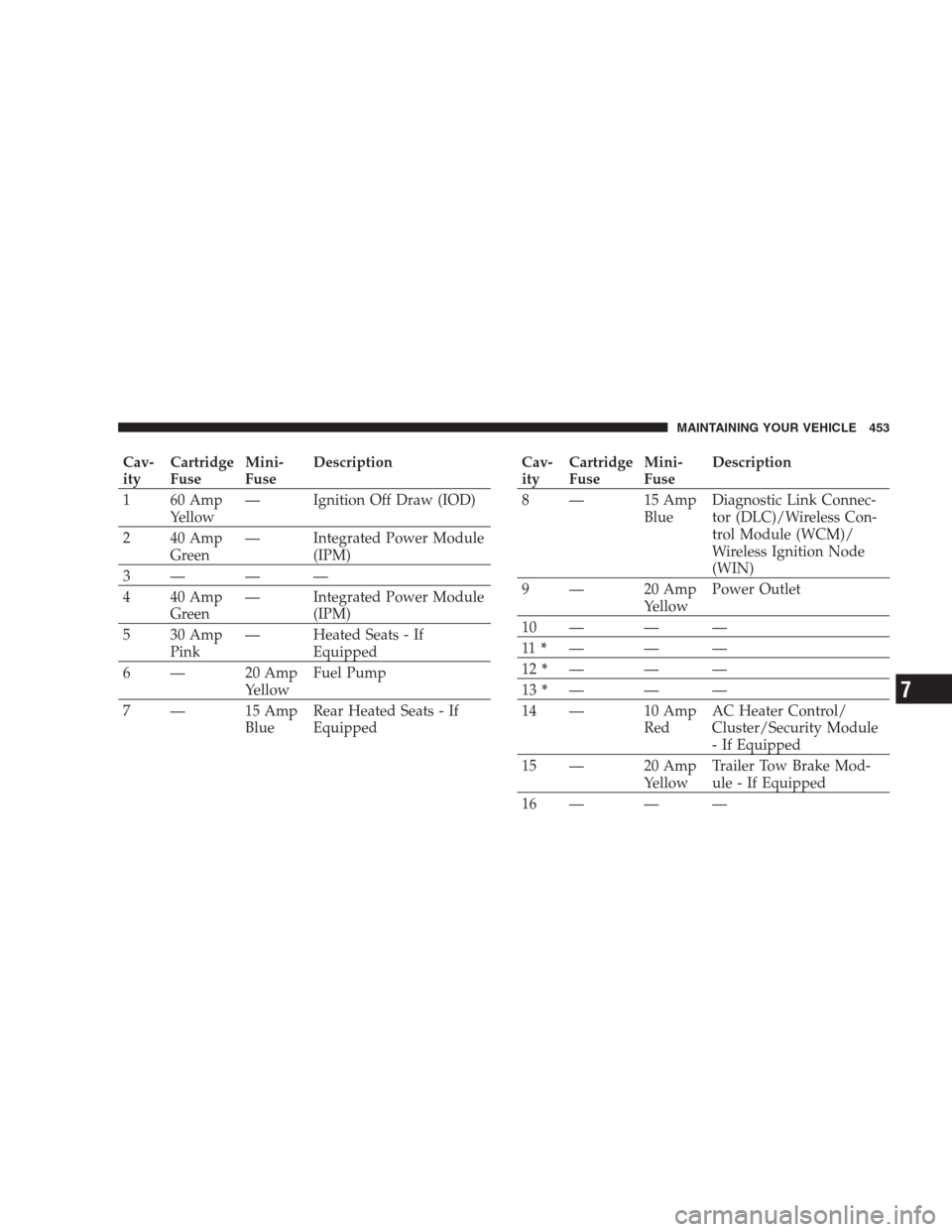
Cav-
ityCartridge
FuseMini-
FuseDescription
1 60 Amp
Yellow— Ignition Off Draw (IOD)
2 40 Amp
Green— Integrated Power Module
(IPM)
3— — —
4 40 Amp
Green— Integrated Power Module
(IPM)
5 30 Amp
Pink— Heated Seats - If
Equipped
6 — 20 Amp
YellowFuel Pump
7 — 15 Amp
BlueRear Heated Seats - If
EquippedCav-
ityCartridge
FuseMini-
FuseDescription
8 — 15 Amp
BlueDiagnostic Link Connec-
tor (DLC)/Wireless Con-
trol Module (WCM)/
Wireless Ignition Node
(WIN)
9 — 20 Amp
YellowPower Outlet
10 — — —
11*———
12*———
13*———
14 — 10 Amp
RedAC Heater Control/
Cluster/Security Module
- If Equipped
15 — 20 Amp
YellowTrailer Tow Brake Mod-
ule - If Equipped
16 — — —
MAINTAINING YOUR VEHICLE 453
7