Page 244 of 526
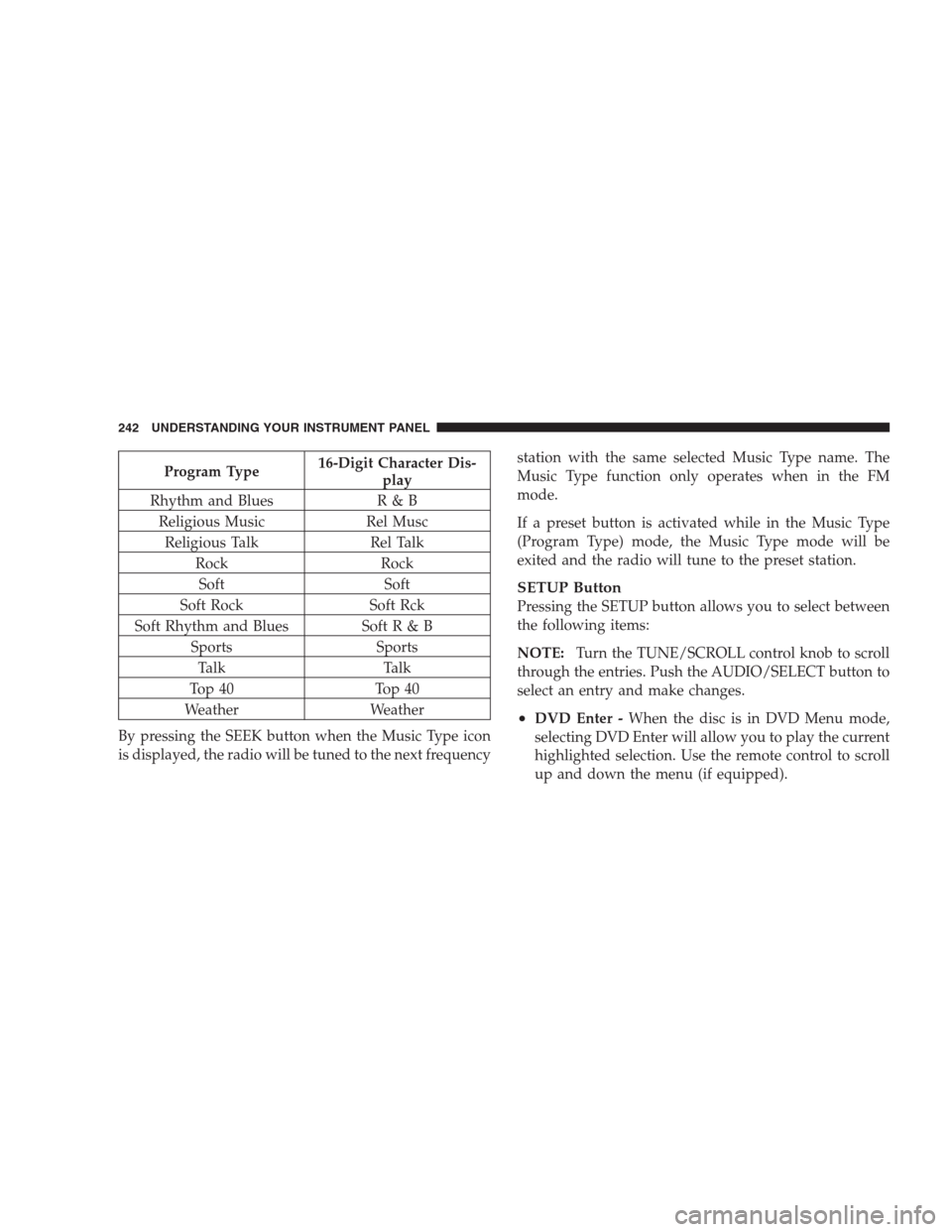
Program Type16-Digit Character Dis-
play
Rhythm and Blues R & B
Religious Music Rel Musc
Religious Talk Rel Talk
Rock Rock
Soft Soft
Soft Rock Soft Rck
Soft Rhythm and Blues Soft R & B
Sports Sports
Talk Talk
Top 40 Top 40
Weather Weather
By pressing the SEEK button when the Music Type icon
is displayed, the radio will be tuned to the next frequencystation with the same selected Music Type name. The
Music Type function only operates when in the FM
mode.
If a preset button is activated while in the Music Type
(Program Type) mode, the Music Type mode will be
exited and the radio will tune to the preset station.
SETUP Button
Pressing the SETUP button allows you to select between
the following items:
NOTE:Turn the TUNE/SCROLL control knob to scroll
through the entries. Push the AUDIO/SELECT button to
select an entry and make changes.
•DVD Enter -When the disc is in DVD Menu mode,
selecting DVD Enter will allow you to play the current
highlighted selection. Use the remote control to scroll
up and down the menu (if equipped).
242 UNDERSTANDING YOUR INSTRUMENT PANEL
Page 245 of 526
•DISC Play/Pause -You can toggle between
playing the DVD and pausing the DVD by
pushing the SELECT button (if equipped).
•DVD Play Options -Selecting the DVD Play Options
will display the following:
•Subtitle – Repeatedly pressing SELECT will switch
subtitles to different subtitle languages that are
available on the disc (if equipped).
•Audio Stream – Repeatedly pressing SELECT will
switch to different audio languages (if supported on
the disc) (if equipped).
•Angle – Repeatedly pressing SELECT will change
the viewing angle if supported by the DVD disc (if
equipped).NOTE:
•The available selections for each of the above entries
varies depending upon the disc.
•These selections can only be made while playing a
DVD.
•VES™ Power -Allows you to turn VES™ ON and
OFF (if equipped).
•VES™ Lock -Locks out rear VES™ remote controls (if
equipped).
•VES™ CH1/CH2 -Allows the user to change the
mode of either the IR1 or IR2 wireless headphones by
pressing the AUDIO/SELECT button (if equipped).
•Set Home Clock -Pressing the SELECT button allows
you to set the clock. Turn the TUNE/SCROLL control
knob to adjust the hours and then press and turn the
UNDERSTANDING YOUR INSTRUMENT PANEL 243
4
Page 247 of 526
Aspect Ratio — If Equipped
Selecting this item allows you to choose between wide
screen, pan scan, and letter box.
AutoPlay — If Equipped
When this is set to On and a DVD video is inserted, it will
bypass the DVD menu screen and automatically play the
movie. In some rare cases, the DVD player may not
auto-play the main title. In such cases, use the MENU
button on the remote control to select desired title to play.
NOTE:The user will have to set these defaults before
loading a disc. If changes are made to these settings after
a disc is loaded, changes will not be effective. Also, the
defaults are effective only if the disc supports the
customer-preferred settings.
AM and FM Buttons
Press the buttons to select AM or FM mode.
SET Button — To Set the Pushbutton Memory
When you are receiving a station that you wish to
commit to pushbutton memory, press the SET button.
The symbol SET 1 will now show in the display window.
Select the button (1-6) you wish to lock onto this station
and press and release that button. If a button is not
selected within five seconds after pressing the SET but-
ton, the station will continue to play but will not be
stored into pushbutton memory.
You may add a second station to each pushbutton by
repeating the above procedure with this exception: Press
the SET button twice and SET 2 will show in the display
window. Each button can be set for SET 1 and SET 2 in
both AM and FM. This allows a total of 12 AM, 12 FM,
and 12 Satellite (if equipped) stations to be stored into
pushbutton memory. The stations stored in SET 2
memory can be selected by pressing the pushbutton
twice.
UNDERSTANDING YOUR INSTRUMENT PANEL 245
4
Page 292 of 526
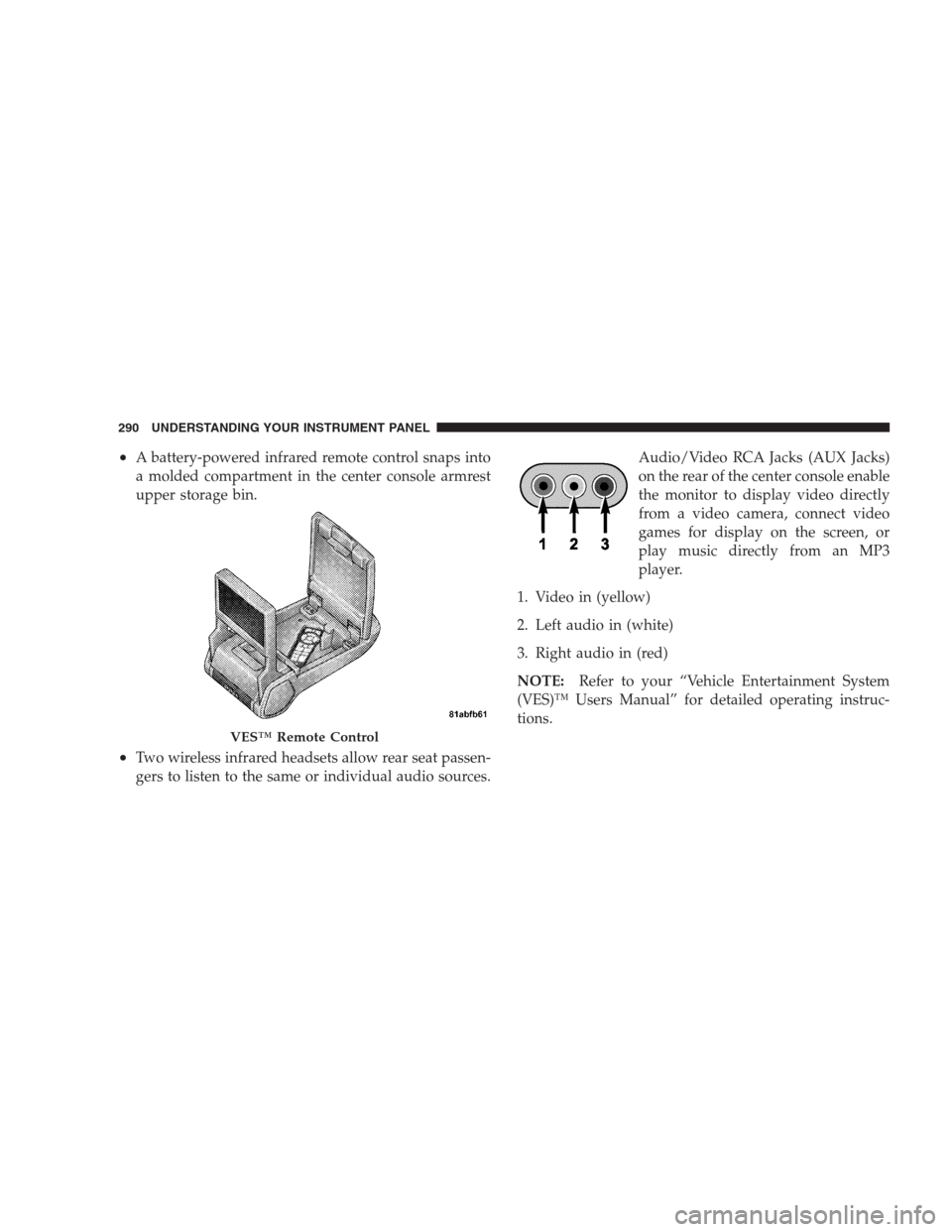
•A battery-powered infrared remote control snaps into
a molded compartment in the center console armrest
upper storage bin.
•Two wireless infrared headsets allow rear seat passen-
gers to listen to the same or individual audio sources.Audio/Video RCA Jacks (AUX Jacks)
on the rear of the center console enable
the monitor to display video directly
from a video camera, connect video
games for display on the screen, or
play music directly from an MP3
player.
1. Video in (yellow)
2. Left audio in (white)
3. Right audio in (red)
NOTE:Refer to your “Vehicle Entertainment System
(VES)™ Users Manual” for detailed operating instruc-
tions.
VES™ Remote Control
290 UNDERSTANDING YOUR INSTRUMENT PANEL
Page 293 of 526
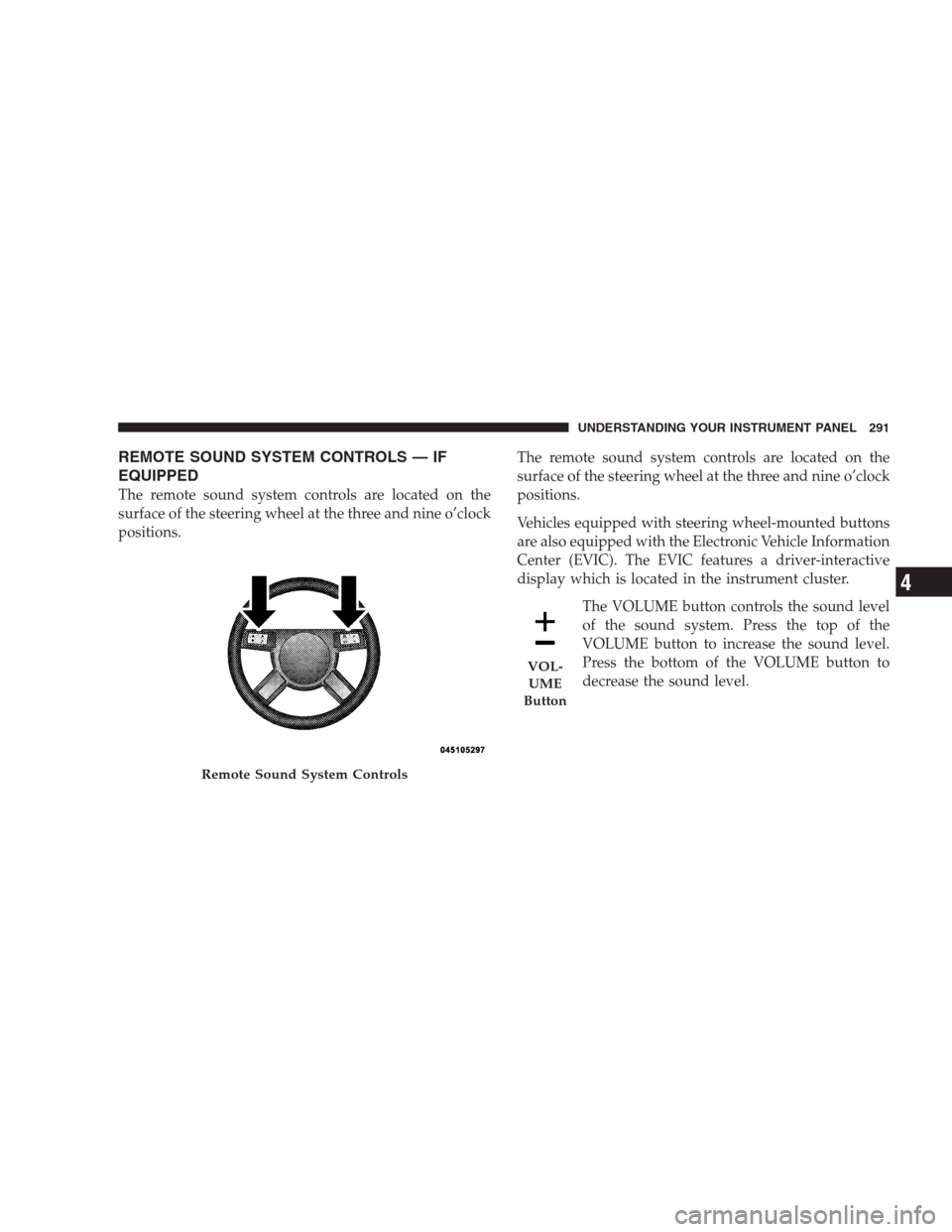
REMOTE SOUND SYSTEM CONTROLS — IF
EQUIPPED
The remote sound system controls are located on the
surface of the steering wheel at the three and nine o’clock
positions.The remote sound system controls are located on the
surface of the steering wheel at the three and nine o’clock
positions.
Vehicles equipped with steering wheel-mounted buttons
are also equipped with the Electronic Vehicle Information
Center (EVIC). The EVIC features a driver-interactive
display which is located in the instrument cluster.
The VOLUME button controls the sound level
of the sound system. Press the top of the
VOLUME button to increase the sound level.
Press the bottom of the VOLUME button to
decrease the sound level.
Remote Sound System Controls
VOL-
UME
Button
UNDERSTANDING YOUR INSTRUMENT PANEL 291
4
Page 296 of 526
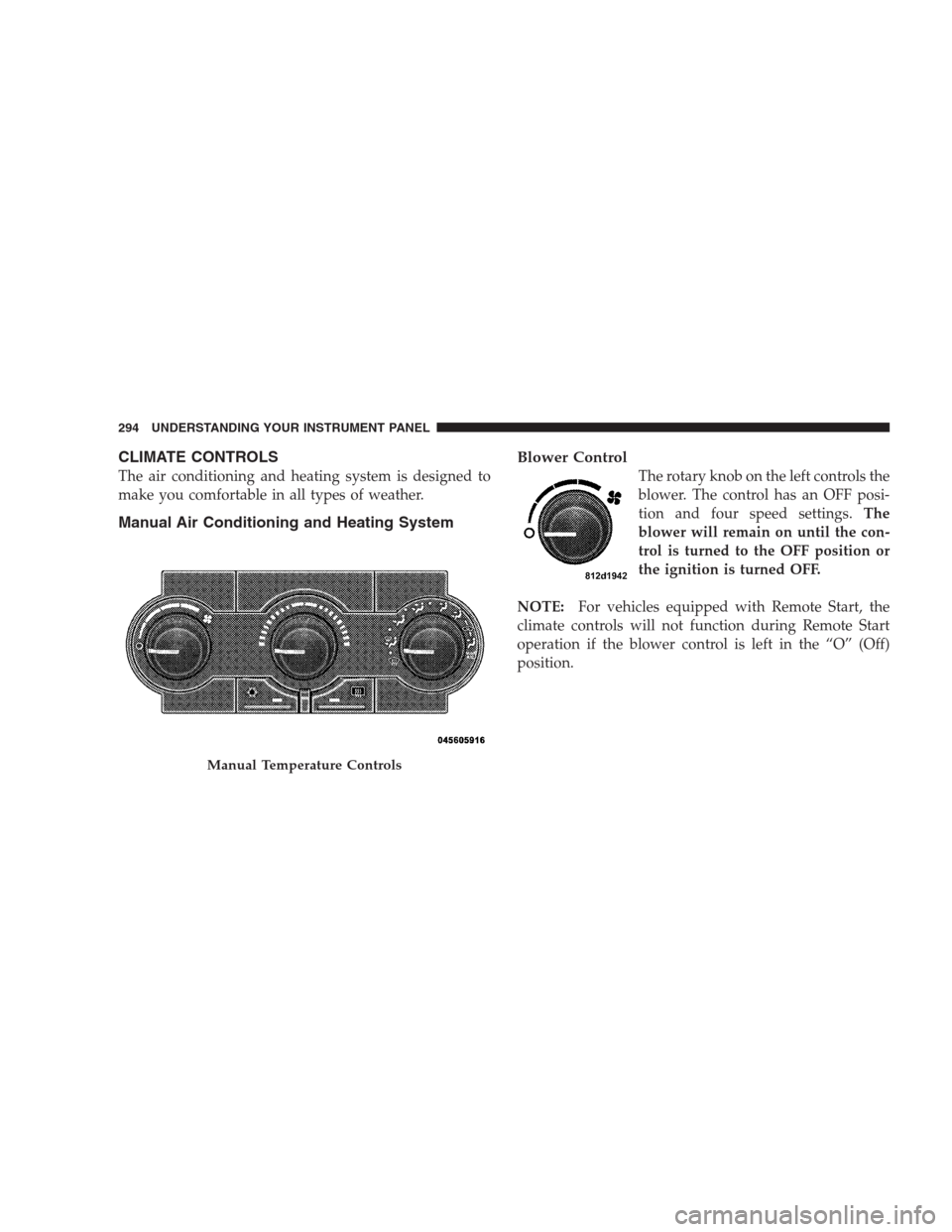
CLIMATE CONTROLS
The air conditioning and heating system is designed to
make you comfortable in all types of weather.
Manual Air Conditioning and Heating SystemBlower Control
The rotary knob on the left controls the
blower. The control has an OFF posi-
tion and four speed settings.The
blower will remain on until the con-
trol is turned to the OFF position or
the ignition is turned OFF.
NOTE:For vehicles equipped with Remote Start, the
climate controls will not function during Remote Start
operation if the blower control is left in the “O” (Off)
position.
Manual Temperature Controls
294 UNDERSTANDING YOUR INSTRUMENT PANEL
Page 508 of 526
Daytime Brightness, Interior Lights........... 143
Daytime Running Lights................... 140
Dealer Service.......................... 422
Deck Lid, Emergency Release................ 40
Deck Lid, Power Release................... 39
Defroster, Rear Window................... 198
Defroster, Windshield................78,295,301
Delay (Intermittent) Wipers................. 144
Diagnostic System, Onboard................ 420
Dimmer Switch, Headlight................. 142
Dipsticks
Oil (Engine).......................423,424
Power Steering........................ 332
Disabled Vehicle Towing................... 412
Disposal
Antifreeze (Engine Coolant)............... 439
Engine Oil........................... 426
Door Locks............................. 28
Door Locks, Automatic.................... 30Door Opener, Garage..................... 181
Driving
On Slippery Surfaces................... 327
Through Flowing, Rising, or Shallow
Standing Water........................ 328
DVD Player (Video Entertainment System™).... 288
Electric Rear Window Defrost............... 198
Electric Remote Mirrors.................... 88
Electrical Power Outlets................... 191
Electronic Brake Control System............. 336
Anti-Lock Brake System................. 336
Brake Assist System.................... 337
Electronic Stability Program............... 338
Traction Control System................. 337
Electronic Power Distribution Center (Fuses).... 449
Electronic Speed Control (Cruise Control)....150,154
Electronic Stability Program (ESP)............ 338
Electronic Throttle Control Warning Light...... 216
506 INDEX
Page 518 of 526
Radio Operation........................ 293
Radio Remote Controls.................... 291
Radio, Satellite (uconnect gps)............282,288
Rain Sensitive Wiper System................ 146
Rear Cupholder......................... 194
Rear Park Sense System................... 177
Rear Seat, Folding....................... 129
Rear Window Defroster................... 198
Rear Window Features.................... 198
Rearview Mirrors........................ 85
Reclining Front Seats..................... 125
Recorder, Event Data...................... 63
Recreational Towing...................... 393
Reformulated Gasoline.................... 371
Refrigerant............................ 430
Release, Hood.......................... 135
Reminder, Lights On..................... 140
Reminder, Seat Belt....................... 48Remote Control
Starting System........................ 26
Remote Keyless Entry (RKE)................. 20
Remote Sound System (Radio) Controls........ 291
Remote Starting System.................... 26
Remote Trunk Release..................... 39
Replacement Bulbs....................... 456
Replacement Keys........................ 16
Replacement Parts....................... 422
Replacement Tires....................... 357
Reporting Safety Defects................... 496
Resetting Oil Change Indicator...........209,225
Restraint, Head......................... 127
Restraints, Child......................... 65
Restraints, Occupant...................... 41
Rocking Vehicle When Stuck................ 411
516 INDEX