Page 105 of 526
•After the�Ready�prompt and the following beep, say
the name of the language you wish to switch to
English, Espanol, or Francais.
•Continue to follow the system prompts to complete
the language selection.
After selecting one of the languages, all prompts and
voice commands will be in that language.
NOTE:After every uconnect�phone language change
operation, only the language-specific 32-name phone-
book is usable. The paired phone name is not language-
specific and usable across all languages.
Emergency Assistance
If you are in an emergency and the cellular phone is
reachable:
•Pick up the phone and manually dial the emergency
number for your area.If the phone is not reachable and the uconnect�phone is
operational, you may reach the emergency number as
follows:
•Press the PHONE button to begin.
•After the�Ready�prompt and the following beep, say
�Emergency�and the uconnect�phone will instruct
the paired cellular phone to call the emergency num-
ber. This feature is supported in the U.S., Canada, and
Mexico.
NOTE:
•The emergency number dialed is based on the country
where the vehicle is purchased (911 for the U.S. and
Canada and 060 for Mexico). The number dialed may
not be applicable with the available cellular service
and area.
UNDERSTANDING THE FEATURES OF YOUR VEHICLE 103
3
Page 107 of 526
Voice Mail Calling
To learn how to access your voice mail, refer to�Working
with Automated Systems.�
Working with Automated Systems
This method is used in instances where one generally has
to press numbers on the cellular phone keypad while
navigating through an automated telephone system.
You can use your uconnect�phone to access a voice mail
system or an automated service, such as a paging service
or automated customer service line. Some services re-
quire immediate response selection. In some instances,
that may be too quick for use of the uconnect�phone.
When calling a number with your uconnect�phone that
normally requires you to enter in a touch-tone sequence
on your cellular phone keypad, you can press the VOICE
RECOGNITION button and say the sequence you wish
to enter, followed by the word�Send.�For example, if
required to enter your PIN followed with a pound, (3 7 46 #), you can press the VOICE RECOGNITION button
and say,�3746#Send.�Saying a number, or sequence of
numbers, followed by�Send,�is also to be used for
navigating through an automated customer service cen-
ter menu structure, and to leave a number on a pager.
You can also send stored uconnect�phonebook entries as
tones for fast and easy access to voice mail and pager
entries. To use this feature, dial the number you wish to
call and then press the VOICE RECOGNITION button
and say, “Send.” The system will prompt you to enter the
name or number and say the name of the phonebook
entry you wish to send. The uconnect�phone will then
send the corresponding phone number associated with
the phonebook entry, as tones over the phone.
NOTE:
•You may not hear all of the tones due to cellular phone
network configurations. This is normal.
UNDERSTANDING THE FEATURES OF YOUR VEHICLE 105
3
Page 118 of 526
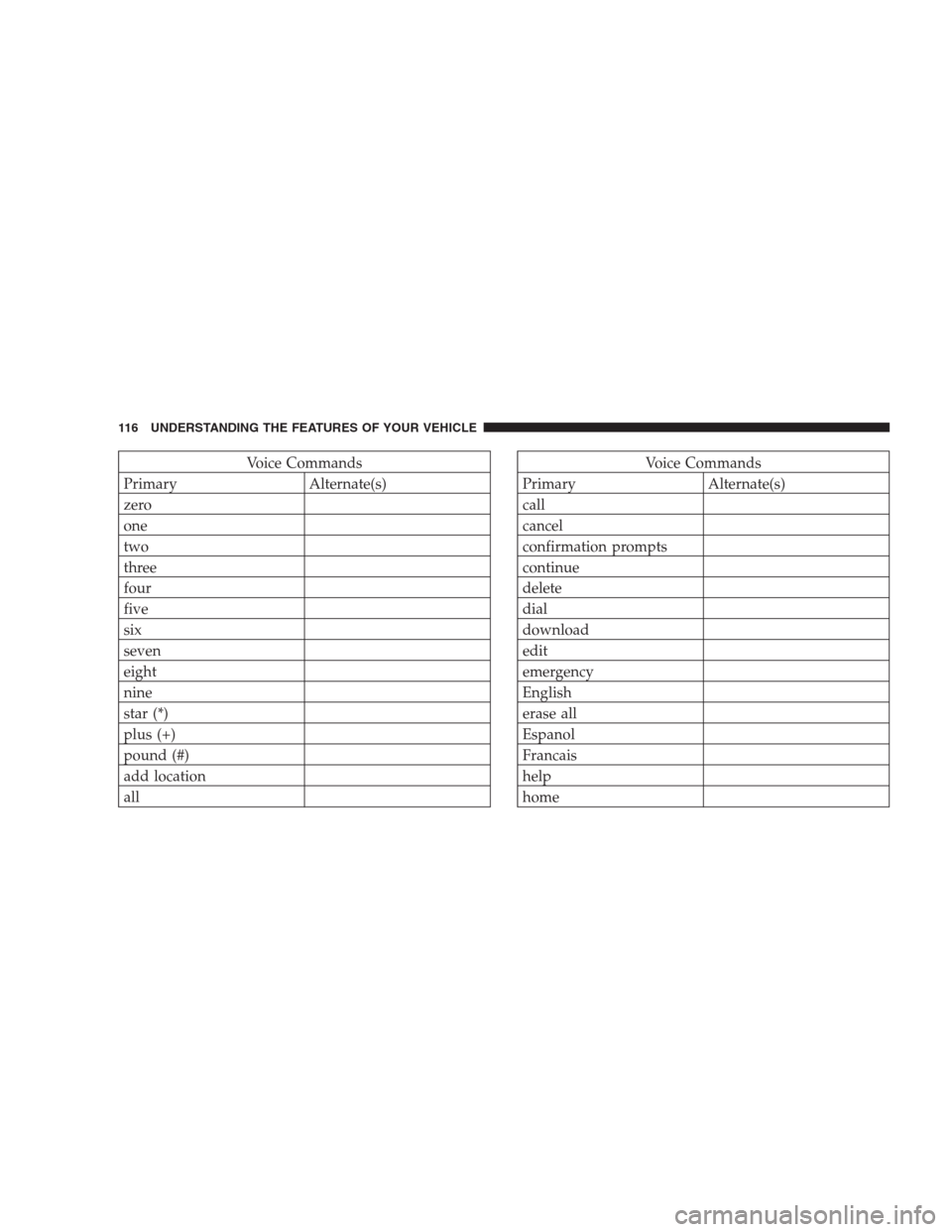
Voice Commands
Primary Alternate(s)
zero
one
two
three
four
five
six
seven
eight
nine
star (*)
plus (+)
pound (#)
add location
allVoice Commands
Primary Alternate(s)
call
cancel
confirmation prompts
continue
delete
dial
download
edit
emergency
English
erase all
Espanol
Francais
help
home
116 UNDERSTANDING THE FEATURES OF YOUR VEHICLE
Page 120 of 526
General Information
This device complies with Part 15 of the FCC rules and
RSS 210 of Industry Canada. Operation is subject to the
following conditions:
•Changes or modifications not expressly approved by
the party responsible for compliance could void the
user’s authority to operate the equipment.
•This device may not cause harmful interference.
•This device must accept any interference received,
including interference that may cause undesired
operation.
VOICE RECOGNITION SYSTEM (VR) — IF
EQUIPPED
Voice Recognition System (VR) Operation
This Voice Recognition system allows you to
control your AM, FM radio, satellite radio, disc
player, and a memo recorder.
NOTE:Take care to speak into the Voice Interface
System as calmly and normally as possible. The ability of
the Voice Interface System to recognize user voice com-
mands may be negatively affected by rapid speaking or a
raised voice level.
WARNING!
Any voice commanded system should be used only
in safe driving conditions and all attention should be
kept on the roadway ahead. Failure to do so may
result in an accident causing serious injury or death.
118 UNDERSTANDING THE FEATURES OF YOUR VEHICLE
Page 131 of 526
WARNING!
•Persons who are unable to feel pain to the skin
because of advanced age, chronic illness, diabetes,
spinal cord injury, medication, alcohol use, ex-
haustion, or other physical conditions must exer-
cise care when using the seat heater. It may cause
burns even at low temperatures, especially if used
for long periods.
•Do not place anything on the seat that insulates
against heat, such as a blanket or cushion. This
may cause the seat heater to overheat.
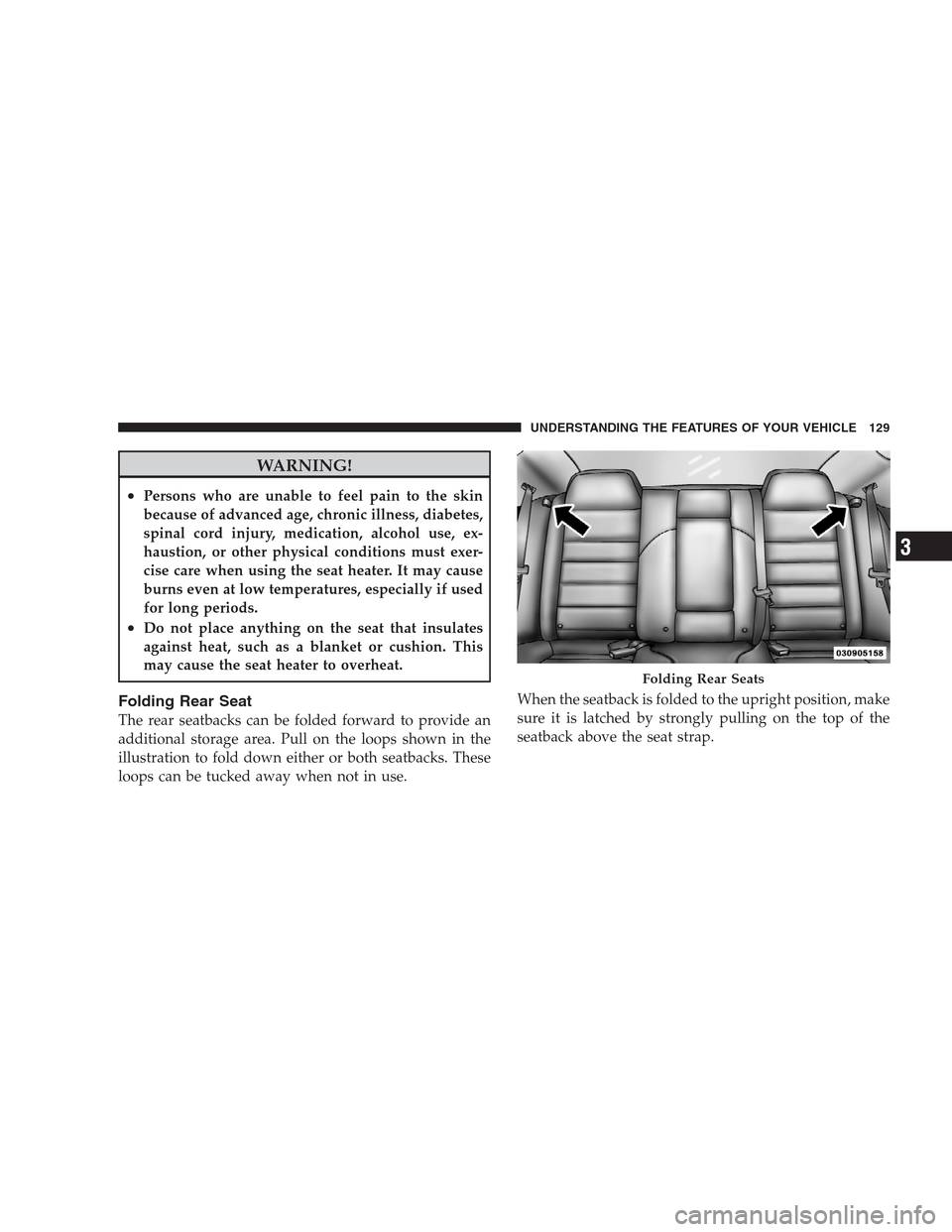
Folding Rear Seat
The rear seatbacks can be folded forward to provide an
additional storage area. Pull on the loops shown in the
illustration to fold down either or both seatbacks. These
loops can be tucked away when not in use.When the seatback is folded to the upright position, make
sure it is latched by strongly pulling on the top of the
seatback above the seat strap.
Folding Rear Seats
UNDERSTANDING THE FEATURES OF YOUR VEHICLE 129
3
Page 143 of 526
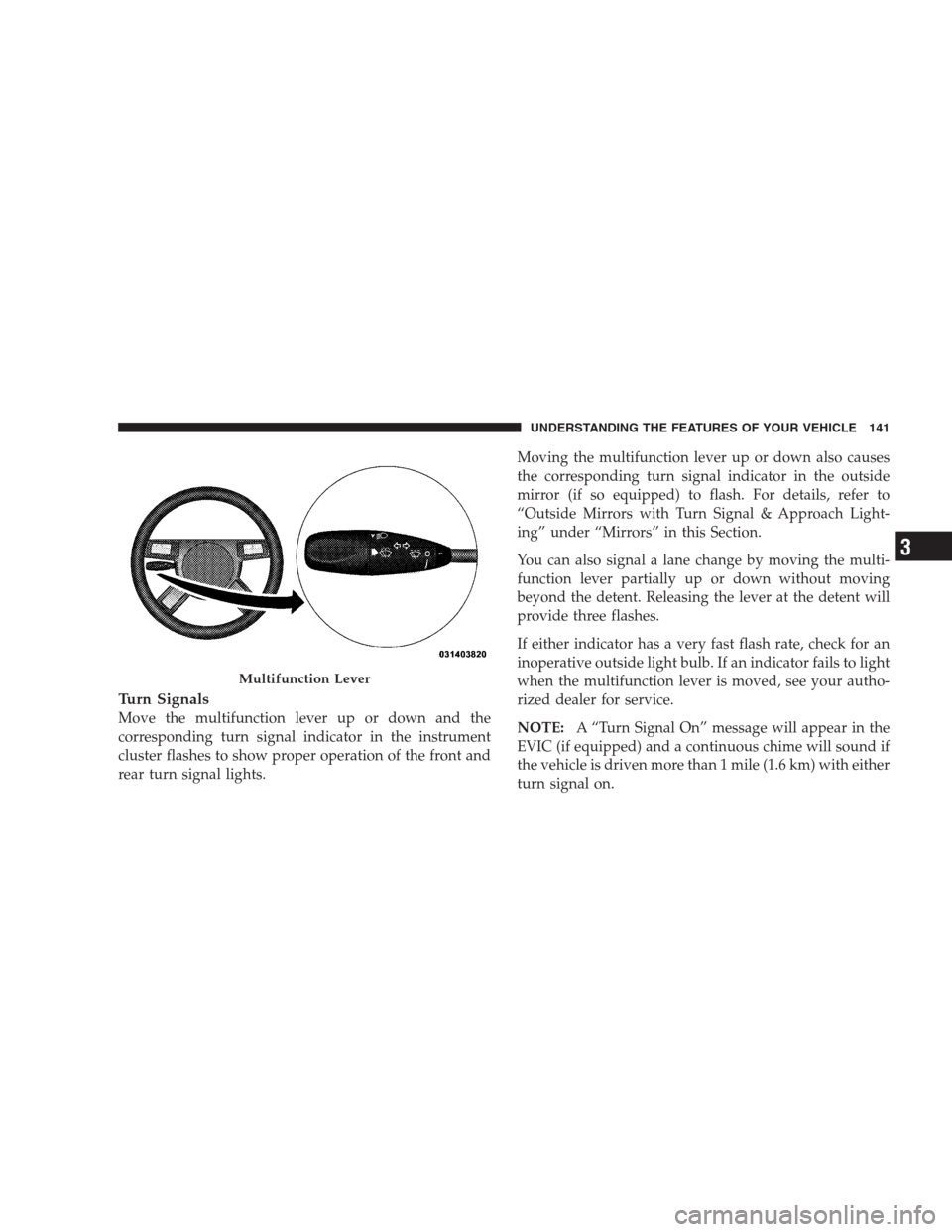
Turn Signals
Move the multifunction lever up or down and the
corresponding turn signal indicator in the instrument
cluster flashes to show proper operation of the front and
rear turn signal lights.Moving the multifunction lever up or down also causes
the corresponding turn signal indicator in the outside
mirror (if so equipped) to flash. For details, refer to
“Outside Mirrors with Turn Signal & Approach Light-
ing” under “Mirrors” in this Section.
You can also signal a lane change by moving the multi-
function lever partially up or down without moving
beyond the detent. Releasing the lever at the detent will
provide three flashes.
If either indicator has a very fast flash rate, check for an
inoperative outside light bulb. If an indicator fails to light
when the multifunction lever is moved, see your autho-
rized dealer for service.
NOTE:A “Turn Signal On” message will appear in the
EVIC (if equipped) and a continuous chime will sound if
the vehicle is driven more than 1 mile (1.6 km) with either
turn signal on.
Multifunction Lever
UNDERSTANDING THE FEATURES OF YOUR VEHICLE 141
3
Page 148 of 526
Wipers,” under “Personal Settings (Customer-
Programmable Features)” under “Electronic Vehicle In-
formation Center (EVIC)” in Section 4.
Rain Sensing Wipers — If Equipped
This feature senses moisture on the windshield and
automatically activates the wipers for the driver. This
feature is especially useful for road splash or over spray
from the windshield washers of the vehicle ahead. Rotate
the end of the multifunction lever to one of the six
intermittent wiper settings to activate this feature.
The sensitivity of the system is adjustable from the
multifunction lever. Wiper delay position 1 is the least
sensitive and wiper delay position 6 is the most sensitive.
Choose setting 3 or 4 for normal rain conditions. Choose
setting 2 or 1 if you desire less wiper sensitivity. Choose
setting 5 or 6 if you desire more sensitivity. Place the
multifunction lever in the off position when not using the
system.NOTE:
•The rain sensing feature will not operate when the
wiper speed is in the low or high position.
•The rain sensing feature may not function properly
when ice or dried salt water is present on the wind-
shield.
•Use of Rain-X�or products containing wax or silicone
may reduce rain sensor performance.
•The rain sense feature can be turned on and off
through the EVIC (if equipped). Refer to “Personal
Settings (Customer-Programmable Features)” under
“Electronic Vehicle Information Center (EVIC)” in
Section 4.
The rain sensing system has protective features for the
wiper blades and arms. It will not operate under the
following conditions:
146 UNDERSTANDING THE FEATURES OF YOUR VEHICLE
Page 157 of 526
WARNING!
•Adaptive Cruise Control (ACC) is a convenience
system. It is not a substitute for active driving
involvement. It is always the driver ’s responsibil-
ity to be attentive of road, traffic, and weather
conditions, vehicle speed, distance to the vehicle
ahead; and, most importantly, brake operation to
ensure safe operation of the vehicle under all road
conditions. Your complete attention is always re-
quired while driving to maintain safe control of
your vehicle. Failure to follow these warnings can
result in an accident or serious personal injury.The
ACC system:
•Does not react to pedestrians, oncoming vehicles,
and stationary objects (i.e., a stopped vehicle in a
traffic jam or a disabled vehicle).
(Continued)
WARNING! (Continued)
•Cannot take street, traffic, and weather conditions
into account, and may be limited upon adverse
sight distance conditions.
•Does not predict the lane curvature or the move-
ment of preceding vehicles and will not compen-
sate for such changes.
•Does not always fully recognize complex driving
conditions, which can result in wrong or missing
distance warnings.
•May not detect a vehicle ahead when strong light
(for example, sunrise or sunset) is directly shining
on the front of the vehicle.
•Can only apply a maximum of 25% of the vehicle’s
braking capability, and will not bring the vehicle
to a complete stop.
UNDERSTANDING THE FEATURES OF YOUR VEHICLE 155
3