Page 291 of 526
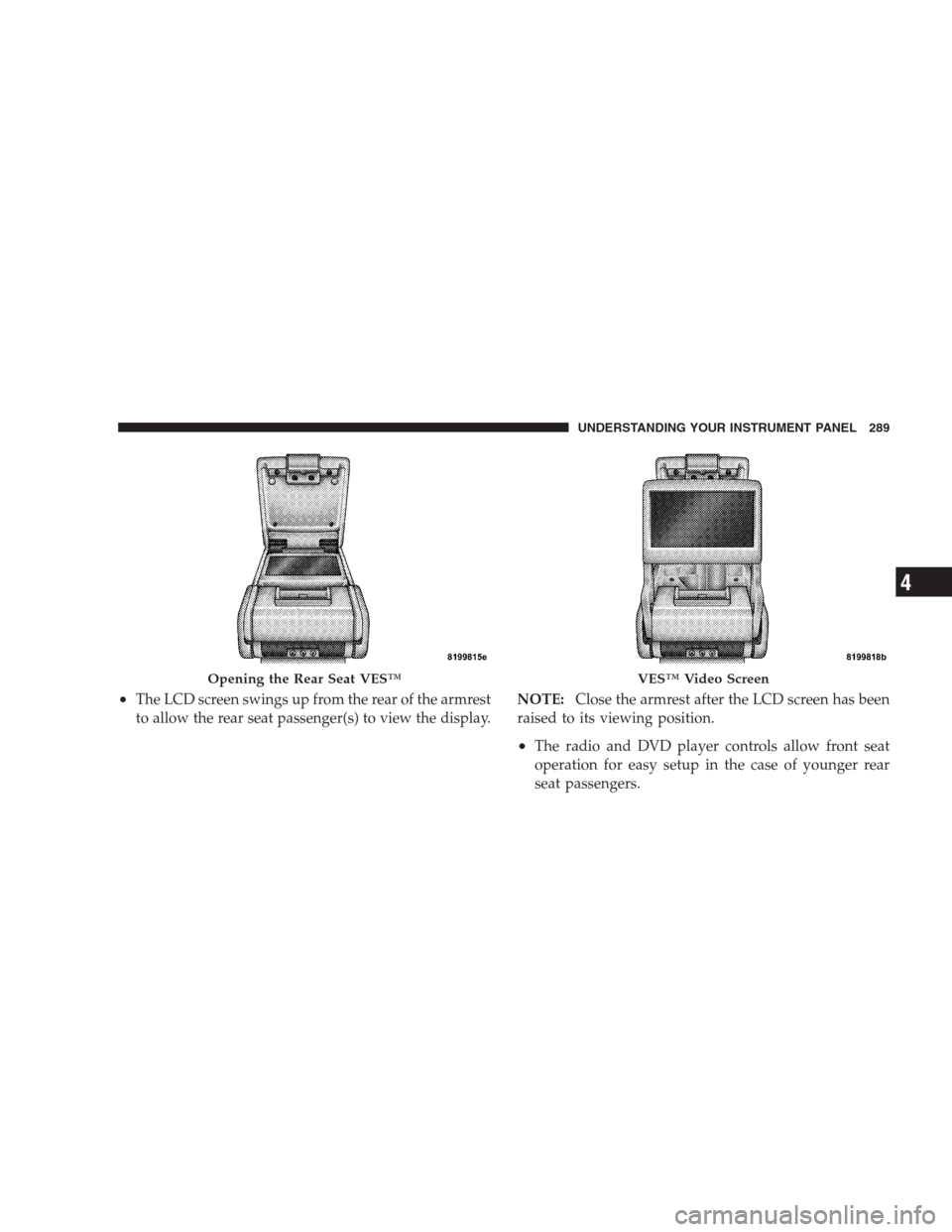
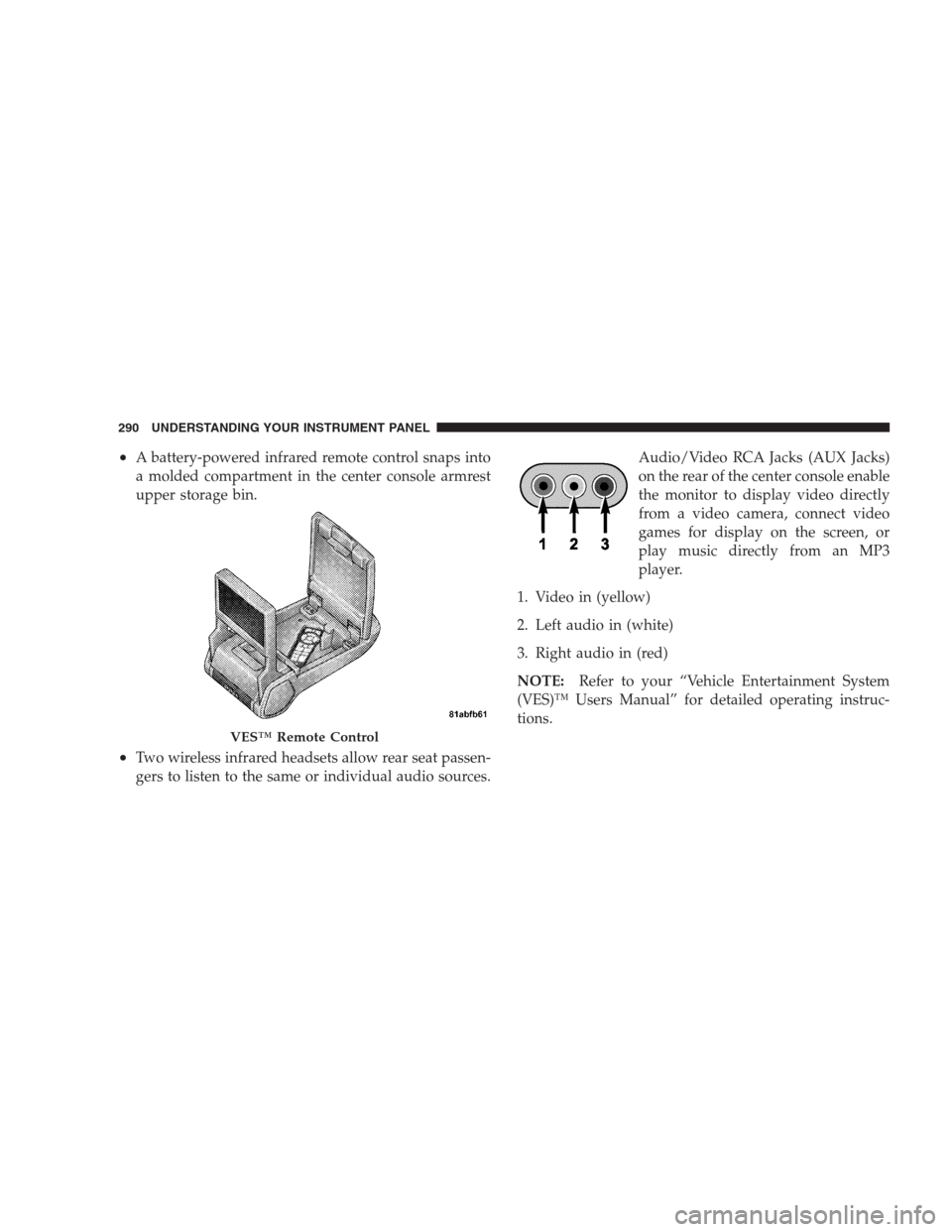
•The LCD screen swings up from the rear of the armrest
to allow the rear seat passenger(s) to view the display.NOTE:Close the armrest after the LCD screen has been
raised to its viewing position.
•The radio and DVD player controls allow front seat
operation for easy setup in the case of younger rear
seat passengers.
Opening the Rear Seat VES™VES™ Video Screen
UNDERSTANDING YOUR INSTRUMENT PANEL 289
4
Page 292 of 526
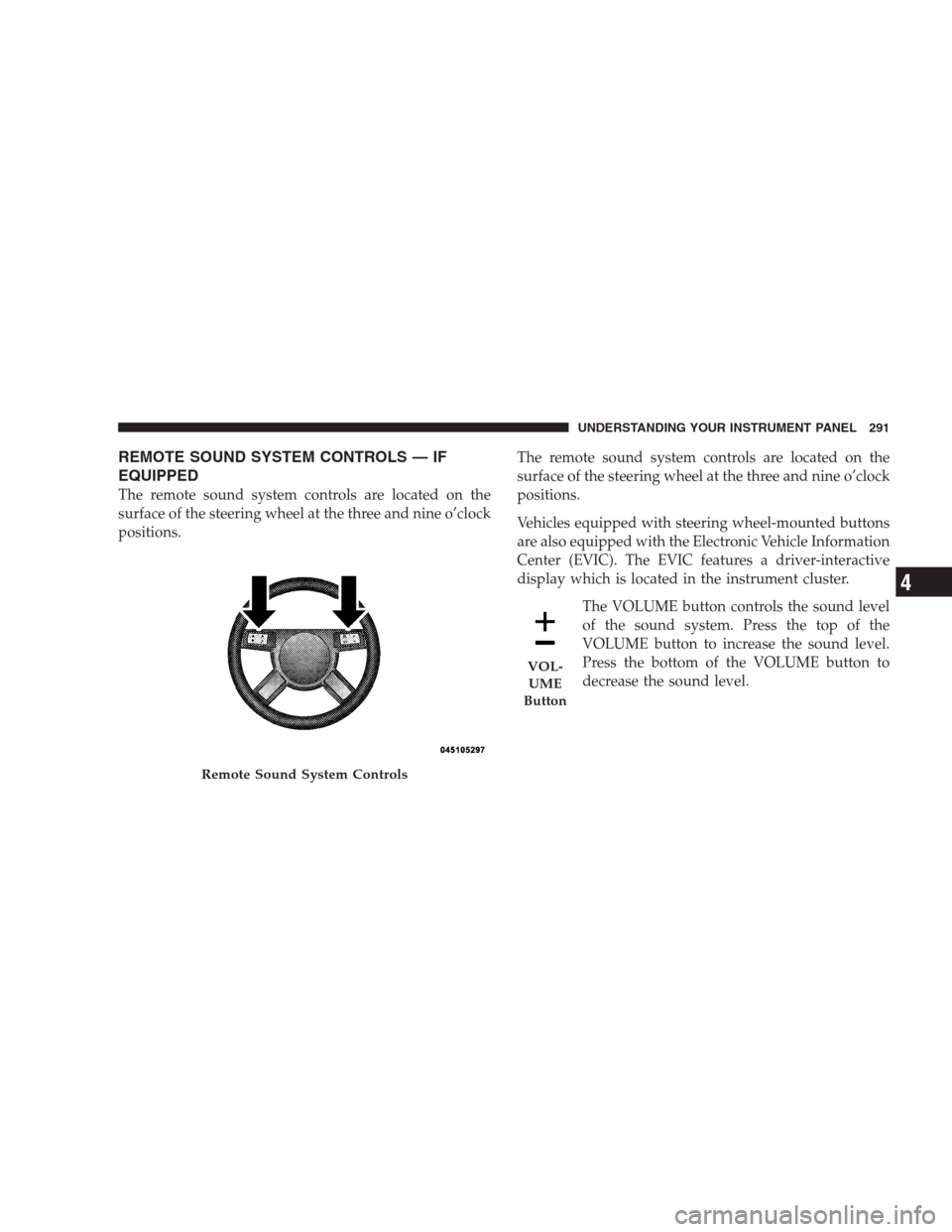
•A battery-powered infrared remote control snaps into
a molded compartment in the center console armrest
upper storage bin.
•Two wireless infrared headsets allow rear seat passen-
gers to listen to the same or individual audio sources.Audio/Video RCA Jacks (AUX Jacks)
on the rear of the center console enable
the monitor to display video directly
from a video camera, connect video
games for display on the screen, or
play music directly from an MP3
player.
1. Video in (yellow)
2. Left audio in (white)
3. Right audio in (red)
NOTE:Refer to your “Vehicle Entertainment System
(VES)™ Users Manual” for detailed operating instruc-
tions.
VES™ Remote Control
290 UNDERSTANDING YOUR INSTRUMENT PANEL
Page 293 of 526
REMOTE SOUND SYSTEM CONTROLS — IF
EQUIPPED
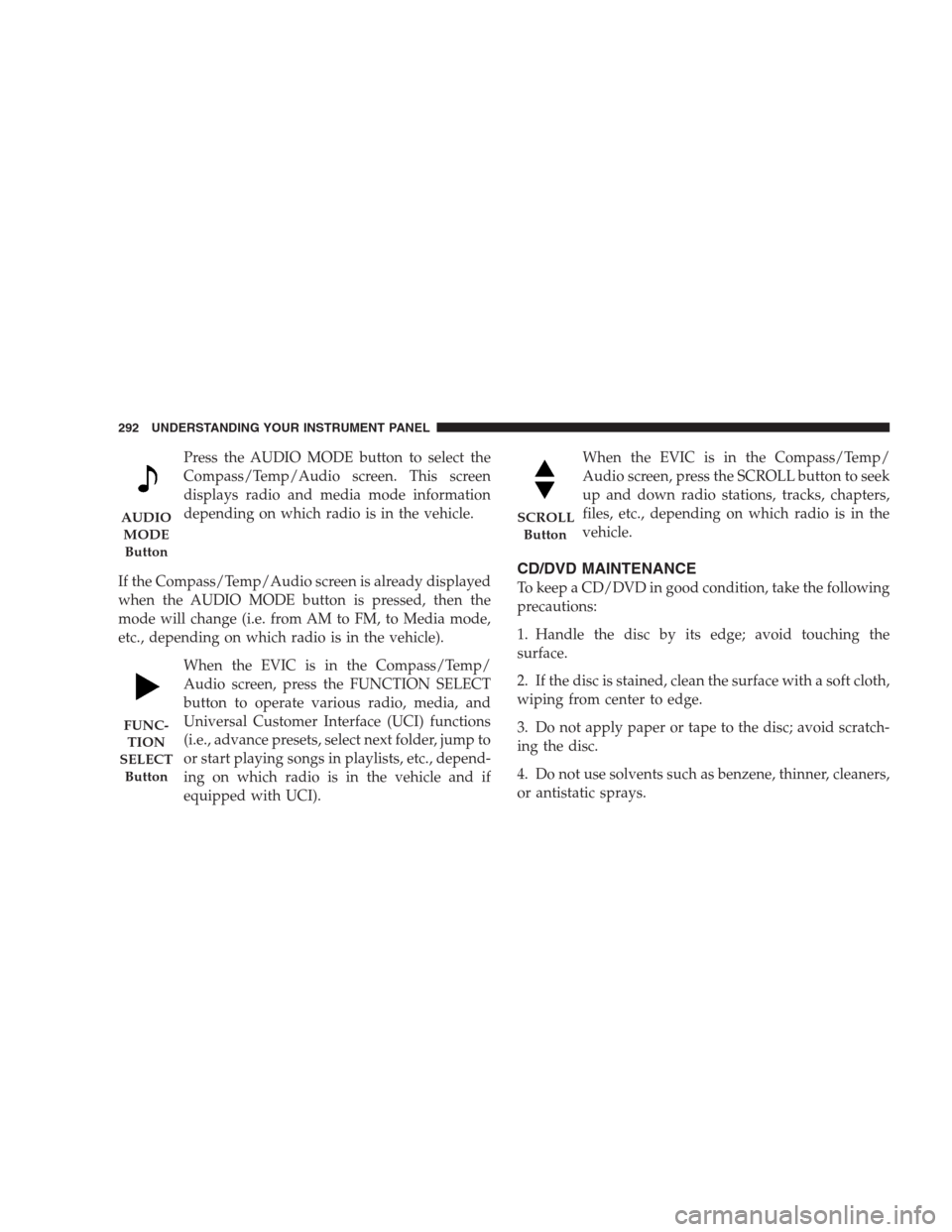
The remote sound system controls are located on the
surface of the steering wheel at the three and nine o’clock
positions.The remote sound system controls are located on the
surface of the steering wheel at the three and nine o’clock
positions.
Vehicles equipped with steering wheel-mounted buttons
are also equipped with the Electronic Vehicle Information
Center (EVIC). The EVIC features a driver-interactive
display which is located in the instrument cluster.
The VOLUME button controls the sound level
of the sound system. Press the top of the
VOLUME button to increase the sound level.
Press the bottom of the VOLUME button to
decrease the sound level.
Remote Sound System Controls
VOL-
UME
Button
UNDERSTANDING YOUR INSTRUMENT PANEL 291
4
Page 294 of 526
Press the AUDIO MODE button to select the
Compass/Temp/Audio screen. This screen
displays radio and media mode information
depending on which radio is in the vehicle.
If the Compass/Temp/Audio screen is already displayed
when the AUDIO MODE button is pressed, then the
mode will change (i.e. from AM to FM, to Media mode,
etc., depending on which radio is in the vehicle).
When the EVIC is in the Compass/Temp/
Audio screen, press the FUNCTION SELECT
button to operate various radio, media, and
Universal Customer Interface (UCI) functions
(i.e., advance presets, select next folder, jump to
or start playing songs in playlists, etc., depend-
ing on which radio is in the vehicle and if
equipped with UCI).When the EVIC is in the Compass/Temp/
Audio screen, press the SCROLL button to seek
up and down radio stations, tracks, chapters,
files, etc., depending on which radio is in the
vehicle.
CD/DVD MAINTENANCE
To keep a CD/DVD in good condition, take the following
precautions:
1. Handle the disc by its edge; avoid touching the
surface.
2. If the disc is stained, clean the surface with a soft cloth,
wiping from center to edge.
3. Do not apply paper or tape to the disc; avoid scratch-
ing the disc.
4. Do not use solvents such as benzene, thinner, cleaners,
or antistatic sprays.
AUDIO
MODE
Button
FUNC-
TION
SELECT
Button
SCROLL
Button
292 UNDERSTANDING YOUR INSTRUMENT PANEL
Page 320 of 526
The following indicators should be used to ensure that
you have engaged the shift lever in the PARK position:
•When shifting into PARK move the shift lever all the
way forward and left until it stops and is fully seated.
•Look at the shift indicator display on the instrument
panel to ensure it is in the P position.
CAUTION!
Damage to the shifter could result if the shift lever is
moved out of PARK before the ignition is turned
from the LOCK to ON position.
REVERSE
Use REVERSE for moving the vehicle rearward. Always
stop before moving the shift lever to REVERSE, except
when rocking the vehicle.NEUTRAL
The engine may be started in this range.
CAUTION!
Coasting the vehicle or driving for any other reason
with shift lever in NEUTRAL can result in transmis-
sion damage.
WARNING!
Do not coast in NEUTRAL and never turn off the
ignition to coast down a hill. These are unsafe
practices that limit your response to changing traffic
or road conditions. You might lose control of the
vehicle and have an accident.
318 STARTING AND OPERATING
Page 325 of 526
The following indicators should be used to ensure that
you have engaged the shift lever in the PARK position:
•When shifting into PARK, move the shift lever all the
way forward and left until it stops and is fully seated.
•Look at the shift indicator display on the instrument
panel to ensure it is in the P position.
CAUTION!
Damage to the shifter could result if the shift lever is
moved out of PARK before the ignition is turned
from the LOCK to ON position.
REVERSE
Shift into REVERSE gear only when the vehicle is com-
pletely stopped.NEUTRAL
In NEUTRAL, no power is transmitted from the engine to
the drive axle. When the brakes are released, the vehicle
can be moved freely (pushed or towed). Do not engage
NEUTRAL position while driving except to coast when
the vehicle is in danger of skidding (e.g., on icy roads).
The engine may be started in this range. Use this range
for starting your vehicle if it is moving or being towed.CAUTION!
Coasting the vehicle or driving for any other reason
with the shift lever in NEUTRAL can result in
transmission damage.
STARTING AND OPERATING 323
5
Page 328 of 526
AUTOSTICK�— IF EQUIPPED
Autostick�is a driver-interactive transmission that offers
manual gear shifting to provide you with more control of
the vehicle. Autostick�allows you to maximize engine
braking, eliminate undesirable upshifts and downshifts,
and improve overall vehicle performance. This system
can also provide you with more control during passing,
city driving, cold slippery conditions, mountain driving,
trailer towing, and many other situations.
Autostick�Operation
By placing the shift lever in the DRIVE position, it can be
moved from side to side. This allows the driver to select
a higher or lower range of gears. Moving the shift lever to
the left (-) triggers a downshift and to the right (+) an
upshift. The gear position will display in the instrument
cluster on the transmission range indicator.
You can shift in or out of the Autostick�mode at any time
without taking your foot off the accelerator pedal. If youchoose the Overdrive mode, the transmission will oper-
ate automatically, shifting between the five available
gears. When you wish to engage Autostick�, simply
move the shift lever to the right or left (D+/D-) while in
the DRIVE position. The transmission will remain in the
current gear until an upshift or downshift is chosen.
ALL-WHEEL DRIVE (AWD) — IF EQUIPPED
This vehicle is equipped with an active on-demand All
Wheel Drive (AWD) system which makes available opti-
mum traction for a wide variety of road surface and
driving conditions. The system minimizes wheel slip by
automatically redirecting torque to the front and rear
wheels as necessary.
To maximize fuel economy, your AWD vehicle automati-
cally defaults to Rear Wheel Drive (RWD) when road and
environmental conditions are such that wheel slip is
unlikely to occur. When specific road and environmental
conditions require increased levels of road traction, the
326 STARTING AND OPERATING
Page 368 of 526
the low-pressure warning limit in any of the four active
road tires. The vehicle may need to be driven for up to
20 minutes above 15 mph (25 km/h) in order for the
TPMS to receive this information.
Premium System — If Equipped
The Tire Pressure Monitor System (TPMS) uses wireless
technology with wheel rim mounted electronic sensors to
monitor tire pressure levels. Sensors mounted to each
wheel as part of the valve stem transmit tire pressure
readings to the receiver module.
NOTE:It is particularly important for you to check the
tire pressure in all of the tires on your vehicle monthly
and to maintain the proper pressure.
The TPMS consists of the following components:
•Receiver module,
•Four TPM sensors,
•Various TPMS messages, which display in the Elec-
tronic Vehicle Information Center (EVIC), and
•TPM Telltale Light
The matching full size spare wheel and tire assembly (if
equipped) has a TPM sensor. The full size spare can be
used in place of any of the four road tires. A spare with a
pressure below the low-pressure limit will not cause the
TPM Telltale Light to illuminate or the chime to sound.
Tire Pressure Monitoring Low Pressure Warnings
The TPM Telltale Light will illuminate in the
instrument cluster and a chime will sound when
tire pressure is low in one or more of the four
active road tires. In addition, the EVIC will display one or
more low pressure messages (Left Front, Left Rear, Right
Front, Right Rear) for three seconds and a graphic
showing the pressure values of each tire with the low tire
pressure values flashing.
366 STARTING AND OPERATING