Page 29 of 537

If your RKE transmitter fails to operate from a normal
distance, check for these two conditions:
1. A weak battery in the RKE transmitter. The expected
life of the battery is a minimum of three years.
2. Closeness to a radio transmitter such as a radio station
tower, airport transmitter, and some mobile or CB radios.
REMOTE STARTING SYSTEM — IF EQUIPPED
This system uses the Remote Keyless Entry (RKE) trans-
mitter to start the engine conveniently from outside the
vehicle while still maintaining security. The system has a
targeted range of 328 ft (100 m).
NOTE:The vehicle must be equipped with an auto-
matic transmission to be equipped with Remote Start.
How to Use Remote Start
All of the following conditions must be met before the
engine will remote start:
•Shift lever in PARK
•Doors closed
•Hood closed
•Trunk closed
•Hazard switch off
•Brake switch inactive (brake pedal not pressed)
•Ignition key removed from ignition switch
•Battery at an acceptable charge level, and
•RKE PANIC button not pressed.
THINGS TO KNOW BEFORE STARTING YOUR VEHICLE 27
2
Page 33 of 537

is open, the key is in the ignition, and the ignition is in the
LOCK or ACC position, a chime will sound as a reminder
to remove the key.
Automatic Door Locks
The doors will lock automatically on vehicles with power
door locks if all of the following conditions are met:
1. The Automatic Door Locks feature is enabled.
2. The transmission is in gear.
3. All doors are closed.
4. The throttle is pressed.
5. The vehicle speed is above 15 mph (24 km/h), and
6. The doors were not previously locked using the power
door lock switch or Remote Keyless Entry (RKE)
transmitter.
Automatic Door Locks Programming
The Automatic Door Locks feature can be enabled or
disabled as follows:
•For vehicles equipped with the Electronic Vehicle
Information Center (EVIC), refer to “Lock Doors Au-
tomatically at 15 mph (24 km/h)” under “Personal
Settings (Customer-Programmable Features)” under
“Electronic Vehicle Information Center (EVIC) – If
Equipped” in Section 4.
•For vehicles not equipped with the EVIC, perform the
following procedure:
1. Close all doors and place the key in the ignition
switch.
2. Cycle the ignition switch between LOCK and ON and
then back to LOCK four times ending up in the LOCK
position.
THINGS TO KNOW BEFORE STARTING YOUR VEHICLE 31
2
Page 35 of 537

•For vehicles not equipped with the EVIC, perform the
following procedure:
1. Close all doors and place the key in the ignition.
2. Cycle the ignition switch between LOCK and ON and
then back to LOCK four times ending up in the LOCK
position.
3. Depress the power door UNLOCK switch to unlock
the doors.
4. A single chime will indicate the completion of the
programming.
5. Repeat these steps if you want to return this feature to
its previous setting.
NOTE:Use the Automatic Unlock Doors On Exit feature
in accordance with local laws.Passive Entry System — If Equipped
The Passive Entry system allows you to unlock the
vehicle’s door(s) without using the Remote Keyless Entry
(RKE) transmitter unlock button, or the unlock button
located on the vehicle’s interior door panel. To use this
feature you must have a valid RKE transmitter within 3 ft
(1.5 m) of the door handle you desire to use.
To Unlock the Vehicle’s Doors
To unlock the vehicle’s door(s), grasp the door handle
and the door(s) will unlock.
NOTE:
•If the vehicle has not been used for 72 hours or it has
been raining for 24 hours, you may have to pull a door
handle to reactivate this feature.
•If the vehicle’s door locks are programmed to “Unlock
Driver’s Door 1st Press”, only the driver’s door will
unlock when the driver’s door handle is grasped. If the
vehicle’s door locks are programmed to “Unlock All
THINGS TO KNOW BEFORE STARTING YOUR VEHICLE 33
2
Page 36 of 537
Doors 1st Press”, all doors will unlock if any door
handle is grasped. Refer to “Remote Key Unlock”
under “Personal Settings (Customer-Programmable
Features)” in the “Electronic Vehicle Information Cen-
ter (EVIC)” in Section 4 of this manual.
•If you accidentally lock your RKE transmitter in the
vehicle using the door panel switch, ALL doors will
unlock and the horn will chirp three times after all
doors are closed. If you do this three times, the system
will not chirp and the doors will remain locked on the
third attempt. To re-enable the system the vehicle must
be unlocked with another valid RKE transmitter.
To Enter the Trunk
Press the button on the left side of CHMSL, which is
located on the deck lid.
NOTE:If you inadvertently leave your RKE transmitter
in the trunk and try to close the deck lid, the deck lid willautomatically unlatch unless another RKE transmitter is
outside the vehicle and within 3 ft (1.5 m) of the deck lid.
To Lock the Vehicle’s Doors
The vehicle doors can be locked by using the RKE
transmitter lock button or the lock button located on the
vehicle’s interior door panel.
To Place an RKE Transmitter in the Vehicle for
Safekeeping – Vehicles Equipped with Keyless
Go only
If you want to lock an RKE transmitter in your vehicle by
using the door panel switch perform the following pro-
cedure:
1. With the desired RKE transmitter in the vehicle, press
the door lock switch located on the door panel. All doors
will lock. When all doors are closed you will hear three
chirps of the horn and the doors will unlock. This is the
34 THINGS TO KNOW BEFORE STARTING YOUR VEHICLE
Page 37 of 537

same lock/unlock and chirping sound that you would
experience if you accidentally locked your RKE transmit-
ter in the vehicle.
2. Open the door and repeat Step 1 two more times (three
times total). The doors will remain locked; no audible
warnings will occur.
NOTE:Any RKE transmitter that is locked in the
vehicle either by a passive lock, another RKE lock, or the
door panel lock switch will be disabled from Keyless Go.
The disabled RKE transmitter(s) will be re-enabled after a
passive unlock or RKE unlock.
Child Protection Door Lock
To provide a safer environment for small children riding
in the rear seats, the rear doors are equipped with a Child
Protection Door Lock system.
To Engage the Child Protection Door Lock System
1. Open the rear door.2. Insert the tip of the valet key (or alike) into the child
lock control and pull it upward.
NOTE:For valet key information, refer to “A Word
About Your Keys” in this section.
3. Repeat Steps 1 and 2 for the opposite rear door.
Child Lock Control
THINGS TO KNOW BEFORE STARTING YOUR VEHICLE 35
2
Page 44 of 537
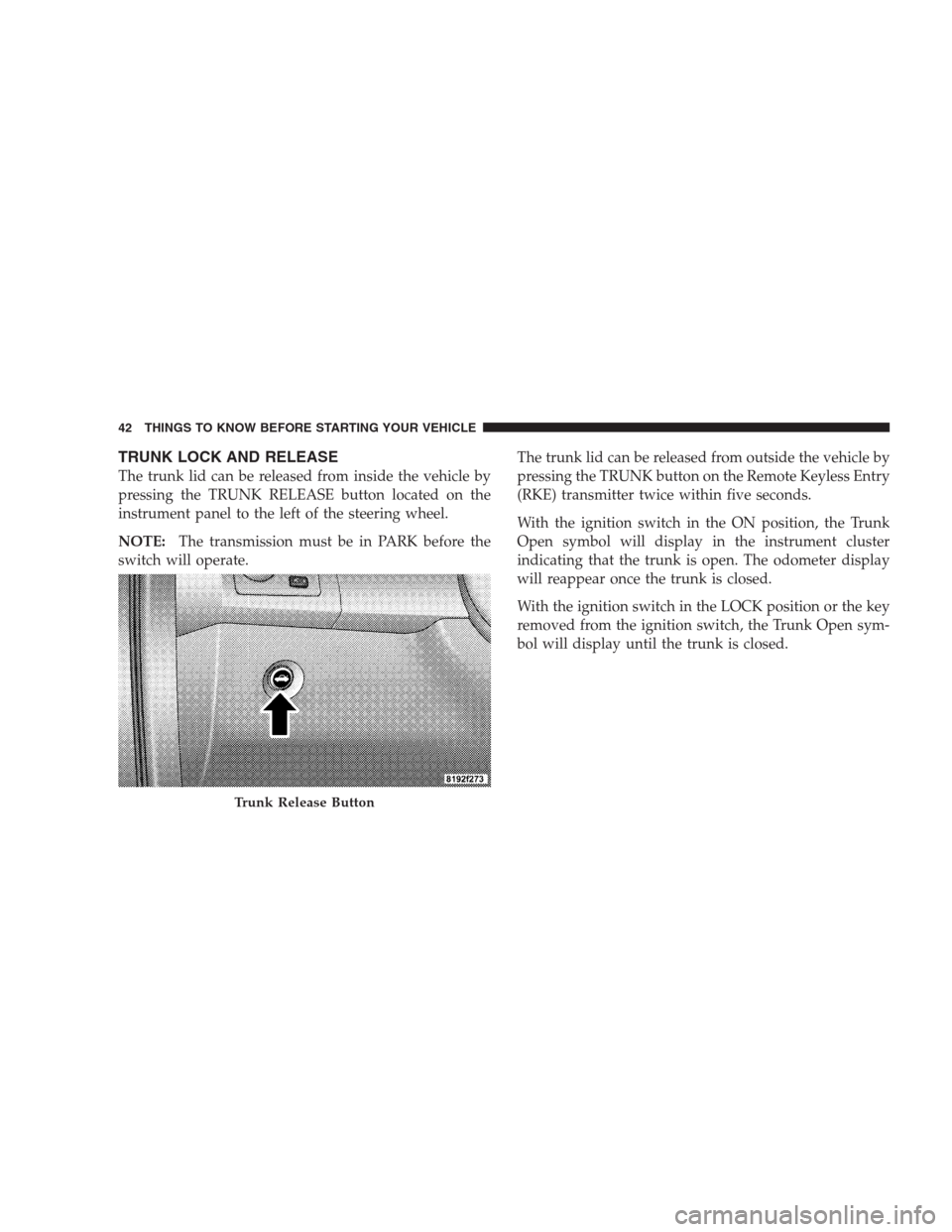
TRUNK LOCK AND RELEASE
The trunk lid can be released from inside the vehicle by
pressing the TRUNK RELEASE button located on the
instrument panel to the left of the steering wheel.
NOTE:The transmission must be in PARK before the
switch will operate.The trunk lid can be released from outside the vehicle by
pressing the TRUNK button on the Remote Keyless Entry
(RKE) transmitter twice within five seconds.
With the ignition switch in the ON position, the Trunk
Open symbol will display in the instrument cluster
indicating that the trunk is open. The odometer display
will reappear once the trunk is closed.
With the ignition switch in the LOCK position or the key
removed from the ignition switch, the Trunk Open sym-
bol will display until the trunk is closed.
Trunk Release Button
42 THINGS TO KNOW BEFORE STARTING YOUR VEHICLE
Page 86 of 537

▫Advanced Phone Connectivity........... 112
▫Things You Should Know About Your
UConnect�System................... 113
▫General Information.................. 122
�Voice Recognition System (VR) —
If Equipped.......................... 122
▫Voice Recognition System (VR) Operation . . . 122
▫Commands........................ 124
▫Voice Training...................... 127
�Seats.............................. 128
▫Power Seats........................ 128
▫Power Reclining Seats................. 129
▫Lumbar Support..................... 130
▫Head Restraints..................... 130▫Heated Seats — If Equipped............ 131
▫Folding Rear Seat.................... 133
�Driver Memory Seat — If Equipped........ 134
▫Programming The Memory Feature....... 135
▫Linking And Unlinking The Remote Keyless
Entry (RKE) Transmitter To The Memory
Feature........................... 136
▫Memory Position Recall................ 136
▫Easy Entry/Exit Seat (Available With
Memory Seat Only)................... 137
�To Open And Close The Hood............ 138
�Lights............................. 139
▫Headlight Switch.................... 139
▫Automatic Headlights — If Equipped...... 140
84 UNDERSTANDING THE FEATURES OF YOUR VEHICLE
Page 94 of 537

The fourth (uppermost) LED supplies illuminated entry
lighting, which turns on in both mirrors when you use
the Remote Keyless Entry (RKE) transmitter or open any
door. This LED shines outward to illuminate the front
and rear door handles. It also shines downward to
illuminate the area in front of the doors.
The illuminated entry lighting fades to off after about
30 seconds or it will fade to off immediately once the
ignition switch is turned ON from the LOCK position.
NOTE:The approach lighting will not function when
the shift lever is moved out of the PARK position.
Tilt Mirrors In Reverse — If Equipped
This additional feature provides automatic outside mir-
ror positioning which will aid the driver ’s view of theground rearward of the front doors. The outside mirrors
will move slightly downward from the present position
when the vehicle is shifted into the REVERSE position.
The outside mirrors will then return to the original
position when the vehicle is shifted out of the REVERSE
position. Each stored memory setting will have an asso-
ciated Tilt Mirrors in Reverse position.
NOTE:The Tilt Mirrors in Reverse feature is not en-
abled when delivered from the factory. The Tilt Mirrors in
Reverse feature can be enabled or disabled through the
customer programmable features in the Electronic Ve-
hicle Information Center (EVIC), refer to “Tilt Mirrors in
Reverse” under “Customer-Programmable Features” un-
der “Electronic Vehicle Information Center (EVIC)” in
Section 4.
92 UNDERSTANDING THE FEATURES OF YOUR VEHICLE