2009 CHEVROLET UPLANDER keyless entry
[x] Cancel search: keyless entryPage 216 of 464

HOOD AJAR
If your vehicle has the remote start feature, this
message displays when the hood is not closed properly.
Make sure that the hood is closed completely. See
Hood Release on page 5-13.
This message displays while the ignition is in ON/RUN.
Press any of the DIC buttons to acknowledge this
message and to clear it from the screen.
This message continues to display for two seconds if it
has not been acknowledged when the engine is turned
off. It also re-displays for two seconds if the message has
been acknowledged, but the condition still exists when
the engine is turned off.
If the condition still exists, the message re-appears
when the engine is turned on.
KEY FOB BATTERY LOW
This message displays when the battery in the Remote
Keyless Entry (RKE) transmitter needs to be replaced.
To replace the battery, see “Battery Replacement” under
Remote Keyless Entry (RKE) System Operation on
page 2-5.This message displays while the ignition is in ON/RUN.
Press any of the DIC buttons to acknowledge this
message and to clear it from the screen.
This message continues to display for two seconds if it
has not been acknowledged when the engine is turned
off. It also re-displays for two seconds if the message has
been acknowledged, but the condition still exists when
the engine is turned off.
If the condition still exists, the message re-appears
when the engine is turned on.
KEY IN IGNITION
This message displays and a chime sounds continuously
when the driver’s door is open and the key is in
ACC/ACCESSORY or LOCK/OFF.
This message cannot be acknowledged.
This message disappears and the chiming stops when
the key is removed from the ignition.
3-56
Page 222 of 464

REMOTE START DISABLED
If your vehicle has the remote start feature, this
message displays if a remote start attempt is
unsuccessful. This may be caused if any of the following
conditions are true when a remote start attempt is made:
The remote start system is disabled through the DIC.
The key is in the ignition.
The hood or the doors are not closed.
There is an emission control system malfunction.
The engine coolant temperature is too high.
The oil pressure is low.
The hazard warning ashers are turned on.
The maximum number of remote starts or remote
start attempts between ignition cycles has been
reached.
The content theft-deterrent alarm is on while
attempting to remote start the vehicle.
See “REMOTE START” underDIC Vehicle
Personalization (Uplevel Only) on page 3-68and
“Remote Vehicle Start” underRemote Keyless Entry
(RKE) System Operation on page 2-5for more
information.
REMOTE START ON
If your vehicle has the remote start feature, this
message displays when a remote start is initiated.
See “Remote Vehicle Start” underRemote Keyless Entry
(RKE) System Operation on page 2-5for more
information.
RIGHT FRONT TURN LAMP OUT
This message displays when the right front turn signal
bulb needs to be replaced. SeeHeadlamps and
Sidemarker Lamps on page 5-42.
This message displays while the ignition is in ON/RUN.
Press any of the DIC buttons to acknowledge this
message and to clear it from the screen.
This message continues to display for two seconds if it
has not been acknowledged when the engine is turned
off. It also re-displays for two seconds if the message has
been acknowledged, but the condition still exists when
the engine is turned off.
If the condition still exists, the message re-appears
when the engine is turned on.
3-62
Page 228 of 464

DIC Vehicle Personalization
(Uplevel Only)
Your vehicle may have customization capabilities that
allow you to program certain features to one preferred
setting. Customization features can only be programmed
to one setting on the vehicle and cannot be programmed
to a preferred setting for two different drivers. The
customization features include the following:
Exterior lighting delay
Interior lighting delay
Delayed locking
Content theft
Remote keyless entry feedback
Remote start
Rear park chime
Your vehicle may also have personalization capabilities
that allow you to program certain features to a
preferred setting for up to two drivers. The rst
personalized key corresponds to driver 1 and the second
personalized key corresponds to driver 2. The driver
number also corresponds to the numbers, 1 or 2, on the
back of the Remote Keyless Entry (RKE) transmitters.The personalization features include the following:
Radio station presets
Auto door unlock preferences
Remote keyless entry unlock preferences
All of the customization and personalization options may
not be available on your vehicle. Only the options
available will be displayed on your DIC.
The default settings for the customization and
personalization features were set when your vehicle left
the factory, but may have been changed from their
default setting since then.
The customization preferences are automatically
recalled.
The driver’s personalization preferences are recalled
by using the key programmed for driver 1 or 2. The
driver number also corresponds to the numbers, 1 or 2,
on the back of the RKE transmitters.
To change customization and personalization
preferences, use the following procedure.
3-68
Page 235 of 464

Press the menu button until AUTO UNLOCK ON
appears on the DIC display. Press the set/reset button
to scroll through the following choices:
KEY-OUT:The door(s) will unlock when the key is
taken out of the ignition.
PARK (default):The door(s) will unlock when the
vehicle is shifted into P (Park).
To select a setting and move on to the next feature,
press the menu button while the desired setting is
displayed on the DIC.
FOB UNLOCK ON 1ST PRESS
This feature allows the selection of which doors will
unlock on the rst press of the unlock button on the RKE
transmitter. SeeRemote Keyless Entry (RKE) System
Operation on page 2-5for more information.
Press the menu button until FOB UNLOCK ON 1ST
PRESS appears on the DIC display. Press the set/reset
button to scroll through the following choices:
DRIVER (default):The driver’s door will unlock on the
rst press of the unlock button on the RKE transmitter.
ALL:All of the doors will unlock on the rst press of the
unlock button on the RKE transmitter.To select a setting, press the menu button while the
desired setting is displayed on the DIC. The DIC
will then display PRESS UNLOCK SWITCH ON KEY
FOB. Press the unlock button on the RKE transmitter
and your setting will be saved for that RKE transmitter.
After programming the last option, the message KEY
FOB NOW PERSONALIZED will appear on the
DIC display for a few seconds if you personalized the
key. Next, the message PERSONAL OPTIONS SAVED
will appear briey on the DIC display, then the display
will return to the PERSONAL PROGRAM main screen.
Exiting the Personal Program Menu
The personal program menu will be exited when any of
the following occurs:
The vehicle is shifted out of P (Park).
The vehicle is no longer in ON/RUN.
The end of the personal program menu is reached.
3-75
Page 371 of 464

You will have two minutes to match the rst tire/wheel
position, and ve minutes overall to match all four
tire/wheel positions. If it takes longer than two minutes, to
match the rst tire and wheel, or more than ve minutes
to match all four tire and wheel positions the matching
process stops and you will need to start over.
The TPMS sensor matching process is outlined below:
1. Set the parking brake.
2. Turn the ignition switch to RUN with the engine off.
3. Using the Remote Keyless Entry (RKE) transmitter,
lock and unlock the vehicle’s doors.
4. Press and hold the RKE transmitter’s LOCK and
UNLOCK buttons at the same time, for about
three seconds. The horn chirps two times indicating
the receiver is ready for the sensor matching
process to begin.
5. Start with the driver side front tire. The driver side
turn signal lamp comes on.6. Remove the valve cap from the valve cap stem.
Activate the TPMS sensor by increasing or
decreasing the tire’s air pressure for ve seconds,
or until a horn chirp sounds. The horn chirp,
which may take up to 30 seconds to sound,
conrms that the sensor identication code has
been matched to this tire and wheel position.
7. Proceed to the passenger side front tire, and repeat
the procedure in Step 6.
8. Proceed to the passenger side rear tire, and repeat
the procedure in Step 6.
9. Proceed to the driver side rear tire, and repeat the
procedure in Step 6.
10. After hearing the conrming horn chirp for the driver
side rear tire, the tire sensor matching process
ends. Turn the ignition switch to LOCK.
11. Set all four tires to the recommended air pressure
level as indicated on the Tire and Loading
Information label.
12. Put the valve caps back on the valve stems.
5-61
Page 409 of 464
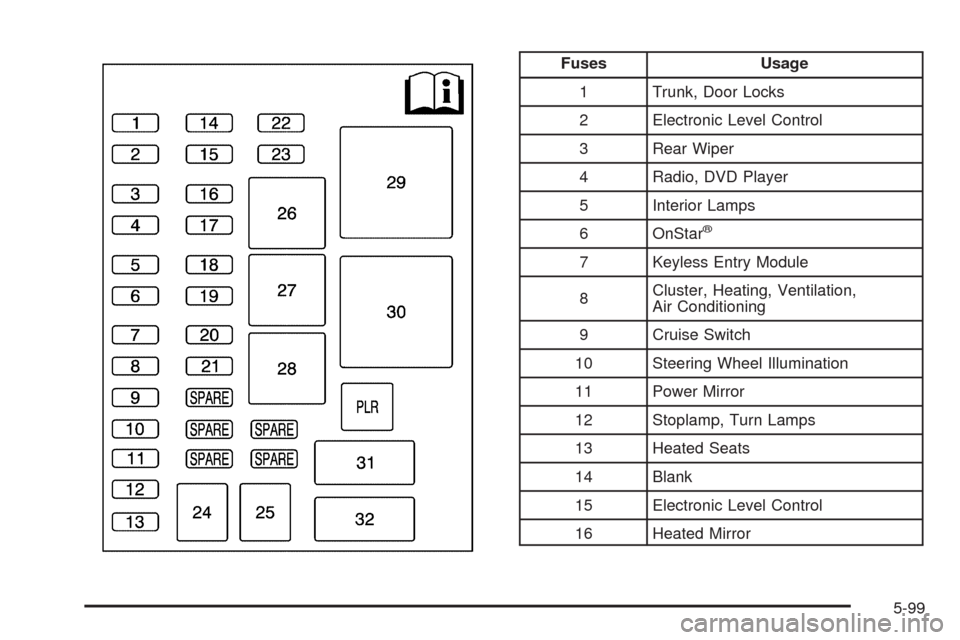
Fuses Usage
1 Trunk, Door Locks
2 Electronic Level Control
3 Rear Wiper
4 Radio, DVD Player
5 Interior Lamps
6 OnStar
®
7 Keyless Entry Module
8Cluster, Heating, Ventilation,
Air Conditioning
9 Cruise Switch
10 Steering Wheel Illumination
11 Power Mirror
12 Stoplamp, Turn Lamps
13 Heated Seats
14 Blank
15 Electronic Level Control
16 Heated Mirror
5-99
Page 457 of 464
I
Ignition Positions.............................................2-31
Infants and Young Children, Restraints...............1-46
Ination - Tire Pressure...................................5-54
Instrument Panel
Brightness..................................................3-15
Cluster.......................................................3-31
Overview..................................................... 3-4
Interior Lamps
Control.......................................................3-15
J
Jump Starting.................................................5-37
K
Keyless Entry System....................................... 2-4
Keys............................................................... 2-3
L
Labeling, Tire Sidewall.....................................5-48
Lamps
Cargo........................................................3-17
Dome ........................................................3-16
Front Reading.............................................3-17
Rear Reading.............................................3-17
Lap-Shoulder Belt...........................................1-37
LATCH System
Child Restraints...........................................1-53
Level Control..................................................4-25
License Plate Lamps.......................................5-45
Liftgate
Carbon Monoxide........................................2-22
Light
Airbag Readiness........................................3-33
Anti-lock Brake System (ABS) Warning...........3-36
Brake System Warning.................................3-35
Charging System.........................................3-35
Cruise Control.............................................3-42
Highbeam On.............................................3-42
Low Fuel Warning.......................................3-43
7
Page 460 of 464

Power (cont.)
Sliding Door................................................2-16
Steering Fluid.............................................5-31
Windows....................................................2-25
Privacy..........................................................7-16
Event Data Recorders..................................7-17
Navigation System.......................................7-18
OnStar .......................................................7-18
Radio Frequency Identication.......................7-18
Programmable Automatic Door Unlock...............2-13
R
Radiator Pressure Cap....................................5-28
Radio Frequency Identication (RFID), Privacy....7-18
Radio(s)........................................................3-77
Radios
Rear Seat Audio........................................3-108
Reception.................................................3-112
Setting the Clock.........................................3-77
Theft-Deterrent..........................................3-110
Rear Climate Control System............................3-28
Rear Reading Lamps......................................3-17
Rear Seat Audio (RSA)..................................3-108
Rear Seat Entertainment System.......................3-93
Rear Seat Operation......................................... 1-6
Rear Windshield Washer/Wiper........................... 3-9Rearview Mirrors.............................................2-43
Reclining Seatbacks.......................................... 1-4
Recommended Fluids and Lubricants.................6-11
Recreational Vehicle Towing.............................4-24
Remote Keyless Entry (RKE) System.................. 2-4
Remote Keyless Entry (RKE) System, Operation . . . 2-5
Remote Vehicle Start........................................ 2-7
Removing the Flat Tire and Installing the
Spare Tire..................................................5-77
Removing the Spare Tire and Tools...................5-75
Replacement Bulbs.........................................5-45
Replacement Parts, Maintenance......................6-13
Reporting Safety Defects
Canadian Government..................................7-15
General Motors...........................................7-15
United States Government............................7-14
Restraint System Check
Checking the Restraint Systems....................1-92
Replacing Restraint System Parts
After a Crash..........................................1-93
Retained Accessory Power (RAP)......................2-32
Roadside
Assistance Program....................................... 7-7
Rocking Your Vehicle to Get it Out....................4-18
Routing, Engine Drive Belt...............................6-14
Running the Vehicle While Parked.....................2-42
10