2009 CHEVROLET TRAIL BLAZER roof
[x] Cancel search: roofPage 72 of 484

Servicing Your Airbag-Equipped
Vehicle
Airbags affect how the vehicle should be serviced.
There are parts of the airbag system in several places
around the vehicle. Your dealer/retailer and the
service manual have information about servicing the
vehicle and the airbag system. To purchase a service
manual, seeService Publications Ordering Information
on page 7-16.
{CAUTION:
For up to 10 seconds after the ignition is turned off
and the battery is disconnected, an airbag can still
inate during improper service. You can be injured
if you are close to an airbag when it inates. Avoid
yellow connectors. They are probably part of the
airbag system. Be sure to follow proper service
procedures, and make sure the person performing
work for you is qualied to do so.
Adding Equipment to Your
Airbag-Equipped Vehicle
Q:Is there anything I might add to or change
about the vehicle that could keep the airbags
from working properly?
A:Yes. If you add things that change your vehicle’s
frame, bumper system, height, front end or side
sheet metal, they may keep the airbag system from
working properly. Changing or moving any parts of
the front seats, safety belts, the airbag sensing and
diagnostic module, steering wheel, instrument panel,
roof-rail airbag modules, ceiling headliner or pillar
garnish trim, rearview mirror, front sensors, rollover
sensor module, or airbag wiring can affect the
operation of the airbag system.
In addition, your vehicle has a passenger sensing
system for the right front passenger’s position, which
includes sensors that are part of the passenger’s
seat. The passenger sensing system may not
operate properly if the original seat trim is replaced
with non-GM covers, upholstery or trim, or with GM
covers, upholstery or trim designed for a different
vehicle.
1-68
Page 73 of 484
Any object, such as an aftermarket seat heater or a
comfort enhancing pad or device, installed under or
on top of the seat fabric, could also interfere with the
operation of the passenger sensing system. This
could either prevent proper deployment of the
passenger airbag(s) or prevent the passenger
sensing system from properly turning off the
passenger airbag(s). SeePassenger Sensing
System on page 1-63.
If you have any questions about this, you should
contact Customer Assistance before you modify
your vehicle. The phone numbers and addresses
for Customer Assistance are in Step Two of
the Customer Satisfaction Procedure in this manual.
SeeCustomer Satisfaction Procedure on page 7-2.
If your vehicle has rollover roof-rail airbags, see
Different Size Tires and Wheels on page 5-77
for additional important information.Q:Because I have a disability, I have to get my
vehicle modied. How can I nd out whether
this will affect my airbag system?
A:If you have questions, call Customer Assistance.
The phone numbers and addresses for Customer
Assistance are in Step Two of the Customer
Satisfaction Procedure in this manual. See
Customer Satisfaction Procedure on page 7-2.
In addition, your dealer/retailer and the service manual
have information about the location of the airbag
sensors, sensing and diagnostic module and airbag
wiring.
1-69
Page 78 of 484

Outside Manual Mirrors..................................2-43
Outside Power Mirrors...................................2-44
Outside Convex Mirror...................................2-44
Outside Heated Mirrors..................................2-44
OnStar
®System.............................................2-45
Universal Home Remote System......................2-48
Universal Home Remote System Operation
(With One Triangular LED)...........................2-49Storage Areas................................................2-53
Glove Box...................................................2-53
Overhead Console........................................2-53
Center Console Storage.................................2-54
Luggage Carrier...........................................2-54
Rear Floor Storage Cover..............................2-55
Convenience Net..........................................2-56
Cargo Cover................................................2-56
Cargo Tie Downs..........................................2-57
Sunroof.........................................................2-57
Section 2 Features and Controls
2-2
Page 99 of 484

Retained Accessory Power (RAP)
These vehicle accessories can be used for up to
20 minutes after the engine is turned off:
Audio System
Power Windows
Overhead Console
Sunroof (if equipped)
These features will work when the key is in ON/RUN
or ACC/ACCESSORY. Once the key is turned from
ON/RUN to LOCK/OFF, these features continue to
work for up to 20 minutes, or until a door is opened.
Starting the Engine
Move the shift lever to P (Park) or N (Neutral). The
engine will not start in any other position. To restart
the engine when the vehicle is already moving,
use N (Neutral) only.
Notice:Do not try to shift to P (Park) if the
vehicle is moving. If you do, you could damage
the transmission. Shift to P (Park) only when
the vehicle is stopped.
Starting Procedure
1. With your foot off the accelerator pedal, turn the
ignition to START. When the engine starts, let go of
the key. The idle speed will slow down as the engine
warms. Do not race the engine immediately after
starting it. Operate the engine and transmission
gently to allow the oil to warm up and lubricate all
moving parts.
The vehicle has a Computer-Controlled Cranking
System. This feature assists in starting the engine
and protects components. If the ignition key is turned
to the START position, and then released when the
engine begins cranking, the engine will continue
cranking for a few seconds or until the vehicle starts.
If the engine does not start and the key is held in
START, cranking will be stopped after 15 seconds to
prevent cranking motor damage. To prevent gear
damage, this system also prevents cranking if the
engine is already running. Engine cranking can be
stopped by turning the ignition switch to the ACC/
ACCESSORY or LOCK/OFF position.
Notice:Cranking the engine for long periods of
time, by returning the key to the START position
immediately after cranking has ended, can overheat
and damage the cranking motor, and drain the
battery. Wait at least 15 seconds between each try,
to let the cranking motor cool down.
2-23
Page 129 of 484

Using Universal Home Remote
Press and hold the appropriate Universal Home Remote
button for at least half of a second. The indicator light
will come on while the signal is being transmitted.
Erasing Universal Home Remote
Buttons
The programmed buttons should be erased when the
vehicle is sold or the lease ends.
To erase all programmed buttons on the Universal
Home Remote device:
1. Press and hold down the two outside buttons until
the indicator light begins to ash, after 20 seconds.
2. Release both buttons.
Reprogramming a Single Universal
Home Remote Button
To reprogram any of the three Universal Home Remote
buttons, repeat the programming instructions earlier
in this section, beginning with Step 2.
For help or information on the Universal Home Remote
System, call the customer assistance phone number
underCustomer Assistance Offices on page 7-6.
Storage Areas
Glove Box
Lift the glove box handle up to open it. Use the key to
lock and unlock the glove box.
Overhead Console
Your vehicle may have this feature. The overhead
console may include reading lamps, a Universal
Home Remote and a sunroof switch. SeeSunroof
on page 2-57andUniversal Home Remote System
on page 2-48for more information.
2-53
Page 130 of 484

Center Console Storage
Pull the front lever on the center console while lifting the
top to open it.
The console has cupholders on the front and rear of the
storage compartment.
The console may also contain:
Rear Seat Audio Controls
Rear Seat Accessory Power Outlets
Rear Climate Control
To open the center armrest compartment, lift the cover
by pulling up on the latch handle located under the
front edge of the armrest.
Luggage Carrier
{CAUTION:
If something is carried on top of the vehicle that is
longer or wider than the luggage carrier — like
paneling, plywood, or a mattress— the wind can
catch it while the vehicle is being driven. This can
cause a driver to lose control. The item being
carried could be violently torn off, and this could
cause a collision, and damage the vehicle. Items
may be carried inside. Never carry something
longer or wider than the luggage carrier on top of
the vehicle.
If your vehicle has a luggage carrier, it will allow you
to load things on top of your vehicle. The luggage carrier
has side rails attached to the roof, places to use for
tying things down and may have sliding crossrails.
These let you load some other things on top of your
vehicle, as long as they are not wider or longer than the
luggage carrier.
2-54
Page 133 of 484
Cargo Tie Downs
Four cargo tie-downs are located in the rear compartment
of the vehicle. The tie-downs can be used to secure small
loads.
Sunroof
The vehicle may have a power sliding sunroof. To open
or close the sunroof, the ignition must be turned to
ON/RUN, ACC/ACCESSORY, or Retained Accessory
Power (RAP) must be active. SeeRetained Accessory
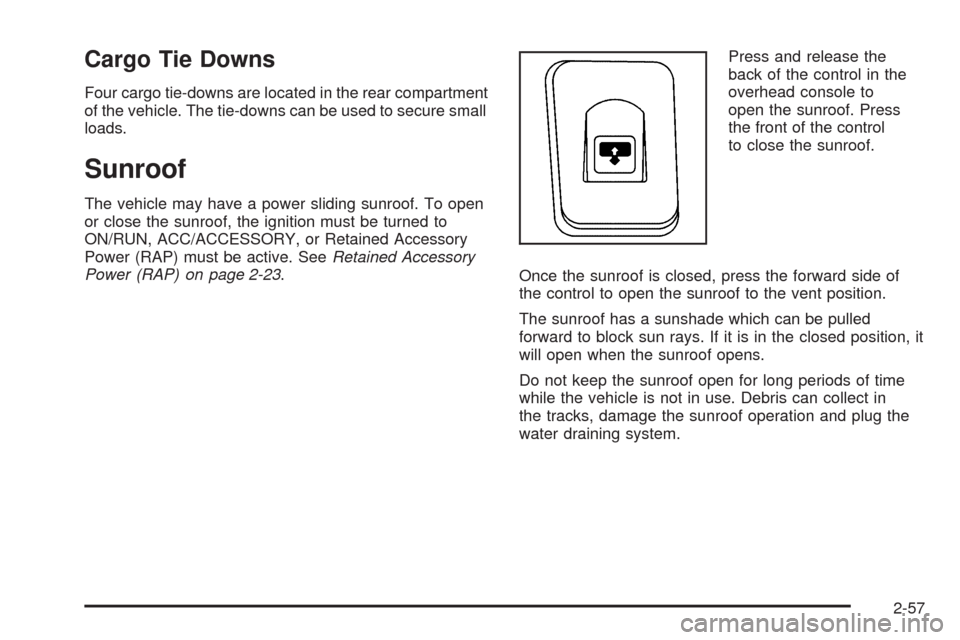
Power (RAP) on page 2-23.Press and release the
back of the control in the
overhead console to
open the sunroof. Press
the front of the control
to close the sunroof.
Once the sunroof is closed, press the forward side of
the control to open the sunroof to the vent position.
The sunroof has a sunshade which can be pulled
forward to block sun rays. If it is in the closed position, it
will open when the sunroof opens.
Do not keep the sunroof open for long periods of time
while the vehicle is not in use. Debris can collect in
the tracks, damage the sunroof operation and plug the
water draining system.
2-57
Page 234 of 484
DVD Player Buttons (Without Sunroof)
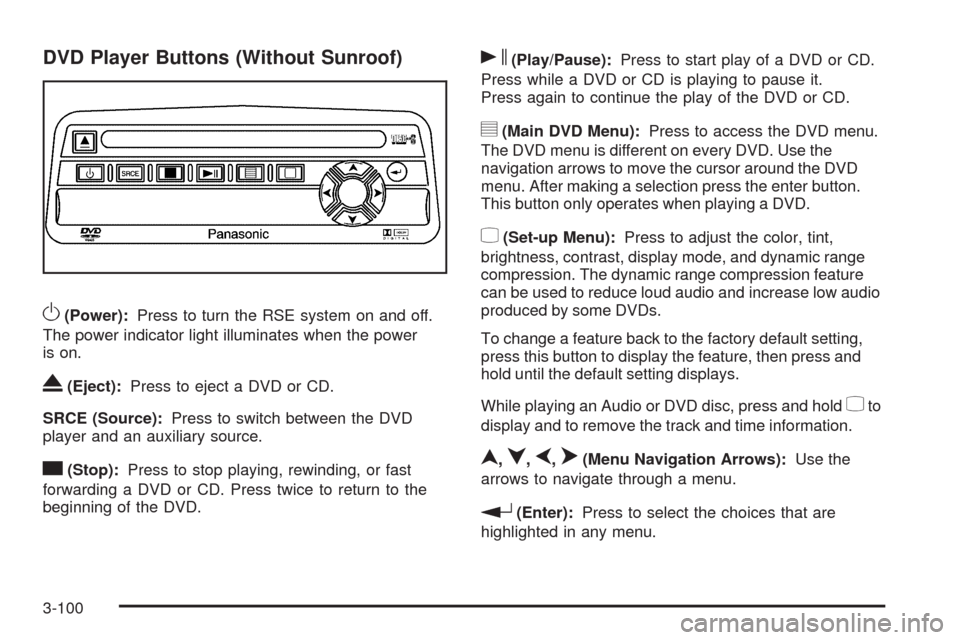
O(Power):Press to turn the RSE system on and off.
The power indicator light illuminates when the power
is on.
X(Eject):Press to eject a DVD or CD.
SRCE (Source):Press to switch between the DVD
player and an auxiliary source.
c(Stop):Press to stop playing, rewinding, or fast
forwarding a DVD or CD. Press twice to return to the
beginning of the DVD.
s(Play/Pause):Press to start play of a DVD or CD.
Press while a DVD or CD is playing to pause it.
Press again to continue the play of the DVD or CD.
y(Main DVD Menu):Press to access the DVD menu.
The DVD menu is different on every DVD. Use the
navigation arrows to move the cursor around the DVD
menu. After making a selection press the enter button.
This button only operates when playing a DVD.
z(Set-up Menu):Press to adjust the color, tint,
brightness, contrast, display mode, and dynamic range
compression. The dynamic range compression feature
can be used to reduce loud audio and increase low audio
produced by some DVDs.
To change a feature back to the factory default setting,
press this button to display the feature, then press and
hold until the default setting displays.
While playing an Audio or DVD disc, press and hold
zto
display and to remove the track and time information.
n,q,p,o(Menu Navigation Arrows):Use the
arrows to navigate through a menu.
r(Enter):Press to select the choices that are
highlighted in any menu.
3-100