2009 CHEVROLET SUBURBAN wheel torque
[x] Cancel search: wheel torquePage 138 of 578

Automatic Transmission Operation
If the vehicle is a Two-mode Hybrid, see the Two-mode
Hybrid manual for more information.
If the vehicle is has an automatic transmission, it has an
electronic shift position indicator within the instrument
panel cluster. This display comes on when the ignition
key is turned to the ON/RUN position.
There are several different positions for the shift lever.
See “Range Selection Mode” later in this section.
P (Park):This position locks the rear wheels. It is the
best position to use when starting the engine because
the vehicle cannot move easily. When parked on a
hill, especially when the vehicle has a heavy load, you
might notice an increase in the effort to shift out of
P (Park). See Torque Lock (Automatic Transmission)
underShifting Into Park on page 2-47for more
information.
Hydra-Matic
®4-Speed
Automatic Transmission
Hevay Duty 6-Speed Automatic Transmission
Shown (Light Duty Similar)
2-32
Page 143 of 578

To use this feature, do the following:
1. Move the shift lever to M (Manual Mode).
2. Press the plus/minus buttons, located on the
steering column shift lever, to select the desired
range of gears for the current driving conditions.
When M (Manual Mode) is selected a number displays
next to the M, indicating the current gear.
This number is the highest gear that can be used.
However, the vehicle can automatically shift to lower
gears as it adjusts to driving conditions. This means
that all gears below that number are available. When
5 (Fifth) is selected, 1 (First) through 5 (Fifth) gears
are automatically shifted by the vehicle, but 6 (Sixth)
cannot be used until the plus/minus button located
on the steering column lever is used to change to
the gear.
Grade Braking is not available when Range Selection
Mode is active. SeeTow/Haul Mode on page 2-38.While using Range Selection Mode, cruise control and
the Tow/Haul mode can be used.
Notice:Spinning the tires or holding the vehicle
in one place on a hill using only the accelerator
pedal may damage the transmission. The repair
will not be covered by the vehicle warranty. If you
are stuck, do not spin the tires. When stopping on a
hill, use the brakes to hold the vehicle in place.
Low Traction Mode
If the vehicle has the Hydra-Matic®6-Speed Automatic
Transmission, it has a Low Traction Mode that assists
in vehicle acceleration when road conditions are
slippery, such as with ice or snow. While the vehicle is
at a stop, select the second gear range using Range
Selection Mode. This will limit torque to the wheels after
it detects wheel slip, preventing the tires from spinning.
2-37
Page 147 of 578

2m(Two-Wheel Drive High):This setting is used
for driving in most street and highway situations.
The front axle is not engaged in two-wheel drive.
This setting also provides the best fuel economy.
AUTO (Automatic Four-Wheel Drive):This setting is
ideal for use when road surface traction conditions are
variable. When driving your vehicle in AUTO, the front
axle is engaged, but the vehicle’s power is primarily
sent to the rear wheels. When the vehicle’s software
determines a need for more traction, the system will
transfer more power to the front wheels. Driving in
this mode results in slightly lower fuel economy than
Two-Wheel Drive High.
4
m(Four-Wheel Drive High):Use the four-wheel high
position when you need extra traction, such as on snowy
or icy roads or in most off-road situations. This setting
also engages your front axle to help drive the vehicle.
This is the best setting to use when plowing snow.
4
n(Four-Wheel Drive Low):This setting also engages
the front axle and delivers extra torque. You may never
need this setting. It sends maximum power to all four
wheels. You might choose Four-Wheel Drive Low if you
are driving off-road in deep sand, deep mud, deep snow,
and while climbing or descending steep hills.The vehicle has StabiliTrak
®. Shifting into
Four-Wheel-Drive Low will turn Traction Control and
StabiliTrak
®off. SeeStabiliTrak®System on page 4-6.
{CAUTION:
Shifting the transfer case to N (Neutral) can cause
the vehicle to roll even if the transmission is in
P (Park). You or someone else could be seriously
injured. Be sure to set the parking brake before
placing the transfer case in N (Neutral). See
Parking Brake on page 2-45.
N (Neutral):Shift the vehicle’s transfer case
to N (Neutral) only when towing the vehicle.
SeeRecreational Vehicle Towing on page 4-43
orTowing Your Vehicle on page 4-43for more
information.
If the SERVICE 4 WHEEL DRIVE message stays on,
you should take the vehicle to your dealer/retailer
for service. See “SERVICE 4 WHEEL DRIVE message”
underDIC Warnings and Messages on page 3-64.
2-41
Page 154 of 578
Leaving the Vehicle With the Engine
Running
{CAUTION:
It can be dangerous to leave the vehicle with the
engine running. The vehicle could move suddenly
if the shift lever is not fully in P (Park) with the
parking brake rmly set.
If you have four-wheel drive and the transfer case is
in N (Neutral), the vehicle will be free to roll, even if
the shift lever is in P (Park). So be sure the transfer
case is in a drive gear — not in N (Neutral).
And, if you leave the vehicle with the engine
running, it could overheat and even catch re.
You or others could be injured. Do not leave the
vehicle with the engine running unless you have to.If you have to leave the vehicle with the engine running,
be sure your vehicle is in P (Park) and the parking brake
is rmly set before you leave it. After you move the shift
lever into P (Park), hold the regular brake pedal down.
Then, see if you can move the shift lever away from
P (Park) without rst pulling it toward you. If you can, it
means that the shift lever was not fully locked into
P (Park).
Torque Lock
If you are parking on a hill and you do not shift your
transmission into P (Park) properly, the weight of
the vehicle may put too much force on the parking pawl
in the transmission. You may nd it difficult to pull the
shift lever out of P (Park). This is called torque lock.
To prevent torque lock, set the parking brake and
then shift into P (Park) properly before you leave the
driver seat. To nd out how, seeShifting Into Park
on page 2-47.
When you are ready to drive, move the shift lever out of
P (Park) before you release the parking brake.
If torque lock does occur, you may need to have another
vehicle push yours a little uphill to take some of the
pressure from the parking pawl in the transmission, then
you will be able to pull the shift lever out of P (Park).
2-48
Page 442 of 578
Brake Wear
This vehicle has disc brakes. Disc brake pads have
built-in wear indicators that make a high-pitched warning
sound when the brake pads are worn and new pads
are needed. The sound can come and go or be heard all
the time the vehicle is moving, except when applying
the brake pedal rmly.
{CAUTION:
The brake wear warning sound means that soon
the brakes will not work well. That could lead to an
accident. When the brake wear warning sound is
heard, have the vehicle serviced.
Notice:Continuing to drive with worn-out brake
pads could result in costly brake repair.
Some driving conditions or climates can cause a brake
squeal when the brakes are rst applied or lightly applied.
This does not mean something is wrong with the brakes.
Properly torqued wheel nuts are necessary to help
prevent brake pulsation. When tires are rotated, inspect
brake pads for wear and evenly tighten wheel nuts in
the proper sequence to torque specications in
Capacities and Specifications on page 5-122.
Brake linings should always be replaced as complete
axle sets.
Brake Pedal Travel
See your dealer/retailer if the brake pedal does not
return to normal height, or if there is a rapid increase in
pedal travel. This could be a sign that brake service
might be required.
Brake Adjustment
Every brake stop, the disc brakes adjust for wear.
Replacing Brake System Parts
The braking system on a vehicle is complex. Its many
parts have to be of top quality and work well together if
the vehicle is to have really good braking. The vehicle
was designed and tested with top-quality brake parts.
When parts of the braking system are replaced — for
example, when the brake linings wear down and new
ones are installed — be sure to get new approved
replacement parts. If this is not done, the brakes might
not work properly. For example, if someone puts in brake
linings that are wrong for the vehicle, the balance
between the front and rear brakes can change — for the
worse. The braking performance expected can change in
many other ways if the wrong replacement brake parts
are installed.
5-42
Page 477 of 578
Make certain that all wheel nuts are properly
tightened. See “Wheel Nut Torque” under
Capacities and Specifications on page 5-122.
{CAUTION:
Rust or dirt on a wheel, or on the parts to
which it is fastened, can make wheel nuts
become loose after time. The wheel could
come off and cause an accident. When you
change a wheel, remove any rust or dirt from
places where the wheel attaches to the
vehicle. In an emergency, you can use a
cloth or a paper towel to do this; but be sure
to use a scraper or wire brush later, if
needed, to get all the rust or dirt off. See
Changing a Flat Tire on page 5-86.
Make sure the spare tire is stored securely. Push,
pull, and then try to rotate or turn the tire. If it
moves, tighten the cable. SeeStoring a Flat or
Spare Tire and Tools on page 5-102.
When It Is Time for New Tires
Various factors, such as maintenance, temperatures,
driving speeds, vehicle loading, and road conditions,
inuence when you need new tires.
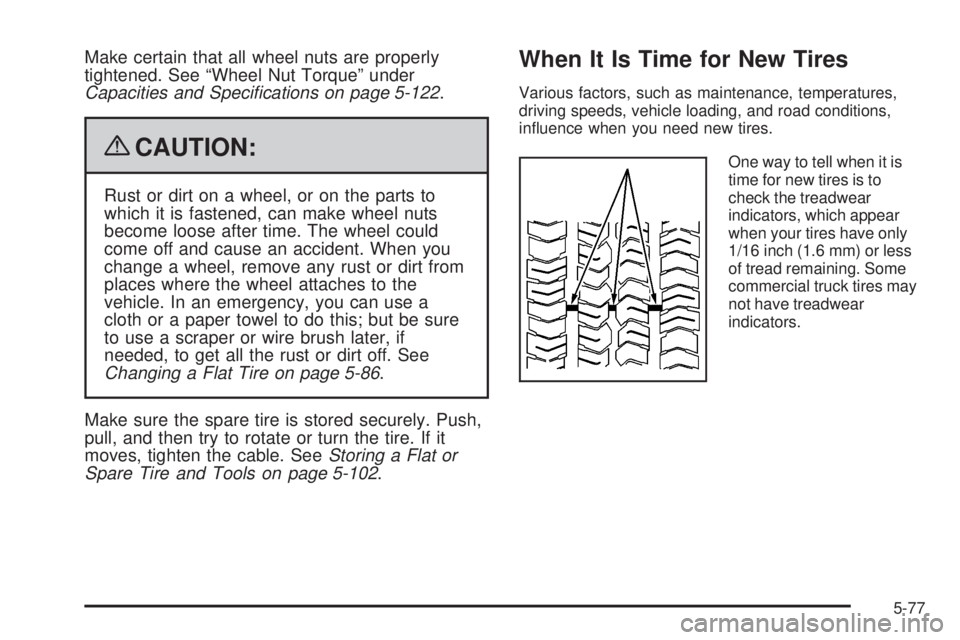
One way to tell when it is
time for new tires is to
check the treadwear
indicators, which appear
when your tires have only
1/16 inch (1.6 mm) or less
of tread remaining. Some
commercial truck tires may
not have treadwear
indicators.
5-77
Page 498 of 578
10. Turn the wheel wrench counterclockwise to lower
the vehicle. Lower the jack completely.
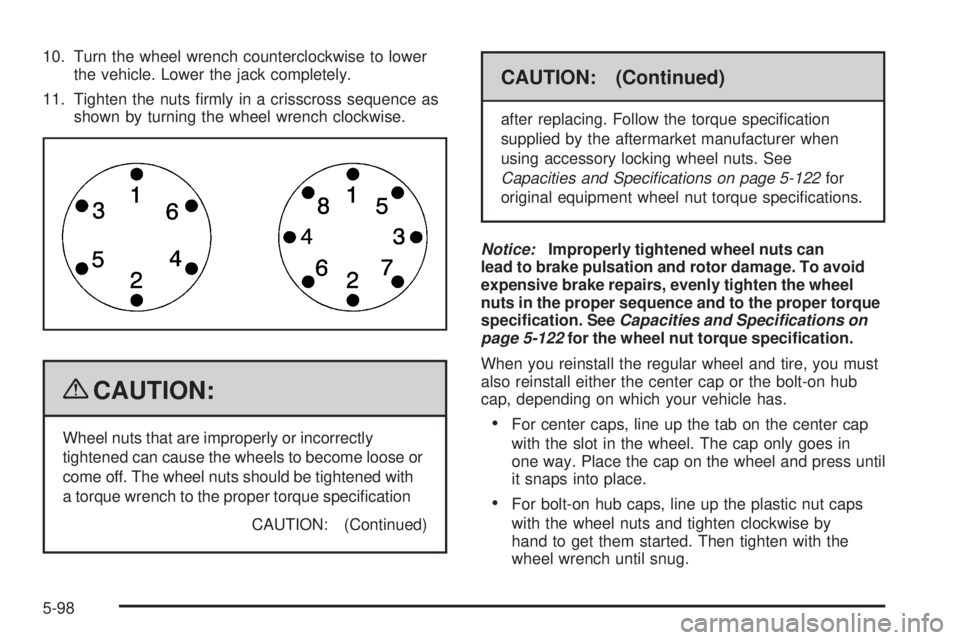
11. Tighten the nuts rmly in a crisscross sequence as
shown by turning the wheel wrench clockwise.
{CAUTION:
Wheel nuts that are improperly or incorrectly
tightened can cause the wheels to become loose or
come off. The wheel nuts should be tightened with
a torque wrench to the proper torque specication
CAUTION: (Continued)
CAUTION: (Continued)
after replacing. Follow the torque specication
supplied by the aftermarket manufacturer when
using accessory locking wheel nuts. See
Capacities and Specifications on page 5-122for
original equipment wheel nut torque specications.
Notice:Improperly tightened wheel nuts can
lead to brake pulsation and rotor damage. To avoid
expensive brake repairs, evenly tighten the wheel
nuts in the proper sequence and to the proper torque
specication. SeeCapacities and Specifications on
page 5-122for the wheel nut torque specication.
When you reinstall the regular wheel and tire, you must
also reinstall either the center cap or the bolt-on hub
cap, depending on which your vehicle has.
For center caps, line up the tab on the center cap
with the slot in the wheel. The cap only goes in
one way. Place the cap on the wheel and press until
it snaps into place.
For bolt-on hub caps, line up the plastic nut caps
with the wheel nuts and tighten clockwise by
hand to get them started. Then tighten with the
wheel wrench until snug.
5-98
Page 523 of 578
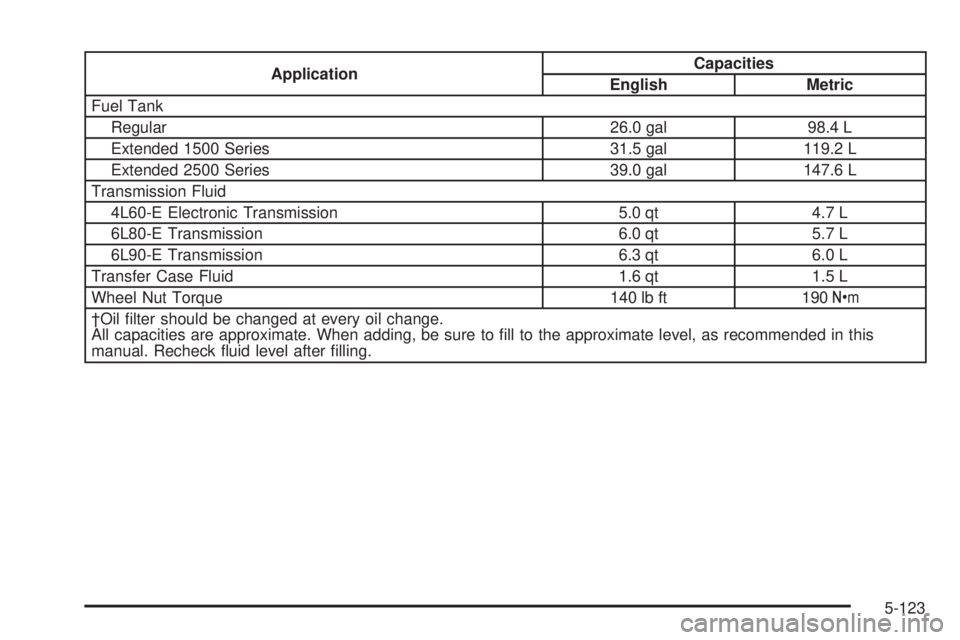
ApplicationCapacities
English Metric
Fuel Tank
Regular 26.0 gal 98.4 L
Extended 1500 Series 31.5 gal 119.2 L
Extended 2500 Series 39.0 gal 147.6 L
Transmission Fluid
4L60-E Electronic Transmission 5.0 qt 4.7 L
6L80-E Transmission 6.0 qt 5.7 L
6L90-E Transmission 6.3 qt 6.0 L
Transfer Case Fluid 1.6 qt 1.5 L
Wheel Nut Torque 140 lb ft 190Y
†Oil lter should be changed at every oil change.
All capacities are approximate. When adding, be sure to ll to the approximate level, as recommended in this
manual. Recheck uid level after lling.
5-123