2009 CHEVROLET SILVERADO AUX
[x] Cancel search: AUXPage 325 of 600
Rear Seat Audio (RSA)
Vehicles with this feature allow the rear seat passengers
to listen to and control any of the music sources:
radio, CDs, DVDs, or other auxiliary sources. However,
the rear seat passengers can only control the music
sources the front seat passengers are not listening to
(except on some radios where dual control is allowed).
For example, rear seat passengers can control and
listen to a CD through the headphones, while the
driver listens to the radio through the front speakers.
The rear seat passengers have control of the volume for
each set of headphones.
The RSA functions can be used even while the main
radio is off. The front audio system will display the
headphone icon when the RSA is on, and will disappear
from the display when it is off.
Audio can be heard through wired headphones (not
included) plugged into the jacks on the RSA. If the
vehicle has this feature, audio can also be heard on
Channel 2 of the wireless headphones.
Depending on the audio system, the rear speakers may
continue to play when the RSA audio is active through
the headphones.To listen to an iPod or portable audio device through
the RSA, attach the iPod or portable audio device to the
front auxiliary input (if available), located on the front
audio system. Turn the iPod on, then choose the
front auxiliary input with the RSA SRCE button.
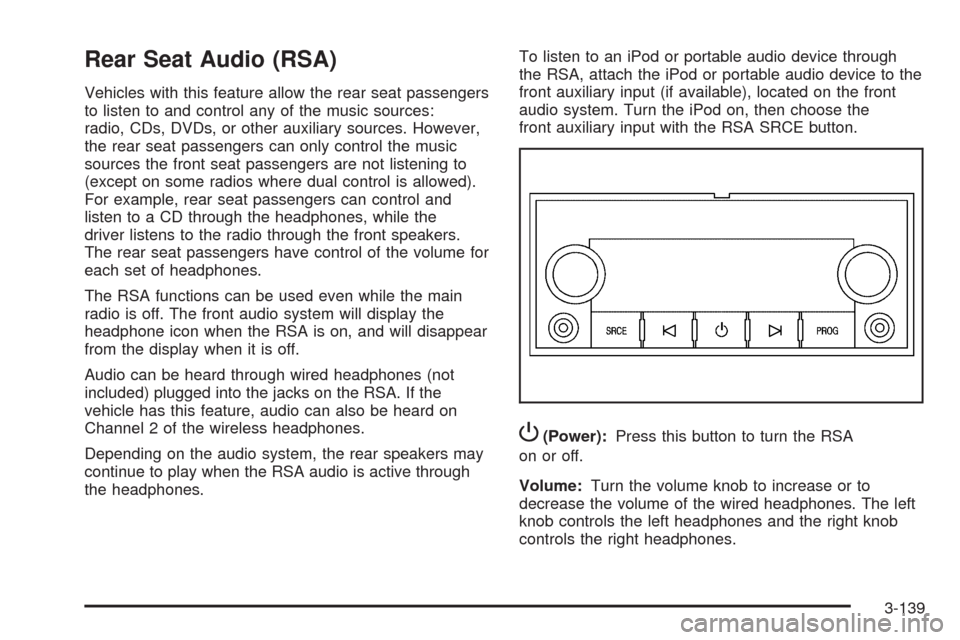
P(Power):Press this button to turn the RSA
on or off.
Volume:Turn the volume knob to increase or to
decrease the volume of the wired headphones. The left
knob controls the left headphones and the right knob
controls the right headphones.
3-139
Page 326 of 600
SRCE (Source):Press this button to switch between
the radio (AM/FM), XM™ (if equipped), CD, and if
the vehicle has these features, DVD, front auxiliary,
and rear auxiliary.
©¨(Seek):When listening to FM, AM, or XM™
(if equipped), press the seek arrows to go to the
previous or to the next station or channels and stay
there. This function is inactive, with some radios,
if the front seat passengers are listening to the radio.
Press and hold either seek arrow until the display
ashes, to tune to an individual station. The display
stops ashing after the buttons have not been pushed
for more than two seconds. This function is inactive, with
some radios, if the front seat passengers are listening
to the radio.
While listening to a disc, press the left seek arrow to go
back to the start of the current track or chapter
(if more than ten seconds have played). Press the right
seek arrow to go the next track or chapter on the
disc. This function is inactive, with some radios, if the
front seat passengers are listening to the disc.
While a DVD video menu is being displayed, press
either seek arrow to perform a cursor up or down on the
menu. Hold either seek arrow to perform a cursor left
or right on the menu.PROG (Program):Press this button to go to the next
preset radio station or channel set on the main
radio. This function is inactive, with some radios, if the
front seat passengers are listening to the radio.
While a CD or DVD audio disc is playing, press this
button to go to the beginning of the CD or DVD audio.
This function is inactive, with some radios, if the
front seat passengers are listening to the CD or DVD
audio.
While a disc is playing in the CD or DVD changer, press
this button to select the next disc, if multiple discs are
loaded. This function is inactive, with some radios, if the
front seat passengers are listening to the disc.
While a DVD video menu is being displayed, press the
PROG button to perform the menu function, Enter.
Theft-Deterrent Feature
THEFTLOCK®is designed to discourage theft of the
vehicle’s radio by learning a portion of the Vehicle
Identication Number (VIN). The radio does not operate
if it is stolen or moved to a different vehicle.
3-140
Page 327 of 600
Audio Steering Wheel Controls
Vehicles with audio
steering wheel controls
could differ depending on
the vehicle’s options.
Some audio controls
can be adjusted at the
steering wheel.
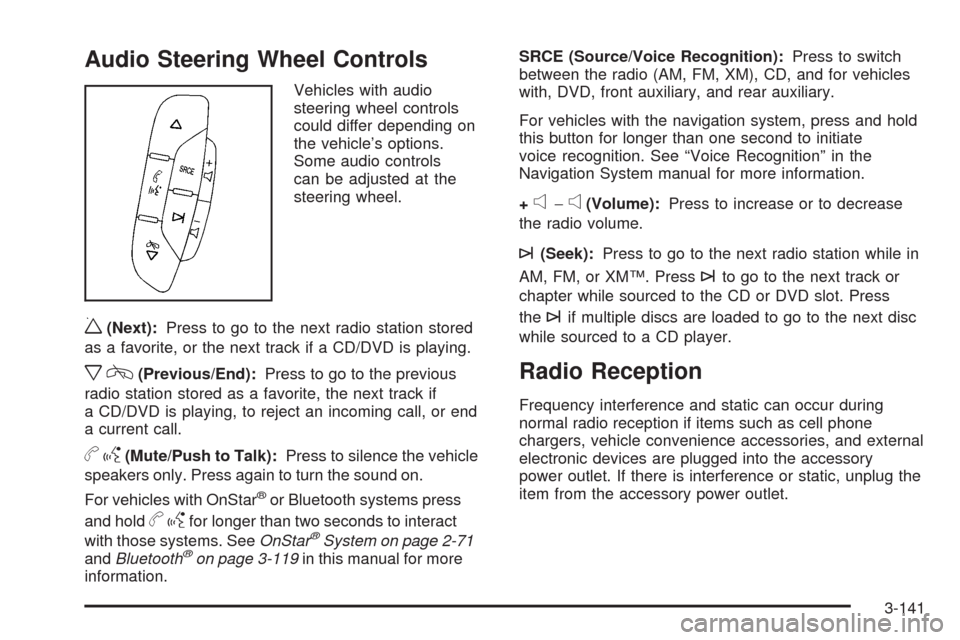
w(Next):Press to go to the next radio station stored
as a favorite, or the next track if a CD/DVD is playing.
xc(Previous/End):Press to go to the previous
radio station stored as a favorite, the next track if
a CD/DVD is playing, to reject an incoming call, or end
a current call.
bg(Mute/Push to Talk):Press to silence the vehicle
speakers only. Press again to turn the sound on.
For vehicles with OnStar
®or Bluetooth systems press
and hold
bgfor longer than two seconds to interact
with those systems. SeeOnStar®System on page 2-71
andBluetooth®on page 3-119in this manual for more
information.SRCE (Source/Voice Recognition):Press to switch
between the radio (AM, FM, XM), CD, and for vehicles
with, DVD, front auxiliary, and rear auxiliary.
For vehicles with the navigation system, press and hold
this button for longer than one second to initiate
voice recognition. See “Voice Recognition” in the
Navigation System manual for more information.
+
e−e(Volume):Press to increase or to decrease
the radio volume.
¨(Seek):Press to go to the next radio station while in
AM, FM, or XM™. Press
¨to go to the next track or
chapter while sourced to the CD or DVD slot. Press
the
¨if multiple discs are loaded to go to the next disc
while sourced to a CD player.
Radio Reception
Frequency interference and static can occur during
normal radio reception if items such as cell phone
chargers, vehicle convenience accessories, and external
electronic devices are plugged into the accessory
power outlet. If there is interference or static, unplug the
item from the accessory power outlet.
3-141
Page 371 of 600
See your dealer/retailer for additional advice and
information about using a snow plow on your vehicle.
Also, seeLoading the Vehicle on page 4-32.
Emergency Roof Lamp Provisions
Vehicles with the RPO VYU snow plow prep package
also have an emergency roof lamp provision package,
RPO TRW. Wiring for the emergency roof lamp is
provided above the overhead console. SeeAuxiliary
Roof Mounted Lamp on page 3-19for switch location.
Truck-Camper Loading Information
A vehicle specic Truck-Camper Loading
information label is attached to the inside of your
vehicle’s glove box. This label will tell you if
your vehicle can carry a slide-in camper, how
much of a load your vehicle can carry, and how to
correctly spread out the load. Also, it will help
you match the right slide-in camper to your vehicle.
When you carry a slide-in camper, the total
cargo load of your vehicle is the weight of the
camper, plus the following:
Everything else added to the camper after it
left the factory
Everything in the camper
All the people insideThe Cargo Weight Rating (CWR) is the maximum
weight of the load your vehicle can carry. It
does not include the weight of the people inside.
But, you can gure about 150 lbs (68 kg) for
each seat.
The total cargo load must not be more than your
vehicle’s CWR.
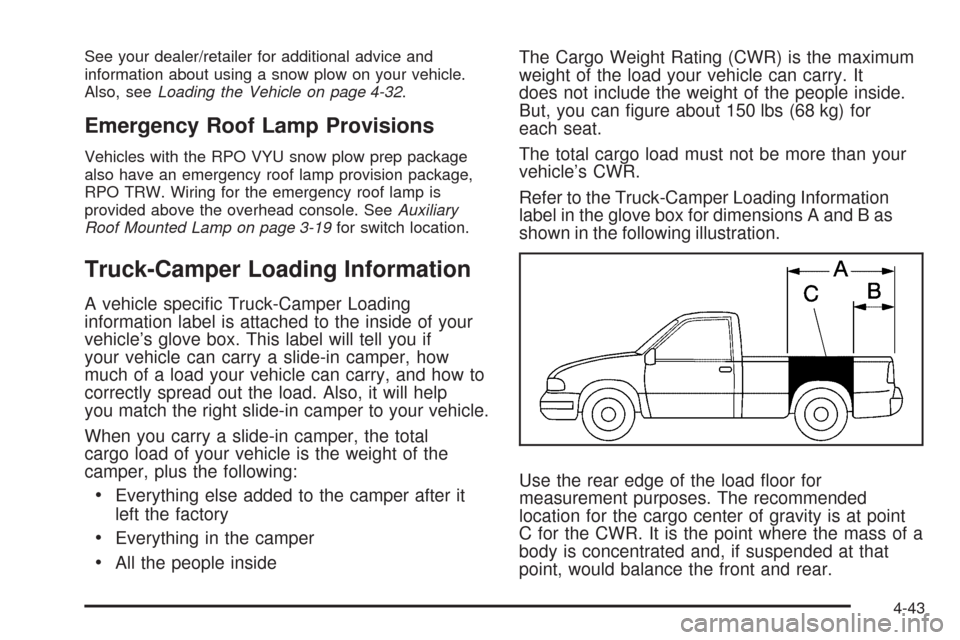
Refer to the Truck-Camper Loading Information
label in the glove box for dimensions A and B as
shown in the following illustration.
Use the rear edge of the load oor for
measurement purposes. The recommended
location for the cargo center of gravity is at point
C for the CWR. It is the point where the mass of a
body is concentrated and, if suspended at that
point, would balance the front and rear.
4-43
Page 409 of 600
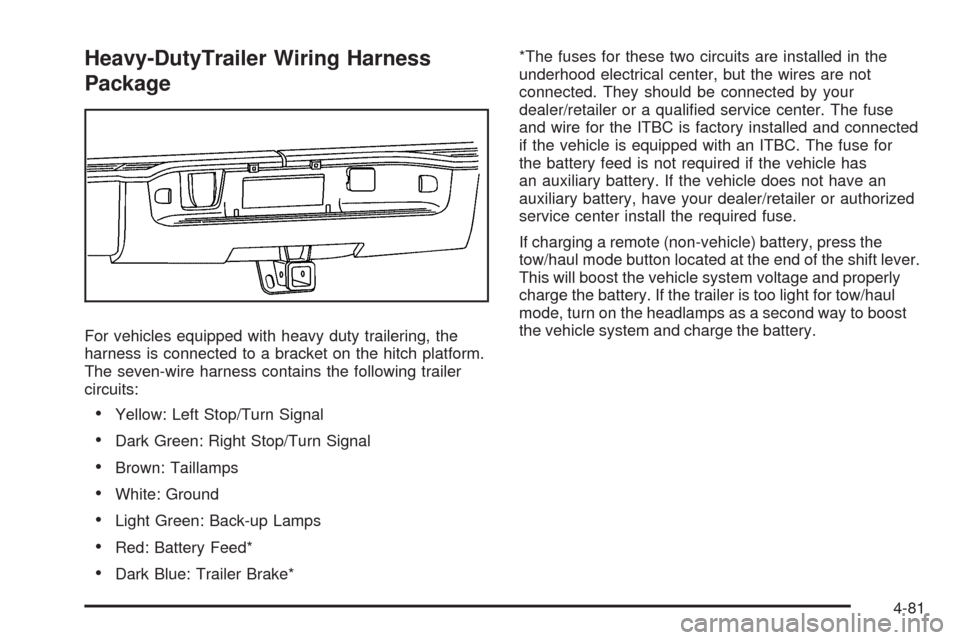
Heavy-DutyTrailer Wiring Harness
Package
For vehicles equipped with heavy duty trailering, the
harness is connected to a bracket on the hitch platform.
The seven-wire harness contains the following trailer
circuits:
Yellow: Left Stop/Turn Signal
Dark Green: Right Stop/Turn Signal
Brown: Taillamps
White: Ground
Light Green: Back-up Lamps
Red: Battery Feed*
Dark Blue: Trailer Brake**The fuses for these two circuits are installed in the
underhood electrical center, but the wires are not
connected. They should be connected by your
dealer/retailer or a qualied service center. The fuse
and wire for the ITBC is factory installed and connected
if the vehicle is equipped with an ITBC. The fuse for
the battery feed is not required if the vehicle has
an auxiliary battery. If the vehicle does not have an
auxiliary battery, have your dealer/retailer or authorized
service center install the required fuse.
If charging a remote (non-vehicle) battery, press the
tow/haul mode button located at the end of the shift lever.
This will boost the vehicle system voltage and properly
charge the battery. If the trailer is too light for tow/haul
mode, turn on the headlamps as a second way to boost
the vehicle system and charge the battery.
4-81
Page 411 of 600
Electric Brake Control Wiring
Provisions
These wiring provisions are included with the vehicle
as part of the trailer wiring package. These provisions
are for an electric brake controller. The instrument panel
contains blunt cut wires behind the steering column
for the trailer brake controller. The harness contains the
following wires:
Dark Blue: Brake Signal to Trailer Connector
Red/Black: Battery
Light Blue/White: Brake Switch
White: Ground
It should be installed by your dealer/retailer or a
qualied service center.
If the vehicle is equipped with an ITBC, the blunt cuts
exist, but are not connected further in the harness.
If an aftermarket trailer brake controller is installed,
the ITBC must be disconnected. Do not power
both ITBC and aftermarket controllers to control the
trailer brakes at the same time.
Auxiliary Battery
The auxiliary battery provision can be used to supply
electrical power to additional equipment that may
be added, such as a slide-in camper. If the vehicle hasthis provision, this relay will be located on the drivers
side of the vehicle, next to the underhood electrical
center.
Be sure to follow the proper installation instructions that
are included with any electrical equipment that is installed.
Notice:Leaving electrical equipment on for
extended periods will drain the battery. Always turn
off electrical equipment when not in use and do not
use equipment that exceeds the maximum amperage
rating for the auxiliary battery provision.
Trailer Recommendations
Subtract the hitch loads from the Cargo Weight Rating
(CWR). CWR is the maximum weight of the load the
vehicle can carry. It does not include the weight of the
people inside, but you can gure about 150 lbs. (68 kg)
for each passenger. The total cargo load must not be
more than the vehicles CWR.
Weigh the vehicle with the trailer attached, so the
GVWR or GAWR are not exceeded. If using a
weight-distributing hitch, weigh the vehicle without the
spring bars in place.
The best performance is obtained by correctly spreading
out the weight of the load and choosing the correct
hitch and trailer brakes.
For more information seeTowing a Trailer on page 4-51.
4-83
Page 541 of 600
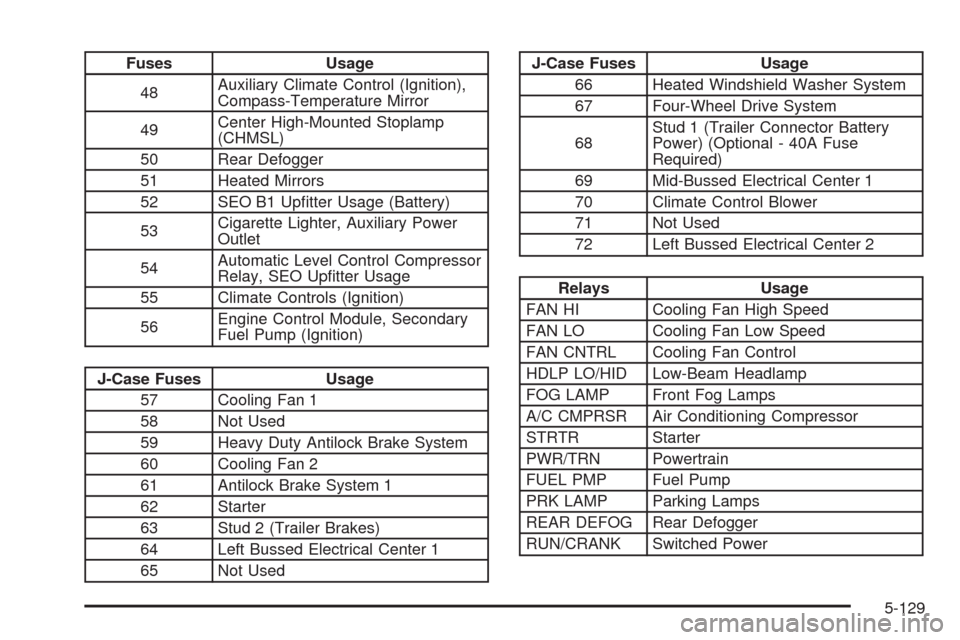
Fuses Usage
48Auxiliary Climate Control (Ignition),
Compass-Temperature Mirror
49Center High-Mounted Stoplamp
(CHMSL)
50 Rear Defogger
51 Heated Mirrors
52 SEO B1 Uptter Usage (Battery)
53Cigarette Lighter, Auxiliary Power
Outlet
54Automatic Level Control Compressor
Relay, SEO Uptter Usage
55 Climate Controls (Ignition)
56Engine Control Module, Secondary
Fuel Pump (Ignition)
J-Case Fuses Usage
57 Cooling Fan 1
58 Not Used
59 Heavy Duty Antilock Brake System
60 Cooling Fan 2
61 Antilock Brake System 1
62 Starter
63 Stud 2 (Trailer Brakes)
64 Left Bussed Electrical Center 1
65 Not Used
J-Case Fuses Usage
66 Heated Windshield Washer System
67 Four-Wheel Drive System
68Stud 1 (Trailer Connector Battery
Power) (Optional - 40A Fuse
Required)
69 Mid-Bussed Electrical Center 1
70 Climate Control Blower
71 Not Used
72 Left Bussed Electrical Center 2
Relays Usage
FAN HI Cooling Fan High Speed
FAN LO Cooling Fan Low Speed
FAN CNTRL Cooling Fan Control
HDLP LO/HID Low-Beam Headlamp
FOG LAMP Front Fog Lamps
A/C CMPRSR Air Conditioning Compressor
STRTR Starter
PWR/TRN Powertrain
FUEL PMP Fuel Pump
PRK LAMP Parking Lamps
REAR DEFOG Rear Defogger
RUN/CRANK Switched Power
5-129
Page 586 of 600
Audio System.................................................3-85
Audio Steering Wheel Controls....................3-141
Fixed Mast Antenna...................................3-142
Navigation/Radio System, see Navigation
Manual.................................................3-119
Radio Reception........................................3-141
Rear Seat Audio (RSA)...............................3-139
Setting the Clock.........................................3-86
Theft-Deterrent Feature...............................3-140
XM™ Satellite Radio Antenna System...........3-142
Audio System(s).............................................3-88
Automatic Headlamp System............................3-18
Automatic Transmission
Fluid..................................................5-21, 5-24
Operation...................................................2-28
Auxiliary Roof Mounted Lamp Switch.................3-19
B
Battery..........................................................5-43
Electric Power Management..........................3-21
Run-Down Protection...................................3-22
Bluetooth
®....................................................3-119
Brake
Emergencies................................................ 4-6
Brake Fluid....................................................5-40Brakes..........................................................5-40
System Warning Light..................................3-42
Braking........................................................... 4-4
Braking in Emergencies..................................... 4-6
Break-In, New Vehicle.....................................2-21
Bulb Replacement...........................................5-58
Center High-Mounted Stoplamp (CHMSL)
and Cargo Lamp......................................5-59
Halogen Bulbs............................................5-58
Headlamp Aiming........................................5-55
Headlamps.................................................5-58
License Plate Lamps....................................5-63
Pickup Box Identication and Fender Marker
Lamps ....................................................5-60
Replacement Bulbs......................................5-63
Taillamps, Turn Signal, Stoplamps and
Back-up Lamps........................................5-61
Buying New Tires...........................................5-84
C
Calibration.....................................................3-63
California Fuel.................................................. 5-7
California Perchlorate Materials Requirements....... 5-5
California Proposition 65 Warning....................... 5-5
Canadian Owners................................................ ii
2