2009 CHEVROLET SILVERADO tailgate
[x] Cancel search: tailgatePage 22 of 600
Safety Belts
Safety Belts: They Are for Everyone
This part of the manual tells you how to use safety
belts properly. It also tells you some things you should
not do with safety belts.
{CAUTION:
Do not let anyone ride where a safety belt cannot
be worn properly. In a crash, if you or your
passenger(s) are not wearing safety belts, the
injuries can be much worse. You can hit things
inside the vehicle harder or be ejected from the
vehicle. You and your passenger(s) can be
seriously injured or killed. In the same crash, you
might not be, if you are buckled up. Always fasten
your safety belt, and check that your passenger(s)
are restrained properly too.
{CAUTION:
People riding on the tailgate (if equipped) can
easily lose their balance and fall even when the
vehicle is operated at low speeds. Falling from a
moving vehicle may result in serious injuries or
death.
{CAUTION:
It is extremely dangerous to ride in a cargo area,
inside or outside of a vehicle. In a collision, people
riding in these areas are more likely to be
seriously injured or killed. Do not allow people to
ride in any area of your vehicle that is not
equipped with seats and safety belts. Be sure
everyone in your vehicle is in a seat and using a
safety belt properly.
Your vehicle has indicators as a reminder to buckle your
safety belts. SeeSafety Belt Reminders on page 3-36.
1-16
Page 101 of 600
Keys...............................................................2-3
Remote Keyless Entry (RKE) System................2-4
Remote Keyless Entry (RKE) System
Operation...................................................2-4
Remote Vehicle Start......................................2-7
Doors and Locks.............................................2-9
Door Locks....................................................2-9
Power Door Locks..........................................2-9
Delayed Locking...........................................2-10
Programmable Automatic Door Locks..............2-10
Rear Door Security Locks..............................2-10
Lockout Protection........................................2-11
Rear Doors..................................................2-11
Tailgate.......................................................2-12
Windows........................................................2-14
Manual Windows..........................................2-14
Power Windows............................................2-15
Power Sliding Rear Window...........................2-16
Sun Visors...................................................2-17
Theft-Deterrent Systems..................................2-17
Content Theft-Deterrent.................................2-17
PASS-Key
®III+ Electronic Immobilizer.............2-19
PASS-Key®III+ Electronic Immobilizer
Operation.................................................2-19Starting and Operating Your Vehicle................2-21
New Vehicle Break-In....................................2-21
Ignition Positions..........................................2-21
Retained Accessory Power (RAP)...................2-23
Starting the Engine.......................................2-23
Fast Idle System..........................................2-25
Adjustable Throttle and Brake Pedal................2-26
Engine Coolant Heater..................................2-26
Active Fuel Management™.............................2-27
Automatic Transmission Operation...................2-28
Tow/Haul Mode............................................2-34
Four-Wheel Drive..........................................2-36
Parking Brake..............................................2-50
Shifting Into Park..........................................2-52
Shifting Out of Park......................................2-54
Parking Over Things That Burn.......................2-54
Engine Exhaust............................................2-55
Running the Vehicle While Parked..................2-56
Mirrors...........................................................2-57
Manual Rearview Mirror.................................2-57
Automatic Dimming Rearview Mirror................2-57
Outside Manual Mirrors..................................2-58
Outside Towing Mirrors..................................2-58
Outside Power Mirrors...................................2-59
Outside Power Foldaway Mirrors.....................2-59
Section 2 Features and Controls
2-1
Page 112 of 600
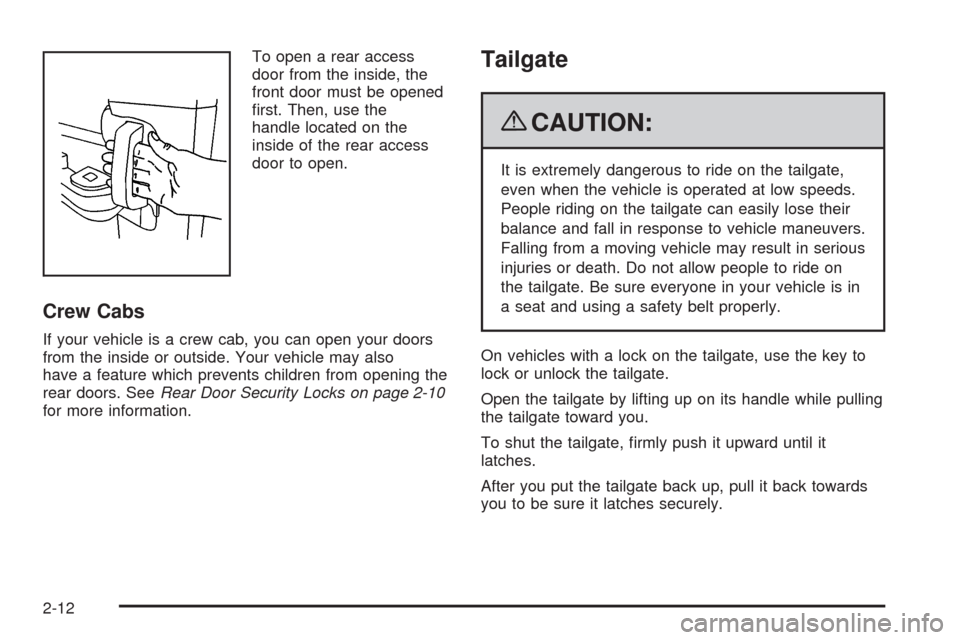
To open a rear access
door from the inside, the
front door must be opened
rst. Then, use the
handle located on the
inside of the rear access
door to open.
Crew Cabs
If your vehicle is a crew cab, you can open your doors
from the inside or outside. Your vehicle may also
have a feature which prevents children from opening the
rear doors. SeeRear Door Security Locks on page 2-10
for more information.
Tailgate
{CAUTION:
It is extremely dangerous to ride on the tailgate,
even when the vehicle is operated at low speeds.
People riding on the tailgate can easily lose their
balance and fall in response to vehicle maneuvers.
Falling from a moving vehicle may result in serious
injuries or death. Do not allow people to ride on
the tailgate. Be sure everyone in your vehicle is in
a seat and using a safety belt properly.
On vehicles with a lock on the tailgate, use the key to
lock or unlock the tailgate.
Open the tailgate by lifting up on its handle while pulling
the tailgate toward you.
To shut the tailgate, rmly push it upward until it
latches.
After you put the tailgate back up, pull it back towards
you to be sure it latches securely.
2-12
Page 113 of 600
Tailgate Removal
The tailgate can be removed to allow for different
loading situations. Although the tailgate can be removed
without assistance, you may want someone to assist
you with the removal to avoid possible damage to
the vehicle.
On vehicles with a rear vision camera, it must be
disconnected before removing the tailgate. SeeRear
Vision Camera (RVC) on page 2-65for more
information.
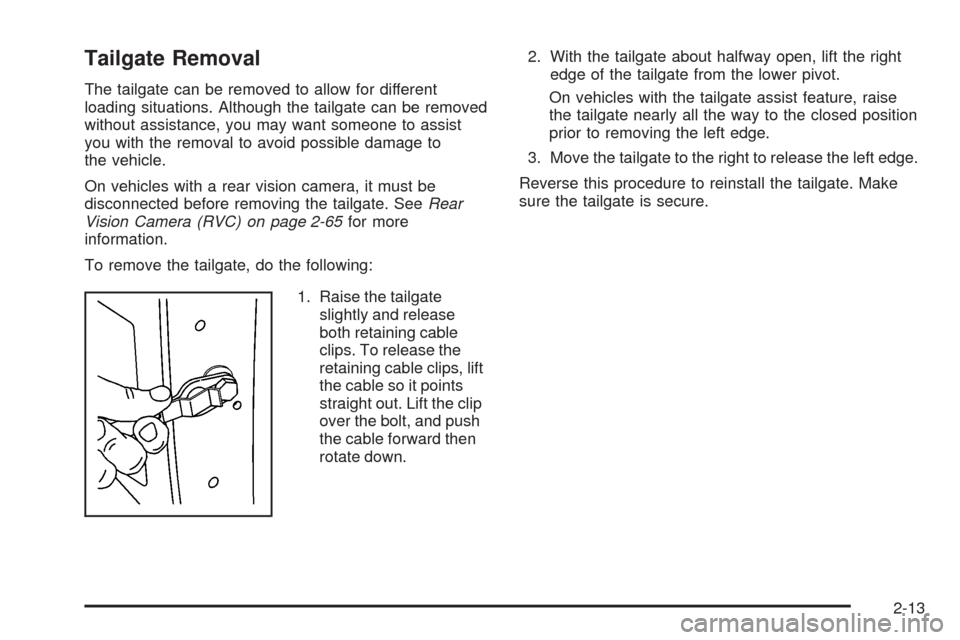
To remove the tailgate, do the following:
1. Raise the tailgate
slightly and release
both retaining cable
clips. To release the
retaining cable clips, lift
the cable so it points
straight out. Lift the clip
over the bolt, and push
the cable forward then
rotate down.2. With the tailgate about halfway open, lift the right
edge of the tailgate from the lower pivot.
On vehicles with the tailgate assist feature, raise
the tailgate nearly all the way to the closed position
prior to removing the left edge.
3. Move the tailgate to the right to release the left edge.
Reverse this procedure to reinstall the tailgate. Make
sure the tailgate is secure.
2-13
Page 163 of 600
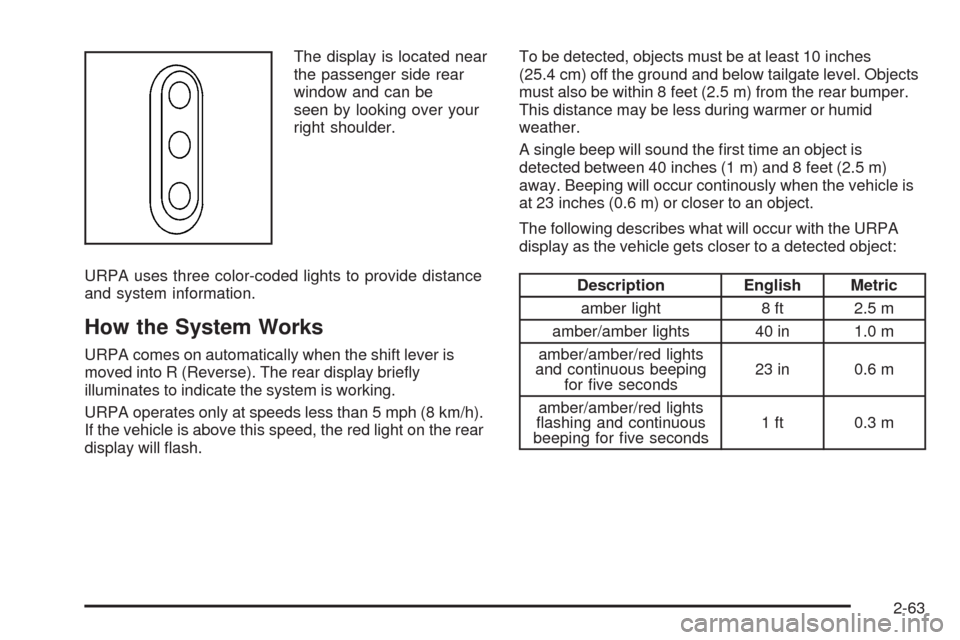
The display is located near
the passenger side rear
window and can be
seen by looking over your
right shoulder.
URPA uses three color-coded lights to provide distance
and system information.
How the System Works
URPA comes on automatically when the shift lever is
moved into R (Reverse). The rear display briey
illuminates to indicate the system is working.
URPA operates only at speeds less than 5 mph (8 km/h).
If the vehicle is above this speed, the red light on the rear
display will ash.To be detected, objects must be at least 10 inches
(25.4 cm) off the ground and below tailgate level. Objects
must also be within 8 feet (2.5 m) from the rear bumper.
This distance may be less during warmer or humid
weather.
A single beep will sound the rst time an object is
detected between 40 inches (1 m) and 8 feet (2.5 m)
away. Beeping will occur continously when the vehicle is
at 23 inches (0.6 m) or closer to an object.
The following describes what will occur with the URPA
display as the vehicle gets closer to a detected object:
Description English Metric
amber light 8 ft 2.5 m
amber/amber lights 40 in 1.0 m
amber/amber/red lights
and continuous beeping
for ve seconds23 in 0.6 m
amber/amber/red lights
ashing and continuous
beeping for ve seconds1 ft 0.3 m
2-63
Page 164 of 600

The system can be
disabled by pressing the
rear park aid disable button
located next to the radio.
The indicator light will come on and PARK ASSIST OFF
displays on the Driver Information Center (DIC) to
indicate that URPA is off, seeDIC Warnings and
Messages on page 3-66for information about clearing
the message.
Notice:If you use URPA while the tailgate is
lowered, it may not detect an object behind your
vehicle, and you might back into the object and
damage your vehicle. Always verify the tailgate is
closed when using URPA or turn off URPA when
driving with the tailgate lowered.When the System Does Not Seem to
Work Properly
If the URPA system will not activate due to a temporary
condition, the message PARK ASSIST OFF will be
displayed on the DIC and a red light will be shown on
the rear URPA display when the shift lever is moved into
R (Reverse). This occurs under the following conditions:
The driver disables the system.
The ultrasonic sensors are not clean. Keep the
vehicle’s rear bumper free of mud, dirt, snow, ice and
slush. For cleaning instructions, seeWashing Your
Vehicle on page 5-118.
A trailer was attached to the vehicle, or a bicycle or
an object was hanging out of the tailgate during the
last drive cycle, the red light may illuminate in the
rear display. Once the attached object is removed,
URPA will return to normal operation.
A tow bar is attached to the vehicle.
The vehicle’s bumper is damaged. Take the vehicle
to your dealer/retailer to repair the system.
Other conditions may affect system performance,
such as vibrations from a jackhammer or the
compression of air brakes on a very large truck.
If the system is still disabled, after driving forward at
least 15 mph (25 km/h), take the vehicle to your
dealer/retailer.
2-64
Page 168 of 600
Rear Vision Camera Location
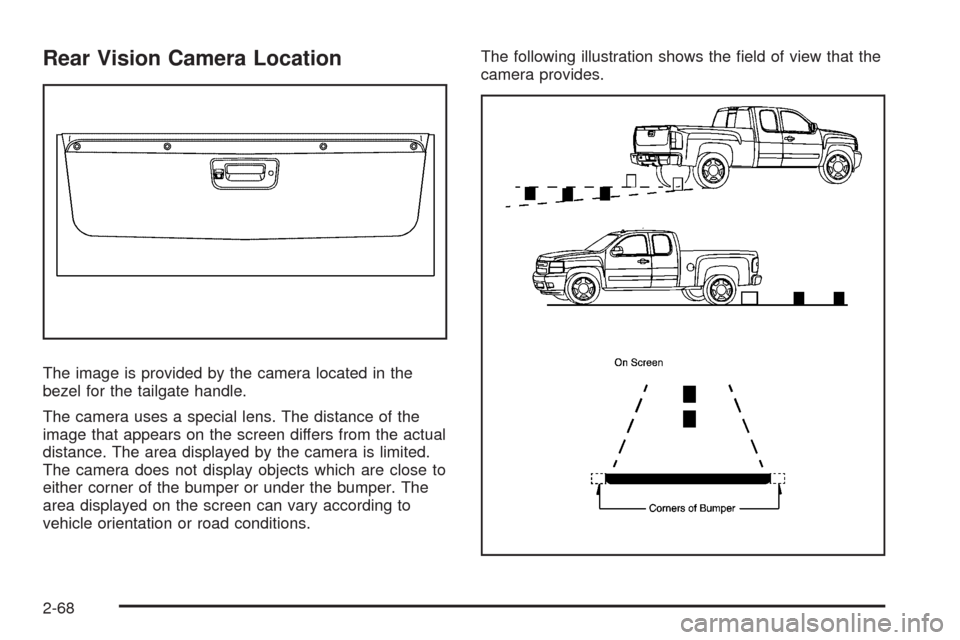
The image is provided by the camera located in the
bezel for the tailgate handle.
The camera uses a special lens. The distance of the
image that appears on the screen differs from the actual
distance. The area displayed by the camera is limited.
The camera does not display objects which are close to
either corner of the bumper or under the bumper. The
area displayed on the screen can vary according to
vehicle orientation or road conditions.The following illustration shows the eld of view that the
camera provides.
2-68
Page 169 of 600
Disconnecting the Rear Vision Camera
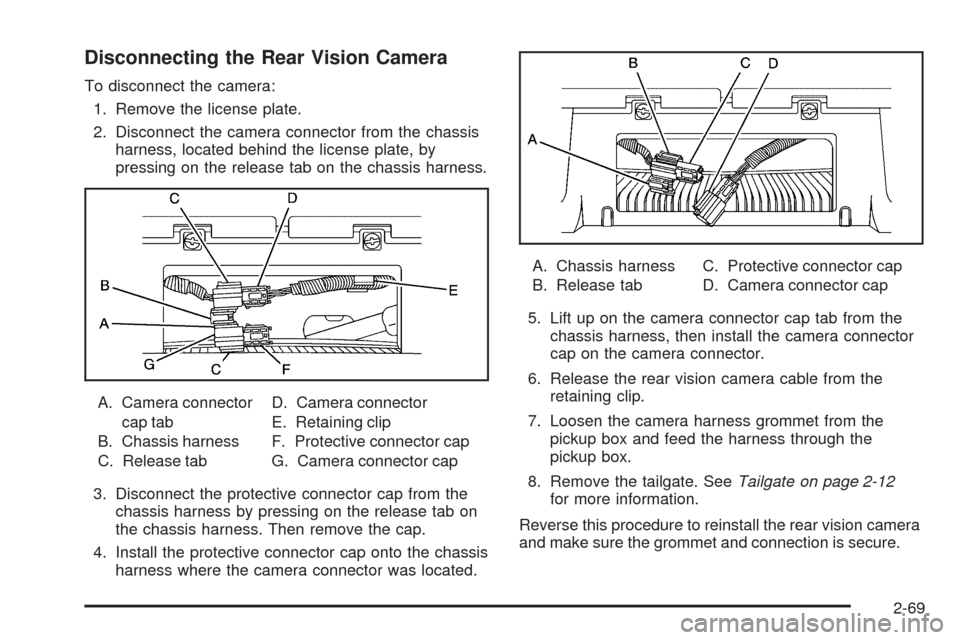
To disconnect the camera:
1. Remove the license plate.
2. Disconnect the camera connector from the chassis
harness, located behind the license plate, by
pressing on the release tab on the chassis harness.
A. Camera connector
cap tab
B. Chassis harness
C. Release tabD. Camera connector
E. Retaining clip
F. Protective connector cap
G. Camera connector cap
3. Disconnect the protective connector cap from the
chassis harness by pressing on the release tab on
the chassis harness. Then remove the cap.
4. Install the protective connector cap onto the chassis
harness where the camera connector was located.A. Chassis harness
B. Release tabC. Protective connector cap
D. Camera connector cap
5. Lift up on the camera connector cap tab from the
chassis harness, then install the camera connector
cap on the camera connector.
6. Release the rear vision camera cable from the
retaining clip.
7. Loosen the camera harness grommet from the
pickup box and feed the harness through the
pickup box.
8. Remove the tailgate. SeeTailgate on page 2-12
for more information.
Reverse this procedure to reinstall the rear vision camera
and make sure the grommet and connection is secure.
2-69