2009 CHEVROLET IMPALA brake
[x] Cancel search: brakePage 4 of 406
Vehicle Symbol Chart
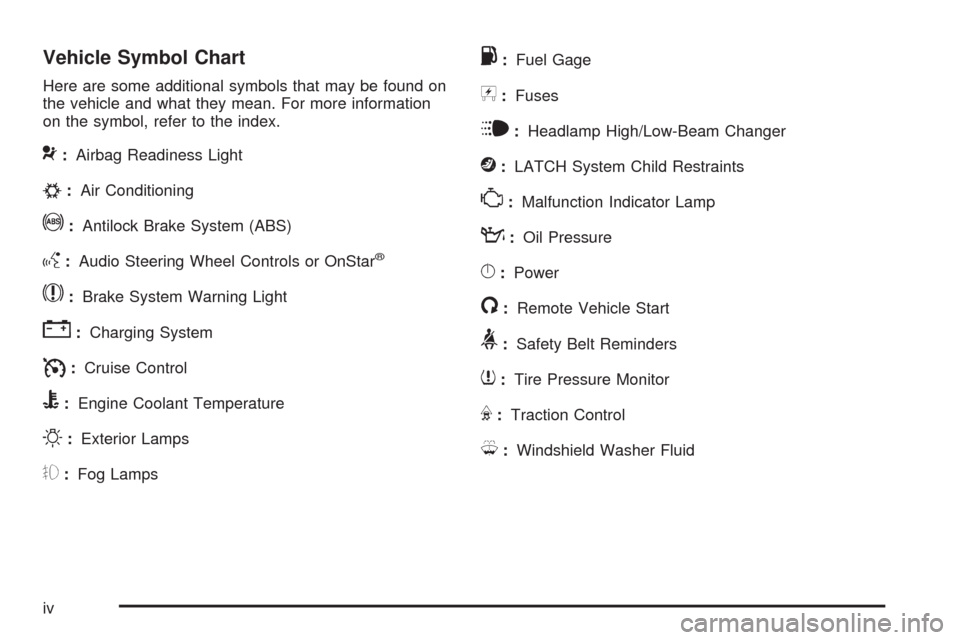
Here are some additional symbols that may be found on
the vehicle and what they mean. For more information
on the symbol, refer to the index.
9:Airbag Readiness Light
#:Air Conditioning
!:Antilock Brake System (ABS)
g:Audio Steering Wheel Controls or OnStar®
$:Brake System Warning Light
":Charging System
I:Cruise Control
B:Engine Coolant Temperature
O:Exterior Lamps
#:Fog Lamps
.:Fuel Gage
+:Fuses
i:Headlamp High/Low-Beam Changer
j:LATCH System Child Restraints
*:Malfunction Indicator Lamp
::Oil Pressure
}:Power
/:Remote Vehicle Start
>:Safety Belt Reminders
7:Tire Pressure Monitor
F:Traction Control
M:Windshield Washer Fluid
iv
Page 79 of 406

Keys...............................................................2-3
Remote Keyless Entry (RKE) System................2-4
Remote Keyless Entry (RKE) System
Operation...................................................2-5
Remote Vehicle Start......................................2-7
Doors and Locks.............................................2-9
Door Locks....................................................2-9
Power Door Locks........................................2-10
Delayed Locking...........................................2-10
Automatic Door Lock.....................................2-10
Programmable Automatic Door Unlock.............2-11
Rear Door Security Locks..............................2-11
Lockout Protection........................................2-12
Trunk..........................................................2-12
Windows........................................................2-14
Power Windows............................................2-15
Sun Visors...................................................2-16
Theft-Deterrent Systems..................................2-16
Content Theft-Deterrent.................................2-16
PASS-Key
®III+ Electronic Immobilizer.............2-17
PASS-Key®III+ Electronic Immobilizer
Operation.................................................2-18Starting and Operating Your Vehicle................2-19
New Vehicle Break-In....................................2-19
Ignition Positions..........................................2-20
Retained Accessory Power (RAP)...................2-21
Starting the Engine.......................................2-21
Engine Coolant Heater..................................2-22
Active Fuel Management™ (5.3L V8 Engine). . . .2-23
Automatic Transmission Operation...................2-24
Parking Brake..............................................2-26
Shifting Into Park..........................................2-27
Shifting Out of Park......................................2-29
Parking Over Things That Burn.......................2-30
Engine Exhaust............................................2-30
Running the Vehicle While Parked..................2-31
Mirrors...........................................................2-32
Manual Rearview Mirror.................................2-32
Automatic Dimming Rearview Mirror................2-32
Outside Power Mirrors...................................2-32
Outside Convex Mirror...................................2-33
Outside Heated Mirrors..................................2-33
OnStar®System.............................................2-33
Section 2 Features and Controls
2-1
Page 97 of 406
See your dealer/retailer or a locksmith who can service
PASS-Key®III+ to get a new key blank that is cut
exactly as the ignition key that operates the system.
To program the new additional key:
1. Verify that the new key has a
1stamped on it.
2. Insert the original, already programmed, key in the
ignition and start the engine. If the engine will not
start, see your dealer/retailer for service.
3. After the engine has started, turn the key to
LOCK/OFF, and remove the key.
4. Insert the new key to be programmed and turn it to
the ON/RUN position within ve seconds of turning
the ignition to the LOCK/OFF position in Step 3.
The security light will turn off once the key has been
programmed.
5. Repeat Steps 1 through 4 if additional keys are to
be programmed.
If you lose or damage your PASS-Key
®III+ key, see
your dealer/retailer or a locksmith who can service
PASS-Key
®III+ to have a new key made.
Do not leave the key or device that disarms or
deactivates the theft deterrent system in the vehicle.
Starting and Operating Your
Vehicle
New Vehicle Break-In
Notice:The vehicle does not need an elaborate
break-in. But it will perform better in the long run if
you follow these guidelines:
Do not drive at any one constant speed, fast or
slow, for the rst 500 miles (805 km). Do not
make full-throttle starts. Avoid downshifting to
brake or slow the vehicle.
Avoid making hard stops for the rst 200 miles
(322 km) or so. During this time the new brake
linings are not yet broken in. Hard stops
with new linings can mean premature wear and
earlier replacement. Follow this breaking-in
guideline every time you get new brake linings.
Do not tow a trailer during break-in. SeeTowing
a Trailer on page 4-28for the trailer towing
capabilities of your vehicle and more
information.
Following break-in, engine speed and load can be
gradually increased.
2-19
Page 98 of 406
Ignition Positions
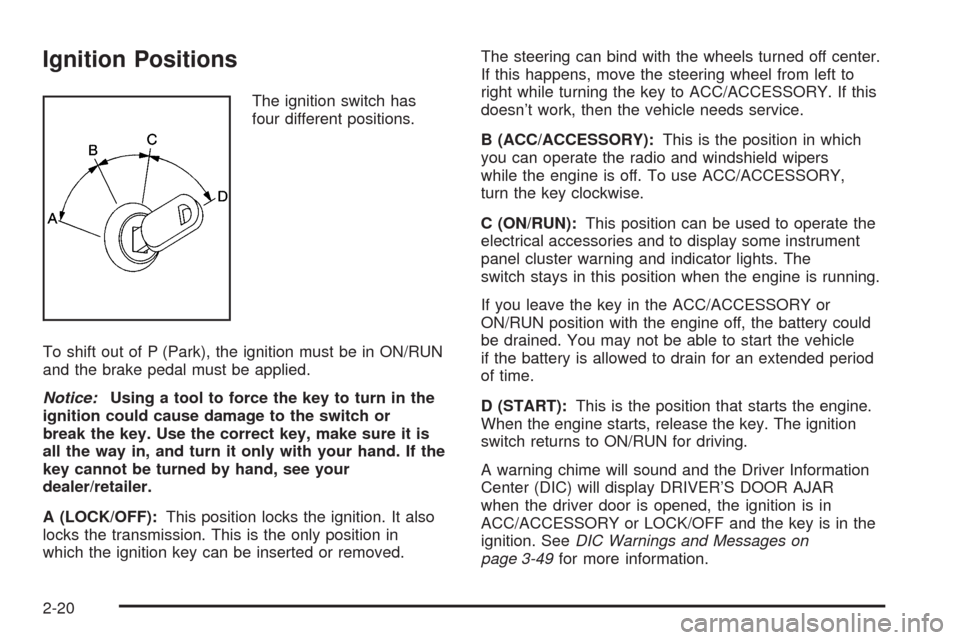
The ignition switch has
four different positions.
To shift out of P (Park), the ignition must be in ON/RUN
and the brake pedal must be applied.
Notice:Using a tool to force the key to turn in the
ignition could cause damage to the switch or
break the key. Use the correct key, make sure it is
all the way in, and turn it only with your hand. If the
key cannot be turned by hand, see your
dealer/retailer.
A (LOCK/OFF):This position locks the ignition. It also
locks the transmission. This is the only position in
which the ignition key can be inserted or removed.The steering can bind with the wheels turned off center.
If this happens, move the steering wheel from left to
right while turning the key to ACC/ACCESSORY. If this
doesn’t work, then the vehicle needs service.
B (ACC/ACCESSORY):This is the position in which
you can operate the radio and windshield wipers
while the engine is off. To use ACC/ACCESSORY,
turn the key clockwise.
C (ON/RUN):This position can be used to operate the
electrical accessories and to display some instrument
panel cluster warning and indicator lights. The
switch stays in this position when the engine is running.
If you leave the key in the ACC/ACCESSORY or
ON/RUN position with the engine off, the battery could
be drained. You may not be able to start the vehicle
if the battery is allowed to drain for an extended period
of time.
D (START):This is the position that starts the engine.
When the engine starts, release the key. The ignition
switch returns to ON/RUN for driving.
A warning chime will sound and the Driver Information
Center (DIC) will display DRIVER’S DOOR AJAR
when the driver door is opened, the ignition is in
ACC/ACCESSORY or LOCK/OFF and the key is in the
ignition. SeeDIC Warnings and Messages on
page 3-49for more information.
2-20
Page 102 of 406

Automatic Transmission Operation
The automatic transmission has a shift lever on the
steering column or on the console between the seats.
There is a display, located on the instrument panel
cluster that will indicate the gear the vehicle is in.
Maximum engine speed is limited on automatic
transmission vehicles while in P (Park) or N (Neutral) to
protect driveline components from improper operation.
There are several different positions for the shift lever.
P (Park):This position locks the front wheels. It is
the best position to use when the engine is started
because the vehicle cannot move easily.{CAUTION:
It can be dangerous to get out of the vehicle if the
shift lever is not fully in P (Park) with the parking
brake rmly set. The vehicle can roll. If you have
left the engine running, the vehicle can move
suddenly. You or others could be injured. To be
sure the vehicle will not move, even when you are
on fairly level ground, use the steps that follow. If
you are pulling a trailer, seeTowing a Trailer on
page 4-28.
Make sure the shift lever is fully in P (Park) before
starting the engine. The vehicle has an automatic
transmission shift lock control system. You must fully
apply the brakes rst, then press the shift lever
button before you can shift from P (Park) while the
ignition is in ON/RUN. If you cannot shift out of P (Park),
ease pressure on the shift lever and push the shift
lever all the way into P (Park) as you maintain brake
application. Then press the shift lever button and move
the shift lever into another gear. SeeShifting Out of
Park on page 2-29.
2-24
Page 103 of 406
R (Reverse):Use this gear to back up.
Notice:Shifting to R (Reverse) while the vehicle is
moving forward could damage the transmission.
The repairs would not be covered by the vehicle
warranty. Shift to R (Reverse) only after the vehicle
is stopped.
To rock the vehicle back and forth to get out of snow,
ice, or sand without damaging the transmission,
seeIf Your Vehicle is Stuck in Sand, Mud, Ice, or Snow
on page 4-19.
N (Neutral):In this position, the engine does not
connect with the wheels. To restart the engine when the
vehicle is already moving, use N (Neutral) only. Also,
use N (Neutral) when the vehicle is being towed.
{CAUTION:
Shifting into a drive gear while the engine is
running at high speed is dangerous. Unless your
foot is rmly on the brake pedal, the vehicle could
move very rapidly. You could lose control and hit
people or objects. Do not shift into a drive gear
while the engine is running at high speed.Notice:Shifting out of P (Park) or N (Neutral) with
the engine running at high speed may damage
the transmission. The repairs would not be covered
by the vehicle warranty. Be sure the engine is
not running at high speed when shifting the vehicle.
D (Drive):This position is for normal driving. It
provides the best fuel economy. If you need more
power for passing, and you are:
Going less than 35 mph (55 km/h), push the
accelerator pedal about halfway down.
Going about 35 mph (55 km/h) or more, push the
accelerator pedal all the way down.
The transmission will shift down to the next gear and
the vehicle will have more power.
Downshifting the transmission in slippery road conditions
could result in skidding, see “Skidding” underLoss of
Control on page 4-11.
Notice:Driving the vehicle if you notice that it is
moving slowly or not shifting gears as you increase
speed may damage the transmission. Have the
vehicle serviced right away. You can drive in
2 (Second) when you are driving less than 35 mph
(55 km/h) and D (Drive) for higher speeds until then.
2-25
Page 104 of 406
3 (Third):This position is also used for normal driving.
However, it reduces vehicle speed more than D (Drive)
without using the brakes. You might choose 3 (Third)
instead of D (Drive) when driving on hilly, winding roads,
when towing a trailer, so there is less shifting between
gears and when going down a steep hill.
2 (Second):This position reduces vehicle speed even
more than 3 (Third) without using the brakes. You
can use 2 (Second) on hills. It can help control vehicle
speed as you go down steep mountain roads. You
would also want to use the brakes off and on.
Notice:Driving in 2 (Second) for more than 25 miles
(40 km) or at speeds over 55 mph (90 km/h) may
damage the transmission. Also, shifting into
2 (Second) at speeds above 65 mph (105 km/h) can
cause damage. Drive in 3 (Third) or D (Drive)
instead of 2 (Second).
1 (First):This position reduces vehicle speed even
more than 2 (Second) without using the brakes. You can
use it on very steep hills, or in deep snow or mud. If
the shift lever is in 1 (First) while the vehicle is moving
forward, the transmission will not shift into rst gear
until the vehicle is going slowly enough.Notice:Spinning the tires or holding the vehicle in
one place on a hill using only the accelerator
pedal may damage the transmission. The repair will
not be covered by the vehicle warranty. If you
are stuck, do not spin the tires. When stopping on a
hill, use the brakes to hold the vehicle in place.
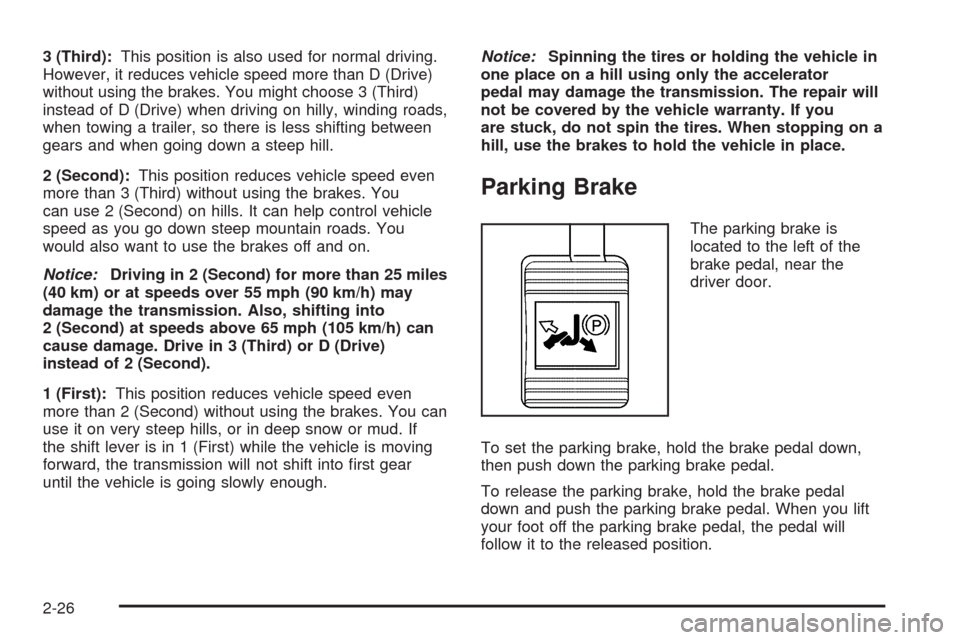
Parking Brake
The parking brake is
located to the left of the
brake pedal, near the
driver door.
To set the parking brake, hold the brake pedal down,
then push down the parking brake pedal.
To release the parking brake, hold the brake pedal
down and push the parking brake pedal. When you lift
your foot off the parking brake pedal, the pedal will
follow it to the released position.
2-26
Page 105 of 406
A warning chime will sound and a brake warning light
located on the instrument panel cluster will come
on, if the parking brake is set, the ignition is on and the
vehicle speed is greater than 5 mph (8 km/h).
Notice:Driving with the parking brake on can
overheat the brake system and cause premature
wear or damage to brake system parts. Make sure
that the parking brake is fully released and the brake
warning light is off before driving.
If you are towing a trailer and parking on any hill, see
Towing a Trailer on page 4-28.
Shifting Into Park
{CAUTION:
It can be dangerous to get out of the vehicle if the
shift lever is not fully in P (Park) with the parking
brake rmly set. The vehicle can roll. If you have
left the engine running, the vehicle can move
suddenly. You or others could be injured. To be
sure the vehicle will not move, even when you are
on fairly level ground, use the steps that follow. If
you are pulling a trailer, seeTowing a Trailer on
page 4-28.
Steering Column Shift Lever
If the vehicle has a steering column shift lever, use this
procedure to shift the vehicle into P (Park):
1. Hold the brake pedal down.
2. Move the shift lever into P (Park) by pulling the
shift lever toward you and moving it up as far as
it will go.
3. With your foot still holding the brake pedal down,
set the parking brake. SeeParking Brake on
page 2-26for more information.
4. Turn the ignition key to LOCK/OFF.
5. Remove the key and take it with you. If you can
leave the vehicle with the ignition key in your
hand, the vehicle is in P (Park).
2-27