2009 CHEVROLET HHR engine
[x] Cancel search: enginePage 183 of 450
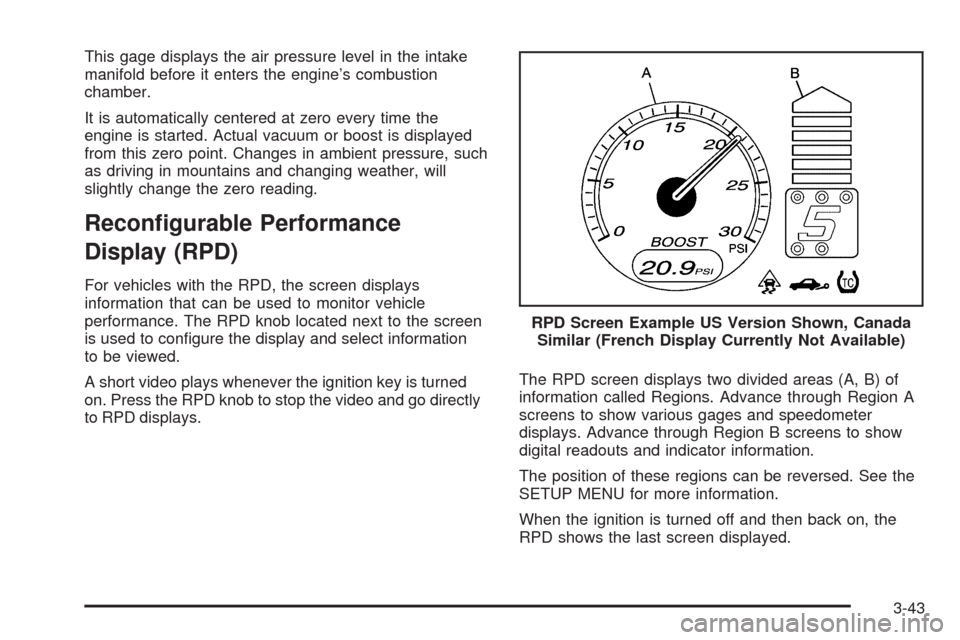
This gage displays the air pressure level in the intake
manifold before it enters the engine’s combustion
chamber.
It is automatically centered at zero every time the
engine is started. Actual vacuum or boost is displayed
from this zero point. Changes in ambient pressure, such
as driving in mountains and changing weather, will
slightly change the zero reading.
Recongurable Performance
Display (RPD)
For vehicles with the RPD, the screen displays
information that can be used to monitor vehicle
performance. The RPD knob located next to the screen
is used to congure the display and select information
to be viewed.
A short video plays whenever the ignition key is turned
on. Press the RPD knob to stop the video and go directly
to RPD displays.The RPD screen displays two divided areas (A, B) of
information called Regions. Advance through Region A
screens to show various gages and speedometer
displays. Advance through Region B screens to show
digital readouts and indicator information.
The position of these regions can be reversed. See the
SETUP MENU for more information.
When the ignition is turned off and then back on, the
RPD shows the last screen displayed.RPD Screen Example US Version Shown, Canada
Similar (French Display Currently Not Available)
3-43
Page 184 of 450
Region A Gage and Speedometer
Displays
Change the information displayed in Region A by
turning the knob either clockwise or counterclockwise.
The available gages are:
BOOST:Displays positive boost pressure as
determined by the manifold air pressure (MAP) sensor.
AIR/FUEL RATIO:Displays the mass ratio of air
to fuel.
CAM PHASER ANGLES:Displays orientation of the
intake and exhaust cam shafts relative to their park
positions as commanded by the engine control module.
OVERLAP represents the total distance the intake and
exhaust cam shafts have phased.
SPARK ADVANCE/ KNOCK RETARD:The spark
advance gage displays ignition timing. Knock retard
indicates the amount of ignition delay to reduce spark
knock.
ENGINE POWER & TORQUE:Displayed engine power
and torque are engine ywheel output values calculated
by the engine control module. These values are
approximate and may change with the air conditioning
load, generator output, air temperature, air pressure, and
fuel octane.SPEEDOMETER&GFORCE:The G FORCE meter
displays lateral acceleration. While turning right, G forces
are felt on the left, and vice versa. PEAK values are
stored indenitely, and can be reset with a press and hold
of the RPD knob while viewing the G FORCE meter.
SETUP MENU:Press the RPD knob to enter this menu.
The vehicle should be stopped while conguring the
setup menu selections.
SCREEN OFF:Turns the screen off.
Region B Readout Displays
Press the RPD knob to highlight Region B. The
information displayed can be changed by turning
the RPD knob either clockwise or counterclockwise.
Press the RPD knob again, to store the selection.
The selection will also be stored after a few seconds
of no activity. Available modes are:
Readouts #1
SHIFT LIGHTS/GEAR INDICATION:The shift lights
provide visual identication of engine speed for a
transmission gear. Shift light minimum and maximum
RPM settings can be viewed and congured in the
SETUP screen.
3-44
Page 185 of 450
Readouts #2
TIRE PRESSURES:Displays the last gage tire
pressures recorded from each of the wheel mounted
tire pressure sensors.
Readouts #3
BAROMETER:Displays ambient air pressure as
measured by the engine’s ambient pressure sensor.
OUTSIDE TEMPERATURE:Displays ambient
temperature as measured by an outside air temperature
sensor.
BATTERY VOLTAGE:Displays the vehicle’s battery
voltage.
Readouts #4
COOLANT TEMPERATURE:Displays engine coolant
temperature as measured by a coolant temperature
sensor.
INLET AIR TEMPERATURE:Displays the
instantaneous temperature of the air at the inlet to the
induction system.
FUEL PRESSURE:Displays fuel pressure as
measured by a sensor on the output of the
high-pressure fuel pump.
INDICATORS
The indicators come on when the corresponding function
is actively working to stabilize or control the vehicle. Each
indicator light on the RPD display can be turned on and
off using the SETUP MENU. These indicators work
independently of the telltales on the instrument panel
cluster. Turning the indicator on the RPD display on or off
does not enable or disable the functions on the vehicle.
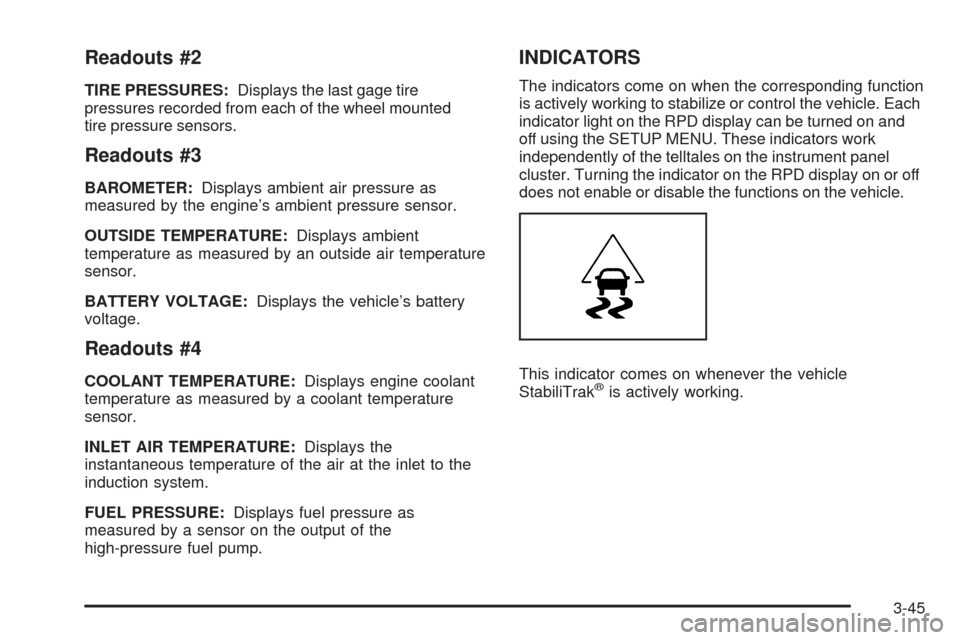
This indicator comes on whenever the vehicle
StabiliTrak
®is actively working.
3-45
Page 190 of 450

OIL LIFE
Press the information button until OIL LIFE displays.
The engine oil life system shows an estimate of the oil’s
remaining useful life. It shows 100% when the system
is reset after an oil change. It alerts you to change the oil
on a schedule consistent with your driving conditions.
In addition to the engine oil life system monitoring the oil
life, additional maintenance is recommended in the
Maintenance Schedule in this manual. SeeEngine Oil
on page 5-17andScheduled Maintenance on page 6-4.
Always reset the engine oil life system after an oil
change. See “How to Reset the Engine Oil Life System”
underEngine Oil Life System on page 5-21.
COOLANT
Press the information button until COOLANT displays.
This mode shows the temperature of the engine coolant
in either degrees Fahrenheit (°F) or degrees Celsius (°C).
Tire Pressure
If your vehicle has a Tire Pressure Monitor System
(TPMS), the pressure for each tire can be viewed in the
DIC. The tire pressure is shown in either pounds per
square inch (psi) or kilopascals (kPa). Press the
information button until LF ## PSI (kPa) ## RF displays
for the front tires. Press the information button again until
LR ## PSI (kPa) ## RR displays for the rear tires.If a low tire pressure condition is detected by the system
while driving, a message advising you to check the tire
pressure appears in the display. SeeInflation - Tire
Pressure on page 5-61andDIC Warnings and Messages
on page 3-50for more information.
DIC Warnings and Messages
These messages appear if there is a problem detected
in one of your vehicle’s systems.
A message clears when the vehicle’s condition is no
longer present. To acknowledge a message and clear it
from the display, press and hold any of the DIC buttons.
If the condition is still present, the warning message
comes back on the next time the vehicle is turned off and
back on. With most messages, a warning chime sounds
when the message displays. Your vehicle may have other
warning messages.
AUTO (Automatic) LIGHTS OFF
This message displays if the automatic headlamp
system is disabled with the headlamp switch.
SeeAutomatic Headlamp System on page 3-16
for more information.
3-50
Page 191 of 450

AUTO (Automatic) LIGHTS ON
This message displays if the automatic headlamp
system is enabled with the headlamp switch.
SeeAutomatic Headlamp System on page 3-16
for more information.
BRAKE FLUID
This message displays, while the ignition is on, when
the brake uid level is low. The brake system warning
light on the instrument panel cluster also comes on.
SeeBrake System Warning Light on page 3-33for more
information. Have the brake system serviced by your
dealer/retailer as soon as possible.
CHANGE OIL SOON
This message displays when the life of the engine oil
has expired and it should be changed.
When this message is acknowledged and cleared from
the display, the engine oil life system must still be reset
separately. SeeEngine Oil Life System on page 5-21
andScheduled Maintenance on page 6-4for more
information.
CHECK GAS CAP
This message displays if the fuel cap has not been fully
tightened. Recheck the fuel cap to make sure that it
is on properly. A few driving trips with the cap properly
installed should turn the message off.
CHECK TIRE PRESS (Pressure)
If your vehicle has a Tire Pressure Monitor System
(TPMS), this message displays when the pressure in
one or more of the vehicle’s tires needs to be checked.
If a tire pressure message appears on the DIC, stop as
soon as you can. Have the tire pressures checked and
set to those shown on the Tire Loading Information
label. SeeTires on page 5-53,Loading the Vehicle on
page 4-25, andInflation - Tire Pressure on page 5-61.
The DIC also shows the tire pressure values. SeeDIC
Operation and Displays on page 3-48. If the tire pressure
is low, the low tire pressure warning light comes on.
SeeTire Pressure Light on page 3-37.
COMPETITIVE MODE
If your vehicle has this feature, this message displays
when the Competitive Driving mode is selected.
The Traction Control System (TCS) will not be operating
while in the Competitive Driving mode and the ESC/TCS
light on the instrument panel cluster will be on solid.
Adjust your driving accordingly. SeeTraction Control
System (TCS) on page 4-10,Electronic Stability Control
(ESC) on page 4-7, andElectronic Stability Control
(ESC)/Traction Control System (TCS) Indicator/Warning
Light on page 3-35for more information.
3-51
Page 192 of 450
COOLING MODE ON
This message may display on some vehicles. Under
severe conditions, hot ambient temperatures, steep
grades, and towing, your vehicle may experience more
transmission shifting. This is temporary and normal
under these conditions. This does not require engine or
transmission service.
CRUISE ENGAGED
This message displays when the cruise control system
is active. SeeCruise Control on page 3-10for more
information.
DOOR AJAR
This message displays if one or more of the vehicle’s
doors are open. Make sure that the door(s) are
closed completely.
ENGINE DISABLED
This message displays if the starting of the engine is
disabled. Have your vehicle serviced by your dealer/
retailer immediately.
ENG (Engine) PWR (Power) REDUCED
This message displays to inform you that the vehicle
has reduced engine power to avoid damaging the engine.
Reduced engine power can affect the vehicle’s ability
to accelerate. If this message is on, but there is no
reduction in performance, proceed to your destination.
The performance may be reduced the next time the
vehicle is driven. The vehicle may be driven at a reduced
speed while this message is on, but acceleration and
speed may be reduced. Anytime this message stays on,
the vehicle should be taken to your dealer/retailer for
service as soon as possible.
ESC (Electronic Stability Control) ACTIVE
If your vehicle has Electronic Stability Control (ESC),
this message displays and the ESC/TCS light on the
instrument panel cluster ashes when ESC is assisting
you with directional control of the vehicle. You may feel or
hear the system working and see this message displayed
in the DIC. Slippery road conditions may exist when this
message is displayed, so adjust your driving accordingly.
This message may stay on for a few seconds after ESC
stops assisting you with directional control of the
vehicle. This is normal when the system is operating.
SeeElectronic Stability Control (ESC) on page 4-7and
Electronic Stability Control (ESC)/Traction Control
System (TCS) Indicator/Warning Light on page 3-35
for more information.
3-52
Page 196 of 450
DIC Vehicle Personalization
Your vehicle has personalization capabilities that allow
you to program certain features to a preferred setting.
All of the features listed may not be available on your
vehicle. Only the features available will be displayed on
the DIC.
The default settings for the features were set when your
vehicle left the factory, but may have been changed
from their default state since that time.
To change feature settings, use the following procedure:
Entering Personalization Menu
1. Turn the ignition on while the vehicle is stopped.
To avoid excessive drain on the battery, it is
recommended that the headlamps are turned off.
2. Press and hold the information and reset buttons at
the same time for one second, then release to enter
the personalization menu.
If the vehicle speed is greater than 2 mph (3 km/h),
only the UNITS menu will be accessible.3. Press the information button to scroll through the
available personalization menu modes.
Press the reset button to scroll through the available
settings for each mode.
If you do not make a selection within ten seconds,
the display will go back to the previous information
displayed.
Personalization Menu Modes
OIL LIFE RESET
When this feature is displayed, you can reset the engine
oil life system. To reset the system, seeEngine Oil Life
System on page 5-21. See “OIL LIFE” underDIC
Operation and Displays on page 3-48for more
information.
3-56
Page 197 of 450
UNITS
This feature allows you to select the units of
measurement in which the DIC will display the vehicle
information. When UNITS appears on the display, press
and hold the reset button for at least one second to
scroll through the available settings:
ENGLISH (default in United States):All information
will be displayed in English units.
METRIC (default in Canada):All information will be
displayed in metric units.
To select a setting and move on to the next feature,
press the information button while the desired setting is
displayed on the DIC.
REMOTE START
If your vehicle has remote start, this feature allows
remote start to be turned off or on. Remote start allows
you to start the engine from outside of the vehicle
using your Remote Keyless Entry (RKE) transmitter.
When REMOTE START appears on the display, press
and hold the reset button for at least one second to
scroll through the available settings:
OFF:The remote start feature will be disabled.
ON (default):The remote start feature will be enabled.SeeRemote Vehicle Start on page 2-7for more
information.
To select a setting and move on to the next feature,
press the information button while the desired setting is
displayed on the DIC.
LOCK HORN
This feature, which allows the vehicle’s horn to chirp
every time the lock button on the Remote Keyless Entry
(RKE) transmitter is pressed, can be enabled or disabled.
When LOCK HORN appears on the display, press and
hold the reset button for at least one second to scroll
through the available settings:
OFF (default):The horn will not chirp on the rst press
of the lock button on the RKE transmitter. The horn will
still chirp on the second press.
ON:The horn will chirp on the rst press of the lock
button on the RKE transmitter.
SeeRemote Keyless Entry (RKE) System Operation on
page 2-4for more information.
To select a setting and move on to the next feature,
press the information button while the desired setting is
displayed on the DIC.
3-57