Page 370 of 450
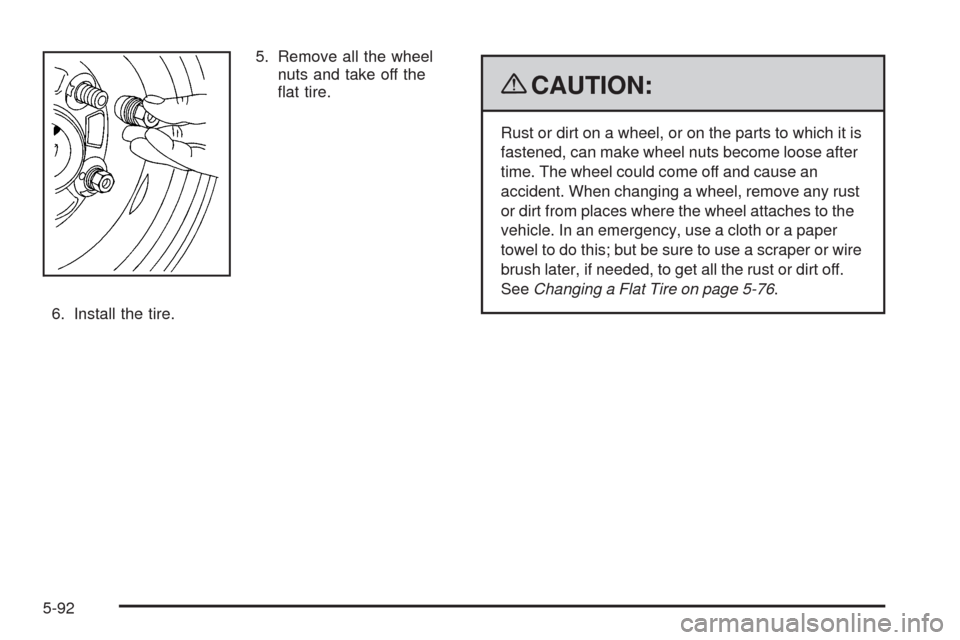
5. Remove all the wheel
nuts and take off the
at tire.
6. Install the tire.
{CAUTION:
Rust or dirt on a wheel, or on the parts to which it is
fastened, can make wheel nuts become loose after
time. The wheel could come off and cause an
accident. When changing a wheel, remove any rust
or dirt from places where the wheel attaches to the
vehicle. In an emergency, use a cloth or a paper
towel to do this; but be sure to use a scraper or wire
brush later, if needed, to get all the rust or dirt off.
SeeChanging a Flat Tire on page 5-76.
5-92
Page 371 of 450
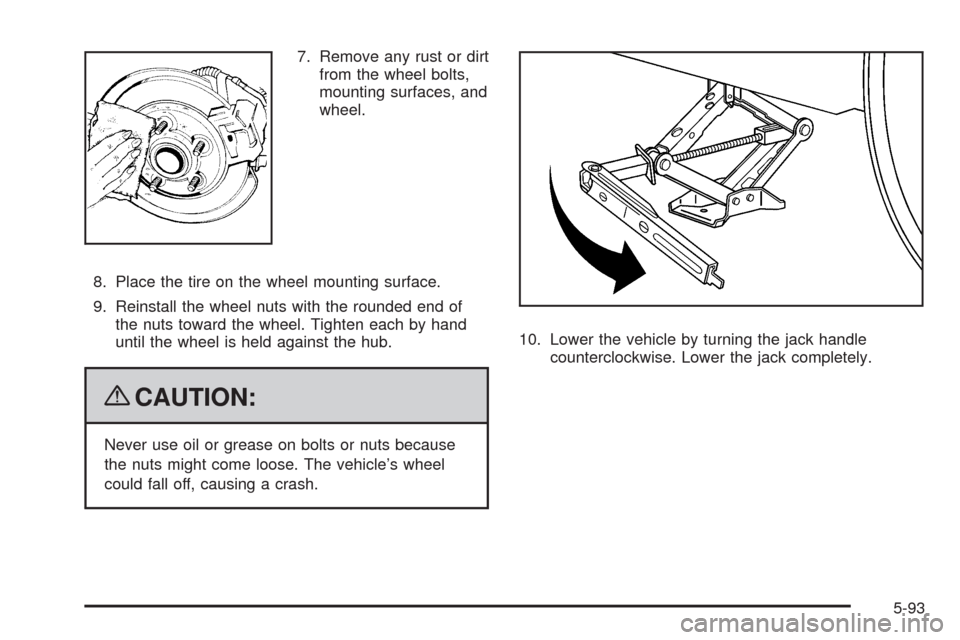
7. Remove any rust or dirt
from the wheel bolts,
mounting surfaces, and
wheel.
8. Place the tire on the wheel mounting surface.
9. Reinstall the wheel nuts with the rounded end of
the nuts toward the wheel. Tighten each by hand
until the wheel is held against the hub.
{CAUTION:
Never use oil or grease on bolts or nuts because
the nuts might come loose. The vehicle’s wheel
could fall off, causing a crash.10. Lower the vehicle by turning the jack handle
counterclockwise. Lower the jack completely.
5-93
Page 372 of 450
{CAUTION:
Wheel nuts that are improperly or incorrectly
tightened can cause the wheels to become loose
or come off. The wheel nuts should be tightened
with a torque wrench to the proper torque
specication after replacing. Follow the torque
specication supplied by the aftermarket
manufacturer when using accessory locking wheel
nuts. SeeCapacities and Specifications on
page 5-114for original equipment wheel nut
torque specications.
Notice:Improperly tightened wheel nuts can lead
to brake pulsation and rotor damage. To avoid
expensive brake repairs, evenly tighten the wheel
nuts in the proper sequence and to the proper
torque specication. SeeCapacities and
Specifications on page 5-114for the wheel nut
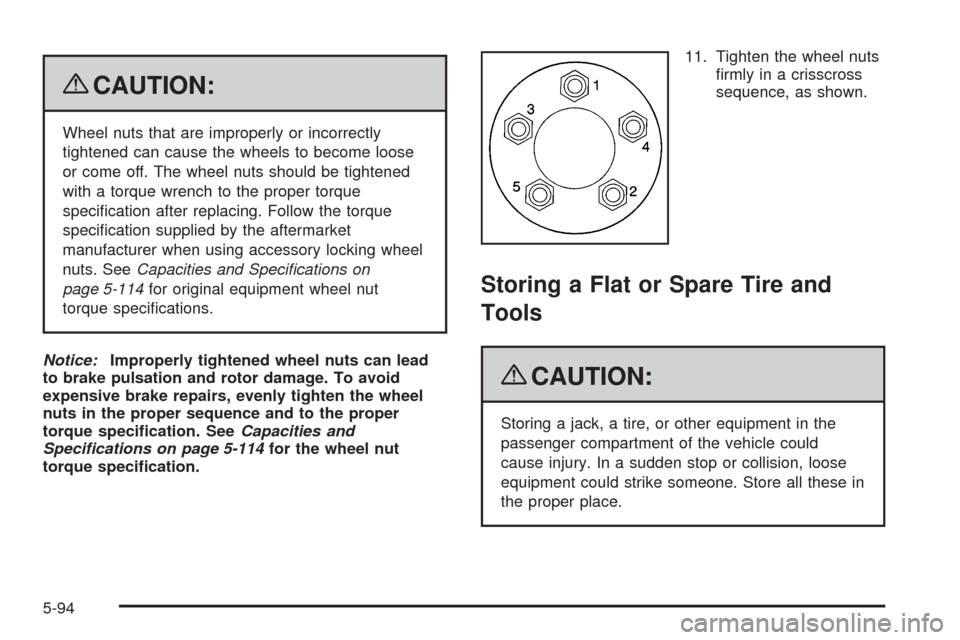
torque specication.11. Tighten the wheel nuts
rmly in a crisscross
sequence, as shown.
Storing a Flat or Spare Tire and
Tools
{CAUTION:
Storing a jack, a tire, or other equipment in the
passenger compartment of the vehicle could
cause injury. In a sudden stop or collision, loose
equipment could strike someone. Store all these in
the proper place.
5-94
Page 374 of 450
8. Route the hook end of the strap through the wheel. Aluminum Wheel
Steel Wheel
5-96
Page 375 of 450
9. Attach the strap to the
cargo tie-downs in the
rear of the vehicle.
10. Slide the buckle to tighten the tie-down strap.
Storing the Compact Spare Tire
and Tools
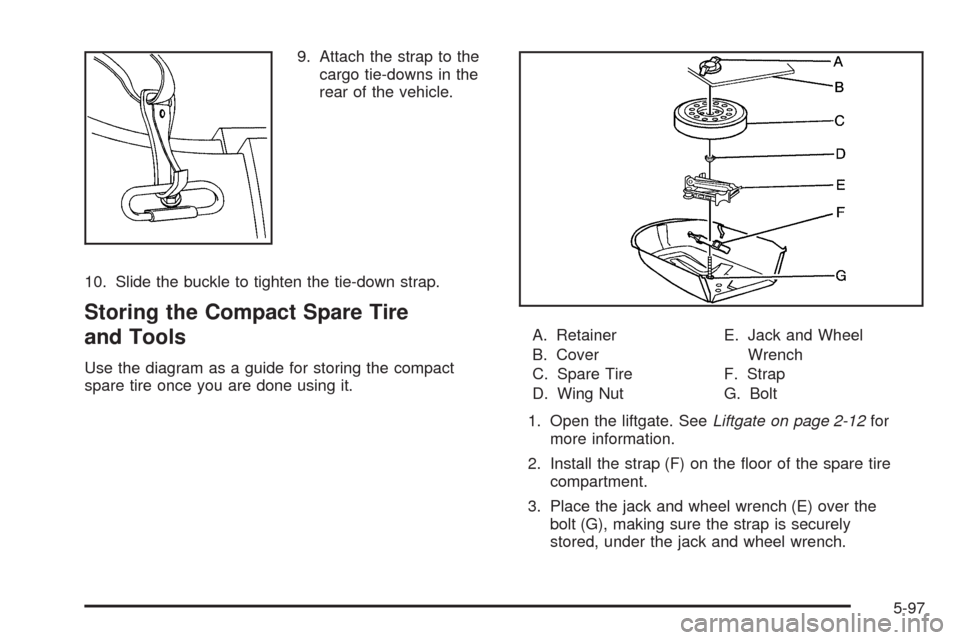
Use the diagram as a guide for storing the compact
spare tire once you are done using it.A. Retainer
B. Cover
C. Spare Tire
D. Wing NutE. Jack and Wheel
Wrench
F. Strap
G. Bolt
1. Open the liftgate. SeeLiftgate on page 2-12for
more information.
2. Install the strap (F) on the oor of the spare tire
compartment.
3. Place the jack and wheel wrench (E) over the
bolt (G), making sure the strap is securely
stored, under the jack and wheel wrench.
5-97
Page 376 of 450
4. Secure the jack and wheel wrench (E) with the
wing nut (D).
5. With the valve stem up, place the spare tire (C) on
the compartment oor.
6. Make sure the bolt (G) passes through the wheel
center.
7. Install the spare tire cover (B).
8. Secure the spare tire and tools with the retainer (A).
The compact spare tire storage area is designed only
for the compact spare tire, the standard tire cannot
be stored there.
Compact Spare Tire
{CAUTION:
Driving with more than one compact spare tire at
a time could result in loss of braking and handling.
This could lead to a crash and you or others could
be injured. Use only one compact spare tire at
a time.Although the compact spare tire was fully inated when
the vehicle was new, it can lose air after a time.
Check the ination pressure regularly. It should be
60 psi (420 kPa).
After installing the compact spare on the vehicle, stop
as soon as possible and make sure the spare tire
is correctly inated. The compact spare is made to
perform well at speeds up to 65 mph (105 km/h)
for distances up to 3,000 miles (5 000 km), so you can
nish your trip and have the full-size tire repaired or
replaced at your convenience. Of course, it is best
to replace the spare with a full-size tire as soon as
possible. The spare tire will last longer and be in good
shape in case it is needed again.
Notice:When the compact spare is installed, do
not take the vehicle through an automatic car wash
with guide rails. The compact spare can get
caught on the rails which can damage the tire,
wheel and other parts of the vehicle.
Do not use the compact spare on other vehicles.
And do not mix the compact spare tire or wheel with
other wheels or tires. They will not t. Keep the
spare tire and its wheel together.
Notice:Tire chains will not t the compact spare.
Using them can damage the vehicle and can damage
the chains too. Do not use tire chains on the
compact spare.
5-98
Page 383 of 450
Aluminum or Chrome-Plated Wheels
and Trim
The vehicle may have either aluminum or chrome-plated
wheels.
Keep the wheels clean using a soft clean cloth with mild
soap and water. Rinse with clean water. After rinsing
thoroughly, dry with a soft clean towel. A wax may then
be applied.
Notice:Chrome wheels and other chrome trim may
be damaged if the vehicle is not washed after driving
on roads that have been sprayed with magnesium,
calcium or sodium chloride. These chlorides are
used on roads for conditions such as ice and dust.
Always wash the vehicle’s chrome with soap and
water after exposure.
Notice:Using strong soaps, chemicals, abrasive
polishes, cleaners, brushes, or cleaners that contain
acid on aluminum or chrome-plated wheels, could
damage the surface of the wheel(s). The repairs
would not be covered by the vehicle warranty.
Use only approved cleaners on aluminum or
chrome-plated wheels.The surface of these wheels is similar to the painted
surface of the vehicle. Do not use strong soaps,
chemicals, abrasive polishes, abrasive cleaners,
cleaners with acid, or abrasive cleaning brushes on
them because they could damage the surface. Do not
use chrome polish on aluminum wheels.
Notice:Using chrome polish on aluminum wheels
could damage the wheels. The repairs would not
be covered by the vehicle warranty. Use chrome
polish on chrome wheels only.
Use chrome polish only on chrome-plated wheels, but
avoid any painted surface of the wheel, and buff off
immediately after application.
Notice:Driving the vehicle through an automatic
car wash that has silicone carbide tire cleaning
brushes, could damage the aluminum or
chrome-plated wheels. The repairs would not be
covered by the vehicle warranty. Never drive
a vehicle that has aluminum or chrome-plated
wheels through an automatic car wash that uses
silicone carbide tire cleaning brushes.
5-105
Page 388 of 450
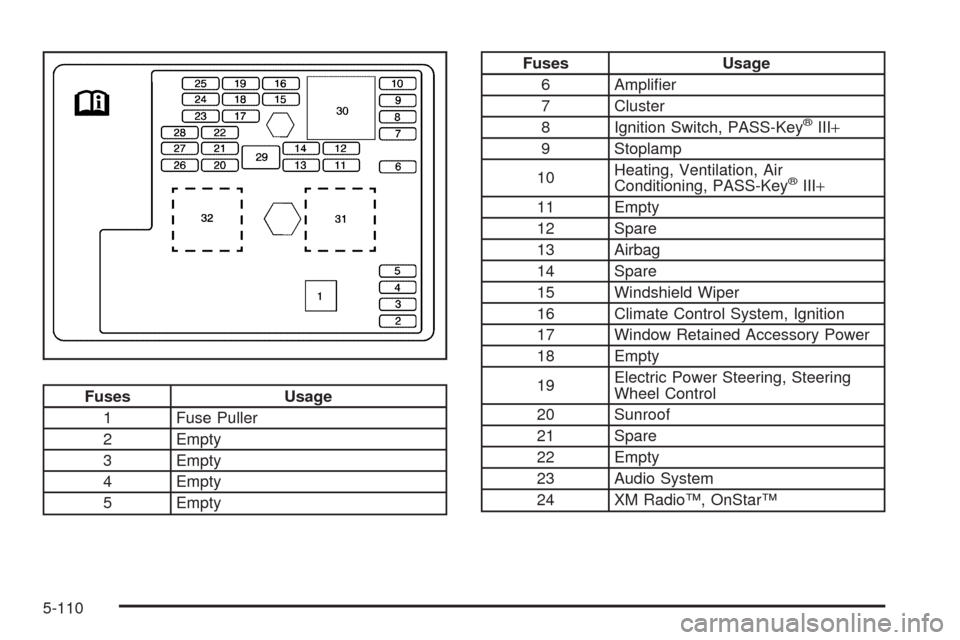
Fuses Usage
1 Fuse Puller
2 Empty
3 Empty
4 Empty
5 Empty
Fuses Usage
6 Amplier
7 Cluster
8 Ignition Switch, PASS-Key
®III+
9 Stoplamp
10Heating, Ventilation, Air
Conditioning, PASS-Key
®III+
11 Empty
12 Spare
13 Airbag
14 Spare
15 Windshield Wiper
16 Climate Control System, Ignition
17 Window Retained Accessory Power
18 Empty
19Electric Power Steering, Steering
Wheel Control
20 Sunroof
21 Spare
22 Empty
23 Audio System
24 XM Radio™, OnStar™
5-110