2009 CHEVROLET EXPRESS CARGO VAN display
[x] Cancel search: displayPage 201 of 408
Audio Steering Wheel Controls
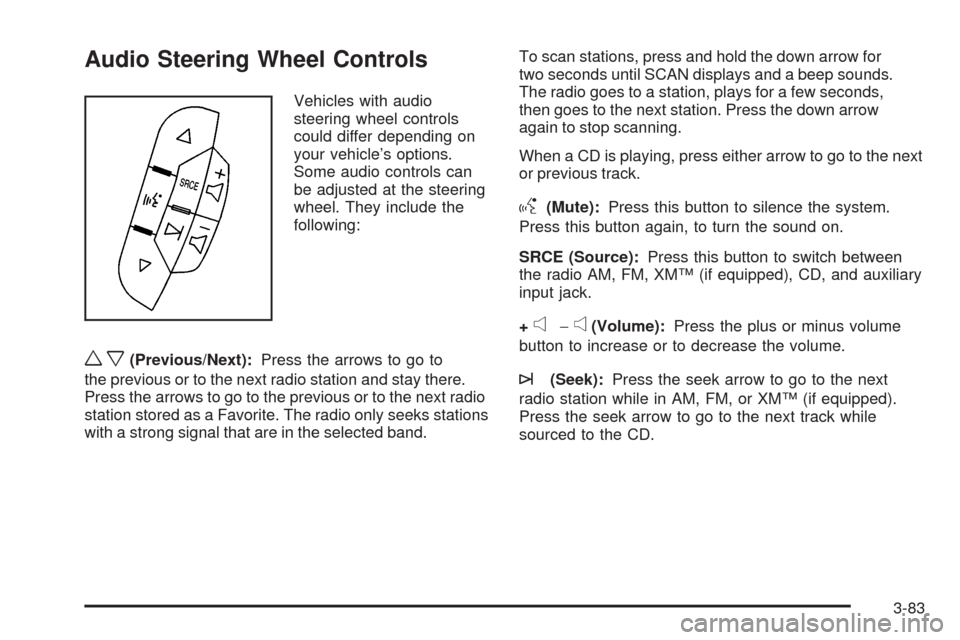
Vehicles with audio
steering wheel controls
could differ depending on
your vehicle’s options.
Some audio controls can
be adjusted at the steering
wheel. They include the
following:
wx(Previous/Next):Press the arrows to go to
the previous or to the next radio station and stay there.
Press the arrows to go to the previous or to the next radio
station stored as a Favorite. The radio only seeks stations
with a strong signal that are in the selected band.To scan stations, press and hold the down arrow for
two seconds until SCAN displays and a beep sounds.
The radio goes to a station, plays for a few seconds,
then goes to the next station. Press the down arrow
again to stop scanning.
When a CD is playing, press either arrow to go to the next
or previous track.
g(Mute):Press this button to silence the system.
Press this button again, to turn the sound on.
SRCE (Source):Press this button to switch between
the radio AM, FM, XM™ (if equipped), CD, and auxiliary
input jack.
+
e−e(Volume):Press the plus or minus volume
button to increase or to decrease the volume.
¨(Seek):Press the seek arrow to go to the next
radio station while in AM, FM, or XM™ (if equipped).
Press the seek arrow to go to the next track while
sourced to the CD.
3-83
Page 276 of 408
If Steam Is Coming From The Engine
Compartment
{CAUTION:
Steam from an overheated engine can burn you
badly, even if you just open the hood. Stay away
from the engine if you see or hear steam coming
from it. Just turn it off and get everyone away
from the vehicle until it cools down. Wait until
there is no sign of steam or coolant before you
open the hood.
If you keep driving when your engine is
overheated, the liquids in it can catch fire. You or
others could be badly burned. Stop your engine if
it overheats, and get out of the vehicle until the
engine is cool.
If No Steam Is Coming From The
Engine Compartment
If an engine overheat warning is displayed but no steam
can be seen or heard, the problem may not be too
serious. Sometimes the engine can get a little too hot
when the vehicle:
•Climbs a long hill on a hot day.
•Stops after high-speed driving.
•Idles for long periods in traffic.
•Tows a trailer. See “Driving on Grades” under
Towing a Trailer on page 4-27.
If the overheat warning is displayed with no sign of
steam:
1. Turn the air off.
2. Turn the heater on to the highest temperature and
to the highest fan speed. Open the windows as
necessary.
3. In heavy traffic, let the engine idle in N (Neutral)
while stopped. If it is safe to do so, pull off the
road, shift to P (Park) or N (Neutral) and let
the engine idle.
5-32
Page 277 of 408
If the temperature overheat gage is no longer in the
overheat zone or an overheat warning no longer
displays, the vehicle can be driven. Continue to drive
the vehicle slow for about 10 minutes. Keep a safe
vehicle distance from the car in front of you. If the
warning does not come back on, continue to drive
normally.
If the warning continues, pull over, stop, and park the
vehicle right away.
If there is still no sign of steam, push down the
accelerator until the engine speed is about twice as
fast as normal idle speed for at least three minutes while
you are parked. If you still have the warning, turn off the
engine until it cools down.
You may decide not to lift the hood but to get service
help right away.Engine Fan Noise
Your vehicle has a clutched engine cooling fan.
When the clutch is engaged, the fan spins faster to
provide more air to cool the engine. In most everyday
driving conditions, the fan is spinning slower and the
clutch is not fully engaged. This improves fuel economy
and reduces fan noise. Under heavy vehicle loading,
trailer towing, and/or high outside temperatures, the fan
speed increases as the clutch more fully engages, so you
may hear an increase in fan noise. This is normal and
should not be mistaken as the transmission slipping or
making extra shifts. It is merely the cooling system
functioning properly. The fan will slow down when
additional cooling is not required and the clutch partially
disengages.
You may also hear this fan noise when you start the
engine. It will go away as the fan clutch partially
disengages.
5-33
Page 309 of 408
Federal Communications
Commission (FCC) and
Industry and Science Canada
The Tire Pressure Monitor System (TPMS) operates
on a radio frequency and complies with Part 15 of
the FCC Rules. Operation is subject to the following
two conditions:
1. This device may not cause harmful interference.
2. This device must accept any interference received,
including interference that may cause undesired
operation.
The TPMS operates on a radio frequency and complies
with RSS-210 of Industry and Science Canada.
Operation is subject to the following two conditions:
1. This device may not cause interference.
2. This device must accept any interference received,
including interference that may cause undesired
operation of the device.
Changes or modifications to this system by other than
an authorized service facility could void authorization to
use this equipment.
Tire Pressure Monitor Operation
The Tire Pressure Monitor System (TPMS), if your
vehicle has this feature, is designed to warn the driver
when a low tire pressure condition exists. TPMS sensors
are mounted onto each tire and wheel assembly,
excluding the spare tire and wheel assembly. The TPMS
sensors monitor the air pressure in the vehicle’s tires and
transmits the tire pressure readings to a receiver located
in the vehicle.
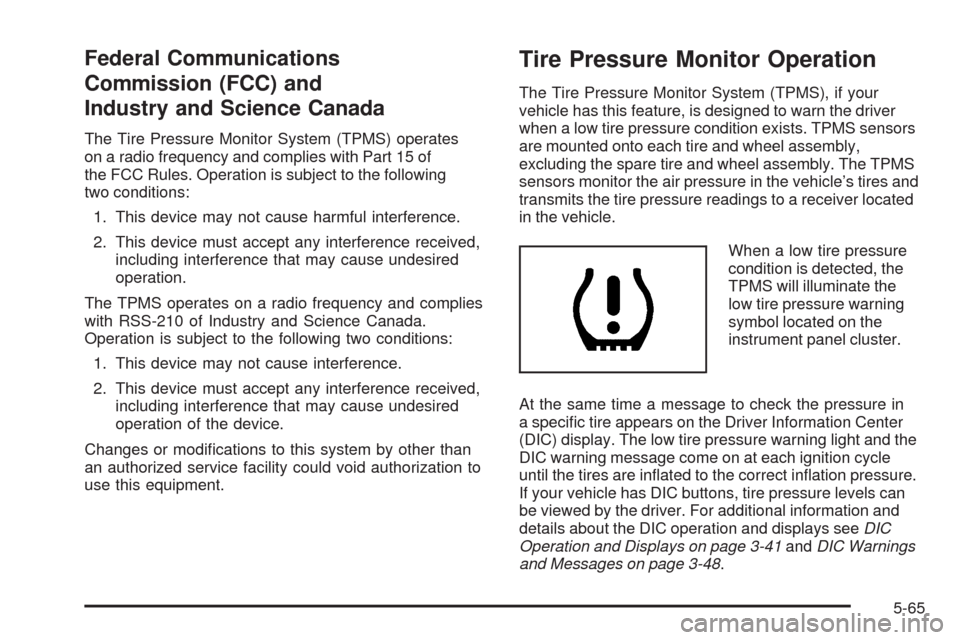
When a low tire pressure
condition is detected, the
TPMS will illuminate the
low tire pressure warning
symbol located on the
instrument panel cluster.
At the same time a message to check the pressure in
a specific tire appears on the Driver Information Center
(DIC) display. The low tire pressure warning light and the
DIC warning message come on at each ignition cycle
until the tires are inflated to the correct inflation pressure.
If your vehicle has DIC buttons, tire pressure levels can
be viewed by the driver. For additional information and
details about the DIC operation and displays seeDIC
Operation and Displays on page 3-41andDIC Warnings
and Messages on page 3-48.
5-65
Page 310 of 408
The low tire pressure warning light may come on in
cool weather when the vehicle is first started, and then
turn off as you start to drive. This could be an early
indicator that the air pressure in the tire(s) are getting
low and need to be inflated to the proper pressure.
A Tire and Loading Information label, attached to
your vehicle, shows the size of your vehicle’s original
equipment tires and the correct inflation pressure
for your vehicle’s tires when they are cold. SeeLoading
the Vehicle on page 4-19, for an example of the Tire
and Loading Information label and its location on
your vehicle. Also seeInflation - Tire Pressure on
page 5-62.
Your vehicle’s TPMS can warn you about a low tire
pressure condition but it does not replace normal
tire maintenance. SeeTire Inspection and Rotation
on page 5-69andTires on page 5-54.
Notice:Liquid tire sealants could damage the Tire
Pressure Monitor System (TPMS) sensors. Sensor
damage caused by using a tire sealant is not
covered by your warranty. Do not use liquid
tire sealants.TPMS Malfunction Light and Message
The TPMS will not function properly if one or more of
the TPMS sensors are missing or inoperable. When the
system detects a malfunction, the low tire warning light
flashes for about one minute and then stays on for the
remainder of the ignition cycle. A DIC warning message
is also displayed. The low tire warning light and DIC
warning message come on at each ignition cycle until
the problem is corrected. Some of the conditions that
can cause the malfunction light and DIC message to
come on are:
•One of the road tires has been replaced with the
spare tire. The spare tire does not have a TPMS
sensor. The TPMS malfunction light and DIC
message should go off once you re-install the
road tire containing the TPMS sensor.
•The TPMS sensor matching process was started but
not completed or not completed successfully after
rotating the vehicle’s tires. The DIC message and
TPMS malfunction light should go off once the TPMS
sensor matching process is performed successfully.
See “TPMS Sensor Matching Process” later in this
section.
5-66
Page 312 of 408
The TPMS sensor matching process is outlined below:
1. Set the parking brake.
2. Turn the ignition switch to ON/RUN with the
engine off.
3. Press the Remote Keyless Entry (RKE) transmitter’s
LOCK and UNLOCK buttons at the same time
for approximately five seconds. The horn sounds
twice to signal the receiver is in relearn mode and
TIRE LEARNING ACTIVE message displays on the
DIC screen.
If your vehicle does not have RKE, press the Driver
Information Center (DIC) vehicle information button
until the PRESS
VTO RELEARN TIRE POSITIONS
message displays. The horn sounds twice to signal
the receiver is in relearn mode and TIRE LEARNING
ACTIVE message displays on the DIC screen.
If your vehicle does not have RKE or DIC buttons,
press the trip odometer reset stem located on
the instrument panel cluster until the PRESS
VTO
RELEARN TIRE POSITIONS message displays.
The horn sounds twice to signal the receiver
is in relearn mode and TIRE LEARNING ACTIVE
message displays on the DIC screen.
4. Start with the driver side front tire.5. Remove the valve cap from the valve cap stem.
Activate the TPMS sensor by increasing or
decreasing the tire’s air pressure for five seconds, or
until a horn chirp sounds. The horn chirp, which may
take up to 30 seconds to sound, confirms that the
sensor identification code has been matched to this
tire and wheel position.
6. Proceed to the passenger side front tire, and repeat
the procedure in Step 5.
7. Proceed to the passenger side rear tire, and repeat
the procedure in Step 5.
8. Proceed to the driver side rear tire, and repeat the
procedure in Step 5. The horn sounds two times to
indicate the sensor identification code has been
matched to the driver side rear tire, and that
the TPMS sensor matching process is no longer
active. The TIRE LEARNING ACTIVE message
on the DIC display screen goes off.
9. Turn the ignition switch to LOCK/OFF.
10. Set all four tires to the recommended air pressure
level as indicated on the Tire and Loading
Information label.
11. Put the valve caps back on the valve stems.
5-68
Page 360 of 408
To purchase service information, seeService
Publications Ordering Information on page 7-16.
Owner Checks and Services on page 6-10tells what
should be checked, when to check it, and what can easily
be done to help keep the vehicle in good condition.
The proper replacement parts, fluids, and lubricants to
use are listed inRecommended Fluids and Lubricants
on page 6-13andMaintenance Replacement Parts
on page 6-15. When the vehicle is serviced, make sure
these are used. All parts should be replaced and all
necessary repairs done before you or anyone else
drives the vehicle. We recommend the use of genuine
parts from your dealer/retailer.
Scheduled Maintenance
This maintenance section applies to vehicles with a
gasoline engine. For diesel engine vehicles, see
the maintenance schedule section in the DURAMAX
®
Diesel manual.
When the CHANGE ENGINE OIL SOON message
displays, service is required for the vehicle. Have the
vehicle serviced as soon as possible within the next
600 miles (1 000 km). It is possible that, if driving under
the best conditions, the engine oil life system may
not indicate that vehicle service is necessary for over
a year. However, the engine oil and filter must be
changed at least once a year and at this time the systemmust be reset. Your dealer/retailer has trained service
technicians who will perform this work using genuine
parts and reset the system.
If the engine oil life system is ever reset accidentally,
service the vehicle within 3,000 miles (5 000 km)
since the last service. Remember to reset the oil life
system whenever the oil is changed. SeeEngine Oil Life
System on page 5-18for information on the Engine
Oil Life System and resetting the system.
When the CHANGE ENGINE OIL SOON message
appears, certain services, checks, and inspections are
required. Required services are described in the
following for “MaintenanceI” and “MaintenanceII.”
Generally, it is recommended that the first service be
MaintenanceI, the second service be MaintenanceII,
and then alternate MaintenanceIand MaintenanceII
thereafter. However, in some cases, MaintenanceIImay
be required more often.
MaintenanceI— Use MaintenanceIif the CHANGE
ENGINE OIL SOON message displays within 10 months
since the vehicle was purchased or MaintenanceII
was performed.
MaintenanceII— Use MaintenanceIIif the previous
service performed was MaintenanceI. Always use
MaintenanceIIwhenever the message displays
10 months or more since the last service or if the
message has not come on at all for one year.
6-4
Page 369 of 408
Park on a fairly steep hill, with the vehicle facing
downhill. Keeping your foot on the regular brake,
set the parking brake.
•To check the parking brake’s holding ability:
With the engine running and the transmission
in N (Neutral), slowly remove foot pressure from the
regular brake pedal. Do this until the vehicle is
held by the parking brake only.
•To check the P (Park) mechanism’s holding ability:
With the engine running, shift to P (Park). Then
release the parking brake followed by the regular
brake.
Contact your dealer/retailer if service is required.
Underbody Flushing Service
At least every spring, use plain water to flush any
corrosive materials from the underbody. Take care to
clean thoroughly any areas where mud and other debris
can collect.
Recommended Fluids and
Lubricants
This maintenance section applies to vehicles with a
gasoline engine. If your vehicle has a diesel engine,
see the maintenance schedule section in the
DURAMAX
®Diesel manual.
Fluids and lubricants identified below by name, part
number, or specification can be obtained from your
dealer/retailer.
Usage Fluid/Lubricant
Engine OilEngine oil which meets GM
Standard GM6094M and displays
the American Petroleum Institute
Certified for Gasoline Engines
starburst symbol. To determine the
proper viscosity for your vehicle’s
engine, seeEngine Oil on
page 5-15.
Engine Coolant50/50 mixture of clean, drinkable
water and use only DEX-COOL
®
Coolant. SeeEngine Coolant on
page 5-25.
Hydraulic Brake
SystemDelco
®Supreme 11 Brake Fluid or
equivalent DOT-3 brake fluid.
6-13