2009 CHEVROLET COLORADO transmission
[x] Cancel search: transmissionPage 169 of 420
Automatic Door Locks
This feature allows you to program the door locks to a
preferred setting.
To set your choice for this feature:
1. With the engine off, turn the key to LOCK/OFF.
Do not remove the key from the ignition.
2. Press and hold the power door lock button until the
DIC display shows the current door lock mode.
3. To view the next available mode, press and hold
the reset stem until the mode appears. Release
the reset stem and press and hold again to view
the next mode.
4. Once the desired mode is shown on the DIC
display, briey press the reset stem to set your
choice. The DIC display then clears.
The following are the available modes:
Lock 1 (default):On vehicles with an automatic
transmission, this mode locks all of the doors when
the vehicle is shifted out of P (Park) and unlocks all
of the doors when the vehicle is shifted into P (Park).On vehicles with a manual transmission, this mode
locks all of the doors when the vehicle speed is greater
than 15 mph (24 km/h) and unlocks all of the doors
when the key is removed from the ignition.
Lock 2:On vehicles with an automatic transmission,
this mode locks all of the doors when the vehicle
is shifted out of P (Park) and unlocks the driver’s
door when the vehicle is shifted into P (Park).
On vehicles with a manual transmission, this mode
locks all of the doors when the vehicle speed is greater
than 15 mph (24 km/h) and unlocks the driver’s door
when the key is removed from the ignition.
Lock 3:On vehicles with an automatic transmission,
this mode locks all of the doors when the vehicle
is shifted out of P (Park). The doors will not
automatically unlock.
On vehicles with a manual transmission, this mode
locks all of the doors when the vehicle speed is greater
than 15 mph (24 km/h). The doors will not automatically
unlock.
3-37
Page 202 of 420
To turn off TCS and StabiliTrak, press and hold the
StabiliTrak/TCS button until the TRAC OFF and
STAB SYS OFF messages come on the DIC and the
StabiliTrak/TCS light comes on the instrument panel.
To turn TCS and StabiliTrak back on, press and release
the StabiliTrak/TCS button.
When the TCS or StabiliTrak system is turned off, the
StabiliTrak/TCS light and the appropriate TRAC OFF or
STAB SYS OFF message will be displayed on the DIC.
The vehicle will still have brake-traction control when TCS
or StabiliTrak is off, but will not be able to use the engine
speed management system. The StabiliTrak/TCS light
ashes when either system is actively working. See
Traction Control Operation following for more information.
Traction Control System (TCS)
The Traction Control System (TCS) is part of StabiliTrak.
TCS limits wheel slip which is especially useful in slippery
road conditions. The system operates only if it senses
that any of the wheels are spinning or beginning to lose
traction. When this happens, TCS applies the brakes to
limit wheel spin and also reduces engine power. The
system may be heard or felt while it is working. This is
normal and does not mean there is a problem with the
vehicle.Notice:If the wheel(s) of one axle is allowed to spin
excessively while the StabiliTrak, ABS and brake
warning lights and any relevant DIC messages are
displayed, the transfer case could be damaged. The
repairs would not be covered by the vehicle warranty.
Reduce engine power and do not spin the wheel(s)
excessively while these lights and messages are
displayed.
TCS can operate on dry roads under some conditions.
When this happens, the system may be heard working or
a reduction in acceleration may be noticed. This is normal
and does not mean there is a problem with the vehicle.
Examples of these conditions include hard acceleration in
a turn, an abrupt upshift or downshift of the transmission
or driving on rough roads.
If cruise control is being used when TCS begins to limit
wheel spin, the cruise control automatically disengages.
The cruise control can be re-engaged when road
conditions allow. SeeCruise Control on page 3-10.
4-8
Page 213 of 420

Attach a ag to the vehicle to be more visible to
approaching traffic on trails or hills.
Sound the horn as you approach the top of the hill
to let opposing traffic know you are there.
Use headlamps even during the day to make the
vehicle more visible to oncoming traffic.
{CAUTION:
Driving to the top (crest) of a hill at full speed can
cause an accident. There could be a drop-off,
embankment, cliff, or even another vehicle. You
could be seriously injured or killed. As you near
the top of a hill, slow down and stay alert.If the vehicle stalls, or is about to stall, and you cannot
make it up the hill:
Push the brake pedal to stop the vehicle and keep
it from rolling backwards and apply the parking
brake.
If the engine is still running, shift the transmission to
R (Reverse), release the parking brake, and slowly
back down the hill in R (Reverse).
If the engine has stopped running, you need to
restart it. With the brake pedal pressed and the
parking brake still applied, shift the automatic
transmission to P (Park) or the manual transmission
to Neutral and restart the engine. Then, shift to
R (Reverse), release the parking brake, and slowly
back down the hill as straight as possible in
R (Reverse).
While backing down the hill, put your left hand on the
steering wheel at the 12 o’clock position so you can
tell if the wheels are straight and can maneuver as
you back down. It is best to back down the hill with
the wheels straight rather than in the left or right
direction. Turning the wheel too far to the left or right
will increase the possibility of a rollover.
4-19
Page 214 of 420

Things not to do if the vehicle stalls, or is about to stall,
when going up a hill:
Never attempt to prevent a stall by shifting into
N (Neutral), or pressing the clutch pedal if the
vehicle has a manual transmission, to rev-up the
engine and regain forward momentum. This will not
work. The vehicle can roll backward very quickly
and could go out of control.
Never try to turn around if about to stall when going
up a hill. If the hill is steep enough to stall the vehicle,
it is steep enough to cause it to roll over. If you
cannot make it up the hill, back straight down the hill.
If, after stalling, you try to back down the hill and decide
you just cannot do it, set the parking brake, shift to
P (Park) or 1 (First) with a manual transmission, and turn
off the engine. Leave the vehicle and go get some help.Exit on the uphill side and stay clear of the path the
vehicle would take if it rolled downhill. Do not shift the
transfer case to Neutral when you leave the vehicle.
Leave it in some gear.
{CAUTION:
Shifting the transfer case to Neutral can cause
your vehicle to roll even if the transmission is in
P (Park). This is because the Neutral position on
the transfer case overrides the transmission. You
or someone else could be injured. If you are going
to leave your vehicle, set the parking brake and
shift the transmission to P (Park). But do not shift
the transfer case to Neutral.
4-20
Page 215 of 420

Driving Downhill
When off-roading takes you downhill, consider:
How steep is the downhill? Will I be able to maintain
vehicle control?
What is the surface like? Smooth? Rough?
Slippery? Hard-packed dirt? Gravel?
Are there hidden surface obstacles? Ruts? Logs?
Boulders?
What is at the bottom of the hill? Is there a hidden
creek bank or even a river bottom with large rocks?
If you decide you can go down a hill safely, try to keep
the vehicle headed straight down. Use a low gear so
engine drag can help the brakes so they do not have to
do all the work. Descend slowly, keeping the vehicle
under control at all times.
{CAUTION:
Heavy braking when going down a hill can cause
your brakes to overheat and fade. This could cause
loss of control and a serious accident. Apply the
brakes lightly when descending a hill and use a low
gear to keep vehicle speed under control.Things not to do when driving down a hill:
When driving downhill, avoid turns that take you
across the incline of the hill. A hill that is not too
steep to drive down might be too steep to drive
across. The vehicle could roll over.
Never go downhill with the transmission in
N (Neutral), called free-wheeling. The brakes
will have to do all the work and could overheat
and fade.
Vehicles are much more likely to stall when going uphill,
but if it happens when going downhill:
1. Stop the vehicle by applying the regular brakes and
apply the parking brake.
2. Shift to P (Park) and, while still braking, restart the
engine.
3. Shift back to a low gear, release the parking brake,
and drive straight down.
4. If the engine will not start, get out and get help.
4-21
Page 222 of 420

Hill and Mountain Roads
Driving on steep hills or through mountains is different
than driving on at or rolling terrain. Tips for driving
in these conditions include:
Keep the vehicle serviced and in good shape.
Check all uid levels and brakes, tires, cooling
system, and transmission.
Going down steep or long hills, shift to a
lower gear.
{CAUTION:
If you do not shift down, the brakes could get so
hot that they would not work well. You would then
have poor braking or even none going down a hill.
You could crash. Shift down to let the engine
assist the brakes on a steep downhill slope.
{CAUTION:
Coasting downhill in N (Neutral) or with the ignition
off is dangerous. The brakes will have to do all the
work of slowing down and they could get so hot
that they would not work well. You would then
have poor braking or even none going down a hill.
You could crash. Always have the engine running
and the vehicle in gear when going downhill.
Stay in your own lane. Do not swing wide or cut
across the center of the road. Drive at speeds
that let you stay in your own lane.
Top of hills: Be alert — something could be in your
lane (stalled car, accident).
Pay attention to special road signs (falling rocks
area, winding roads, long grades, passing or
no-passing zones) and take appropriate action.
SeeOff-Road Driving on page 4-12for information
about driving off-road.
4-28
Page 226 of 420
Rocking Your Vehicle to Get It Out
Turn the steering wheel left and right to clear the area
around the front wheels. For four-wheel drive vehicles,
shift into 4HI. Turn off any traction system. Shift back and
forth between R (Reverse) and a forward gear, or with a
manual transmission, between 1 (First) or 2 (Second) and
R (Reverse), spinning the wheels as little as possible.
To prevent transmission wear, wait until the wheels stop
spinning before shifting gears. Release the accelerator
pedal while shifting, and press lightly on the accelerator
pedal when the transmission is in gear. Slowly spinning
the wheels in the forward and reverse directions causes a
rocking motion that could free the vehicle. If that does not
get the vehicle out after a few tries, it might need to be
towed out. Recovery hooks can be used, if the vehicle
has them. If the vehicle does need to be towed out, see
Towing Your Vehicle on page 4-40.
Recovery Hooks
{CAUTION:
These hooks, when used, are under a lot of force.
Always pull the vehicle straight out. Never pull on
the hooks at a sideways angle. The hooks could
break off and you or others could be injured from
the chain or cable snapping back.
4-32
Page 235 of 420
Recreational Vehicle Towing
Recreational vehicle towing means towing the vehicle
behind another vehicle – such as behind a motorhome.
The two most common types of recreational vehicle
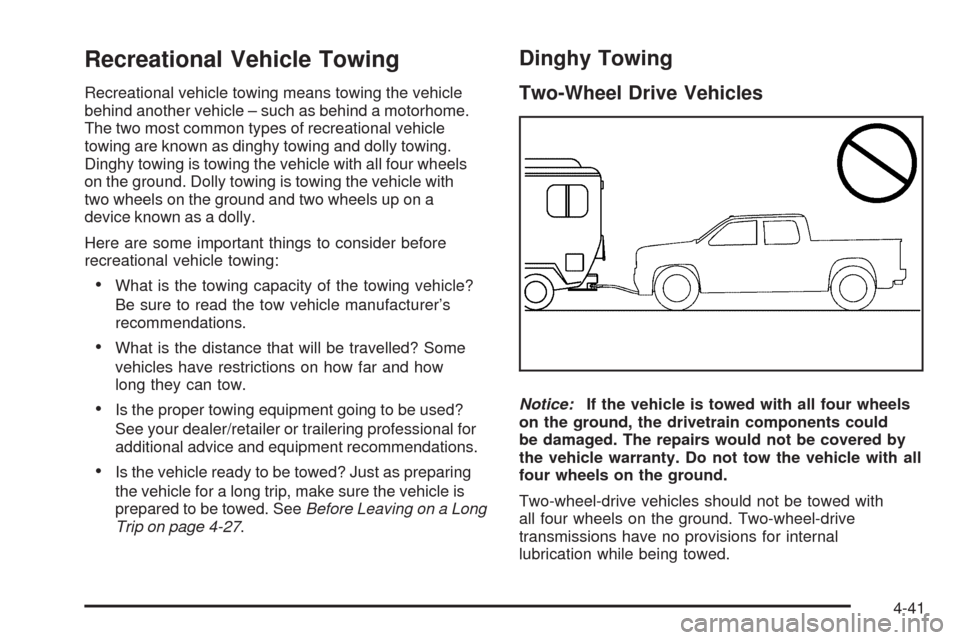
towing are known as dinghy towing and dolly towing.
Dinghy towing is towing the vehicle with all four wheels
on the ground. Dolly towing is towing the vehicle with
two wheels on the ground and two wheels up on a
device known as a dolly.
Here are some important things to consider before
recreational vehicle towing:
What is the towing capacity of the towing vehicle?
Be sure to read the tow vehicle manufacturer’s
recommendations.
What is the distance that will be travelled? Some
vehicles have restrictions on how far and how
long they can tow.
Is the proper towing equipment going to be used?
See your dealer/retailer or trailering professional for
additional advice and equipment recommendations.
Is the vehicle ready to be towed? Just as preparing
the vehicle for a long trip, make sure the vehicle is
prepared to be towed. SeeBefore Leaving on a Long
Trip on page 4-27.
Dinghy Towing
Two-Wheel Drive Vehicles
Notice:If the vehicle is towed with all four wheels
on the ground, the drivetrain components could
be damaged. The repairs would not be covered by
the vehicle warranty. Do not tow the vehicle with all
four wheels on the ground.
Two-wheel-drive vehicles should not be towed with
all four wheels on the ground. Two-wheel-drive
transmissions have no provisions for internal
lubrication while being towed.
4-41