2009 CHEVROLET COLORADO transmission
[x] Cancel search: transmissionPage 109 of 420

3 (Third), 4 (Fourth) and 5 (Fifth):Shift into 3 (Third),
4 (Fourth) and 5 (Fifth) the same way you do for
2 (Second). Slowly let up on the clutch pedal as you
press the accelerator pedal.
To stop, let up on the accelerator pedal and press the
brake pedal. Just before the vehicle stops, press
the clutch pedal and the brake pedal, and shift to
Neutral.
Neutral:Use this position when you start or idle the
engine.
R (Reverse):To back up, press the clutch pedal. After
the vehicle stops, shift into R (Reverse). Slowly let up on
the clutch pedal as you press the accelerator pedal. If it
is hard to shift, let the shift lever return to Neutral and
release the clutch pedal. Then press the clutch again and
shift into R (Reverse). Do not attempt to shift into 5 (Fifth)
prior to shifting into R (Reverse). The transmission
has a lock out feature which prevents a 5 (Fifth) gear to
R (Reverse) gear shift.
Notice:Shifting to R (Reverse) while the vehicle is
moving forward could damage the transmission.
The repairs would not be covered by the vehicle
warranty. Shift to R (Reverse) only after the vehicle
is stopped.
Use R (Reverse), along with the parking brake, for
parking the vehicle.Up-Shift Light
This light will show you
when to shift to the next
higher gear for best
fuel economy.
When this light comes on, you can shift to the next
higher gear if weather, road and traffic conditions permit.
For the best fuel economy, accelerate slowly and shift
when the light comes on.
While you accelerate, it is normal for the light to go on
and off if you quickly change the position of the
accelerator. Ignore the shift light when you downshift.
If the vehicle has four-wheel drive and has a manual
transmission, disregard the shift light when the transfer
case is in four-wheel low.
2-27
Page 111 of 420
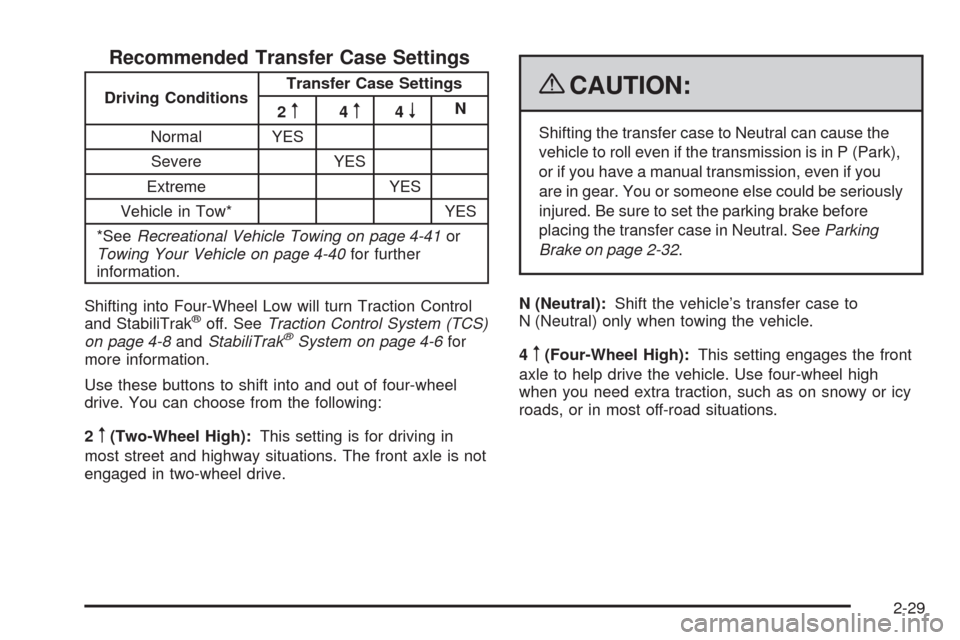
Recommended Transfer Case Settings
Driving ConditionsTransfer Case Settings
2m4m4nN
Normal YES
Severe YES
Extreme YES
Vehicle in Tow* YES
*SeeRecreational Vehicle Towing on page 4-41or
Towing Your Vehicle on page 4-40for further
information.
Shifting into Four-Wheel Low will turn Traction Control
and StabiliTrak
®off. SeeTraction Control System (TCS)
on page 4-8andStabiliTrak®System on page 4-6for
more information.
Use these buttons to shift into and out of four-wheel
drive. You can choose from the following:
2
m(Two-Wheel High):This setting is for driving in
most street and highway situations. The front axle is not
engaged in two-wheel drive.
{CAUTION:
Shifting the transfer case to Neutral can cause the
vehicle to roll even if the transmission is in P (Park),
or if you have a manual transmission, even if you
are in gear. You or someone else could be seriously
injured. Be sure to set the parking brake before
placing the transfer case in Neutral. SeeParking
Brake on page 2-32.
N (Neutral):Shift the vehicle’s transfer case to
N (Neutral) only when towing the vehicle.
4
m(Four-Wheel High):This setting engages the front
axle to help drive the vehicle. Use four-wheel high
when you need extra traction, such as on snowy or icy
roads, or in most off-road situations.
2-29
Page 112 of 420

4n(Four-Wheel Low):This setting also engages the
front axle to give you extra traction. It sends the maximum
power to all four wheels. You might choose four-wheel
low if you were driving off-road in sand, mud, or deep
snow and while climbing or descending steep hills.
Shifting into Four-Wheel Low will turn Traction Control
and StabiliTrak
®off. SeeTraction Control System (TCS)
on page 4-8andStabiliTrak®System on page 4-6for
more information.
Indicator lights in the buttons show you which setting you
are in. The indicator lights will come on briey when you
turn on the ignition and one will stay on the selected
setting. If the lights do not come on, you should take the
vehicle in for service. An indicator light will ash while
shifting. It will stay on when the shift is completed.
If the transfer case does not shift, it will return to the last
chosen setting.
Shifting from Two-Wheel High to
Four-Wheel High
Press and release the Four-Wheel High button. This
can be done at any speed, and the front axle will lock
automatically.
Shifting from Four-Wheel High to
Two-Wheel High
Press and release the Two-Wheel High button. This can
be done at any speed, and the front axle will unlock
automatically.
It is normal to hear and feel the vehicle’s transfer case
shift into Four-Wheel High. If you shift with the vehicle
stopped, the indicator light may still ash slowly. It may be
necessary to shift the transmission momentarily into
R (Reverse) and D (Drive), for an automatic transmission,
or R (Reverse) and 1 (First) for a manual transmission to
have the light stop ashing.
Shifting from Two-Wheel High or
Four-Wheel High to Four-Wheel Low
To shift from Two-Wheel High or Four-Wheel High to
Four-Wheel Low, the vehicle must be stopped or moving
less than 3 mph (5 km/h) with the transmission in
N (Neutral) for an automatic transmission or the clutch
pedal pressed for a manual transmission. The preferred
method for shifting into Four-Wheel Low is to have your
vehicle moving 1 to 2 mph (1.6 to 3.2 km/h).
Press and release the Four-Wheel Low button. You
must wait for the Four-Wheel Low indicator light to stop
ashing and stay on before shifting the transmission
into gear or releasing the clutch pedal.
2-30
Page 113 of 420
If the Four-Wheel Low button is pressed when the
vehicle is in gear and/or moving faster than 3 mph
(5 km/h), the four-wheel low indicator light will ash for
30 seconds and not complete the shift.
Shifting from Four-Wheel Low to
Two-Wheel High or Four-Wheel High
To shift from Four-Wheel Low to Two-Wheel High or
Four-Wheel High, the vehicle must be stopped or
moving less than 3 mph (5 km/h) with the transmission
in N (Neutral) for an automatic transmission or the
clutch pedal pressed for a manual transmission. The
preferred method for shifting out of four-wheel low is to
have your vehicle moving 1 to 2 mph (1.6 to 3.2 km/h).
Press and release the Four-Wheel High or Two-Wheel
High button. You must wait for the Four-Wheel High
or Two-Wheel High indicator light to stop ashing and
stay on before shifting the transmission into gear or
releasing the clutch pedal.
If the Four-Wheel High or Two-Wheel High button is
pressed when the vehicle is in gear and/or moving faster
than 3 mph (5km/h), the Four-Wheel High or Two Wheel
High indicator light will ash for 30 seconds but not
complete the shift.
Shifting to Neutral
Use N (Neutral) when you plan to tow the vehicle. See
Recreational Vehicle Towing on page 4-41for towing
instructions. To shift the transfer case into N (Neutral) do
the following:
1. Set the parking brake.
2. Start the vehicle.
3. Press the regular brake pedal and shift the
transmission in N (Neutral), or press in the clutch for
vehicles with a manual transmission.
4. Shift the transfer case to Two-Wheel High.
5. Press and hold the Two-Wheel High and
Four-Wheel Low buttons at the same time for
10 seconds. The N (Neutral) light will come on when
the transfer case shift to N (Neutral) is complete.
6. Press and hold the regular brake pedal and shift the
transmission to R (Reverse) for one second, then
shift the transmission to D (Drive) for one second, or
1 (First) for vehicles with manual transmissions, and
let out the clutch to insure the transfer case is in
N (Neutral). If the transfer case is not in N (Neutral),
repeat this procedure starting at Step 3.
7. Turn the engine off by turning the key to
ACC/ACCESSORY.
2-31
Page 114 of 420

8. Place the transmission shift lever in P (Park), or
1 (First) for vehicles that have a manual
transmission.
9. Turn the ignition to LOCK/OFF.
Shifting Out of Neutral
After towing the vehicle, you will have to shift out of
N (Neutral) in order to drive. To shift out of N (Neutral),
do the following:
1. Set the parking brake and apply the regular brake
pedal.
2. Start a vehicle with an automatic transmission in
P (Park). Use 1 (First) for vehicles with a manual
transmission.
3. Shift the transmission to N (Neutral), or press the
clutch pedal for vehicles with a manual
transmission.
4. Press the button for the desired transfer case shift
position (Two-Wheel High, Four-Wheel High, or
Four-Wheel Low).
5. After the transfer case has shifted out of N (Neutral),
the indicator light will go out.
6. Release the parking brake.
7. Shift the transmission to the desired position.
Parking Brake
The parking brake pedal is
located to the left of the
brake pedal, near the
driver door.
To set the parking brake, hold the brake pedal down,
then push the parking brake pedal down to its
fully-applied position.
2-32
Page 116 of 420
Shifting Into Park
(Automatic Transmission)
{CAUTION:
It can be dangerous to get out of the vehicle if the
shift lever is not fully in P (Park) with the parking
brake rmly set. The vehicle can roll. If you have
left the engine running, the vehicle can move
suddenly. You or others could be injured. To be
sure the vehicle will not move, even when you are
on fairly level ground, use the steps that follow. If
you are pulling a trailer, seeTowing a Trailer on
page 4-47.
1. Hold the brake pedal down with your right foot and
set the parking brake.
SeeParking Brake on page 2-32for more
information.
{CAUTION:
If you have four-wheel drive, the vehicle will be free
to roll — even if the shift lever is in P (Park) — if the
transfer case is in N (Neutral). So, be sure the
transfer case is in a drive gear, two-wheel
high (2H) or four-wheel high (4H) or four-wheel
low (4L) — not in N (Neutral).
2. Move the shift lever into P (Park) by pulling the
lever toward you and moving it up as far as it
will go.
3. Turn the ignition key to LOCK/OFF.
4. Remove the key and take it with you. If you can
leave the vehicle with the key, the vehicle is in
P (Park).
2-34
Page 117 of 420
Leaving the Vehicle With the Engine
Running (Automatic Transmission)
{CAUTION:
It can be dangerous to leave the vehicle with the
engine running. The vehicle could move suddenly if
the shift lever is not fully in P (Park) with the parking
brake rmly set. And, if you leave the vehicle with
the engine running, it could overheat and even
catch re. You or others could be injured. Do not
leave the vehicle with the engine running.
If you have to leave the vehicle with the engine running,
be sure the vehicle is in P (Park) and the parking
brake is rmly set before you leave it. After you have
moved the shift lever into P (Park), hold the regular
brake pedal down. Then, see if you can move the shift
lever away from P (Park) without rst pulling it toward
you. If you can, the shift lever was not fully locked into
P (Park).
Torque Lock (Automatic Transmission)
If you are parking on a hill and you do not shift the
transmission into P (Park) properly, the weight of the
vehicle may put too much force on the parking pawl in
the transmission. You may nd it difficult to pull the
shift lever out of P (Park). This is called torque lock. To
prevent torque lock, set the parking brake and then
shift into P (Park) properly before you leave the driver
seat. To nd out how, seeShifting Into Park (Automatic
Transmission) on page 2-34.
When you are ready to drive, move the shift lever out of
P (Park) before you release the parking brake.
If torque lock does occur, you may need to have another
vehicle push yours a little uphill to take some of the
pressure from the parking pawl in the transmission, so
you can pull the shift lever out of P (Park).
2-35
Page 118 of 420

Shifting Out of Park
(Automatic Transmission)
The vehicle has an automatic transmission shift lock
control system. You have to fully apply the brake pedal
before you can shift from P (Park) when the ignition
is ON/RUN. SeeAutomatic Transmission Operation on
page 2-24.
The shift lock control system is designed to do the
following:
Prevent the ignition key from being removed unless
the shift lever is in P (Park).
Prevent movement of the shift lever out of P (Park),
unless the ignition is in ON/RUN and the brake
pedal is applied.
The shift lock control system is always functional except
in the case of a dead battery or low voltage (less
than 9 V) battery.
If the vehicle has an uncharged battery or a battery with
low voltage, try charging or jump starting the battery.
SeeJump Starting on page 5-42for more information.To shift out of P (Park) use the following:
1. Apply the brake pedal.
2. Move the shift lever to the desired position.
If you still are unable to shift out of P (Park):
1. Ease the pressure on the shift lever.
2. While holding down the brake pedal, push the shift
lever all the way into P (Park)
3. Move the shift lever to the desired position.
If you are still having a problem shifting, then have the
vehicle serviced.Parking the Vehicle
(Manual Transmission)
If the vehicle has a manual transmission, before you get
out of the vehicle, move the shift lever into R (Reverse),
and rmly apply the parking brake. Once the shift
lever has been placed into R (Reverse) with the clutch
pedal pressed in, turn the ignition key to LOCK/OFF,
remove the key and release the clutch.
If you are parking on a hill, or if the vehicle is pulling a
trailer, seeTowing a Trailer on page 4-47.
2-36