2009 CHEVROLET AVALANCHE audio
[x] Cancel search: audioPage 308 of 550
Cleaning the RSE Overhead Console
When cleaning the RSE overhead console surface, use
only a clean cloth dampened with clean water.
Cleaning the Video Screen
When cleaning the video screen, use only a clean cloth
dampened with clean water. Use care when directly
touching or cleaning the screen, as damage could result.
Rear Seat Audio (RSA)
Vehicles with this feature allow the rear seat passengers
to listen to and control any of the music sources:
radio, CDs, DVDs, or other auxiliary sources. However,
the rear seat passengers can only control the music
sources the front seat passengers are not listening to,
except on some radios where dual control is allowed.
For example, rear seat passengers can control and
listen to a CD through the headphones, while the driver
listens to the radio through the front speakers. The
rear seat passengers have control of the volume
for each set of headphones.
The RSA functions operate even when the main radio is
off. The front audio system will display the headphone
icon when the RSA is on, and will disappear from
the display when it is off.Audio can be heard through wired headphones (not
included) plugged into the jacks on the RSA. If the
vehicle has this feature, audio can also be heard on
Channel 2 of the wireless headphones.
The audio system mutes the rear speakers when the
RSA audio is active through the headphones.
To listen to an iPod or portable audio device through
the RSA, attach the iPod or portable audio device to the
front auxiliary input (if available), located on the front
audio system. Turn the iPod on, then choose the
front auxiliary input with the RSA SRCE button.
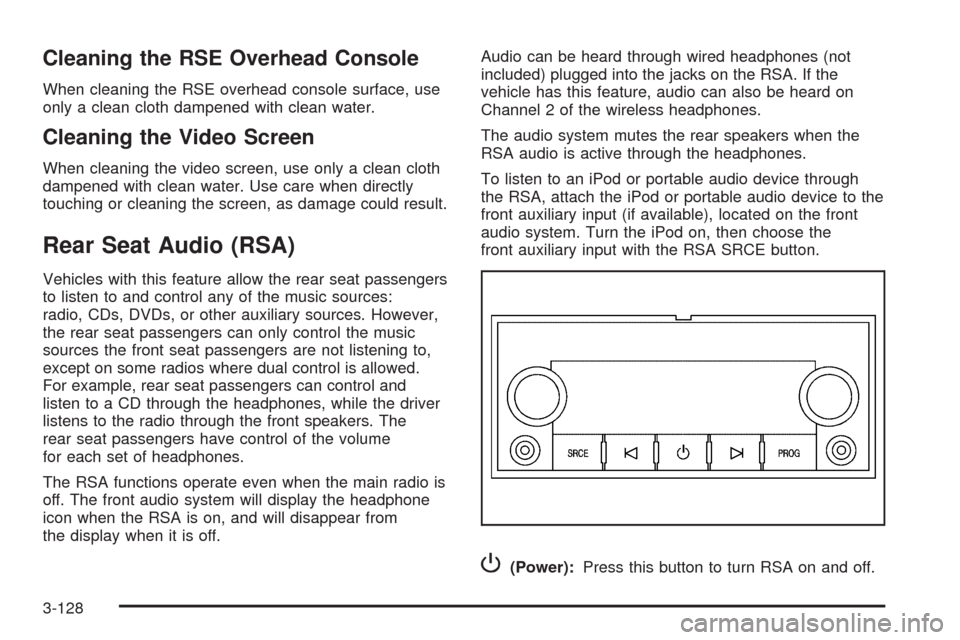
P(Power):Press this button to turn RSA on and off.
3-128
Page 309 of 550

Volume:Turn this knob to increase or to decrease the
volume of the wired headphones. The left knob
controls the left wired headphones and the right knob
controls the right wired headphones.
SRCE (Source):Press this button to switch between
the radio FM, AM, or XM™ (if equipped), CD, and if the
vehicle has these features, DVD, front auxiliary, and
rear auxiliary.
©¨(Seek):When listening to FM, AM, or XM (if
equipped), press the seek arrows to go to the previous
or to the next station or channels and stay there.
This function is inactive, with some radios, if the front
seat passengers are listening to the radio.
Press and hold either seek arrow until the display
ashes, to tune to an individual station. The display
stops ashing after the buttons have not been pushed
for more than two seconds. This function is inactive, with
some radios, if the front seat passengers are listening
to the radio.
While listening to a disc, press the left seek arrow to go
to the start of the current track or chapter (if more
than ten seconds have played). Press the right seek
arrow to go to the next track or chapter on the disc. This
function is inactive, with some radios, if the front seat
passengers are listening to the disc.When a DVD video menu is being displayed, press
either seek arrow to perform a cursor up or down on the
menu. Hold either seek arrow to perform a cursor left
or right on the menu.
PROG (Program):Press this button to go to the next
preset radio station or channel set on the main
radio. This function is inactive, with some radios, if the
front seat passengers are listening to the radio.
When a CD or DVD audio disc is playing, press this
button to go to the beginning of the CD or DVD audio.
This function is inactive, with some radios, if the
front seat passengers are listening to the disc.
When a disc is playing in the CD or DVD changer,
press this button to select the next disc, if multiple discs
are loaded. This function is inactive, with some radios,
if the front seat passengers are listening to the disc.
When a DVD video menu is being displayed, press the
PROG button to perform the menu function, Enter.
3-129
Page 310 of 550
Theft-Deterrent Feature
THEFTLOCK®is designed to discourage theft of the
vehicle’s radio by learning a portion of the Vehicle
Identication Number (VIN). The radio does not operate
if it is stolen or moved to a different vehicle.
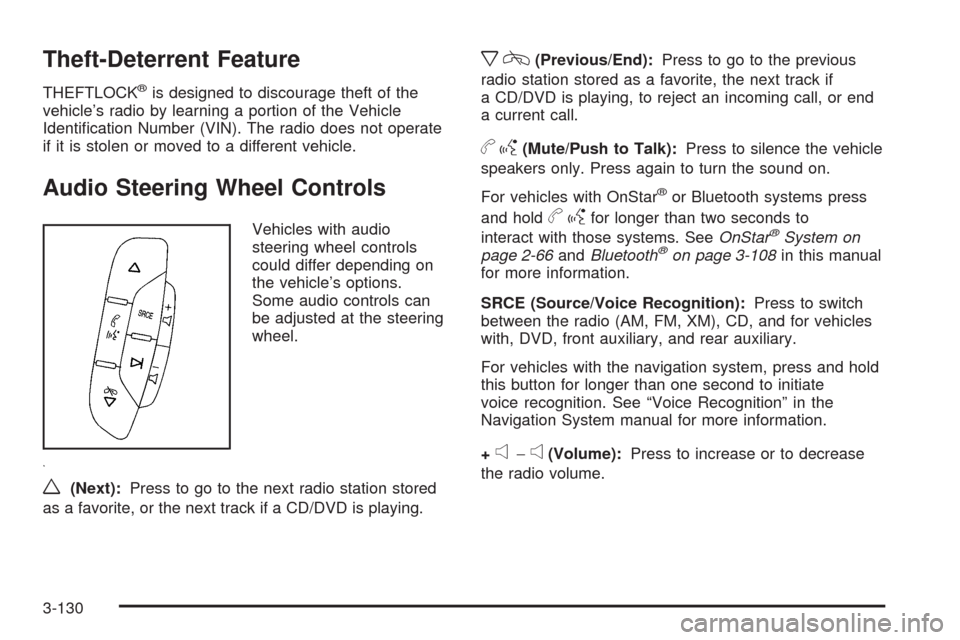
Audio Steering Wheel Controls
Vehicles with audio
steering wheel controls
could differ depending on
the vehicle’s options.
Some audio controls can
be adjusted at the steering
wheel.
w(Next):Press to go to the next radio station stored
as a favorite, or the next track if a CD/DVD is playing.
xc(Previous/End):Press to go to the previous
radio station stored as a favorite, the next track if
a CD/DVD is playing, to reject an incoming call, or end
a current call.
bg(Mute/Push to Talk):Press to silence the vehicle
speakers only. Press again to turn the sound on.
For vehicles with OnStar
®or Bluetooth systems press
and hold
bgfor longer than two seconds to
interact with those systems. SeeOnStar®System on
page 2-66andBluetooth®on page 3-108in this manual
for more information.
SRCE (Source/Voice Recognition):Press to switch
between the radio (AM, FM, XM), CD, and for vehicles
with, DVD, front auxiliary, and rear auxiliary.
For vehicles with the navigation system, press and hold
this button for longer than one second to initiate
voice recognition. See “Voice Recognition” in the
Navigation System manual for more information.
+
e−e(Volume):Press to increase or to decrease
the radio volume.
3-130
Page 494 of 550
Fuses sage
25 Trailer Park Lamps
26 Driver Side Park Lamps
27 Passenger Side Park Lamps
28 Fog Lamps
29 Horn
30Passenger Side High-Beam
Headlamp
31 Daytime Running Lamps
32 Driver Side High-Beam Headlamp
33 Daytime Running Lights 2
34 Sunroof
35Key Ignition System, Theft Deterrent
System
36 Windshield Wiper
37 SEO B2 Uptter Usage (Battery)
38 Electric Adjustable Pedals
39 Climate Controls (Battery)
40 Airbag System (Ignition)
41 Amplier
42 Audio SystemFuses sage
43Miscellaneous (Ignition), Cruise
Control
44 Liftgate Release
45 Airbag System (Battery)
46 Instrument Panel Cluster
47 NOT USED
48 Auxiliary Climate Control (Ignition)
49 Center High-Mounted Stoplamp
50 Rear Defogger
51 Heated Mirrors
52 SEO B1 Uptter Usage (Battery)
53Cigarette Lighter, Auxiliary Power
Outlet
54Automatic Level Control Compressor
Relay, SEO Uptter Usage
55 Climate Controls (Ignition)
56Engine Control Module, Secondary
Fuel Pump (Ignition)
5-114
Page 537 of 550
A
Accessories and Modications............................ 5-3
Accessory Power Outlets.................................3-19
Adding Equipment to Your Airbag-Equipped
Vehicle.......................................................1-77
Additives, Fuel................................................. 5-7
Add-On Electrical Equipment...........................5-107
Adjustable Throttle and Brake Pedal..................2-35
Air Cleaner/Filter, Engine.................................5-19
Air Conditioning......................................3-20, 3-23
Airbag
Passenger Status Indicator...........................3-33
Readiness Light..........................................3-32
Airbag System................................................1-62
Adding Equipment to Your Airbag-Equipped
Vehicle...................................................1-77
How Does an Airbag Restrain?......................1-68
Passenger Sensing System...........................1-70
Servicing Your Airbag-Equipped Vehicle..........1-76
What Makes an Airbag Inate?......................1-68
What Will You See After an Airbag Inates?....1-69
When Should an Airbag Inate?....................1-67
Where Are the Airbags?...............................1-65
Antenna, Fixed Mast......................................3-132
Antenna, XM™ Satellite Radio Antenna System . . . 3-132
Antilock Brake System (ABS)............................. 4-5
Antilock Brake, System Warning Light................3-37Appearance Care
Aluminum or Chrome-Plated Wheels.............5-105
Care of Safety Belts...................................5-102
Chemical Paint Spotting..............................5-106
Cleaning Exterior Lamps/Lenses..................5-103
Fabric/Carpet............................................5-101
Finish Care...............................................5-104
Finish Damage..........................................5-106
Instrument Panel, Vinyl, and Other Plastic
Surfaces...............................................5-102
Interior Cleaning........................................5-100
Leather....................................................5-102
Sheet Metal Damage..................................5-106
Tires........................................................5-105
Underbody Maintenance.............................5-106
Washing Your Vehicle.................................5-103
Weatherstrips............................................5-103
Windshield and Wiper Blades......................5-104
Appointments, Scheduling Service.....................7-10
Ashtray.........................................................3-20
Audio System.................................................3-76
Audio Steering Wheel Controls....................3-130
Fixed Mast Antenna...................................3-132
Navigation/Radio System, see Navigation
Manual.................................................3-108
Radio Reception........................................3-131
Rear Seat Audio (RSA)...............................3-128
1
Page 538 of 550

Audio System (cont.)
Setting the Clock.........................................3-77
Theft-Deterrent Feature...............................3-130
XM™ Satellite Radio Antenna System...........3-132
Audio System(s).............................................3-79
Automatic Headlamp System............................3-16
Automatic Transmission
Fluid..........................................................5-21
Operation...................................................2-37
Autoride
®.......................................................4-47
B
Battery..........................................................5-39
Electric Power Management..........................3-18
Run-Down Protection...................................3-19
Bluetooth
®....................................................3-108
Brake
Emergencies................................................ 4-6
Brake Fluid....................................................5-36
Brakes..........................................................5-36
System Warning Light..................................3-36
Braking........................................................... 4-4
Braking in Emergencies..................................... 4-6
Break-In, New Vehicle.....................................2-32Bulb Replacement...........................................5-51
Halogen Bulbs............................................5-51
Headlamp Aiming........................................5-48
License Plate Lamps....................................5-53
Replacement Bulbs......................................5-53
Taillamps, Turn Signal, Sidemarker, Stoplamps,
and Back-Up Lamps.................................5-51
Buying New Tires...........................................5-71
C
Calibration.....................................................3-55
California Fuel.................................................. 5-6
California Perchlorate Materials Requirements....... 5-4
California Proposition 65 Warning....................... 5-4
Canadian Owners............................................... iii
Capacities and Specications..........................5-116
Carbon Monoxide...................2-13, 2-23, 2-53, 4-29
Care of
Safety Belts..............................................5-102
Cargo Area, All-Weather..................................2-87
Cargo Cover Panels........................................2-78
CD, MP3 .............................................3-96, 3-101
Center Console Storage Area...........................2-76
Center Overhead Console................................2-76
2
Page 546 of 550
Park Brake....................................................2-48
Park Tilt Mirrors..............................................2-57
Parking
Assist........................................................2-58
Over Things That Burn.................................2-52
Passenger Airbag Status Indicator.....................3-33
Passenger Sensing System..............................1-70
Passing.........................................................4-11
PASS-Key
®III+ Electronic Immobilizer...............2-30
PASS-Key®III+ Electronic Immobilizer Operation . . . 2-30
Perchlorate Materials Requirements, California...... 5-4
Phone
Bluetooth
®................................................3-108
Power
Door Locks.................................................2-10
Electrical System.......................................5-108
Lumbar Controls........................................... 1-6
Retained Accessory.....................................2-34
Seat ............................................................ 1-4
Steering Fluid.............................................5-34
Windows....................................................2-26
Power Assist Steps.........................................2-24
Privacy..........................................................7-16
Event Data Recorders..................................7-17
Navigation System.......................................7-18
OnStar .......................................................7-18
Radio Frequency Identication.......................7-18
Programmable Automatic Door Locks.................2-11
R
Radio Frequency Identication (RFID), Privacy....7-18
Radio(s)........................................................3-79
Radios
Navigation/Radio System, see Navigation
Manual.................................................3-108
Rear Seat Audio........................................3-128
Reception.................................................3-131
Setting the Clock.........................................3-77
Theft-Deterrent..........................................3-130
Rainsense™ II Wipers....................................... 3-9
Reading Lamps..............................................3-18
Rear Axle......................................................5-45
Locking........................................................ 4-9
Rear Door Security Locks................................2-12
Rear Seat Audio (RSA)..................................3-128
Rear Seat Entertainment System.....................3-119
Rear Seat Operation.......................................1-13
Rear Vision Camera........................................2-61
Rearview Mirror, Automatic Dimming..................2-55
Rearview Mirrors.............................................2-55
Reclining Seatbacks........................................1-10
Recommended Fluids and Lubricants.................6-13
Recovery Hooks.............................................4-33
Recreational Vehicle Towing.............................4-40
Remote Keyless Entry (RKE) System.................. 2-4
Remote Keyless Entry (RKE) System, Operation . . . 2-5
Remote Vehicle Start........................................ 2-7
10
Page 548 of 550

Service (cont.)
Doing Your Own Work................................... 5-4
Engine Soon Lamp......................................3-39
Publications Ordering Information...................7-15
Service, Scheduling Appointments.....................7-10
Servicing Your Airbag-Equipped Vehicle..............1-76
Setting the Clock............................................3-77
Sheet Metal Damage.....................................5-106
Shifting Into Park............................................2-50
Shifting Out of Park........................................2-52
Signals, Turn and Lane-Change.......................... 3-7
Spare Tire.....................................................5-99
Installing....................................................5-86
Removing...................................................5-81
Storing.......................................................5-95
Specications, Capacities...............................5-116
Speedometer..................................................3-31
StabiliTrak
®Indicator Light...............................3-37
StabiliTrak®System.......................................... 4-6
Start Vehicle, Remote....................................... 2-7
Starting the Engine.........................................2-34
Steering.......................................................... 4-9
Steering Wheel Controls, Audio.......................3-130
Steering Wheel, Tilt Wheel................................. 3-6
Steps
Power Assist...............................................2-24
Storage Areas
All-Weather Cargo Area................................2-87
Center Console Storage Area........................2-76
Center Overhead Console.............................2-76Storage Areas (cont.)
Cupholders.................................................2-76
Front Armrest Storage Area...........................2-76
Glove Box..................................................2-76
Luggage Carrier..........................................2-77
Top-Box Storage..........................................2-92
Stuck in Sand, Mud, Ice, or Snow.....................4-32
Sun Visors.....................................................2-27
Sunroof.........................................................2-93
T
Tachometer....................................................3-31
Tailgate.........................................................2-23
Taillamps
Turn Signal, Sidemarker, Stoplamps, and
Back-Up Lamps.......................................5-51
Theft-Deterrent, Radio....................................3-130
Theft-Deterrent Systems...................................2-28
Content Theft-Deterrent................................2-28
PASS-Key
®III+ Electronic Immobilizer............2-30
PASS-Key®III+ Electronic Immobilizer
Operation................................................2-30
Tilt Wheel........................................................ 3-6
Time, Setting..................................................3-77
Tire
Pressure Light.............................................3-38
Tires.............................................................5-55
12