2009 CHEVROLET AVALANCHE roof
[x] Cancel search: roofPage 83 of 550

Adding Equipment to Your
Airbag-Equipped Vehicle
Q:Is there anything I might add to or change
about the vehicle that could keep the airbags
from working properly?
A:Yes. If you add things that change the vehicle’s
frame, bumper system, height, front end or side
sheet metal, they may keep the airbag system from
working properly. Changing or moving any parts
of the front seats, safety belts, the airbag sensing
and diagnostic module, steering wheel, instrument
panel, roof-rail airbag modules, ceiling headliner
or pillar garnish trim, overhead console, front
sensors, side impact sensors, rollover sensor
module, or airbag wiring can affect the operation of
the airbag system.
In addition, the vehicle has a passenger sensing
system for the right front passenger position, which
includes sensors that are part of the passenger
seat. The passenger sensing system may not
operate properly if the original seat trim is replaced
with non-GM covers, upholstery or trim, or with
GM covers, upholstery or trim designed for a
different vehicle. Any object, such as an aftermarket
seat heater or a comfort enhancing pad or device,installed under or on top of the seat fabric, could
also interfere with the operation of the passenger
sensing system. This could either prevent
proper deployment of the passenger airbag(s) or
prevent the passenger sensing system from
properly turning off the passenger airbag(s). See
Passenger Sensing System on page 1-70.
If you have any questions, call Customer
Assistance. The phone numbers and addresses for
Customer Assistance are in Step Two of the
Customer Satisfaction Procedure in this manual.
SeeCustomer Satisfaction Procedure on page 7-2.
If the vehicle has rollover roof-rail airbags, see
Different Size Tires and Wheels on page 5-73for
additional important information.
Q:Because I have a disability, I have to get my
vehicle modied. How can I nd out whether
this will affect my airbag system?
A:If you have questions, call Customer Assistance.
The phone numbers and addresses for Customer
Assistance are in Step Two of the Customer
Satisfaction Procedure in this manual. See
Customer Satisfaction Procedure on page 7-2.
In addition, your dealer/retailer and the service manual
have information about the location of the airbag
sensors, sensing and diagnostic module and airbag
wiring.
1-77
Page 88 of 550
Object Detection Systems...............................2-58
Ultrasonic Rear Parking
Assist (URPA)...........................................2-58
Rear Vision Camera (RVC)............................2-61
OnStar
®System.............................................2-66
Universal Home Remote System......................2-69
Universal Home Remote System Operation
(With Three Round LED)............................2-70Storage Areas................................................2-76
Glove Box...................................................2-76
Cupholders..................................................2-76
Center Overhead Console..............................2-76
Front Armrest Storage Area...........................2-76
Center Console Storage.................................2-76
Luggage Carrier...........................................2-77
Cargo Cover Panels......................................2-78
All-Weather Cargo Area.................................2-87
Top-Box Storage..........................................2-92
Sunroof.........................................................2-93
Section 2 Features and Controls
2-2
Page 120 of 550

Retained Accessory Power (RAP)
The following vehicle accessories can be used for up to
10 minutes after the engine is turned off:
Audio System
Power Windows
OnStar®System (if equipped)
Sunroof (if equipped)
These features work when the key is in ON/RUN or
ACC/ACCESSORY. Once the key is turned from
ON/RUN to LOCK/OFF, the windows and sunroof
continue to work up to 10 minutes until any door
is opened. The radio continues to work for up to
10 minutes or until the driver door is opened.
Starting the Engine
Move the shift lever to P (Park) or N (Neutral). The
engine will not start in any other position. To restart the
engine when the vehicle is already moving, use
N (Neutral) only.
Notice:Do not try to shift to P (Park) if the
vehicle is moving. If you do, you could damage the
transmission. Shift to P (Park) only when the
vehicle is stopped.
Starting Procedure
1. With your foot off the accelerator pedal, turn the
ignition to START. When the engine starts, let go of
the key. The idle speed will slow down as the engine
warms. Do not race the engine immediately after
starting it. Operate the engine and transmission
gently to allow the oil to warm up and lubricate all
moving parts.
The vehicle has a Computer-Controlled Cranking
System. This feature assists in starting the engine
and protects components. If the ignition key is turned
to the START position, and then released when the
engine begins cranking, the engine will continue
cranking for a few seconds or until the vehicle starts.
If the engine does not start and the key is held in
START, cranking will be stopped after 15 seconds to
prevent cranking motor damage. To prevent gear
damage, this system also prevents cranking if the
engine is already running. Engine cranking can be
stopped by turning the ignition switch to the ACC/
ACCESSORY or LOCK/OFF position.
Notice:Cranking the engine for long periods of
time, by returning the key to the START position
immediately after cranking has ended, can overheat
and damage the cranking motor, and drain the
battery. Wait at least 15 seconds between each try,
to let the cranking motor cool down.
2-34
Page 163 of 550
Luggage Carrier
Notice:Loading cargo on the luggage carrier that
weighs more than 200 lbs (91 kg) or hangs over
the rear or sides of the vehicle can damage
the vehicle. Load cargo so that it rests on the slats
as far forward as possible and against the side
rails, making sure to fasten it securely.
For vehicles with a luggage carrier, items can be loaded
on top of the vehicle.
The luggage carrier has siderails attached to the roof. It
can also have crossrails which can be moved back
and forth to help secure cargo. Tie the load to the
siderails or siderail supports.
Do not exceed the maximum vehicle capacity when
loading the vehicle. For more information on vehicle
capacity and loading, seeLoading the Vehicle on
page 4-34.
Make sure the cargo is properly loaded.
To prevent damage or loss of cargo while driving,
periodically stop and check to make sure cargo is still
securely fastened.
If small heavy objects are placed on the roof, cut a
piece of 3/8 inch plywood to t inside the crossrails
and siderails to spread the load. Tie the plywood
to the siderail supports.
Tie the load and secure it to the crossrails or the
siderail supports. Use the crossrails only to keep
the load from sliding. To move a crossrail, lift
the release lever up, on both sides of the rail. Then
slide the crossrail to the desired position balancing
the force side to side. Press the release lever
down on both sides of the rail, down to tighten it.
Try to slide the crossrail back and forth slightly
to make sure it is tight.
To carry long items, move the crossrails as far
apart as possible. Tie the load to the crossrails and
the siderails or siderail supports. Also tie the
load to the bumpers, but do not tie the load so
tightly that the crossrails or siderails are damaged.
After moving a crossrail, be sure it is securely
locked into the siderail.
A Center High-Mounted Stoplamp (CHMSL) is located
above the rear window glass.
Make sure items loaded on the roof of the vehicle do
not block or damage the CHMSL.
2-77
Page 179 of 550
Sunroof
Your vehicle may be equipped with a power sliding
sunroof. To open or close the sunroof, the ignition needs
to be turned to ON/RUN, or Retained Accessory
Power (RAP) must be active. When RAP is active, the
sunroof will work for 10 minutes after the ignition is
turned off, or until a front door is opened. SeeRetained
Accessory Power (RAP) on page 2-34for more
information.
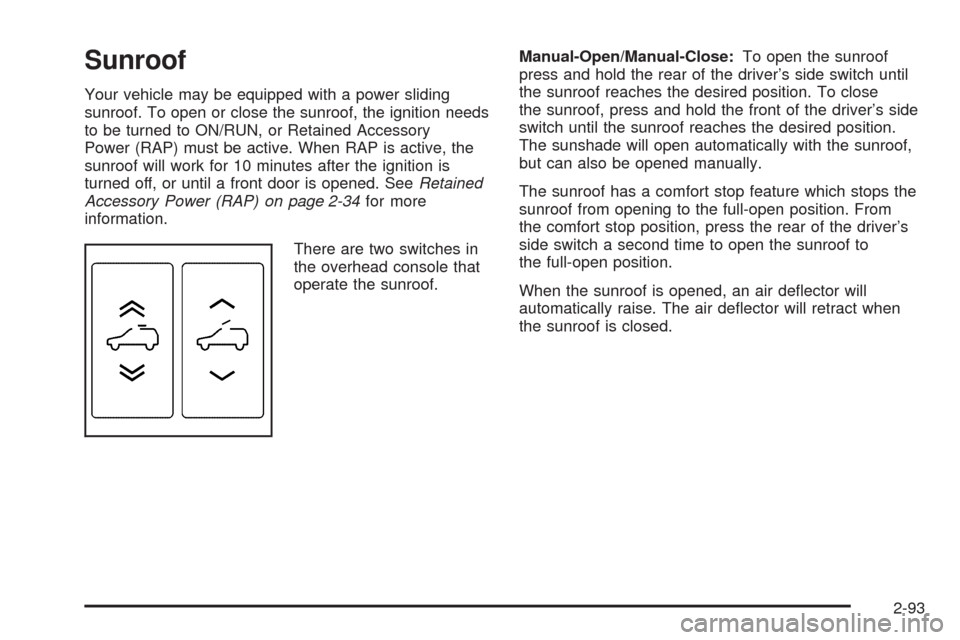
There are two switches in
the overhead console that
operate the sunroof.Manual-Open/Manual-Close:To open the sunroof
press and hold the rear of the driver’s side switch until
the sunroof reaches the desired position. To close
the sunroof, press and hold the front of the driver’s side
switch until the sunroof reaches the desired position.
The sunshade will open automatically with the sunroof,
but can also be opened manually.
The sunroof has a comfort stop feature which stops the
sunroof from opening to the full-open position. From
the comfort stop position, press the rear of the driver’s
side switch a second time to open the sunroof to
the full-open position.
When the sunroof is opened, an air deector will
automatically raise. The air deector will retract when
the sunroof is closed.
2-93
Page 180 of 550
Express-Open/Express-Close:To express-open the
sunroof, fully press and release the rear of the
driver’s side switch. The sunroof will open automatically.
To stop the sunroof partway, press the switch a
second time. To express-close the sunroof, fully press
and release the front of the driver’s side switch. The
sunroof will close automatically. To stop the sunroof
partway, press the switch a second time. The sunshade
will open automatically with the sunroof, but can also
be opened manually.
The sunroof has a comfort stop feature which stops the
sunroof from opening to the full-open position. From
the comfort stop position, press the rear of the driver’s
side switch a second time to open the sunroof to
the full-open position.
When the sunroof is opened, an air deector will
automatically raise. The air deector will retract when
the sunroof is closed.
Vent:The sunroof has an express-vent open feature.
From the closed position, press the rear of the
passenger’s side switch to vent the sunroof. To stop the
sunroof partway, press the switch a second time. To
close the sunroof, press and hold the front of the
passenger’s side switch. To stop the sunroof partway,
release the switch.Anti-Pinch Feature:If an object is in the path of the
sunroof while it is closing, the anti-pinch feature will
detect the object and stop the sunroof from closing at
the point of the obstruction. The sunroof will then
open halfway, and the air deector will raise. To close
the sunroof once it has re-opened, refer to the
“Express-Close” or “Manual-Close” functions described
previously. If the sunroof is in the vent position, and
there is an object in the path of the sunroof when
it closing, the anti-pinch feature will detect the object
and stop the sunroof. To close the sunroof once it has
re-opened, refer to the “Manual-Close” or
“Express-Close” functions described previously.
Do not keep the sunroof open for long periods of time
while the vehicle is not in use. Debris can collect in
the tracks, damage the sunroof operation and plug the
water draining system.
2-94
Page 196 of 550

Automatic Headlamp System
When it is dark enough outside and the headlamp switch
is in AUTO, the automatic headlamp system will turn on
the headlamps at the normal brightness along with other
lamps such as the taillamps, sidemarker, parking lamps,
roof marker lamps, and the instrument panel lights. The
radio lights will also be dim.
To turn off the automatic headlamp system, turn the
exterior lamps switch to the off position and then
release. For vehicles rst sold in Canada, the
transmission must be in the P (Park) position, before
the automatic headlamp system can be turned off.
The vehicle has a light sensor located on the top of the
instrument panel. Do not cover this sensor or the
system will come on whenever the ignition is on.
The system may also turn on the headlamps when
driving through a parking garage, heavy overcast
weather, or a tunnel. This is normal.
There is a delay in the transition between the daytime
and nighttime operation of the Daytime Running
Lamps (DRL) and the automatic headlamp systems so
that driving under bridges or bright overhead street
lights does not affect the system. The DRL and
automatic headlamp system will only be affected when
the light sensor sees a change in lighting lasting
longer than the delay.If the vehicle is started in a dark garage, the automatic
headlamp system will come on immediately. Once
the vehicle leaves the garage, it takes approximately
one minute for the automatic headlamp system to
change to DRL if it is light outside. During that delay,
the instrument panel cluster may not be as bright
as usual. Make sure the instrument panel brightness
control is in the full bright position. SeeInstrument Panel
Brightness on page 3-17.
Fog Lamps
If your vehicle has fog lamps you can use them for
better vision in foggy or misty conditions. Your parking
lamps and/or low-beam headlamps must be on for
your fog lamps to work.
The fog lamp button is located on the left side of your
instrument panel.
#(Fog Lamps):Press the button to turn the fog lamps
on. An indicator light will glow near the button when
the fog lamps are on. Press the button again to
turn them off.
Remember, fog lamps alone will not give off as much
light as your headlamps. Never use your fog lamps
in the dark without turning on the headlamps.
3-16
Page 237 of 550
4. Press the trip/fuel button until the vehicle heading, for
example, N for North, is displayed in the DIC. Or, if
the vehicle does not have DIC buttons, press and
hold the trip odometer reset stem for two seconds to
select the next available variance zone. Repeat this
step until the appropriate variance zone is displayed.
5. If calibration is necessary, calibrate the compass.
See “Compass Calibration Procedure” following.
Compass Calibration
The compass can be manually calibrated. Only calibrate
the compass in a magnetically clean and safe location,
such as an open parking lot, where driving the vehicle in
circles is not a danger. It is suggested to calibrate
away from tall buildings, utility wires, manhole covers, or
other industrial structures, if possible.
If CAL should ever appear in the DIC display, the
compass should be calibrated.
If the DIC display does not show a heading, for example,
N for North, or the heading does not change after
making turns, there may be a strong magnetic eld
interfering with the compass. Such interference may be
caused by a magnetic CB or cell phone antenna
mount, a magnetic emergency light, magnetic note pad
holder, or any other magnetic item. Turn off the
vehicle, move the magnetic item, then turn on the
vehicle and calibrate the compass.
To calibrate the compass, use the following procedure:
Compass Calibration Procedure
1. Before calibrating the compass, make sure the
compass zone is set to the variance zone in
which the vehicle is located. See “Compass
Variance (Zone) Procedure” earlier in this section.
Do not operate any switches such as window,
sunroof, climate controls, seats, etc. during
the calibration procedure.
2. Press the vehicle information button until
PRESS
VTO CALIBRATE COMPAS (Compass)
displays. Or, if the vehicle does not have DIC
buttons, press the trip odometer reset stem until
CALIBRATE COMPASS displays.
3. Press the set/reset button to start the compass
calibration. Or, if the vehicle does not have DIC
buttons, press and hold the trip odometer reset stem
for two seconds to start the compass calibration.
4. The DIC will display CALIBRATING: DRIVE IN
CIRCLES. Drive the vehicle in tight circles at less
than 5 mph (8 km/h) to complete the calibration. The
DIC will display CALIBRATION COMPLETE for a
few seconds when the calibration is complete. The
DIC display will then return to the previous menu.
3-57