2009 CADILLAC SRX seats
[x] Cancel search: seatsPage 134 of 442

Storage Areas
Glove Box
Lift the glovebox handle up to open it. Use the key to
lock and unlock the glovebox.
Cupholders
Your vehicle has cupholders located between the
front seats. Slide the cover back to expose them.
There are also cupholders in the armrest of the
second row seat. Press the panel on the front of the
armrest to expose the cupholders. On the outboard
sides of the third row there may also be cupholders.
Instrument Panel Storage
A storage area is located above the glove box. Press
the trim panel button located to the left of the storage
panel door, to automatically open upward.
For vehicles with a storage area, located below the
climate controls, press on the storage door to open it.
Center Console Storage
The vehicle has a center console storage area located
between the front seats. It includes storage areas, and
accessory power outlet(s) on the rear of the console.
Luggage Carrier
{CAUTION:
If something is carried on top of the vehicle that is
longer or wider than the luggage carrier — like
paneling, plywood, or a mattress — the wind can
catch it while the vehicle is being driven. This can
cause a driver to lose control. The item being
carried could be violently torn off, and this could
cause a collision, and damage the vehicle. Items
may be carried inside. Never carry something
longer or wider than the luggage carrier on top of
the vehicle.
2-54
Page 136 of 442

Sunroof
Sunroof (Ultra View)
{CAUTION:
People who are in a crash and not wearing a
safety belt properly can suffer much worse injuries.
They can hit things inside the vehicle or be ejected
from it, and be seriously injured or killed. This is true
for any vehicle occupant, in any motor vehicle. In a
rollover or other crash, the Ultra View
®roof can be
damaged or destroyed. People who are unbelted
would be at risk of being ejected from the vehicle.
Always fasten your safety belt, and check that your
passengers’ belts are fastened properly too.Your vehicle may have an Ultra View
®sunroof over
the rst two rows of seats. The ignition must be turned
to ON/RUN, ACC/ACCESSORY, or the Retained
Accessory Power (RAP) must be active to operate it.
SeeRetained Accessory Power (RAP) on page 2-24.
The sunroof/sunshade
switches are located in
the headliner between the
driver and front passenger.
One switch operates the sunroof and the other switch
operates the sunshade.
2-56
Page 157 of 442

Reading Lamps
The reading lamps are located on the overhead console.
These lamps come on automatically when any door is
opened.
For manual operation, press the button next to each
lamp to turn it on or off.
If the reading lamps are left on, they automatically shut
off 10 minutes after the ignition has been turned off.
Electric Power Management
The vehicle has Electric Power Management (EPM) that
estimates the battery’s temperature and state of
charge. It then adjusts the voltage for best performance
and extended life of the battery.
When the battery’s state of charge is low, the voltage is
raised slightly to quickly bring the charge back up.
When the state of charge is high, the voltage is lowered
slightly to prevent overcharging. If the vehicle has a
voltmeter gage or a voltage display on the Driver
Information Center (DIC), you may see the voltage move
up or down. This is normal. If there is a problem, an
alert will be displayed.The battery can be discharged at idle if the electrical
loads are very high. This is true for all vehicles. This is
because the generator (alternator) may not be spinning
fast enough at idle to produce all the power that is
needed for very high electrical loads.
A high electrical load occurs when several of the
following are on: headlamps, high beams, fog lamps,
rear window defogger, climate control fan at high speed,
heated seats, engine cooling fans, trailer loads, and
loads plugged into accessory power outlets.
EPM works to prevent excessive discharge of the
battery. It does this by balancing the generator’s output
and the vehicle’s electrical needs. It can increase
engine idle speed to generate more power, whenever
needed. It can temporarily reduce the power demands of
some accessories.
Normally, these actions occur in steps or levels, without
being noticeable. In rare cases at the highest levels of
corrective action, this action may be noticeable to the
driver. If so, a Driver Information Center (DIC) message
might be displayed, such as BATTERY SAVER ACTIVE,
BATTERY VOLTAGE LOW, or LOW BATTERY. If this
message is displayed, it is recommended that the driver
reduce the electrical loads as much as possible. SeeDIC
Warnings and Messages on page 3-51.
3-19
Page 164 of 442

Rear Window Defogger
The rear window defogger uses a warming grid to
remove fog or frost from the rear window.
<(Rear Defogger):Press to turn the rear window
defogger on or off. The rear window defogger stays on
for about 20 minutes, before turning off. At higher
vehicle speeds, the rear defogger can stay on
continuously. Each additional press runs the defogger
for about 10 minutes.
When the rear window defogger is pressed, the heated
outside mirrors come on. They help to clear fog or
frost from the surface of the mirror. SeeOutside Heated
Mirrors on page 2-40.
Notice:Do not use a razor blade or sharp object
to clear the inside rear window. Do not adhere
anything to the defogger grid lines in the rear glass.
These actions may damage the rear defogger.
Repairs would not be covered by your warranty.
Outlet Adjustment
Use the knobs located in the center of each outlet to
change the direction of the airow. Use the thumbwheels
to open or close the outlets.
Operation Tips
Clear away any ice, snow, or leaves from the air
inlets at the base of the windshield that could
block the ow of air into the vehicle.
Use of non-GM approved hood deectors may
adversely affect the performance of the system.
Keep the path under the front seats clear of objects
to help circulate the air inside of the vehicle more
effectively.
If the airow seems low when the fan speed is at
the highest setting, the passenger compartment
air lter might need to be replaced. For more
information, seePassenger Compartment Air Filter
on page 3-28.
Set the climate control system to AUTO fan and
mode and then adjust the temperature setting
up or down a few degrees for best comfort.
3-26
Page 165 of 442
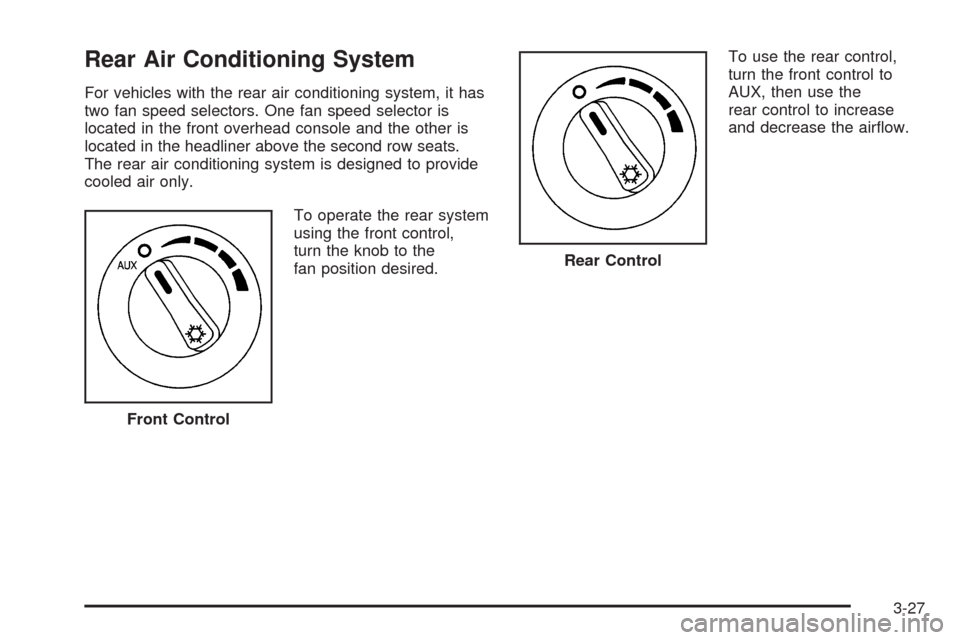
Rear Air Conditioning System
For vehicles with the rear air conditioning system, it has
two fan speed selectors. One fan speed selector is
located in the front overhead console and the other is
located in the headliner above the second row seats.
The rear air conditioning system is designed to provide
cooled air only.
To operate the rear system
using the front control,
turn the knob to the
fan position desired.To use the rear control,
turn the front control to
AUX, then use the
rear control to increase
and decrease the airow.
Front Control
Rear Control
3-27
Page 188 of 442

FRONT TIRES or REAR TIRES
The pressure for each tire can be viewed in the DIC.
The tire pressure will be shown in either pounds
per square inch (psi) or kilopascals (kPa). Press the
vehicle information button until the DIC shows the tire
pressure for the front tires. Press the vehicle information
button again to view the pressure for the rear tires.
If a low or high tire pressure condition is detected by
the system while driving, a message advising you to
check the pressure in a specic tire will appear in the
display. SeeInflation - Tire Pressure on page 5-56
andDIC Warnings and Messages on page 3-51for
more information.
RELEARN REMOTE KEY
This display allows you to match Remote Keyless
Entry (RKE) transmitters to the vehicle. To match an
RKE transmitter to the vehicle:
1. Press the vehicle information button until PRESS
V
TO RELEARN REMOTE KEY displays.
2. Press the set/reset button until REMOTE KEY
LEARNING ACTIVE is displayed.3. Press and hold the lock and unlock buttons on the
rst transmitter at the same time for about
15 seconds.
On vehicles with memory recall seats, the rst
transmitter learned will match driver 1 and
the second will match driver 2.
A chime will sound indicating that the transmitter
is matched.
4. To match additional transmitters at this time,
repeat Step 3.
Each vehicle can have a maximum of
eight transmitters matched to it.
5. To exit the programming mode, you must cycle the
key to LOCK/OFF.
SPEEDOMETER
This display shows a digital speedometer in the DIC.
The speed will be displayed in either miles per hour
(mph) or kilometers per hour (km/h). Press the vehicle
information button until the DIC shows the digital
speedometer. To change the units from English to
metric, see “UNITS” earlier in this section.
Blank Display
This display shows no information.
3-50
Page 266 of 442

If you put things inside your vehicle — like
suitcases, tools, packages, or anything
else —they will go as fast as the vehicle goes.
If you have to stop or turn quickly, or if there is a
crash, they will keep going.
{CAUTION:
Things you put inside your vehicle can strike
and injure people in a sudden stop or turn, or
in a crash.
Put things in the cargo area of your
vehicle. Try to spread the weight evenly.
Never stack heavier things, like
suitcases, inside the vehicle so that some
of them are above the tops of the seats.
Do not leave an unsecured child restraint
in your vehicle.
When you carry something inside the
vehicle, secure it whenever you can.
Do not leave a seat folded down unless
you need to.
There is also important loading information for
off-road driving in this manual. SeeOff-Road
Driving on page 4-11.
Towing
Towing Your Vehicle
To avoid damage, the disabled vehicle should be
towed with all four wheels off the ground. Consult your
dealer/retailer or a professional towing service if the
disabled vehicle must be towed. SeeRoadside Service
on page 7-7.
To tow the vehicle behind another vehicle for
recreational purposes (such as behind a motorhome),
see “Recreational Vehicle Towing” following.
Recreational Vehicle Towing
Recreational vehicle towing means towing the vehicle
behind another vehicle – such as behind a motorhome.
The two most common types of recreational vehicle
towing are known as “dinghy towing” (towing the vehicle
with all four wheels on the ground) and “dolly towing”
(towing the vehicle with two wheels on the ground
and two wheels up on a device known as a “dolly”).
4-36
Page 333 of 442

(C) Aspect Ratio:A two-digit number that
indicates the tire height-to-width measurements.
For example, if the tire size aspect ratio is 60, as
shown in item C of the illustration, it would mean
that the tire’s sidewall is 60 percent as high as
it is wide.
(D) Construction Code
:A letter code is used to
indicate the type of ply construction in the tire. The
letter R means radial ply construction; the letter D
means diagonal or bias ply construction; and the
letter B means belted-bias ply construction.
(E) Rim Diameter
:Diameter of the wheel in
inches.
(F) Service Description
:These characters
represent the load range and speed rating of the
tire. The load index represents the load carry
capacity a tire is certied to carry. The load index
can range from 1 to 279. The speed rating is the
maximum speed a tire is certied to carry a load.
Speed ratings range from A to Z.
Tire Terminology and Denitions
Air Pressure:The amount of air inside the
tire pressing outward on each square inch of the
tire. Air pressure is expressed in pounds per
square inch (psi) or kilopascal (kPa).
Accessory Weight
:This means the combined
weight of optional accessories. Some examples of
optional accessories are, automatic transmission,
power steering, power brakes, power windows,
power seats, and air conditioning.
Aspect Ratio
:The relationship of a tire’s height
to its width.
Belt
:A rubber coated layer of cords that is located
between the plies and the tread. Cords may be
made from steel or other reinforcing materials.
Bead
:The tire bead contains steel wires wrapped
by steel cords that hold the tire onto the rim.
Bias Ply Tire
:A pneumatic tire in which the plies
are laid at alternate angles less than 90 degrees
to the centerline of the tread.
5-53