2009 CADILLAC CTS brake
[x] Cancel search: brakePage 131 of 490

If the vehicle has an uncharged battery or a battery with
low voltage, try charging or jump starting the battery.
SeeJump Starting on page 5-46for more information.
To shift out of P (Park) use the following:
1. Apply the brake pedal.
2. Then press the shift lever button.
3. Move the shift lever to the desired position.
If you still are unable to shift out of P (Park):
1. Fully release the shift lever button.
2. While holding down the brake pedal, press the shift
lever button again.
3. Move the shift lever to the desired position.
If you still cannot move the shift lever from P (Park),
consult your dealer/retailer or a professional towing
service.Parking the Vehicle
(Manual Transmission)
Before you get out of the vehicle, place the shift lever in
R (Reverse) and rmly apply the parking brake.
For vehicles with the key access ignition, turn the
ignition key to OFF/LOCK, press the release button and
remove the key. See “Key Release Button” under
Ignition Positions (Key Access) on page 2-31orIgnition
Positions (Keyless Access) on page 2-32for more
information.
For vehicles with the keyless access ignition, turn the
ignition to LOCK/OFF and remove the keyless
access transmitter.
If you are towing a trailer, seeTowing a Trailer (CTS-V)
on page 4-27orTowing a Trailer (CTS) on page 4-28.
Parking Over Things That Burn
{CAUTION:
Things that can burn could touch hot exhaust
parts under the vehicle and ignite. Do not park
over papers, leaves, dry grass, or other things that
can burn.
2-49
Page 133 of 490

Running the Vehicle While Parked
It is better not to park with the engine running. But if you
ever have to, here are some things to know.
{CAUTION:
Idling a vehicle in an enclosed area with poor
ventilation is dangerous. Engine exhaust may
enter the vehicle. Engine exhaust contains Carbon
Monoxide (CO) which cannot be seen or smelled.
It can cause unconsciousness and even death.
Never run the engine in an enclosed area that has
no fresh air ventilation. For more information,
seeEngine Exhaust on page 2-50.
{CAUTION:
It can be dangerous to get out of the vehicle if the
automatic transmission shift lever is not fully in
P (Park) with the parking brake rmly set. The
vehicle can roll. Do not leave the vehicle when the
engine is running unless you have to. If you have
left the engine running, the vehicle can move
suddenly. You or others could be injured. To be
sure the vehicle will not move, even when it is on
fairly level ground, always set the parking brake and
move the automatic transmission shift lever to
P (Park), or the manual transmission shift lever to
Neutral.
Follow the proper steps to be sure the vehicle will not
move. SeeShifting Into Park (Automatic Transmission)
on page 2-47andParking the Vehicle (Manual
Transmission) on page 2-49.
If pulling a trailer, seeTowing a Trailer (CTS-V) on
page 4-27orTowing a Trailer (CTS) on page 4-28.
2-51
Page 138 of 490

When the System Does Not Seem to
Work Properly
If the URPA system will not activate due to a temporary
condition, the message PARK ASSIST OFF will be
displayed on the DIC and a red light will be shown on
the rear URPA display when the shift lever is moved into
R (Reverse). This occurs under the following conditions:
The driver disables the system.
The ultrasonic sensors are not clean. Keep the
vehicle’s rear bumper free of mud, dirt, snow,
ice and slush. For cleaning instructions, see
Washing Your Vehicle on page 5-110.
A trailer was attached to the vehicle, or a bicycle or
an object was hanging out of the trunk during the
last drive cycle, the red light may illuminate in
the rear display. Once the attached object is
removed, URPA will return to normal operation.
A tow bar is attached to the vehicle.
The vehicle’s bumper is damaged. Take the vehicle
to your dealer/retailer to repair the system.
Other conditions may affect system performance,
such as vibrations from a jackhammer or the
compression of air brakes on a very large truck.
If the system is still disabled after driving forward at least
15 mph (25 km/h), take the vehicle to your dealer/retailer.
OnStar®System
OnStar uses several innovative technologies and live
advisors to provide a wide range of safety, security,
information, and convenience services. If the airbags
deploy, the system is designed to make an automatic
call to OnStar Emergency advisors who can request
emergency services be sent to your location. If the keys
are locked in the vehicle, call OnStar at 1-888-4-ONSTAR
to have a signal sent to unlock the doors. OnStar
Hands-Free Calling, including 30 trial minutes good
for 60 days, is available on most vehicles. OnStar
Turn-by-Turn Navigation service, with one trial route, is
available on most vehicles. Press the OnStar button to
have an OnStar advisor contact Roadside Service.
OnStar service is provided subject to the OnStar Terms
and Conditions included in the OnStar Subscriber glove
box literature.
2-56
Page 149 of 490

Instrument Panel Overview...............................3-4
Hazard Warning Flashers................................3-6
Horn .............................................................3-6
Tilt and Telescopic Steering Wheel...................3-6
Power Tilt Wheel and Telescopic Steering
Column......................................................3-7
Turn Signal/Multifunction Lever.........................3-7
Turn and Lane-Change Signals........................3-8
Headlamp High/Low-Beam Changer..................3-8
Flash-to-Pass.................................................3-9
Windshield Wipers..........................................3-9
Rainsense™ Wipers......................................3-10
Windshield Washer.......................................3-12
Headlamp Washer........................................3-13
Cruise Control..............................................3-14
Headlamps..................................................3-17
Wiper Activated Headlamps............................3-17
Headlamps on Reminder................................3-17
Daytime Running Lamps (DRL).......................3-18
Adaptive Forward Lighting System...................3-19
Fog Lamps ..................................................3-19
Exterior Lighting Battery Saver........................3-20
Instrument Panel Brightness...........................3-20
Entry Lighting...............................................3-20
Parade Dimming...........................................3-20
Reading Lamps............................................3-21
Electric Power Management...........................3-21Battery Run-Down Protection..........................3-22
Accessory Power Outlet(s).............................3-22
Ashtray(s) and Cigarette Lighter......................3-23
Analog Clock...............................................3-23
Climate Controls............................................3-24
Dual Climate Control System..........................3-24
Outlet Adjustment.........................................3-29
Passenger Compartment Air Filter...................3-29
Warning Lights, Gages, and Indicators............3-30
Instrument Panel Cluster................................3-31
Speedometer and Odometer...........................3-33
Trip Odometers............................................3-33
Tachometer.................................................3-34
Engine Speed Limiter....................................3-34
Safety Belt Reminders...................................3-35
Airbag Readiness Light..................................3-36
Passenger Airbag Status Indicator...................3-37
Charging System Light..................................3-38
Up-Shift Light...............................................3-38
Brake System Warning Light..........................3-39
Antilock Brake System (ABS) Warning Light.....3-40
StabiliTrak
®/Traction Control System (TCS)
Warning Light...........................................3-41
Engine Coolant Temperature Warning Light......3-41
Engine Coolant Temperature Gage..................3-42
Tire Pressure Light.......................................3-42
Section 3 Instrument Panel
3-1
Page 153 of 490
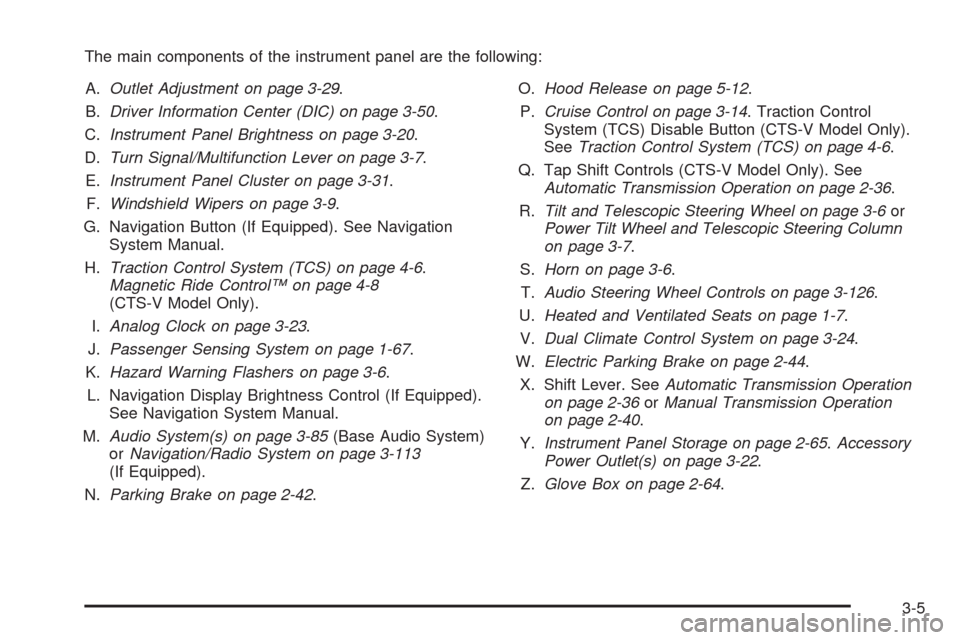
The main components of the instrument panel are the following:
A.Outlet Adjustment on page 3-29.
B.Driver Information Center (DIC) on page 3-50.
C.Instrument Panel Brightness on page 3-20.
D.Turn Signal/Multifunction Lever on page 3-7.
E.Instrument Panel Cluster on page 3-31.
F.Windshield Wipers on page 3-9.
G. Navigation Button (If Equipped). See Navigation
System Manual.
H.Traction Control System (TCS) on page 4-6.
Magnetic Ride Control™ on page 4-8
(CTS-V Model Only).
I.Analog Clock on page 3-23.
J.Passenger Sensing System on page 1-67.
K.Hazard Warning Flashers on page 3-6.
L. Navigation Display Brightness Control (If Equipped).
See Navigation System Manual.
M.Audio System(s) on page 3-85(Base Audio System)
orNavigation/Radio System on page 3-113
(If Equipped).
N.Parking Brake on page 2-42.O.Hood Release on page 5-12.
P.Cruise Control on page 3-14. Traction Control
System (TCS) Disable Button (CTS-V Model Only).
SeeTraction Control System (TCS) on page 4-6.
Q. Tap Shift Controls (CTS-V Model Only). See
Automatic Transmission Operation on page 2-36.
R.Tilt and Telescopic Steering Wheel on page 3-6or
Power Tilt Wheel and Telescopic Steering Column
on page 3-7.
S.Horn on page 3-6.
T.Audio Steering Wheel Controls on page 3-126.
U.Heated and Ventilated Seats on page 1-7.
V.Dual Climate Control System on page 3-24.
W.Electric Parking Brake on page 2-44.
X. Shift Lever. SeeAutomatic Transmission Operation
on page 2-36orManual Transmission Operation
on page 2-40.
Y.Instrument Panel Storage on page 2-65.Accessory
Power Outlet(s) on page 3-22.
Z.Glove Box on page 2-64.
3-5
Page 162 of 490

Cruise Control
{CAUTION:
Cruise control can be dangerous where you cannot
drive safely at a steady speed. So, do not use the
cruise control on winding roads or in heavy traffic.
Cruise control can be dangerous on slippery roads.
On such roads, fast changes in tire traction can
cause excessive wheel slip, and you could lose
control. Do not use cruise control on slippery roads.
With cruise control, a speed of about 25 mph (40 km/h)
or more can be maintained without keeping your foot
on the accelerator. Cruise control does not work
at speeds below about 25 mph (40 km/h).
When the brakes are applied, the cruise control
turns off.
If the vehicle has the StabiliTrak
®system and begins
to limit wheel spin while you are using cruise control,
the cruise control will automatically disengage.
SeeStabiliTrak
®System on page 4-6. When road
conditions allow you to safely use it again, the cruise
control can be turned back on.The cruise control buttons
are located on the left side
of the steering wheel.
I(On/Off):Press to turn the system on or off.
The indicator light on the button turns on when cruise
control is on.
+ RES (Resume/Accelerate):Press to make the
vehicle accelerate or resume to a previously set speed.
SET−(Set/Coast):Press to set the speed or make
the vehicle decelerate.
[(Cancel):Press to cancel cruise control without
erasing the set speed from memory.CTS Shown, CTS-V
Similar
3-14
Page 163 of 490

Setting Cruise Control
Cruise control will not work if the parking brake is set, or
if the master cylinder brake uid level is low.
The cruise control light on the instrument panel cluster
comes on after the cruise control has been set to
the desired speed.
{CAUTION:
If you leave your cruise control on when you are
not using cruise, you might hit a button and go
into cruise when you do not want to. You could be
startled and even lose control. Keep the cruise
control switch off until you want to use cruise
control.
1. Press the
Ibutton.
2. Get up to the desired speed.
3. Press the SET−button located on the steering
wheel and release it.
4. Take your foot off the accelerator.
Resuming a Set Speed
Suppose the cruise control is set at a desired speed
and then the brake is applied. This shuts off the cruise
control. But it does not need to be reset.
Once the vehicle is driving at about 25 mph (40 km/h)
or more, press the +RES button on the steering
wheel. The vehicle goes back to the previously set
speed and stays there.
Increasing Speed While Using Cruise
Control
To increase the cruise speed while using cruise control:
Press and hold the +RES button on the steering
wheel until the desired speed is reached, then
release it.
To increase vehicle speed in small increments,
press the +RES button. Each time this is done,
the vehicle goes about 1 mph (1.6 km/h) faster.
3-15
Page 164 of 490

Reducing Speed While Using Cruise
Control
To reduce the vehicle’s speed while using cruise
control:
Press and hold the SET– button on the steering
wheel until the desired speed is reached, then
release it.
To slow down in very small amounts, press the
SET– button on the steering wheel briey.
Each time this is done, the vehicle goes about
1 mph (1.6 km/h) slower.
Passing Another Vehicle While Using
Cruise Control
Use the accelerator pedal to increase the vehicle’s
speed. When you take your foot off the pedal, the
vehicle slows down to the previously set cruise speed.
Using Cruise Control on Hills
How well the cruise control works on hills depends upon
the vehicle’s speed, load, and the steepness of the
hills. When going up steep hills, you might have to step
on the accelerator pedal to maintain the vehicle’s speed.
When going downhill, you might have to brake or shift
to a lower gear to keep the vehicle’s speed down.
When the brakes are applied the cruise control turns off.
Ending Cruise Control
There are four ways to end cruise control:
Step lightly on the brake pedal
(manual and automatic transmissions).
Press the clutch pedal to the oor
(manual transmissions).
Press[on the steering wheel.
PressIon the steering wheel.
Erasing Speed Memory
The cruise control set speed memory is erased when
the cruise control or the ignition is turned off.
3-16