2009 BMW Z4 SDRIVE30I ROADSTER brake
[x] Cancel search: brakePage 56 of 248
Driving
54
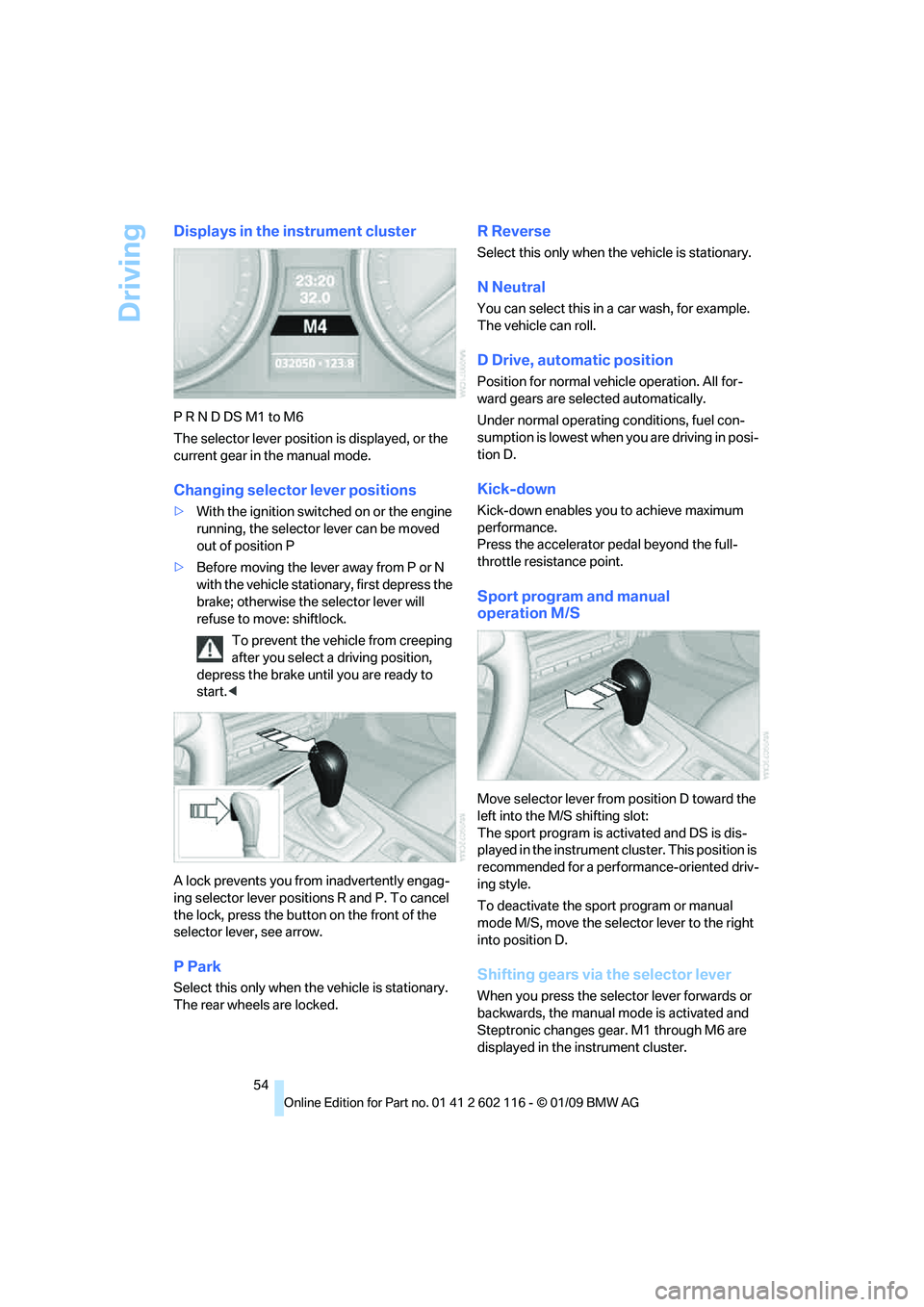
Displays in the instrument cluster
P R N D DS M1 to M6
The selector lever position is displayed, or the
current gear in the manual mode.
Changing selector lever positions
>With the ignition switched on or the engine
running, the selector lever can be moved
out of position P
> Before moving the lever away from P or N
with the vehicle stationary, first depress the
brake; otherwise the selector lever will
refuse to move: shiftlock.
To prevent the vehicle from creeping
after you select a driving position,
depress the brake until you are ready to
start. <
A lock prevents you from inadvertently engag-
ing selector lever positions R and P. To cancel
the lock, press the butto n on the front of the
selector lever, see arrow.
P Park
Select this only when th e vehicle is stationary.
The rear wheels are locked.
R Reverse
Select this only when th e vehicle is stationary.
N Neutral
You can select this in a car wash, for example.
The vehicle can roll.
D Drive, automatic position
Position for normal vehicle operation. All for-
ward gears are selected automatically.
Under normal operating conditions, fuel con-
sumption is lowest when you are driving in posi-
tion D.
Kick-down
Kick-down enables you to achieve maximum
performance.
Press the accelerator pedal beyond the full-
throttle resistance point.
Sport program and manual
operation M/S
Move selector lever from position D toward the
left into the M/S shifting slot:
The sport program is activated and DS is dis-
played in the instrument cl uster. This position is
recommended for a performance-oriented driv-
ing style.
To deactivate the spor t program or manual
mode M/S, move the sele ctor lever to the right
into position D.
Shifting gears via the selector lever
When you press the select or lever forwards or
backwards, the manual mode is activated and
Steptronic changes gear. M1 through M6 are
displayed in the instrument cluster.
Page 58 of 248
Driving
56
The indicator lamp lights up yellow if
the transmission becomes too warm.
Avoid high engine loads and driving off
frequently. If the transmission overheats, the
indicator lamp lights up red and power flow to
the engine is interrupted. You can only continue
driving after the transmi ssion has cooled down.
Avoid driving off frequently with a high acceler-
ation and do not hold the vehicle on inclines by
depressing the accelerato r lightly and dragging
the clutch; otherwise, the transmission may
overheat.
Transmission positions
P R N D M/S + –
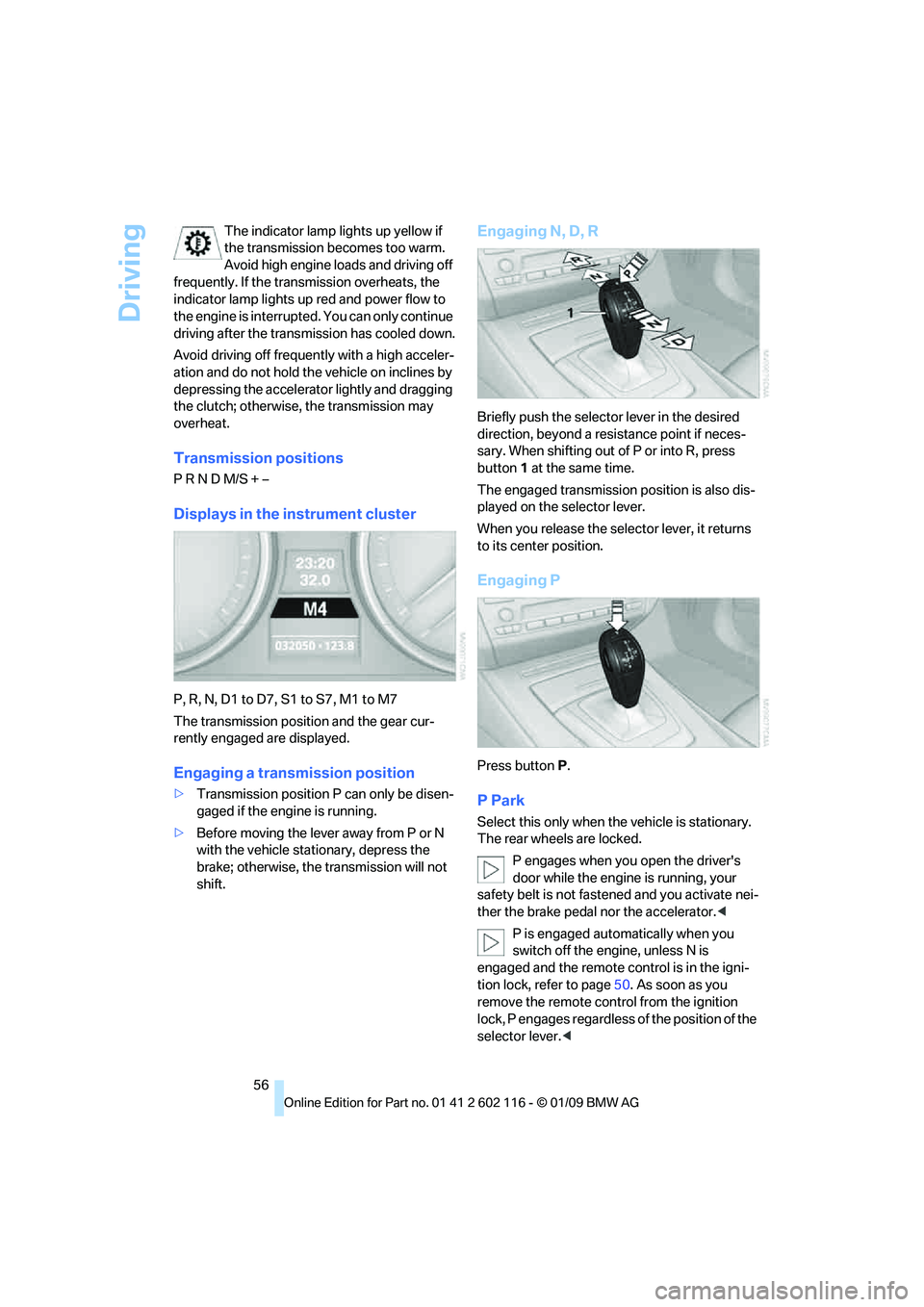
Displays in the instrument cluster
P, R, N, D1 to D7, S1 to S7, M1 to M7
The transmission position and the gear cur-
rently engaged are displayed.
Engaging a transmission position
> Transmission position P can only be disen-
gaged if the engine is running.
> Before moving the lever away from P or N
with the vehicle stat ionary, depress the
brake; otherwise, the transmission will not
shift.
Engaging N, D, R
Briefly push the selector lever in the desired
direction, beyond a resi stance point if neces-
sary. When shifting out of P or into R, press
button 1 at the same time.
The engaged transmission position is also dis-
played on the selector lever.
When you release the sele ctor lever, it returns
to its center position.
Engaging P
Press button P.
P Park
Select this only when th e vehicle is stationary.
The rear wheels are locked.
P engages when you open the driver's
door while the engine is running, your
safety belt is not fastened and you activate nei-
ther the brake pedal nor the accelerator.<
P is engaged automatically when you
switch off the engine, unless N is
engaged and the remote co ntrol is in the igni-
tion lock, refer to page 50. As soon as you
remove the remote cont rol from the ignition
lock, P engages regardless of the position of the
selector lever. <
Page 60 of 248
Driving
58
>
To shift up: pull one of the shift paddles.
> To shift down: press one of the shift
paddles.
Launch Control
Launch Control enables you to drive off with an
optimal vehicle acceleration on a high grip road
surface.
Do not use Launch Control too often, as
the higher loads on the vehicle lead to
premature component wear. <
Launch Control is availa ble when the engine is
at operating temperature, i.e. after driving con-
tinuously for at least 6 miles/10 km.
1. With the engine running, depress the brake
pedal with your left foot.
2. Activate the SPORT+ program of the
Dynamic Driving Control, refer to page 79.
3. With the vehicle stationary, activate manual
mode and select first gear.
4. Press the accelerator all the way down. The
engine speed when driving off is controlled.
A flag symbol appears in the instrument
cluster.
5. The vehicle accelerates when you release
the brake pedal. Keep the accelerator
pressed all the way down.
6. The transmission shifts up automatically as
long as the accelerator is pressed all the
way down.
Launch Control only be comes available again
after a certain distance has been driven.
Launch Control can only be used after the
break-in phase, refer to page 110.To maintain driving stability, activate DSC
whenever possible.
<
Releasing the transmission lock
manually
If a power failure occurs, e.g. if the battery
is discharged or disconnected or if there
is an electrical malfun ction, the transmission
lock must be released manually; otherwise, the
rear wheels are blocked and the vehicle cannot
be towed. <
Release the transmission lock manually for tow-
ing only and set the parking brake beforehand
to prevent the vehicle from rolling. After parking
the vehicle, lock the transmission lock again.
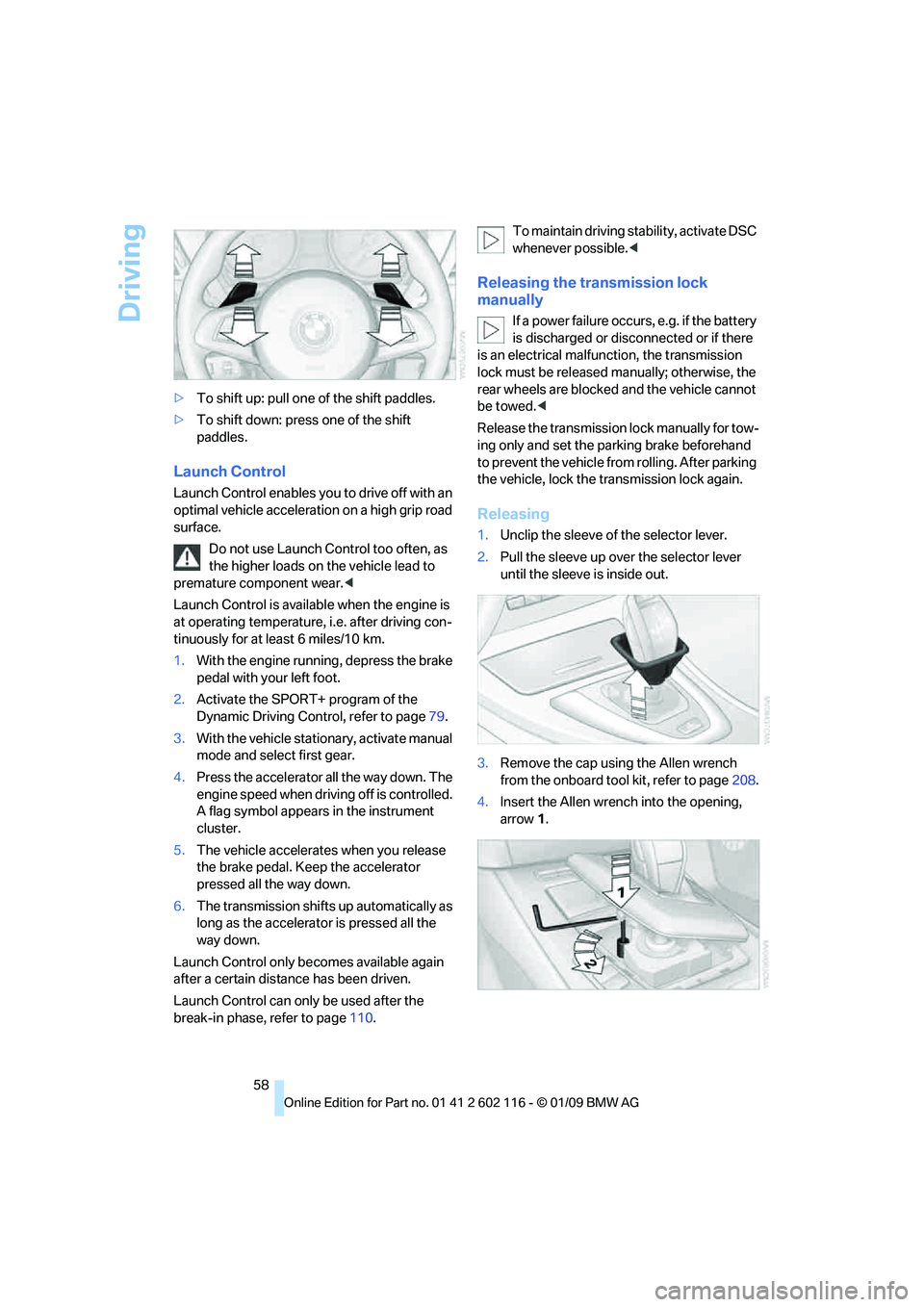
Releasing
1. Unclip the sleeve of the selector lever.
2. Pull the sleeve up over the selector lever
until the sleeve is inside out.
3. Remove the cap using the Allen wrench
from the onboard tool kit, refer to page 208.
4. Insert the Allen wrench into the opening,
arrow 1.
Page 61 of 248
Controls
59Reference
At a glance
Driving tips
Communications
Navigation
Entertainment
Mobility
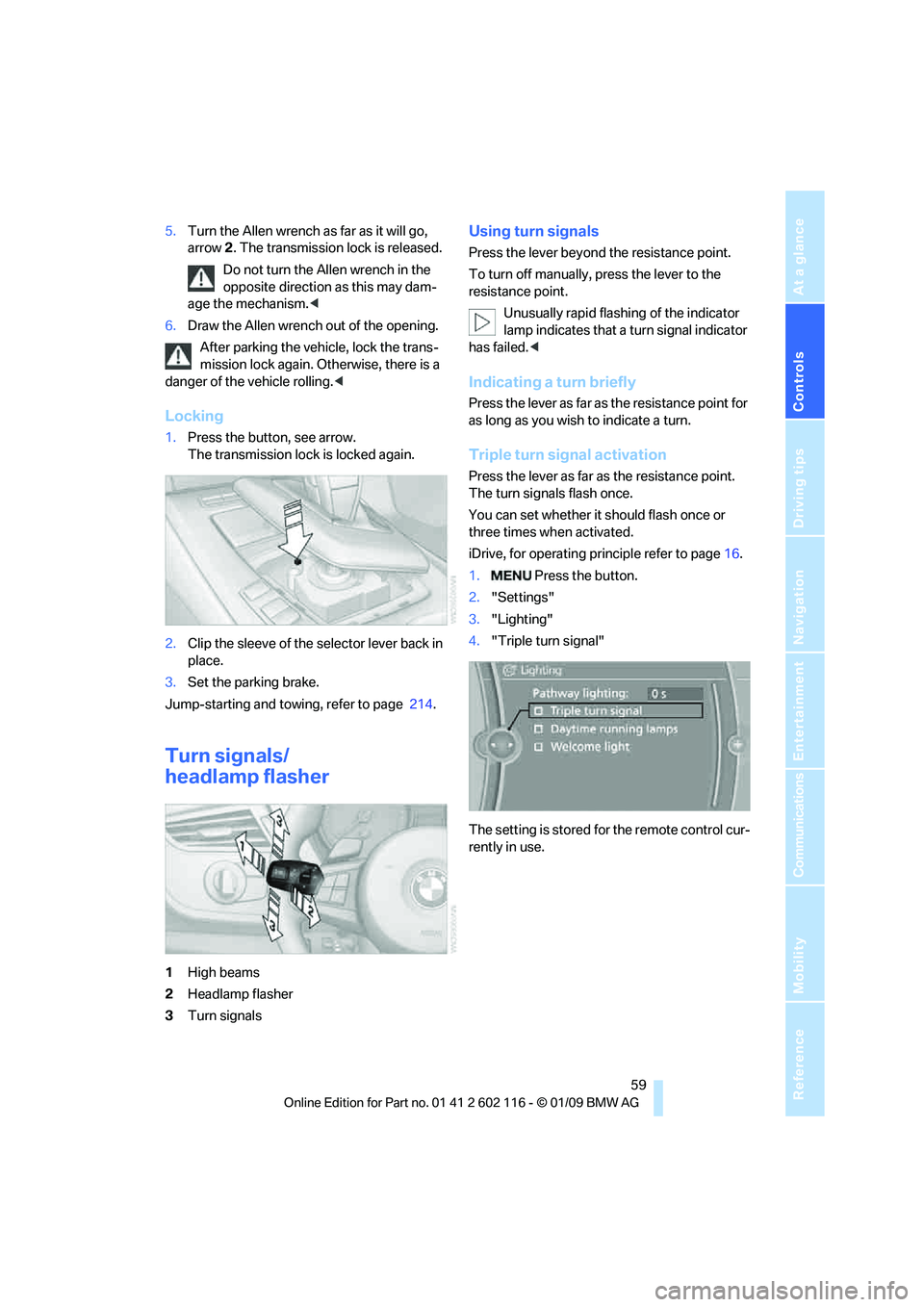
5.Turn the Allen wrench as far as it will go,
arrow 2. The transmission lock is released.
Do not turn the Allen wrench in the
opposite direction as this may dam-
age the mechanism.<
6. Draw the Allen wrench out of the opening.
After parking the vehicle, lock the trans-
mission lock again. Otherwise, there is a
danger of the vehicle rolling. <
Locking
1.Press the button, see arrow.
The transmission lock is locked again.
2. Clip the sleeve of the selector lever back in
place.
3. Set the parking brake.
Jump-starting and towing, refer to page 214.
Turn signals/
headlamp flasher
1High beams
2 Headlamp flasher
3 Turn signals
Using turn signals
Press the lever beyond the resistance point.
To turn off manually, press the lever to the
resistance point.
Unusually rapid flashi ng of the indicator
lamp indicates that a turn signal indicator
has failed. <
Indicating a turn briefly
Press the lever as far as the resistance point for
as long as you wish to indicate a turn.
Triple turn signal activation
Press the lever as far as the resistance point.
The turn signals flash once.
You can set whether it should flash once or
three times when activated.
iDrive, for operating pr inciple refer to page16.
1. Press the button.
2. "Settings"
3. "Lighting"
4. "Triple turn signal"
The setting is stored for the remote control cur-
rently in use.
Page 63 of 248
Controls
61Reference
At a glance
Driving tips
Communications
Navigation
Entertainment
Mobility
Windshield washer nozzles
The windshield washer nozzles are heated
automatically while the engine is running or the
ignition is switched on.
Washer fluid
Washer fluid antifreeze is flammable.
Therefore, keep it away from ignition
sources and only store it in the closed original
container that is kept ou t of reach of children,
otherwise there is a risk of personal injury.
Comply with the instructions on the con-
tainer. <
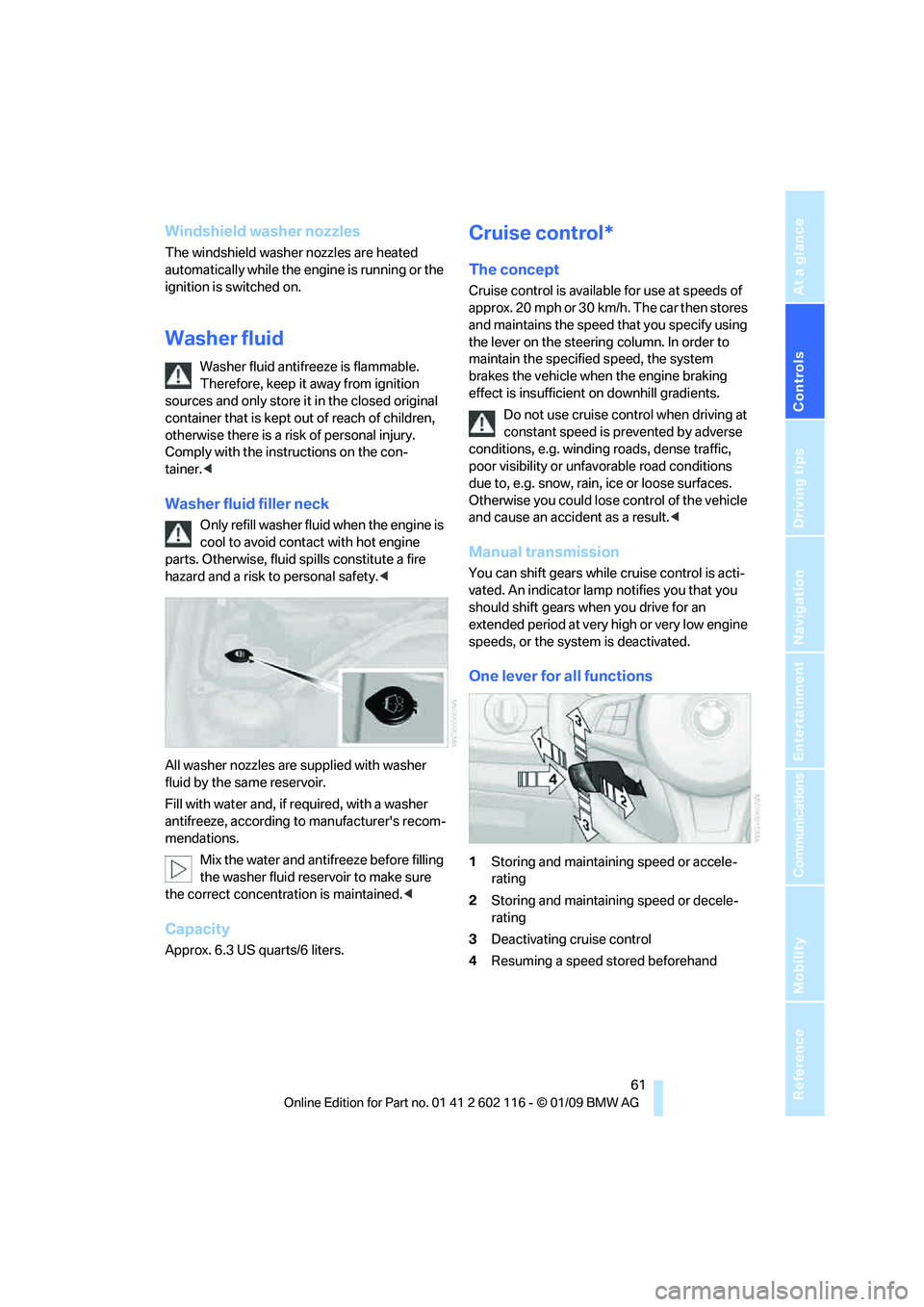
Washer fluid filler neck
Only refill washer fluid when the engine is
cool to avoid contac t with hot engine
parts. Otherwise, fluid spills constitute a fire
hazard and a risk to personal safety. <
All washer nozzles are supplied with washer
fluid by the same reservoir.
Fill with water and, if required, with a washer
antifreeze, according to manufacturer's recom-
mendations. Mix the water and antifreeze before filling
the washer fluid reservoir to make sure
the correct concentration is maintained. <
Capacity
Approx. 6.3 US quarts/6 liters.
Cruise control*
The concept
Cruise control is available for use at speeds of
approx. 20 mph or 30 km/h. The car then stores
and maintains the speed that you specify using
the lever on the steering column. In order to
maintain the specified speed, the system
brakes the vehicle when the engine braking
effect is insufficient on downhill gradients.
Do not use cruise control when driving at
constant speed is prevented by adverse
conditions, e.g. winding roads, dense traffic,
poor visibility or unfavorable road conditions
due to, e.g. snow, rain, ice or loose surfaces.
Otherwise you could lose control of the vehicle
and cause an accident as a result. <
Manual transmission
You can shift gears while cruise control is acti-
vated. An indicator lamp notifies you that you
should shift gears wh en you drive for an
extended period at very high or very low engine
speeds, or the system is deactivated.
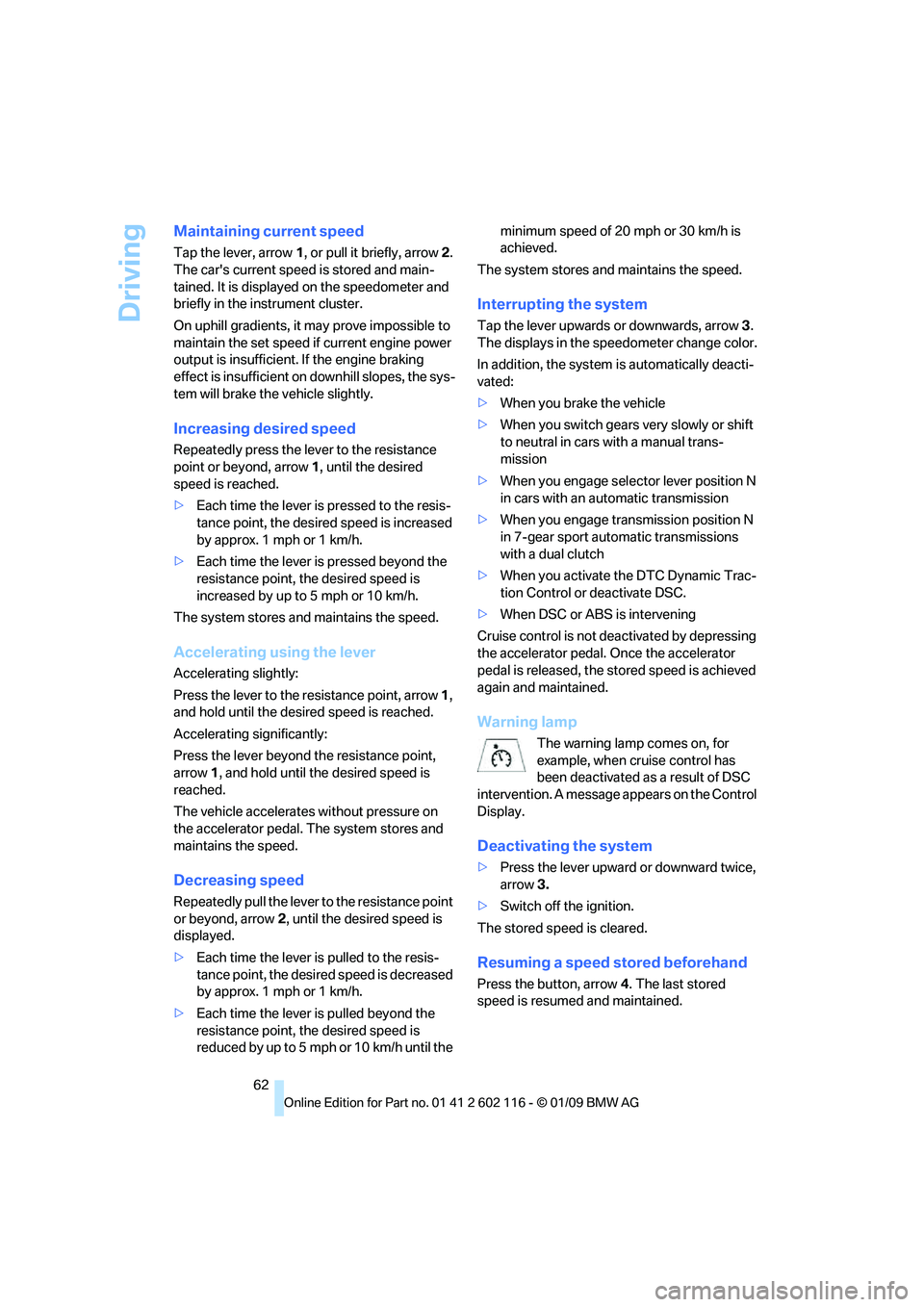
One lever for all functions
1 Storing and maintaining speed or accele-
rating
2 Storing and maintaining speed or decele-
rating
3 Deactivating cruise control
4 Resuming a speed stored beforehand
Page 64 of 248
Driving
62
Maintaining current speed
Tap the lever, arrow 1, or pull it briefly, arrow 2.
The car's current speed is stored and main-
tained. It is displayed on the speedometer and
briefly in the instrument cluster.
On uphill gradients, it may prove impossible to
maintain the set speed if current engine power
output is insufficient. If the engine braking
effect is insufficient on downhill slopes, the sys-
tem will brake the vehicle slightly.
Increasing desired speed
Repeatedly press the lever to the resistance
point or beyond, arrow 1, until the desired
speed is reached.
> Each time the lever is pressed to the resis-
tance point, the desired speed is increased
by approx. 1 mph or 1 km/h.
> Each time the lever is pressed beyond the
resistance point, the desired speed is
increased by up to 5 mph or 10 km/h.
The system stores and maintains the speed.
Accelerating using the lever
Accelerating slightly:
Press the lever to the resistance point, arrow 1,
and hold until the desired speed is reached.
Accelerating significantly:
Press the lever beyond the resistance point,
arrow 1, and hold until the desired speed is
reached.
The vehicle accelerates without pressure on
the accelerator pedal. The system stores and
maintains the speed.
Decreasing speed
Repeatedly pull the lever to the resistance point
or beyond, arrow 2, until the desired speed is
displayed.
> Each time the lever is pulled to the resis-
tance point, the desired speed is decreased
by approx. 1 mph or 1 km/h.
> Each time the lever is pulled beyond the
resistance point, the desired speed is
reduced by up to 5 mph o r 10 km/h until the minimum speed of 20 mph or 30 km/h is
achieved.
The system stores and maintains the speed.
Interrupting the system
Tap the lever upwards or downwards, arrow 3.
The displays in the speedometer change color.
In addition, the system is automatically deacti-
vated:
> When you brake the vehicle
> When you switch gears very slowly or shift
to neutral in cars with a manual trans-
mission
> When you engage selector lever position N
in cars with an automatic transmission
> When you engage transmission position N
in 7-gear sport automatic transmissions
with a dual clutch
> When you activate the DTC Dynamic Trac-
tion Control or deactivate DSC.
> When DSC or ABS is intervening
Cruise control is not de activated by depressing
the accelerator pedal. Once the accelerator
pedal is released, the st ored speed is achieved
again and maintained.
Warning lamp
The warning lamp comes on, for
example, when cruise control has
been deactivated as a result of DSC
intervention. A message appears on the Control
Display.
Deactivating the system
> Press the lever upward or downward twice,
arrow 3.
> Switch off the ignition.
The stored speed is cleared.
Resuming a speed stored beforehand
Press the button, arrow 4. The last stored
speed is resumed and maintained.
Page 72 of 248
Everything under control
70
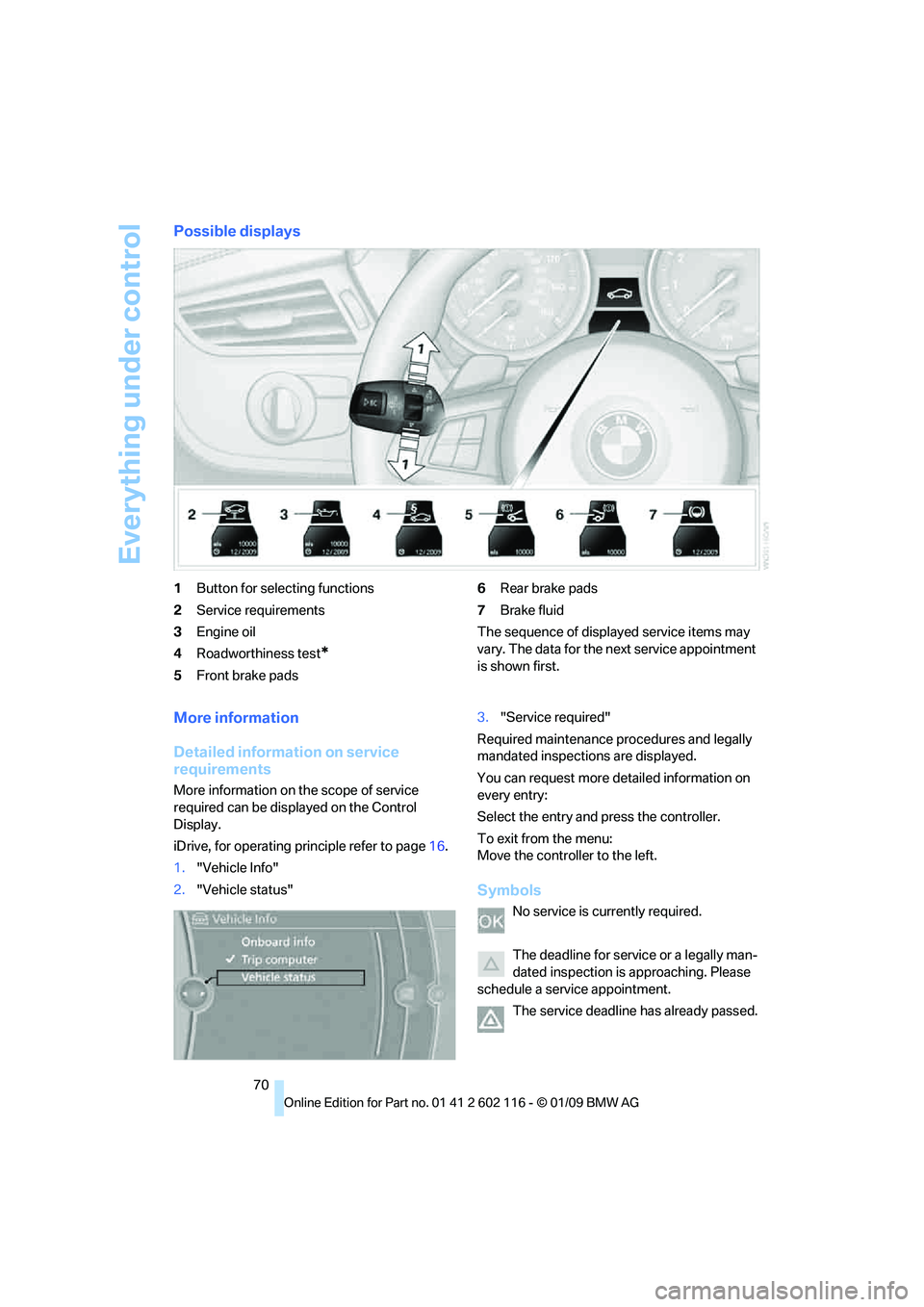
Possible displays
1Button for selecting functions
2 Service requirements
3 Engine oil
4 Roadworthiness test
*
5Front brake pads 6
Rear brake pads
7 Brake fluid
The sequence of displayed service items may
vary. The data for the ne xt service appointment
is shown first.
More information
Detailed information on service
requirements
More information on the scope of service
required can be disp layed on the Control
Display.
iDrive, for operating pr inciple refer to page16.
1. "Vehicle Info"
2. "Vehicle status" 3.
"Service required"
Required maintenance procedures and legally
mandated inspections are displayed.
You can request more detailed information on
every entry:
Select the entry and press the controller.
To exit from the menu:
Move the controller to the left.
Symbols
No service is currently required.
The deadline for servic e or a legally man-
dated inspection is approaching. Please
schedule a service appointment.
The service deadline has already passed.
Page 80 of 248
Technology for driving comfort and safety
78
Loud sound sources outside or inside the car
can drown out the PDC signal. Therefore,
always drive cautiously, otherwise there is a risk
of personal injury or property damage.
<
Driving stability control
systems
Your BMW has a number of systems that help
to maintain the vehicle's stability even in
adverse driving conditions.
Antilock Brake System ABS
ABS prevents locking of the wheels during
braking. Safe steering response is maintained
even during full braking. Active safety is thus
increased.
The ABS is operational every time you start the
engine. Braking safely, refer to page 112.
Electronic brake-force distribution
The system controls the brake pressure in the
rear wheels to ensure st able braking behavior.
Dynamic Brake Control DBC
When you apply the brakes rapidly, this system
automatically produces the maximum braking
force boost and thus helps to achieve the short-
est possible braking distance during full brak-
ing. This system exploits all of the benefits pro-
vided by ABS.
Do not reduce the pressu re on the brake for the
duration of the full braking application.
Dynamic Stability Control DSC
DSC prevents the driving wheels from losing
traction when you pull away from rest or accel-
erate. The system also recognizes unstable
driving conditions, for example if the rear of the
car is about to swerve or if momentum is acting
at an angle past the front wheels. In these
cases, DSC helps the vehicle maintain a safe
course within physical lim its by reducing engine
output and through braking actions at the indi-
vidual wheels. The laws of physics
cannot be repealed,
even with DSC. An appropriate driving
style always remains th e responsibility of the
driver. Therefore, do no t reduce the additional
s a f e t y m a r g i n a g a i n b y t a k i n g r i s k s , a s t h i s c o u l d
result in an accident. <
Deactivating/activating the DSC OFF
program
The program can be de activated via Dynamic
Driving Control, refer to DSC OFF.
For better control
The indicator lamp flashes: DSC con-
trols the drive forces and brake forces.
The indicator lamp lights up: DSC has
failed.
DTC Dynamic Traction Control
The concept
The DTC system and the TRACTION program
is a variant of the DSC in which forward momen-
tum is optimized.
The system ensures maximum forward
momentum on special road conditions, e.g.,
unplowed snowy roads, bu t driving stability is
limited.
It is therefore necessary to drive with appropri-
ate caution.
You may find it useful to briefly activate DTC
under the following special circumstances:
> When driving in slus h or on uncleared,
snow-covered roads.
> When rocking the vehicle or driving off in
deep snow or on loose surfaces.
> When driving with snow chains.
Deactivating/activ ating DTC Dynamic
Traction Control
The system and program can be deactivated/
activated via Dynamic Driving Control.