2009 BMW M3 service
[x] Cancel search: servicePage 205 of 246
Mobility
203Reference
At a glance
Controls
Driving tips
Communications
Navigation
Entertainment
Replacing components
Onboard tool kit
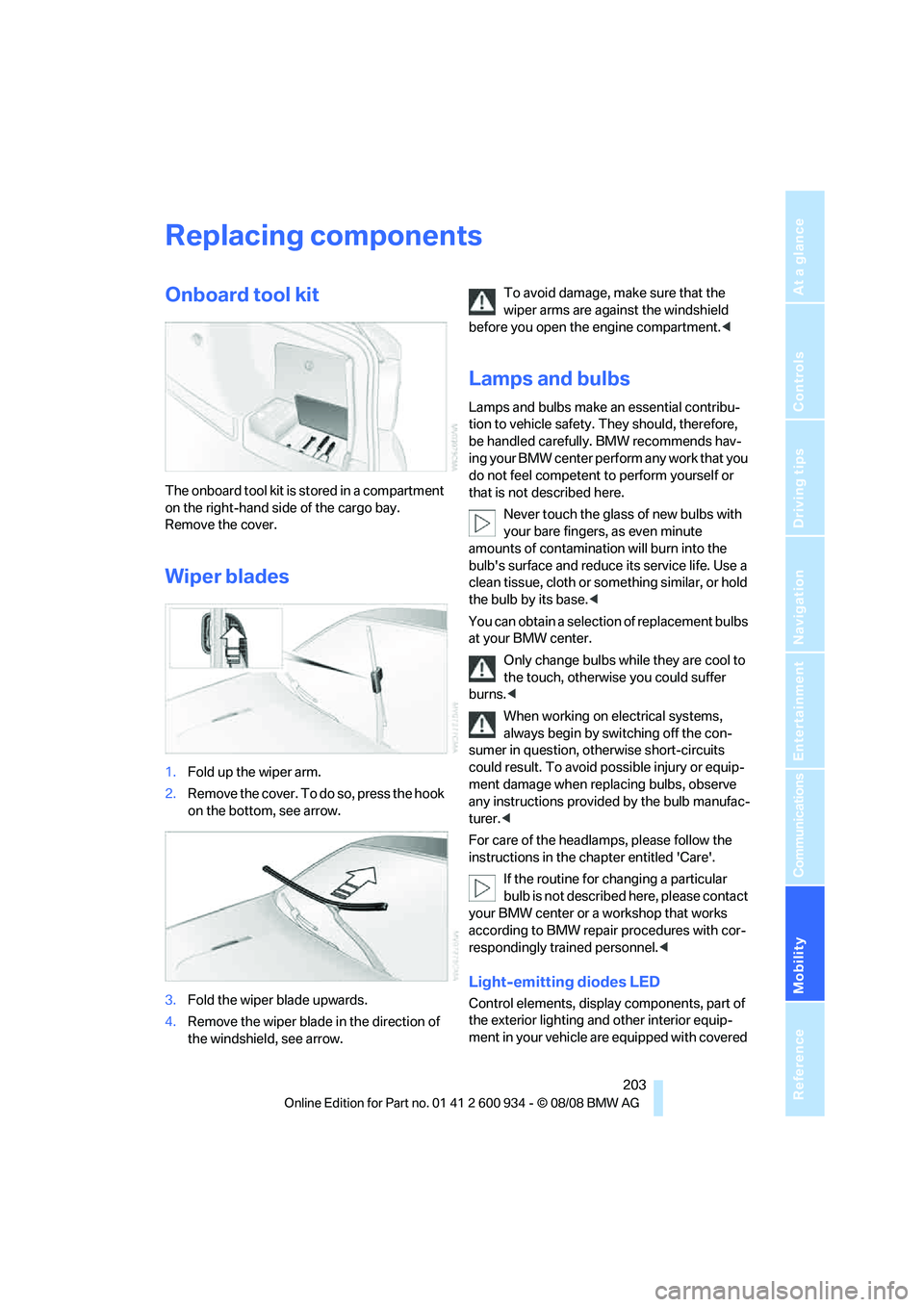
The onboard tool kit is stored in a compartment
on the right-hand side of the cargo bay.
Remove the cover.
Wiper blades
1.Fold up the wiper arm.
2.Remove the cover. To do so, press the hook
on the bottom, see arrow.
3.Fold the wiper blade upwards.
4.Remove the wiper blade in the direction of
the windshield, see arrow.To avoid damage, make sure that the
wiper arms are against the windshield
before you open the engine compartment.<
Lamps and bulbs
Lamps and bulbs make an essential contribu-
tion to vehicle safety. They should, therefore,
be handled carefully. BMW recommends hav-
ing your BMW center perform any work that you
do not feel competent to perform yourself or
that is not described here.
Never touch the glass of new bulbs with
your bare fingers, as even minute
amounts of contamination will burn into the
bulb's surface and reduce its service life. Use a
clean tissue, cloth or something similar, or hold
the bulb by its base.<
You can obtain a selection of replacement bulbs
at your BMW center.
Only change bulbs while they are cool to
the touch, otherwise you could suffer
burns.<
When working on electrical systems,
always begin by switching off the con-
sumer in question, otherwise short-circuits
could result. To avoid possible injury or equip-
ment damage when replacing bulbs, observe
any instructions provided by the bulb manufac-
turer.<
For care of the headlamps, please follow the
instructions in the chapter entitled 'Care'.
If the routine for changing a particular
bulb is not described here, please contact
your BMW center or a workshop that works
according to BMW repair procedures with cor-
respondingly trained personnel.<
Light-emitting diodes LED
Control elements, display components, part of
the exterior lighting and other interior equip-
ment in your vehicle are equipped with covered
ba8_E90M3_cic.book Seite 203 Dienstag, 19. August 2008 11:51 11
Page 206 of 246

Replacing components
204 light-emitting diodes as light sources. These
light-emitting diodes, which operate using a
concept similar to that applied in conventional
lasers, are officially designated as Class 1 light-
emitting diodes.
Do not remove the covers or expose the
eyes directly to the unfiltered light source
for several hours, otherwise this could cause
irritation to the retina.<
Xenon lamps
These bulbs have a very long service life and are
highly unlikely to fail.
Have any work on the xenon lamp system,
including bulb replacements, performed
only by a BMW center or a workshop that works
according to BMW repair procedures with cor-
respondingly trained personnel. Otherwise, if
such work is carried out improperly, the high
voltage in the system presents the danger of
fatal injuries.<
Accessing the bulbs
1.Switch off the lamps and take the remote
control out of the ignition lock.
2.Remove the upper cover from the head-
lamp. To do so, use a screwdriver to press
the catches towards the rear, see arrows,
and pull the cover forward and out.
Follow the same steps in reverse order to reat-
tach the cover.
Be careful when installing the cover, oth-
erwise leaks could occur and cause dam-
age to the headlamp system.<
Parking lamps and roadside parking
lamps, daytime running lamps
H8 bulb, 35 watts
1.Remove the cover, refer to Accessing the
bulbs.
2.Turn the bulb approx. 90°, see arrow, and
take it out.
3.Disconnect the plug, change the bulb and
reconnect the plug.
4.Insert the bulb and turn it until it stops.
5.Reattach the cover.
Corner-illuminating lamp*
H3 bulb, 55 watts
1.Switch off the lamps and take the remote
control out of the ignition lock.
2.Remove the cover, refer to Accessing the
bulbs.
3.Push the wire bracket out of the anchor
towards the right and fold it up.
4.Disconnect the plug, change the bulb and
reconnect the plug.
5.Insert the bulb.
6.Fold the wire bracket down and engage it.
7.Reattach the cover.
ba8_E90M3_cic.book Seite 204 Dienstag, 19. August 2008 11:51 11
Page 212 of 246
Giving and receiving assistance
210
Giving and receiving assistance
Emergency Request*
Conditions for an Emergency Request:
>Equipment version with Full preparation
package mobile phone. This equipment
makes it possible to send an Emergency
Request even if no mobile phone is paired
with the vehicle.
>BMW Assist is activated. Activating
BMW Assist, refer to page176.
>Radio readiness is on.
>The BMW Assist system is logged on to a
wireless network.
>The Emergency Request system is opera-
ble.
Once your service contract for BMW Assist
expires, the BMW Assist system can be deacti-
vated by a BMW center without you having to
visit a workshop. Once the BMW Assist system
has been deactivated, Emergency Requests
are not possible. The BMW Assist system can
be reactivated by a BMW center after a new
contract has been signed.
Sending an Emergency Request
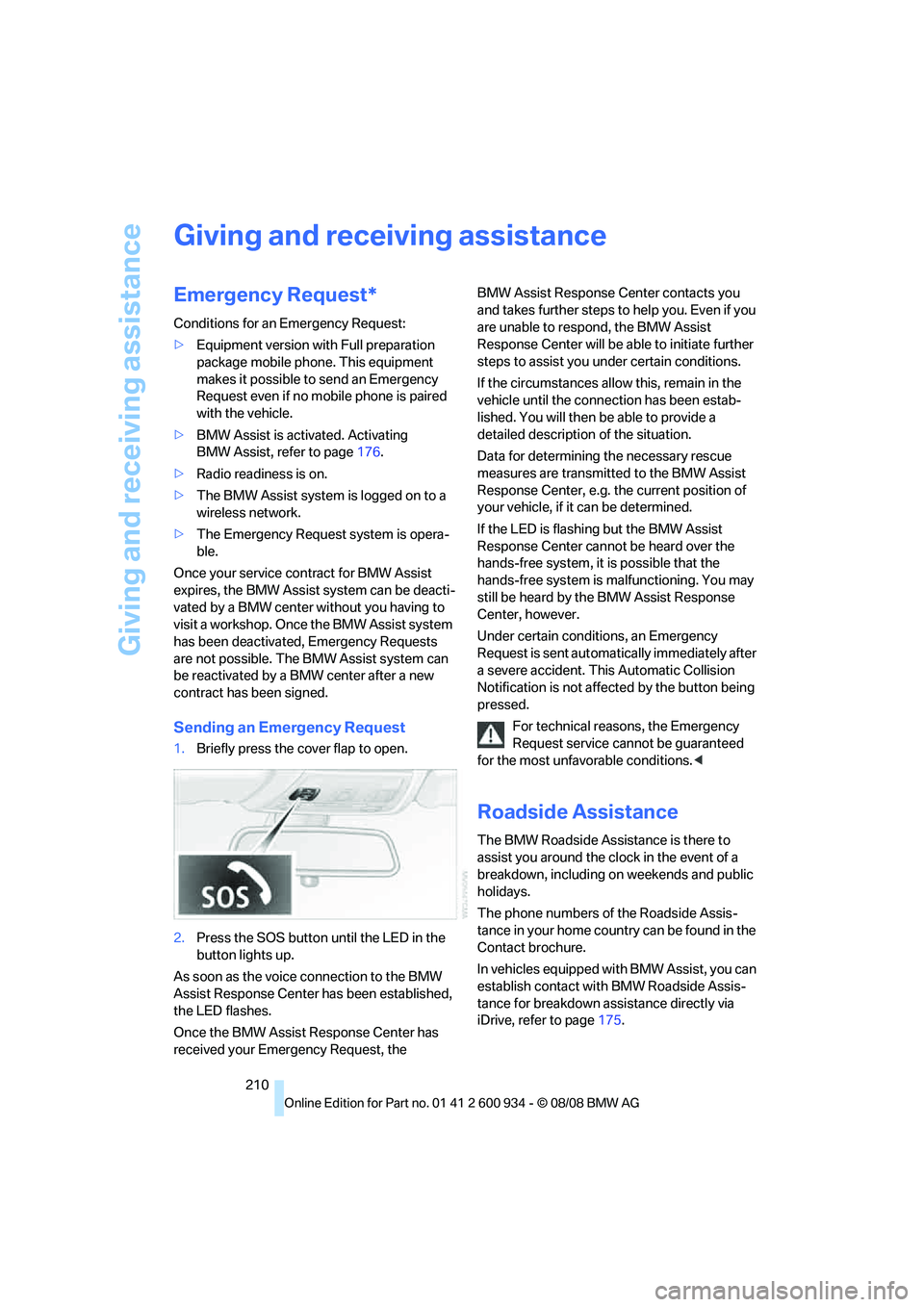
1.Briefly press the cover flap to open.
2.Press the SOS button until the LED in the
button lights up.
As soon as the voice connection to the BMW
Assist Response Center has been established,
the LED flashes.
Once the BMW Assist Response Center has
received your Emergency Request, the BMW Assist Response Center contacts you
and takes further steps to help you. Even if you
are unable to respond, the BMW Assist
Response Center will be able to initiate further
steps to assist you under certain conditions.
If the circumstances allow this, remain in the
vehicle until the connection has been estab-
lished. You will then be able to provide a
detailed description of the situation.
Data for determining the necessary rescue
measures are transmitted to the BMW Assist
Response Center, e.g. the current position of
your vehicle, if it can be determined.
If the LED is flashing but the BMW Assist
Response Center cannot be heard over the
hands-free system, it is possible that the
hands-free system is malfunctioning. You may
still be heard by the BMW Assist Response
Center, however.
Under certain conditions, an Emergency
Request is sent automatically immediately after
a severe accident. This Automatic Collision
Notification is not affected by the button being
pressed.
For technical reasons, the Emergency
Request service cannot be guaranteed
for the most unfavorable conditions.<
Roadside Assistance
The BMW Roadside Assistance is there to
assist you around the clock in the event of a
breakdown, including on weekends and public
holidays.
The phone numbers of the Roadside Assis-
tance in your home country can be found in the
Contact brochure.
In vehicles equipped with BMW Assist, you can
establish contact with BMW Roadside Assis-
tance for breakdown assistance directly via
iDrive, refer to page175.
ba8_E90M3_cic.book Seite 210 Dienstag, 19. August 2008 11:51 11
Page 213 of 246
Mobility
211Reference
At a glance
Controls
Driving tips
Communications
Navigation
Entertainment
First aid pouch*
Some of the articles contained in the first aid
pouch have a limited service life. Therefore,
check the expiration dates of the contents reg-
ularly and replace any items in good time, if nec-
essary.
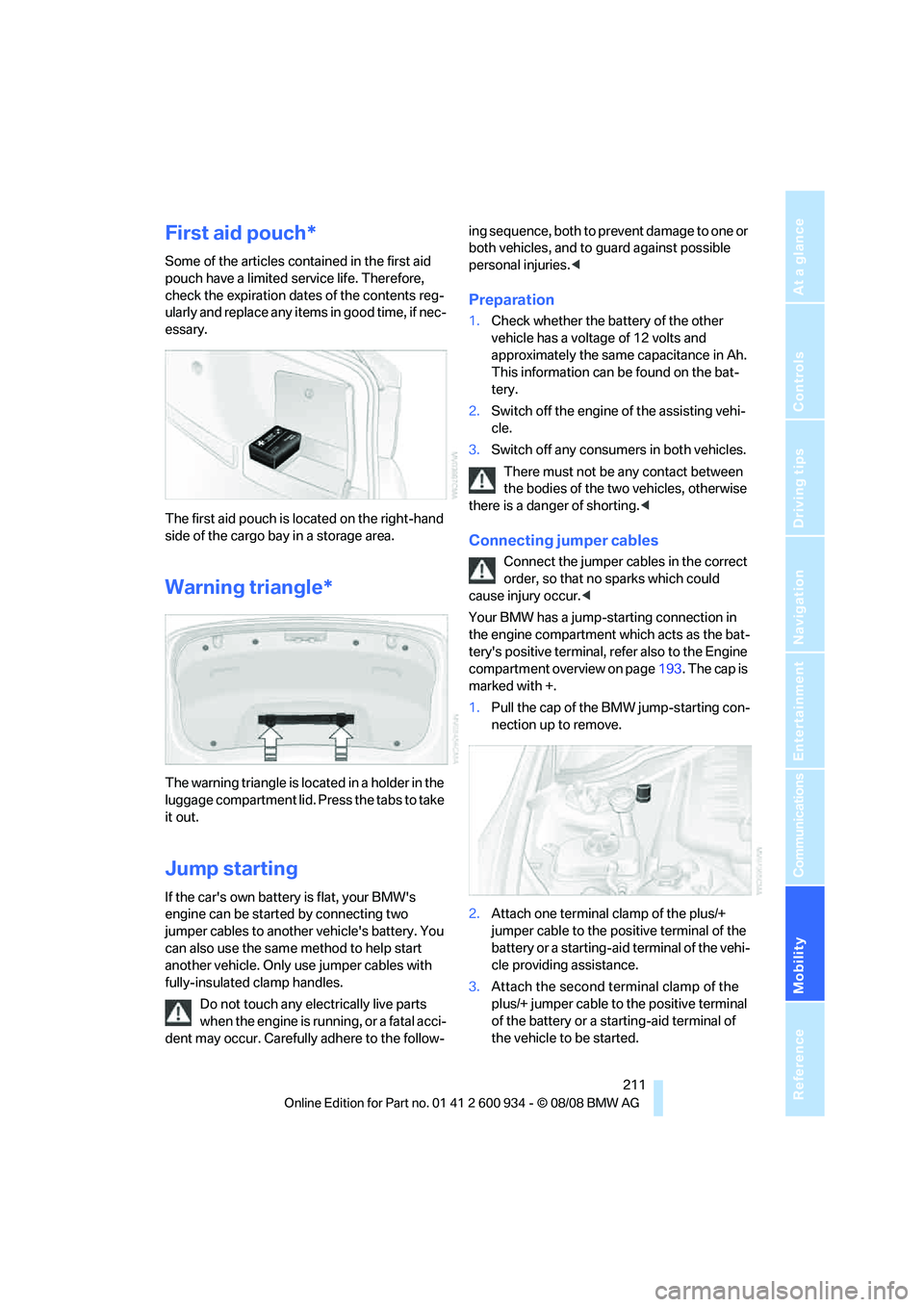
The first aid pouch is located on the right-hand
side of the cargo bay in a storage area.
Warning triangle*
The warning triangle is located in a holder in the
luggage compartment lid. Press the tabs to take
it out.
Jump starting
If the car's own battery is flat, your BMW's
engine can be started by connecting two
jumper cables to another vehicle's battery. You
can also use the same method to help start
another vehicle. Only use jumper cables with
fully-insulated clamp handles.
Do not touch any electrically live parts
when the engine is running, or a fatal acci-
dent may occur. Carefully adhere to the follow-ing sequence, both to prevent damage to one or
both vehicles, and to guard against possible
personal injuries.<
Preparation
1.Check whether the battery of the other
vehicle has a voltage of 12 volts and
approximately the same capacitance in Ah.
This information can be found on the bat-
tery.
2.Switch off the engine of the assisting vehi-
cle.
3.Switch off any consumers in both vehicles.
There must not be any contact between
the bodies of the two vehicles, otherwise
there is a danger of shorting.<
Connecting jumper cables
Connect the jumper cables in the correct
order, so that no sparks which could
cause injury occur.<
Your BMW has a jump-starting connection in
the engine compartment which acts as the bat-
tery's positive terminal, refer also to the Engine
compartment overview on page193. The cap is
marked with +.
1.Pull the cap of the BMW jump-starting con-
nection up to remove.
2.Attach one terminal clamp of the plus/+
jumper cable to the positive terminal of the
battery or a starting-aid terminal of the vehi-
cle providing assistance.
3.Attach the second terminal clamp of the
plus/+ jumper cable to the positive terminal
of the battery or a starting-aid terminal of
the vehicle to be started.
ba8_E90M3_cic.book Seite 211 Dienstag, 19. August 2008 11:51 11
Page 230 of 246

Everything from A - Z
228
Everything from A - Z
Index
"..." Identifies Control Display
texts used to select
individual functions and
refers you to the page where
these texts can be found.
A
ABS Antilock Brake
System76
Acceleration assistant, refer to
Launch Control57
Accident, refer to Sending an
Emergency Request210
Activated-charcoal filter for
automatic climate control92
Adaptive brake light
– brake force display82
Adaptive Head Light86
Additives
– coolant196
Address, entering117,123
Address for navigation
– entering117,123
Adjusting temperature inside
the car, refer to Automatic
climate control90
Adjusting the thigh support38
Adjusting the tone during
audio operation, refer to
Tone control136
Airbags82
– indicator/warning lamp84
– sitting safely37
Air conditioning mode
– automatic climate control90
– ventilation92
Air distribution
– automatic90
Air flow rate91
Airing, refer to Ventilation92
Air pressure, refer to Tire
inflation pressure186Air recirculation, refer to
Recirculated-air mode91
Air supply
– automatic climate control90
– ventilation92
Air vents89
AKI, refer to Fuel
specifications184
Alarm system31
– avoiding unintentional
alarms32
– interior motion sensor32
– switching off an alarm32
– tilt alarm sensor32
Album information for
music153
Albums of music
collection153
All-season tires, refer to
Winter tires190
AM, waveband139
Ambient air, refer to
Recirculated-air mode91
Antenna for mobile phone162
Antifreeze
– coolant196
– washer fluid60
Antilock Brake System
ABS
76
Anti-theft alarm system, refer
to Alarm system31
Anti-theft system27
Approved axle loads, refer to
Weights220
Approved gross vehicle
weight, refer to Weights220
Armrest, refer to Center
armrest98
Arrival time, refer to
Computer64
Ashtray
– front99
– rear100Assistance systems, refer to
Driving stability control
systems76
AUC Automatic recirculated-
air control91
Audio136
– controls136
– switching on/off136
– tone control136
– volume136
Audio device, external98
Automatic
– air distribution90
– air flow rate90
– cruise control60
– headlamp control85
Automatic car washes199
Automatic climate control89
– automatic air distribution90
Automatic curb monitor43
Automatic recirculated-air
control AUC91
Automatic Service
Request179
Automatic transmission with
Steptronic
– towing212
– tow-starting212
AUTO program for automatic
climate control90
AUX-IN port155
Average fuel consumption64
– setting the units65
Avoid highways in
navigation127
Avoiding unintentional
alarms32
Axle loads, refer to
Weights220
ba8_E90M3_cic.book Seite 228 Dienstag, 19. August 2008 11:51 11
Page 231 of 246

Reference 229
At a glance
Controls
Driving tips
Communications
Navigation
Entertainment
Mobility
B
Backrest contour, refer to
Lumbar support38
Backrests, refer to Seat
adjustment38
Backrest width adjustment39
Back seats
– refer to Rear seats39
Backup lamps
– replacing bulb205,206
Backup lamps, refer to Tail
lamps205
Band-aids, refer to First-aid
pouch211
Bar, refer to Towing
methods213
Base plate for telephone or
mobile phone
– refer to Snap-in adapter171
– refer to Snap-in adapter in
the center armrest storage
compartment98
Bass, tone setting136
Battery208
– charging208
– disposal34,208
– jump starting211
– remote control26
– temporary power failure209
Battery for mobile phone171
Battery renewal
– remote control34
– remote control for vehicle34
Being towed212
Belts, refer to Safety belts41
Belt tensioner, refer to Safety
belts41
Beverage holders, refer to
Cup holders99
Blower, refer to Air flow
rate91
Bluetooth, activating/
deactivating164
Bluetooth, refer to separate
Owner's Manual
BMW
– car shampoo201
BMW Assist, activating176BMW Assist175
BMW center180
BMW Homepage4
BMW Maintenance
System197
BMW Search176
BMW webpage4
Bottle holders, refer to Cup
holders99
Brake assist76
Brake fluid, refer to Service
requirements66
Brake force display82
Brake lamps
– replacing bulb205,206
Brake lights
– brake force display82
Brake pads106
– breaking in106
Brake rotors107
– brakes106
– breaking in106
Brakes
– ABS76
– BMW Maintenance
System197
– brake force display82
– breaking in106
– parking brake51
– service requirements66
Brakes, refer to Braking
safely107
Brake system106
– BMW Maintenance
System197
– breaking in106
– disc brakes107
Breakdown services, refer to
Roadside Assistance210
Breaking in the clutch106
Breaking in the differential,
refer to Engine and
differential106
Break-in period106
Brightness of the Control
Display73
Bulb changing, refer to Lamps
and bulbs203Button for starting the engine,
refer to Start/stop button49
Buttons on the steering
wheel11
C
California Proposition 65
warning6
Call
– accepting165
– ending166
– rejecting166
Calling, refer to Phone
numbers, dialing166
Can holders, refer to Cup
holders99
Capacities220
Capacity of the cargo bay220
Car battery, refer to Vehicle
battery208
Car care, refer to Care199
Care199
– automatic car washes199
– care products199
– carpets201
– CD/DVD drives201
– chrome parts200
– displays201
– exterior199
– fine wood parts201
– headlamps200
– high-pressure washer199
– interior201
– leather201
– light-alloy wheels200
– paintwork200
– plastic parts201
– rubber seals200
– safety belts201
– sensors and cameras201
– upholstery and cloth
trim201
– washing the car
manually200
– windows200
– wiper blades200
Cargo, securing109
ba8_E90M3_cic.book Seite 229 Dienstag, 19. August 2008 11:51 11
Page 232 of 246

Everything from A - Z
230 Cargo bay
– capacity220
– convenient access33
– folding up the floor
panel101
– lamp, refer to Interior
lamps87
– opening from inside30
– opening from outside30
Cargo loading
– securing cargo109
– stowing cargo109
– vehicle108
Car jack
– jacking points208
Car key, refer to Remote
control26
Car phone
– installation location, refer to
Center armrest98
– refer to separate Owner's
Manual
Car phone, refer to
Telephone162
Car radio, refer to Radio139
Car shampoo201
Car wash
– before entering51
Catalytic converter, refer to
Hot exhaust system106
CBS Condition Based
Service197
CD, audio playback144
CD changer144
– controls136
– fast forward/reverse146
– installation location148
– random play sequence145
– selecting a track144
– switching on/off136
– tone control136
– volume136CD player144
– controls136
– fast forward/reverse146
– random play sequence145
– selecting a track144
– switching on/off136
– tone control136
– volume136
Center armrest98
Center brake lamp, replacing
bulb206
Center console, refer to
Around the center
console14
Central locking
– from inside29
– from outside27
Central locking system27
– convenient access32
– hotel function31
Changes, technical, refer to
For your own safety5
Changing bulbs, refer to
Lamps and bulbs203
Changing gears54
Changing the language on the
Control Display73
Changing the measurement
units on the Control
Display65
Changing wheels208
Chassis number, refer to
Engine compartment193
Check Control70
Check Gas Cap184
Child-restraint fixing system
LATCH47
Child-restraint systems46
Child-safety lock48
Child seats, refer to
Transporting children
safely46
Chrome parts201
Chrome polish201
Cigarette lighter, refer to
Lighter99
Cleaning headlamps59
– washer fluid60Cleaning your BMW, refer to
Care199
Clock62
– 12h/24h mode69
– setting the time and date69
– setting time68
Closing
– from inside29
– from outside27
Clothes hooks98
Cockpit10
Cold start, refer to Starting the
engine50
Combined instrument, refer to
Instrument cluster12
Comfort access, refer to
Convenient access32
Comfort area, refer to Around
the center console14
Compartment for remote
control, refer to Ignition
lock49
Compass96
Computer63
– displays on Control
Display64
Computer, refer to iDrive16
Concierge service175
Condensation, refer to When
the vehicle is parked108
Condition Based Service
CBS197
Configuring settings, refer to
Personal Profile
26
Confirmation signals for
locking/unlocking the
vehicle28
Congestion
– refer to Route, bypassing
sections128
Connecting vacuum cleaner,
refer to Connecting
electrical appliances100
Consumption, refer to
Average consumption64
Consumption indicator, refer
to Average consumption64
Control Center, refer to
iDrive16
ba8_E90M3_cic.book Seite 230 Dienstag, 19. August 2008 11:51 11
Page 233 of 246
Reference 231
At a glance
Controls
Driving tips
Communications
Navigation
Entertainment
Mobility
Control Display
– brightness73
– changing the language73
– switching off/on19
Control Display, refer to
iDrive16
Controller, refer to iDrive16
Controls and displays10
Control unit, refer to iDrive16
Convenient access32
– replacing the battery34
Convenient operation
– glass roof28
– glass roof with convenient
access33
– windows28
– windows with convenient
access33
Coolant196
– checking level196
Coolant temperature63
Cooling, maximum90
Cooling fluid, refer to
Coolant196
Cooling system, refer to
Coolant196
Copyright2
Corner-illuminating lamps,
refer to Adaptive Head
Light86
Cornering lamps, refer to
Adaptive Head Light86
Correct tires190
Country codes DVD146
Courtesy lamps, refer to
Interior lamps87
Criteria for route127
Cross-hairs in navigation122
Cruise control60
Cruising range64
Cup holders99
Curb weight, refer to
Weights220
Current playback of music
collection152
Current position
– displaying133
Customer Relations179D
Dashboard, refer to
Cockpit10
Dashboard, refer to
Instrument cluster12
Dashboard lighting, refer to
Instrument lighting87
Data, technical218
– dimensions219
– engine218
– weights220
Data transfer180
Date
– date format70
– setting69
Daytime running lamps86
Deactivating front passenger
airbags83
Deadlocking, refer to
Locking28
Defect
– door lock29
– fuel filler door184
– glass roof36
Destination, entering by town/
city name117
Destination address
– entering117,123
Destination for navigation
– entering by voice123
– entering via map122
– entry117
– home address120
– manual entry117
Destination guidance127
– bypassing a route
section128
– changing specified
route127
– continuing127
– starting127
– voice instructions128
– volume of voice
instructions129
Digital clock62
Digital compass96
Digital radio, refer to High
Definition Radio140Dimensions219
Directional indicators, refer to
Turn signals58
Direction instructions, refer to
Voice instructions128
Directory for navigation, refer
to Address book119
Displacement, refer to Engine
data218
Display, refer to iDrive
controls16
Display lighting, refer to
Instrument lighting87
Displays
– on the Control Display16
Displays, refer to Instrument
cluster12
Displays and controls10
Disposal
– coolant196
– remote control battery34
– vehicle battery208
Distance remaining to service,
refer to Service
requirements66
Distance warning, refer to
Park Distance Control
PDC75
Door key, refer to Remote
control26
Door lock29
Doors, emergency
operation29
DOT Quality Grades188
Draft-free ventilation92
Drinks holders, refer to Cup
holders99
Drivelogic55
Drive mode53
Drive-off assistance, refer to
Dynamic Stability Control
DSC76
Drive-off assistant78
Drive position, engaging, refer
to Selector lever
positions52
Drive programs, refer to
Drivelogic55
ba8_E90M3_cic.book Seite 231 Dienstag, 19. August 2008 11:51 11