2009 BMW M3 COUPE engine
[x] Cancel search: enginePage 37 of 256

Controls
35Reference
At a glance
Driving tips
Communications
Navigation
Entertainment
Mobility
If the vehicle detects that a remote con-
trol has been accidentally left inside the
locked vehicle's cargo bay after the luggage
compartment lid is closed, the lid will reopen.
The hazard warning flashers flash and an
acoustic signal
* sounds.<
Switching on radio readiness
Radio readiness is switched on by pressing the
start/stop button, refer to page55.
Do not depress the brake or the clutch,
otherwise the engine will start.<
Starting the engine
You can start the engine or switch on the igni-
tion when a remote control is inside the vehicle.
It is not necessary to insert a remote control into
the ignition lock, refer to page55.
Malfunction
Convenient access may malfunction due to
local radio waves. If this happens, open or close
the vehicle via the buttons on the remote con-
trol or using the integrated key. To start the
engine afterward, insert the remote control into
the ignition lock.
Warning lamps
The warning lamp in the instrument
cluster lights up when you attempt to
start the engine: the engine cannot
be started. The remote control is not inside the
vehicle or is malfunctioning. Take the remote
control with you inside the vehicle or have it
checked. If necessary, insert another remote
control into the ignition lock.
The warning lamp in the instrument
cluster lights up while the engine is
running: the remote control is no
longer inside the vehicle. After the engine is
switched off, the engine can only be restarted
within approx. 10 seconds.
The indicator lamp in the instrument
cluster comes on and a message
appears on the Control Display:
replace the battery in the remote control.
Replacing the battery
The remote control for convenient access con-
tains a battery that will need to be replaced from
time to time.
1.Take the integrated key out of the remote
control, refer to page26.
2.Remove the cover.
3.Insert the new battery with the plus side fac-
ing up.
4.Press the cover on to close.
Take the old battery to a battery collec-
tion point or to your BMW center.<
Windows
To prevent injuries, watch the windows
while closing them.
Take the remote control with you when you
leave the car, otherwise children could operate
the electric windows and possibly injure them-
selves.<
Coupe: opening, closing
>Press the switch to the resistance point:
The window opens as long as you press the
switch.
ba8_E9293M3_cic.book Seite 35 Dienstag, 19. August 2008 12:01 12
Page 41 of 256

Controls
39Reference
At a glance
Driving tips
Communications
Navigation
Entertainment
Mobility
from the cargo bay beforehand to avoid
water stains or soiling.
Do not place any objects on the retract-
able hardtop or on the luggage compart-
ment lid, otherwise they could fall during move-
ments of the retractable hardtop and cause
damage or injury.
Never move the retractable hardtop when the
rollover protection system is in the activated
position.
Driving when the hardtop is not fully opened or
closed may result in damage or injury.
Do not reach into the mechanism while the
hardtop is opening or closing. Keep children
away from the swiveling area of the retractable
hardtop.<
The retractable hardtop cannot be moved
at temperatures below + 147/–106. A
message appears on the Control Display.<
The retractable hardtop can only be
opened and closed when the vehicle is
stationary. To avoid causing damage, do not
drive off until the hardtop has stopped mov-
ing.<
Before opening and closing
>Comply with the safety precautions
described above.
>Ensure that the cargo bay partition is folded
down and engaged on both sides, refer to
page108, otherwise it will not be possible
to open the retractable hardtop.
>Do not place any objects next to or on the
cargo bay partition and close the storage
compartment on the left side of the cargo
bay.
>Do not exceed the maximum loading height
under the cargo bay partition; refer to the
label in the cargo bay showing a line indicat-
ing the maximum height.
>Ensure that the luggage compartment lid is
closed.
>The vehicle should be parked on fairly level
ground. Excessive angle is indicated by a
lamp.
Opening and closing
When the vehicle is stationary and at radio
readiness or beyond, refer to page55:
If possible, conserve the battery by only
operating the retractable hardtop when
the engine is running.
Before closing the retractable hardtop, remove
all foreign objects from the windshield frame as
these could prevent the hardtop from closing
properly.<
1Push button: open the retractable hardtop.
Pull button: close the retractable hardtop.
2LEDs
The side windows move down when the
switch for hardtop operation is pulled or
pushed.<
LEDs
In the following situations, a message appears
on the Control Display or an acoustic signal
sounds in addition to the LED lighting up:
>While the hardtop is being operated, the left
LED lights up green. It goes out as soon as
the top is fully opened or closed.
>If the right-hand LED flashes red when you
release the switch, the opening or closing
action has not yet finished.
>If the right LED lights up red when the
switch is pressed, the cargo bay partition is
folded up, the luggage compartment lid is
not closed, the vehicle is standing on a
strong incline or there is a malfunction. The
retractable hardtop cannot be moved.
ba8_E9293M3_cic.book Seite 39 Dienstag, 19. August 2008 12:01 12
Page 51 of 256

Controls
49Reference
At a glance
Driving tips
Communications
Navigation
Entertainment
Mobility
1Adjustments
2Switching to the other mirror or automatic
curb monitor
*
3Folding mirrors in and out*
The setting for the exterior mirrors is stored for
the remote control currently in use. The stored
position is called up automatically when the
vehicle is unlocked.
Manual adjustment
The mirrors can also be adjusted manually:
press the edge of the glass.
Folding mirrors in and out*
At driving speeds up to approx. 12 mph/
20 km/h, you can fold the mirrors in and out by
pressing button3. This can be beneficial in nar-
row streets, for example, or for moving mirrors
that were folded in by hand back out into their
correct positions. Mirrors that were folded in are
folded out automatically at a speed of approx.
25 mph/40 km/h.
Before entering an automatic car wash,
fold in the exterior mirrors manually or
with button3 to prevent them from being dam-
aged, depending on the width of the vehicle.<
Automatic heating
Depending on the outside temperature, both
exterior mirrors are heated automatically when
the engine is running or the ignition is switched
on.
Passenger-side mirror tilt function –
automatic curb monitor*
Activating
1.Push the switch to the position for the
driver's-side mirror, arrow 1.
2.Engage reverse gear or transmission posi-
tion R.
The glass of the mirror on the passenger
side tilts slightly down. This allows the
driver to see the area immediately adjacent
to the vehicle, e.g. a curb, when backing into
a parking space.
Deactivating
Push the switch to the position for the passen-
ger-side mirror, arrow 2.
Interior and exterior mirrors*,
automatic dimming feature
The automatic dimming feature of the interior
and exterior mirrors
* is controlled by two photo
cells in the interior rearview mirror. One photo
cell is in the mirror frame, see arrow; the other is
on the back of the mirror.
In order to ensure that the system functions
correctly, keep the photo cells clean, do not
cover the area between the interior rearview
ba8_E9293M3_cic.book Seite 49 Dienstag, 19. August 2008 12:01 12
Page 52 of 256

Adjustments
50 mirror and windshield, and do not affix adhesive
labels or stickers of any kind to the windshield
directly in front of the mirror.
Steering wheel
Adjustments
Do not adjust the steering wheel position
while the car is in motion, otherwise there
is a risk of accident due to an unexpected move-
ment.<
1.Fold the lever down.
2.Move the steering wheel to the preferred
height and angle to suit your seated posi-
tion.
3.Swing the lever back up.
Do not use force to swing the lever
back up, otherwise the mechanism
will be damaged.<
MDrive*
With MDrive you can configure several individ-
ual settings for your vehicle on the Control Dis-
play and activate them using the button on
the steering wheel.
Configuring settings
You can set MDrive on the Control Display
when the ignition is switched on.
iDrive, for operating principle refer to page16.1."Settings"
2."MDrive"
The functions contained in MDrive are dis-
played:
>"Drivelogic:"
M dual clutch transmission with Drivel-
ogic: shift modes and Drivelogic drive
programs, refer to page61
>"EDC:"
Electronic Damper Control EDC
* pro-
grams, refer to page83
>"DSC:"
Dynamic Stability Control and
M Dynamic Mode, refer to page82
>"POWER:"
M Engine Dynamics Control programs,
refer to page64
>"Servotronic:"
Servotronic programs, refer to page87
>"Shift lights:"
Shift Lights, refer to page62
ba8_E9293M3_cic.book Seite 50 Dienstag, 19. August 2008 12:01 12
Page 53 of 256

Controls
51Reference
At a glance
Driving tips
Communications
Navigation
Entertainment
Mobility
3.Select the desired function.
4.Select the desired setting.
"Unchanged" retains the current setting
made outside of MDrive.
The setting is stored for the remote control cur-
rently in use.
Activating the settings
Press the button on the steering wheel.
The indicator lamp in the instrument
cluster comes on. The settings made
on the Control Display for the functions
in MDrive are active.
Pressing the button again deactivates MDrive.
If the indicator lamp flashes after the but-
ton was pressed, MDrive was unable to
respond because the Antilock Brake System
ABS or Dynamic Stability Control DSC are cur-
rently regulating driving stability. Press the
button again when the indicator lamp is no
longer flashing.<
You can change individual settings outside of
MDrive even when MDrive is activated, e. g.
using the buttons on the center console. To
reactivate all settings made on the Control Dis-
play for MDrive: press the button twice.
Resetting the settings
You can reset all MDrive settings to their default
values:
1."Settings"
2."MDrive"
3.Move the controller to the right repeatedly
until the "Options" menu is selected.
4."Reset"
5."Yes"
M Key settings
For the remote control currently in use, you can
set your preferred program for the M Engine
Dynamics Control, the Electronic Damper Con-
trol EDC and the Shift Lights. These preset-
tings are called up when the engine is started.
1."Settings"
2."MDrive"
3.Move the controller to the right repeatedly
until the "Options" menu is selected.
ba8_E9293M3_cic.book Seite 51 Dienstag, 19. August 2008 12:01 12
Page 54 of 256

Adjustments
52 The available functions are displayed:
>"POWER:"
M Engine Dynamics Control programs,
refer to page64
>"EDC:"
Electronic Damper Control
* programs,
refer to page83
>"Shift lights:"
Shift Lights, refer to page62
4.Select the desired function.
5.Select the desired setting.
The setting is stored for the remote control cur-
rently in use.
ba8_E9293M3_cic.book Seite 52 Dienstag, 19. August 2008 12:01 12
Page 57 of 256

Controls
55Reference
At a glance
Driving tips
Communications
Navigation
Entertainment
Mobility
Driving
Ignition lock
Insert the remote control into the
ignition lock
Insert the remote control all the way into the
ignition lock.
>Radio readiness is switched on.
Individual electrical consumers can operate.
Convenient access*
If the car is equipped with convenient access,
only insert the remote control into the ignition
lock under special circumstances, refer to
page34.
Removing the remote control from the
ignition lock
Do not forcibly pull the remote control out
of the ignition lock as this may cause
damage.<
Before removing the remote control, push it all
the way in to release the locking mechanism.
>The ignition is switched off if it was on.
Start/stop button
Pressing the start/stop button switches radio
readiness or the ignition on or off.
Manual transmission: when you press the
start/stop button while the clutch is
depressed, the engine starts.
M dual clutch transmission: when you press the
start/stop button while the brake is depressed,
the engine starts.<
Radio readiness
Individual electrical consumers can operate.
The time and the outside temperature are dis-
played in the instrument cluster.
Radio readiness is switched off automatically:
>When the remote control is removed from
the ignition lock
>In cars with convenient access
*, by touch-
ing the surface above the door lock, refer to
Locking on page34
Ignition on
All electrical consumers can operate. The
odometer and trip odometer are displayed in
the instrument cluster.
When the engine is off, please switch off
the ignition and any unnecessary electri-
cal consumers in order to preserve the bat-
tery.<
ba8_E9293M3_cic.book Seite 55 Dienstag, 19. August 2008 12:01 12
Page 58 of 256
Driving
56
Radio readiness and ignition off
All indicator and warning lamps as well as dis-
plays in the instrument cluster go out.
Starting the engine
Do not run the engine in closed rooms,
otherwise the inhalation of toxic exhaust
gases can cause unconsciousness and death.
The exhaust gases contain carbon monoxide,
an odorless and colorless, but highly toxic gas.
Never leave an unattended vehicle with the
engine running, otherwise such a vehicle repre-
sents a potential safety hazard.
Before leaving the car with the engine running,
place the transmission in neutral and forcefully
apply the parking brake to prevent the car from
moving.<
Avoid frequent starting in quick succes-
sion as well as repeated start attempts in
which the engine does not start. Otherwise, the
fuel is not burned or incompletely burned and
there is a danger of overheating and damaging
the catalytic converter.<
Do not wait for the engine to warm up while the
vehicle remains stationary. Start driving right
away, but at moderate engine speeds.
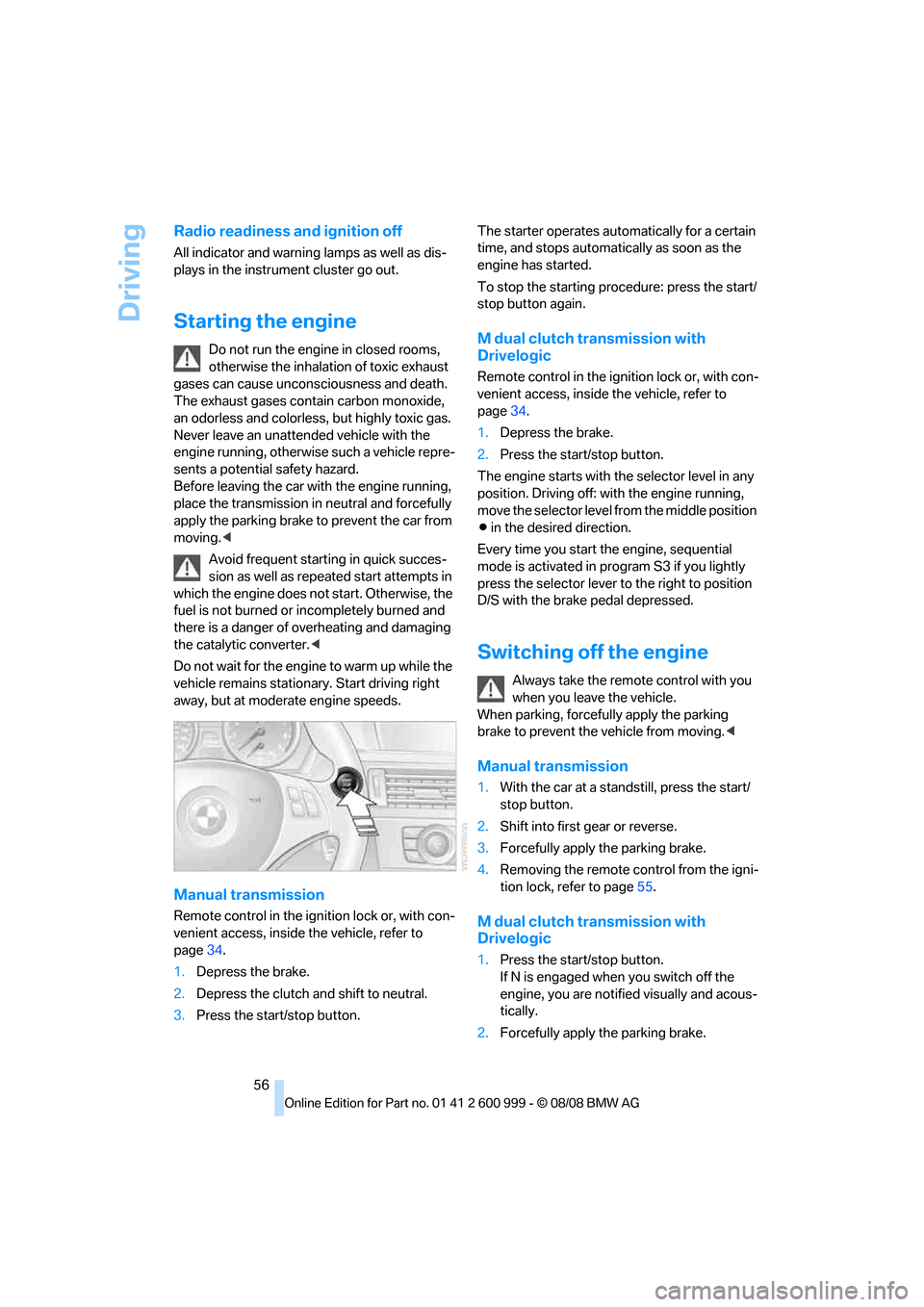
Manual transmission
Remote control in the ignition lock or, with con-
venient access, inside the vehicle, refer to
page34.
1.Depress the brake.
2.Depress the clutch and shift to neutral.
3.Press the start/stop button.The starter operates automatically for a certain
time, and stops automatically as soon as the
engine has started.
To stop the starting procedure: press the start/
stop button again.
M dual clutch transmission with
Drivelogic
Remote control in the ignition lock or, with con-
venient access, inside the vehicle, refer to
page34.
1.Depress the brake.
2.Press the start/stop button.
The engine starts with the selector level in any
position. Driving off: with the engine running,
move the selector level from the middle position
Β in the desired direction.
Every time you start the engine, sequential
mode is activated in program S3 if you lightly
press the selector lever to the right to position
D/S with the brake pedal depressed.
Switching off the engine
Always take the remote control with you
when you leave the vehicle.
When parking, forcefully apply the parking
brake to prevent the vehicle from moving.<
Manual transmission
1.With the car at a standstill, press the start/
stop button.
2.Shift into first gear or reverse.
3.Forcefully apply the parking brake.
4.Removing the remote control from the igni-
tion lock, refer to page55.
M dual clutch transmission with
Drivelogic
1.Press the start/stop button.
If N is engaged when you switch off the
engine, you are notified visually and acous-
tically.
2.Forcefully apply the parking brake.
ba8_E9293M3_cic.book Seite 56 Dienstag, 19. August 2008 12:01 12