2009 AUDI TT COUPE lock
[x] Cancel search: lockPage 45 of 316

If you need to replace the remote control, or if you need to have it
repaired, you must see your authorized Audi dealer. Only then can
you use the key again.
& WARNING
Read and follow all WARNINGS => & in "General description" on
page 41.
[ i] Tips
• The remote control key is automatically deactivated when the
ignition is switched on.
• The operation of the remote control key can be temporarily
disrupted by interference from transmitters in the vicinity of the
vehicle working in the same frequency range (e.g. a cell phone, radio equipment) .
• In order to make sure the locking function is working, you should
always keep your eye on the vehicle to make sure it is properly
locked.
• Do not use the remote control if you are inside the car, otherwise
you may unintentionally lock the vehicle, and then you would set off the anti-theft alarm when you try to start the engine or open a door .
In case this happens anyhow, push the unlock button
II).
• Use the panic function only if you are in an emergency
situation. •
Resetting the remote control
The remote control must be reset if the vehicle does not
unlock.
- Press the unlock CD button on the remote control.
- Unlock or lock the vehicle once at the door lock using the
stem of the remote control key.
Controls and equip
ment
Opening and closing
The synchronization process must not take longer than 30
seconds. •
Operating locks with the key
To lock and unlock the vehicle from the outside, turn the
key in the lock of the driver's door.
To unlock the vehicle
Fig. 27 Key turns for
opening and closing.
-Insert the key into the lock of the driver's door.
- Turn the key
one time to position @to unlock the driver's
door.
- Turn the key
two times to position @~ fig . 27 to unlock
all doors.
To lock the vehicle
- Close all windows and doors properly.
- Turn the key in the lock of the driver's door to the lock
position @~
& in "General description" on page 41. ~
I • •
Page 46 of 316

Opening and closing
& WARNING
Alw ay s re ad an d heed WARNIN G => & in uG eneral desc ripti on" on
pag e 41. •
Locking and unlocking the vehicle from inside
The vehicle can be locked or unlocked from the inside
using the power locking switch .
Fig . 28 Sec tion fro m
ce nte r co nsol e: C entr al
lo cking swi tc h
How to lock all doors simultaneously
- Press t he upper part of the power locking switch
63 => & .
How to unlo ck all door s simultan eously
- Press lower part of t he switch
@ .
How to unlock each door separat ely us ing the
door h andle
Pu ll the door handle
once to re lease the lock.
- Pull the handl e to open the door .
If you lock the vehicle using the power locking sw it c h , p lease note
the following: •
You cannot open the doors or the rear lid from the
outside
(increased security, for examp le when you are stopped at a red
light).
• You can unlock and open the doors from the inside by pulling on
the door handle .
• I f the driver's door is opened (after you have locked the vehicle
from the inside us ing the power locking switch) , the door will
remain unlocked to prevent you from locking yourse lf out of your
veh ic le. After you close the door, you have to lock the driver 's door
again.
• If you hav e a crash and the airbag is activated, th e doors auto
matically un lock .
& WARNING
• If y ou us e the p ower lo ck ing switch with the door s close d,
remember th at all the vehi cle doors will lo ck .
• Lock ing door s from the in sid e ca n help pre vent in adver te nt
do or op enin g dur ing an a ccident and can also pre vent unwa nted
entry from the o uts ide . Lo cke d d oors c an, howe ver, de lay ass is
t a nc e to vehicle o ccupant s and h old up re scue efforts from the
out side in an a cciden t or other emergen cy . •
Page 47 of 316
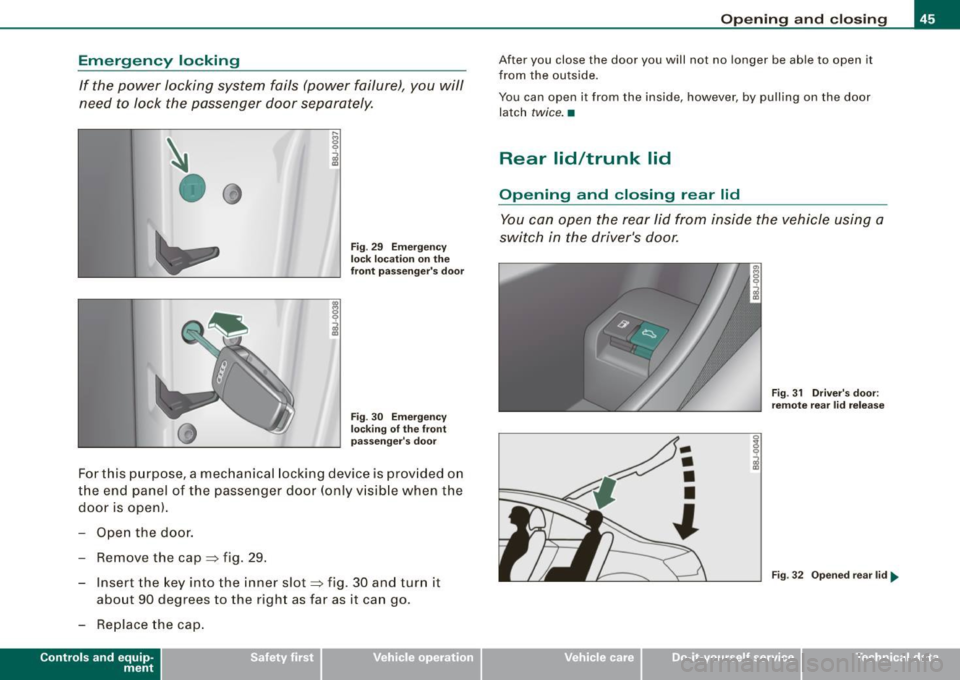
Emergency locking
If the power locking system fails (power failure), you will
need to lock the passenger door separately.
•0
Fig . 29 Emergency
lock location on the
front passenger's door
Fig . 30 Emergency
locking of the front
passenger 's door
For this purpose, a mechanical locking device is provided on
the end panel of the passenger door (only visible when the
door is open).
- Open the door.
- Remove the cap:::::, fig. 29.
- Insert the key into the inner slot:::::, fig . 30 and turn it
about 90 degrees to the right as far as it can go.
- Replace the cap.
Con tro ls and eq uip
ment
Opening and closing
After you close the door you will not no longer be able to open it
from the outside .
You can open it from the inside, however , by pulling on the door
latch
twice. •
Rear lid/trunk lid
Opening and closing rear lid
You can open the rear lid from inside the vehicle using a
switch in the driver's door.
Vehicle care
-
•
•
•
l
I I
Fig . 31 Driver's door:
remote rear lid release
Fig . 32 Opened rear lid ..
irechnical data
Page 48 of 316

Opening and closing
Opening the rear lid
Press the cente r bu tton i::::::5 on t he m ast er ke y or p ull t he
r e lea se b utto n
i::::::5 in t he dr iv er's do or=> pa ge 45, fig. 31 .
Th e re ar lid is un lock ed .
Opening rear lid
- Lift t he re ar lid.
Closing the rear lid
- Pull the re ar lid dow n an d all ow it to drop gent ly=> ,& .
& WARNING
• The rear seat area is too small to safely transport passengers
taller than 4 '11 " (1 .5 m l.
- Persons taller than 4'11 " (1.5
ml as well as children in
booster seats who are too close to the rear window and roof
can suffer severe head and neck injuries when the rear lid is
closed or in a crash .
- The minimum clearance between the passengers' heads and
the rear window must never -under any circumstances -be
less than 1 inch (2 .5 cm) when the passengers sit fully upright .
- Always make sure that rear seat passengers cannot be
struck when the rear lid is closed .
• After closing the rear lid , always pull up on it to make sure that
it is properly closed. Otherwise it could open suddenly when the
vehicle is moving .
• To help prevent poisonous exhaust gas from being drawn into
the vehicle , always keep the rear lid closed while driving. Never
transport objects larger than those which fit completely into the
luggage area , because then the rear lid cannot be fully closed .
• Never leave your vehicle unattended especially with the rear lid
left open . A child could crawl into the car through the luggage
compartment and pull the lid shut , becoming trapped and unable
& WARNING (continued)
to get out. To reduce the risk of personal injury , never let children
play in or around your vehicle. Always keep the rear lid as well as
the vehicle doors closed when not in use.
[ i ] Tips
• I f the rear lid is open or not properly locked wh en the igni tion is
t ur ned on, the doo r and rear li d warning a ppears i n the instrum ent
cluster display.
• If th e rear lid o n a locked ve hic le is un locke d with th e m idd le
button
c::$ on the remote key , the rear lid is automatica lly locked
a ga in im med iat ely aft er closi ng . This is i ndi cate d by th e turn s igna ls
blin king .•
Emergency release for rear lid
If the rear lid cannot b e opened , an em ergency release is
prov ided.
Fig . 33 Acce ss to
emergency rele ase on
the left side of the
luggage compartment
below t he rear window ...
Page 49 of 316

-Fold down the lef t rear seat back.
Fig . 3 4 Sec tio n: In te
r ior luggage co mpart
m ent: E merg en cy
re lease
Using the vehicle key, pry off the cover => page 46, fig . 33
- Pull the plastic cord~ fig. 34 in the direction of the
arrow. •
Anti-theft alarm system
The anti-theft alarm triggers an alarm if any one attempts
to break into the vehicle.
llllD
Fig. 35 Dio de posi tion
i n th e ins trum en t pane l
The anti-theft a larm system triggers an audible alarm and turns on
the emerg ency flasher i f an unauthorized inter ference with the
vehicle is sensed by the system .
Contro ls and eq uip
ment
Op ening and clo sing
H ow i s th e a nti-th eft al arm sys te m sw itch ed o n?
The anti -theft alarm system is switched on when you lock the
driver's door manually using the fo ld-out key, or when you use the
remote con trol. The system is activated approximately 30 seconds
after the vehicle is locked . The indicator light~ fig. 35 starts
flashing rapidly for 30 seconds and then blinks slowly.
How i s th e a nti-th eft ala rm s yste m sw itch ed off?
The anti -theft alarm system is switched off only when you use the
remote contro l to unlock your veh icle . If you do not open a door
within 30 seconds after you have unlocked with the remote control,
the vehicle will lock itself again automatically.
If you lock jus t th e driv er's door using your key , the front
passenger 's door and the rear lid remain locked .
When w ill th e anti th eft ala rm sys te m b e trigge re d ?
When the vehic le is locked, the alarm system mon itors and protects
the following parts of the v ehicl e:
• engine compartment
• luggage compartment
• doors
• ignition
When the system is activated, the alarm will be triggered if one of
the doors , the engine hood or the rear lid are opened , or if the igni
tion is turned on .
The anti- theft alarm system will also go off when the battery is
disconnected.
You can also trigger the alarm by pressing the PANIC button on your remote -contro l key. This will alert other people in case of emer -
gency . Press the
PANIC button again to turn of f the alarm. ..,_
Vehicle care I I irechnical data
Page 50 of 316

Opening and closing
H ow is th e a nti-th eft alarm swit ch ed off when
trigger ed?
The alarm system is switched off when you unlock the vehicle using
the remote -con trol key or when the ignition is switched on . The
alarm wi ll also switch itse lf off when it comes to the end of its cycle.
Em ergenc y flasher
The emergency flasher will blink brief ly when the doors, engine
hood and rear lid are properly closed .
If the emergency flashers do not blink, check the doors, engine hood
and rear lid to make sure they are properly closed. If you close a
door, the hood or the rear lid with the anti-theft alarm switched on,
the emergency flashers will blink only after you have closed the
door or lid.
[ i ] Tips
• For the anti -theft a larm system to function p roperly, make sure
a ll vehicle doors and windows are closed before leav ing the vehicle .
• When you open the vehicle fr om the driver's door using the key,
the central locking switch will work only after you have switched on
the ignition . •
Power windows
Controls
The driver can ope rate all windows.
Fi g. 36 D riv er's door:
powe r window
sw itch es
Fig . 37 Passenge r's
doo r: p ower window
sw itch
If the respective switch is pushed or pulled the window will
open or c lose. The power window switches have a
two -posi
tion function :
Opening the windows
Press the sw itch and hold it down until the window has
reached the des ired position.
Page 51 of 316

-Press the switch briefly to open the window automat i
cally. By briefly pressing the switch again, the downward
travel of the window can be stopped in any position
=> & .
Closing the windows
-Pull the sw itch and hold it until the window has reached
the des ired pos ition.
- Pull the switch
briefly to close the window automatically .
By briefly pressing the sw itch again, the upward travel of
the window can be stopped in any position=>& .
Switch @~ page 48 , fig. 36 operates the window in the driver's
door.
Switch @ operates the window in the front passenger 's door .
& WARNING
• Do not leave children unattended in the vehicle, especially with
access to vehicle keys. Unsupervised use of the keys can result in
starting of the engine and use of vehicle systems such as power
windows, etc. which could result in serious injury.
• Remember -you can still open or close the power windows for
about ten minutes after the ignition is switched off. Only when
either of the front doors are opened are the power windows
switched off.
• Be careful when closing the windows . Check to see that no one
is in the way, or serious injury could result!
• Always remove the ignition key whenever you leave your
vehicle.
• If you lock your vehicle from the outside, no one, especially chil
dren, should remain in the vehicle.
• Do not stick anything on the windows or the windshield that
may interfere with the driver's field of vision.
Controls and equip
ment
Opening and closing
[ i] Tips
• When the doors are opened, the windows are automatically
lowered 10 mm.
• The windows can st ill be opened and closed for abou t ten
minutes after the ignition has been turned off. The power windows
are not shut off until one of the front doors is opened. •
Convenience close/open feature
You can close or open the windows from outside when
you lock or unlock your car with the key.
Closing the windows
Fig. 38 Key turns for
opening and closing
- Insert the key into the lock of the driver's door.
- Make sure that the windows are not blocked => & .
- Turn and hold the key in the lock position@=> fig. 38
until the w indows are completely closed.
Opening the windows
- Insert the key into the lock of the driver's door.
- Turn and hold the key in the open posit ion
@ .
I • •
Page 53 of 316

Clear vision
Lights
Switching the headlights on and off ·'t!-·
Fig. 3 9 I nstrum ent
p ane l: lig ht sw itch
All sw itc h positions refer to the indentat ion on the switch
aligned with the specified symbol. The light switch must not
be overturned past the stops in
either direction .
Switching on the side marker lights
-Tur n t he light switch ligh t to ==> fig. 39 ;oo; . The indi ca tor
light
; oo ~ comes o n when t he park ing lig hts are sw itched
on .
Switching on the headlights and high beam
- Turn t he light switch to lD.
- Push the high beam leve r fo rward towards t he instru -
ment panel ==> page
58.
Switching off the lights
-Tur n t he lig ht switch to 0 .
Con tro ls and eq uip
ment
Clear vision
The headlights only work when the ignition is switched on . While
starting the engine or when switching off the ignition, the head
lights will go off and only the side marker lights will remain lit .
& WARNING
Crashe s can happen when you cannot see the road ahead and
when you c annot be seen by other motori sts.
• Always tu rn on the headlight s so th at you can see ahead and
so that others can see your ca r from the ba ck.
[ i ] Tips
• I f you remove the ignition from the ignition lock wh ile the head
lights are still on, a buzzer will sound as long as the driver's doo r is
open to remind you to switch off the lights .
• Always observe the spec ific local regulations for your area when
to use your lights .
• I n coo l or damp weather conditions the headlights may fog over
tempo ra rily on the inside .
- The critical factor is the t emperature diff erence between the
interior and the ex te rior of the headlight lens .
- With the main beams switched on, the light -emitting area will
be free o f condensation after a short time, however the edges of
the glass may still be fogged .
- The rear lights and turn signa ls may also be affected.
- This physical phenomenon has no effect on the life of your
vehicle 's lighting system. •
Vehicle care I I irechnical data